tail light wiring DODGE RAM 2003 Service User Guide
[x] Cancel search | Manufacturer: DODGE, Model Year: 2003, Model line: RAM, Model: DODGE RAM 2003Pages: 2895, PDF Size: 83.15 MB
Page 581 of 2895
NOSIS AND TESTING) or (Refer to 8 - ELECTRI-
CAL/POWER LOCKS/REMOTE KEYLESS ENTRY
MODULE - DIAGNOSIS AND TESTING).
²If the power lock system functions with the RKE
transmitter, but not with one or both power lock
switches, proceed to diagnosis of the door lock
switches. (Refer to 8 - ELECTRICAL/POWER
LOCKS/POWER LOCK SWITCH - DIAGNOSIS AND
TESTING).
²If the driver side power lock switch operates
only the driver side front door power lock motor, but
all other power lock motors operate with the passen-
ger side power lock switch or the RKE transmitter,
use a DRBIIItscan tool and the appropriate diagnos-
tic information to diagnose the Programmable Com-
munications Interface (PCI) data bus.
²If only one power lock motor fails to operate
with both power lock switches and the RKE trans-
mitter, proceed to diagnosis of the power lock motor.
(Refer to 8 - ELECTRICAL/POWER LOCKS/POWER
LOCK MOTOR - DIAGNOSIS AND TESTING).
POWER LOCK SWITCH
DIAGNOSIS AND TESTING - POWER LOCK
SWITCH
The Light-Emitting Diode (LED) illumination lamp
of the power lock switch receives battery current
through a fuse in the Integrated Power Module (IPM)
on a fused ignition switch output (run) circuit. The
power lock switch on the driver side front door trim
panel is integral to the driver door module. (Refer to
8 - ELECTRICAL/POWER LOCKS/DOOR MODULE
- DIAGNOSIS AND TESTING). If the power lock
switch operates, but the LED is inoperative, check
for battery current at the switch with the ignition
switch in the On position. If OK, replace the faulty
switch. Refer to the appropriate wiring information.
The wiring information includes wiring diagrams,
proper wire and connector repair procedures, details
of wire harness routing and retention, connector pin-
out information and location views for the various
wire harness connectors, splices and grounds.
(1) Disconnect and isolate the battery negative
cable. Remove the power lock switch from the door
trim panel. Disconnect the door wire harness connec-
tor for the power lock switch from the switch connec-
tor receptacle.
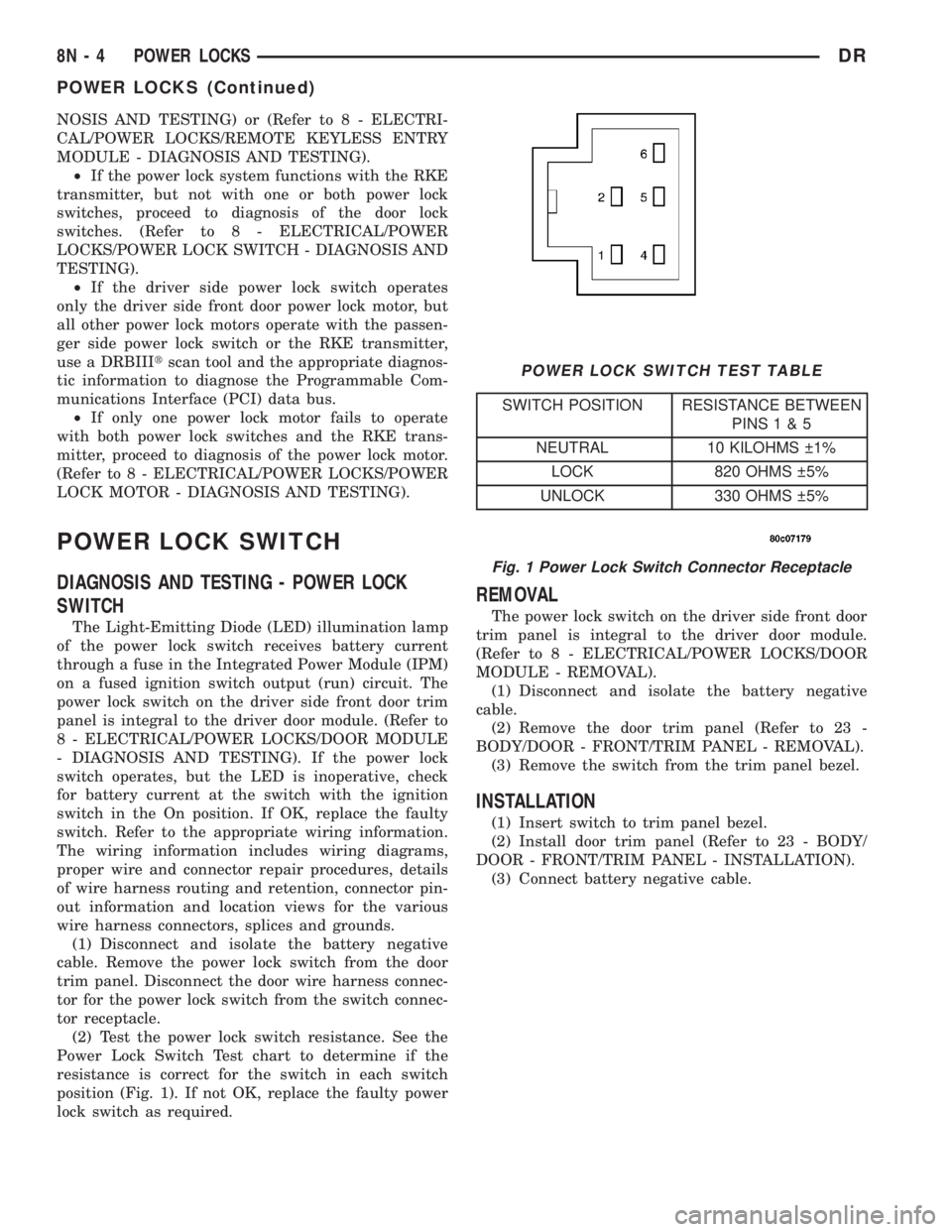
(2) Test the power lock switch resistance. See the
Power Lock Switch Test chart to determine if the
resistance is correct for the switch in each switch
position (Fig. 1). If not OK, replace the faulty power
lock switch as required.
REMOVAL
The power lock switch on the driver side front door
trim panel is integral to the driver door module.
(Refer to 8 - ELECTRICAL/POWER LOCKS/DOOR
MODULE - REMOVAL).
(1) Disconnect and isolate the battery negative
cable.
(2) Remove the door trim panel (Refer to 23 -
BODY/DOOR - FRONT/TRIM PANEL - REMOVAL).
(3) Remove the switch from the trim panel bezel.
INSTALLATION
(1) Insert switch to trim panel bezel.
(2) Install door trim panel (Refer to 23 - BODY/
DOOR - FRONT/TRIM PANEL - INSTALLATION).
(3) Connect battery negative cable.
Fig. 1 Power Lock Switch Connector Receptacle
POWER LOCK SWITCH TEST TABLE
SWITCH POSITION RESISTANCE BETWEEN
PINS1&5
NEUTRAL 10 KILOHMS 1%
LOCK 820 OHMS 5%
UNLOCK 330 OHMS 5%
8N - 4 POWER LOCKSDR
POWER LOCKS (Continued)
Page 582 of 2895
DOOR LOCK MOTOR
DESCRIPTION
The lock mechanisms are actuated by a reversible
electric motor mounted within each door. The power
lock motors are integral to the door latch units.
The power lock motors cannot be adjusted or
repaired and, if faulty or damaged, the door latch
unit must be replaced.
OPERATION
The door lock motors are controlled by the instru-
ment cluster. A positive and negative battery connec-
tion to the two motor terminals will cause the motor
to move in one direction. Reversing the current will
cause the motor to move in the opposite direction.
DIAGNOSIS AND TESTING - DOOR LOCK
MOTOR
The most reliable, efficient, and accurate means to
diagnose the power lock system requires the use of a
DRBIIItscan tool and the proper Diagnostic Proce-
dures manual. The DRBIIItscan tool can provide
confirmation that the PCI data bus is functional, that
all of the electronic modules are sending and receiv-
ing the proper messages on the PCI data bus, and
that the power lock motors are being sent the proper
hard wired outputs by the door modules for them to
perform their power lock system functions.
Refer to the appropriate wiring information. The
wiring information includes wiring diagrams, proper
wire and connector repair procedures, details of wire
harness routing and retention, connector pin-out
information and location views for the various wire
harness connectors, splices and grounds.
DRIVER DOOR MODULE
DESCRIPTION
A Driver Door Module (DDM) is used on all models
equipped with power locks, power windows, and
power mirrors. The DDM houses the following
switches:
²Power Lock Switch- The DDM includes a
two-way, momentary, resistor multiplexed switch to
control the power lock system.
²Power Mirror Selector Switch- A three-posi-
tion rocker switch in the DDM selects the right or
left power mirror for adjustment, or turns the power
mirror system Off.
²Power Mirror Adjustment Switches- Four
momentary, arrowhead shaped, directional switches
allow the driver to adjust the selected power mirror
in the Up, Down, Right, or Left directions.²Power Window Lockout Switch- A two-way,
latching, push-button switch in the DDM allows the
vehicle operator to lock out the power window
switches on each passenger door so that the passen-
ger door power windows may be operated only from
the master switches in the DDM.
²Power Window Switches- The DDM houses a
two-way, momentary power window switch for the
driver side front door. This switch also has a second
detent in the Down direction and internal circuitry to
provide an Auto-Down feature for the driver side
front door power window. In addition to the power
window switch for its own door, the DDM houses
individual master switches for each passenger door
power window.
The DDM also incorporates several green Light-
Emitting Diodes (LEDs) that illuminate the power
lock and power window switch paddles, and the
power mirror switch directional buttons to improve
switch visibility in dark ambient lighting conditions.
The DDM cannot be adjusted or repaired and, if
faulty or damaged, the entire DDM unit must be
replaced.
OPERATION
The Driver Door Module (DDM) combines a power
lock switch, a driver power window switch with an
Auto-down feature, master switches for each passen-
ger door power window, a power window lockout
switch, a power mirror selector switch, and four
power mirror adjustment switches in a single unit.
The switches in the DDM can be diagnosed using
conventional diagnostic tools and methods.
Power Lock Switch
The DDM power lock switch circuitry is connected
in series between ground and the driver door switch
mux input of the instrument cluster. Each power lock
switch position (Lock, Unlock, and Neutral) provides
a different resistance value to the instrument cluster
input, which allows the instrument cluster to sense
the switch position. Based upon the power lock
switch input, the instrument cluster controls the bat-
tery and ground feed outputs to the individual power
lock motors to lock or unlock the door latches. The
Light-Emitting Diode (LED) in the DDM power lock
switch is connected to battery current through the
power window circuit breaker in the Integrated
Power Module (IPM) on a fused ignition switch out-
put (run-acc) circuit so that the switch will be illumi-
nated whenever the ignition switch is in the On or
Accessory positions.
Power Window Switches
The DDM power window switch circuitry is con-
nected to battery current through a circuit breaker in
DRPOWER LOCKS 8N - 5
Page 583 of 2895
the Integrated Power Module (IPM) on a fused igni-
tion switch output (run-acc) circuit so that the power
windows will operate whenever the ignition switch is
in the On or Accessory positions. Each two-way,
momentary master passenger power window switch
in the DDM provides battery current and ground to
the individual power window switches on each pas-
senger door so that the power window switch controls
the battery current and ground feeds to its respective
power window motor. The DDM switch for the driver
side front door power window is labeled ªAutoº and
includes an auto-down feature. When this switch is
depressed to a second momentary detent position and
released, the driver door power window is automati-
cally operated through an internal circuit and relay
to its fully lowered position. The Auto-down event is
cancelled if the switch paddle is depressed a second
time in either the Up or Down direction. When the
two position window lockout switch in the DDM is
depressed and latched in the lockout position, the
battery current feed to each of the individual passen-
ger power window switches is interrupted so that the
passenger door power windows can only be operated
from the master switches in the DDM. The window
lockout switch also controls the battery current feed
for the LED in each passenger power window switch
so that the switch will not be illuminated when it is
locked out.
Power Mirror Switches
The DDM power mirror switch circuitry is con-
nected to battery current through a fuse in the IPM
on a fused B(+) circuit so that the power mirrors
remain operational regardless of the ignition switch
position. A rocker type selector switch has three posi-
tions, one to select the right mirror, one to select the
left mirror, and a neutral Off position. After the right
or left mirror is selected, one of four directional but-
tons is depressed to move the selected mirror Up,
Down, Right or Left. The DDM power mirror switch
circuitry controls the battery current and ground
feeds to each of the four (two in each mirror head)
power mirror motors. The Light-Emitting Diode
(LED) in the DDM power mirror switch is connected
to battery current through the power window circuit
breaker in the IPM on a fused ignition switch output
(run-acc) circuit so that the switch directional but-
tons will be illuminated whenever the ignition switch
is in the On or Accessory positions.DIAGNOSIS AND TESTING - DRIVER DOOR
MODULE
The Light-Emitting Diode (LED) illumination
lamps for all of the Driver Door Module (DDM)
power window, power lock, and power mirror
switches receive battery current through the power
window circuit breaker in the Integrated Power Mod-
ule (IPM). If all of the LEDs are inoperative in the
DDM, be certain to diagnose the power window sys-
tem before replacing the switch unit. (Refer to 8 -
ELECTRICAL/POWER WINDOWS - DIAGNOSIS
AND TESTING). If only one LED in the DDM is
inoperative, replace the faulty DDM. If the driver
side front door power window operates in a normal
manner, but the Auto-Down feature is inoperative,
replace the faulty DDM. Refer to the appropriate wir-
ing information. The wiring information includes wir-
ing diagrams, proper wire and connector repair
procedures, details of wire harness routing and
retention, connector pin-out information and location
views for the various wire harness connectors, splices
and grounds.
(1) Disconnect and isolate the battery negative
cable. Remove the DDM from the door trim panel.
Disconnect the door wire harness connectors for the
DDM from the DDM connector receptacles.
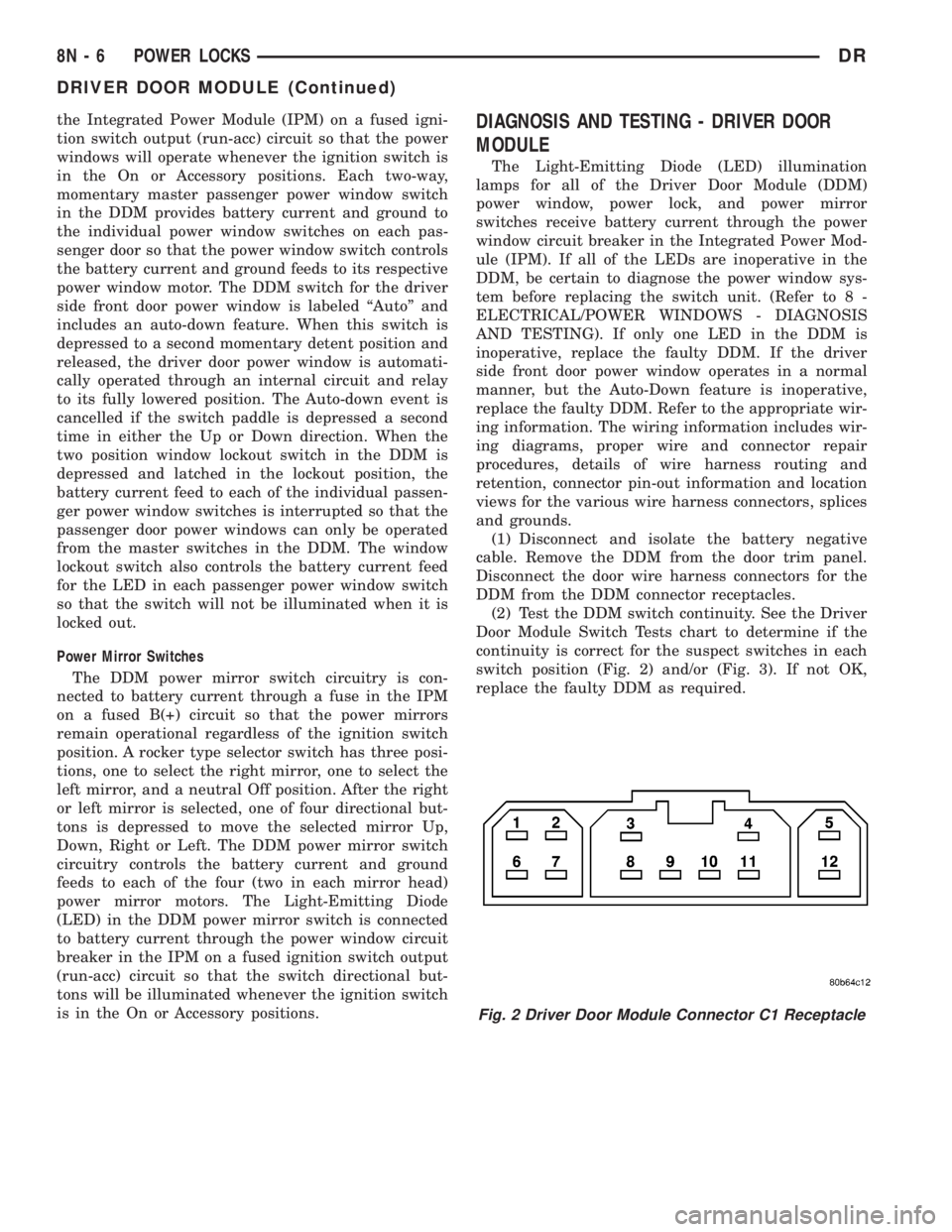
(2) Test the DDM switch continuity. See the Driver
Door Module Switch Tests chart to determine if the
continuity is correct for the suspect switches in each
switch position (Fig. 2) and/or (Fig. 3). If not OK,
replace the faulty DDM as required.
Fig. 2 Driver Door Module Connector C1 Receptacle
8N - 6 POWER LOCKSDR
DRIVER DOOR MODULE (Continued)
Page 585 of 2895
the horn to sound for about three minutes, or until a
second panic message is sent to the instrument clus-
ter. A vehicle speed of about 25.7 kilometers-per-hour
(15 miles-per-hour) will also cancel the panic event.
Refer to the owner's manual for more information
on the features, use and operation of the RKE sys-
tem.
OPERATION
Whenever the vehicle battery power is interrupted,
the Remote Keyless Module (RKE) Module will retain
all vehicle access codes in its memory. When replac-
ing or adding a key fob transmitter (maximum of 4) a
DRB IIItscan tool is required to program the RKE
Module to accept the new Vehicle Access Code if a
customer owned transmitter is not available.
If a functioning transmitter is available, (Refer to 8
- ELECTRICAL/POWER LOCKS/KEYLESS ENTRY
TRANSMITTER - STANDARD PROCEDURE)
DIAGNOSIS AND TESTING - REMOTE KEYLESS
ENTRY MODULE
Refer to the appropriate wiring information. The
wiring information includes wiring diagrams, proper
wire and connector repair procedures, further details
on wire harness routing and retention, as well as
pin-out and location views for the various wire har-
ness connectors, splices and grounds. Refer to the
proper Body Diagnostic Procedures Manual for test-
ing the Remote Keyless Entry system using a DRB
IIItscan tool.
REMOVAL
(1) Disconnect and isolate the battery negative
cable.
(2) Remove the instrument cluster (Refer to 8 -
ELECTRICAL/INSTRUMENT CLUSTER - REMOV-
AL).
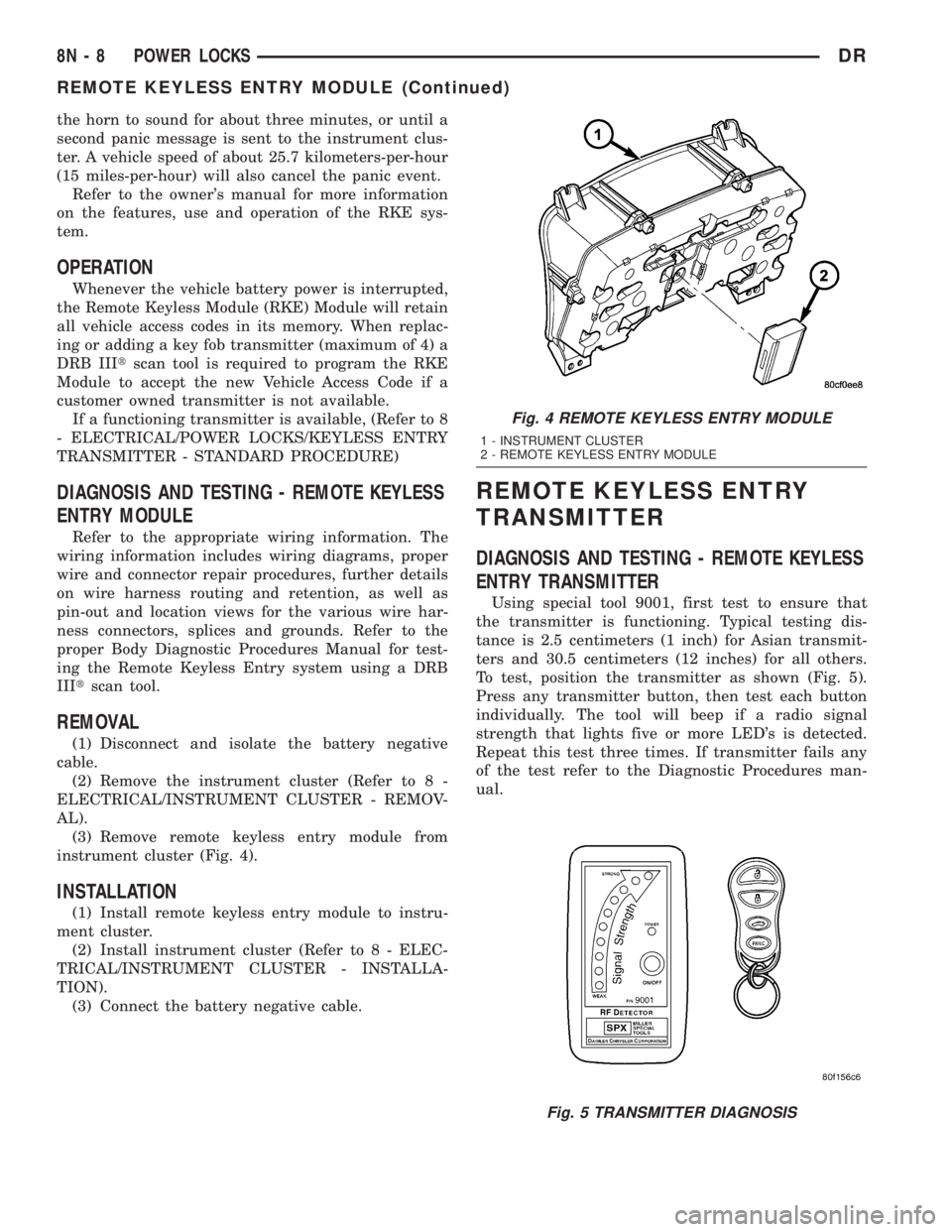
(3) Remove remote keyless entry module from
instrument cluster (Fig. 4).
INSTALLATION
(1) Install remote keyless entry module to instru-
ment cluster.
(2) Install instrument cluster (Refer to 8 - ELEC-
TRICAL/INSTRUMENT CLUSTER - INSTALLA-
TION).
(3) Connect the battery negative cable.
REMOTE KEYLESS ENTRY
TRANSMITTER
DIAGNOSIS AND TESTING - REMOTE KEYLESS
ENTRY TRANSMITTER
Using special tool 9001, first test to ensure that
the transmitter is functioning. Typical testing dis-
tance is 2.5 centimeters (1 inch) for Asian transmit-
ters and 30.5 centimeters (12 inches) for all others.
To test, position the transmitter as shown (Fig. 5).
Press any transmitter button, then test each button
individually. The tool will beep if a radio signal
strength that lights five or more LED's is detected.
Repeat this test three times. If transmitter fails any
of the test refer to the Diagnostic Procedures man-
ual.
Fig. 4 REMOTE KEYLESS ENTRY MODULE
1 - INSTRUMENT CLUSTER
2 - REMOTE KEYLESS ENTRY MODULE
Fig. 5 TRANSMITTER DIAGNOSIS
8N - 8 POWER LOCKSDR
REMOTE KEYLESS ENTRY MODULE (Continued)
Page 588 of 2895
POWER MIRRORS
TABLE OF CONTENTS
page page
POWER MIRRORS
DESCRIPTION.........................11
OPERATION...........................11
DIAGNOSIS AND TESTING - POWER
MIRRORS...........................11
AUTOMATIC DAY / NIGHT MIRROR
DESCRIPTION.........................12
OPERATION...........................12
DIAGNOSIS AND TESTING - AUTOMATIC DAY
/ NIGHT MIRROR......................12REMOVAL.............................13
POWER MIRROR SWITCH
DIAGNOSIS AND TESTING - POWER MIRROR
SWITCH............................13
REMOVAL.............................13
SIDEVIEW MIRROR
REMOVAL.............................13
POWER MIRRORS
DESCRIPTION
AUTOMATIC DAY/NIGHT MIRROR
The automatic day/night mirror system is able to
automatically change the reflectance of the inside
rear view mirror in order to reduce the glare of head-
lamps approaching the vehicle from the rear. The
automatic day/night rear view mirror receives bat-
tery current through a fuse in the Integrated Power
Module (IPM) only when the ignition switch is in the
On position.
OUTSIDE REAR VIEW MIRROR
The power operated outside rear view mirrors
allow the driver to adjust both outside mirrors elec-
trically from the driver side front seat position by
operating a switch on the driver side front door trim
panel. The power mirrors receive a non-switched bat-
tery feed through a fuse in the Integrated Power
Module (IPM) so that the system will remain opera-
tional, regardless of the ignition switch position.
OPERATION
AUTOMATIC DAY/NIGHT MIRROR
A switch located on the bottom of the automatic
day/night mirror housing allows the vehicle operator
to select whether the automatic dimming feature is
operational. When the automatic day/night mirror is
turned on, the mirror switch is lighted by an integral
Light-Emitting Diode (LED). The mirror will auto-
matically disable its self-dimming feature whenever
the vehicle is being driven in reverse.Refer to the owner's manual for more information
on the features, use and operation of the automatic
day/night mirror system.
OUTSIDE REAR VIEW MIRROR
The heated mirrors include an electric heating grid
behind the mirror glass in each outside mirror, which
can clear the mirror glass of ice, snow, or fog. (Refer
to 8 - ELECTRICAL/HEATED MIRRORS -
DESCRIPTION) for more information.
DIAGNOSIS AND TESTING - POWER MIRRORS
WIRING VOLTAGE TEST
The following wiring test determines whether or
not voltage is continuous through the body harness
to switch.
(1) Remove the power mirror switch (Refer to 8 -
ELECTRICAL/POWER LOCKS/DOOR MODULE -
REMOVAL).
(2) Disconnect wire harness connector from back of
power mirror switch.
(3) Connect the clip end of a 12 volt test light to
Pin 5 in the mirror switch harness connector. Touch
the test light probe to Pin 3.
If the test light illuminates, the wiring circuit
between the battery and switch is OK.
If the lamp does not illuminate, first check fuse in
the Integrated Power Module (IPM). If fuse is OK,
then check for a broken wire.
Refer to the appropriate wiring information. The
wiring information includes wiring diagrams, proper
wire and connector repair procedures, details of wire
harness routing and retention, connector pin-out
information and location views for the various wire
harness connectors, splices and grounds.
DRPOWER MIRRORS 8N - 11
Page 589 of 2895
POWER MIRROR MOTOR TEST
If the power mirror switch is receiving proper cur-
rent and ground and mirrors do not operate, proceed
with power mirror motor test. Refer to the appropri-
ate wiring information. The wiring information
includes wiring diagrams, proper wire and connector
repair procedures, details of wire harness routing
and retention, connector pin-out information and
location views for the various wire harness connec-
tors, splices and grounds.
(1) Remove the power mirror switch (Refer to 8 -
ELECTRICAL/POWER LOCKS/DOOR MODULE -
REMOVAL).
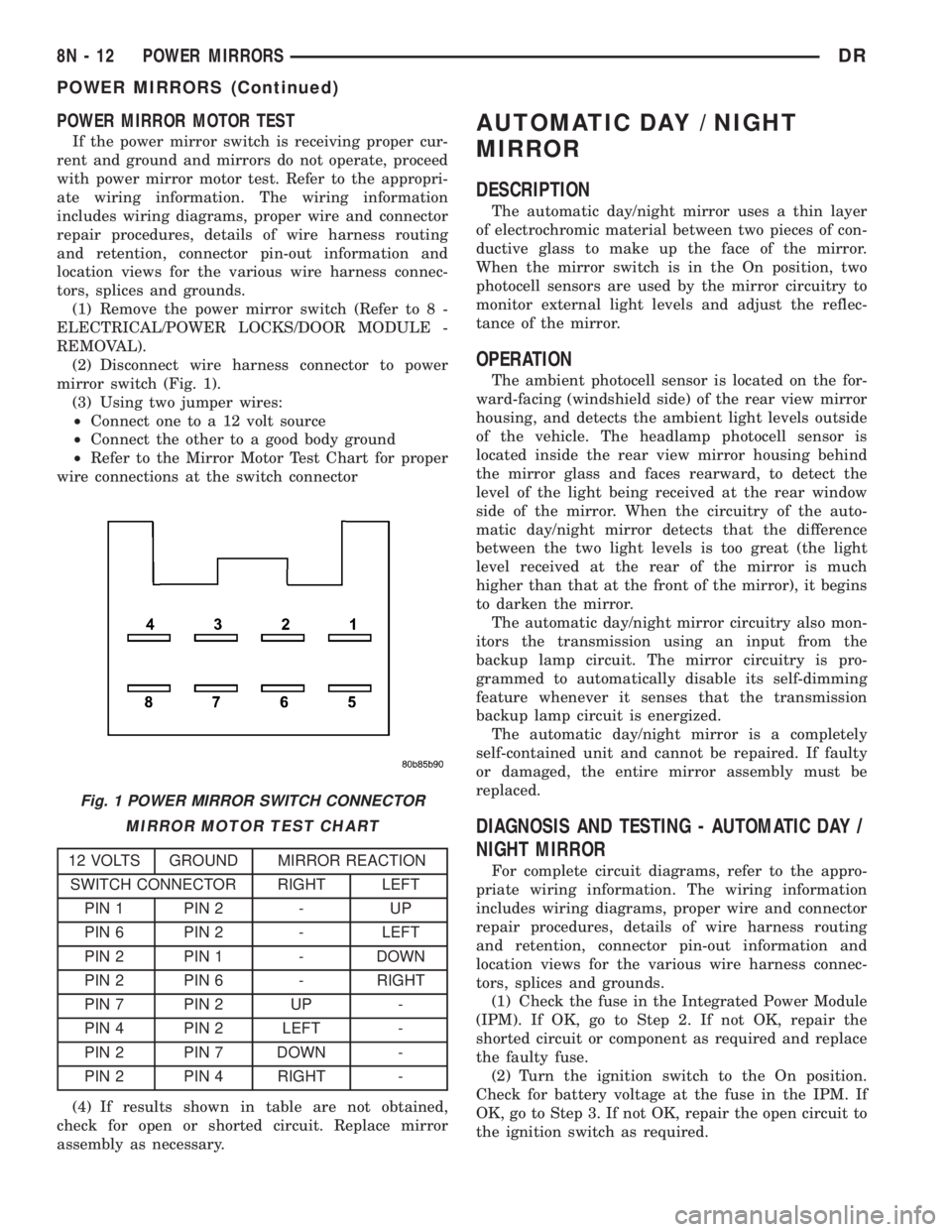
(2) Disconnect wire harness connector to power
mirror switch (Fig. 1).
(3) Using two jumper wires:
²Connect one to a 12 volt source
²Connect the other to a good body ground
²Refer to the Mirror Motor Test Chart for proper
wire connections at the switch connector
MIRROR MOTOR TEST CHART
12 VOLTS GROUND MIRROR REACTION
SWITCH CONNECTOR RIGHT LEFT
PIN 1 PIN 2 - UP
PIN 6 PIN 2 - LEFT
PIN 2 PIN 1 - DOWN
PIN 2 PIN 6 - RIGHT
PIN 7 PIN 2 UP -
PIN 4 PIN 2 LEFT -
PIN 2 PIN 7 DOWN -
PIN 2 PIN 4 RIGHT -
(4) If results shown in table are not obtained,
check for open or shorted circuit. Replace mirror
assembly as necessary.
AUTOMATIC DAY / NIGHT
MIRROR
DESCRIPTION
The automatic day/night mirror uses a thin layer
of electrochromic material between two pieces of con-
ductive glass to make up the face of the mirror.
When the mirror switch is in the On position, two
photocell sensors are used by the mirror circuitry to
monitor external light levels and adjust the reflec-
tance of the mirror.
OPERATION
The ambient photocell sensor is located on the for-
ward-facing (windshield side) of the rear view mirror
housing, and detects the ambient light levels outside
of the vehicle. The headlamp photocell sensor is
located inside the rear view mirror housing behind
the mirror glass and faces rearward, to detect the
level of the light being received at the rear window
side of the mirror. When the circuitry of the auto-
matic day/night mirror detects that the difference
between the two light levels is too great (the light
level received at the rear of the mirror is much
higher than that at the front of the mirror), it begins
to darken the mirror.
The automatic day/night mirror circuitry also mon-
itors the transmission using an input from the
backup lamp circuit. The mirror circuitry is pro-
grammed to automatically disable its self-dimming
feature whenever it senses that the transmission
backup lamp circuit is energized.
The automatic day/night mirror is a completely
self-contained unit and cannot be repaired. If faulty
or damaged, the entire mirror assembly must be
replaced.
DIAGNOSIS AND TESTING - AUTOMATIC DAY /
NIGHT MIRROR
For complete circuit diagrams, refer to the appro-
priate wiring information. The wiring information
includes wiring diagrams, proper wire and connector
repair procedures, details of wire harness routing
and retention, connector pin-out information and
location views for the various wire harness connec-
tors, splices and grounds.
(1) Check the fuse in the Integrated Power Module
(IPM). If OK, go to Step 2. If not OK, repair the
shorted circuit or component as required and replace
the faulty fuse.
(2) Turn the ignition switch to the On position.
Check for battery voltage at the fuse in the IPM. If
OK, go to Step 3. If not OK, repair the open circuit to
the ignition switch as required.
Fig. 1 POWER MIRROR SWITCH CONNECTOR
8N - 12 POWER MIRRORSDR
POWER MIRRORS (Continued)
Page 598 of 2895
POWER WINDOWS
TABLE OF CONTENTS
page page
POWER WINDOWS
DESCRIPTION.........................21
OPERATION...........................21
DIAGNOSIS AND TESTING - POWER
WINDOWS...........................21
WINDOW MOTOR
REMOVAL.............................22WINDOW SWITCH
DIAGNOSIS AND TESTING - WINDOW
SWITCH............................22
REMOVAL.............................23
INSTALLATION.........................23
POWER WINDOWS
DESCRIPTION
The power window system allows each of the door
windows to be raised and lowered electrically by
actuating a switch on each door panel. A master
switch on the drivers door allows the driver to raise
or lower each of the passenger door windows and to
lock out the individual switches on the passenger
doors from operation. The power window system
receives battery feed through a fuse in the Integrated
Power Module (IPM) and a circuit breaker located in
the instrument panel wiring harness near the park
brake pedal, only when the ignition switch is in the
RUN or ACCESSORY position.
OPERATION
WINDOW SWITCH
The power window switches control the battery
and ground feeds to the power window motors. The
passenger door power window switches receive their
battery and ground feeds through the circuitry of the
drivers window switch. When the power window lock-
out switch is in the Lock position, the battery feed
for the passenger door window switches is inter-
rupted.
WINDOW MOTOR
Window motors use permanent type magnets. The
B+ and ground applied at the motor terminal pins
will cause the motor to rotate in one direction.
Reversing current through the motor terminals will
cause the motor to rotate in the opposite direction.
Refer to the appropriate wiring information. The
wiring information includes wiring diagrams, proper
wire and connector repair procedures, details of wire
harness routing and retention, connector pin-out
information and location views for the various wire
harness connectors, splices and grounds.
DIAGNOSIS AND TESTING - POWER
WINDOWS
WIRING VOLTAGE TEST
The following wiring test determines whether or
not voltage is continuous through the body harness
to the front switch.
(1) Remove the Driver Door Module (Refer to 8 -
ELECTRICAL/POWER LOCKS/DOOR MODULE -
REMOVAL).
(2) Disconnect wire connector from back of power
window switch.
(3) Switch ignition to the ON position.
(4) Connect the clip end of a 12 volt test light to
Pin 14 of the window switch harness connector.
Touch the test light probe to Pin 10.
²If the test light illuminates, the wiring circuit
between the battery and switch is OK.
²If the lamp does not illuminate, first check the
fuse in the Integrated Power Module (IPM). Check
the circuit breaker located near the park brake
pedal. If fuse and circuit breaker are OK, then check
for a broken wire.
Refer to the appropriate wiring information. The
wiring information includes wiring diagrams, proper
wire and connector repair procedures, details of wire
harness routing and retention, connector pin-out
information and location views for the various wire
harness connectors, splices and grounds.
POWER WINDOW MOTOR TEST
If the power window motor is receiving proper cur-
rent and ground and does not operate, proceed with
motor test. Refer to the appropriate wiring informa-
tion. The wiring information includes wiring dia-
grams, proper wire and connector repair procedures,
details of wire harness routing and retention, connec-
tor pin-out information and location views for the
various wire harness connectors, splices and grounds.
(1) Remove front door trim panel as necessary to
gain access to power window motor wire connector
DRPOWER WINDOWS 8N - 21
Page 599 of 2895
(Refer to 23 - BODY/DOOR - FRONT/TRIM PANEL -
REMOVAL).
(2) Disconnect power window motor wire connector
from door harness.
(3) Using two jumper wires, connect one to a bat-
tery (+) source and the other to a good ground (-).
(4) Connect the Negative (-) jumper probe to one of
the motor connector terminals.
(5) Momentarily touch the Positive (+) jumper
probe to the other motor connector terminal.
When positive probe is connected the motor should
rotate in one direction to either move window up or
down. If window is all the way up or down the motor
will grunt and the inner door panel will flex when
actuated in that one direction.
(6) Reverse jumper probes at the motor connector
terminals and window should now move in opposite
direction. If window does not move or grunt, replace
the motor.
If window moved completely up or down, reverse
the jumper probes and cycle window to the opposite
position to verify full operation.
If motor grunts and does not move, verify that reg-
ulator is not binding.
WINDOW MOTOR
REMOVAL
The window motor is serviced with the window reg-
ulator (Refer to 23 - BODY/DOOR - FRONT/WINDOW
REGULATOR - REMOVAL) or (Refer to 23 - BODY/
DOORS - REAR/WINDOW REGULATOR - REMOVAL).
WINDOW SWITCH
DIAGNOSIS AND TESTING - WINDOW SWITCH
The Light-Emitting Diode (LED) illumination
lamps for all of the power window and lock switch
and bezel unit switch paddles receive battery current
through the power window circuit breaker in the
junction block. If all of the LEDs are inoperative in
both the power window and lock switch units and the
power windows are inoperative, (Refer to 8 - ELEC-
TRICAL/POWER WINDOWS - DIAGNOSIS AND
TESTING). If the power windows operate, but any or
all of the LEDs are inoperative, the power window
and lock switch units with the inoperative LED(s) is
faulty and must be replaced. For complete circuit dia-
grams, refer to the appropriate wiring information.
The wiring information includes wiring diagrams,
proper wire and connector repair procedures, details
of wire harness routing and retention, connector pin-
out information and location views for the various
wire harness connectors, splices and grounds.(1) Check the fuse in the Integrated Power Module
(IPM) and the circuit breaker located near the park
brake pedal. If OK, go to Step 2. If not OK, replace
the faulty fuse or circuit breaker.
(2) Turn the ignition switch to the On position.
Check for battery voltage at the fuse in the Inte-
grated Power Module (IPM). If OK, turn the ignition
switch to the Off position and go to Step 3. If not OK,
check circuit breaker and repair the circuit to the
ignition switch as required.
(3) Disconnect and isolate the battery negative
cable. Remove the power window switch unit from
the door trim panel (passenger doors). The drivers
door switch is included with the Driver Door Module
(Refer to 8 - ELECTRICAL/POWER LOCKS/DOOR
MODULE - DIAGNOSIS AND TESTING) for service
procedures. Unplug the wire harness connector from
the switch unit.
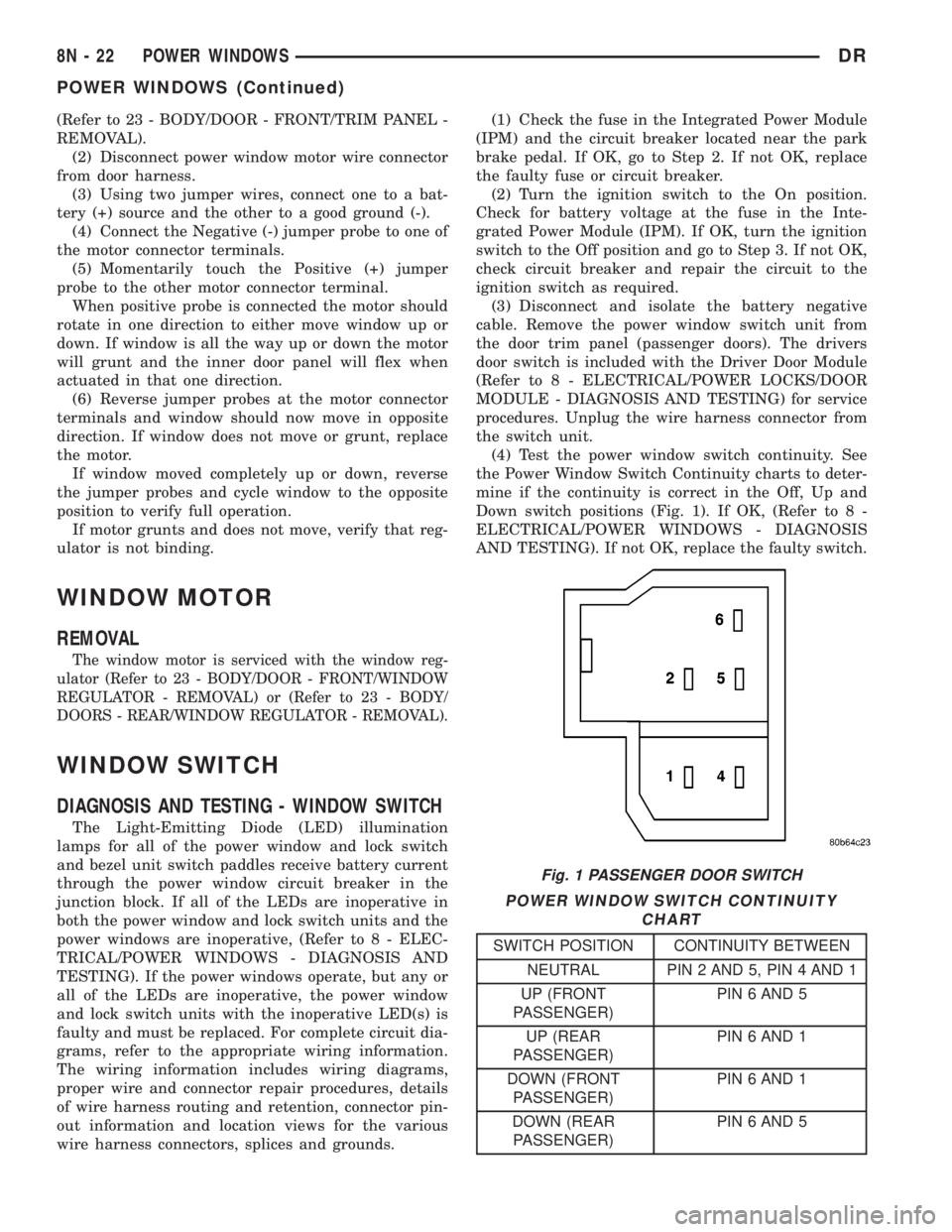
(4) Test the power window switch continuity. See
the Power Window Switch Continuity charts to deter-
mine if the continuity is correct in the Off, Up and
Down switch positions (Fig. 1). If OK, (Refer to 8 -
ELECTRICAL/POWER WINDOWS - DIAGNOSIS
AND TESTING). If not OK, replace the faulty switch.
POWER WINDOW SWITCH CONTINUITY
CHART
SWITCH POSITION CONTINUITY BETWEEN
NEUTRAL PIN 2 AND 5, PIN 4 AND 1
UP (FRONT
PASSENGER)PIN 6 AND 5
UP (REAR
PASSENGER)PIN 6 AND 1
DOWN (FRONT
PASSENGER)PIN 6 AND 1
DOWN (REAR
PASSENGER)PIN 6 AND 5
Fig. 1 PASSENGER DOOR SWITCH
8N - 22 POWER WINDOWSDR
POWER WINDOWS (Continued)
Page 681 of 2895
If the control knob is held depressed for more than
about thirty seconds, the FCM will suspend washer
pump/motor operation until the knob is released for
about two seconds, then cycled back to the Wash
position; however, the wipers will continue to operate
for as long as the Wash switch is held closed. The
FCM monitors the changing state of the wiper motor
park switch through a hard wired wiper park switch
sense circuit input. This input allows the FCM to
count the number of wipe cycles that occur after the
Wash switch is released, and to determine the proper
interval at which to de-energize the wiper on/off
relay to complete the wipe-after-wash mode cycle.
DIAGNOSIS AND TESTING - WIPER &
WASHER SYSTEM
If the wiper motor operates, but the wipers do not
move on the windshield, replace the faulty wiper
module. If the washer pump/motor operates, but no
washer fluid is dispensed on the glass; or, if the wip-
ers operate, but chatter, lift, or do not clear the glass,
clean and inspect the wiper and washer system com-
ponents as required. (Refer to 8 - ELECTRICAL/
WIPERS/WASHERS - CLEANING) and (Refer to 8 -
ELECTRICAL/WIPERS/WASHERS - INSPECTION).
For diagnosis and testing of the multi-function
switch (Refer to 8 - ELECTRICAL/LAMPS/LIGHT-
ING - EXTERIOR/MULTI-FUNCTION SWITCH -
DIAGNOSIS AND TESTING). Refer to the appropri-
ate wiring information. The wiring information
includes wiring diagrams, proper wire and connector
repair procedures, details of wire harness routing
and retention, connector pin-out information and
location views for the various wire harness connec-
tors, splices and grounds.
The hard wired circuits and components of the
wiper and washer system may be diagnosed and
tested using conventional diagnostic tools and proce-
dures. However, conventional diagnostic methods
may not prove conclusive in the diagnosis of the
instrument cluster, the Front Control Module (FCM),
or the electronic message inputs to or outputs from
the instrument cluster and the FCM that control the
various wiper and washer system operating modes.
The most reliable, efficient, and accurate means to
diagnose the instrument cluster, the FCM, or the
electronic message inputs and outputs related to the
various wiper and washer system operating modes
requires the use of a DRBIIItscan tool. Refer to the
appropriate diagnostic information.
WARNING: ON VEHICLES EQUIPPED WITH AIR-
BAGS, DISABLE THE SUPPLEMENTAL RESTRAINT
SYSTEM BEFORE ATTEMPTING ANY STEERING
WHEEL, STEERING COLUMN, DRIVER AIRBAG,
PASSENGER AIRBAG, SEAT BELT TENSIONER,SIDE CURTAIN AIRBAG, OR INSTRUMENT PANEL
COMPONENT DIAGNOSIS OR SERVICE. DISCON-
NECT AND ISOLATE THE BATTERY NEGATIVE
(GROUND) CABLE, THEN WAIT TWO MINUTES FOR
THE SYSTEM CAPACITOR TO DISCHARGE BEFORE
PERFORMING FURTHER DIAGNOSIS OR SERVICE.
THIS IS THE ONLY SURE WAY TO DISABLE THE
SUPPLEMENTAL RESTRAINT SYSTEM. FAILURE TO
TAKE THE PROPER PRECAUTIONS COULD
RESULT IN ACCIDENTAL AIRBAG DEPLOYMENT
AND POSSIBLE PERSONAL INJURY.
CLEANING - WIPER & WASHER SYSTEM
WIPER SYSTEM
The squeegees of wiper blades exposed to the ele-
ments for a long time tend to lose their wiping effec-
tiveness. Periodic cleaning of the squeegees is
suggested to remove any deposits of salt or road film.
The wiper blades, arms, and windshield glass should
only be cleaned using a sponge or soft cloth and
windshield washer fluid, a mild detergent, or a non-
abrasive cleaner. If the wiper blades continue to
leave streaks, smears, hazing, or beading on the
glass after thorough cleaning of the squeegees and
the glass, the entire wiper blade assembly must be
replaced.
CAUTION: Protect the rubber squeegees of the
wiper blades from any petroleum-based cleaners,
solvents, or contaminants. These products can rap-
idly deteriorate the rubber squeegees.
WASHER SYSTEM
If the washer system is contaminated with foreign
material, drain the washer reservoir by removing the
washer pump/motor from the reservoir. Clean foreign
material from the inside of the washer pump/motor
inlet filter screen and the washer reservoir using
clean washer fluid, a mild detergent, or a non-abra-
sive cleaner. Flush foreign material from the washer
system plumbing by first disconnecting the washer
hoses from the washer nozzles, then running the
washer pump/motor to run clean washer fluid or
water through the system. Plugged or restricted
washer nozzles should be carefully back-flushed
using compressed air. If the washer nozzle obstruc-
tion cannot be cleared, replace the washer nozzle.
CAUTION: Never introduce petroleum-based clean-
ers, solvents, or contaminants into the washer sys-
tem. These products can rapidly deteriorate the
rubber seals and hoses of the washer system, as
well as the rubber squeegees of the wiper blades.
8R - 6 WIPERS/WASHERSDR
WIPERS/WASHERS (Continued)
Page 1249 of 2895
no continuity between terminals 87 and 30. If OK, go
to Step 3. If not OK, replace the faulty relay.
(3) Resistance between terminals 85 and 86 (elec-
tromagnet) should be 67.5 - 82.5 ohms. If OK, go to
Step 4. If not OK, replace the faulty relay.
(4) Connect a battery to terminals 85 and 86.
There should now be continuity between terminals
30 and 87, and no continuity between terminals 87A
and 30. If OK, reinstall the relay and use a DRB IIIt
scan tool to perform further testing. Refer to the
appropriate diagnostic information.
Refer to the appropriate wiring information. The
wiring information includes wiring diagrams, proper
wire and connector repair procedures, details of wire
harness routing and retention, connector pin-out
information and location views for the various wire
harness connectors, splices and grounds.REMOVAL
(1) Disconnect and isolate the negative battery
cable.
(2) Remove the relay by grasping it firmly and
pulling it straight out from its receptacle. A slight
back and fourth rocking motion may help the
removal process.
INSTALLATION
(1) Align the micro-relay terminals with the termi-
nal cavities in the receptacle.
(2) Push firmly and evenly on the top of the relay
until the terminals are fully seated in the terminal
cavities in the receptacle.
(3) Connect the battery negative cable.
8W - 97 - 10 8W-97 POWER DISTRIBUTIONDR
MICRO RELAY (Continued)