light DODGE RAM 2003 Service Owner's Manual
[x] Cancel search | Manufacturer: DODGE, Model Year: 2003, Model line: RAM, Model: DODGE RAM 2003Pages: 2895, PDF Size: 83.15 MB
Page 166 of 2895
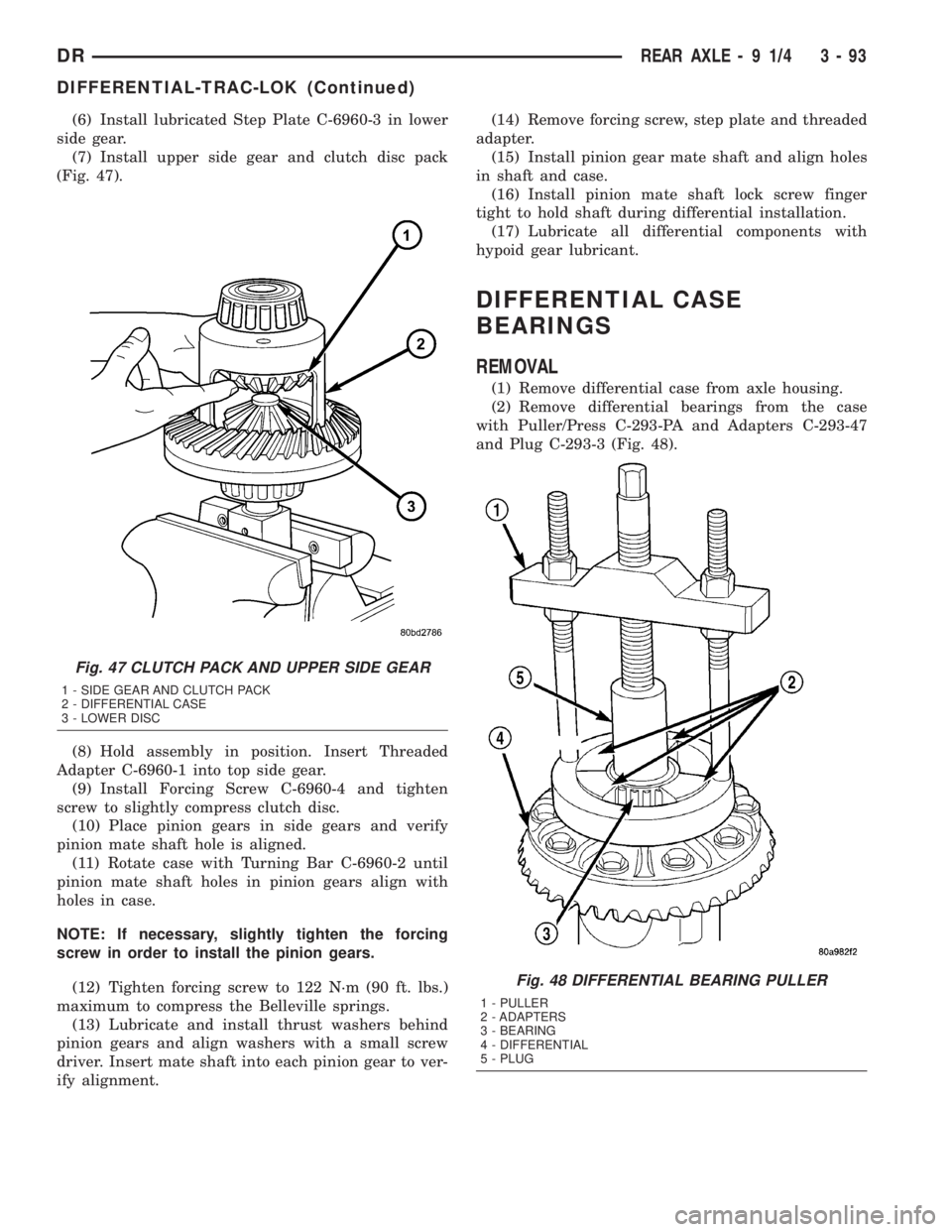
(6) Install lubricated Step Plate C-6960-3 in lower
side gear.
(7) Install upper side gear and clutch disc pack
(Fig. 47).
(8) Hold assembly in position. Insert Threaded
Adapter C-6960-1 into top side gear.
(9) Install Forcing Screw C-6960-4 and tighten
screw to slightly compress clutch disc.
(10) Place pinion gears in side gears and verify
pinion mate shaft hole is aligned.
(11) Rotate case with Turning Bar C-6960-2 until
pinion mate shaft holes in pinion gears align with
holes in case.
NOTE: If necessary, slightly tighten the forcing
screw in order to install the pinion gears.
(12) Tighten forcing screw to 122 N´m (90 ft. lbs.)
maximum to compress the Belleville springs.
(13) Lubricate and install thrust washers behind
pinion gears and align washers with a small screw
driver. Insert mate shaft into each pinion gear to ver-
ify alignment.(14) Remove forcing screw, step plate and threaded
adapter.
(15) Install pinion gear mate shaft and align holes
in shaft and case.
(16) Install pinion mate shaft lock screw finger
tight to hold shaft during differential installation.
(17) Lubricate all differential components with
hypoid gear lubricant.
DIFFERENTIAL CASE
BEARINGS
REMOVAL
(1) Remove differential case from axle housing.
(2) Remove differential bearings from the case
with Puller/Press C-293-PA and Adapters C-293-47
and Plug C-293-3 (Fig. 48).
Fig. 47 CLUTCH PACK AND UPPER SIDE GEAR
1 - SIDE GEAR AND CLUTCH PACK
2 - DIFFERENTIAL CASE
3 - LOWER DISC
Fig. 48 DIFFERENTIAL BEARING PULLER
1 - PULLER
2 - ADAPTERS
3 - BEARING
4 - DIFFERENTIAL
5 - PLUG
DRREAR AXLE - 9 1/4 3 - 93
DIFFERENTIAL-TRAC-LOK (Continued)
Page 169 of 2895
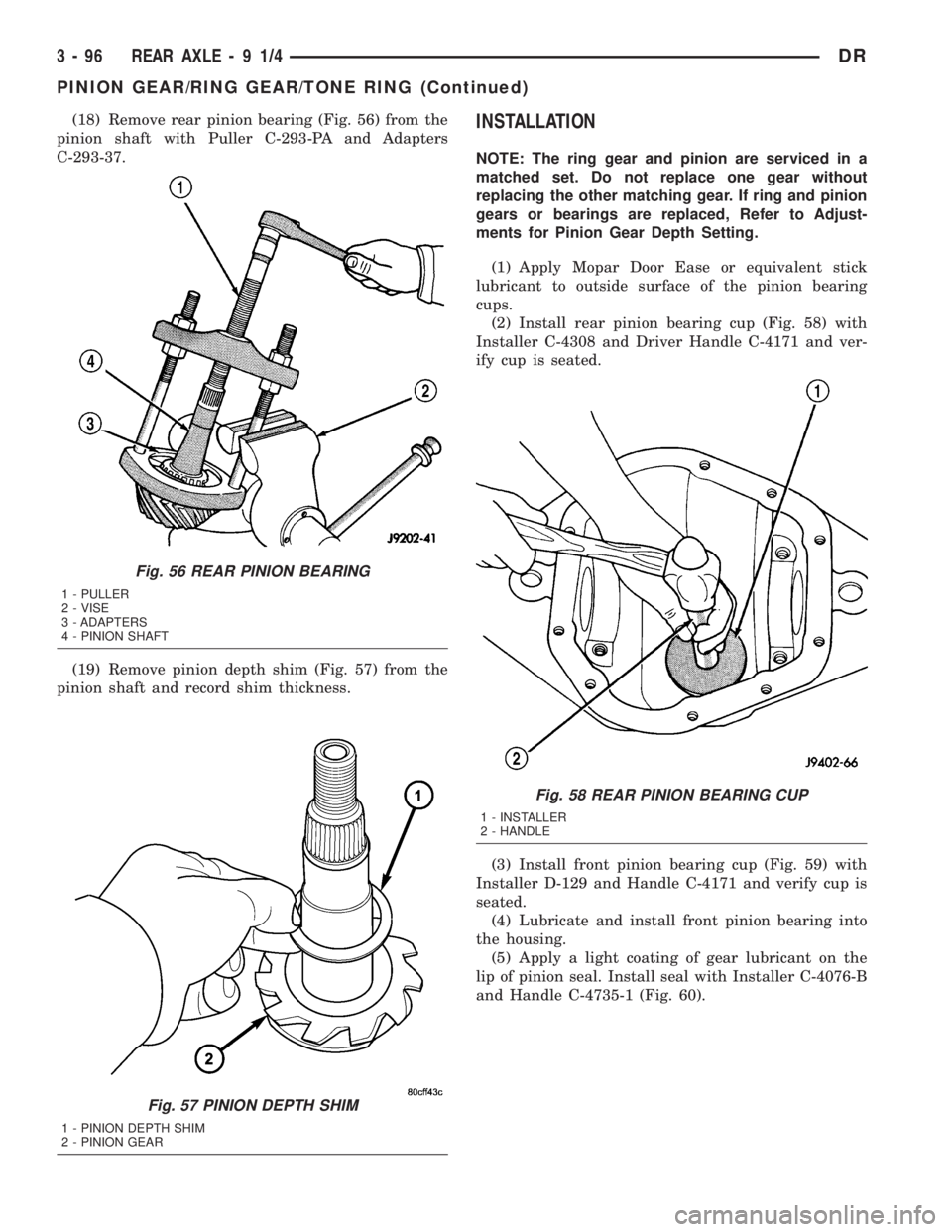
(18) Remove rear pinion bearing (Fig. 56) from the
pinion shaft with Puller C-293-PA and Adapters
C-293-37.
(19) Remove pinion depth shim (Fig. 57) from the
pinion shaft and record shim thickness.INSTALLATION
NOTE: The ring gear and pinion are serviced in a
matched set. Do not replace one gear without
replacing the other matching gear. If ring and pinion
gears or bearings are replaced, Refer to Adjust-
ments for Pinion Gear Depth Setting.
(1) Apply Mopar Door Ease or equivalent stick
lubricant to outside surface of the pinion bearing
cups.
(2) Install rear pinion bearing cup (Fig. 58) with
Installer C-4308 and Driver Handle C-4171 and ver-
ify cup is seated.
(3) Install front pinion bearing cup (Fig. 59) with
Installer D-129 and Handle C-4171 and verify cup is
seated.
(4) Lubricate and install front pinion bearing into
the housing.
(5) Apply a light coating of gear lubricant on the
lip of pinion seal. Install seal with Installer C-4076-B
and Handle C-4735-1 (Fig. 60).
Fig. 56 REAR PINION BEARING
1 - PULLER
2 - VISE
3 - ADAPTERS
4 - PINION SHAFT
Fig. 57 PINION DEPTH SHIM
1 - PINION DEPTH SHIM
2 - PINION GEAR
Fig. 58 REAR PINION BEARING CUP
1 - INSTALLER
2 - HANDLE
3 - 96 REAR AXLE-91/4DR
PINION GEAR/RING GEAR/TONE RING (Continued)
Page 174 of 2895
BEARING NOISE
The axle shaft, differential and pinion bearings can
all produce noise when worn or damaged. Bearing
noise can be either a whining, or a growling sound.
Pinion bearings have a constant-pitch noise. This
noise changes only with vehicle speed. Pinion bearing
noise will be higher pitched because it rotates at a
faster rate. Drive the vehicle and load the differen-
tial. If bearing noise occurs, the rear pinion bearing
is the source of the noise. If the bearing noise is
heard during a coast, the front pinion bearing is the
source.
Worn or damaged differential bearings usually pro-
duce a low pitch noise. Differential bearing noise is
similar to pinion bearing noise. The pitch of differen-
tial bearing noise is also constant and varies only
with vehicle speed.
Axle shaft bearings produce noise and vibration
when worn or damaged. The noise generally changes
when the bearings are loaded. Road test the vehicle.
Turn the vehicle sharply to the left and to the right.
This will load the bearings and change the noise
level. Where axle bearing damage is slight, the noise
is usually not noticeable at speeds above 30 mph.
LOW SPEED KNOCK
Low speed knock is generally caused by a worn
U-joint or by worn side-gear thrust washers. A worn
pinion shaft bore will also cause low speed knock.
VIBRATION
Vibration at the rear of the vehicle is usually
caused by a:
²Damaged drive shaft.
²Missing drive shaft balance weight(s).²Worn or out-of-balance wheels.
²Loose wheel lug nuts.
²Worn U-joint(s).
²Loose/broken springs.
²Damaged axle shaft bearing(s).
²Loose pinion gear nut.
²Excessive pinion yoke run out.
²Bent axle shaft(s).
Check for loose or damaged front-end components
or engine/transmission mounts. These components
can contribute to what appears to be a rearend vibra-
tion. Do not overlook engine accessories, brackets
and drive belts.
NOTE: All driveline components should be exam-
ined before starting any repair.
DRIVELINE SNAP
A snap or clunk noise when the vehicle is shifted
into gear (or the clutch engaged), can be caused by:
²High engine idle speed.
²Transmission shift operation.
²Loose engine/transmission/transfer case mounts.
²Worn U-joints.
²Loose spring mounts.
²Loose pinion gear nut and yoke.
²Excessive ring gear backlash.
²Excessive side gear to case clearance.
The source of a snap or a clunk noise can be deter-
mined with the assistance of a helper. Raise the vehi-
cle on a hoist with the wheels free to rotate. Instruct
the helper to shift the transmission into gear. Listen
for the noise, a mechanics stethoscope is helpful in
isolating the source of a noise.
DIAGNOSTIC CHART
Condition Possible Causes Correction
Wheel Noise 1. Wheel loose. 1. Tighten loose nuts.
2. Faulty, brinelled wheel bearing. 2. Replace bearing.
Axle Shaft Noise 1. Misaligned axle tube. 1. Inspect axle tube alignment.
Correct as necessary.
2. Bent or sprung axle shaft. 2. Inspect and correct as necessary.
DRREAR AXLE - 10 1/2 AA 3 - 101
REAR AXLE - 10 1/2 AA (Continued)
Page 179 of 2895
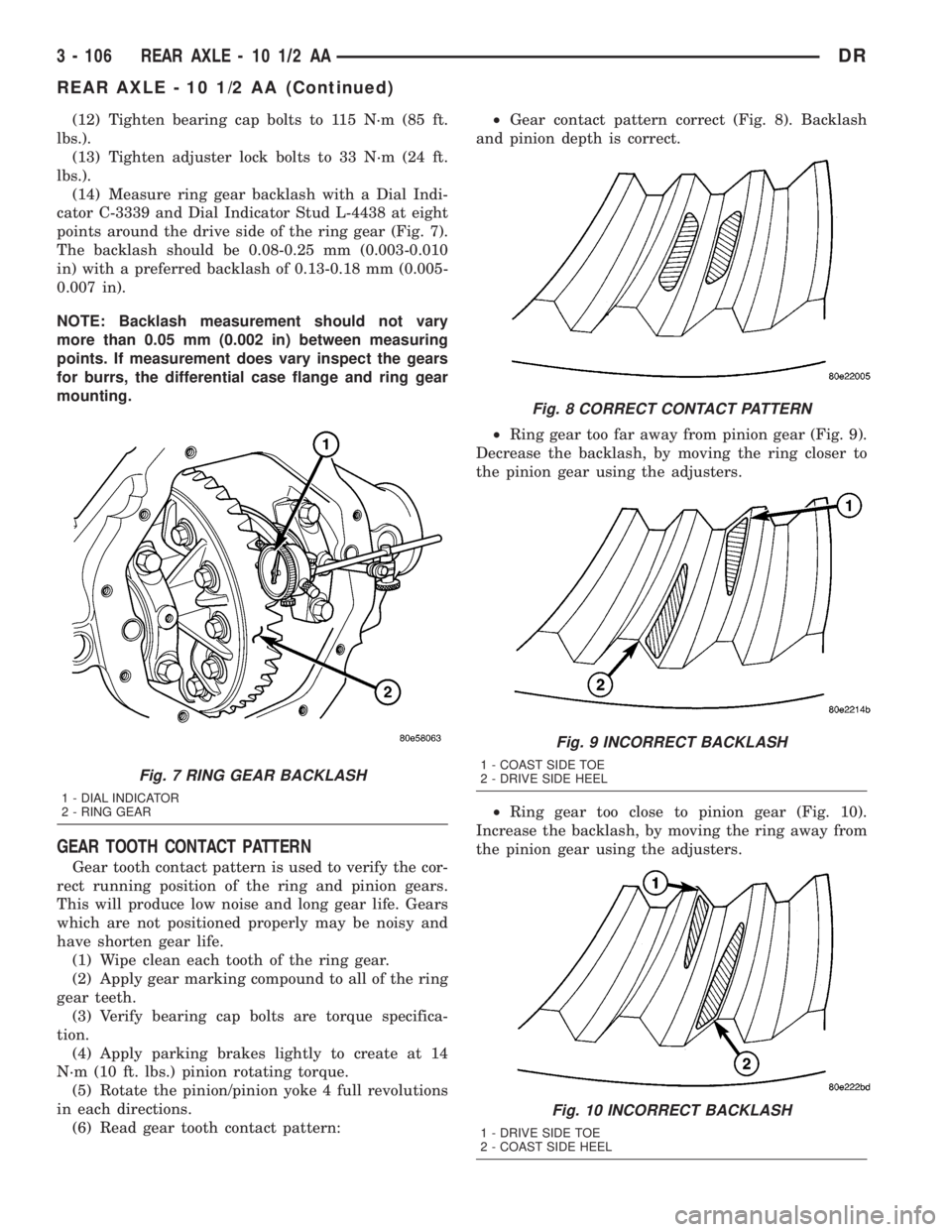
(12) Tighten bearing cap bolts to 115 N´m (85 ft.
lbs.).
(13) Tighten adjuster lock bolts to 33 N´m (24 ft.
lbs.).
(14) Measure ring gear backlash with a Dial Indi-
cator C-3339 and Dial Indicator Stud L-4438 at eight
points around the drive side of the ring gear (Fig. 7).
The backlash should be 0.08-0.25 mm (0.003-0.010
in) with a preferred backlash of 0.13-0.18 mm (0.005-
0.007 in).
NOTE: Backlash measurement should not vary
more than 0.05 mm (0.002 in) between measuring
points. If measurement does vary inspect the gears
for burrs, the differential case flange and ring gear
mounting.
GEAR TOOTH CONTACT PATTERN
Gear tooth contact pattern is used to verify the cor-
rect running position of the ring and pinion gears.
This will produce low noise and long gear life. Gears
which are not positioned properly may be noisy and
have shorten gear life.
(1) Wipe clean each tooth of the ring gear.
(2) Apply gear marking compound to all of the ring
gear teeth.
(3) Verify bearing cap bolts are torque specifica-
tion.
(4) Apply parking brakes lightly to create at 14
N´m (10 ft. lbs.) pinion rotating torque.
(5) Rotate the pinion/pinion yoke 4 full revolutions
in each directions.
(6) Read gear tooth contact pattern:²Gear contact pattern correct (Fig. 8). Backlash
and pinion depth is correct.
²Ring gear too far away from pinion gear (Fig. 9).
Decrease the backlash, by moving the ring closer to
the pinion gear using the adjusters.
²Ring gear too close to pinion gear (Fig. 10).
Increase the backlash, by moving the ring away from
the pinion gear using the adjusters.
Fig. 7 RING GEAR BACKLASH
1 - DIAL INDICATOR
2 - RING GEAR
Fig. 8 CORRECT CONTACT PATTERN
Fig. 9 INCORRECT BACKLASH
1 - COAST SIDE TOE
2 - DRIVE SIDE HEEL
Fig. 10 INCORRECT BACKLASH
1 - DRIVE SIDE TOE
2 - COAST SIDE HEEL
3 - 106 REAR AXLE - 10 1/2 AADR
REAR AXLE - 10 1/2 AA (Continued)
Page 186 of 2895
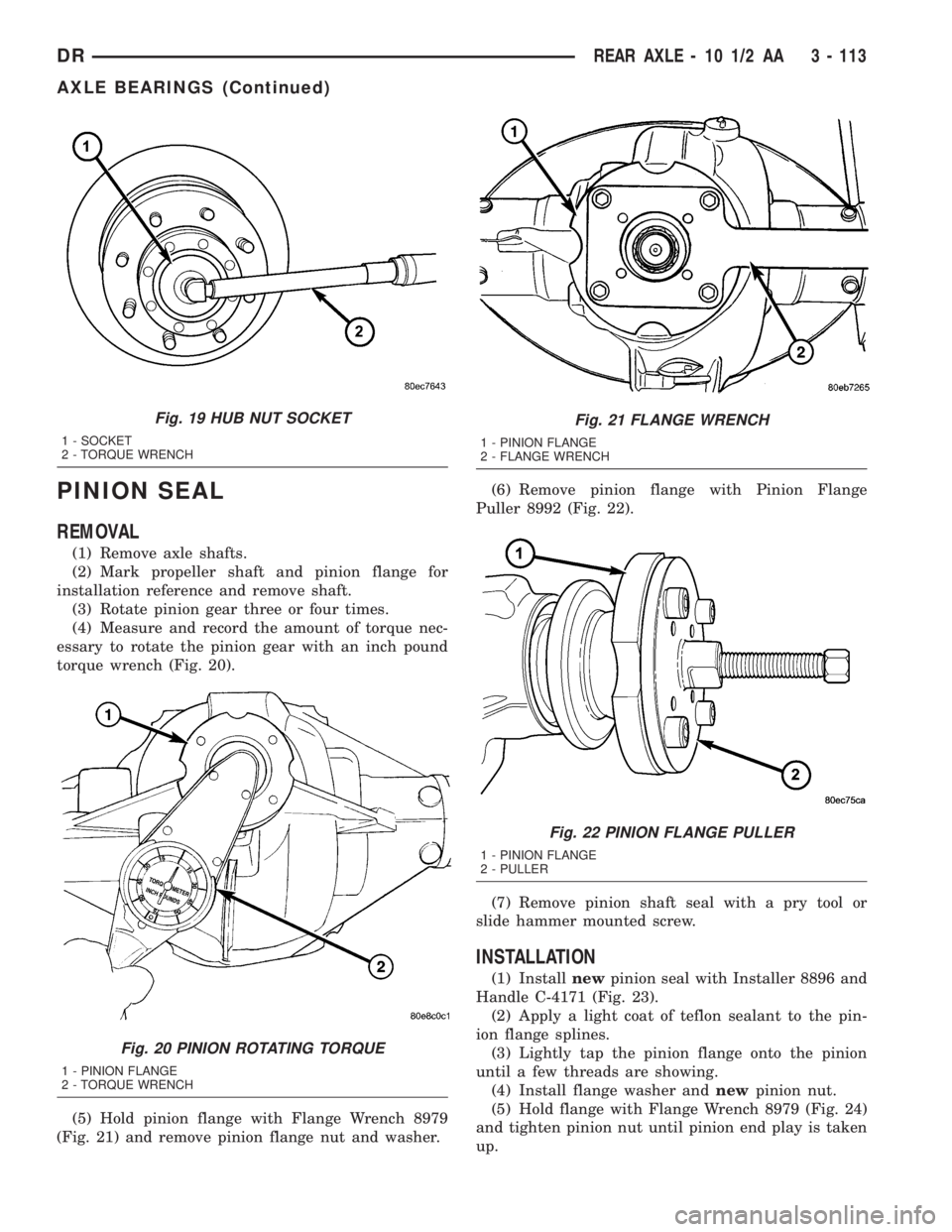
PINION SEAL
REMOVAL
(1) Remove axle shafts.
(2) Mark propeller shaft and pinion flange for
installation reference and remove shaft.
(3) Rotate pinion gear three or four times.
(4) Measure and record the amount of torque nec-
essary to rotate the pinion gear with an inch pound
torque wrench (Fig. 20).
(5) Hold pinion flange with Flange Wrench 8979
(Fig. 21) and remove pinion flange nut and washer.(6) Remove pinion flange with Pinion Flange
Puller 8992 (Fig. 22).
(7) Remove pinion shaft seal with a pry tool or
slide hammer mounted screw.
INSTALLATION
(1) Installnewpinion seal with Installer 8896 and
Handle C-4171 (Fig. 23).
(2) Apply a light coat of teflon sealant to the pin-
ion flange splines.
(3) Lightly tap the pinion flange onto the pinion
until a few threads are showing.
(4) Install flange washer andnewpinion nut.
(5) Hold flange with Flange Wrench 8979 (Fig. 24)
and tighten pinion nut until pinion end play is taken
up.
Fig. 19 HUB NUT SOCKET
1 - SOCKET
2 - TORQUE WRENCH
Fig. 20 PINION ROTATING TORQUE
1 - PINION FLANGE
2 - TORQUE WRENCH
Fig. 21 FLANGE WRENCH
1 - PINION FLANGE
2 - FLANGE WRENCH
Fig. 22 PINION FLANGE PULLER
1 - PINION FLANGE
2 - PULLER
DRREAR AXLE - 10 1/2 AA 3 - 113
AXLE BEARINGS (Continued)
Page 190 of 2895
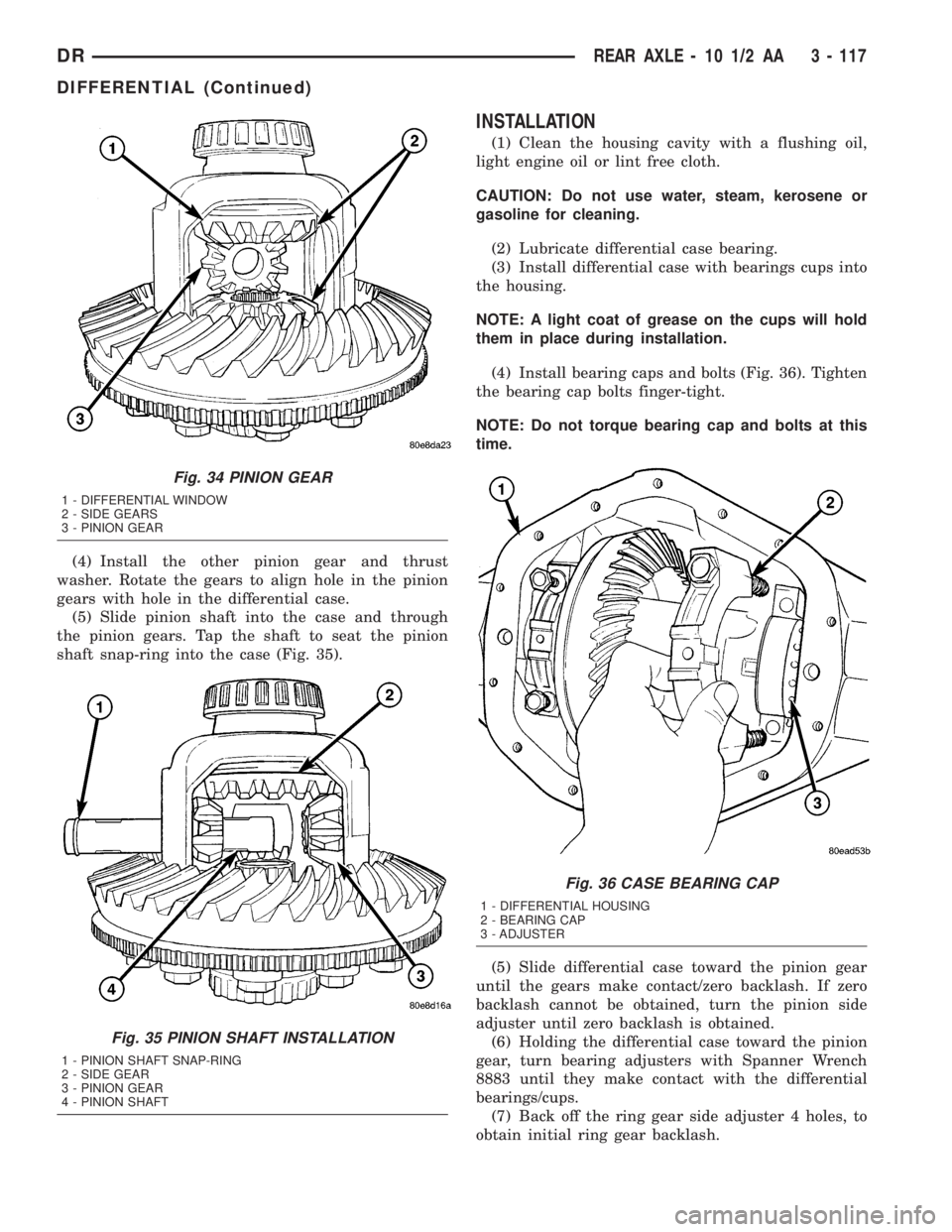
(4) Install the other pinion gear and thrust
washer. Rotate the gears to align hole in the pinion
gears with hole in the differential case.
(5) Slide pinion shaft into the case and through
the pinion gears. Tap the shaft to seat the pinion
shaft snap-ring into the case (Fig. 35).
INSTALLATION
(1) Clean the housing cavity with a flushing oil,
light engine oil or lint free cloth.
CAUTION: Do not use water, steam, kerosene or
gasoline for cleaning.
(2) Lubricate differential case bearing.
(3) Install differential case with bearings cups into
the housing.
NOTE: A light coat of grease on the cups will hold
them in place during installation.
(4) Install bearing caps and bolts (Fig. 36). Tighten
the bearing cap bolts finger-tight.
NOTE: Do not torque bearing cap and bolts at this
time.
(5) Slide differential case toward the pinion gear
until the gears make contact/zero backlash. If zero
backlash cannot be obtained, turn the pinion side
adjuster until zero backlash is obtained.
(6) Holding the differential case toward the pinion
gear, turn bearing adjusters with Spanner Wrench
8883 until they make contact with the differential
bearings/cups.
(7) Back off the ring gear side adjuster 4 holes, to
obtain initial ring gear backlash.
Fig. 34 PINION GEAR
1 - DIFFERENTIAL WINDOW
2 - SIDE GEARS
3 - PINION GEAR
Fig. 35 PINION SHAFT INSTALLATION
1 - PINION SHAFT SNAP-RING
2 - SIDE GEAR
3 - PINION GEAR
4 - PINION SHAFT
Fig. 36 CASE BEARING CAP
1 - DIFFERENTIAL HOUSING
2 - BEARING CAP
3 - ADJUSTER
DRREAR AXLE - 10 1/2 AA 3 - 117
DIFFERENTIAL (Continued)
Page 192 of 2895
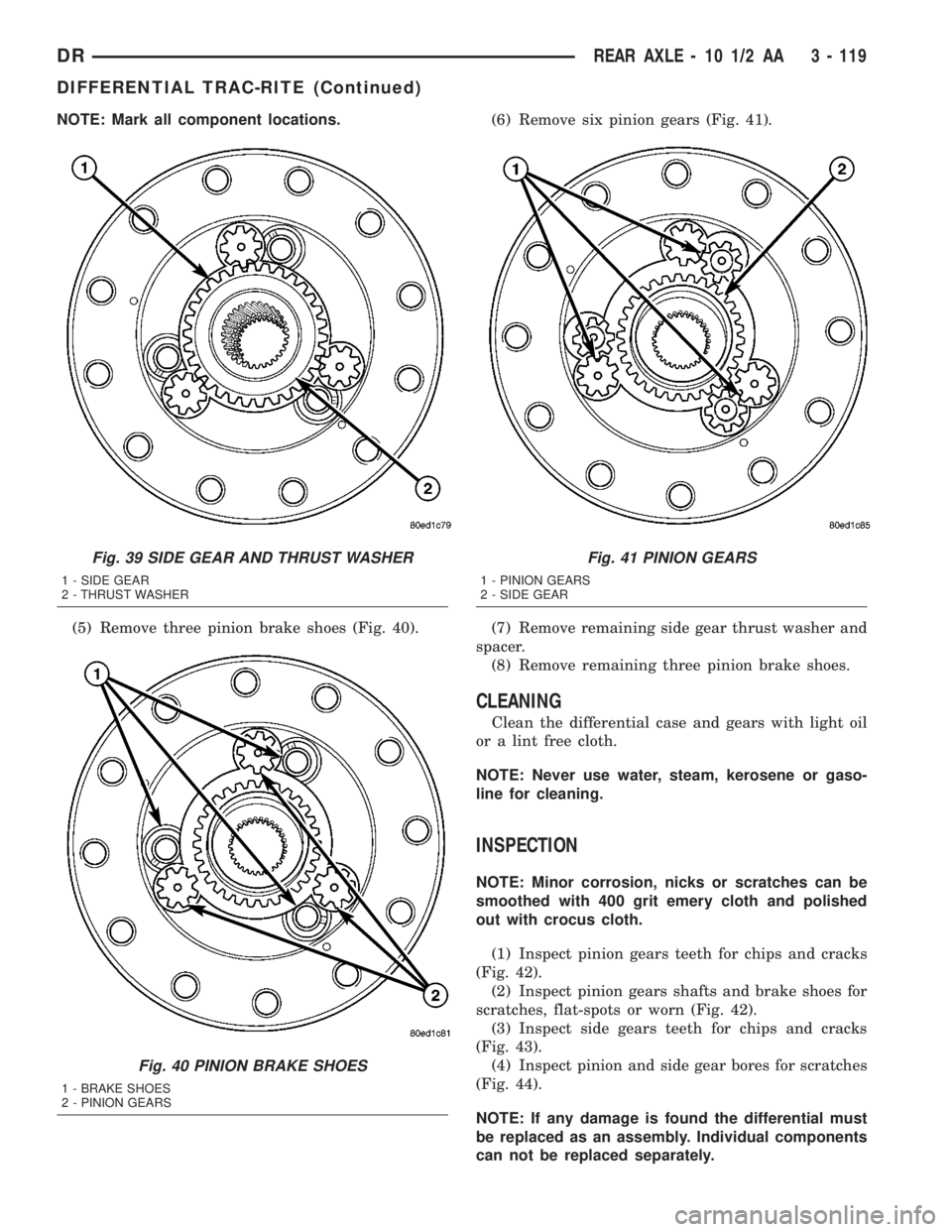
NOTE: Mark all component locations.
(5) Remove three pinion brake shoes (Fig. 40).(6) Remove six pinion gears (Fig. 41).
(7) Remove remaining side gear thrust washer and
spacer.
(8) Remove remaining three pinion brake shoes.
CLEANING
Clean the differential case and gears with light oil
or a lint free cloth.
NOTE: Never use water, steam, kerosene or gaso-
line for cleaning.
INSPECTION
NOTE: Minor corrosion, nicks or scratches can be
smoothed with 400 grit emery cloth and polished
out with crocus cloth.
(1) Inspect pinion gears teeth for chips and cracks
(Fig. 42).
(2) Inspect pinion gears shafts and brake shoes for
scratches, flat-spots or worn (Fig. 42).
(3) Inspect side gears teeth for chips and cracks
(Fig. 43).
(4) Inspect pinion and side gear bores for scratches
(Fig. 44).
NOTE: If any damage is found the differential must
be replaced as an assembly. Individual components
can not be replaced separately.
Fig. 39 SIDE GEAR AND THRUST WASHER
1 - SIDE GEAR
2 - THRUST WASHER
Fig. 40 PINION BRAKE SHOES
1 - BRAKE SHOES
2 - PINION GEARS
Fig. 41 PINION GEARS
1 - PINION GEARS
2 - SIDE GEAR
DRREAR AXLE - 10 1/2 AA 3 - 119
DIFFERENTIAL TRAC-RITE (Continued)
Page 198 of 2895
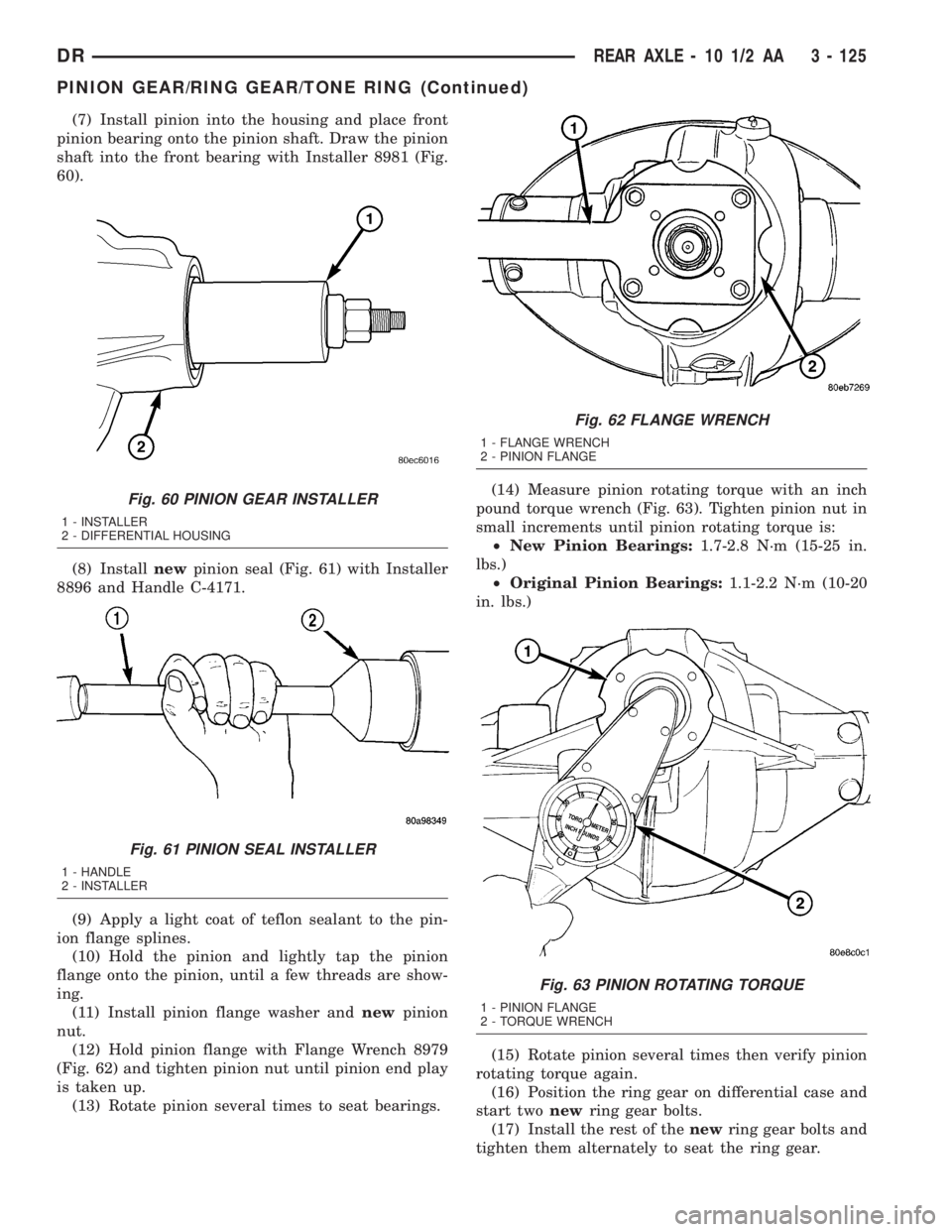
(7) Install pinion into the housing and place front
pinion bearing onto the pinion shaft. Draw the pinion
shaft into the front bearing with Installer 8981 (Fig.
60).
(8) Installnewpinion seal (Fig. 61) with Installer
8896 and Handle C-4171.
(9) Apply a light coat of teflon sealant to the pin-
ion flange splines.
(10) Hold the pinion and lightly tap the pinion
flange onto the pinion, until a few threads are show-
ing.
(11) Install pinion flange washer andnewpinion
nut.
(12) Hold pinion flange with Flange Wrench 8979
(Fig. 62) and tighten pinion nut until pinion end play
is taken up.
(13) Rotate pinion several times to seat bearings.(14) Measure pinion rotating torque with an inch
pound torque wrench (Fig. 63). Tighten pinion nut in
small increments until pinion rotating torque is:
²New Pinion Bearings:1.7-2.8 N´m (15-25 in.
lbs.)
²Original Pinion Bearings:1.1-2.2 N´m (10-20
in. lbs.)
(15) Rotate pinion several times then verify pinion
rotating torque again.
(16) Position the ring gear on differential case and
start twonewring gear bolts.
(17) Install the rest of thenewring gear bolts and
tighten them alternately to seat the ring gear.
Fig. 60 PINION GEAR INSTALLER
1 - INSTALLER
2 - DIFFERENTIAL HOUSING
Fig. 61 PINION SEAL INSTALLER
1 - HANDLE
2 - INSTALLER
Fig. 62 FLANGE WRENCH
1 - FLANGE WRENCH
2 - PINION FLANGE
Fig. 63 PINION ROTATING TORQUE
1 - PINION FLANGE
2 - TORQUE WRENCH
DRREAR AXLE - 10 1/2 AA 3 - 125
PINION GEAR/RING GEAR/TONE RING (Continued)
Page 201 of 2895
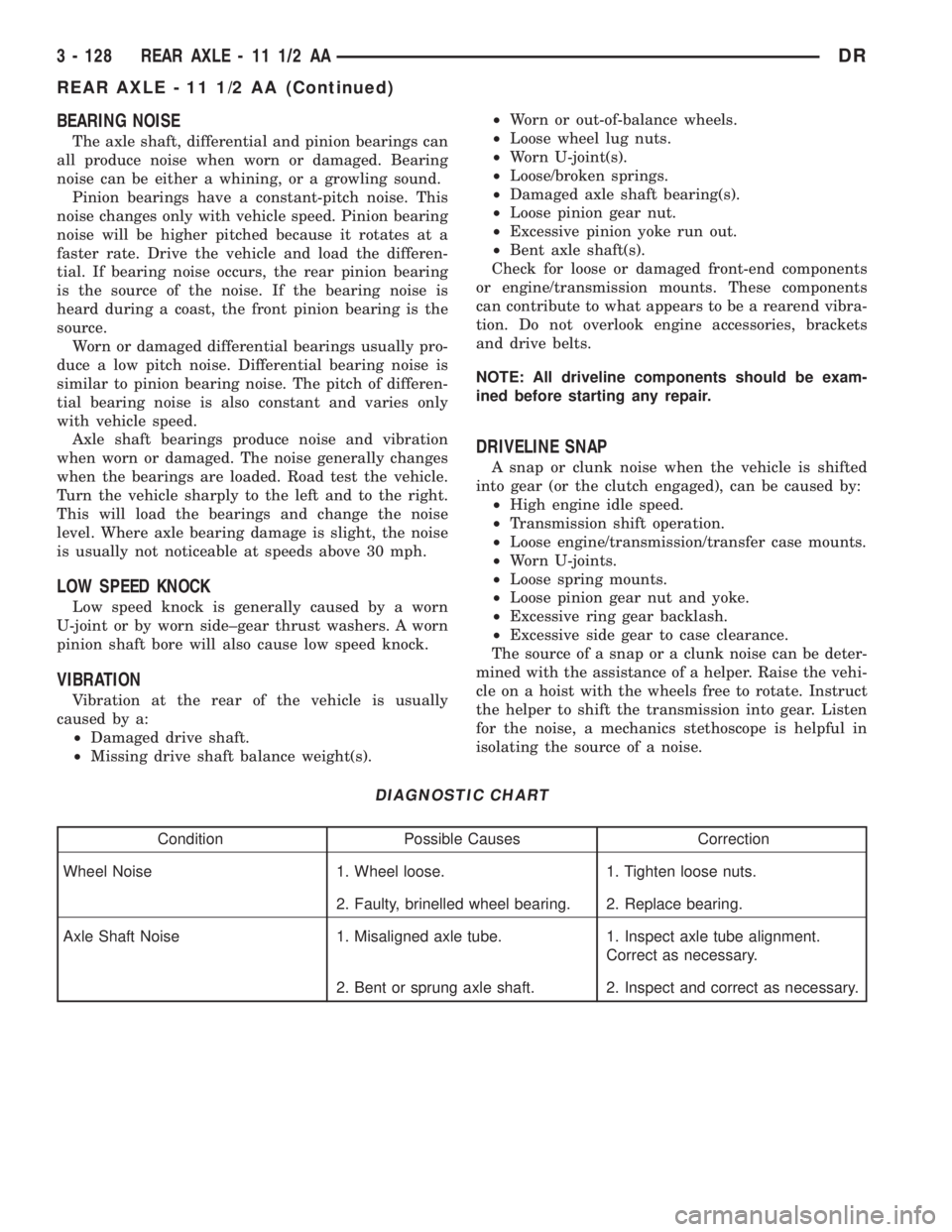
BEARING NOISE
The axle shaft, differential and pinion bearings can
all produce noise when worn or damaged. Bearing
noise can be either a whining, or a growling sound.
Pinion bearings have a constant-pitch noise. This
noise changes only with vehicle speed. Pinion bearing
noise will be higher pitched because it rotates at a
faster rate. Drive the vehicle and load the differen-
tial. If bearing noise occurs, the rear pinion bearing
is the source of the noise. If the bearing noise is
heard during a coast, the front pinion bearing is the
source.
Worn or damaged differential bearings usually pro-
duce a low pitch noise. Differential bearing noise is
similar to pinion bearing noise. The pitch of differen-
tial bearing noise is also constant and varies only
with vehicle speed.
Axle shaft bearings produce noise and vibration
when worn or damaged. The noise generally changes
when the bearings are loaded. Road test the vehicle.
Turn the vehicle sharply to the left and to the right.
This will load the bearings and change the noise
level. Where axle bearing damage is slight, the noise
is usually not noticeable at speeds above 30 mph.
LOW SPEED KNOCK
Low speed knock is generally caused by a worn
U-joint or by worn side±gear thrust washers. A worn
pinion shaft bore will also cause low speed knock.
VIBRATION
Vibration at the rear of the vehicle is usually
caused by a:
²Damaged drive shaft.
²Missing drive shaft balance weight(s).²Worn or out-of-balance wheels.
²Loose wheel lug nuts.
²Worn U-joint(s).
²Loose/broken springs.
²Damaged axle shaft bearing(s).
²Loose pinion gear nut.
²Excessive pinion yoke run out.
²Bent axle shaft(s).
Check for loose or damaged front-end components
or engine/transmission mounts. These components
can contribute to what appears to be a rearend vibra-
tion. Do not overlook engine accessories, brackets
and drive belts.
NOTE: All driveline components should be exam-
ined before starting any repair.
DRIVELINE SNAP
A snap or clunk noise when the vehicle is shifted
into gear (or the clutch engaged), can be caused by:
²High engine idle speed.
²Transmission shift operation.
²Loose engine/transmission/transfer case mounts.
²Worn U-joints.
²Loose spring mounts.
²Loose pinion gear nut and yoke.
²Excessive ring gear backlash.
²Excessive side gear to case clearance.
The source of a snap or a clunk noise can be deter-
mined with the assistance of a helper. Raise the vehi-
cle on a hoist with the wheels free to rotate. Instruct
the helper to shift the transmission into gear. Listen
for the noise, a mechanics stethoscope is helpful in
isolating the source of a noise.
DIAGNOSTIC CHART
Condition Possible Causes Correction
Wheel Noise 1. Wheel loose. 1. Tighten loose nuts.
2. Faulty, brinelled wheel bearing. 2. Replace bearing.
Axle Shaft Noise 1. Misaligned axle tube. 1. Inspect axle tube alignment.
Correct as necessary.
2. Bent or sprung axle shaft. 2. Inspect and correct as necessary.
3 - 128 REAR AXLE - 11 1/2 AADR
REAR AXLE - 11 1/2 AA (Continued)
Page 206 of 2895
(12) Tighten bearing cap bolts to 115 N´m (85 ft.
lbs.).
(13) Tighten adjuster lock bolts to 33 N´m (24 ft.
lbs.).
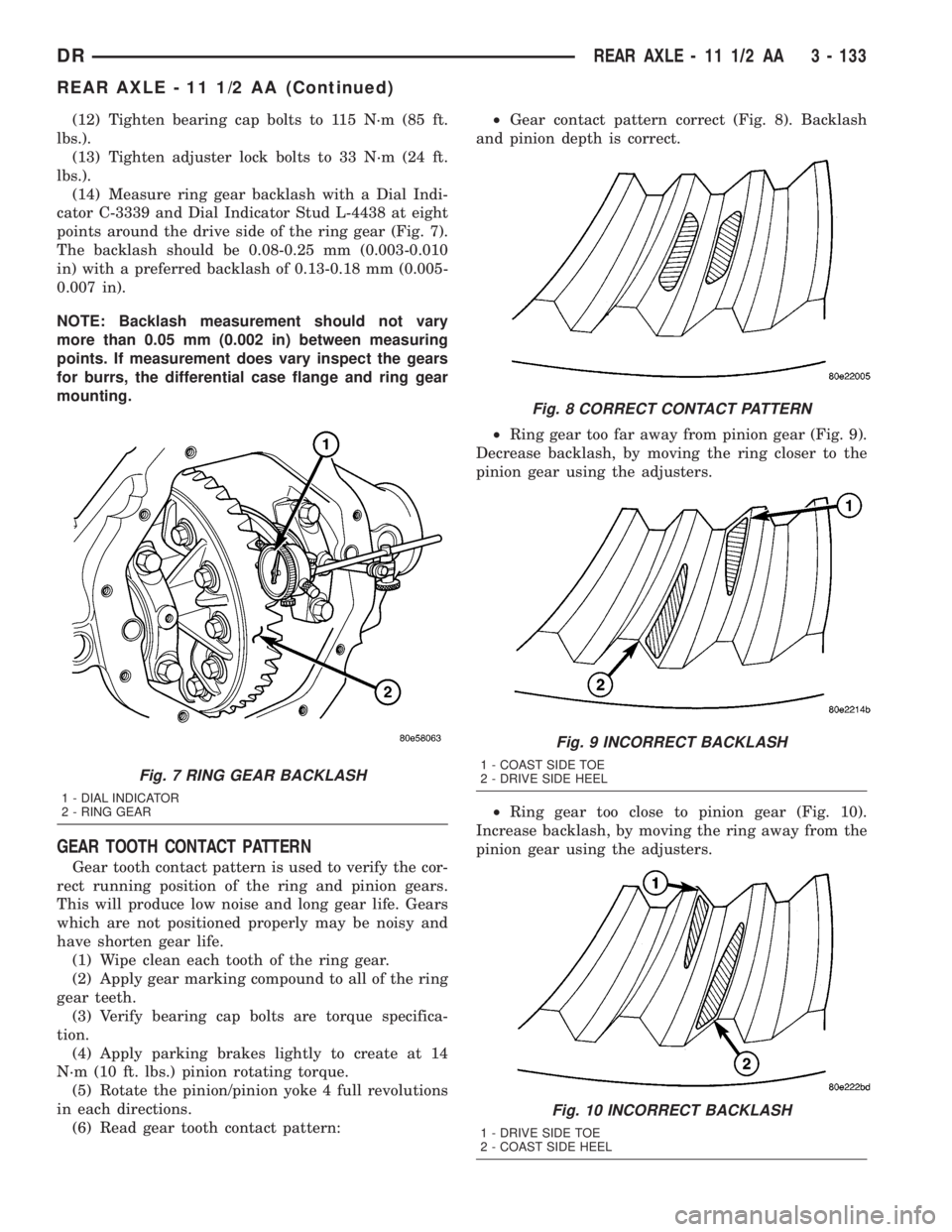
(14) Measure ring gear backlash with a Dial Indi-
cator C-3339 and Dial Indicator Stud L-4438 at eight
points around the drive side of the ring gear (Fig. 7).
The backlash should be 0.08-0.25 mm (0.003-0.010
in) with a preferred backlash of 0.13-0.18 mm (0.005-
0.007 in).
NOTE: Backlash measurement should not vary
more than 0.05 mm (0.002 in) between measuring
points. If measurement does vary inspect the gears
for burrs, the differential case flange and ring gear
mounting.
GEAR TOOTH CONTACT PATTERN
Gear tooth contact pattern is used to verify the cor-
rect running position of the ring and pinion gears.
This will produce low noise and long gear life. Gears
which are not positioned properly may be noisy and
have shorten gear life.
(1) Wipe clean each tooth of the ring gear.
(2) Apply gear marking compound to all of the ring
gear teeth.
(3) Verify bearing cap bolts are torque specifica-
tion.
(4) Apply parking brakes lightly to create at 14
N´m (10 ft. lbs.) pinion rotating torque.
(5) Rotate the pinion/pinion yoke 4 full revolutions
in each directions.
(6) Read gear tooth contact pattern:²Gear contact pattern correct (Fig. 8). Backlash
and pinion depth is correct.
²Ring gear too far away from pinion gear (Fig. 9).
Decrease backlash, by moving the ring closer to the
pinion gear using the adjusters.
²Ring gear too close to pinion gear (Fig. 10).
Increase backlash, by moving the ring away from the
pinion gear using the adjusters.
Fig. 7 RING GEAR BACKLASH
1 - DIAL INDICATOR
2 - RING GEAR
Fig. 8 CORRECT CONTACT PATTERN
Fig. 9 INCORRECT BACKLASH
1 - COAST SIDE TOE
2 - DRIVE SIDE HEEL
Fig. 10 INCORRECT BACKLASH
1 - DRIVE SIDE TOE
2 - COAST SIDE HEEL
DRREAR AXLE - 11 1/2 AA 3 - 133
REAR AXLE - 11 1/2 AA (Continued)