phone DODGE RAM 2500 DIESEL 2004 3.G User Guide
[x] Cancel search | Manufacturer: DODGE, Model Year: 2004, Model line: RAM 2500 DIESEL, Model: DODGE RAM 2500 DIESEL 2004 3.GPages: 426, PDF Size: 7.22 MB
Page 87 of 426

Three-Way Calling
To initiate three-way calling, press the 'Voice Recogni-
tion' button while a call is in progress and make a second
phone call. When the second call is established, press the
'Phone' button until you hear a double beep indicating
that the two calls have been joined into one conference
call.
Call Termination
To end a call in progress, press the 'Phone' button. All
calls in progress will be terminated.
Phone Redial
²
Press the 'Phone' button to begin.
²After the9Ready9prompt, say9Redial9.
²The UConnectŸ system will call the last number that
was dialed on your cellular phone. This may not be the
last number dialed by your UConnectŸ system.
Advanced Phone Connectivity
Transferring an Active Call between the
UConnectŸ System and Your Cellular Phone
The UConnectŸ system allows ongoing calls to be trans-
ferred to your cellular phone or to the UConnectŸ
system without terminating the call. To transfer an ongo-
ing call from your cellular phone to the UConnectŸ
system or vice versa, press the 'Voice Recognition' button
and say9Transfer Call9.
Delete Paired Cellular Phones
²
Press the 'Phone' button to begin.
²After the9Ready9prompt, say9Setup9.
²When prompted, say ª Phone Pairingº.
²At the next prompt, say9Delete9.
UNDERSTANDING THE FEATURES OF YOUR VEHICLE 87
3
Page 88 of 426

²You will be asked to say the name of the phone that
you wish to delete. You can either say the name of the
phone that you wish to delete or you can say9All9to
delete all the phones.
Connect or Disconnect the Connection between the
UConnectŸ System and Your Cellular Phone
Your cellular phone can be paired with many different
electronic devices, but can only be actively9connected9
with one electronic device at a time.
If you would like to connect or disconnect the Blue-
toothŸ connection between a paired cellular phone and
the UConnectŸ system, follow the instruction described
in your cellular phone user's manual.
List Paired Cellular Phone Names
²
Press the 'Phone' button to begin.
²After the9Ready9prompt, say9Setup List Phones9and
the UConnectŸ system will play the phone names of
all paired cellular phones in order from highest prior-
ity to lowest priority.
Select a Lower Priority Paired Cellular Phone
²
Press the 'Phone' button to begin.
²After the9Ready9prompt, say9Setup9.
²When prompted, say ªSelect Phoneº.
²When prompted, say the phone name of the cellular
phone you wish to use, or say9List Phones9to hear a
list of all the phones that have been paired to your
UConnectŸ system. To select a phone from the list,
press the 'Voice Recognition' button and say9Select9.
88 UNDERSTANDING THE FEATURES OF YOUR VEHICLE
Page 89 of 426

²The lower priority phone will only be used for the next
phone call. After that, the UConnectŸ system will
return to using the highest priority phone in the
vehicle.
UConnectŸ System Features
Barge In - Touch Tone Phone Inputs
You can use your UConnectŸ system to access a voice
mail system, an automated service, or any other phone
number that you can dial with any phone. When calling
a number with your UConnectŸ system that normally
requires you to enter in a touch-tone sequence on your
cellular phone keypad, you can push the 'Voice Recogni-
tion' button and say the sequence you wish to enter
followed by9Send9. For example, if required to enter your
pin number, you can press the 'Voice Recognition' button
and say93746Send9, or whatever you have made your
pin. This method can also be used in instances where youare pressing a number on your keypad to navigate
through a menu structure or to enter a number for a
pager.
Barge In - Overriding Prompts
The 'Voice Recognition' button can be used when you
wish to skip part of a prompt and issue your voice
recognition command immediately. For example, if a
prompt is playing9Would you like to pair a phone, clear
a{9, you could press the 'Voice Recognition' button and
say9Pair A Phone9to select that option without having to
listen to the rest of the voice prompt.
Language Selection
To change the language that the UConnectŸ system is
using, press the 'Phone' button and say the name of the
language you wish to switch to (English, EspaÞol, or
FranÕais as equipped). After selecting one of the lan-
guages, all prompts and voice commands will be in the
selected language.
UNDERSTANDING THE FEATURES OF YOUR VEHICLE 89
3
Page 90 of 426

Turning Confirmation Prompts On/Off
Turning confirmation prompts off will stop the system
from confirming your choices (e.g. the UConnectŸ sys-
tem will not repeat a phone number before you dial it).
²Press the 'Phone' button to begin.
²After the9Ready9prompt, say9Setup Confirmation9.
The UConnectŸ system will play the current confir-
mation prompt status and you will be given the choice
to change it.
Low Signal, Battery Strength, and Roam
Notification
The UConnectŸ system will provide notification to
inform you if your cellular phone is in roaming status,
has low signal strength, or has a low battery when you
are trying to place a phone call.
Dialing Using the Cellular Phone Keypad
You can dial a phone number with your cellular phone
keypad and still use the UConnectŸ system. By dialing a
number with your paired BluetoothŸ cellular phone, the
audio will be played through your vehicle's stereo sys-
tem. The UConnectŸ system will work the same as if
you dialed the number using voice recognition.
Mute/Unmute
When you mute the UConnectŸ system, you will still be
able to hear the conversation coming from the other
party, but the other party will not be able to hear you. In
order to mute the UConnectŸ system press the 'Voice
Recognition' button and say9Mute9. In order to unmute
the UConnectŸ system; press the 'Voice Recognition'
button and say9Unmute9.
90 UNDERSTANDING THE FEATURES OF YOUR VEHICLE
Page 91 of 426
Help
If you need assistance at any prompt or if you want to
know what your options are at any prompt, say9Help9.
The UConnectŸ system will play all the options at any
prompt if you ask for help.
Cancel
At any prompt, you can say9Cancel9and you will be
returned to the previous menu.
Emergency Assistance
If you are in an emergency, say9Dial Emergency9or9Call
Emergency9and the UConnectŸ system will instruct
your cellular phone to call 911.
Towing Assistance
If you need towing assistance, say9Dial Towing Assis-
tance9or9Call Towing Assistance9. Please refer to the
24-Hour Towing Assistance coverage details in the
DaimlerChrysler Motors Company 24-Hour Towing As-
sistance Program Guide.
SEATS
The seating options available in this truck are the result of
extensive customer research and evaluations.
WARNING!
It is extremely dangerous to ride in a cargo area,
inside or outside of a vehicle. In a collision, people
riding in these areas are more likely to be seriously
injured or killed.
Do not allow people to ride in any area of your
vehicle that is not equipped with seats and seat belts.
Be sure everyone in your vehicle is in a seat and
using a seat belt properly.
UNDERSTANDING THE FEATURES OF YOUR VEHICLE 91
3
Page 126 of 426

ELECTRICAL POWER OUTLETS
The auxiliary electrical outlet can provide power for in
cab accessories designed for use with the standard ªcigar
lighterº plug. The outlet is located in the instrument
panel below the ash receiver. A cap is attached to the
outlet base indicating ªPower Outletº 12V-20A.
There is an additional Power Outlet in the center console
of a 40/20/40 seat (if equipped).
The outlet(s) has/have a fused direct feed from the
battery so it/they receive power whether the ignition is
ON or OFF.
All accessories connected to this/these outlet(s) should
be removed or turned OFF when the vehicle is not in use
to protect the battery against discharge.CAUTION!
Electrical Outlet Use With Engine Off
²Many accessories that can be plugged in draw
power from the vehicle's battery, even when not
in use (i.e. cellular phones, etc.). Eventually, if
plugged in long enough, the vehicle's battery will
discharge sufficiently to degrade battery life
and/or prevent engine starting.
²Accessories that draw higher power (i.e. coolers,
vacuum cleaners, lights, etc.), will discharge the
battery even more quickly. Only use these inter-
mittently and with greater caution.
²After the use of high power draw accessories, or
long periods of the vehicle not being started (with
accessories still plugged in), the vehicle must be
driven a sufficient length of time to allow the
generator to recharge the vehicle's battery.
126 UNDERSTANDING THE FEATURES OF YOUR VEHICLE
Page 129 of 426
STORAGE
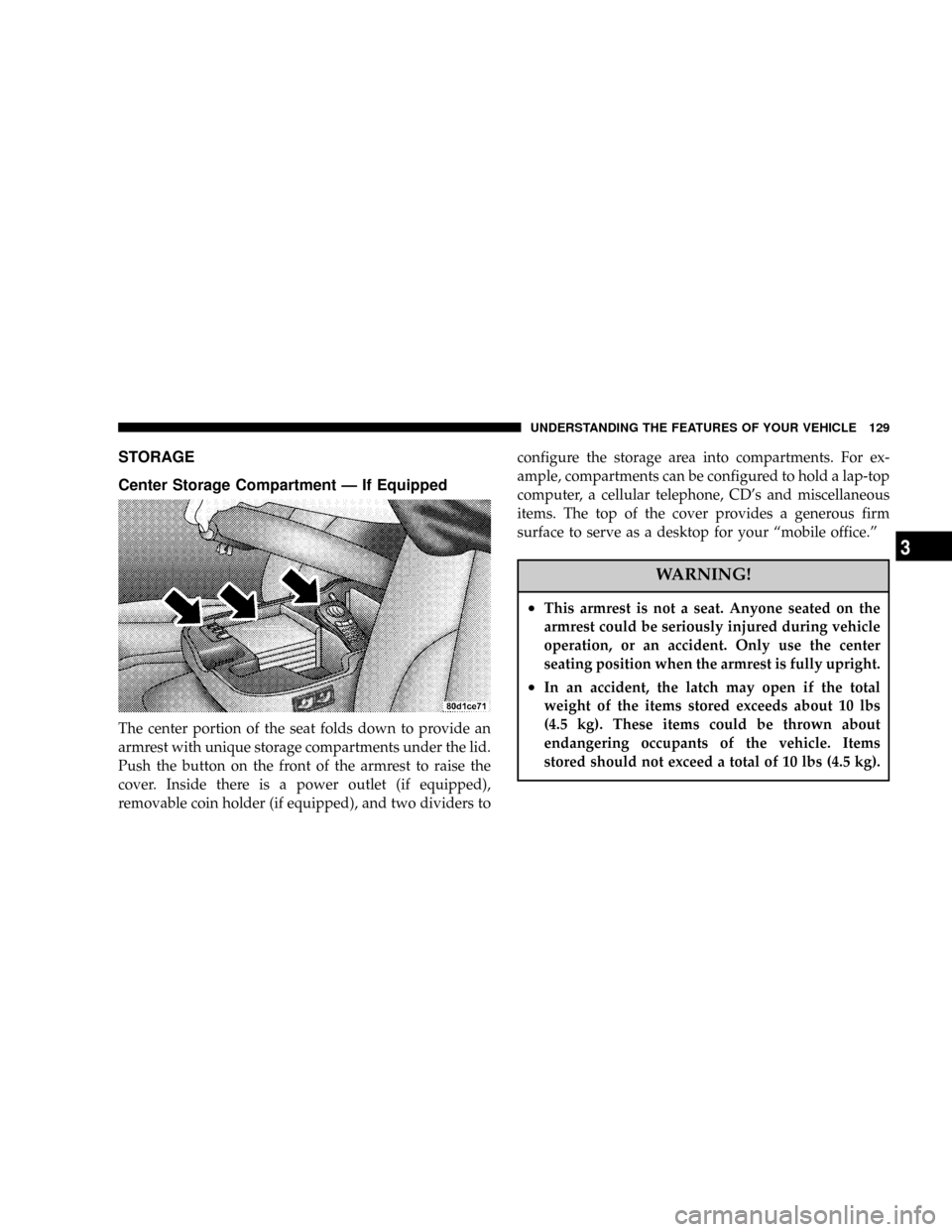
Center Storage Compartment Ð If Equipped
The center portion of the seat folds down to provide an
armrest with unique storage compartments under the lid.
Push the button on the front of the armrest to raise the
cover. Inside there is a power outlet (if equipped),
removable coin holder (if equipped), and two dividers toconfigure the storage area into compartments. For ex-
ample, compartments can be configured to hold a lap-top
computer, a cellular telephone, CD's and miscellaneous
items. The top of the cover provides a generous firm
surface to serve as a desktop for your ªmobile office.º
WARNING!
²This armrest is not a seat. Anyone seated on the
armrest could be seriously injured during vehicle
operation, or an accident. Only use the center
seating position when the armrest is fully upright.
²In an accident, the latch may open if the total
weight of the items stored exceeds about 10 lbs
(4.5 kg). These items could be thrown about
endangering occupants of the vehicle. Items
stored should not exceed a total of 10 lbs (4.5 kg).
UNDERSTANDING THE FEATURES OF YOUR VEHICLE 129
3
Page 140 of 426

mRemote Sound System Controls Ð If Equipped . . 181
NRadio Operation......................182
NTape Player.........................182
NCD Player..........................182
mCassette Tape And Player Maintenance.......183
mCompact Disc Maintenance................184
mRadio Operation And Cellular Phones........184
mClimate Controls.......................185NHeater Only Ð Fleet Vehicles.............185
NAir ConditioningÐIf Equipped...........187
NElectric Rear Window Defroster And Heated
Sideview Mirrors Ð If Equipped..........191
NAir Conditioning With Dual Zone Temperature
Control Ð If Equipped.................191
NOperating Tips.......................196
NOperating Tips Chart...................198
140 UNDERSTANDING YOUR INSTRUMENT PANEL
Page 184 of 426

COMPACT DISC MAINTENANCE
To keep the compact discs in good condition, take the
following precautions:
1. Handle the disc by its edge; avoid touching the
surface.
2. If the disc is stained, clean the surface with a soft cloth,
wiping from center to edge.
3. Do not apply paper or tape to the disc; avoid scratch-
ing the disc.
4. Do not use solvents such as benzene, thinner, cleaners,
or antistatic sprays.
5. Store the disc in its case after playing.
6. Do not expose the disc to direct sunlight.
7. Do not store the disc where temperatures may become
too high.NOTE:If you experience difficulty in playing a particu-
lar disc, it may be damaged, oversized, or have theft
protection encoding. Try a known good disc before
considering disc player service.
RADIO OPERATION AND CELLULAR PHONES
Under certain conditions, the operation of a cellular
phone in your vehicle can cause erratic or noisy perfor-
mance from your radio. This condition may be lessened
or eliminated by relocating the cellular phone antenna.
This condition is not harmful to the radio. If your radio
performance does not satisfactorily ªclearº by the repo-
sitioning of the antenna, it is recommended that the radio
volume be turned down or off during cellular phone
operation.
184 UNDERSTANDING YOUR INSTRUMENT PANEL
Page 403 of 426

The manufacturer has empowered its dealers to make
warranty and repair decisions that ensure you are not
inconvenienced. There is no need for you to wait for a
decision from the manufacturer. If a special circumstance
occurs that requires information from the manufacturer,
we have asked the dealer's service management to make
the contact on your behalf.
This is why you should always talk to your dealer's
service manager first. Most matters can be resolved with
this process.
²If for some reason you are still not satisfied, talk to the
general manager or owner of the dealership. They
want to know if you need assistance.
²If your dealership is unable to resolve the concern, you
may contact the Manufacturer's Customer Center.Any communication to the Manufacturer's Customer
Center should include the following information:
²Owner's name and address
²Owner's telephone number (home and office)
²Dealership name
²Vehicle identification number
²Vehicle delivery date and mileage
DaimlerChrysler Motors Corporation Customer Center
P.O. Box 21±8004
Auburn Hills, MI 48321±8004
Phone: (800) 992-1997
DaimlerChrysler Canada Inc. Customer Center
P.O. Box 1621
Windsor, Ontario N9A 4H6
Phone Ð(800) 465±2001
IF YOU NEED CONSUMER ASSISTANCE 403
9