language DODGE RAM 2500 DIESEL 2008 3.G Owners Manual
[x] Cancel search | Manufacturer: DODGE, Model Year: 2008, Model line: RAM 2500 DIESEL, Model: DODGE RAM 2500 DIESEL 2008 3.GPages: 527, PDF Size: 8.88 MB
Page 91 of 527
HANDS-FREE COMMUNICATION (UConnectT)Ð
IF EQUIPPED
NOTE: The sales code RER radio contains an inte-
grated Hands-Free Communication (UConnectt) sys-
tem. Refer to your ªNavigation User's Manualº for
UConnecttsystem operating instructions for this radio.
UConnecttis a voice-activated, hands-free, in-vehicle
communications system. UConnecttallows you to dial a
phone number with your cellular phone using simple
voice commands (e.g.,9Callº{ªMikeº{ºWork9or9Dialº
{ª248-555-12129). Your cellular phone's audio is trans-
mitted through your vehicle's audio system; the system
will automatically mute your radio when using the
UConnecttsystem.
NOTE:The UConnecttsystem requires a cellular phone
equipped with the Bluetootht9Hands-Free Profile,9Ve r -
sion 0.96 or higher. See the UConnecttwebsite for
supported phones.NOTE:For UConnecttcustomer support, visit the
following websites:²www.chrysler.com/uconnect
²www.dodge.com/uconnect
²www.jeep.com/uconnect
²or call 1±877±855±8400
UConnecttallows you to transfer calls between the
system and your cellular phone as you enter or exit your
vehicle and enables you to mute the system's microphone
for private conversation.
The UConnecttphonebook enables you to store up to 32
names, with four numbers per name. Each language has
a separate 32-name phonebook accessible only in that
language. This system is driven through your Bluetootht
ªHands-Free profileº cellular phone. UConnecttfeatures
Bluetoothttechnology - the global standard that enables
UNDERSTANDING THE FEATURES OF YOUR VEHICLE 89
3
Page 92 of 527
different electronic devices to connect to each other
without wires or a docking station, so UConnecttworks
no matter where you stow your cellular phone (be it your
purse, pocket, or briefcase), as long as your phone is
turned on and has been paired to the vehicle's
UConnecttsystem. The UConnecttsystem allows up to
seven cellular phones to be linked to the system. Only
one linked (or paired) cellular phone can be used with the
system at a time. The system is available in English,
Spanish, or French languages (as equipped).
PHONE Button
The rearview mirror contains the microphone
for the system (depending on the type of
mirror and radio equipped), and either the
radio or the mirror has the two control buttons
(PHONE Button and VOICE RECOGNITION button)
that will enable you to access the system.Voice Recognition Button
Actual button location may vary with radio.
The individual buttons are described in the
ªOperationº section.
The UConnecttsystem can be used with any Hands-Free
Profile certified Bluetoothtcellular phone. See the
UConnecttwebsite for supported phones. If your cellu-
lar phone supports a different profile (e.g., Headset
Profile) you may not be able to use any UConnectt
features. Refer to your cellular service provider or the
phone manufacturer for details.
The UConnecttsystem is fully integrated with the vehi-
cle's audio system. The volume of the UConnecttsystem
can be adjusted either from the radio volume control
knob or from the steering wheel radio control (right
switch), if so equipped.
90 UNDERSTANDING THE FEATURES OF YOUR VEHICLE
Page 97 of 527
The UConnecttsystem will allow you to enter up to 32
names in the phonebook with each name having up to
four associated phone numbers and designations. Each
language has a separate 32-name phonebook accessible
only in that language.
Phonebook Download
UConnecttallows the user to download entries from
their phone via Bluetootht. To use this feature, press the
PHONE button and say ªPhonebook Download.º The
system prompts, ªReady to accept ªVº card entry via
Bluetootht¼º The system is now ready to accept phone-
book entries from your phone using the Bluetootht
Object Exchange Profile (OBEX). Please see your phone
Owner's Manual for specific instructions on how to send
these entries from your phone.
NOTE:
²The phone handset must support BluetoothtOBEX
transfers of phonebook entries to use this feature.
²Some phones cannot send phonebook entries if they
are already connected to any system via Bluetootht,
and you may see a message on the phone display that
the Bluetoothtlink is busy. In this case, the user must
first disconnect or drop the Bluetoothtconnection to
the UConnecttsystem, and then send the address
book entry via Bluetootht. Please see your phone
Owner 's Manual for specific instructions on how to
drop the Bluetoothtconnection.
²If the phonebook entry is longer than 24 characters, it
will only use the first 24 characters.
Edit Entries in the UConnecttPhonebook
NOTE:Editing names in the phonebook is recom-
mended when the vehicle is not in motion.
²Press the PHONE button to begin.
²After the9Ready9prompt and the following beep, say
9Phonebook Edit.9
UNDERSTANDING THE FEATURES OF YOUR VEHICLE 95
3
Page 99 of 527
²After you enter the name, the UConnecttsystem will
ask you which designation you wish to delete: home,
work, mobile, pager, or all. Say the designation you
wish to delete.
²Note that only the phonebook entry in the current
language is deleted.
Delete All Entries in the UConnecttPhonebook
²
Press the PHONE button to begin.
²After the9Ready9prompt and the following beep, say
9Phonebook Erase All.9
²The UConnecttsystem will ask you to verify that you
wish to delete all the entries from the phonebook.
²After confirmation, the phonebook entries will be
deleted.
²Note that only the phonebook in the current language
is deleted.
List All Names in the UConnecttPhonebook
²
Press the PHONE button to begin.
²After the9Ready9prompt and the following beep, say
9Phonebook List Names.9
²The UConnecttsystem will play the names of all the
phonebook entries.
²To call one of the names in the list, press the ªVoice
Recognitionº button during the playing of the desired
name, and say9Call.9
NOTE:The user can also exercise9Edit9or9Delete9
operations at this point.
²The UConnecttsystem will then prompt you as to the
number designation you wish to call.
²The selected number will be dialed.
UNDERSTANDING THE FEATURES OF YOUR VEHICLE 97
3
Page 102 of 527
²After the9Ready9prompt and the following beep, say
9Redial.9
²The UConnecttsystem will call the last number that
was dialed from your cellular phone.
NOTE:This may not be the last number dialed from the
UConnecttsystem.
Call Continuation
Call continuation is the progression of a phone call on the
UConnecttsystem after the vehicle ignition key has been
switched to OFF. Call continuation functionality avail-
able on the vehicle can be any one of three types:
²After the ignition key is switched to OFF, a call can
continue on the UConnecttsystem either until the call
ends, or until the vehicle battery condition dictates
cessation of the call on the UConnecttsystem and
transfer of the call to the mobile phone.
²After the ignition key is switched to OFF, a call can
continue on the UConnecttsystem for a certain dura-
tion, after which the call is automatically transferred
from the UConnecttsystem to the mobile phone.
²An active call is automatically transferred to the
mobile phone after the ignition key is switched to OFF.
UConnectTSystem Features
Language Selection
To change the language that the UConnecttsystem is
using:
²Press the PHONE button to begin.
²After the9Ready9prompt and the following beep, say
the name of the language you wish to switch to
(English, Espanol, or Francais, if so equipped).
²Continue to follow the system prompts to complete
language selection.
100 UNDERSTANDING THE FEATURES OF YOUR VEHICLE
Page 103 of 527
After selecting one of the languages, all prompts and
voice commands will be in that language.
NOTE:After every UConnecttlanguage change opera-
tion, only the language-specific 32-name phonebook is
usable. The paired phone name is not language-specific
and usable across all languages.
Emergency Assistance
If you are in an emergency and the mobile phone is
reachable:
²Pick up the phone and manually dial the emergency
number for your area.
If the phone is not reachable and the UConnecttsystem
is operational, you may reach the emergency number as
follows:
²Press the PHONE button to begin.
²After the9Ready9prompt and the following beep, say
9Emergency9and the UConnecttsystem will instruct
the paired cellular phone to call the emergency num-
ber. This feature is only supported in the U.S.
NOTE:The emergency number dialed is based on the
country where the vehicle is purchased (911 for the U.S.
and Canada and 060 for Mexico). The number dialed may
not be applicable with the available cellular service and
area.
The UConnecttsystem does slightly lower your chances
of successfully making a phone call as to that for the cell
phone directly.
Your phone must be turned on and paired to the
UConnecttsystem to allow use of this vehicle feature in
emergency situations, when the cell phone has network
coverage and stays paired to the UConnecttsystem.
UNDERSTANDING THE FEATURES OF YOUR VEHICLE 101
3
Page 111 of 527
²In a convertible vehicle, system performance may be
compromised with the convertible top down.
Far End Audio Performance
²
Audio quality is maximized under:
²low-to-medium blower setting,
²low-to-medium vehicle speed,
²low road noise,
²smooth road surface,
²fully closed windows,
²dry weather conditions, and
²operation from the drivers seat.
²Performance, such as audio clarity, echo, and loudness
to a large degree rely on the phone and network, and
not the UConnecttsystem.
²Echo at the far end can sometimes be reduced by
lowering the in-vehicle audio volume.
²In a convertible vehicle, system performance may be
compromised with the convertible top down.
BluetoothtCommunication Link
Cellular phones have been found to lose connection to
the UConnecttsystem. When this happens, the connec-
tion can generally be re-established by switching the
phone off/on. Your cell phone is recommended to remain
in BluetoothtON mode.
Power-Up
After switching the ignition key from OFF to either ON
or ACC position, or after a language change, you must
wait at least five seconds prior to using the system.
UNDERSTANDING THE FEATURES OF YOUR VEHICLE 109
3
Page 116 of 527
Voice Commands
Primary Alternate(s)
language
list names
list phones
mobile
mute
mute off
new entry
no
pager
pair a phone
phone pairing pairing
phonebook phone book
previous
record again
redialVoice Commands
Primary Alternate(s)
return to main menu return or main menu
select phone select
send
set up phone settings or phone
set up
towing assistance
transfer call
UConnecttTutorial
try again
voice training
work
yes
114 UNDERSTANDING THE FEATURES OF YOUR VEHICLE
Page 149 of 527
Press and release the Menu button until the
Personal Settings displays on the EVIC.
Use the STEP button to display one of the following:
²ªLANGUAGEº ± When in this display you may select
one of three languages for all display nomenclature,
including the trip functions. Press the RESET button
while in this display to select English, Espanol, or
Francais. Then, as you continue, the information will
display in the selected language.
²ªAUTO DOOR LOCKS > ONº ± When ON is selected,
all doors will lock automatically when the vehicle
reaches a speed of 15 mph (24 km/h). To make your
selection, press and release the RESET button until
ªONº or ªOFFº appears.
²ªAUTO UNLOCK ON EXIT > ONº ± When ON is
selected, all doors will unlock when the vehicle isstopped and the transmission is in the PARK or
NEUTRAL position and the driver's door is opened.
To make your selection, press and release the RESET
button until ªONº or ªOFFº appears.
²ªRKE UNLOCK DRV DR 1stº ± WhenDRV DR 1stis
selected, only the driver's door will unlock on the first
press of the remote keyless entry UNLOCK button.
When Driver Door 1st Press is selected, you must
press the remote keyless entry UNLOCK button twice
to unlock the passenger's doors. To make your selec-
tion, press and release the RESET button until ªDRV
DR 1st º appears.
²ªRKE UNLOCK ALL DR 1STº ± WhenALL DR 1STis
selected, all of the doors will unlock on the first press
of the remote keyless entry unlock button. To make
your selection, press and release the RESET button
until ªAll DR 1stº appears.
UNDERSTANDING THE FEATURES OF YOUR VEHICLE 147
3
Page 216 of 527
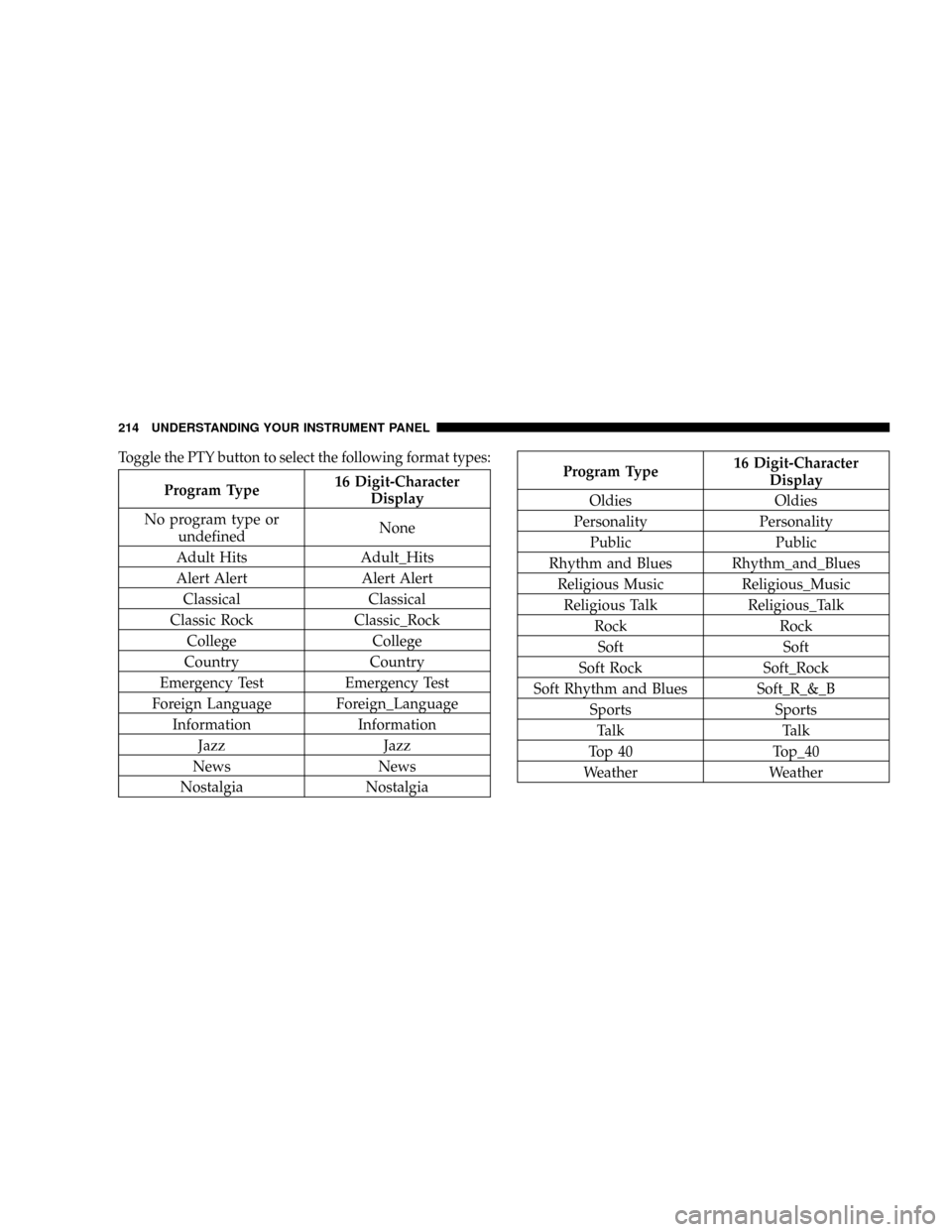
Toggle the PTY button to select the following format types:
Program Type16 Digit-Character
Display
No program type or
undefinedNone
Adult Hits Adult_Hits
Alert Alert Alert Alert
Classical Classical
Classic Rock Classic_Rock
College College
Country Country
Emergency Test Emergency Test
Foreign Language Foreign_Language
Information Information
Jazz Jazz
News News
Nostalgia Nostalgia
Program Type16 Digit-Character
Display
Oldies Oldies
Personality Personality
Public Public
Rhythm and Blues Rhythm_and_Blues
Religious Music Religious_Music
Religious Talk Religious_Talk
Rock Rock
Soft Soft
Soft Rock Soft_Rock
Soft Rhythm and Blues Soft_R_&_B
Sports Sports
Talk Talk
Top 40 Top_40
Weather Weather
214 UNDERSTANDING YOUR INSTRUMENT PANEL