Light load DODGE RAM 2500 GAS 2008 3.G User Guide
[x] Cancel search | Manufacturer: DODGE, Model Year: 2008, Model line: RAM 2500 GAS, Model: DODGE RAM 2500 GAS 2008 3.GPages: 554, PDF Size: 9.93 MB
Page 320 of 554
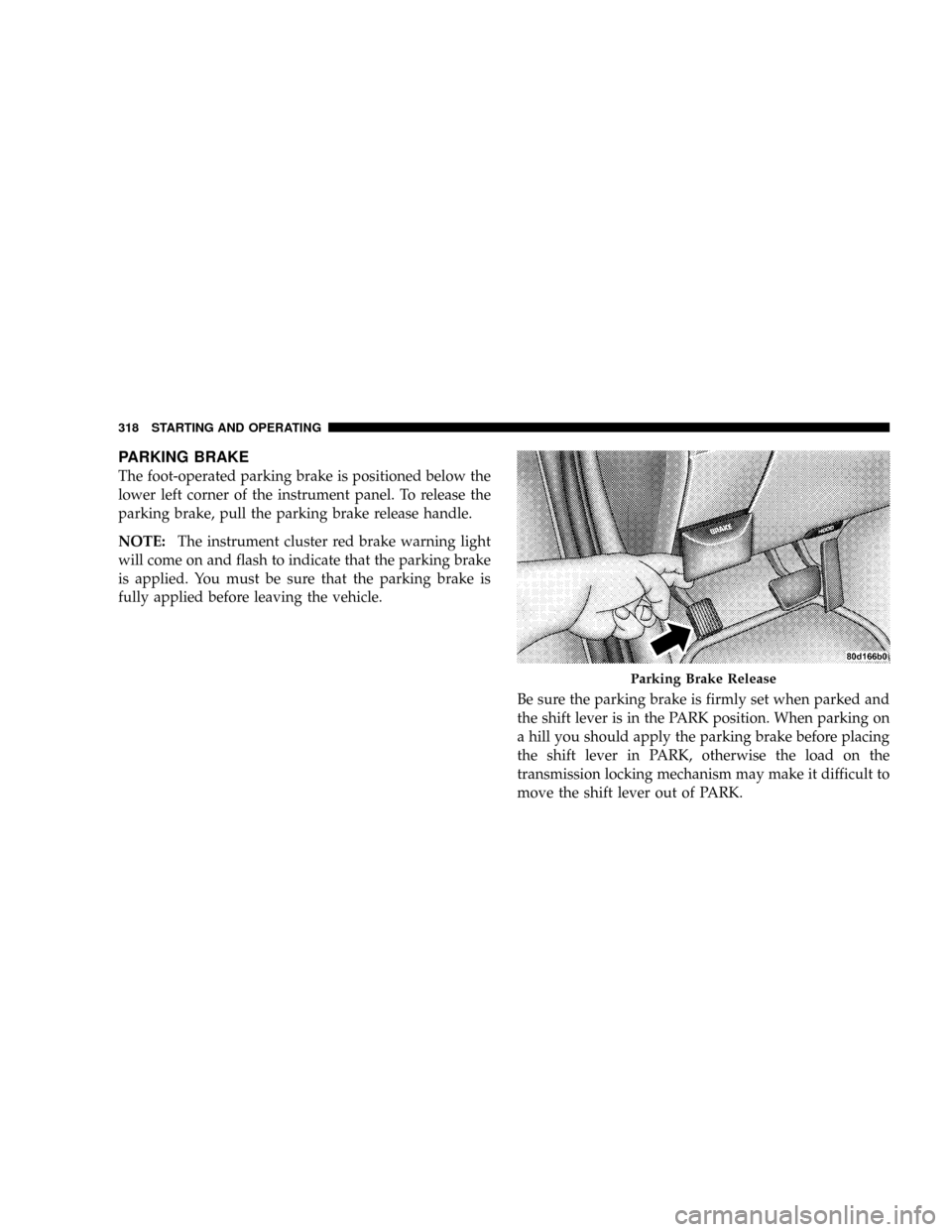
PARKING BRAKE
The foot-operated parking brake is positioned below the
lower left corner of the instrument panel. To release the
parking brake, pull the parking brake release handle.
NOTE:The instrument cluster red brake warning light
will come on and flash to indicate that the parking brake
is applied. You must be sure that the parking brake is
fully applied before leaving the vehicle.
Be sure the parking brake is firmly set when parked and
the shift lever is in the PARK position. When parking on
a hill you should apply the parking brake before placing
the shift lever in PARK, otherwise the load on the
transmission locking mechanism may make it difficult to
move the shift lever out of PARK.
Parking Brake Release
318 STARTING AND OPERATING
Page 331 of 554
²Gear selection matches vehicle uphill direction (i.e.,
vehicle facing uphill is in forward gear; vehicle back-
ing uphill is in REVERSE gear).
WARNING!
There may be situations on minor hills (i.e., less than
7%), with a loaded vehicle, or while pulling a trailer
where the system will not activate and slight rolling
may occur, which could cause a collision with an-
other vehicle or object. Always remember the driver
is responsible for braking the vehicle.
The system will only work if the intended direction of the
vehicle and vehicle gear match. For example, if the
intended direction is forward up a hill and the vehicle is
in drive (automatic equipped vehicle), and the activation
criteria are met, HSA will activate.
HSA on Automatic Vehicles
The system will work in REVERSE and all forward gears
on vehicles equipped with an automatic transmission.
The system will not activate if the vehicle is placed in
neutral.
HSA on Manual Vehicles
The system will work in REVERSE, forward gears, and
NEUTRAL on manual transmission equipped vehicles.
The system does not recognize NEUTRAL on manual
vehicles, thus it will hold the vehicle on an incline for a
short period while in NEUTRAL, regardless of clutch
position. To prevent this, do not attempt to roll down a
hill simply by putting the transmission in NEUTRAL and
letting gravity act on the vehicle, as the HSA will prevent
the vehicle from rolling. Instead, use the appropriate gear
for moving in the desired direction.
STARTING AND OPERATING 329
5
Page 332 of 554
Towing and Hauling with HSA (Vehicles Equipped
with Automatic Transmissions Only)
The HSA system does not know if your vehicle is loaded
or towing a trailer, unless the TOW/HAUL button,
located on the transmission gear shift lever, is selected.
When activated, the TOW/HAUL light will illuminate in
the instrument cluster. For more information on TOW/
HAUL mode, refer to ªWhen To USE TOW/HAUL and
O/D OFF Modesº under9Automatic Transmissionº in
Section 5. In order to accommodate the extra weight
entailed under towing and hauling conditions and to
increase driver comfort while launching on a hill, the
system recognizes when the TOW/HAUL button is acti-
vated and compensates by releasing brake pressure at a
slower rate while throttle is applied in order to prevent
the vehicle from rolling down the hill.
WARNING!
If you use a trailer brake controller with your trailer,
your trailer brakes may be activated and deactivated
with the brake switch. If so, when the brake pedal is
released, there may not be enough brake pressure to
hold the vehicle and trailer on a hill and this could
cause a collision with another vehicle or object be-
hind you. In order to avoid rolling down the incline
while resuming acceleration, manually activate the
trailer brake or apply more vehicle brake pressure
prior to releasing the brake pedal. Always remember
the driver is responsible for braking the vehicle.
330 STARTING AND OPERATING
Page 340 of 554
information on towing a trailer with your vehicle. When
TSC is functioning, the ªESP/TCS Indicator Lightº will
flash, the engine power may be reduced and you may
feel the brakes being applied to individual wheels to
attempt to stop the trailer from swaying. TSC is disabled
when the ESP system is in the Partial Off or Full Off
modes.
TSC is only active in the default ªESP Onº mode. TSC can
be disabled by pressing the ESP Off button and entering
ªESP Partial Offº mode. It is not active in the ªESP Partial
Offº or ªESP Offº modes. Please refer to the ESP portion
of this section for an explanation of the different ESP
operating modes.WARNING!
If TSC activates while driving, slow the vehicle
down, stop at the nearest safe location, and adjust the
trailer load to eliminate trailer sway.
MULTI-DISPLACEMENT SYSTEM (MDS) Ð 5.7L
ENGINE ONLY
This feature offers improved fuel economy by shutting
off four of the engine's eight cylinders during light load
and cruise conditions. The system is automatic with no
driver inputs or additional driving skills required.
NOTE:The MDS system may take some time to return
to full functionality after a battery disconnect.
338 STARTING AND OPERATING
Page 343 of 554
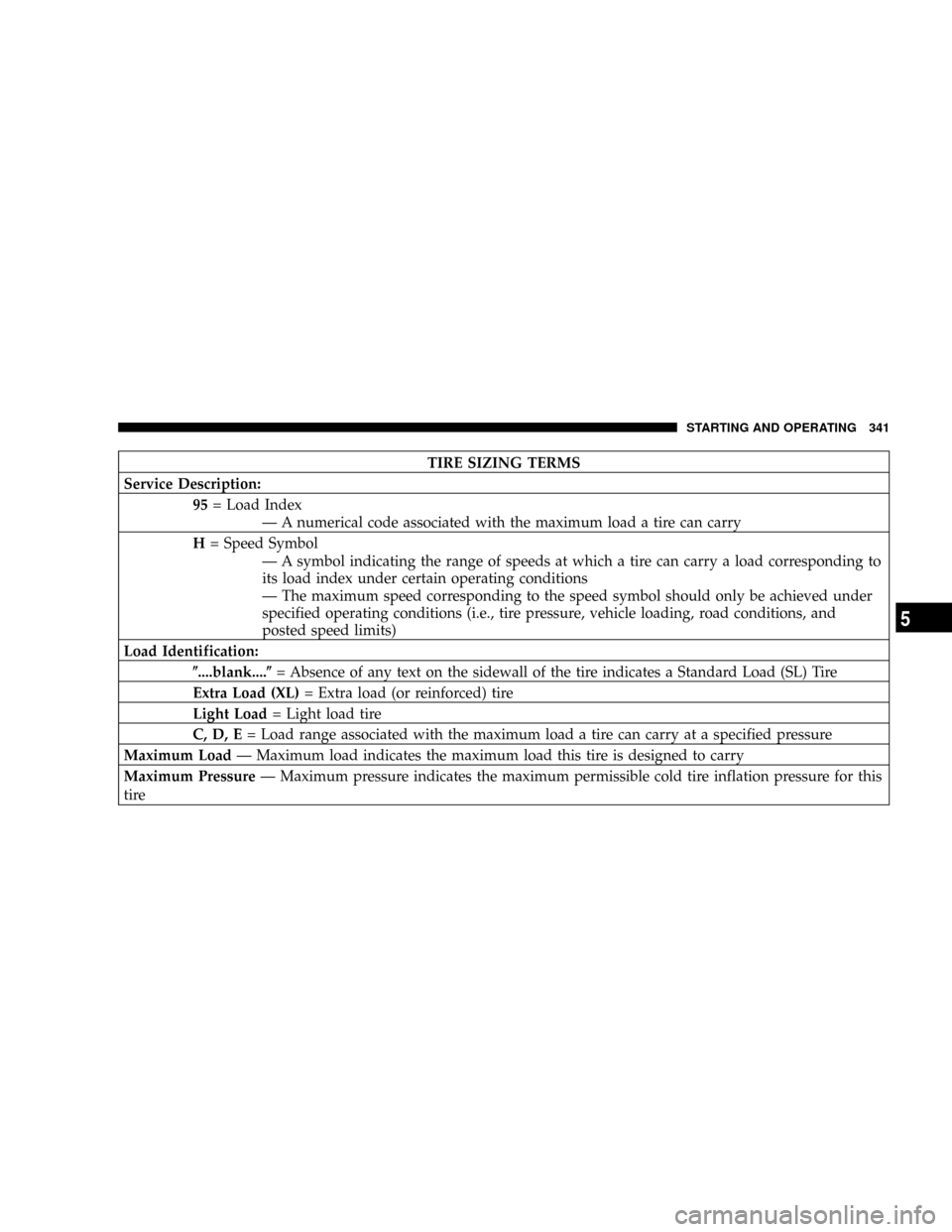
TIRE SIZING TERMS
Service Description:
95= Load Index
Ð A numerical code associated with the maximum load a tire can carry
H= Speed Symbol
Ð A symbol indicating the range of speeds at which a tire can carry a load corresponding to
its load index under certain operating conditions
Ð The maximum speed corresponding to the speed symbol should only be achieved under
specified operating conditions (i.e., tire pressure, vehicle loading, road conditions, and
posted speed limits)
Load Identification:
(....blank....(= Absence of any text on the sidewall of the tire indicates a Standard Load (SL) Tire
Extra Load (XL)= Extra load (or reinforced) tire
Light Load= Light load tire
C, D, E= Load range associated with the maximum load a tire can carry at a specified pressure
Maximum LoadÐ Maximum load indicates the maximum load this tire is designed to carry
Maximum PressureÐ Maximum pressure indicates the maximum permissible cold tire inflation pressure for this
tire
STARTING AND OPERATING 341
5
Page 359 of 554
![DODGE RAM 2500 GAS 2008 3.G User Guide SUPPLEMENTAL TIRE PRESSURE INFORMATION
Ð IF EQUIPPED
A light load vehicle condition is defined as two passen-
gers [150 lbs (68 kg) each] plus 200 lbs (91 kg) of cargo.
Cold tire inflation pressures](/img/12/5494/w960_5494-358.png "DODGE RAM 2500 GAS 2008 3.G User Guide SUPPLEMENTAL TIRE PRESSURE INFORMATION
Ð IF EQUIPPED
A light load vehicle condition is defined as two passen-
gers [150 lbs (68 kg) each] plus 200 lbs (91 kg) of cargo.
Cold tire inflation pressures")
SUPPLEMENTAL TIRE PRESSURE INFORMATION
Ð IF EQUIPPED
A light load vehicle condition is defined as two passen-
gers [150 lbs (68 kg) each] plus 200 lbs (91 kg) of cargo.
Cold tire inflation pressures for a lightly loaded vehicle
will be found on the face of the driver's door.
TIRE CHAINS
Use ªClass Sº chains on 1500 model Trucks, or other
traction aids that meet SAE Type ªSº specifications.
Use ªClass Uº chains on 2500/3500 model Trucks, or
other traction aids that meet SAE Type ªUº specifica-
tions.
NOTE:Chains must be the proper size for the vehicle,
as recommended by the chain manufacturer.
CAUTION!
To avoid damage to your vehicle, tires or chains, observe the
following precautions:
²Because of limited chain clearance between tires and other
suspension components, it is important that only chains in
good condition are used. Broken chains can cause serious
vehicle damage. Stop the vehicle immediately if noise occurs
that could suggest chain breakage. Remove the damaged parts
of the chain before further use.
²Install chains as tightly as possible and then retighten after
driving about 0.5 mile (0.8 km).
²Do not exceed 45 mph (72 km/h).
²Drive cautiously and avoid severe turns and large bumps,
especially with a loaded vehicle.
²Do not install tire chains on front wheels of 4x2 vehicles.
²Do not drive for a prolonged period on dry pavement.
²Observe the tire chain manufacturer's instructions on method
of installation, operating speed, and conditions for usage.
Always use the lower suggested operating speed of the chain
manufacturer if different than the speed recommended by the
manufacturer.
STARTING AND OPERATING 357
5
Page 364 of 554
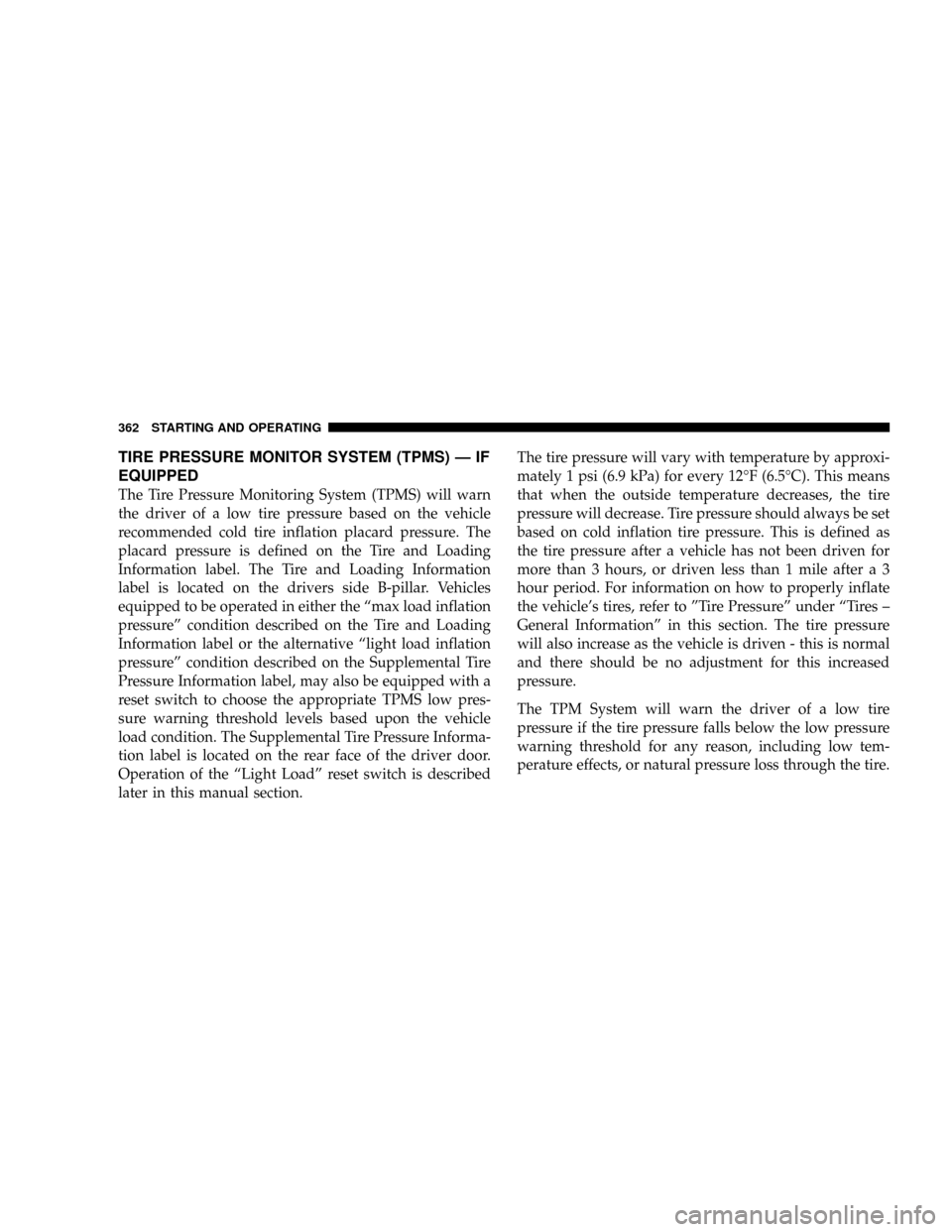
TIRE PRESSURE MONITOR SYSTEM (TPMS) Ð IF
EQUIPPED
The Tire Pressure Monitoring System (TPMS) will warn
the driver of a low tire pressure based on the vehicle
recommended cold tire inflation placard pressure. The
placard pressure is defined on the Tire and Loading
Information label. The Tire and Loading Information
label is located on the drivers side B-pillar. Vehicles
equipped to be operated in either the ªmax load inflation
pressureº condition described on the Tire and Loading
Information label or the alternative ªlight load inflation
pressureº condition described on the Supplemental Tire
Pressure Information label, may also be equipped with a
reset switch to choose the appropriate TPMS low pres-
sure warning threshold levels based upon the vehicle
load condition. The Supplemental Tire Pressure Informa-
tion label is located on the rear face of the driver door.
Operation of the ªLight Loadº reset switch is described
later in this manual section.The tire pressure will vary with temperature by approxi-
mately 1 psi (6.9 kPa) for every 12ÉF (6.5ÉC). This means
that when the outside temperature decreases, the tire
pressure will decrease. Tire pressure should always be set
based on cold inflation tire pressure. This is defined as
the tire pressure after a vehicle has not been driven for
more than 3 hours, or driven less than 1 mile after a 3
hour period. For information on how to properly inflate
the vehicle's tires, refer to ºTire Pressureº under ªTires ±
General Informationº in this section. The tire pressure
will also increase as the vehicle is driven - this is normal
and there should be no adjustment for this increased
pressure.
The TPM System will warn the driver of a low tire
pressure if the tire pressure falls below the low pressure
warning threshold for any reason, including low tem-
perature effects, or natural pressure loss through the tire.
362 STARTING AND OPERATING
Page 367 of 554
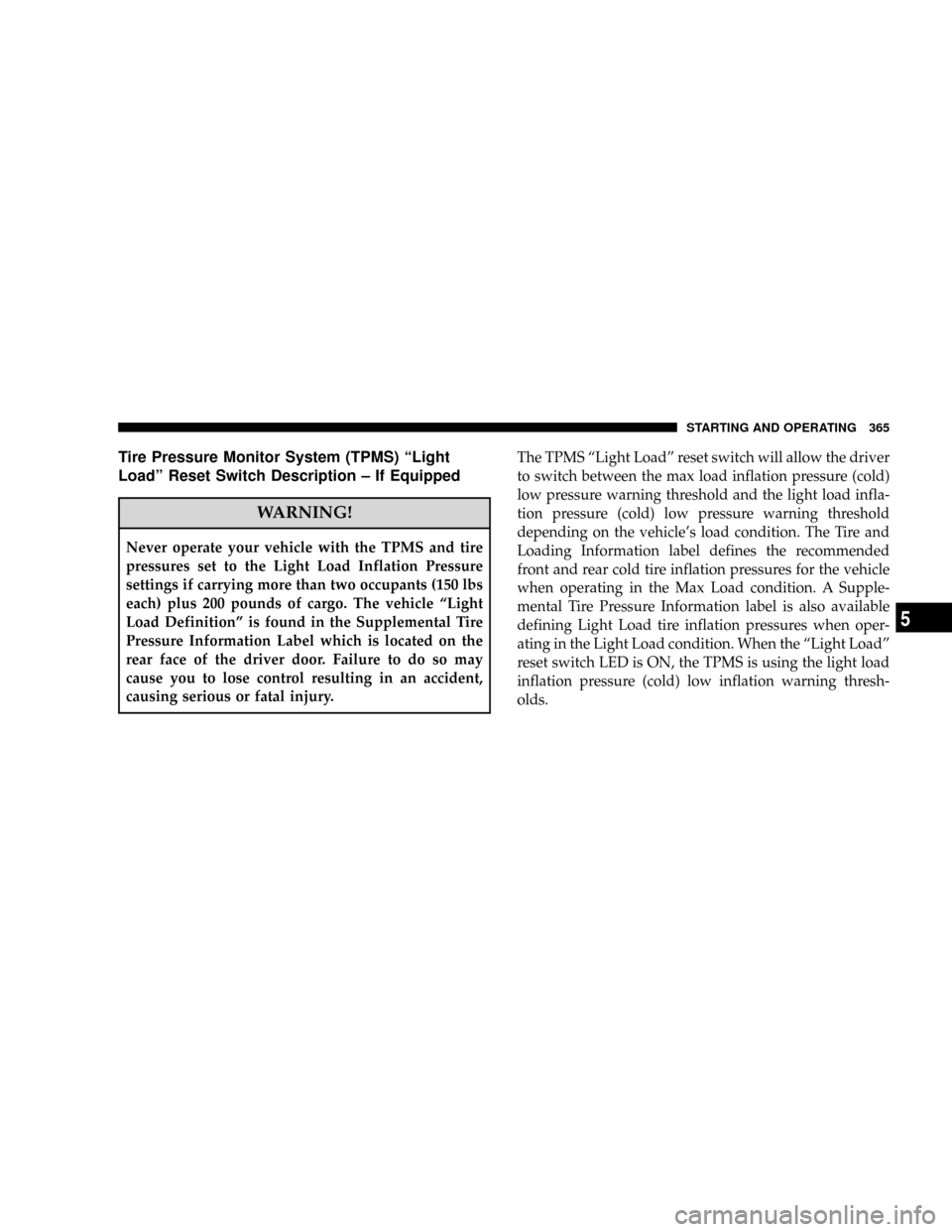
Tire Pressure Monitor System (TPMS) ªLight
Loadº Reset Switch Description ± If Equipped
WARNING!
Never operate your vehicle with the TPMS and tire
pressures set to the Light Load Inflation Pressure
settings if carrying more than two occupants (150 lbs
each) plus 200 pounds of cargo. The vehicle ªLight
Load Definitionº is found in the Supplemental Tire
Pressure Information Label which is located on the
rear face of the driver door. Failure to do so may
cause you to lose control resulting in an accident,
causing serious or fatal injury.The TPMS ªLight Loadº reset switch will allow the driver
to switch between the max load inflation pressure (cold)
low pressure warning threshold and the light load infla-
tion pressure (cold) low pressure warning threshold
depending on the vehicle's load condition. The Tire and
Loading Information label defines the recommended
front and rear cold tire inflation pressures for the vehicle
when operating in the Max Load condition. A Supple-
mental Tire Pressure Information label is also available
defining Light Load tire inflation pressures when oper-
ating in the Light Load condition. When the ªLight Loadº
reset switch LED is ON, the TPMS is using the light load
inflation pressure (cold) low inflation warning thresh-
olds.
STARTING AND OPERATING 365
5
Page 368 of 554
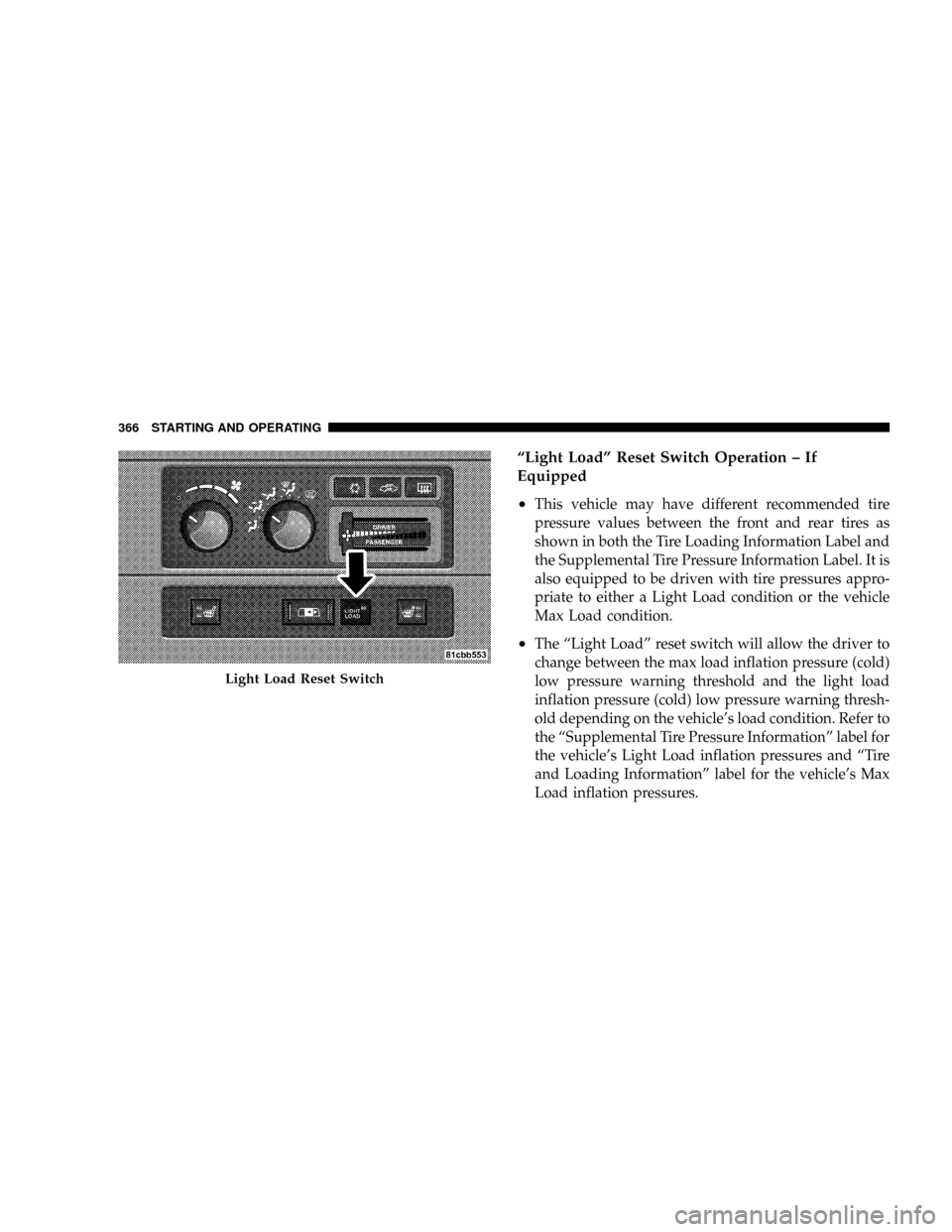
ªLight Loadº Reset Switch Operation ± If
Equipped
²
This vehicle may have different recommended tire
pressure values between the front and rear tires as
shown in both the Tire Loading Information Label and
the Supplemental Tire Pressure Information Label. It is
also equipped to be driven with tire pressures appro-
priate to either a Light Load condition or the vehicle
Max Load condition.
²The ªLight Loadº reset switch will allow the driver to
change between the max load inflation pressure (cold)
low pressure warning threshold and the light load
inflation pressure (cold) low pressure warning thresh-
old depending on the vehicle's load condition. Refer to
the ªSupplemental Tire Pressure Informationº label for
the vehicle's Light Load inflation pressures and ªTire
and Loading Informationº label for the vehicle's Max
Load inflation pressures.
Light Load Reset Switch
366 STARTING AND OPERATING
Page 369 of 554
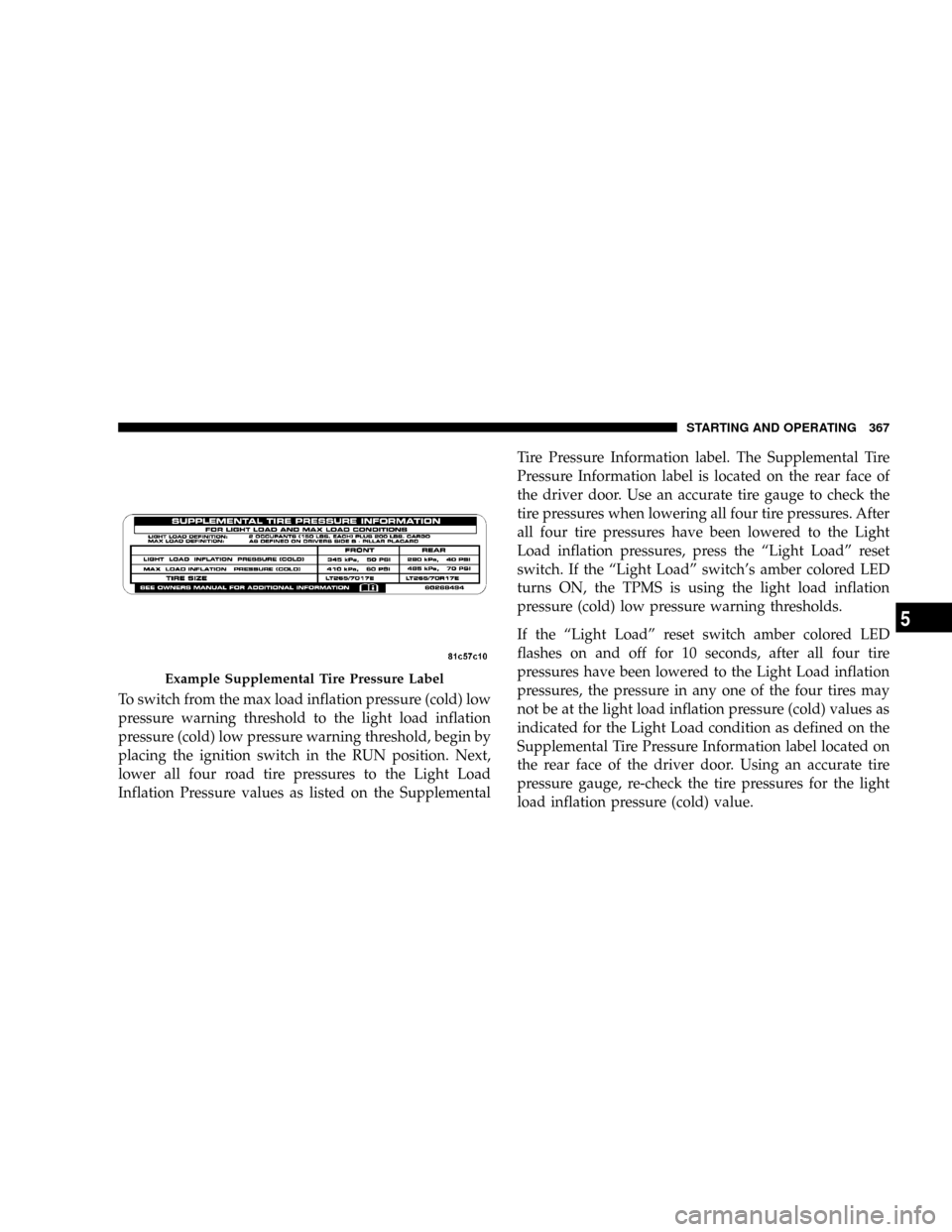
To switch from the max load inflation pressure (cold) low
pressure warning threshold to the light load inflation
pressure (cold) low pressure warning threshold, begin by
placing the ignition switch in the RUN position. Next,
lower all four road tire pressures to the Light Load
Inflation Pressure values as listed on the SupplementalTire Pressure Information label. The Supplemental Tire
Pressure Information label is located on the rear face of
the driver door. Use an accurate tire gauge to check the
tire pressures when lowering all four tire pressures. After
all four tire pressures have been lowered to the Light
Load inflation pressures, press the ªLight Loadº reset
switch. If the ªLight Loadº switch's amber colored LED
turns ON, the TPMS is using the light load inflation
pressure (cold) low pressure warning thresholds.
If the ªLight Loadº reset switch amber colored LED
flashes on and off for 10 seconds, after all four tire
pressures have been lowered to the Light Load inflation
pressures, the pressure in any one of the four tires may
not be at the light load inflation pressure (cold) values as
indicated for the Light Load condition as defined on the
Supplemental Tire Pressure Information label located on
the rear face of the driver door. Using an accurate tire
pressure gauge, re-check the tire pressures for the light
load inflation pressure (cold) value.
Example Supplemental Tire Pressure Label
STARTING AND OPERATING 367
5