change time DODGE RAM 2500 GAS 2008 3.G User Guide
[x] Cancel search | Manufacturer: DODGE, Model Year: 2008, Model line: RAM 2500 GAS, Model: DODGE RAM 2500 GAS 2008 3.GPages: 554, PDF Size: 9.93 MB
Page 218 of 554
SCAN Button (CD Mode)
Press this button to play the first 10 seconds of each track.
To stop the scan function, press the button a second time.
EJECT Button (CD Mode)
Press this button and the disc will unload and
move to the entrance for easy removal. The
unit will switch to the last selected mode.
If you do not remove the disc within 15 seconds, it will be
reloaded. The radio mode will continue to appear.
TIME Button (CD Mode)
Press this button to change the display from elapsed CD
playing time to time of day. The time of day will display
for five seconds.
RW/FF (CD Mode)
Press and hold the FF (Fast Forward) and the CD player
will begin to fast forward until FF is released. The RW
(Reverse) button works in a similar manner.Press and hold the FF button to fast forward through the
tracks. Release the FF button to stop the fast forward
feature. If the RW button is pressed, the current track will
reverse to the beginning of the track and begin playing.
RND/SET Button (Random Play Button) (CD
Mode)
Press this button while the CD is playing to activate
Random play. This feature plays the selections on the
compact disc in random order to provide an interesting
change of pace.
Press the SEEK button to move to the next randomly
selected track.
Press the RND button a second time to stop Random
play.
216 UNDERSTANDING YOUR INSTRUMENT PANEL
Page 220 of 554
TIME Button (Auxiliary Mode)
Press this button to change the display from elapsed
playing time to time of day. The time of day will display
for five seconds.
RW/FF (Auxiliary Mode)
No function.
RND/SET Button (Auxiliary Mode)
No function.
Mode Button (Auxiliary Mode)
Press the MODE button repeatedly to select between the
CD player and Satellite Radio (if equipped).
Operating Instructions - Hands-Free Phone Ð If
Equipped
Refer to the ªHands-Free Phone (UConnectt)º section of
this Owner's Manual.
Operating Instructions - Satellite Radio Ð If
Equipped
Refer to the ªSatellite Radioº section of this Owner's
Manual.
218 UNDERSTANDING YOUR INSTRUMENT PANEL
Page 229 of 554
display9INSERT DISCº for 10 seconds. If no discs are
inserted within 10 seconds ªNO DISCS LOADEDº will
be displayed.
On some vehicles a disc can be ejected with the radio and
ignition OFF.
TIME Button (CD Mode for CD Audio Play)
Press this button to change the display from a large CD
playing time display to a small CD playing time display.
RW/FF (CD Mode for CD Audio Play)
Press and hold FF (Fast Forward) and the CD player will
begin to fast forward until FF is released or RW or
another CD button is pressed. The RW (Reverse) button
works in a similar manner.
Press and hold the FF button to fast forward through the
tracks. Release the FF button to stop the fast forward
feature.
TUNE Control (CD Mode for CD Audio Play)
Pressing the TUNE control allows the setting of the Tone,
Fade, and Balance. See Radio Mode.
AM/FM Button (CD Mode for CD Audio Play)
Switches the Radio to the Radio mode.
RND/PTY Button (Random Play Button) (CD Mode
for CD Audio Play)
Press this button while the CD is playing to activate
Random Play. This feature plays the selections on the
compact disc in random order to provide an interesting
change of pace.
Press the SEEK button to move to the next randomly
selected track.
Press the RND button a second time to stop Random
play.
Buttons1-6(CDMode for CD Audio Play)
Selects disc positions1-6forPlay/Load/Eject.
UNDERSTANDING YOUR INSTRUMENT PANEL 227
4
Page 243 of 554
LOAD/EJECT Button (CD Mode for CD Audio
Play)
LOAD/EJECT - Load
Press the LOAD/EJT button and the push-
button with the corresponding number where
the CD is being loaded. The radio will display
PLEASE WAIT and prompt when to INSERT
DISC. After the radio displays9INSERT DISC,9insert the
CD into the player.
Radio display will show9LOADING DISC9when the disc
is loading and ªREADING DISCº when the radio is
reading the disc.
LOAD/EJT - Eject
Press the LOAD/EJT button and the push-
button with the corresponding number where
the CD was loaded and the disc will unload
and move to the entrance for easy removal.Radio display will show9EJECTING DISC9when the disc
is being ejected and prompt the user to remove the disc.
Press and hold the LOAD/EJT button for five seconds
and all CDs will be ejected from the radio.
If you have ejected a disc and have not removed it within
15 seconds, it will be reloaded. If the CD is not removed,
the radio will continue to play the non-removed CD. If
the CD is removed and there are other CDs in the radio,
the radio will play the next CD after a two-minute
timeout. If the CD is removed and there are no other CDs
in the radio, the radio will remain in CD mode and
display9INSERT DISCº for two minutes. After two
minutes, the radio will go to the previous tuner mode.
The disc can be ejected with the radio and ignition OFF.
TIME Button (CD Mode for CD Audio Play)
Press this button to change the display from a large CD
playing time display to a small CD playing time display.
UNDERSTANDING YOUR INSTRUMENT PANEL 241
4
Page 244 of 554
RW/FF (CD Mode for CD Audio Play)
Press and hold FF (Fast Forward) and the CD player will
begin to fast forward until FF is released or RW or
another CD button is pressed. The RW (Reverse) button
works in a similar manner.
Press and hold the FF button to fast forward through the
tracks. Release the FF button to stop the fast forward
feature. If the RW button is pressed, the current track will
reverse to the beginning of the track and begin playing.
TUNE Control (CD Mode for CD Audio Play)
Pressing the TUNE control allows the setting of the Tone,
Fade, and Balance. See Radio Mode.
AM/FM Button (CD Mode for CD Audio Play)
Switches the Radio to the Radio mode.
RND/PTY Button (Random Play Button) (CD Mode
for CD Audio Play)
Press this button while the CD is playing to activate
Random play. This feature plays the selections on the
compact disc in random order to provide an interesting
change of pace.
NOTE:MP3 and WMA Random play are for file folders
only.
Press the SEEK button to move to the next randomly
selected track.
Press the RND button a second time to stop Random
play.
Buttons1-6(CDMode for CD Audio Play)
Selects disc positions1-6forPlay/Load/Eject.
242 UNDERSTANDING YOUR INSTRUMENT PANEL
Page 250 of 554
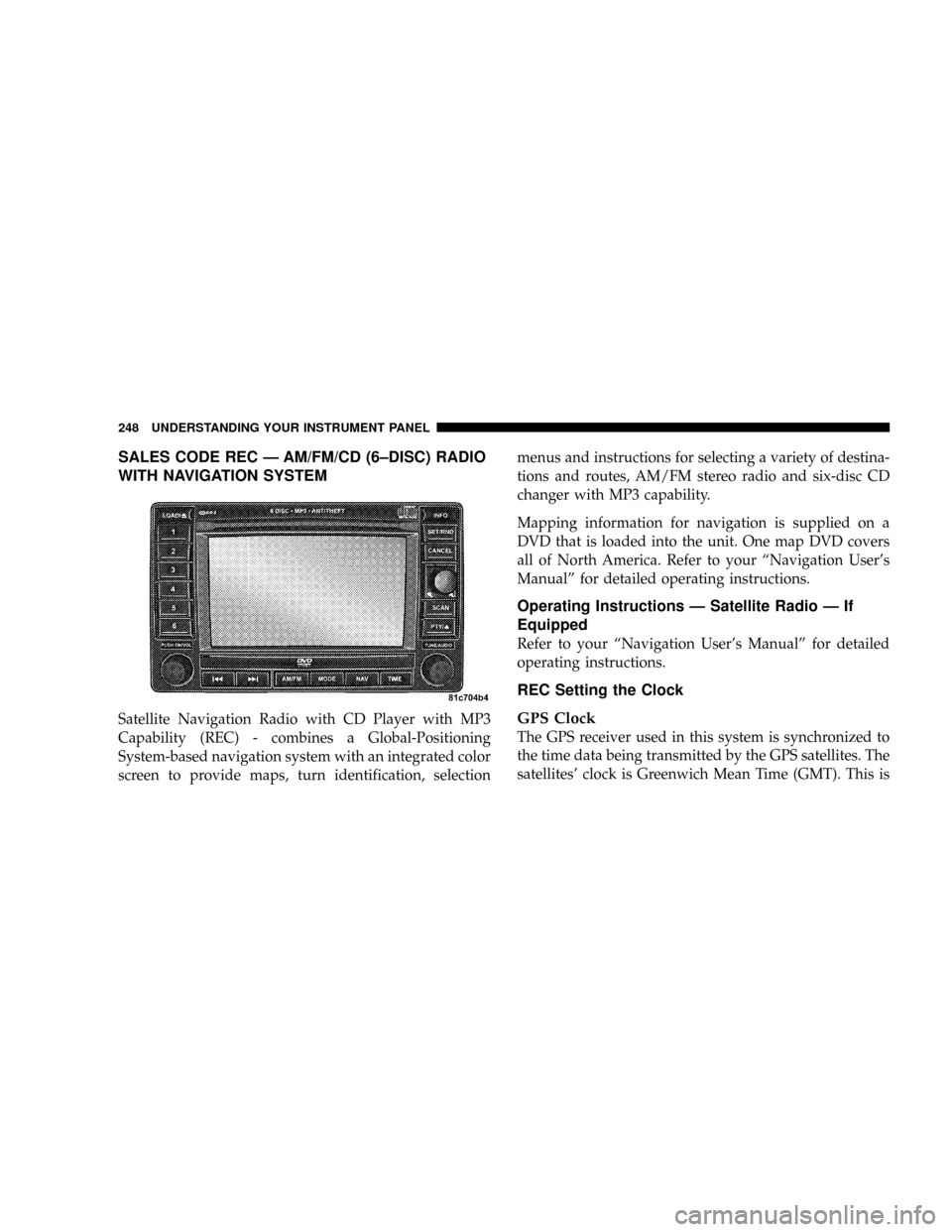
SALES CODE REC Ð AM/FM/CD (6±DISC) RADIO
WITH NAVIGATION SYSTEM
Satellite Navigation Radio with CD Player with MP3
Capability (REC) - combines a Global-Positioning
System-based navigation system with an integrated color
screen to provide maps, turn identification, selectionmenus and instructions for selecting a variety of destina-
tions and routes, AM/FM stereo radio and six-disc CD
changer with MP3 capability.
Mapping information for navigation is supplied on a
DVD that is loaded into the unit. One map DVD covers
all of North America. Refer to your ªNavigation User's
Manualº for detailed operating instructions.
Operating Instructions Ð Satellite Radio Ð If
Equipped
Refer to your ªNavigation User's Manualº for detailed
operating instructions.
REC Setting the Clock
GPS Clock
The GPS receiver used in this system is synchronized to
the time data being transmitted by the GPS satellites. The
satellites' clock is Greenwich Mean Time (GMT). This is
248 UNDERSTANDING YOUR INSTRUMENT PANEL
Page 251 of 554
the worldwide standard for time. This makes the sys-
tem's clock very accurate once the appropriate time zone
and daylight savings information is set.
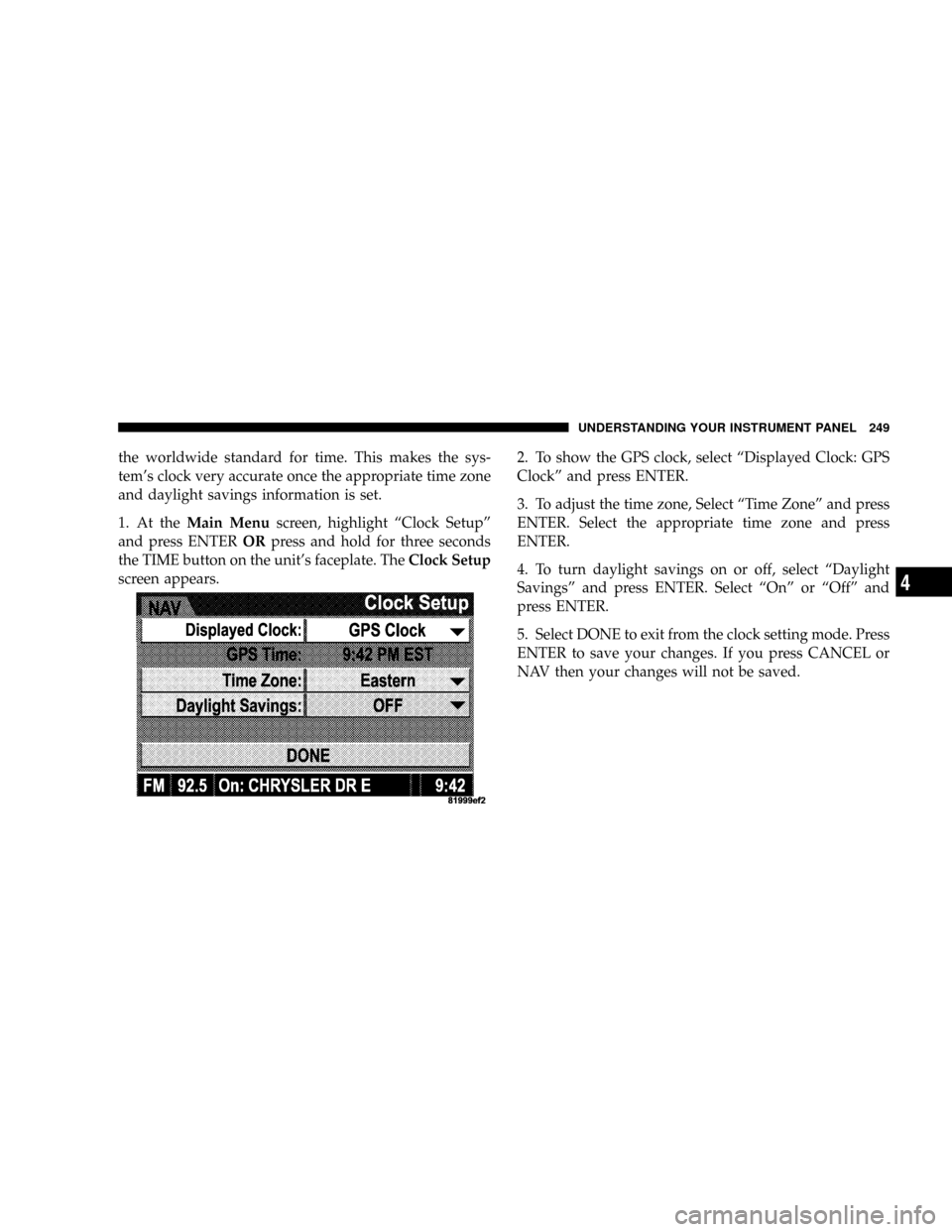
1. At theMain Menuscreen, highlight ªClock Setupº
and press ENTERORpress and hold for three seconds
the TIME button on the unit's faceplate. TheClock Setup
screen appears.2. To show the GPS clock, select ªDisplayed Clock: GPS
Clockº and press ENTER.
3. To adjust the time zone, Select ªTime Zoneº and press
ENTER. Select the appropriate time zone and press
ENTER.
4. To turn daylight savings on or off, select ªDaylight
Savingsº and press ENTER. Select ªOnº or ªOffº and
press ENTER.
5. Select DONE to exit from the clock setting mode. Press
ENTER to save your changes. If you press CANCEL or
NAV then your changes will not be saved.
UNDERSTANDING YOUR INSTRUMENT PANEL 249
4
Page 252 of 554
User Defined Clock
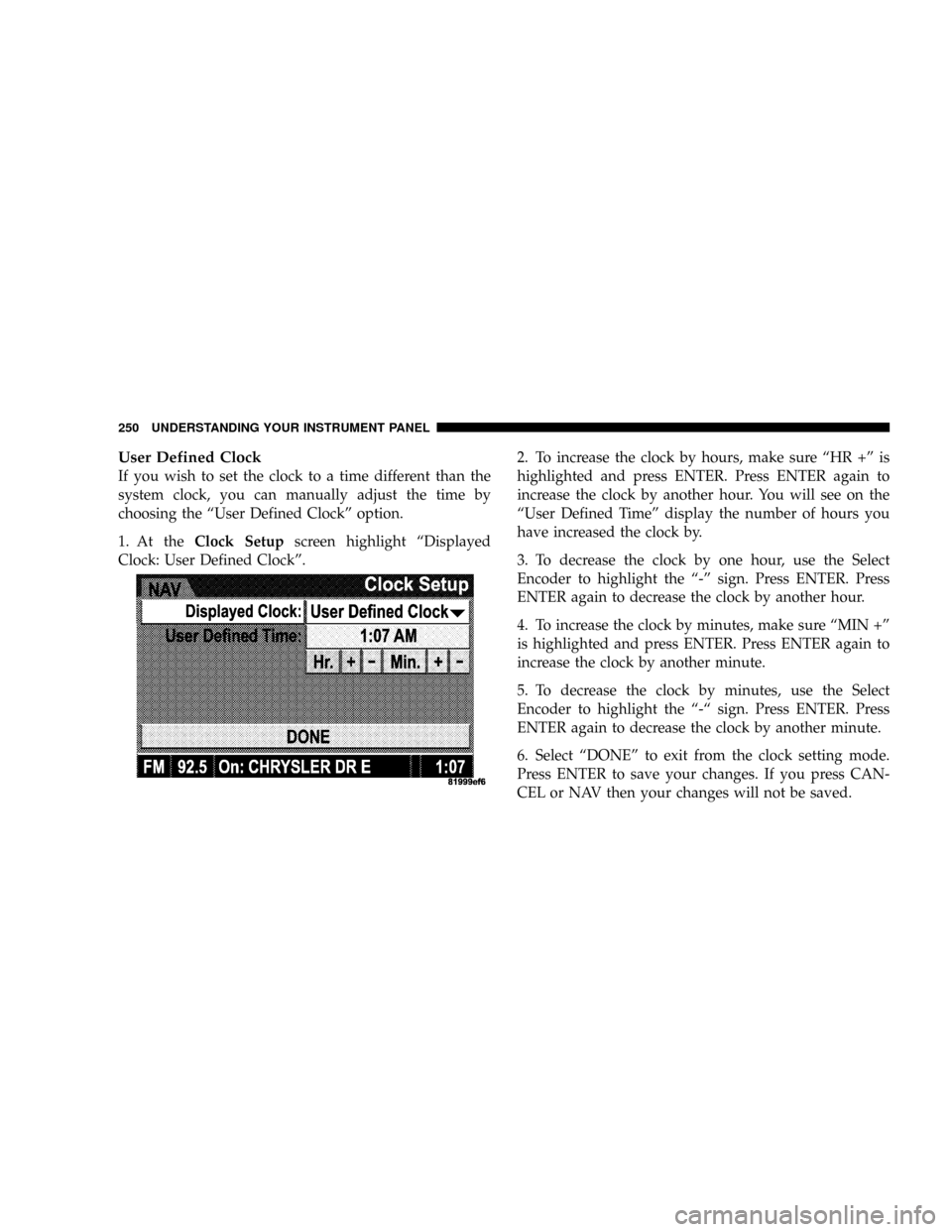
If you wish to set the clock to a time different than the
system clock, you can manually adjust the time by
choosing the ªUser Defined Clockº option.
1. At theClock Setupscreen highlight ªDisplayed
Clock: User Defined Clockº.2. To increase the clock by hours, make sure ªHR +º is
highlighted and press ENTER. Press ENTER again to
increase the clock by another hour. You will see on the
ªUser Defined Timeº display the number of hours you
have increased the clock by.
3. To decrease the clock by one hour, use the Select
Encoder to highlight the ª-º sign. Press ENTER. Press
ENTER again to decrease the clock by another hour.
4. To increase the clock by minutes, make sure ªMIN +º
is highlighted and press ENTER. Press ENTER again to
increase the clock by another minute.
5. To decrease the clock by minutes, use the Select
Encoder to highlight the ª-ª sign. Press ENTER. Press
ENTER again to decrease the clock by another minute.
6. Select ªDONEº to exit from the clock setting mode.
Press ENTER to save your changes. If you press CAN-
CEL or NAV then your changes will not be saved.
250 UNDERSTANDING YOUR INSTRUMENT PANEL
Page 255 of 554
Selecting Satellite Mode Ð RAQ and RAK Radio
Press the MODE button repeatedly until the word9SAT9
appears in the display.
These radios will also display the current station name
and program type. For more information, such as song
title and artist, press the MSG or INFO button.
A CD or tape may remain in the radio while in the
Satellite radio mode.
Selecting A Channel
Press and release the SEEK or TUNE knob to search for
the next channel. Press the top of the button to search up
and the bottom of the button to search down. Holding the
TUNE button causes the radio to bypass channels until
the button is released.
Press and release the SCAN button (if equipped) to
automatically change channels every seven seconds. The
radio will pause on each channel for seven secondsbefore moving on to the next channel. The word9SCAN9
will appear in the display between each channel change.
Press the SCAN button a second time to stop the search.
NOTE:Channels that may contain objectionable content
can be blocked. Contact Sirius Customer Care at 888-539-
7474 to discuss options for channel blocking or unblock-
ing. Please have your ESN/SID information available.
Storing And Selecting Preset Channels
In addition to the 12 AM and 12 FM preset stations, you
may also commit 12 satellite stations to pushbutton
memory. These satellite channel preset stations will not
erase any AM or FM preset memory stations. Follow the
memory preset procedures that apply to your radio.
UNDERSTANDING YOUR INSTRUMENT PANEL 253
4
Page 256 of 554
Using The PTY (Program Type) Button Ð If
Equipped
Follow the PTY button instructions that apply to your
radio.
PTY Button SCAN
When the desired program type is obtained, press the
SCAN button within five seconds. The radio will play
seven seconds of the selected channel before moving to
the next channel of the selected program type. Press the
SCAN button a second time to stop the search.
NOTE:Pressing the SEEK or SCAN button, while
performing a music type scan, will change the channel by
one and stop the search. Pressing a preset memory button
during a music type scan will call up the memory
channel and stop the search.
PTY Button SEEK
When the desired program is obtained, press the SEEK
button within five seconds. The channel will change to
the next channel that matches the program type selected.
Satellite Antenna
To ensure optimum reception on vehicles available with
a luggage rack, do not place items on the roof around the
rooftop antenna location. Metal objects placed within the
line of sight of the antenna will cause decreased perfor-
mance. Larger luggage items should be placed as far
forward as possible. Do not place items directly on or
above the antenna.
254 UNDERSTANDING YOUR INSTRUMENT PANEL