key DODGE RAM 2500 GAS 2008 3.G Owner's Manual
[x] Cancel search | Manufacturer: DODGE, Model Year: 2008, Model line: RAM 2500 GAS, Model: DODGE RAM 2500 GAS 2008 3.GPages: 554, PDF Size: 9.93 MB
Page 35 of 554
and on the rear doors of Quad Cabtand Mega Cabt
models. The windows will operate when the ignition
switch is turned to the ON or ACC position, and for ten
minutes after the ignition is turned OFF or a front door is
opened.
NOTE:The Power Accessory Delay feature will allow
the power windows to operate for 10 minutes after the
ignition is turned OFF.WARNING!
Never leave children alone in a vehicle. Leaving
unattended children in a vehicle is dangerous for a
number of reasons. A child or others could be seri-
ously or fatally injured. Don't leave the key in the
ignition. A child could operate power windows,
other controls, or move the vehicle.
Auto Down (Driver's Side Only)
The driver's window switch has an Auto Down feature.
Press the window switch past the detent, release, and the
window will automatically go down.
THINGS TO KNOW BEFORE STARTING YOUR VEHICLE 33
2
Page 42 of 554
6. To release the belt, push the red button on the buckle.
The belt will automatically retract to its stowed position.
If necessary, slide the latch plate down the webbing to
allow the belt to retract fully.
WARNING!
A frayed or torn belt could rip apart in a collision and
leave you with no protection. Inspect the belt system
periodically, checking for cuts, frays, or loose parts.
Damaged parts must be replaced immediately. Do
not disassemble or modify the system. Seat belt
assemblies must be replaced after a collision if they
have been damaged (bent retractor, torn webbing,
etc.) or if the airbag deployed.
Regular Cab Front Center Three-Point Belt
1. The front center seat belt on the Regular Cab may be
disconnected to open up utilization of the storage areas
behind the front seats. The black latch plate can be
detached from the black keyed seat belt buckle located on
the inboard side of the passenger seat. Insert the vehicle
ignition key into the center white slot on the black buckle.
The black buckle latch plate can be removed when the
key is pressed into the buckle. Allow the retractor to take
up the surplus webbing, and the buckles will hang
vertically from the cab back exit bezel, thus freeing up all
the area behind the front seats.
40 THINGS TO KNOW BEFORE STARTING YOUR VEHICLE
Page 43 of 554
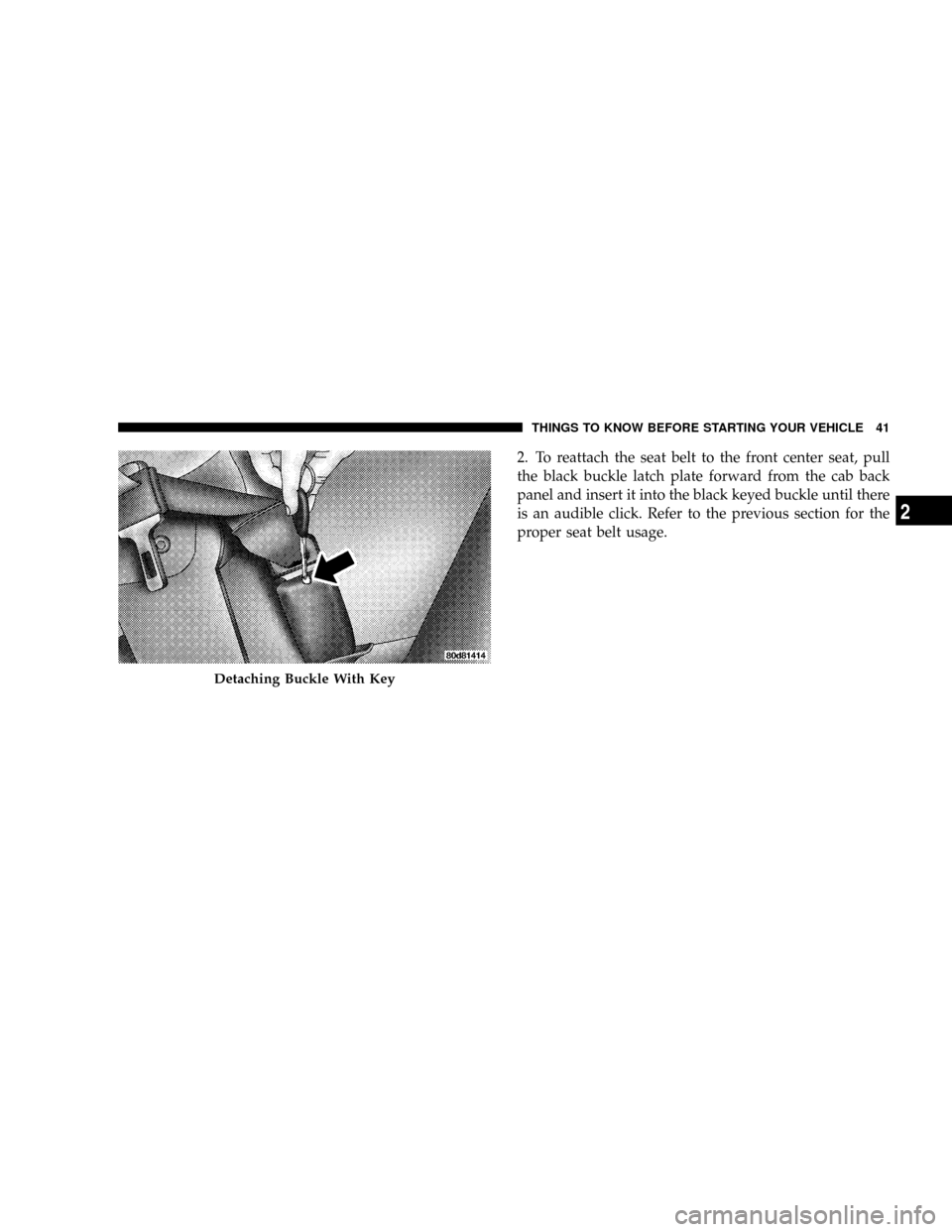
2. To reattach the seat belt to the front center seat, pull
the black buckle latch plate forward from the cab back
panel and insert it into the black keyed buckle until there
is an audible click. Refer to the previous section for the
proper seat belt usage.
Detaching Buckle With Key
THINGS TO KNOW BEFORE STARTING YOUR VEHICLE 41
2
Page 55 of 554
the START or RUN positions. These include all of the
items listed above except the steering wheel and
column, and knee bolsters. If the key is in the OFF
position, in the ACC position, or not in the ignition,
the airbags are not on and will not inflate.
²Also, the ORC turns on the AIRBAG warn-
ing light in the instrument panel for six to
eight seconds for a self-check when the
ignition is first turned on. After the self-
check, the AIRBAG warning light will turn off. If the
ORC detects a malfunction in any part of the system, it
turns on the AIRBAG warning light either momen-
tarily or continuously. A single chime will sound if the
light comes on again after initial start up.
WARNING!
Ignoring the AIRBAG warning light in your instru-
ment panel could mean you won't have the airbags to
protect you in a collision. If the light does not come
on, stays on after you start the vehicle, or if it comes
on as you drive, have the airbag system checked right
away.
²ThePassenger Airbag Disable (PAD) Indicator Light
(if equipped)(an amber light located in the center of
the instrument panel), tells the driver and front pas-
senger when the front passenger airbag is turned off.
The PAD indicator light illuminates the words9PASS
AIR BAG OFF9to show that the passenger airbag will
not inflate during a collision requiring airbags. The
PAD light will illuminate when the passenger frontal
airbag has been turned off by using the manual
THINGS TO KNOW BEFORE STARTING YOUR VEHICLE 53
2
Page 59 of 554
WARNING!
Whenever an airbag is turned off, even a lap/
shoulder belted passenger may hit their head, neck,
or chest on the dashboard (instrument panel) or
windshield in a crash. This may result in serious
injury or death.
To Shut Off the Passenger Airbag (2500/3500 Regular
Cab Vehicles Only)
Place the ignition key in the Passenger Airbag ON/OFF
Switch, push the key in and turn clockwise, and remove
the key from the switch. This will shut off the passenger
side airbag. The OFF light near the switch will illuminate
when the ignition switch is turned to the ON position.To Turn On the Passenger Airbag (2500/3500 Regular
Cab Vehicles Only)
Place the ignition key in the Passenger Airbag ON/OFF
Switch, push the key in and turn counterclockwise, and
remove the key from the switch. This will turn ON the
passenger airbag. The OFF light near the switch will be
off when the ignition switch is turned to the ON position.
If A Deployment Occurs
The airbag system is designed to deploy the airbags
when the impact sensors detect a moderate-to-severe
frontal collision, to help restrain the driver and front
passenger, and then immediately deflate.
NOTE:A frontal collision that is not severe enough to
need airbag protection will not activate the system. This
does not mean something is wrong with the airbag
system.
THINGS TO KNOW BEFORE STARTING YOUR VEHICLE 57
2
Page 104 of 554
Redial
²
Press the PHONE button to begin.
²After the9Ready9prompt and the following beep, say
9Redial.9
²The UConnecttsystem will call the last number that
was dialed from your cellular phone.
NOTE:This may not be the last number dialed from the
UConnecttsystem.
Call Continuation
Call continuation is the progression of a phone call on the
UConnecttsystem after the vehicle ignition key has been
switched to OFF. Call continuation functionality avail-
able on the vehicle can be any one of three types:
²After the ignition key is switched to OFF, a call can
continue on the UConnecttsystem either until the callends, or until the vehicle battery condition dictates
cessation of the call on the UConnecttsystem and
transfer of the call to the mobile phone.
²After the ignition key is switched to OFF, a call can
continue on the UConnecttsystem for a certain dura-
tion, after which the call is automatically transferred
from the UConnecttsystem to the mobile phone.
²An active call is automatically transferred to the
mobile phone after the ignition key is switched to OFF.
UConnectTSystem Features
Language Selection
To change the language that the UConnecttsystem is
using:
²Press the PHONE button to begin.
102 UNDERSTANDING THE FEATURES OF YOUR VEHICLE
Page 106 of 554
Your phone must be turned on and paired to the
UConnecttsystem to allow use of this vehicle feature in
emergency situations, when the cell phone has network
coverage and stays paired to the UConnecttsystem.
Towing Assistance
If you need towing assistance:
²Press the PHONE button to begin.
²After the9Ready9prompt and the following beep, say
9Towing Assistance.9
NOTE:The Towing Assistance number dialed is based
on the country where the vehicle is purchased (1-800-528-
2069 for the U.S., 1-877-213-4525 for Canada, 55-14-3454
for Mexico City and 1-800-712-3040 for outside Mexico
City in Mexico).
Please refer to the 24-Hour ªTowing Assistanceº cover-
age details in the Warranty Information Booklet and on
the 24±Hour Towing Assistance Card.
Paging
To learn how to page, refer to9Working with Automated
Systems.9Paging works properly except for pagers of
certain companies, which time out a little too soon to
work properly with the UConnecttsystem.
Voice Mail Calling
To learn how to access your voice mail, refer to9Working
with Automated Systems.9
Working with Automated Systems
This method is used in instances where one generally has
to press numbers on the cellular phone keypad while
navigating through an automated telephone system.
You can use your UConnecttsystem to access a voice
mail system or an automated service, such as a paging
service or automated customer service line. Some ser-
vices require immediate response selection. In some
instances, that may be too quick for use of the UConnectt
system.
104 UNDERSTANDING THE FEATURES OF YOUR VEHICLE
Page 107 of 554
When calling a number with your UConnecttsystem
that normally requires you to enter in a touch-tone
sequence on your cellular phone keypad, you can press
the ªVoice Recognitionº button and say the sequence you
wish to enter, followed by the word9Send.9For example,
if required to enter your PIN followed with a pound, (3 7
4 6 #), you can press the ªVoice Recognitionº button and
say,93746#Send.9Saying a number, or sequence of
numbers, followed by9Send,9is also to be used for
navigating through an automated customer service cen-
ter menu structure, and to leave a number on a pager.
You can also send stored UConnecttphonebook entries
as tones for fast and easy access to voice mail and pager
entries. To use this feature, dial the number you wish to
call and then press the ªVoice Recognitionº button and
say, ªSend.º The system will prompt you to enter the
name or number and say the name of the phonebook
entry you wish to send. The UConnecttsystem will thensend the corresponding phone number associated with
the phonebook entry, as tones over the phone.
NOTE:
²You may not hear all of the tones due to cellular phone
network configurations; this is normal.
²Some paging and voice mail systems have system time
out settings that are too short and may not allow the
use of this feature.
Barge In - Overriding Prompts
The ªVoice Recognitionº button can be used when you
wish to skip part of a prompt and issue your voice
recognition command immediately. For example, if a
prompt is asking9Would you like to pair a phone, clear
a{,9you could press the ªVoice Recognitionº button and
say,9Pair a Phone9to select that option without having to
listen to the rest of the voice prompt.
UNDERSTANDING THE FEATURES OF YOUR VEHICLE 105
3
Page 108 of 554
Turning Confirmation Prompts On/Off
Turning confirmation prompts off will stop the system
from confirming your choices (e.g., the UConnecttsys-
tem will not repeat a phone number before you dial it).
²Press the PHONE button to begin.
²After the9Ready9prompt and the following beep, say
9Setup Confirmations.9The UConnecttsystem will
play the current confirmation prompt status and you
will be given the choice to change it.
Phone and Network Status Indicators
If available on the radio and/or on a premium display
such as the instrument panel cluster, and supported by
your cell phone, the UConnecttsystem will provide
notification to inform you of your phone and network
status when you are attempting to make a phone call
using UConnectt. The status is given for roaming, net-
work signal strength, phone battery strength, etc.
Dialing Using the Cellular Phone Keypad
You can dial a phone number with your cellular phone
keypad and still use the UConnecttsystem (while dial-
ing via the cell phone keypad, the user must exercise
caution and take precautionary safety measures). By
dialing a number with your paired Bluetoothtcellular
phone, the audio will be played through your vehicle's
audio system. The UConnecttsystem will work the same
as if you dial the number using voice recognition.
NOTE:Certain brands of mobile phones do not send the
dial ring to the UConnecttsystem to play it on the
vehicle audio system, so you will not hear it. Under this
situation, after successfully dialing a number the user
may feel that the call did not go through even though the
call is in progress. Once your call is answered, you will
hear the audio.
106 UNDERSTANDING THE FEATURES OF YOUR VEHICLE
Page 113 of 554
²In a convertible vehicle, system performance may be
compromised with the convertible top down.
Far End Audio Performance
²
Audio quality is maximized under:
²low-to-medium blower setting,
²low-to-medium vehicle speed,
²low road noise,
²smooth road surface,
²fully closed windows,
²dry weather conditions, and
²operation from the driver's seat.
²Performance, such as audio clarity, echo, and loudness
to a large degree rely on the phone and network, and
not the UConnecttsystem.
²Echo at the far end can sometimes be reduced by
lowering the in-vehicle audio volume.
²In a convertible vehicle, system performance may be
compromised with the convertible top down.
BluetoothtCommunication Link
Cellular phones have been found to lose connection to
the UConnecttsystem. When this happens, the connec-
tion can generally be re-established by switching the
phone off/on. Your cell phone is recommended to remain
in BluetoothtON mode.
Power-Up
After switching the ignition key from OFF to either ON
or ACC position, or after a language change, you must
wait at least five seconds prior to using the system.
UNDERSTANDING THE FEATURES OF YOUR VEHICLE 111
3