display DODGE RAM 2500 POWER WAGON 2008 3.G User Guide
[x] Cancel search | Manufacturer: DODGE, Model Year: 2008, Model line: RAM 2500 POWER WAGON, Model: DODGE RAM 2500 POWER WAGON 2008 3.GPages: 504, PDF Size: 8.17 MB
Page 149 of 504
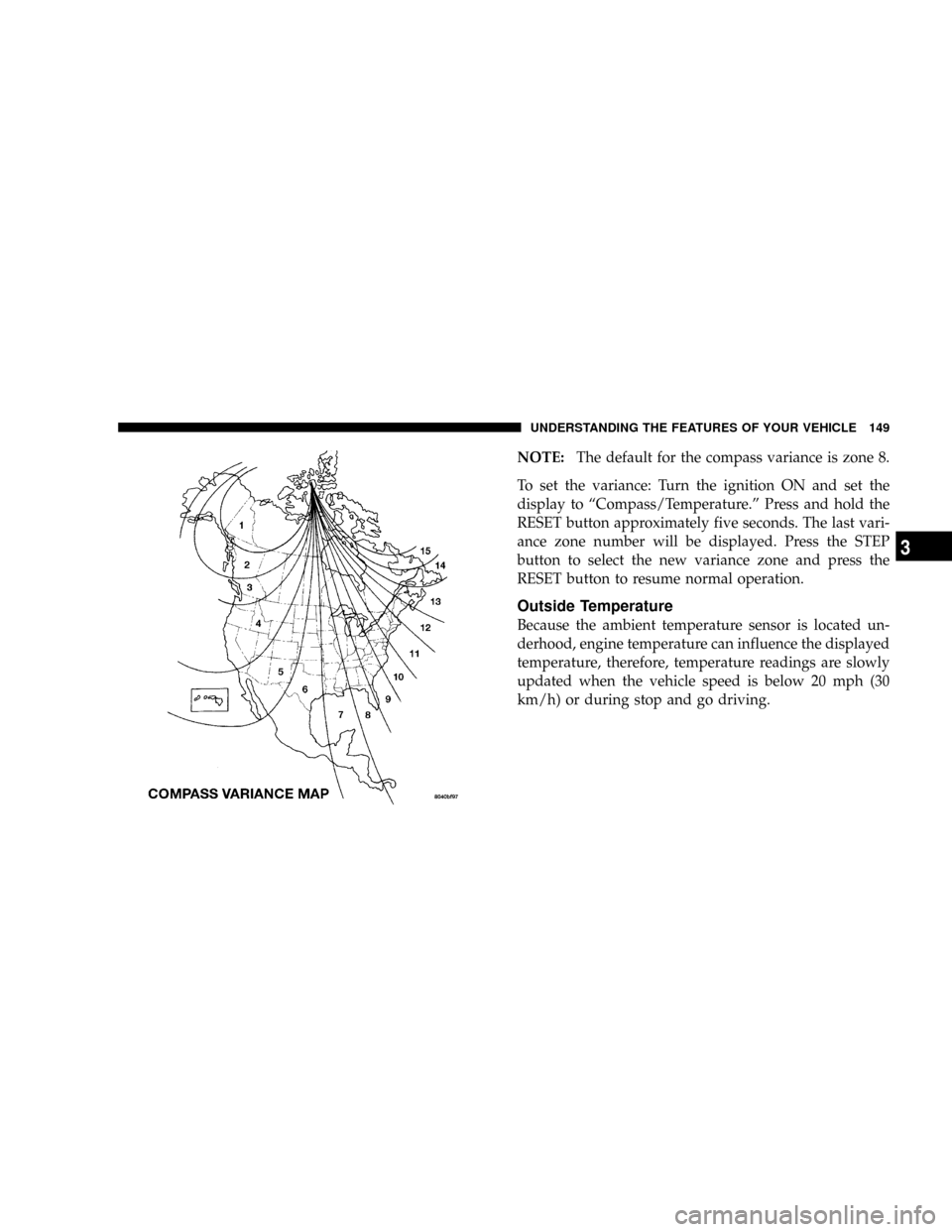
NOTE:The default for the compass variance is zone 8.
To set the variance: Turn the ignition ON and set the
display to ªCompass/Temperature.º Press and hold the
RESET button approximately five seconds. The last vari-
ance zone number will be displayed. Press the STEP
button to select the new variance zone and press the
RESET button to resume normal operation.
Outside Temperature
Because the ambient temperature sensor is located un-
derhood, engine temperature can influence the displayed
temperature, therefore, temperature readings are slowly
updated when the vehicle speed is below 20 mph (30
km/h) or during stop and go driving.
UNDERSTANDING THE FEATURES OF YOUR VEHICLE 149
3
Page 152 of 504

To do this, press and hold the two outside buttons for 20
seconds. Release the buttons when the indicators start to
flash.
It is recommended that anew batterybe placed in the
hand-held transmitter of the device being programmed
to HomeLinktfor more efficient training and accurate
transmission of the radio-frequency signal.
Your vehicle should be parked outside of the garage
while training.
1. Turn the ignition switch to the ON/RUN position.
2. Place the hand-held transmitter 1±3 inches (3±8 cm)
from the HomeLinktbuttons while keeping the
HomeLinktdisplay in view.
For optimal training, point the battery end of the hand-
held transmitter away from the HomeLinkt.3. Simultaneously press and hold both the chosen
HomeLinktbutton and the hand-held transmitter button
until the indicator(s) change from a slow to a rapid flash
rate.
Then release both the HomeLinktand hand-held trans-
mitter buttons.
It may take up to 30 seconds, or longer in rare cases. The
garage door may open & close while you train.
If the signal is too weak to train, replace the battery in the
original hand-held transmitter.
NOTE:Some gate operators and garage door openers
may require you to replace Step #3 with procedures
noted in the ªGate Operator/Canadian Programmingº
section.
152 UNDERSTANDING THE FEATURES OF YOUR VEHICLE
Page 175 of 504
NOperation Instructions - (CD Mode For CD
Audio Play).........................219
NLoad/Eject Button (CD Mode For CD Audio
Play)..............................220
NNotes On Playing MP3 Files.............222
NOperation Instructions - (CD Mode For MP3
And WMA Audio Play).................225
NLoad/Eject Button (CD Mode For MP3 And
WMA Play).........................225
mSales Code REC Ð AM/FM/CD (6±Disc) Radio
With Navigation System..................227
NOperating Instructions Ð Satellite Radio
(If Equipped)........................228
NREC Setting The Clock.................228
NAudio Clock Display...................230mSatellite Radio Ð If Equipped..............231
NSystem Activation.....................231
NElectronic Serial Number/Sirius Identification
Number (ESN/SID)....................232
NSelecting Satellite Mode In REF, RAQ, And
RAK Radios.........................233
NSelecting a Channel....................233
NStoring And Selecting Pre-Set Channels......234
NUsing The PTY (Program Type) Button Ð
If Equipped.........................234
NPTY Button9Scan9.....................234
NPTY Button9Seek9.....................234
NSatellite Antenna......................234
NReception Quality.....................235
UNDERSTANDING YOUR INSTRUMENT PANEL 175
4
Page 183 of 504
To reset a trip odometer, display the desired trip odom-
eter to be reset then push and hold the button until the
display resets (approximately 2 seconds).
Vehicle Warning Messages
When the appropriate conditions exist, messages such as
ªdoorº (indicates that a door(s) may be ajar), ªhoodº (if
the hood is open or ajar, on vehicles with remote start),
ªgASCAPº (which indicates that your gas cap is possibly
loose or damaged),9CHANgE OILº (indicates that the
engine oil should be change), ªLoWASHº (low washer
fluid),º LoCOOLº (low engine coolant level), and ªno-
FUSEº (indicates that the IOD fuse is removed from the
Integrated Power Module), will display in the odometer.
NOTE:There is also an engine hour function. This
indicates the total number of hours the engine has been
running. To display the engine hours perform the follow-
ing: Place the ignition in RUN, but do not start the
engine. With the odometer value displayed, hold the tripbutton down for a period of 6 seconds. The odometer will
change to trip value first, then it will display the engine
hour value. The engine hours will be displayed for a
period of 30 seconds until the ignition is turned off or the
engine is started.
Change Oil Message
Your vehicle is equipped with an engine oil change
indicator system. The ªCHANgE OILº message will flash
in the instrument cluster odometer for approximately 3
seconds and a single chime will sound to indicate the
next scheduled oil change interval. The engine oil change
indicator system is duty cycle based, which means the
engine oil change interval may fluctuate dependent upon
your personal driving style.
Unless reset, this message will continue to display each
time you turn the ignition switch to the ON/RUN
position. To turn off the message temporarily, press and
release the Trip Odometer button on the instrument
UNDERSTANDING YOUR INSTRUMENT PANEL 183
4
Page 189 of 504
TPMS ªLight Loadº Reset Switch ± If Equipped
The TPMS ºLight Loadº reset switch allows you to
choose between Light Load vehicle conditions and Max
Load vehicle conditions tire pressures and related TPMS
warning levels. The switch is located in the instrument
panel, below the climate control panel. For additional
information refer to ªTire Pressure Monitoring System
(TPMS) Ð If Equippedº in section 5 of this manual.
25. Transmission Oil Temperature Warning Light
(Automatic Transmissions Only)
This light indicates that there is excessive trans-
mission fluid temperature that might occur
with severe usage such as trailer towing. It may
also occur when operating the vehicle in a high
torque converter slip condition, such as 4-wheel-drive
operation (e.g. snow plowing, off- road operation). If thislight comes on, stop the vehicle and run the engine at idle
or faster, with the transmission in NEUTRAL until the
light goes off.
26. Odometer/Trip Odometer Button
Press this button to toggle between the odometer and the
trip odometer display. Holding the button in resets the
trip odometer reading when in trip mode.
27. Fuel Gauge
Shows level of fuel in tank when ignition switch is in the
ON position.
28. Low Fuel Warning Light
When the fuel level drops to 1/16 tank, the fuel
symbol will light and a single chime will sound.
NOTE:If your vehicle is equipped with an overhead
console module (CMTC), it is possible for DTE to display
ªLO FUELº before the low fuel warning light turns on in
the instrument cluster. This could occur because the low
UNDERSTANDING YOUR INSTRUMENT PANEL 189
4
Page 190 of 504

fuel warning is set to a specified fuel tank volume and
DTE is an estimated distance calculation based on vehicle
fuel economy and remaining fuel tank volume.
Ram fuel tank volumes are as follows:
²34 gallons - short box models
²35 gallons - long box models
29. CRUISE Light
This indicator lights when the electronic speed control
system is turned on.
ELECTRONIC DIGITAL CLOCK
The clock and radio each use the display panel built into
the radio. A digital readout shows the frequency and/or
time in hours and minutes (depending on your radio
model) whenever the ignition switch is in the ªONº or
ªACCº position.When the ignition switch is in the ªOFFº position, or
when the radio frequency is being displayed, time keep-
ing is accurately maintained.
On the RAQ radio the time button alternates the location
of the time and frequency on the display. On the REF only
one of the two, time or frequency is displayed at a time.
Clock Setting Procedure
1. Press and hold the time button until the hours blink.
2. Adjust the hours by turning the right side Tune /
Audio control.
3. After the hours are adjusted, press the right side Tune
/ Audio control to set the minutes.
4. Adjust the minutes using the right side Tune / Audio
control.
5. To exit, press any button/knob or wait approximately
5 seconds.
190 UNDERSTANDING YOUR INSTRUMENT PANEL
Page 193 of 504
Power Switch/Volume Control (Rotary)
Press the ON/VOL control to turn the radio ON. Press
the ON/VOL a second time to turn OFF the radio.
Electronic Volume Control
The electronic volume control turns continuously (360
degrees) in either direction without stopping. Turning the
volume control to the right increases the volume and to
the left decreases it.
When the audio system is turned on, the sound will be
set at the same volume level as last played.
For your convenience, the volume can be turned down,
but not up, when the audio system is off and the ignition
is ON.
Mode Button (Radio Mode)
Press the mode button repeatedly to select between the
CD player and Satellite Radio (if equipped).
SEEK Button (Radio Mode)
Press and release the SEEK button to search for the next
listenable station in either AM/FM or Satellite (if
equipped) mode. Press the right side of the button to seek
up and the left side to seek down. The radio will remain
tuned to the new station until you make another selec-
tion. Holding the button will bypass stations without
stopping until you release it.
MUTE Button (Radio Mode)
Press the MUTE button to cancel the sound from the
speakers.9MUTE9will display. Press the MUTE button a
second time and the sound from the speakers will return.
Rotating the volume control, turning the radio ON/OFF,
or turning ON/OFF the ignition, will cancel the MUTE
feature.
NOTE:In Hands Free Phone (if equipped) mode, the
MUTE button mutes the microphone.
UNDERSTANDING YOUR INSTRUMENT PANEL 193
4
Page 194 of 504

SCAN Button (Radio Mode)
Pressing the SCAN button causes the tuner to search for
the next listenable station in either, AM, FM, or Satellite
(if equipped) frequencies, pausing for 5 seconds at each
listenable station before continuing to the next. To stop
the search, press SCAN a second time.
PSCAN Button (Radio Mode)
Pressing the PSCAN button causes the tuner to scan
through preset stations in either, AM, FM, or Satellite (if
equipped) frequencies, pausing for 5 seconds at each
preset station before continuing to the next. To stop the
search, press PSCAN a second time.
Time Button
Press the time button and the time of day will display for
5 seconds.
Clock Setting Procedure
1. Press and hold the time button until the hours blink.2. Adjust the hours by turning the right side Tune/
Audio control.
3. After the hours are adjusted, press the right side
Tune/Audio control to set the minutes. The minutes will
begin to blink.
4. Adjust the minutes using the right side Tune/Audio
control.
5. To exit, press any button/knob or wait 5 seconds.
RW/FF (Radio Mode)
Pressing the rewind/fast forward button causes the tuner
to search for the next frequency in the direction of the
arrows. This feature operates in either AM, FM or Satel-
lite (if equipped) frequencies.
TUNE Control (Radio Mode)
Turn the right side rotary control clockwise to increase or
counter-clockwise to decrease the frequency.
194 UNDERSTANDING YOUR INSTRUMENT PANEL
Page 195 of 504
AM/FM Button (Radio Mode)
Press the button to select AM or FM Modes.
Setting the Tone, Balance, and Fade
Press the rotary TUNE control and BASS will display.
Turn the TUNE control to the right or left to increase or
decrease the Bass tones.
Press the rotary TUNE control a second time and MID
will display. Turn the TUNE control to the right or left to
increase or decrease the Mid Range tones.
Press the rotary TUNE control a third time and TREB will
display. Turn the TUNE control to the right or left to
increase or decrease the Treble tones.
Press the rotary TUNE control a fourth time and BAL will
display. Turn the TUNE control to the right or left to
adjust the sound level from the right or left side speakers.Press the rotary TUNE control a fifth time and FADE will
display. Turn the TUNE control to the left or right to
adjust the sound level between the front and rear speak-
ers.
Press the tune control again or wait 5 seconds to exit
setting tone, balance, and fade.
RND/SET Button (Radio Mode) To SET The
Push-Button Memory
When you are receiving a station that you wish to
commit to push-button memory, press the SET button.
The symbol SET 1 will now show in the display window.
Select the button (1-6) you wish to lock onto this station
and press and release that button. If a button is not
selected within 5 seconds after pressing the SET button,
the station will continue to play but will not be stored
into push-button memory.
UNDERSTANDING YOUR INSTRUMENT PANEL 195
4
Page 196 of 504

You may add a second station to each push-button by
repeating the above procedure with this exception: Press
the SET button twice and SET 2 will show in the display
window. Each button can be set for SET 1 and SET 2 in
both AM and FM. This allows a total of 12 AM, 12 FM,
and 12 Satellite (if equipped) stations to be stored into
push-button memory. The stations stored in SET 2
memory can be selected by pressing the push-button
twice.
Every time a preset button is used, a corresponding
button number will display.
Preset Buttons1-6(Radio Mode)
These buttons tune the Radio to the stations that you
commit to push-button memory {12 AM, 12 FM, and 12
Satellite (if equipped) stations}.
Operation Instructions - CD Mode
NOTE:The ignition switch must be in the ON or ACC
position to operate the radio.
Inserting The Compact Disc (Single CD Player)
Gently insert one CD into the CD player with the CD
label facing up. The CD will automatically be pulled into
the CD Player and the CD icon will illuminate on the
radio display.
If the volume control is ON, the unit will switch to CD
mode and begin to play. The display will show the track
number and play time in minutes and seconds. Play will
begin at the start of track one.
NOTE:
²On some vehicles, you may insert or eject a disc with
the radio or ignition switch OFF.
196 UNDERSTANDING YOUR INSTRUMENT PANEL