radio DODGE RAM 2500 POWER WAGON 2008 3.G User Guide
[x] Cancel search | Manufacturer: DODGE, Model Year: 2008, Model line: RAM 2500 POWER WAGON, Model: DODGE RAM 2500 POWER WAGON 2008 3.GPages: 504, PDF Size: 8.17 MB
Page 129 of 504
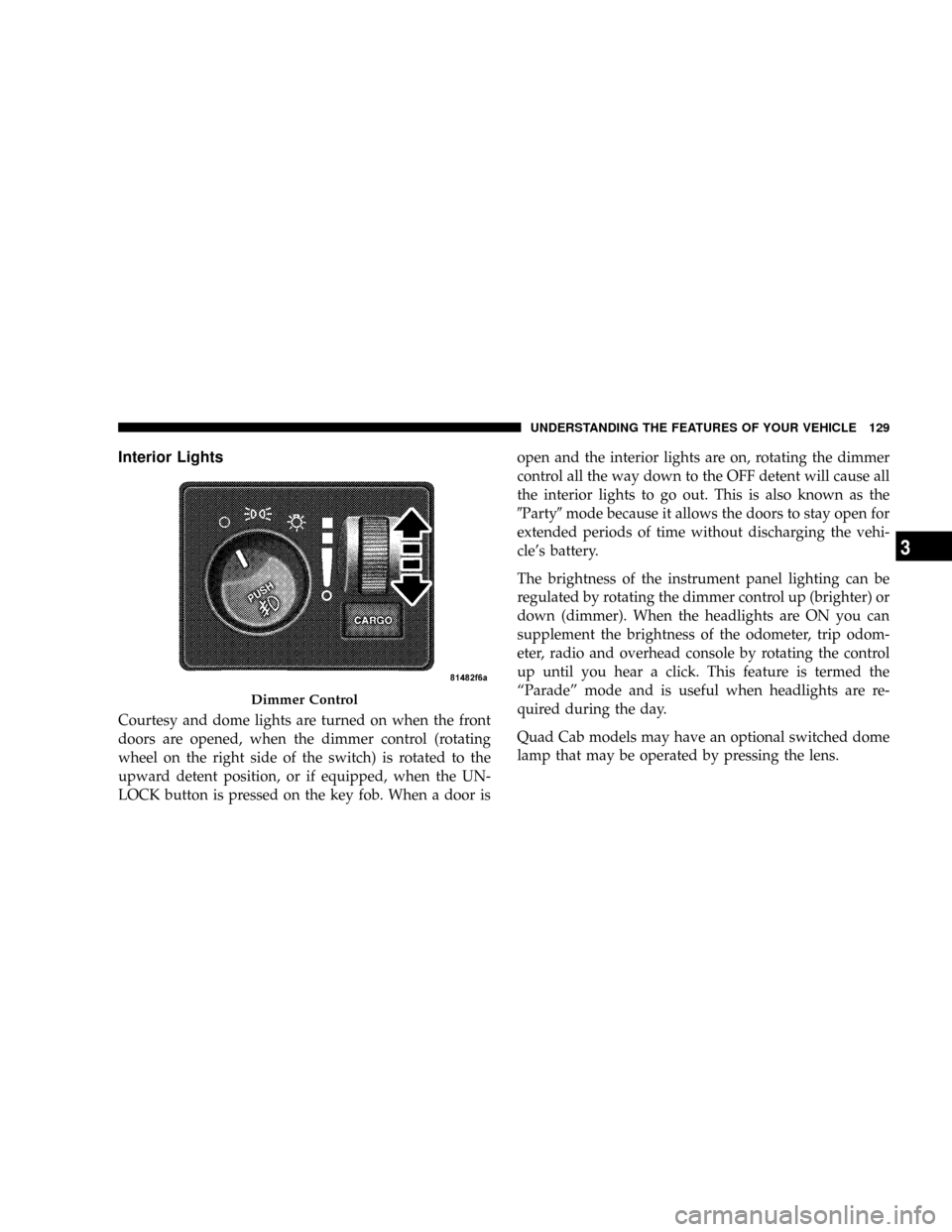
Interior Lights
Courtesy and dome lights are turned on when the front
doors are opened, when the dimmer control (rotating
wheel on the right side of the switch) is rotated to the
upward detent position, or if equipped, when the UN-
LOCK button is pressed on the key fob. When a door isopen and the interior lights are on, rotating the dimmer
control all the way down to the OFF detent will cause all
the interior lights to go out. This is also known as the
9Party9mode because it allows the doors to stay open for
extended periods of time without discharging the vehi-
cle's battery.
The brightness of the instrument panel lighting can be
regulated by rotating the dimmer control up (brighter) or
down (dimmer). When the headlights are ON you can
supplement the brightness of the odometer, trip odom-
eter, radio and overhead console by rotating the control
up until you hear a click. This feature is termed the
ªParadeº mode and is useful when headlights are re-
quired during the day.
Quad Cab models may have an optional switched dome
lamp that may be operated by pressing the lens.
Dimmer Control
UNDERSTANDING THE FEATURES OF YOUR VEHICLE 129
3
Page 152 of 504

To do this, press and hold the two outside buttons for 20
seconds. Release the buttons when the indicators start to
flash.
It is recommended that anew batterybe placed in the
hand-held transmitter of the device being programmed
to HomeLinktfor more efficient training and accurate
transmission of the radio-frequency signal.
Your vehicle should be parked outside of the garage
while training.
1. Turn the ignition switch to the ON/RUN position.
2. Place the hand-held transmitter 1±3 inches (3±8 cm)
from the HomeLinktbuttons while keeping the
HomeLinktdisplay in view.
For optimal training, point the battery end of the hand-
held transmitter away from the HomeLinkt.3. Simultaneously press and hold both the chosen
HomeLinktbutton and the hand-held transmitter button
until the indicator(s) change from a slow to a rapid flash
rate.
Then release both the HomeLinktand hand-held trans-
mitter buttons.
It may take up to 30 seconds, or longer in rare cases. The
garage door may open & close while you train.
If the signal is too weak to train, replace the battery in the
original hand-held transmitter.
NOTE:Some gate operators and garage door openers
may require you to replace Step #3 with procedures
noted in the ªGate Operator/Canadian Programmingº
section.
152 UNDERSTANDING THE FEATURES OF YOUR VEHICLE
Page 154 of 504

7. Return to the vehicle and press the programmed
HomeLinktbutton twice (holding the button for 2 sec-
onds each time). If the device is plugged in and activates,
programming is complete.
If the device does not activate, press the button a third
time (for 2 seconds) to complete the training.
If you are have any problems, or require assistance,
please call toll-free 1±800±355±3515 or, on the Internet at
www.HomeLink.com for information or assistance.
To program the remaining two HomeLinktbuttons,
repeat each step for each remaining button. DO NOT
erase the channels.
Gate Operator/Canadian Programming
Canadian radio-frequency laws require transmitter sig-
nals to ªtime-outº (or quit) after several seconds of
transmission ± which may not be long enough for
HomeLinktto pick up the signal during programming.Similar to this Canadian law, some U.S. gate operators are
designed to ªtime-outº in the same manner.
It may be helpful to unplug the device during the cycling
process to prevent possible overheating of the garage
door or gate motor.
If you are having difficulties programming a garage door
opener or a gate operator, replace ªProgramming
HomeLinkº Step 3 with the following:
3. Continue to press and hold the HomeLinktbutton
while you press and release - every two seconds
(ªcycleº) your hand-held transmitter until
HomeLinkthas successfully accepted the frequency
signal. The indicator(s) will change from a slow to
rapid flash when trained.
If you unplugged the device for training, plug it back in
at this time.
154 UNDERSTANDING THE FEATURES OF YOUR VEHICLE
Page 173 of 504
UNDERSTANDING YOUR INSTRUMENT PANEL
CONTENTS
mInstruments And Controls.................177
mInstrument Cluster......................178
mInstrument Cluster Description.............179
mElectronic Digital Clock..................190
NClock Setting Procedure.................190
mRadio General Information................191
NRadio Broadcast Signals.................191
NTwo Types Of Signals..................191
NElectrical Disturbances..................191NAM Reception.......................191
NFM Reception........................191
mSales Code REF Ð AM/FM/CD (Single Disc)
Radio With Optional Satellite Radio And Hands
Free Phone Capability...................192
NOperating Instructions - Radio Mode.......192
NOperation Instructions - CD Mode.........196
NOperation Instructions - Auxiliary Mode.....198
NOperating Instructions - Hands Free Phone Ð
If Equipped.........................1994
Page 174 of 504

NOperating Instructions - Satellite Radio Ð
If Equipped.........................199
mSales Code RAQ ± AM/FM/CD (6-Disc) Radio
With Optional Satellite Radio, Hands Free Phone,
And Vehicle Entertainment Systems (VES)
Capabilities...........................200
NOperating Instructions - Radio Mode.......200
NOperation Instructions - (CD Mode For CD
Audio Play).........................205
NLoad/Eject Button (CD Mode For CD Audio
Play)..............................207
NNotes On Playing MP3 Files.............208
NOperation Instructions - (CD Mode For MP3
Audio Play).........................211
NLoad/Eject Button (CD Mode For MP3 Play) . . 211mSales Code RAK ± AM/FM/Cassette/CD (6-Disc)
Radio With Optional Satellite Radio, Hands Free
Phone, Video, MP3, And WMA Capabilities....213
NOperating Instructions - Radio Mode.......213
NOperating Instructions Ð Tape Player.......218
NSeek Button.........................218
NFast Forward (FF).....................218
NRewind (RW)........................218
NTape Eject...........................218
NScan Button.........................219
NChanging Tape Direction................219
NMetal Tape Selection...................219
NPinch Roller Release...................219
NNoise Reduction......................219
174 UNDERSTANDING YOUR INSTRUMENT PANEL
Page 175 of 504
NOperation Instructions - (CD Mode For CD
Audio Play).........................219
NLoad/Eject Button (CD Mode For CD Audio
Play)..............................220
NNotes On Playing MP3 Files.............222
NOperation Instructions - (CD Mode For MP3
And WMA Audio Play).................225
NLoad/Eject Button (CD Mode For MP3 And
WMA Play).........................225
mSales Code REC Ð AM/FM/CD (6±Disc) Radio
With Navigation System..................227
NOperating Instructions Ð Satellite Radio
(If Equipped)........................228
NREC Setting The Clock.................228
NAudio Clock Display...................230mSatellite Radio Ð If Equipped..............231
NSystem Activation.....................231
NElectronic Serial Number/Sirius Identification
Number (ESN/SID)....................232
NSelecting Satellite Mode In REF, RAQ, And
RAK Radios.........................233
NSelecting a Channel....................233
NStoring And Selecting Pre-Set Channels......234
NUsing The PTY (Program Type) Button Ð
If Equipped.........................234
NPTY Button9Scan9.....................234
NPTY Button9Seek9.....................234
NSatellite Antenna......................234
NReception Quality.....................235
UNDERSTANDING YOUR INSTRUMENT PANEL 175
4
Page 176 of 504

mRemote Sound System Controls Ð If Equipped . . 235
NRadio Operation......................236
NTape Player.........................236
NCD Player..........................236
mCassette Tape And Player Maintenance.......237
mCompact Disc Maintenance................238
mRadio Operation And Cellular Phones........238mClimate Controls.......................239
NHeater Only Ð Fleet Vehicles.............239
NAir Conditioning And Heating Ð
If Equipped.........................242
NAir Conditioning With Dual Zone Temperature
Control Ð If Equipped.................245
NOperating Tips.......................249
NOperating Tips Chart...................251
176 UNDERSTANDING YOUR INSTRUMENT PANEL
Page 177 of 504
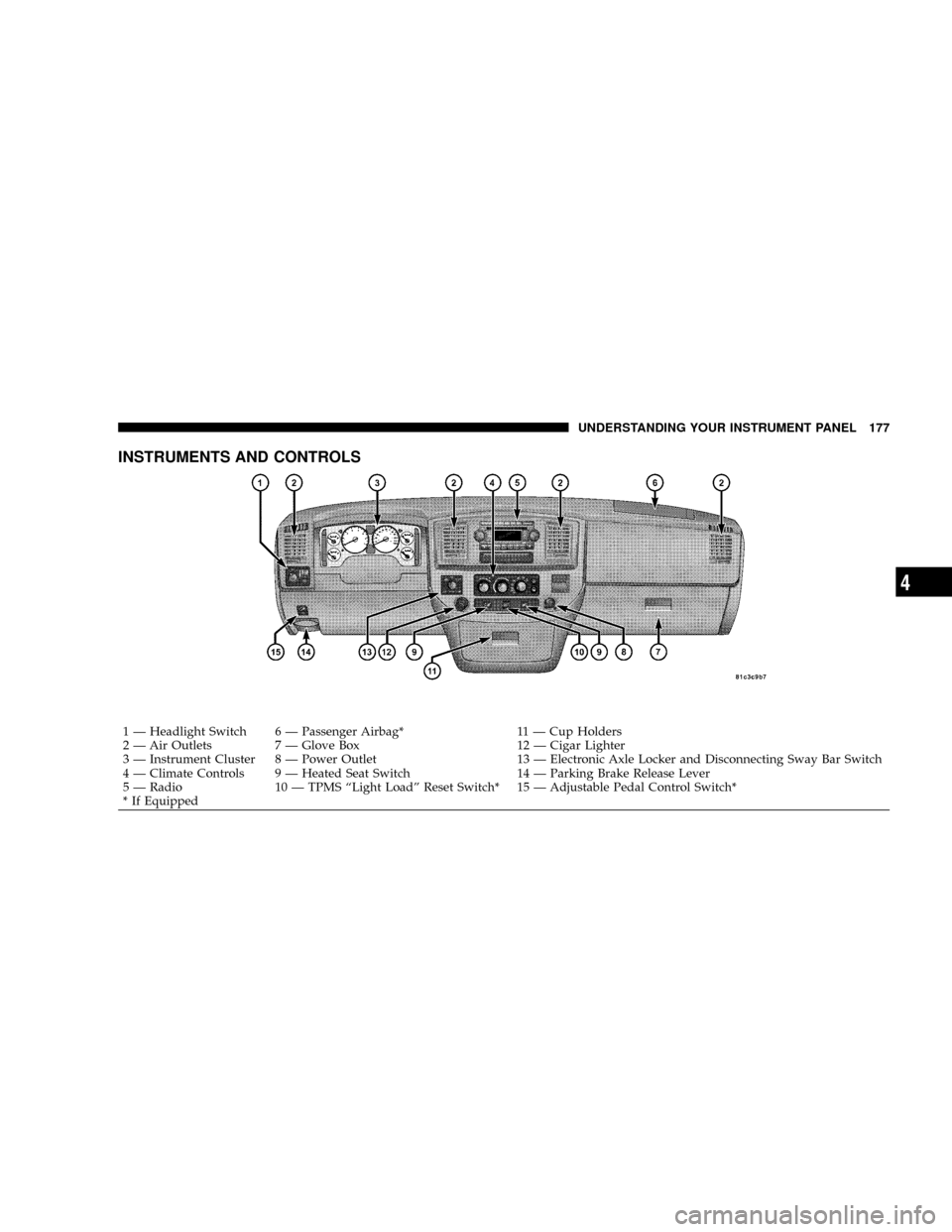
INSTRUMENTS AND CONTROLS
1 Ð Headlight Switch 6 Ð Passenger Airbag* 11 Ð Cup Holders
2 Ð Air Outlets 7 Ð Glove Box 12 Ð Cigar Lighter
3 Ð Instrument Cluster 8 Ð Power Outlet 13 Ð Electronic Axle Locker and Disconnecting Sway Bar Switch
4 Ð Climate Controls 9 Ð Heated Seat Switch 14 Ð Parking Brake Release Lever
5 Ð Radio 10 Ð TPMS ªLight Loadº Reset Switch* 15 Ð Adjustable Pedal Control Switch*
* If EquippedUNDERSTANDING YOUR INSTRUMENT PANEL 177
4
Page 190 of 504

fuel warning is set to a specified fuel tank volume and
DTE is an estimated distance calculation based on vehicle
fuel economy and remaining fuel tank volume.
Ram fuel tank volumes are as follows:
²34 gallons - short box models
²35 gallons - long box models
29. CRUISE Light
This indicator lights when the electronic speed control
system is turned on.
ELECTRONIC DIGITAL CLOCK
The clock and radio each use the display panel built into
the radio. A digital readout shows the frequency and/or
time in hours and minutes (depending on your radio
model) whenever the ignition switch is in the ªONº or
ªACCº position.When the ignition switch is in the ªOFFº position, or
when the radio frequency is being displayed, time keep-
ing is accurately maintained.
On the RAQ radio the time button alternates the location
of the time and frequency on the display. On the REF only
one of the two, time or frequency is displayed at a time.
Clock Setting Procedure
1. Press and hold the time button until the hours blink.
2. Adjust the hours by turning the right side Tune /
Audio control.
3. After the hours are adjusted, press the right side Tune
/ Audio control to set the minutes.
4. Adjust the minutes using the right side Tune / Audio
control.
5. To exit, press any button/knob or wait approximately
5 seconds.
190 UNDERSTANDING YOUR INSTRUMENT PANEL
Page 191 of 504
RADIO GENERAL INFORMATION
Radio Broadcast Signals
Your new radio will provide excellent reception under
most operating conditions. Like any system, however, car
radios have performance limitations, due to mobile opera-
tion and natural phenomena, which might lead you to
believe your sound system is malfunctioning. To help you
understand and save you concern about these ªapparentº
malfunctions, you must understand a point or two about
the transmission and reception of radio signals.
Two Types of Signals
There are two basic types of radio signals... AM or
Amplitude Modulation, in which the transmitted sound
causes the amplitude, or height, of the radio waves to
vary... and FM or Frequency Modulation, in which the
frequency of the wave is varied to carry the sound.
Electrical Disturbances
Radio waves may pick up electrical disturbances during
transmission. They mainly affect the wave amplitude,
and thus remain a part of the AM reception. They
interfere very little with the frequency variations that
carry the FM signal.
AM Reception
AM sound is based on wave amplitude, so AM reception
can be disrupted by such things as lightning, power lines
and neon signs.
FM Reception
Because FM transmission is based on frequency varia-
tions, interference that consists of amplitude variations
can be filtered out, leaving the reception relatively clear,
which is the major feature of FM radio.
UNDERSTANDING YOUR INSTRUMENT PANEL 191
4