ESP DODGE RAM 3500 DIESEL 2008 3.G Owner's Manual
[x] Cancel search | Manufacturer: DODGE, Model Year: 2008, Model line: RAM 3500 DIESEL, Model: DODGE RAM 3500 DIESEL 2008 3.GPages: 527, PDF Size: 8.88 MB
Page 223 of 527
Playlist files are not supported. MP3 Pro files are not
supported.
Playback of MP3 Files
When a medium containing MP3 data is loaded, the
radio checks all files on the medium. If the medium
contains a lot of folders or files, the radio will take more
time to start playing the MP3 files.
Loading times for playback of MP3 files may be affected
by the following:
²Media - CD-RW media may take longer to load than
CD-R media
²Medium formats - Multisession discs may take longer
to load than non-multisession discs
²Number of files and folders - Loading times will
increase with more files and foldersTo increase the speed of disc loading, it is recommended
to use CD-R media and single-session discs. To create a
single-session disc, enable the Disc at Once option before
writing to the disc.
Operating Instructions - (CD Mode for MP3 Audio
Play)
SEEK Button (CD Mode for MP3 Play)
Pressing the right side of the SEEK button plays the next
MP3 File. Pressing the left side of the SEEK button plays
the beginning of the MP3 file. Pressing the button within
the first ten seconds plays the previous file.
LOAD/EJECT Button (CD Mode for MP3 Play)
LOAD/EJECT - Load
Press the LOAD/ EJECT button and the push-
button with the corresponding number where
the CD is being loaded. The radio will display
UNDERSTANDING YOUR INSTRUMENT PANEL 221
4
Page 224 of 527
PLEASE WAIT and prompt when to INSERT DISC. After
the radio displays9LOAD DISC9insert the CD into the
player.
Radio display will show9LOADING DISC9when the disc
is loading.
LOAD/EJECT - Eject
Press the LOAD/ EJECT button and the push-
button with the corresponding number where
the CD was loaded and the disc will unload
and move to the entrance for easy removal.
Radio display will show9EJECTING DISC9when the disc
is being ejected and prompt the user to remove the disc.
If you have ejected a disc and have not removed it within
15 seconds, it will be reloaded. If the CD is not removed,
the radio will continue to play the non-removed CD. If
the CD is removed and there are other CDs in the radio,
the radio will play the next CD after a two minute
timeout. If the CD is removed and there are no other CD'sin the radio, the radio will remain in CD mode and
display9INSERT DISCº for two minutes. After two
minutes the radio will go to the previous tuner mode.
MSG or INFO Button (CD Mode for MP3 Play)
Press and MSG or INFO button while playing MP3 disc.
The radio scrolls through the following TAG information:
Song Title, Artist, File Name, and Folder Name (if avail-
able).
Press the MSG or INFO button once more to return to
9elapsed time9priority mode.
Press and hold the MSG or INFO button while in the
message display priority mode or elapsed time display
priority mode will display the song title for each file.
RW/FF (CD Mode for MP3 Play)
Press the FF side of the button to move forward through
the MP3 selection.
222 UNDERSTANDING YOUR INSTRUMENT PANEL
Page 233 of 527
If you insert a disc with the ignition ON and the radio
ON, the unit will switch from radio to CD mode and
begin to play when you insert the disc. The display will
show the disc number, the track number, and index time
in minutes and seconds. Play will begin at the start of
track one.
SEEK Button (CD Mode for CD Audio Play)
Press the right side of the SEEK button for the next
selection on the CD. Press the left side of the button to
return to the beginning of the current selection, or return
to the beginning of the previous selection if the CD is
within the first five seconds of the current selection.
SCAN Button (CD Mode for CD Audio Play)
Press the SCAN button to scan through each track on the
CD currently playing.
LOAD/EJECT Button (CD Mode for CD Audio
Play)
LOAD/EJECT - Load
Press the LOAD/EJT button and the push-
button with the corresponding number where
the CD is being loaded. The radio will display
PLEASE WAIT and prompt when to INSERT
DISC. After the radio displays9INSERT DISC,9insert the
CD into the player.
Radio display will show9LOADING DISC9when the disc
is loading and ªREADING DISCº when the radio is
reading the disc.
LOAD/EJT - Eject
Press the LOAD/EJT button and the push-
button with the corresponding number where
the CD was loaded and the disc will unload
and move to the entrance for easy removal.
UNDERSTANDING YOUR INSTRUMENT PANEL 231
4
Page 238 of 527
Operating Instructions - (CD Mode for MP3 and
WMA Audio Play)
SEEK Button (CD Mode for MP3 and WMA Play)
Pressing the right side of the SEEK button plays the next
file. Pressing the left side of the SEEK button plays the
beginning of the file. Pressing the button within the first
10 seconds plays the previous file.
LOAD/EJECT Button (CD Mode for MP3 and WMA
Play)
LOAD/EJT - Load
Press the LOAD/EJT button and the push-
button with the corresponding number where
the CD is being loaded. The radio will display
PLEASE WAIT and prompt when to INSERT
DISC. After the radio displays9INSERT DISC,9insert the
CD into the player.The radio display will show9LOADING DISC9when the
disc is loading.
LOAD/EJT - Eject
Press the LOAD/EJT button and the push-
button with the corresponding number where
the CD was loaded and the disc will unload
and move to the entrance for easy removal.
Radio display will show9EJECTING DISC9when the disc
is being ejected and prompt the user to remove the disc.
If you have ejected a disc and have not removed it within
15 seconds, it will be reloaded. If the CD is not removed,
the radio will continue to play the non-removed CD. If
the CD is removed and there are other CDs in the radio,
the radio will play the next CD after a two-minute
timeout. If the CD is removed and there are no other CDs
in the radio, the radio will remain in CD mode and
display9INSERT DISCº for two minutes. After two
minutes, the radio will go to the previous tuner mode.
236 UNDERSTANDING YOUR INSTRUMENT PANEL
Page 263 of 527
Summer Operation
Air conditioned vehicles must be protected with a high
quality antifreeze coolant during summer to provide
proper corrosion protection and to raise the boiling point
of the coolant for protection against overheating. A 50 %
concentration is recommended. For proper coolant type,
refer to ªRecommended Fluids and Genuine Partsº in
Section 7.
When using the air conditioner in extremely heavy traffic
in hot weather, especially when towing a trailer, addi-
tional engine cooling may be required. If this situation is
encountered, operate the transmission in a lower gear to
increase engine RPM, coolant flow and fan speed. When
stopped in heavy traffic, it may be necessary to shift into
NEUTRAL and depress the accelerator slightly for fast
idle operation to increase coolant flow and fan speed.NOTE:On models equipped with Diesel engines, the
idle speed will automatically increase to 1000 rpm at
elevated coolant temperatures to improve engine cooling.
Your air conditioning system is also equipped with an
automatic recirculation system. When the system senses
a heavy load or high heat conditions, it may use partial
Recirculation A/C mode to provide additional comfort.
Winter Operation
When operating the system during the Winter months,
make sure the air intake, located directly in front of the
windshield, is free of ice, slush, snow, or other obstruc-
tions.
UNDERSTANDING YOUR INSTRUMENT PANEL 261
4
Page 280 of 527
NOTE:High-speed, no-load running of a cold engine
can result in excessive white smoke and poor engine
performance. No-load engine speeds should be kept
under 1,200 rpm during the warm-up period, especially
in cold ambient temperature conditions.
If temperatures are below 32ÉF (0ÉC), operate the engine
at moderate speeds for 5 minutes before full loads are
applied.
Engine Idling
Avoid prolonged idling, long periods of idling may be
harmful to your engine because combustion chamber
temperatures can drop so low that the fuel may not burn
completely. Incomplete combustion allows carbon and
varnish to form on piston rings and injector nozzles.
Also, the unburned fuel can enter the crankcase, diluting
the oil and causing rapid wear to the engine.
CAUTION!
Extended periods of idle time may not allow the
vehicle's exhaust aftertreatment system to properly
regenerate. This can lead to the illumination of the
Malfunction Indicator Light (MIL) or an Electronic
Vehicle Information Center (EVIC) warning message.
Operating the engine for extended periods with the
MIL illuminated or an EVIC warning message dis-
played can cause extensive engine and exhaust sys-
tem damage.
NOTE:Your vehicle is equipped with a turbo speed
limiter, this feature limits the engine speed to 1200 rpm
when engine coolant temperatures are below 70ÉF (21ÉC).
This feature is designed to protect the turbo charger from
damage and will only operate in PARK or NEUTRAL.
278 STARTING AND OPERATING
Page 282 of 527
Stopping The Engine
Idle the engine a few minutes before routine shutdown.
After full load operation, idle the engine 3 to 5 minutes
before shutting it down. This idle period will allow the
lubricating oil and coolant to carry excess heat away from
the combustion chamber, bearings, internal components,
and turbocharger. This is especially important for turbo-
charged, charge air cooled engines.
NOTE:During engine shutdown on vehicles equipped
with manual transmissions, it is normal for the diesel
engine to resonate heavily for a moment during engine
shut off. When the engine is connected to a manual
transmission, this resonance causes loud gear rattle from
the transmission. This is commonly referred to as ªshut
down rattleº. The manufacturer recommends performing
engine shut down with the clutch pedal pushed to the
floor (clutch disengaged). When engine shut down is
performed in this manner the rattle is reduced (not
eliminated).Driving
ConditionLoadTurbo-
charger
TemperatureIdle Time
(min.) Be-
fore Engine
Shutdown
Stop and
GoEmpty Cool Less than
One
Stop and
GoMedium One
Highway
SpeedsMedium Warm Two
City Traffic Maximum
GCWRThree
Highway
SpeedsMaximum
GCWRFour
Uphill
GradeMaximum
GCWRHot Five
280 STARTING AND OPERATING
Page 292 of 527
NOTE:To select the proper gear position for maximum
deceleration (engine braking), simply press and hold the
switch down (-). The transmission will shift to the range
from which the vehicle can best be slowed down.
Torque Converter Clutch
A feature designed to improve fuel economy has been
included in the automatic transmission on your vehicle.
A clutch within the torque converter engages automati-
cally at calibrated speeds. This may result in a slightly
different feeling or response during normal operation in
the upper gears. When the vehicle speed drops or during
acceleration when the transmission downshifts to second
gear, the clutch automatically disengages.NOTE:The torque converter clutch will not engage
until the transmission fluid and engine coolant are warm
[usually after 1-3 miles (1.6 - 4.8 km) of driving]. Because
the engine speed is higher when the torque converter
clutch is not engaged, it may seem as if the transmission
is not shifting into Overdrive when cold. This is normal.
Pressing the TOW HAUL O/D OFF button, when the
transmission is sufficiently warm, will demonstrate that
the transmission is able to shift into and out of Overdrive.
NOTE:If the vehicle has not been driven in several
days, the first few seconds of operation after shifting the
transmission into gear may seem sluggish. This is due to
the fluid partially draining from the torque converter into
the transmission. This condition is normal and will not
cause damage to the transmission. The torque converter
will refill within five seconds of shifting from PARK into
any other gear position.
290 STARTING AND OPERATING
Page 293 of 527
MANUAL TRANSMISSION
WARNING!
You or others could be injured if you leave the
vehicle unattended without having the parking
brake fully applied. The parking brake should al-
ways be applied when the driver is not in the vehicle,
especially on an incline.
CAUTION!
Never drive with your foot resting on the clutch
pedal, or attempt to hold the vehicle on a hill with the
clutch pedal partially engaged, as this will cause
abnormal wear on the clutch.NOTE:During cold weather, you may experience in-
creased effort in shifting until the transmission fluid
warms up. This is normal.
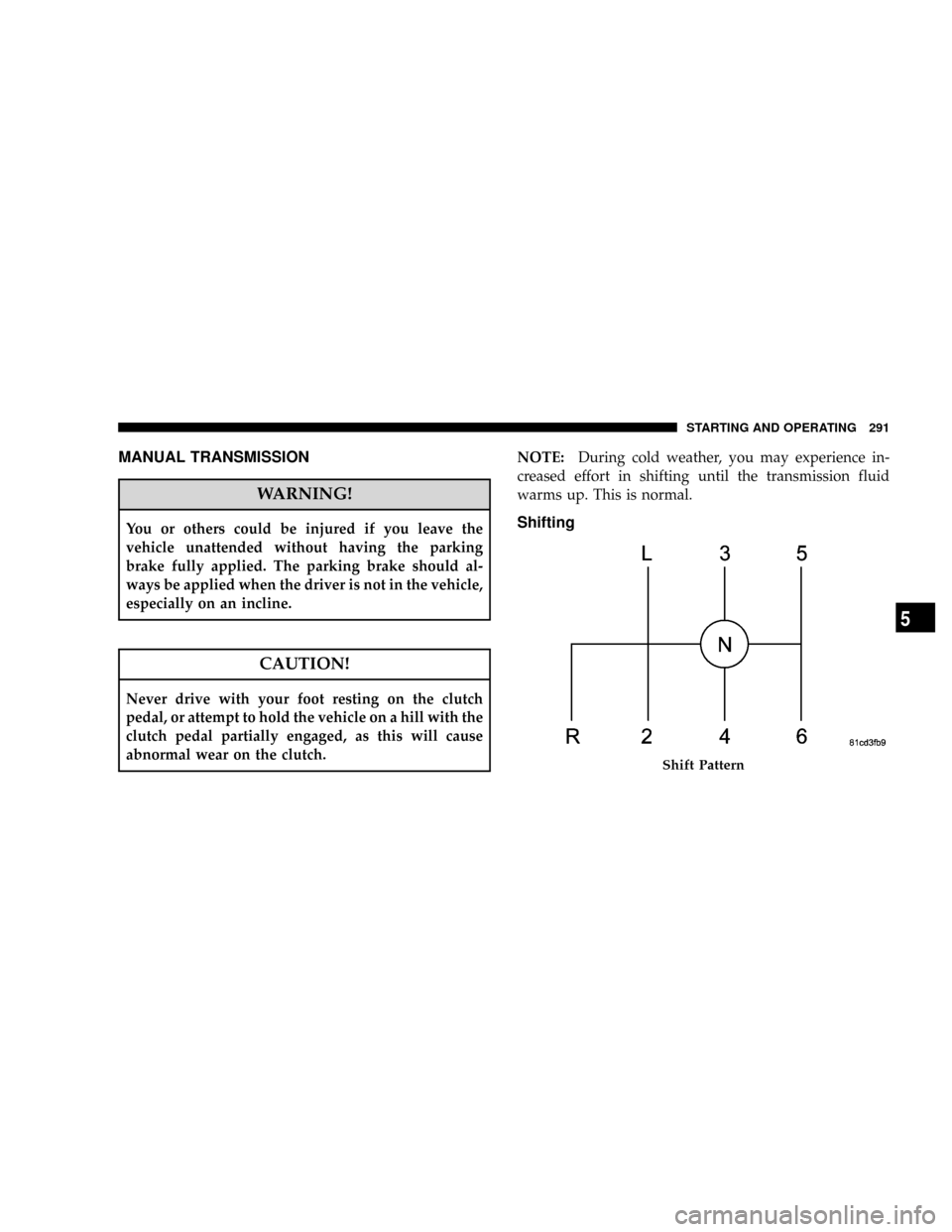
Shifting
Shift Pattern
STARTING AND OPERATING 291
5
Page 308 of 527
LIMITED-SLIP DIFFERENTIAL Ð IF EQUIPPED
The limited-slip differential provides additional traction
on snow, ice, mud, sand and gravel, particularly when
there is a difference between the traction characteristics
of the surface under the right and left rear wheels. During
normal driving and cornering, the limited-slip unit per-
forms similarly to a conventional differential. On slip-
pery surfaces, however, the differential delivers more of
the driving effort to the rear wheel having the better
traction.
The limited-slip differential is especially helpful during
slippery driving conditions. With both rear wheels on a
slippery surface, a slight application of the accelerator
will supply maximum traction. When starting with only
one rear wheel on an excessively slippery surface, slight
momentary application of the parking brake may be
necessary to gain maximum traction.WARNING!
On vehicles equipped with a limited-slip differen-
tial, never run the engine with one rear wheel off the
ground, since the vehicle may drive through the rear
wheel remaining on the ground. You could lose
control of the vehicle.
Care should be taken to avoid sudden accelerations when
both rear wheels are on a slippery surface. This could
cause both rear wheels to spin, and allow the vehicle to
slide sideways on the crowned surface of a road or in a
turn.
306 STARTING AND OPERATING