light DODGE RAM 4500 CHASSIS CAB 2008 3.G Owners Manual
[x] Cancel search | Manufacturer: DODGE, Model Year: 2008, Model line: RAM 4500 CHASSIS CAB, Model: DODGE RAM 4500 CHASSIS CAB 2008 3.GPages: 528, PDF Size: 7.84 MB
Page 466 of 528
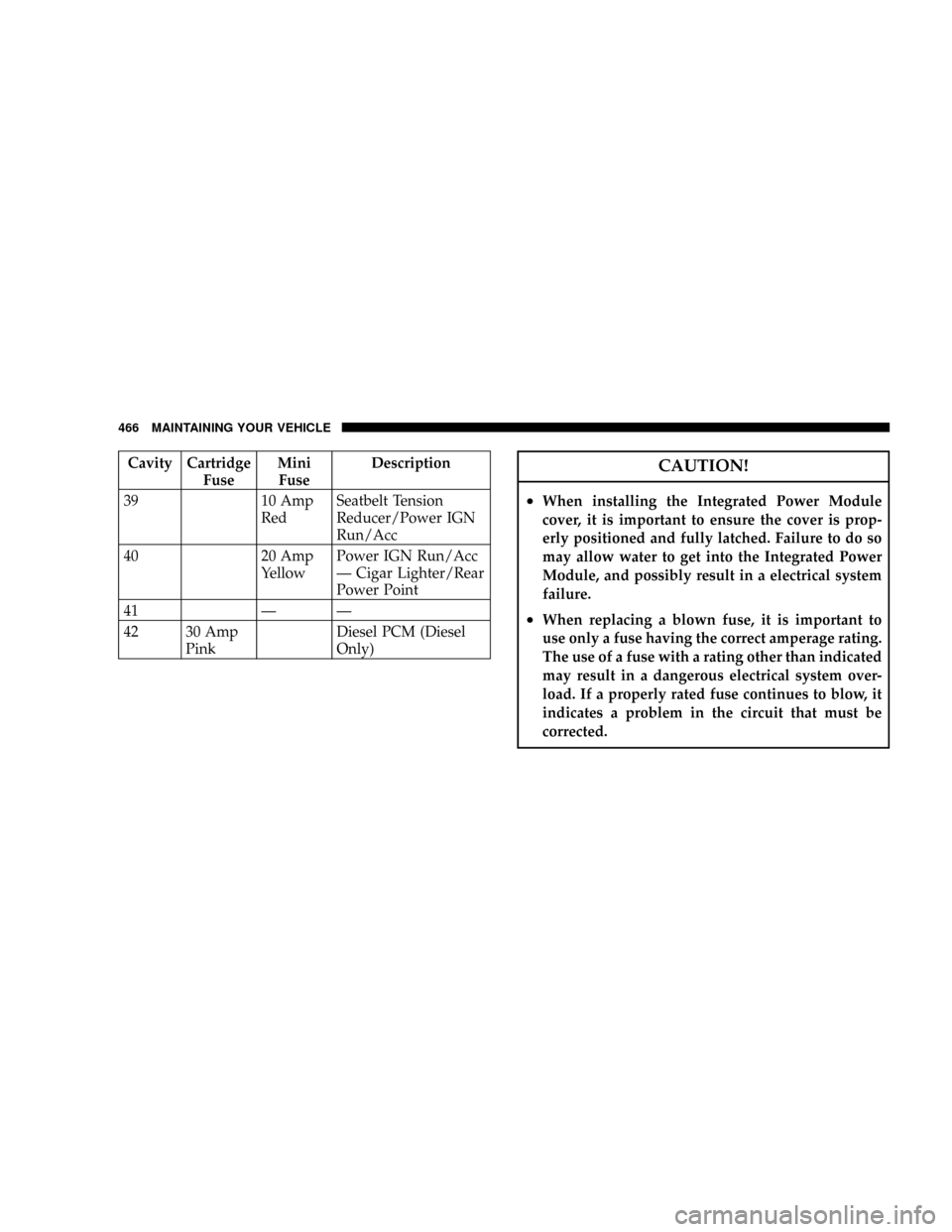
Cavity Cartridge
FuseMini
FuseDescription
39 10 Amp
RedSeatbelt Tension
Reducer/Power IGN
Run/Acc
40 20 Amp
YellowPower IGN Run/Acc
Ð Cigar Lighter/Rear
Power Point
41 Ð Ð
42 30 Amp
PinkDiesel PCM (Diesel
Only)CAUTION!
²When installing the Integrated Power Module
cover, it is important to ensure the cover is prop-
erly positioned and fully latched. Failure to do so
may allow water to get into the Integrated Power
Module, and possibly result in a electrical system
failure.
²When replacing a blown fuse, it is important to
use only a fuse having the correct amperage rating.
The use of a fuse with a rating other than indicated
may result in a dangerous electrical system over-
load. If a properly rated fuse continues to blow, it
indicates a problem in the circuit that must be
corrected.
466 MAINTAINING YOUR VEHICLE
Page 468 of 528

REPLACEMENT LIGHT BULBS
LIGHT BULBS Ð Inside Bulb No.
Overhead Console Lights............... TS212-2
Dome Light............................7679
NOTE:For lighted switches, see your dealer for replace-
ment instructions.
All of the inside bulbs are brass or glass wedge base.
Aluminum base bulbs are not approved.
LIGHT BULBS Ð Exterior Bulb No.
Back-Up..............................1156
Fog Lamp...........................9006LL
Headlamp (Halogen)..................... H13
Side Marker, Park & Turn Signal.............1157
Rear License Plate Lamp...................1157
Rear Cargo Light......................... 912
Tail & Stop............................1157
BULB REPLACEMENT
Headlight (Halogen)/Front Park and Turn Lights
CAUTION!
This is a halogen bulb. Avoid touching the glass with
your fingers. Reduced bulb life will result.
1. Open the hood
468 MAINTAINING YOUR VEHICLE
Page 469 of 528

2. Remove the two (2) bolts from the front of the head-
light housing.3. Remove the plug from the inner fender well and
remove the nut through the access hole.
Front Headlight Housing BoltsInner Fender Plug
MAINTAINING YOUR VEHICLE 469
7
Page 470 of 528

4. Pull the housing out from the fender to allow room to
disconnect the electrical connectors.
NOTE:For easier removal, pull the headlight assembly
straight forward, applying the greatest amount of force to
the outer edge of the headlight assembly.
Rear Headlight Housing Nut Access
Headlight Removal
470 MAINTAINING YOUR VEHICLE
Page 471 of 528

5. Unlock and pull connector straight from the base of
the headlight halogen bulb.
6. Twist connector on the side marker/turn signal/park
light bulb
1¤4turn and remove connector and bulb from
housing.
7. Remove housing from vehicle with headlight halogen
bulb in housing.
8. Twist the headlight halogen bulb
1¤4turn and remove
headlight bulb from the housing.
9. Replace headlight or side marker/turn signal/park
light bulb. Do not touch the headlight halogen bulb.
10. Reverse procedure for installation of bulbs and hous-
ing.
Bulb Removal
MAINTAINING YOUR VEHICLE 471
7
Page 472 of 528

Fog Lights
1. Reach under the vehicle, unlock and twist connector
counterclockwise1¤4turn and remove connector and bulb
from housing.2. Pull bulb straight from the connector.
3. Reverse procedure for installation of bulbs and hous-
ing.
472 MAINTAINING YOUR VEHICLE
Page 473 of 528

Cab Top Clearance Lights Ð If Equipped
1. Remove the two screws from the top of the light.2. Rotate the socket
1¤4turn and pull it from the light
assembly.
MAINTAINING YOUR VEHICLE 473
7
Page 481 of 528

²Check the windshield washer solvent and add if
required. When refilling the washer fluid reservoir,
take some washer fluid and apply it to a cloth or towel
and wipe clean the wiper blades, this will help blade
performance.
Once a Month
²Check tire pressure and look for unusual wear or
damage.
²Inspect the batteries and clean and tighten the termi-
nals as required.
²Check the fluid levels of coolant reservoir, transmis-
sion and transfer case (if equipped), add as needed.
²Check master cylinder reservoir fluid level for indica-
tions of brake maintenance.
²Check Filter MinderŸ. Replace air cleaner filter
element if necessary.
²Check all lights and all other electrical items for correct
operation.
At Each Oil Change
²Change the engine oil filter.
²Inspect the exhaust system.
²Inspect the brake hoses.
²Inspect the U-Joints ( if equipped) and front suspen-
sion components.
²Check the automatic transmission fluid level.
²Check the manual transmission fluid level.
²Check the coolant level, hoses, and clamps.
²Lubricate outer tie rod ends (4X4) models only.
²Lubricate Front Drive Shaft Fitting (4X4).
MAINTENANCE SCHEDULES 481
8
M
A
I
N
T
E
N
A
N
C
E
S
C
H
E
D
U
L
E
S
Page 492 of 528

²Change your engine oil more often if you drive your
vehicle off-road for an extended period of time.
²Under no circumstances should oil change intervals
exceed 6,000 miles (10,000 km) or 6 months, whichever
comes first.
Your dealer will reset the oil change indicator message
after completing the scheduled oil change. If this sched-
uled oil change is performed by someone other than your
dealer the message can be reset by referring to the steps
described under ªOdometer/Trip Odometerº under ªIn-
strument Cluster Descriptionº in Section 4 of this
manual.
At Each Stop for Fuel
²Check the engine oil level about 5 minutes after a fully
warmed engine is shut off. Checking the oil level whilethe vehicle is on level ground will improve the accu-
racy of the oil level reading. Add oil only when the
level is at or below the ADD or MIN mark.
²Check the windshield washer solvent and add if
required.
Once a Month
²Check tire pressure and look for unusual wear or
damage.
²Inspect the battery and clean and tighten the terminals
as required.
²Check the fluid levels of coolant reservoir, brake
master cylinder, power steering and transmission and
add as needed.
²Check all lights and other electrical items for correct
operation.
492 MAINTENANCE SCHEDULES
8
M
A
I
N
T
E
N
A
N
C
E
S
C
H
E
D
U
L
E
S
Page 502 of 528

Customer Assistance For The Hearing Or Speech
Impaired (TDD/TTY)
To assist customers who have hearing difficulties, the
manufacturer has installed special TDD (Telecommuni-
cation Devices for the Deaf) equipment at its Customer
Center. Any hearing or speech impaired customer who
has access to a TDD or a conventional teletypewriter
(TTY) in the United States can communicate with the
manufacturer by dialing 1±800±380±CHRY.
Service Contract
You may have purchased a service contract for your
vehicle to help protect you from the high cost of unex-
pected repairs after your manufacturer's new vehicle
limited warranty expires. The manufacturer stands be-
hind only the manufacturer's Service Contracts. If you
purchased a manufacturer's Service Contract, you will
receive Plan Provisions and an Owner Identification Card
in the mail within three weeks of your vehicle delivery
date. If you have any questions about your servicecontract, call the manufacturer's Service Contract Na-
tional Customer Hotline at 1-800-521-9922.
The manufacturer will not stand behind any service
contract that is not the manufacturer's Service Contract. It
is not responsible for any service contract other than the
manufacturer's Service Contract. If you purchased a
service contract that is not a manufacturer's Service
Contract, and you require service after your manufactur-
er's new vehicle limited warranty expires, please refer to
your contract documents, and contact the person listed in
those documents.
We appreciate that you have made a major investment
when you purchased your new vehicle. Your dealer has
also made a major investment in facilities, tools, and
training to assure that you are absolutely delighted with
your ownership experience. You'll be pleased with their
sincere efforts to resolve any warranty issues or related
concerns.
502 IF YOU NEED CONSUMER ASSISTANCE