reset DODGE RAM 4500 CHASSIS CAB 2008 3.G Owner's Manual
[x] Cancel search | Manufacturer: DODGE, Model Year: 2008, Model line: RAM 4500 CHASSIS CAB, Model: DODGE RAM 4500 CHASSIS CAB 2008 3.GPages: 528, PDF Size: 7.84 MB
Page 189 of 528

Press the rotary TUNE control a fourth time and BAL will
display. Turn the TUNE control to the right or left to
adjust the sound level from the right or left side speakers.
Press the rotary TUNE control a fifth time and FADE will
display. Turn the TUNE control to the left or right to adjust
the sound level between the front and rear speakers.
Press the tune control again or wait 5 seconds to exit
setting tone, balance, and fade.
RND/SET Button (Radio Mode) To SET The
Push-Button Memory
When you are receiving a station that you wish to
commit to push-button memory, press the SET button.
The symbol SET 1 will now show in the display window.
Select the button (1-6) you wish to lock onto this station
and press and release that button. If a button is not
selected within 5 seconds after pressing the SET button,
the station will continue to play but will not be stored
into push-button memory.You may add a second station to each push-button by
repeating the above procedure with this exception: Press
the SET button twice and SET 2 will show in the display
window. Each button can be set for SET 1 and SET 2 in
both AM and FM. This allows a total of 12 AM, 12 FM,
and 12 Satellite (if equipped) stations to be stored into
push-button memory. The stations stored in SET 2
memory can be selected by pressing the push-button
twice.
Every time a preset button is used, a corresponding
button number will display.Preset Buttons1-6(Radio Mode)
These buttons tune the Radio to the stations that you
commit to push-button memory {12 AM, 12 FM, and 12
Satellite (if equipped) stations}.
UNDERSTANDING YOUR INSTRUMENT PANEL 189
4
Page 198 of 528
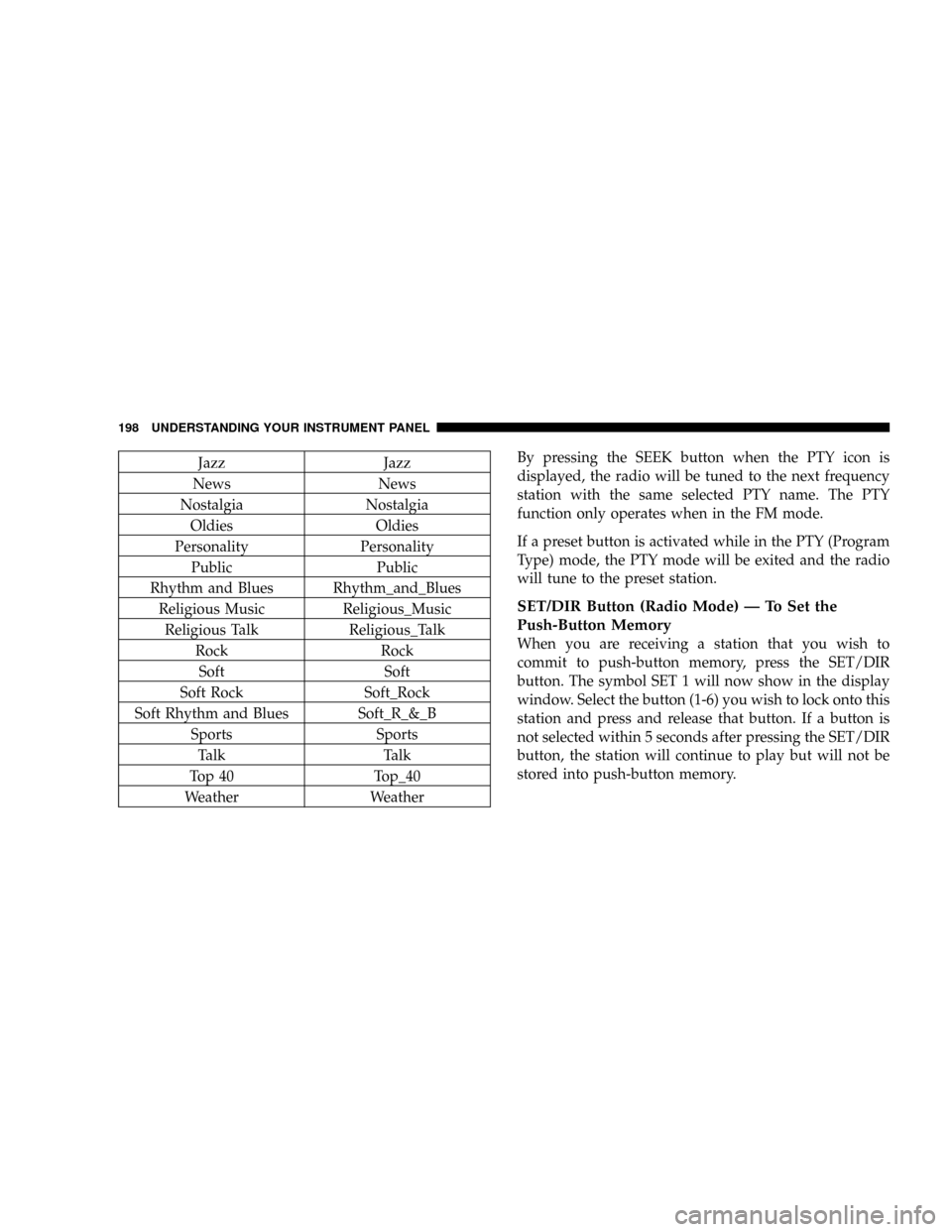
Jazz Jazz
News News
Nostalgia Nostalgia
Oldies Oldies
Personality Personality
Public Public
Rhythm and Blues Rhythm_and_Blues
Religious Music Religious_Music
Religious Talk Religious_Talk
Rock Rock
Soft Soft
Soft Rock Soft_Rock
Soft Rhythm and Blues Soft_R_&_B
Sports Sports
Talk Talk
Top 40 Top_40
Weather WeatherBy pressing the SEEK button when the PTY icon is
displayed, the radio will be tuned to the next frequency
station with the same selected PTY name. The PTY
function only operates when in the FM mode.
If a preset button is activated while in the PTY (Program
Type) mode, the PTY mode will be exited and the radio
will tune to the preset station.
SET/DIR Button (Radio Mode) Ð To Set the
Push-Button Memory
When you are receiving a station that you wish to
commit to push-button memory, press the SET/DIR
button. The symbol SET 1 will now show in the display
window. Select the button (1-6) you wish to lock onto this
station and press and release that button. If a button is
not selected within 5 seconds after pressing the SET/DIR
button, the station will continue to play but will not be
stored into push-button memory.
198 UNDERSTANDING YOUR INSTRUMENT PANEL
Page 199 of 528

You may add a second station to each push-button by
repeating the above procedure with this exception: Press
the SET/DIR button twice and SET 2 will show in the
display window. Each button can be set for SET 1 and
SET 2 in both AM and FM. This allows a total of 12 AM,12
FM and 12 Satellite (if equipped) stations to be stored into
push-button memory. The stations stored in SET 2
memory can be selected by pressing the push-button
twice.
Every time a preset button is used a corresponding
button number will be displayed.
Buttons1-6(Radio Mode)
These buttons tune the Radio to the stations that you
commit to push-button memory {12AM, 12 FM, and 12
Satellite (if equipped) stations}.
Operation Instructions - (CD MODE for CD Audio
Play)
NOTE:The ignition switch must be in the ON or ACC
position to operate the radio.
NOTE:Note: This Radio is capable of playing compact
discs (CD), recordable compact discs (CD-R), rewritable
compact discs (CD-RW) compact discs with MP3 tracks
and multisession compact discs with CD and MP3 tracks.
Inserting Compact Disc(s)
Gently insert one CD into the CD player with the CD
label facing up. The CD will automatically be pulled into
the CD Player and the CD icon will illuminate on the
radio display.
UNDERSTANDING YOUR INSTRUMENT PANEL 199
4
Page 212 of 528

If a preset button is activated while in the PTY (Program
Type) mode, the PTY mode will be exited and the radio
will tune to the preset station.
NOTE:If you have selected a PTY with the tune knob,
simply pressing the tune button in will go directly to a
ªPTY seekº.
Buttons1-6(Radio Mode)
These buttons tune the Radio to the stations that you
commit to push-button memory {12 AM, 12 FM, and 12
Satellite (if equipped) stations}.
Operating Instructions Ð Tape Player
Insert the cassette with the exposed tape side toward the
left and the mechanical action of the player will gently
pull the cassette into the play position.NOTE:When subjected to extremely cold temperatures,
the tape mechanism may require a few minutes to warm
up for proper operation. Sometimes poor playback may
be experienced due to a defective cassette tape. Clean and
demagnetize the tape heads at least twice a year.
Seek Button
Press the SEEK button up for the next selection on the
tape and down to return to the beginning of the current
selection.
Press the SEEK button up or down to move the track
number to skip forward or backward 1 to 6 selections.
Press the SEEK button once to move 1 selection, twice to
move 2 selections, etc.
212 UNDERSTANDING YOUR INSTRUMENT PANEL
Page 213 of 528

Fast Forward (FF)
Press the FF button up momentarily to advance the tape
in the direction that it is playing. The tape will advance
until the button is pressed again or the end of the tape is
reached. At the end of the tape, the tape will play in the
opposite direction.
Rewind (RW)
Press the RW button momentarily to reverse the tape
direction. The tape will reverse until the button is pressed
again or until the end of the tape is reached. At the end of
the tape, the tape will play in the opposite direction.
Tape Eject
Press this button and the cassette will disen-
gage and eject from the radio.
Scan Button
Press this button to play 10 seconds of each selection.
Press the scan button a second time to cancel the feature.
Changing Tape Direction
If you wish to change the direction of tape travel (side
being played), press Preset 6. The lighted arrow in the
display window will show the new direction.
Metal Tape Selection
If a standard metal tape is inserted into the player, the
player will automatically select the correct equalization.
Pinch Roller Release
If ignition power or the radio ON/OFF switch is turned
off, the pinch roller will automatically retract to protect
the tape from any damage. When power is restored to the
tape player, the pinch roller will automatically reengage
and the tape will resume play.
UNDERSTANDING YOUR INSTRUMENT PANEL 213
4
Page 214 of 528

Noise Reduction
The Dolby Noise Reduction System* is on whenever the
tape player is on, but may be switched off.
To turn off the Dolby Noise reduction System: Press
Preset 1 after you insert the tape. The NR light in the
display will go off when the Dolby System is off.
* ºDolbyº noise reduction is manufactured under license
from Dolby Laboratories Licensing Corporation. Dolby
and the double-D symbol are trademarks of Dolby Labo-
ratories Licensing Corporation.
Operation Instructions - (CD MODE for CD Audio
Play)
NOTE:The ignition switch must be in the ON or ACC
position to operate the radio.
NOTE:Note: This Radio is capable of playing compact
discs (CD), recordable compact discs (CD-R), rewritablecompact discs (CD-RW) compact discs with MP3 tracks
and multisession compact discs with CD and MP3 tracks
and WMA.
Inserting Compact Disc(s)
CAUTION!
This CD player will accept 4 3/4 inch (12 cm) discs
only. The use of other sized discs may damage the
CD player mechanism.
You may eject a disc with the radio OFF.
If you insert a disc with the ignition ON and the radio
ON, the unit will switch from radio to CD mode and
begin to play when you insert the disc. The display will
show the disc number, the track number, and index time
in minutes and seconds. Play will begin at the start of
track 1.
214 UNDERSTANDING YOUR INSTRUMENT PANEL
Page 259 of 528

²Allow the engine to idle about three minutes until
the manifold heaters have completed the post-heat
cycle.
²Release the parking brake and drive.
NOTE:Engine idle speed will automatically increase to
1000 rpm at low coolant temperatures to improve engine
warm-up.
NOTE:If the engine stalls or if the ignition switch is left
On for more than 2 minutes after the WAIT TO START
light goes out, reset the grid heaters by turning the
ignition switch to Off for at least 5 seconds and then back
On. Repeat steps 3 through 7 of the normal starting
procedure.
For Extremely Cold Weather Starting Ð Engine
Manifold Air Temperature Below 0ÉF (- 18ÉC)
In extremely cold weather below 0ÉF (- 18ÉC) it may be
beneficial to cycle the manifold heaters twice before
attempting to start the engine. This can be accomplished
by turning the ignition OFF for at least 5 seconds and
then back ON after the WAIT TO START light has gone
off, but before the engine is started. However, repeated
cycling of the manifold heaters will result in damage to
the heater elements or reduced battery voltage.
NOTE: If multiple pre-heat cycles are used before
starting, additional engine run time may be required to
maintain battery state of charge at a satisfactory level.
²If the engine stalls after the initial start, the ignition
must be turned to the OFF position for at least 5
seconds and then to the ON position to recycle the
manifold heaters.
STARTING AND OPERATING 259
5
Page 304 of 528

operation. To disengage PTO operation and return to
ªstandard vehicle operationº simply turn the up fitter
provided on/off switch to the off position.
NOTE:For application specific information with respect
to PTO and pump requirements and additional vehicle
information (wiring schematics, preset idle values, en-
gine speed limits, and vehicle hardware and software
requirements) please refer to the Dodge Body Builders
Guide by accessingªwww.dodge.com/bodybuilderºand
choosing the appropriate links.
Power Take Off ± Aftermarket Installation
If you did not order the PTO (Power Take Off) Prep
Package from the factory and want to convert your
vehicle, refer to the Body Builders Guide at
www.dodge.com/bodybuilder or contact the manufac-
turer directly at [email protected] (e-mail), 866±205±
4102 (toll free) or 313±493±2020.
DRIVING ON SLIPPERY SURFACES
When driving on wet or slushy roads, it is possible for a
wedge of water to build up between the tire and road
surface. This is known as hydroplaning and may cause
partial or complete loss of vehicle control and stopping
ability. To reduce this possibility, the following precau-
tions should be observed:
1. Slow down during rainstorms or when roads are
slushy.
2. Slow down if road has standing water or puddles.
3. Replace tires when tread wear indicators first become
visible.
4. Keep tires properly inflated.
5. Maintain sufficient distance between your vehicle and
the car in front to avoid a collision in a sudden stop.
304 STARTING AND OPERATING
Page 344 of 528
NOTE:Tighten the gas cap 1/4 turn until you hear one
click. This is an indication that the cap is properly
tightened.
If the gas cap is not tightened properly, the Malfunction
Indicator Light will come on, Be sure the gas cap is
tightened every time the vehicle is refueled.
WARNING!
A fire may result if gasoline is pumped into a
portable container that is inside of a vehicle. You
could be burned. Always place gas containers on the
ground while filling.
Loose Fuel Filler Cap Message
If the vehicles diagnostic system determines that the fuel
filler cap in loose, improperly installed, or damaged, a
GASCAP message will be displayed in the instrument
cluster. Tighten the gas cap until a ªclickingº sound is
heard. This is an indication that the gas cap is properly
tightened. Press the odometer reset button to turn the
message off. If the problem persists, the message will
appear the next time the vehicle is started. This might
indicate a damaged cap. If the problem is detected twice
in a row, the system will turn on the Malfunction
Indicator Light (MIL). Resolving the problem will turn
the MIL light off.
344 STARTING AND OPERATING
Page 367 of 528

Vehicle front end wheel alignment was set to specifica-
tions at the factory without consideration for the weight
of the plow. Front end tow-in should be checked and
reset if necessary at the beginning and end of the
snowplow season. This will help prevent uneven tire
wear.
The blade should be lowered whenever the vehicle is
parked.
Maintain and operate your vehicle and snowplow equip-
ment following the recommendations provided by the
specific snowplow manufacturer.
Over the Road Operation With Snowplow
Attached
The blade restricts air flow to the radiator and causes the
engine to operate at higher than normal temperatures.
Therefore, when transporting the plow, angle the blade
completely and position it as low as road or surfaceconditions permit. Do not exceed 40 mph (64 km/h). The
operator should always maintain a safe stopping distance
and allow adequate passing clearance.
Methods For Removing Snow
STARTING AND OPERATING 367
5