reset DODGE SPRINTER 2008 2.G User Guide
[x] Cancel search | Manufacturer: DODGE, Model Year: 2008, Model line: SPRINTER, Model: DODGE SPRINTER 2008 2.GPages: 666, PDF Size: 14.11 MB
Page 164 of 666
162 Controls in detailOperating system with steering wheel buttons*
3
Resetting settingsYou can reset the functions in all sub-
menus to the factory defaults.\1
Press the reset button for ap-
proximately 3 seconds.
You will see the message in the dis-
play prompting you to press the
reset button once more to confirm.
\1
Press reset button again.
The functions in most submenus are
reset to the factory defaults.
Resetting the functions of a submenuYou can reset the functions of an individ-
ual submenu to the factory defaults.\1
Select a function in a submenu.
\1
Press reset button for approxi-
mately 3 seconds.
You will see the message in the dis-
play prompting you to press the
reset button once more to confirm.
\1
Press reset button again.
Most functions in the submenu are
reset to the factory defaults.
iIf you do not press the reset but-
ton a second time to confirm, the
changed settings remain set. The Settings
menu is displayed again af-
ter approximately 5 seconds.
For safety reasons, it is not possible
to reset all of the functions while the
vehicle is in motion. For example, the
Hdlmp. mode
function in the
Lighting
submenu remains unchanged.
nf_BA.book Page 162 Friday, January 25, 2008 3:53 PM
Page 165 of 666
163 Controls in detail
Operating system with steering wheel buttons*
3
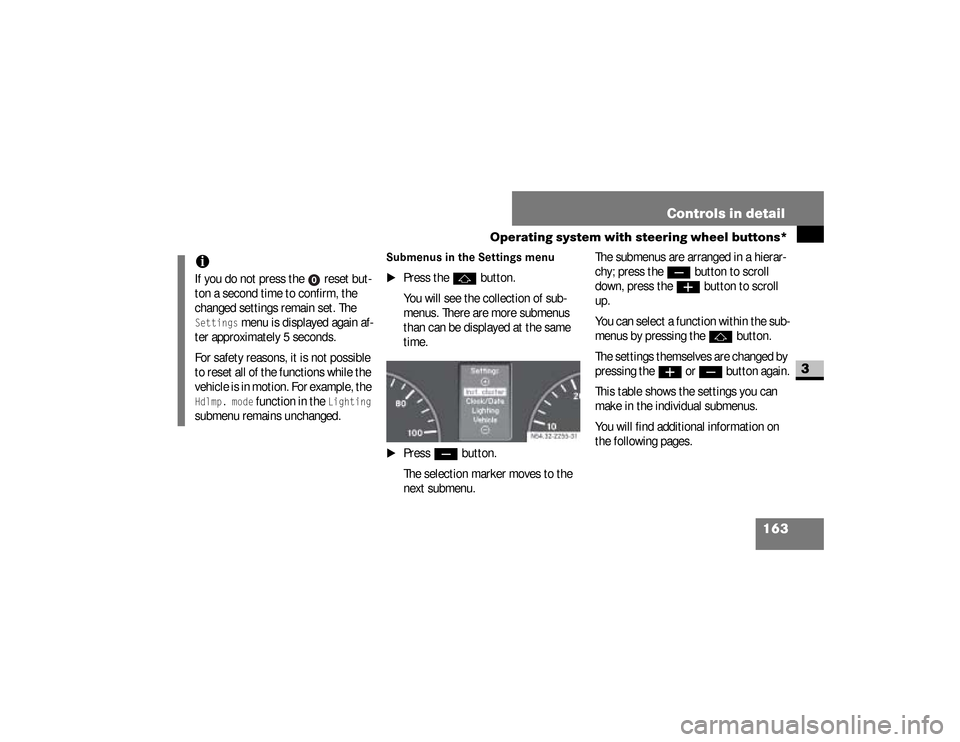
Submenus in the Settings menu
\1
Press the
j
button.
You will see the collection of sub-
menus. There are more submenus
than can be displayed at the same
time.
\1
Press
ç
button.
The selection marker moves to the
next submenu.The submenus are arranged in a hierar-
chy; press the
ç
button to scroll
down, press the
æ
button to scroll
up.
You can select a function within the sub-
menus by pressing thej
button.
The settings themselves are changed by
pressing the
æ
or
ç
button again.
This table shows the settings you can
make in the individual submenus.
You will find additional information on
the following pages.
iIf you do not press the reset but-
ton a second time to confirm, the
changed settings remain set. The Settings
menu is displayed again af-
ter approximately 5 seconds.
For safety reasons, it is not possible
to reset all of the functions while the
vehicle is in motion. For example, the
Hdlmp. mode
function in the
Lighting
submenu remains unchanged.
N54.32-2255-31
nf_BA.book Page 163 Friday, January 25, 2008 3:53 PM
Page 173 of 666
171 Controls in detail
Operating system with steering wheel buttons*
3
Setting constant headlamp mode*If you have set constant headlamp mode
and the light switch is at
M
, the fol-
lowing light up automatically when the
engine is running:
\4
The parking lamps and low-beam
headlamps
\4
The tail lamps
\4
The license plate lamp
For safety reasons, it is only possible to
change this setting when the vehicle is
stationary. The factory setting is
Con-
stant
in countries in which constant
headlamp mode is mandatory.
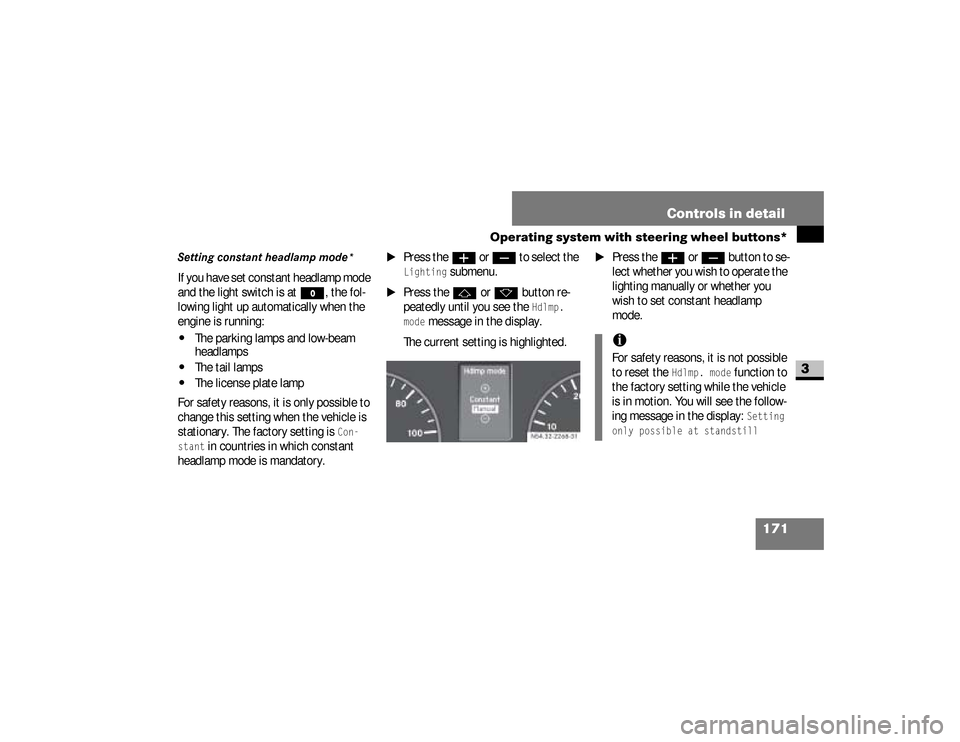
\1
Press the
æ
or
ç
to select the
Lighting
submenu.
\1
Press the
j
or
k
button re-
peatedly until you see the
Hdlmp.
mode
message in the display.
The current setting is highlighted.
\1
Press the
æ
or
ç
but ton to se -
lect whether you wish to operate the
lighting manually or whether you
wish to set constant headlamp
mode.
N54.32-2268-31
iFor safety reasons, it is not possible
to reset the
Hdlmp. mode
function to
the factory setting while the vehicle
is in motion. You will see the follow-
ing message in the display:
Setting
only possible at standstill
nf_BA.book Page 171 Friday, January 25, 2008 3:53 PM
Page 178 of 666

176 Controls in detailOperating system with steering wheel buttons*
3
\1
Press the
j
or
k
button re-
peatedly until you see the
Key
mes-
sage in the display.
The current setting is highlighted.
\1
Press the
æ
or
ç
button to
switch key dependence On or
Off
.The Trip computer menu displays statis-
tical data for your vehicle. N54.32-2273-31
iFor safety reasons, it is not possible
to set the
Key
function while the vehi-
cle is in motion. You will see the fol-
lowing message in the display:
Setting only possible at stand-
still
.
Trip computer menuFunction
Page
Consumption statistics after
start
177
Consumption statistics after
reset
177
Reset consumption statistics
178
iWhen you call up the trip computer
again, it always displays the con-
sumption statistics after start first.
The units of the trip computer are
country-specific and depend on the
setting in the
Instrument
submenu of
the
Settings
menu.
Function
Page
nf_BA.book Page 176 Friday, January 25, 2008 3:53 PM
Page 179 of 666
177 Controls in detail
Operating system with steering wheel buttons*
3
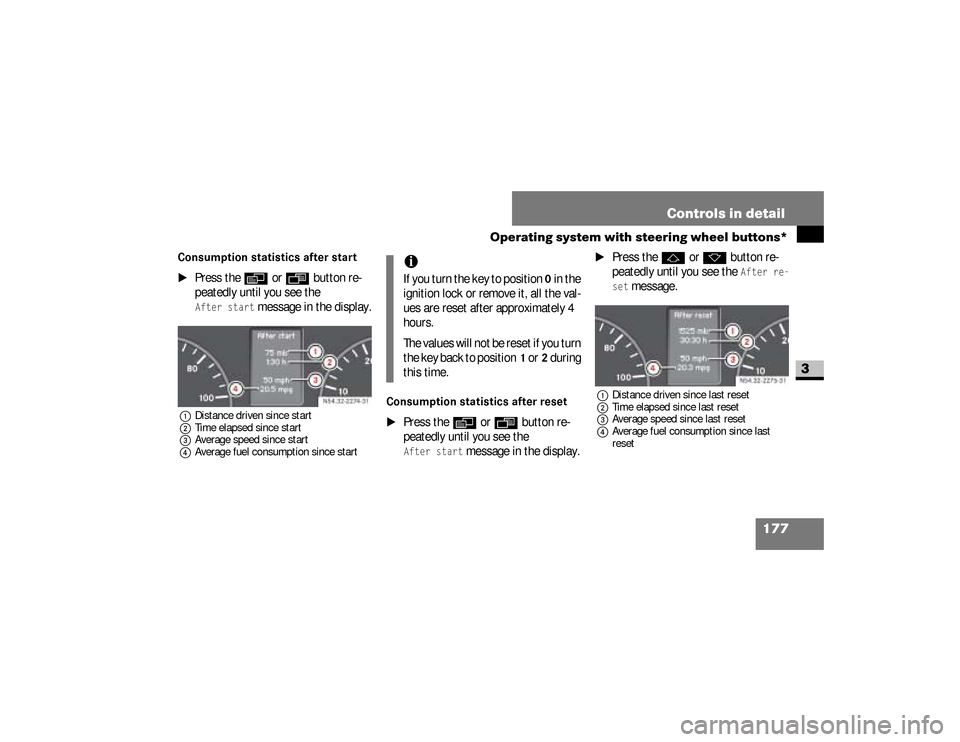
Consumption statistics after start
\1
Press the
è
or
ÿ
button re-
peatedly until you see the
After start
message in the display.
1Distance driven since start
2Time elapsed since start
3Average speed since start
4Average fuel consumption since start
Consumption statistics after reset
\1
Press the
è
or
ÿ
button re-
peatedly until you see the
After start
message in the display.
\1
Press the
j
or
k
button re-
peatedly until you see the
After re-
set
message.
1Distance driven since last reset
2Time elapsed since last reset
3Average speed since last reset
4Average fuel consumption since last
reset
N54.32-2274-31
iIf you turn the key to position
0 in the
ignition lock or remove it, all the val-
ues are reset after approximately 4
hours.
The values will not be reset if you turn
the key back to position
1 or
2 during
this time.
N54.32-2275-31
nf_BA.book Page 177 Friday, January 25, 2008 3:53 PM
Page 180 of 666
178 Controls in detailOperating system with steering wheel buttons*
3
Resetting the consumption statistics
\1
Press the
è
or
ÿ
button re-
peatedly until you see the
After start
message in the display.
\1
Press the
j
or
k
button re-
peatedly until you see the statistics
that you want to reset in the display.
\1
Press and hold the reset button
until the values are reset to 0.You can operate your cell phone using
the functions in the
TEL
menu, provided
it is connected to the manufacturer’s
hands-free system*.
iThe consumption statistics after
start are automatically reset after
999 hours or 9,999 miles (kilome-
ters).
The consumption statistics after re-
set are automatically reset after
9,999 hours or 99,999 miles (kilome-
ters).
Telephone menu
*
Warning
G
You must observe the legal requirements
for the country in which you are driving
when operating a cell phone in the vehi-
cle.
Continued
nf_BA.book Page 178 Friday, January 25, 2008 3:53 PM
Page 244 of 666
242 Controls in detailAuxiliary heating/ventilation*
3
\1
Press the
æ
or
ç
button to se-
lect the desired switch-on time. The
automatic switch-on is deactivated if
the
Timer off
setting is selected.
\1
Press the
è
button.
The switch-on time is selected.
The yellow indicator lamp in
the
ö
switch comes on.
Setting the switch-on time
Operating system without steering
wheel buttons
\1
Select a switch-on time as described
under “Selecting a switch-on time”
(\2
page 240).
\1
Press the reset button on the
in-
strument cluster to set the selected
switch-on time.
The hours figure flashes and
the
”
symbol appears in the dis-
play.
\1
Set the hours using the or
am
button on the
instrument cluster.
\1
Press the reset button.
The minute display flashes.
\1
Set the minutes using the
or button.
iYou can reach the
Aux. heat.
sub-
menu via the
Settings
menu
(
\2
page 161).
iIf you turn the key to position
0 in the
ignition lock, the yellow indicator
lamp in the
ö
switch goes out af-
ter 30 minutes.
The red indicator lamp in the
ö
switch comes on when the auxiliary
heating switches on.
nf_BA.book Page 242 Friday, January 25, 2008 3:53 PM
Page 247 of 666
245 Controls in detail
Open air
3
Resetting the side windowsThe side windows must be reset if the
battery has been disconnected:\1
Pull the two power window switches
until the side windows are closed.
\1
Hold the switches in this position for
about 1 second.
The side windows are reset.
Sliding sunroof*Warning
G
Make sure that nobody can become
trapped as you close the sliding sunroof.The glass may shatter in the event of an
accident.If you or other occupants are not wearing
your seat belt, there is a risk of being
thrown out of the opening in the event of
the vehicle overturning. Therefore, always
wear a seat belt to reduce the risk of inju-
ries.
Continued
Warning (Continued)
G
In accidents in which the vehicle over-
turns, there is an increased risk of injury
even for occupants who have fastened
their seat belts correctly, as their head or
limbs could be thrust through the open-
ing.Remove the key from the ignition lock
even if you are only leaving the vehicle for
a short time.
nf_BA.book Page 245 Friday, January 25, 2008 3:53 PM
Page 249 of 666
247 Controls in detail
Open air
3
Resetting the sliding sunroofThe sliding sunroof must be reset after:\4
the sunroof has been closed manual-
ly using the emergency operation
key (
\2
page 522)
\4
the sunroof has opened with a jerk
\4
a malfunction
\1
Switch on the ignition (
\2
page 111).
\1
Press the sliding sunroof switch in
the direction of arrow
2
(\2
page 246).
\1
Wait until the sliding sunroof is
closed and then keep the sliding sun-
roof switch pressed for approximate-
ly 3 seconds.
The sliding sunroof is reset.The roof ventilator can be used to venti-
late or remove air from the load com-
partment.
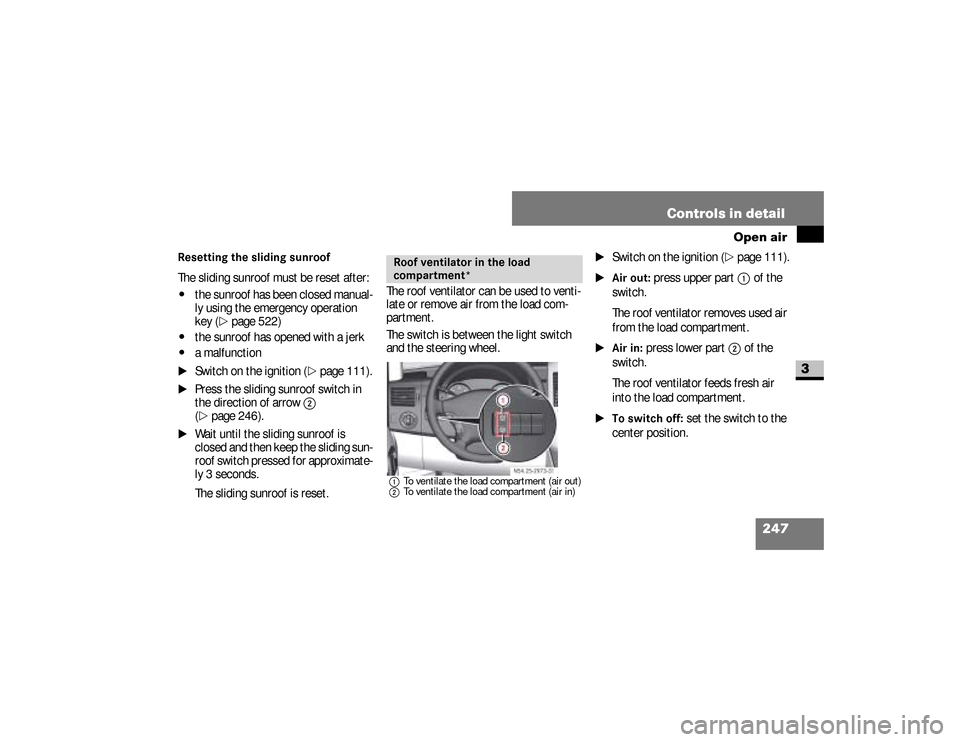
The switch is between the light switch
and the steering wheel.
1To ventilate the load compartment (air out)
2To ventilate the load compartment (air in)
\1
Switch on the ignition (
\2
page 111).
\1Air out:
press upper part
1
of the
switch.
The roof ventilator removes used air
from the load compartment.
\1Air in:
press lower part
2
of the
switch.
The roof ventilator feeds fresh air
into the load compartment.
\1To switch off:
set the switch to the
center position.
Roof ventilator in the load
compartment*
N54.25-2929-31
nf_BA.book Page 247 Friday, January 25, 2008 3:53 PM
Page 275 of 666
273 Controls in detail
Operating the vehicle
3
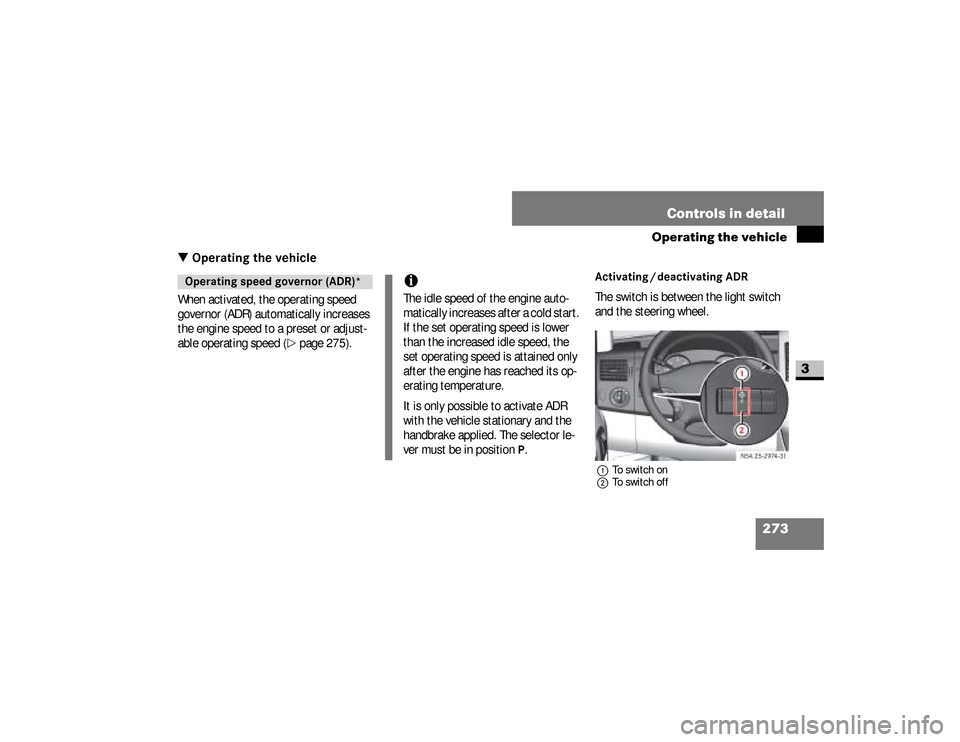
\3 Operating the vehicleWhen activated, the operating speed
governor (ADR) automatically increases
the engine speed to a preset or adjust-
able operating speed (
\2
page 275).
Activating / deactivating ADRThe switch is between the light switch
and the steering wheel.1To switch on
2To switch off
Operating speed governor (ADR)*
iThe idle speed of the engine auto-
matically increases after a cold start.
If the set operating speed is lower
than the increased idle speed, the
set operating speed is attained only
after the engine has reached its op-
erating temperature.
It is only possible to activate ADR
with the vehicle stationary and the
handbrake applied. The selector le-
ver must be in position
P.
N54.25-2932-31
nf_BA.book Page 273 Friday, January 25, 2008 3:53 PM