instrument panel DODGE STRATUS 2004 2.G User Guide
[x] Cancel search | Manufacturer: DODGE, Model Year: 2004, Model line: STRATUS, Model: DODGE STRATUS 2004 2.GPages: 273
Page 55 of 273
MIRRORS
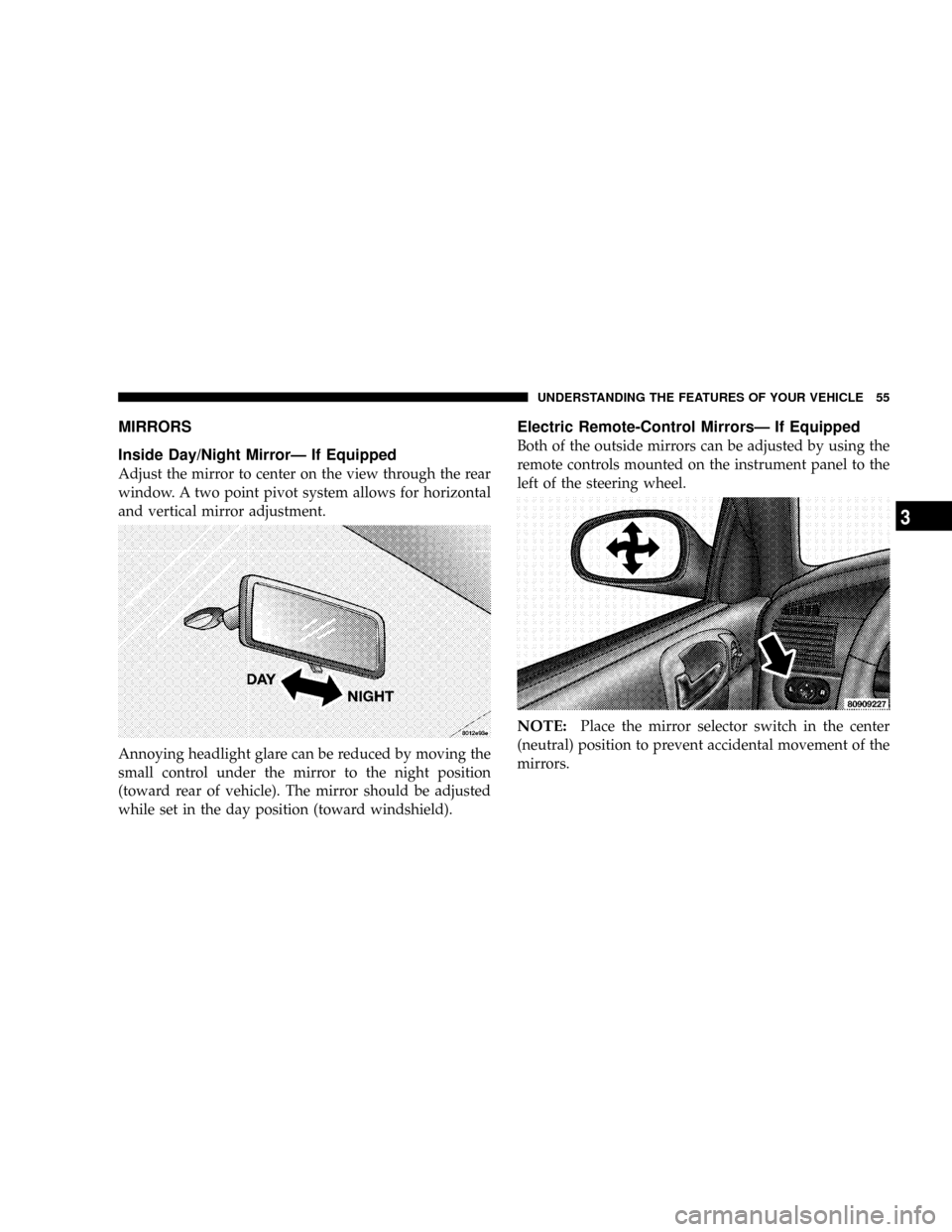
Inside Day/Night MirrorÐ If Equipped
Adjust the mirror to center on the view through the rear
window. A two point pivot system allows for horizontal
and vertical mirror adjustment.
Annoying headlight glare can be reduced by moving the
small control under the mirror to the night position
(toward rear of vehicle). The mirror should be adjusted
while set in the day position (toward windshield).
Electric Remote-Control MirrorsÐ If Equipped
Both of the outside mirrors can be adjusted by using the
remote controls mounted on the instrument panel to the
left of the steering wheel.
NOTE:Place the mirror selector switch in the center
(neutral) position to prevent accidental movement of the
mirrors.
UNDERSTANDING THE FEATURES OF YOUR VEHICLE 55
3
Page 60 of 273

TO OPEN AND CLOSE THE HOOD
To open the hood, two latches must be released. First pull
the hood release lever located under the left side of the
instrument panel.
Then lift the secondary latch located under the front edge
of the hood, near the center and raise the hood.Use the hood prop rod to secure the hood in the open
position. Place the upper end of the prop rod in the hole
marked ªpropº on the underside of the hood.
To prevent possible damage, do not slam the hood to
close it. Use a firm downward push at the center of the
hood to ensure that both latches engage.
60 UNDERSTANDING THE FEATURES OF YOUR VEHICLE
Page 61 of 273
WARNING!
If the hood is not fully latched it could fly up when
the vehicle is moving and block your forward vision.
You could have a collision. Be sure all hood latches
are fully latched before driving.
LIGHTS
Interior Lights
The map/courtesy lights come on when a door is opened
and the panel lamp dimmer switch (located on the turn
signal control stalk) is in any detent except fully counter-
clockwise (dome lamp ON position) or fully clockwise
(dome lamp OFF position). Rotating the panel dimmer
switch fully counter-clockwise will turn on the lights.
Turn the panel dimmer switch fully clockwise to prevent
the lights from coming on when a door is opened.
NOTE:The interior lights have a ªfade to offº feature.
When the lights are turned off, they gradually ªfadeº off.
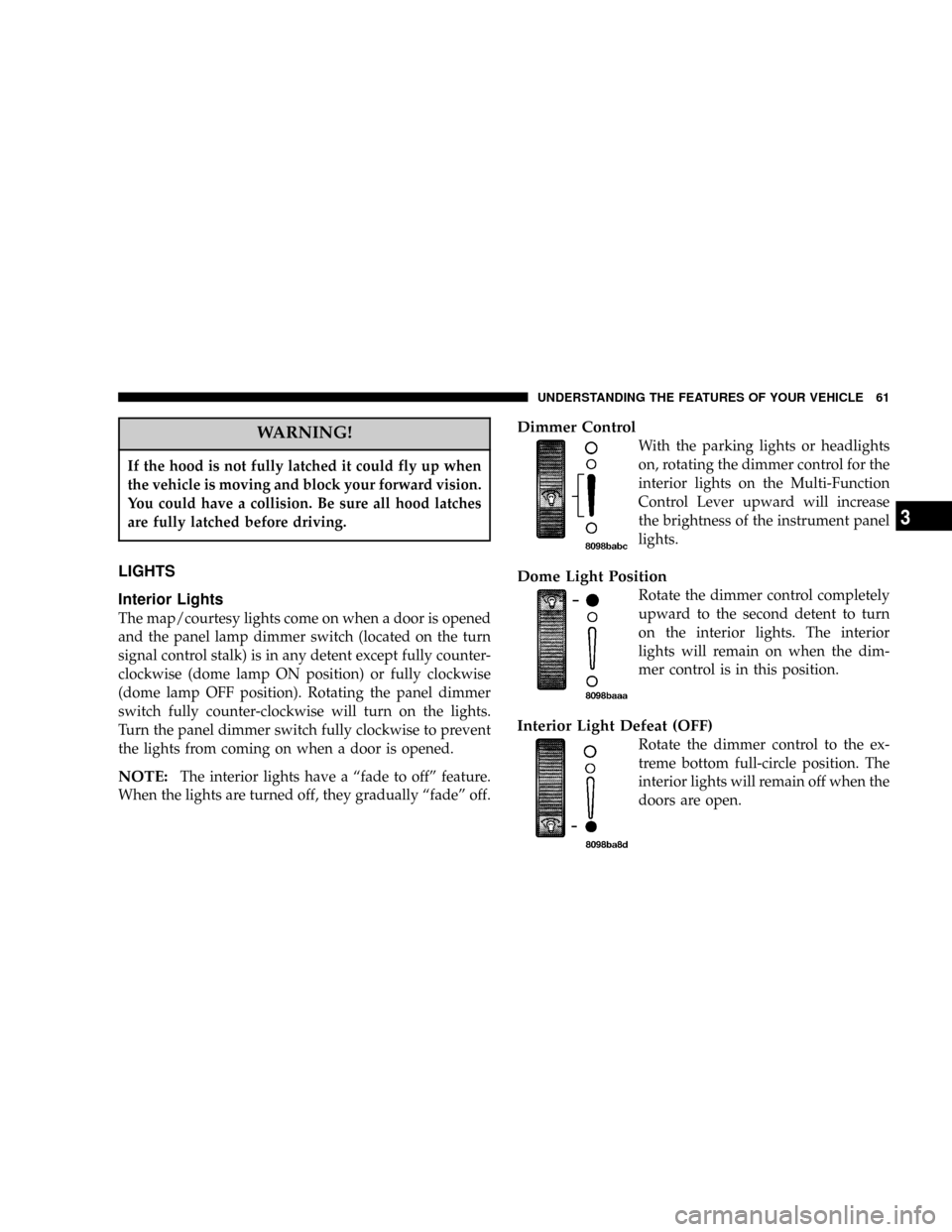
Dimmer Control
With the parking lights or headlights
on, rotating the dimmer control for the
interior lights on the Multi-Function
Control Lever upward will increase
the brightness of the instrument panel
lights.
Dome Light Position
Rotate the dimmer control completely
upward to the second detent to turn
on the interior lights. The interior
lights will remain on when the dim-
mer control is in this position.
Interior Light Defeat (OFF)
Rotate the dimmer control to the ex-
treme bottom full-circle position. The
interior lights will remain off when the
doors are open.
UNDERSTANDING THE FEATURES OF YOUR VEHICLE 61
3
Page 63 of 273
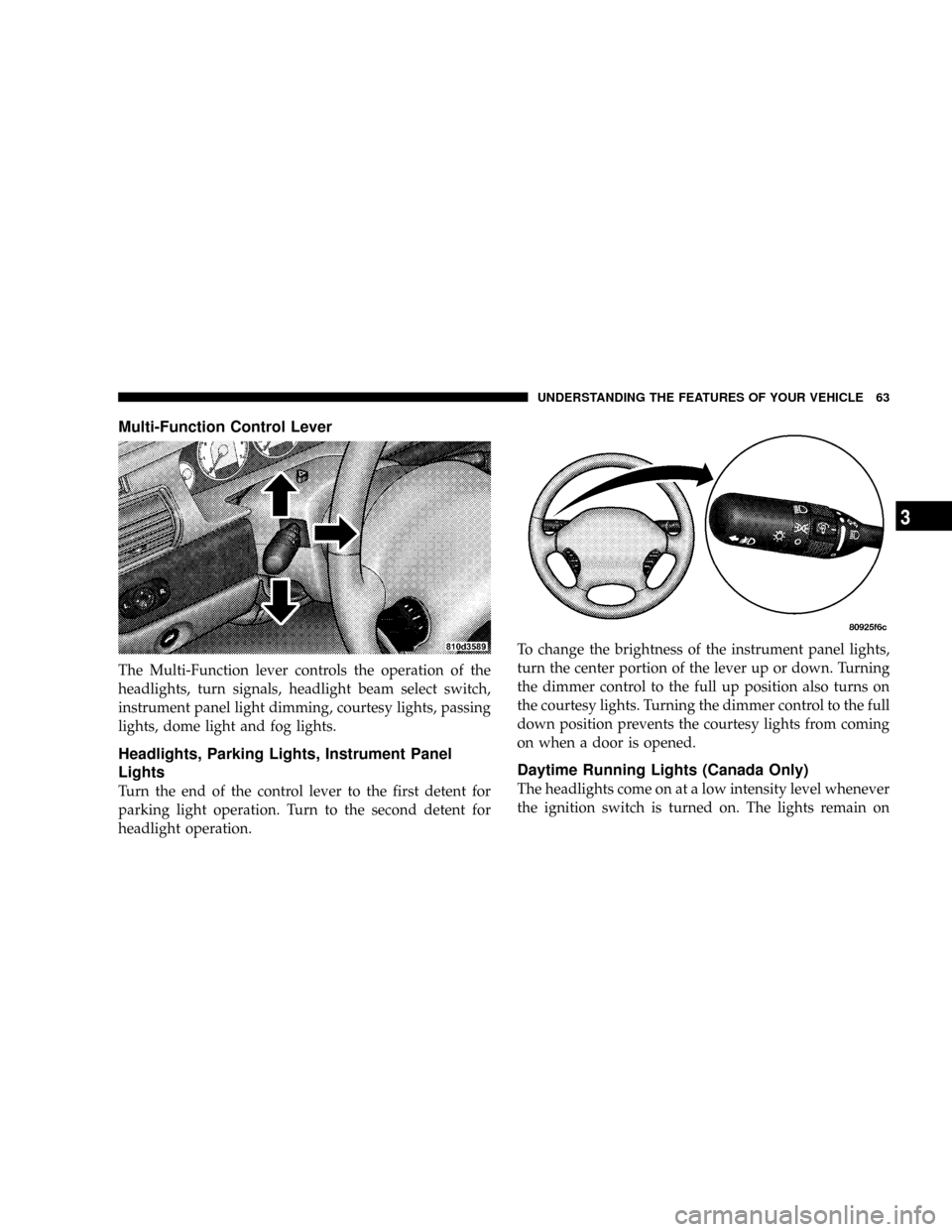
Multi-Function Control Lever
The Multi-Function lever controls the operation of the
headlights, turn signals, headlight beam select switch,
instrument panel light dimming, courtesy lights, passing
lights, dome light and fog lights.
Headlights, Parking Lights, Instrument Panel
Lights
Turn the end of the control lever to the first detent for
parking light operation. Turn to the second detent for
headlight operation.To change the brightness of the instrument panel lights,
turn the center portion of the lever up or down. Turning
the dimmer control to the full up position also turns on
the courtesy lights. Turning the dimmer control to the full
down position prevents the courtesy lights from coming
on when a door is opened.
Daytime Running Lights (Canada Only)
The headlights come on at a low intensity level whenever
the ignition switch is turned on. The lights remain on
UNDERSTANDING THE FEATURES OF YOUR VEHICLE 63
3
Page 77 of 273
Wind Buffeting
Wind buffeting can be described as the perception of
pressure on the ears or a helicopter type sound in the
ears. Your vehicle may exhibit wind buffeting with the
windows down, or the sunroof (if so equipped) in certain
open or partially open positions. This is a normal occur-
rence and can be minimized. If the buffeting occurs with
the rear windows open, open the front and rear windows
together to minimize the buffeting. If the buffeting occurs
with the sunroof open, adjust the sunroof opening to
minimize the buffeting.
ELECTRICAL POWER OUTLET
The power outlet is located in the lower center of your
instrument panel. If your vehicle is equipped with heated
seats, a second power outlet is located inside the center
console. All accessories connected to any outlet should be
removed or turned off when the vehicle is not in use.
CAUTION!
Electrical Outlet Use With Engine Off
²Many accessories that can be plugged in draw
power from the vehicle's battery, even when not
in use (i.e., cellular phones, etc.). Eventually, if
plugged in long enough, the vehicle's battery will
discharge sufficiently to degrade battery life
and/or prevent engine starting.
²Accessories that draw higher power (i.e., coolers,
vacuum cleaners, lights, etc.) will degrade the
battery even more quickly. Only use these inter-
mittently and with greater caution.
²After the use of high power draw accessories, or
long periods of the vehicle not being started (with
accessories still plugged in), the vehicle must be
driven a sufficient length of time to allow the
alternator to recharge the vehicle's battery.
UNDERSTANDING THE FEATURES OF YOUR VEHICLE 77
3
Page 79 of 273
UNDERSTANDING YOUR INSTRUMENT PANEL
CONTENTS
mInstruments And Controls.................83
mInstrument Cluster......................84
mInstrument Cluster Description.............85
mCompass, Temperature, And Trip Computer
Display Ð If Equipped
...................90
NControl Buttons.......................91
NTrip Conditions........................91
NCompass Temperature Display.............92
mCigar Lighter/Ashtray...................94
mElectronic Digital Clock..................94
NTo Set The Clock.......................94
mRadio General Information................94NRadio Broadcast Signals..................94
NTwo Types Of Signals...................95
NElectrical Disturbances...................95
NAM Reception........................95
NFM Reception.........................95
mSales Code RAZÐAM/ FM Stereo Radio With
Cassette Tape Player, CD Player And CD
Changer Controls Ð If Equipped
...........95
NOperating Instructions Ð Radio............95
NPower Switch, Volume Control.............95
NSeek Button (Radio Mode)................96
NTuning..............................96
4
Page 80 of 273

NPTY (Program Type) Button...............96
NBalance.............................97
NFade...............................97
NTone Control.........................97
NAM/FM Selection......................98
NScan Button..........................98
NTo Set The Radio Push-Button Memory.......98
NTo Change From Clock To Radio Mode.......98
NOperating Instructions Ð Tape Player........98
NSeek Button..........................99
NFast Forward (FF)......................99
NRewind (RW).........................99
NTape Eject............................99
NScan Button..........................99
NChanging Tape Direction.................99NMetal Tape Selection....................99
NPinch Roller Release....................99
NNoise Reduction......................100
NOperating Instructions Ð CD Player........100
NInserting The Compact Disc..............100
NSeek Button.........................101
NEJT CD (Eject) Button..................101
NFF/Tune/RW........................101
NProgram Button 4 (Random Play)..........101
NMode..............................102
NTape CD Button......................102
NTime Button.........................102
NScan Button.........................102
NCD Changer Control Capability Ð If
Equipped...........................102
80 UNDERSTANDING YOUR INSTRUMENT PANEL
Page 81 of 273
mSales Code RBBÐAM/FM Stereo Radio With
Cassette Tape Player And CD Changer
Capability
...........................104
NOperating Instructions..................104
NPower Button........................104
NElectronic Volume Control...............104
NSeek..............................104
NTune ..............................105
NTo Set The Push-Button Memory..........105
NBalance............................105
NFade..............................105
NBass And Treble Tone Control............105
NAM/FM Selection.....................106
NMode Button........................106
NCassette Player Features................106
NCD Changer Control Capability Ð If
Equipped...........................107NRadio Display Messages................108mSales Code RBKÐAM/ FM Stereo Radio With
CD Player And CD Changer Controls
.......109
NRadio Operation......................109
NCD Player Operation...................111
NCD Changer Control Capability Ð If
Equipped...........................112
NRadio Display Messages................114
m6 Disc CD Changer Ð If Equipped.........114
NLoading The CD Changer...............114
NPlaying Discs........................115
NSeek Button.........................115
NFF/Tune/RW........................115
NMode Button........................115
NProgram Button 1.....................115
NProgram Button 4 (Random Play)..........115
UNDERSTANDING YOUR INSTRUMENT PANEL 81
4
Page 82 of 273

NProgram Button 5.....................116
NTime Button.........................116
NChanging Modes......................116
NRemoving Discs From The CD Changer.....116
NCD Changer Operation With The Changer
Off ...............................116
mRemote Sound System Controls Ð If
Equipped
............................117
NRadio Operation......................117NTape Player.........................117
NCD Player Ð Single Disc In Radio.........118
NCD Player Ð 6 Disc CD Changer..........118
mCassette Tape And Player Maintenance......118
mCompact Disc Maintenance...............119
mRadio Operation And Cellular Phones.......120
mClimate Controls......................120
NManual Air Conditioning/Heater Control....120
82 UNDERSTANDING YOUR INSTRUMENT PANEL
Page 83 of 273
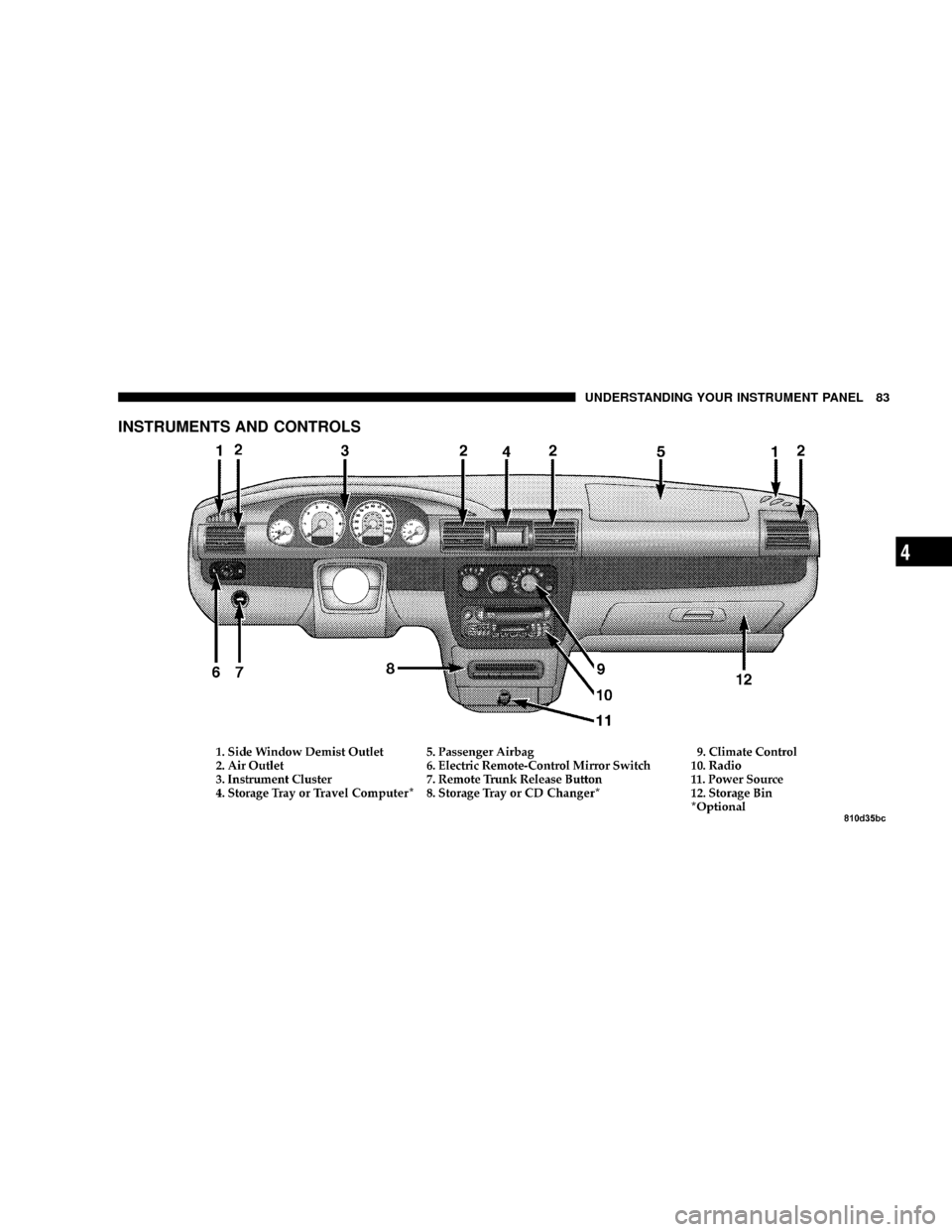
INSTRUMENTS AND CONTROLS
UNDERSTANDING YOUR INSTRUMENT PANEL 83
4