light DODGE STRATUS 2004 2.G Workshop Manual
[x] Cancel search | Manufacturer: DODGE, Model Year: 2004, Model line: STRATUS, Model: DODGE STRATUS 2004 2.GPages: 273
Page 123 of 273

²Floor
Air is directed through the floor outlets with a
lesser amount through the defrost and side
window demist outlets.
²
Mix
Air is directed through the floor, defrost and
side window demist outlets. This setting
works best in cold or snowy conditions that
require extra heat at the windshield. This setting is
good for maintaining comfort while reducing mois-
ture on the windshield.
²
Defrost
Air is directed through the windshield and
side window demist outlets. Use this mode
with maximum fan and temperature settings for
best windshield and side window defrosting.
NOTE:
The air conditioning compressor operates in
both Mix and Defrost modes even if the Air Conditioning
is not selected. This dehumidifies the air to help dry the
windshield.
Rear Seat Outlets
These outlets are located under the front seats and direct
warm air to the rear seat passengers. Air is directed
through these outlets when you select either the Floor,
Bi-Level, or Mix modes.
Rear Window Defroster
The Rear Window Defroster button is located to
the right of the Mode Control. Press this button
once to turn on the Rear Window Defrost and a second
time to turn them off. A light above the button shows that
the defroster is on.
NOTE:The defroster turns off automatically after 15
minutes of operation. Each later activation will allow 10
minutes of operation.
Side Window Demisters
A side window demister outlet is at each end of the
instrument panel. These non-adjustable outlets direct air
toward the side windows when the system is in either the
FLOOR, MIX, or DEFROST modes. A small amount of air
is directed to the side window demisters in BI-LEVEL
mode as well. The air is directed at the area of the
windows through which you view the outside mirrors.
UNDERSTANDING YOUR INSTRUMENT PANEL 123
4
Page 130 of 273
STARTING PROCEDURES
Before starting your vehicle, adjust your seat, adjust both
inside and outside mirrors, and fasten your seat belts.
CAUTION!
Long periods of engine idling, especially at high
engine speeds can cause excessive exhaust tempera-
tures which can damage your vehicle. Do not leave
your vehicle unattended with the engine running.
WARNING!
Do not leave children or animals inside parked
vehicles in hot weather. Interior heat build up may
cause serious injury or death.
Automatic Transaxle
The gear selector must be in the NEUTRAL or PARK
position before you can start the engine. Apply the brakes
before shifting to any driving gear.
Manual Transaxle
Fully apply the parking brake, press the clutch pedal to
the floor and place the gear selector in NEUTRAL before
starting the engine.
Normal Starting
Normal Starting of either a cold or a warm engine does
not require pumping or depressing the accelerator pedal.
Simply turn the key to the ªSTART'º position and release
when the engine starts. If the engine has not started
within 3 seconds, slightly depress the accelerator pedal
while continuing to crank. If the engine fails to start
within 15 seconds, turn the key to the ªOFFº position,
wait 10 to 15 seconds, then repeat the normal starting
procedure.
130 STARTING AND OPERATING
Page 137 of 273
NOTE:Using the ª3º range while operating the vehicle
under heavy operating conditions will improve perfor-
mance, fuel economy, and extend transaxle life by reduc-
ing excessive shifting and heat build up.
Use the ª3º range when descending steep grades to
prevent brake system distress.
ªLº Low
This range should be used for maximum engine braking
when descending steep grades. In this range, up shifts
will occur only to prevent engine over speed while down
shifts occur as early as possible.
WARNING!
Never use Park position on an automatic transmis-
sion as a substitute for the parking brake. Always
apply parking brake fully when parked to guard
against vehicle movement and possible injury or
damage.
MANUAL TRANSAXLE
NOTE:
The parking brake should be engaged and the
gear selector placed in REVERSE before leaving the
vehicle, especially on an incline.
Fully depress the clutch pedal before you shift gears. As
you release the clutch pedal, lightly depress the accelera-
tor pedal.
Use each gear in numerical order ± do not skip a gear. Be
sure the transaxle is in FIRST gear, (not THIRD), when
starting from a standing position. Damage to the clutch
can result from starting in THIRD.
For most city driving you will find it easier to use only
the lower gears. For steady highway driving with light
accelerations, 5th gear is recommended.
Never drive with your foot resting on the clutch pedal, or
try to hold the vehicle on a hill with the clutch pedal
partially engaged. This will cause abnormal wear on the
clutch.
Never shift into REVERSE until the vehicle has come to a
complete stop.
STARTING AND OPERATING 137
5
Page 139 of 273

PARKING BRAKE
When the parking brake is applied with the
ignition on, the brake light in the instrument
cluster will come on.
NOTE:This light only shows that the parking brake is
on. It does not show the degree of brake application.Before leaving the vehicle, make sure that the parking
brake is set. To set the parking brake, pull up firmly on
the lever. Also place the gear selector in the Park position
for automatic transaxle vehicles, or reverse for vehicles
with manual transaxle. To release the parking brake,
apply the brake pedal and pull up on the parking brake
lever. Push the release button and lower the lever fully.
When parking on a hill, it is important to set the parking
brake before placing the gear selector in Park, otherwise
the load on the transaxle locking mechanism may make it
difficult to move the selector out of Park. As an added
precaution, turn the front wheels toward the curb on a
downhill grade and away from the curb on a uphill
grade.
You should always apply the parking brake before leav-
ing the vehicle.
STARTING AND OPERATING 139
5
Page 142 of 273

POWER STEERING
The power assisted steering system of your vehicle
provides mechanical steering capability in the event
power assist is lost.
If for some reason the hydraulic pressure is interrupted,
it will still be possible to steer your vehicle. Under these
conditions you will observe a substantial increase in
steering effort.
TRACTION CONTROL Ð IF EQUIPPED
The Traction Control System reduces wheel
slip and maintains traction at the driving
(front) wheels. The system reduces wheel slip
by engaging the brake on the wheel that is
losing traction while spinning. The traction system oper-
ates at speeds below 35 mph (56 km/h).
The system is always in the ªstand byº mode unless:
²The Traction Control switch has been used to turn the
system off;
²There is an Anti-Lock Brake or Traction System mal-
function;
²The system has been deactivated to prevent damage to
the brake system due to overheated brake tempera-
tures.
NOTE:Extended heavy use of Traction Control may
cause the system to deactivate and turn on the Traction
Control indicator located in the instrument cluster.
This is to prevent overheating of the brake system and is
a normal condition. After cooling, the system will auto-
matically reactivate and turn off the Traction Control
Light.
142 STARTING AND OPERATING
Page 143 of 273

TIRE SAFETY INFORMATION
Tire Markings
NOTE:
²
P(Passenger)-Metric tire sizing is based on U.S. design
standards. P-Metric tires have the letter ªPº molded
into the sidewall preceding the size designation. Ex-
ample: P215/65R15 95H.
²European Metric tire sizing is based on European
design standards. Tires designed to this standard have
the tire size molded into the sidewall beginning with
the section width. The letter9P9is absent from this tire
size designation. Example: 215/65R15 96H
²LT(Light Truck)-Metric tire sizing is based on U.S.
design standards. The size designation for LT-Metric
tires is the same as for P-Metric tires except for the
letters ªLTº that are molded into the sidewall preced-
ing the size designation. Example: LT235/85R16.
²Temporary Spare tires are high pressure compact
spares designed for temporary emergency use only.
Tires designed to this standard have the letter ªTº
molded into the sidewall preceding the size designa-
tion. Example: T145/80D18 103M.
²High Flotation tire sizing is based on U.S. design
standards and begins with the tire diameter molded
into the sidewall. Example: 31x10.5 R15 LT.
STARTING AND OPERATING 143
5
Page 144 of 273

Tire Sizing Chart
EXAMPLE:
Size Designation:
P= Passenger car tire size based on U.S. design standards
(....blank....(= Passenger car tire based on European design standards
LT= Light Truck tire based on U.S. design standards
T= Temporary Spare tire
31= Overall Diameter in Inches (in)
215= Section Width in Milimeters (mm)
65= Aspect Ratio in Percent (%)
ÐRatio of section height to section width of tire.
10.5= Section Width in Inches (in)
R= Construction Code
Ð9R9means Radial Construction.
Ð9D9means Diagonal or Bias Construction.
15= Rim Diameter in Inches (in)
144 STARTING AND OPERATING
Page 145 of 273
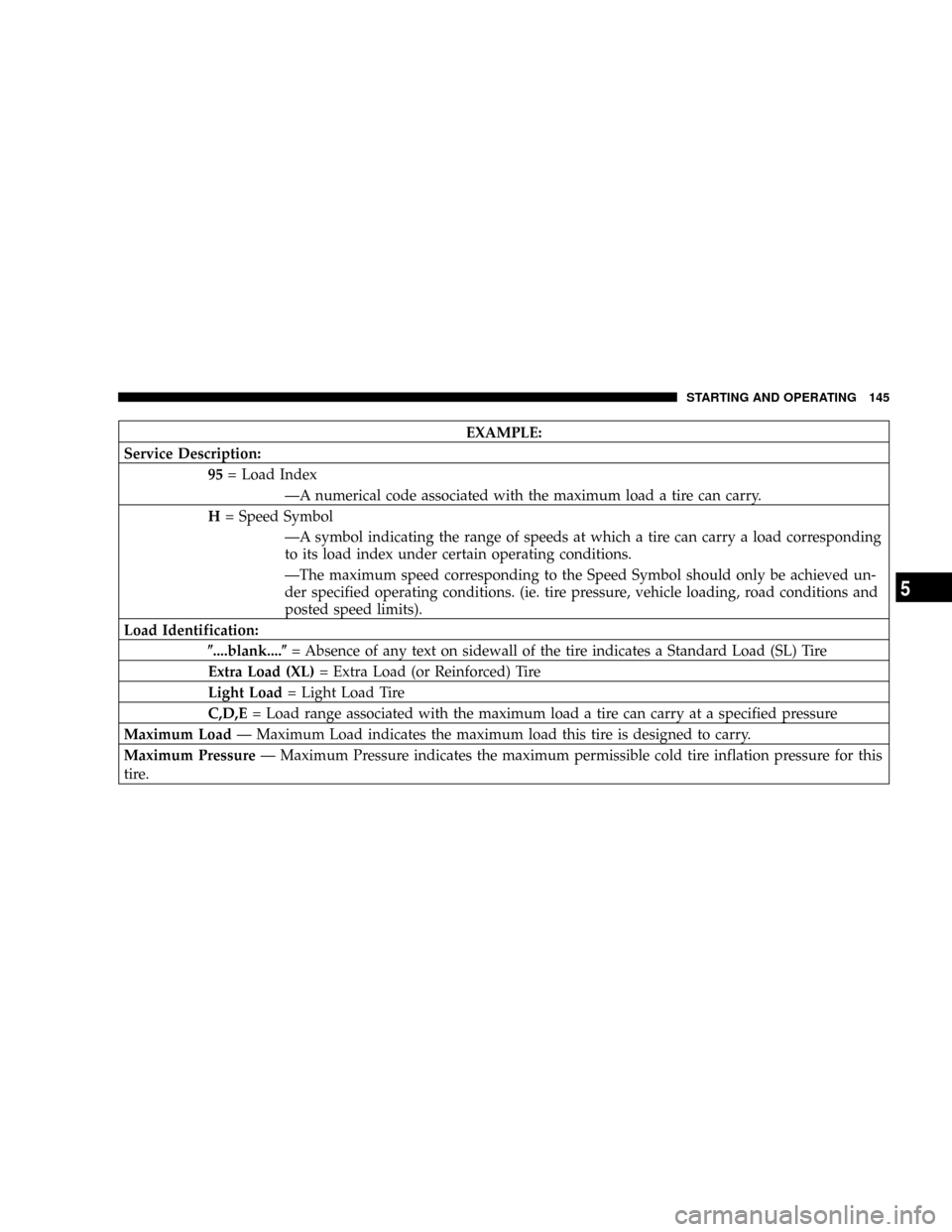
EXAMPLE:
Service Description:
95= Load Index
ÐA numerical code associated with the maximum load a tire can carry.
H= Speed Symbol
ÐA symbol indicating the range of speeds at which a tire can carry a load corresponding
to its load index under certain operating conditions.
ÐThe maximum speed corresponding to the Speed Symbol should only be achieved un-
der specified operating conditions. (ie. tire pressure, vehicle loading, road conditions and
posted speed limits).
Load Identification:
(....blank....(= Absence of any text on sidewall of the tire indicates a Standard Load (SL) Tire
Extra Load (XL)= Extra Load (or Reinforced) Tire
Light Load= Light Load Tire
C,D,E= Load range associated with the maximum load a tire can carry at a specified pressure
Maximum LoadÐ Maximum Load indicates the maximum load this tire is designed to carry.
Maximum PressureÐ Maximum Pressure indicates the maximum permissible cold tire inflation pressure for this
tire.
STARTING AND OPERATING 145
5
Page 160 of 273

²If the system detects a problem it will disable the
Autostick mode and the transaxle will return to the
automatic mode until the problem is corrected.
FUEL REQUIREMENTS
Your vehicle is designed to meet all emis-
sion regulations and provide excellent fuel
economy when using high quality regular
unleaded gasoline with an octane rating of
87. The use of premium gasoline is not
recommended. The use of premium gaso-
line will provide no benefit over high quality regular
gasolines, and in some circumstances, may result in
poorer performance.
Light spark knock at low engine speeds is not harmful to
your engine. However, continued heavy spark knock at
high speeds can cause damage and should be reported to
your dealer immediately. Engine damage resulting from
operating with a heavy spark knock may not be covered
by the new vehicle warranty.Poor quality gasoline can cause problems such as hard
starting, stalling and stumble. If you experience these
problems, try another brand of regular gasoline before
considering service for the vehicle.Reformulated Gasoline
Many areas of the country require the use of cleaner
burning fuel referred to as ªReformulated Gasolineº.
Reformulated gasolines contain oxygenates, and are spe-
cially blended to reduce vehicle emissions and improve
air quality.
The manufacturer supports the use of reformulated gaso-
lines. Properly blended reformulated gasolines will pro-
vide excellent performance and durability of engine and
fuel system components.
Gasoline/Oxygenate Blends
Some fuel suppliers blend unleaded gasoline with mate-
rials called oxygenates such as 10% ethanol, MTBE and
ETBE. Oxygenates are required in some areas of the
country during the winter months to reduce carbon
monoxide emissions. Fuels blended with these oxygen-
ates may be used in your vehicle.
160 STARTING AND OPERATING
Page 162 of 273

Malfunction Indicator Light to illuminate. The manufac-
turer recommends that you try a different brand of
unleaded gasoline having lower sulfur to determine if the
problem is fuel related prior to returning your vehicle to
an authorized dealer for service.
CAUTION!
If the Malfunction Indicator Light is flashing, imme-
diate service is required. See the On Board Diagnos-
tics paragraph in the Maintenance section of this
manual.
Materials Added to Fuel
All gasoline sold in the United States is required to
contain effective detergent additives. Use of additional
detergents or other additives is not needed under normal
conditions and would result in additional cost. Therefore
you should not have to add anything to the fuel.
ADDING FUEL
Fuel Filler Cap (Gas Cap)
The gas cap is behind the fuel filler door, on the driver's
side of the vehicle. If the gas cap is lost or damaged, be
sure the replacement cap is for use with this vehicle.
CAUTION!
Damage to the fuel system or emission control
system could result from using an improper fuel
tank filler tube cap (gas cap). A poorly fitting cap
could let impurities into the fuel system.
CAUTION!
To avoid fuel spillage and overfilling, do not ªtop
offº the fuel tank after filling.
162 STARTING AND OPERATING