radio DODGE STRATUS 2005 2.G Owner's Guide
[x] Cancel search | Manufacturer: DODGE, Model Year: 2005, Model line: STRATUS, Model: DODGE STRATUS 2005 2.GPages: 293
Page 121 of 293

Time Button
Press this button to switch between time of day and CD
track time.
Changing Modes
While in the radio mode, if a cassette is loaded, press the
Mode button to switch to the tape mode. If a CD is
loaded, press the Mode button to select the CD mode. If
neither a tape nor CD is loaded, the radio will ignore the
command.
•Inserting either a tape or CD automatically starts that
mode of play.
•Pressing the AM/FM button while in the tape or CD
mode will select the radio mode.
•If in the CD mode and the last CD is ejected, the radio
will tune to the last station selected.
Removing Discs from the CD Changer
If there is a single CD in the changer, press the EJT button
and the CD will eject. If the CD is not removed within 15
seconds, it will automatically reload into the CD changer.
To eject additional CDs from the changer, first select the
numbered button where the CD is located and then press
the EJT button.
CD Changer Operation with the Changer Off
The CD changer is able to load and eject discs with the
ignition power off. However, while the ignition is off, one
of the six numbered buttons must be pressed first.
UNDERSTANDING YOUR INSTRUMENT PANEL 121
4
Page 122 of 293

REMOTE SOUND SYSTEM CONTROLS—IF
EQUIPPED
The remote sound system controls are located on the rear
surface of the steering wheel. Reach behind the wheel to
access the switches.
The right hand control is a rocker type switch with a
push-button in the center and controls the volume and
mode of the sound system. Pressing the top of the rocker
switch will increase the volume and pressing the bottom
of the rocker switch will decrease the volume.Pressing the center button will make the radio switch
between the various modes available (AM/FM/TAPE/
CD, Etc.).
The left hand control is a rocker type switch with a
push-button in the center. The function of the left hand
control is different depending on which mode you are in.
The following describes the left hand control operation in
each mode.
Radio Operation
Pressing the top of the switch will“Seek”up for the next
listenable station and pressing the bottom of the switch
will“Seek”down for the next listenable station.
The button located in the center of the left hand control
will tune to the next preset station that you have pro-
grammed in the radio preset push-button.
Tape Player
Pressing the top of the switch once will go to the next
selection on the cassette. Pressing the bottom of the
switch once will go to the beginning of the current
selection or to the beginning of the previous selection if it
is within the first 5 seconds of the current selection.
Remote Sound System Controls
122 UNDERSTANDING YOUR INSTRUMENT PANEL
Page 123 of 293

If you press the switch up or down twice it plays the
second selection, three times, it will play the third, etc.
The button in the center of the left hand switch has no
function in this mode.
CD Player—Single Disc in Radio
Pressing the top of the switch once will go to the next
track on the CD. Pressing the bottom of the switch once
will go to the beginning of the current track or to the
beginning of the previous track if it is within one second
after the current track begins to play.
If you press the switch up or down twice it plays the
second track, three times, it will play the third, etc.
The button in the center of the left hand switch has no
function in this mode.
CD Player—6 Disc CD Changer
Pressing the top of the switch once will go to the next
track on the CD. Pressing the bottom of the switch once
will go to the beginning of the current track or to the
beginning of the previous track if it is within one second
after the current track begins to play.If you press the switch up or down twice it plays the
second track, three times, it will play the third, etc.
The button in the center of the left hand switch will cause
the CD changer to play the next available disc.
CASSETTE TAPE AND PLAYER MAINTENANCE
To keep the cassette tapes and player in good condition,
take the following precautions:
1. Do not use cassette tapes longer than C-90; otherwise,
sound quality and tape durability will be greatly dimin-
ished.
2. Keep the cassette tape in its case to protect from
slackness and dust when it is not in use.
3. Keep the cassette tape away from direct sunlight, heat
and magnetic fields such as the radio speakers.
4. Before inserting a tape, make sure that the label is
tightly secured to the cassette.
5. A loose tape should not be inserted into the radio.
Maintain your cassette tape player. The head and capstan
shaft in the cassette player can pick up dirt or tape
UNDERSTANDING YOUR INSTRUMENT PANEL 123
4
Page 125 of 293

considering disc player service. You may have a problem
with CD-R (recordable) and CD-RW (recordable and
writable) disks.
RADIO OPERATION AND CELLULAR PHONES
Under certain conditions, the operation of a cellular
phone in your vehicle can cause erratic or noisy perfor-
mance from your radio. This condition may be lessened
or eliminated by relocating the cellular phone antenna.
This condition is not harmful to the radio. If your radio
performance does not satisfactorily“clear”by the repo-
sitioning of the cellular antenna, it is recommended that
the radio volume be turned down or off during cellular
phone operation.
CLIMATE CONTROLS
Automatic Temperature Control (ATC)—If
Equipped
The ATC system can maintain a steady comfort level in
various weather conditions with a simple two step op-
eration. Press the AUTO button and select your comfort
setting. The system will automatically control comfort by
varying temperature, fan speed, and Mode.
You also may choose to customize your comfort by
selecting the fan speed and Mode. This will place the
system into manual operation
Automatic Temperature Controls
UNDERSTANDING YOUR INSTRUMENT PANEL 125
4
Page 193 of 293
JUMP-STARTING PROCEDURES IF BATTERY IS
LOW
WARNING!
•Do not attempt to push or tow your vehicle to get
it started. Vehicles equipped with an automatic
transaxle cannot be started this way. Unburned
fuel could enter the catalytic converter and once
the engine has started, ignite and damage the
converter and vehicle. If the vehicle has a dis-
charged battery, booster cables may be used to
obtain a start from another vehicle. This type of
start can be dangerous if done improperly, so
follow this procedure carefully.
•Take care to avoid the radiator cooling fan when-
ever the hood is raised. It can start anytime the
ignition switch is on. You can be hurt by the fan.
NOTE:The battery is stored in a compartment behind
the left front fender and is accessible without removingthe tire and wheel. Remote battery terminals are located
in the engine compartment for jump starting.
1. Wear eye protection and remove any metal jewelry
such as watch bands or bracelets that might make an
inadvertent electrical contact.
2. When boosting from a battery in another vehicle, park
that vehicle within booster cable reach but without
letting the vehicles touch. Set parking brake, place auto-
matic transaxle in PARK and turn ignition to OFF for
both vehicles.
3. Turn off the heater, radio and all unnecessary electrical
loads.
4. Connect one end of a jumper cable to the positive
terminal of the booster battery. Connect the other end to
the positive jump start attachment of the discharged
battery.
WHAT TO DO IN EMERGENCIES 193
6
Page 236 of 293
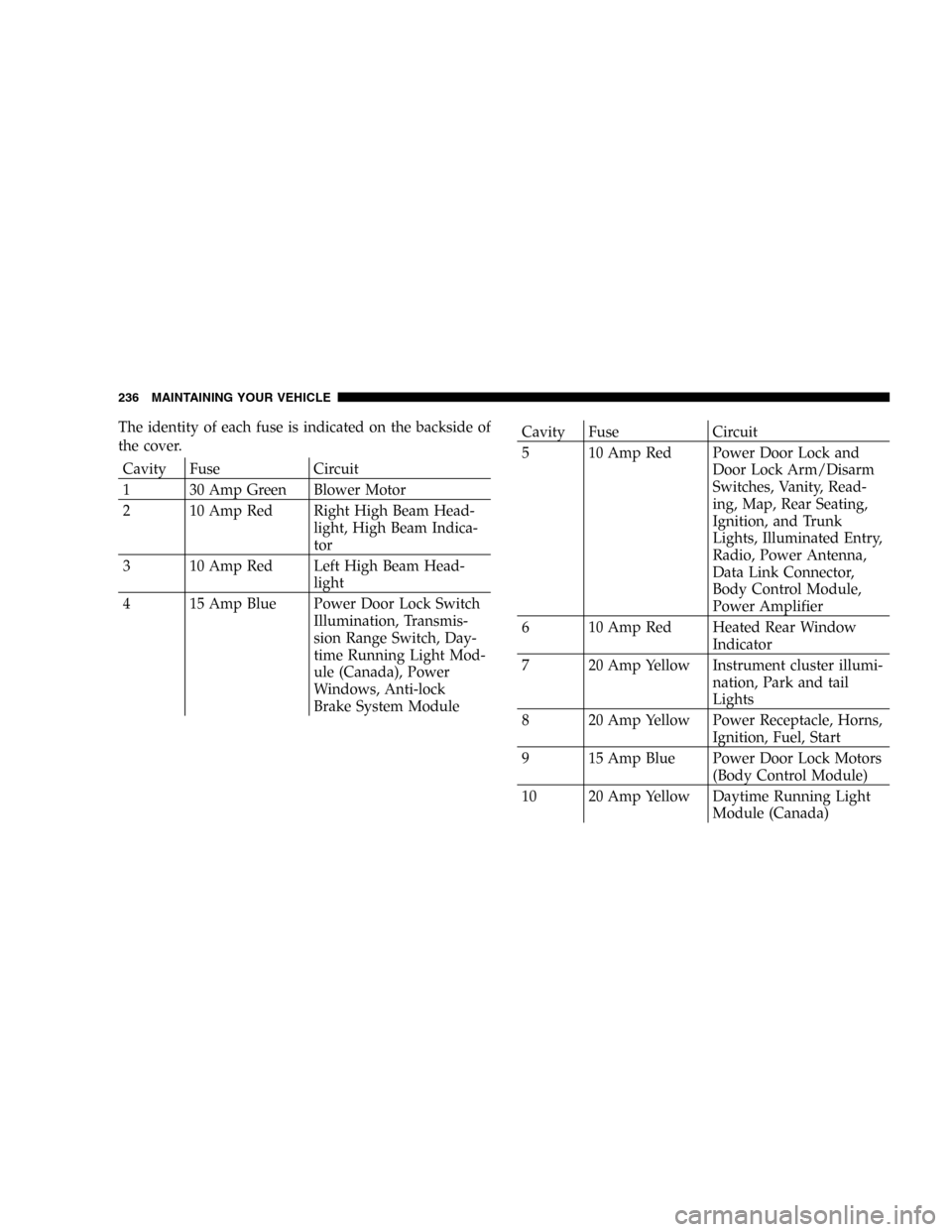
The identity of each fuse is indicated on the backside of
the cover.
Cavity Fuse Circuit
1 30 Amp Green Blower Motor
2 10 Amp Red Right High Beam Head-
light, High Beam Indica-
tor
3 10 Amp Red Left High Beam Head-
light
4 15 Amp Blue Power Door Lock Switch
Illumination, Transmis-
sion Range Switch, Day-
time Running Light Mod-
ule (Canada), Power
Windows, Anti-lock
Brake System Module
Cavity Fuse Circuit
5 10 Amp Red Power Door Lock and
Door Lock Arm/Disarm
Switches, Vanity, Read-
ing, Map, Rear Seating,
Ignition, and Trunk
Lights, Illuminated Entry,
Radio, Power Antenna,
Data Link Connector,
Body Control Module,
Power Amplifier
6 10 Amp Red Heated Rear Window
Indicator
7 20 Amp Yellow Instrument cluster illumi-
nation, Park and tail
Lights
8 20 Amp Yellow Power Receptacle, Horns,
Ignition, Fuel, Start
9 15 Amp Blue Power Door Lock Motors
(Body Control Module)
10 20 Amp Yellow Daytime Running Light
Module (Canada)
236 MAINTAINING YOUR VEHICLE
Page 237 of 293
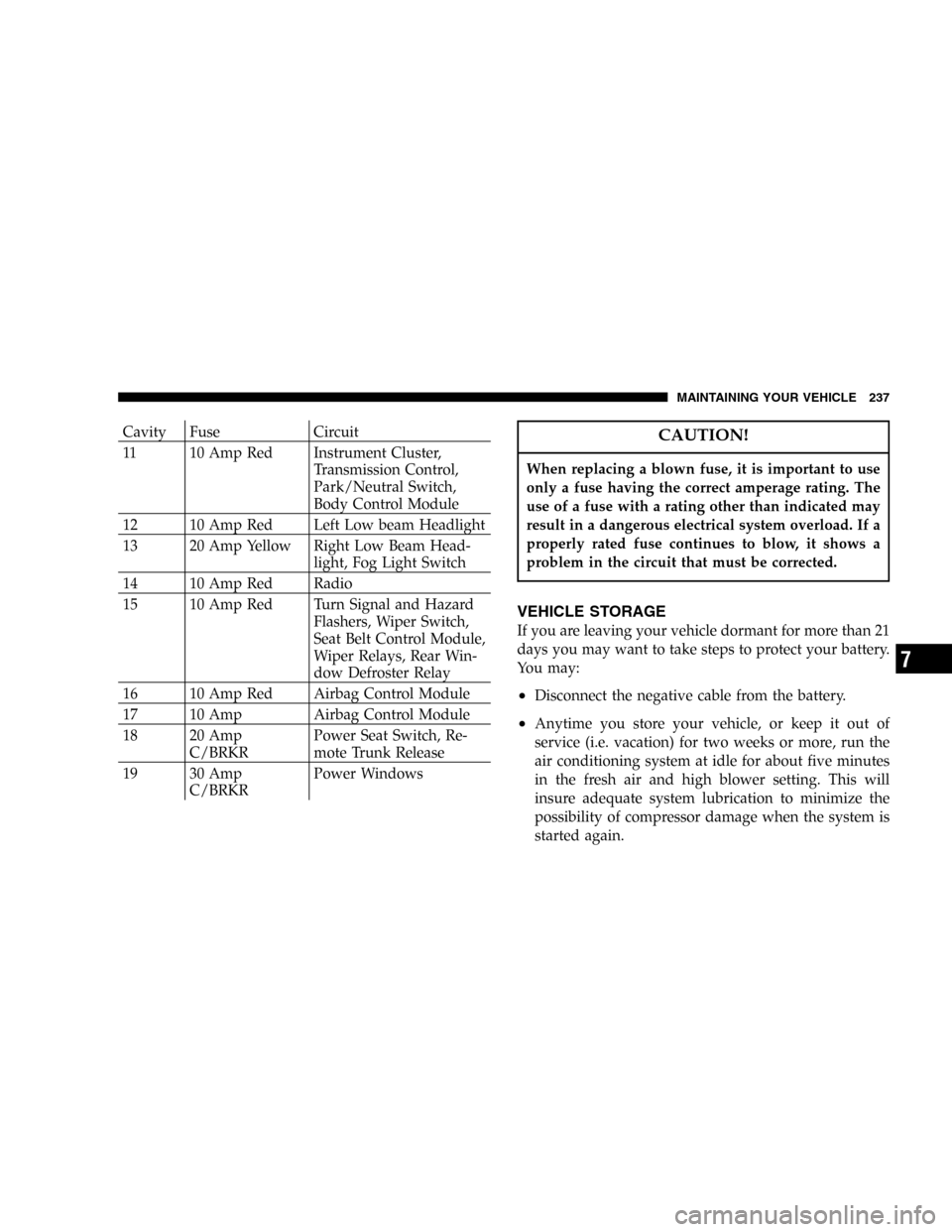
Cavity Fuse Circuit
11 10 Amp Red Instrument Cluster,
Transmission Control,
Park/Neutral Switch,
Body Control Module
12 10 Amp Red Left Low beam Headlight
13 20 Amp Yellow Right Low Beam Head-
light, Fog Light Switch
14 10 Amp Red Radio
15 10 Amp Red Turn Signal and Hazard
Flashers, Wiper Switch,
Seat Belt Control Module,
Wiper Relays, Rear Win-
dow Defroster Relay
16 10 Amp Red Airbag Control Module
17 10 Amp Airbag Control Module
18 20 Amp
C/BRKRPower Seat Switch, Re-
mote Trunk Release
19 30 Amp
C/BRKRPower WindowsCAUTION!
When replacing a blown fuse, it is important to use
only a fuse having the correct amperage rating. The
use of a fuse with a rating other than indicated may
result in a dangerous electrical system overload. If a
properly rated fuse continues to blow, it shows a
problem in the circuit that must be corrected.
VEHICLE STORAGE
If you are leaving your vehicle dormant for more than 21
days you may want to take steps to protect your battery.
You may:
•Disconnect the negative cable from the battery.
•Anytime you store your vehicle, or keep it out of
service (i.e. vacation) for two weeks or more, run the
air conditioning system at idle for about five minutes
in the fresh air and high blower setting. This will
insure adequate system lubrication to minimize the
possibility of compressor damage when the system is
started again.
MAINTAINING YOUR VEHICLE 237
7
Page 289 of 293

Partial Zero Emissions Vehicle for 2.4 Liter.... 248
Passing Light........................... 67
Pets.................................. 48
Placard, Tire and Loading Information....... 159
Power
Brakes............................. 151
Door Locks.......................... 16
Outlet.............................. 81
Seats............................... 60
Steering............................ 153
Steering, Checking.................... 215
Sunroof............................. 79
Windows.........................25,153
Power Steering Fluid.................... 246
Pregnant Women and Seat Belts............. 33
Preparation for Jacking................... 188
Pretensioners
Seat Belts............................ 31
Programmable Electronic Features.........74,78
Programming Transmitters............21,74,78
Radial Ply Tires........................ 166
Radiator Cap (Coolant Pressure Cap)........ 223Radio Broadcast Signals................... 99
Radio Operation...............108,113,122,125
Radio Remote Controls.................. 122
Radio (Sound Systems).............100,108,113
Rear Seat, Folding....................... 61
Rear Window Defroster.................. 135
Rearview Mirrors........................ 56
Recommended Fluids, Lubricants and Genuine
Parts............................... 245
Reformulated Gasoline................... 174
Refrigerant............................ 215
Reminder, Lights On..................... 67
Reminder, Seat Belt...................... 32
Remote Keyless Entry.................... 19
Remote Sound System Controls............ 122
Remote Trunk Release.................... 24
Replacement Tires...................... 169
Reporting Safety Defects................. 274
Restraint, Head......................... 61
Restraints, Occupant..................... 26
Rocking Vehicle When Stuck.............. 197
Rotation, Tires......................... 171
INDEX 289
10