brake light DODGE STRATUS COUPE 2004 2.G User Guide
[x] Cancel search | Manufacturer: DODGE, Model Year: 2004, Model line: STRATUS COUPE, Model: DODGE STRATUS COUPE 2004 2.GPages: 388, PDF Size: 2.28 MB
Page 153 of 388

NOTE: Slight noises may be heard on engine start-up.
These noises will disappear as you continue warming up
the engine.
Flooded engine
If the engine has become flooded during starting, first
operate the starter for 5 to 6 seconds while fully depress-
ing the accelerator pedal (clear flood), then start the
engine without depressing the accelerator pedal at all.
At extremely cold ambient temperature
If the engine won't start, depress the accelerator pedal
about halfway while cranking the engine. Once the
engine starts, release the accelerator pedal.
CAUTION!
When starting the engine, make sure that you step on
the brake pedal. During very cold weather, when
you start the engine while putting your foot on the
accelerator pedal, move your foot to the brake pedal
immediately after the engine has started.
AUTOMATIC TRANSAXLE (IF SO EQUIPPED)
The automatic transaxle is designed for optimum control
and equipped with adaptive control capabilities. The
electronically controlled transaxle optimally matches
gear shifts to almost all driving and road conditions.
DRIVING UPHILL
The transaxle may not upshift to a higher gear if the
computer determines the current speed cannot be main-
tained once a higher gear is engaged.
For smoother vehicle performance, if you release the
throttle while climbing a steep grade, the transaxle may
not upshift. This is normal, as the computer is controlling
the shifting. After reaching the top of the hill, normal gear
shift function will resume.
DRIVING DOWNHILL
When traveling down steep grades and depressing the
brake pedal, the computer may automatically select a
lower gear. This function assists engine braking efforts,
reducing the need to use the brakes.
STARTING AND DRIVING 153
5
Page 161 of 388
WARNING!
Always depress the brake pedal when shifting the
selector lever into a gear from the ªNº (NEUTRAL)
position. When beginning to drive, do not shift the
selector lever from the ªNº (NEUTRAL) position
while depressing the accelerator pedal; doing so may
cause the vehicle to ªjumpº forward or backward.
CAUTION!
If the button is always depressed to operate the
selector lever, the lever may be accidentally shifted
into the ªPº, ªRº position. Be sure not to depress the
button when performing the operations indicated by
in the illustration.
NOTE:
If the brake pedal is not depressed and held, the
shift-lock device activates to prevent the selector lever
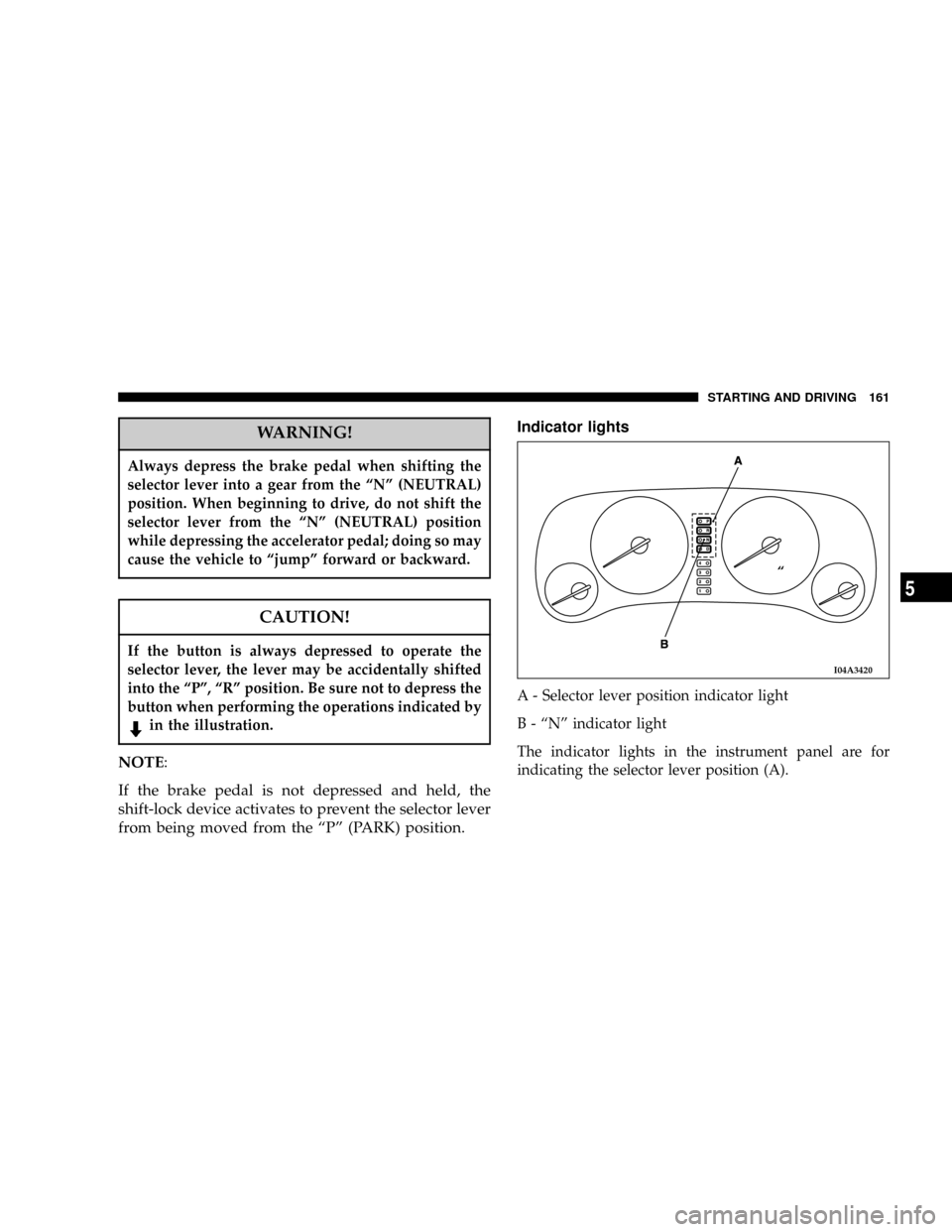
from being moved from the ªPº (PARK) position.Indicator lights
A - Selector lever position indicator light
B - ªNº indicator light
The indicator lights in the instrument panel are for
indicating the selector lever position (A).
I04A3420
ª
STARTING AND DRIVING 161
5
Page 165 of 388
3. In Autostick, downward shifts are made automatically
when the vehicle slows down. When the vehicle stops,
1st gear is automatically selected.
4. When starting out on slippery roads, push the selector
lever forward into the + (UP) position. This puts the
transmission into 2nd gear and is better for starting out
on slippery roads. Push the selector lever to the ±
(DOWN) side to shift back to 1st gear.
5. Move the selector lever gently between the manual
and main gates and between positions in the manual
gate. Undue force could damage the selector lever.Indication lights
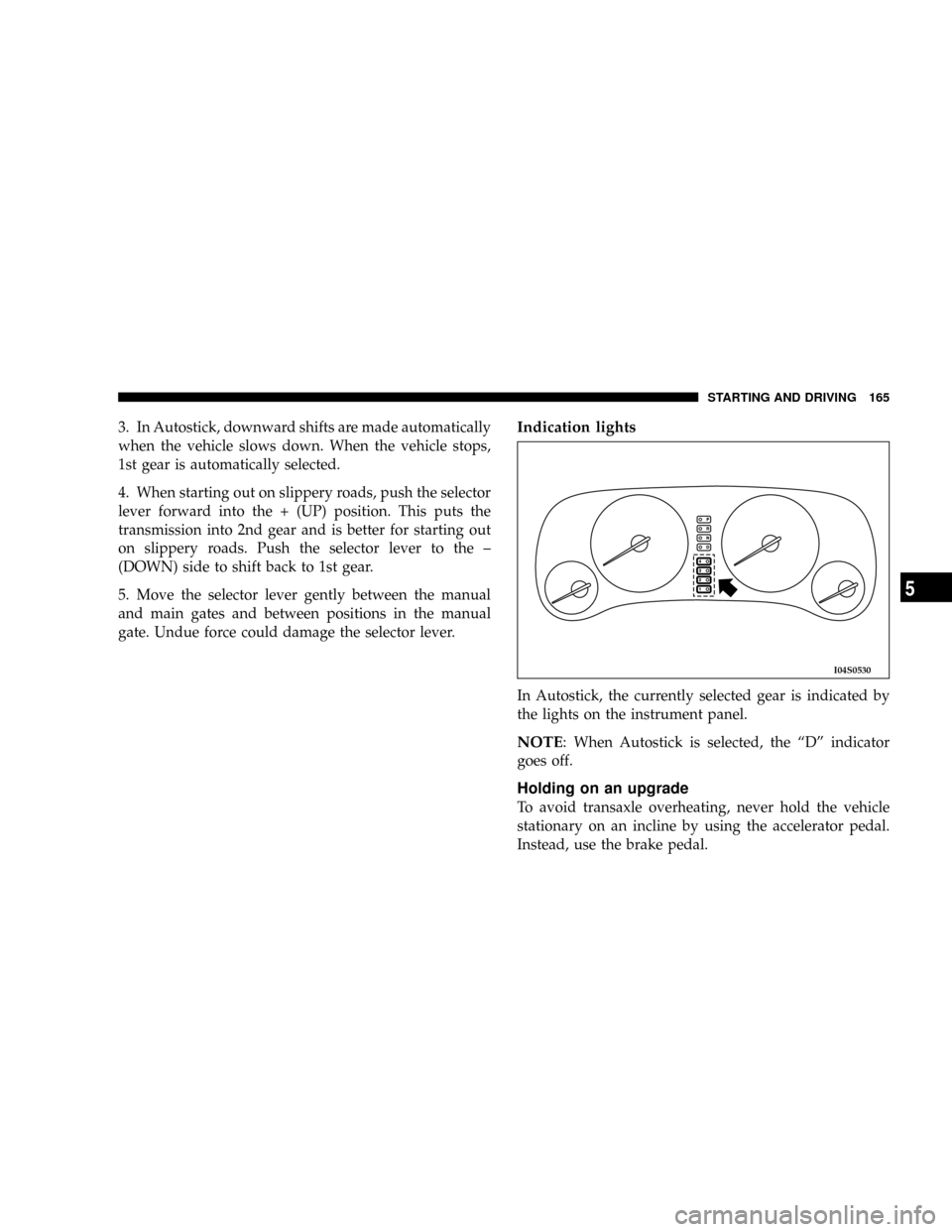
In Autostick, the currently selected gear is indicated by
the lights on the instrument panel.
NOTE: When Autostick is selected, the ªDº indicator
goes off.
Holding on an upgrade
To avoid transaxle overheating, never hold the vehicle
stationary on an incline by using the accelerator pedal.
Instead, use the brake pedal.
I04S0530
STARTING AND DRIVING 165
5
Page 169 of 388
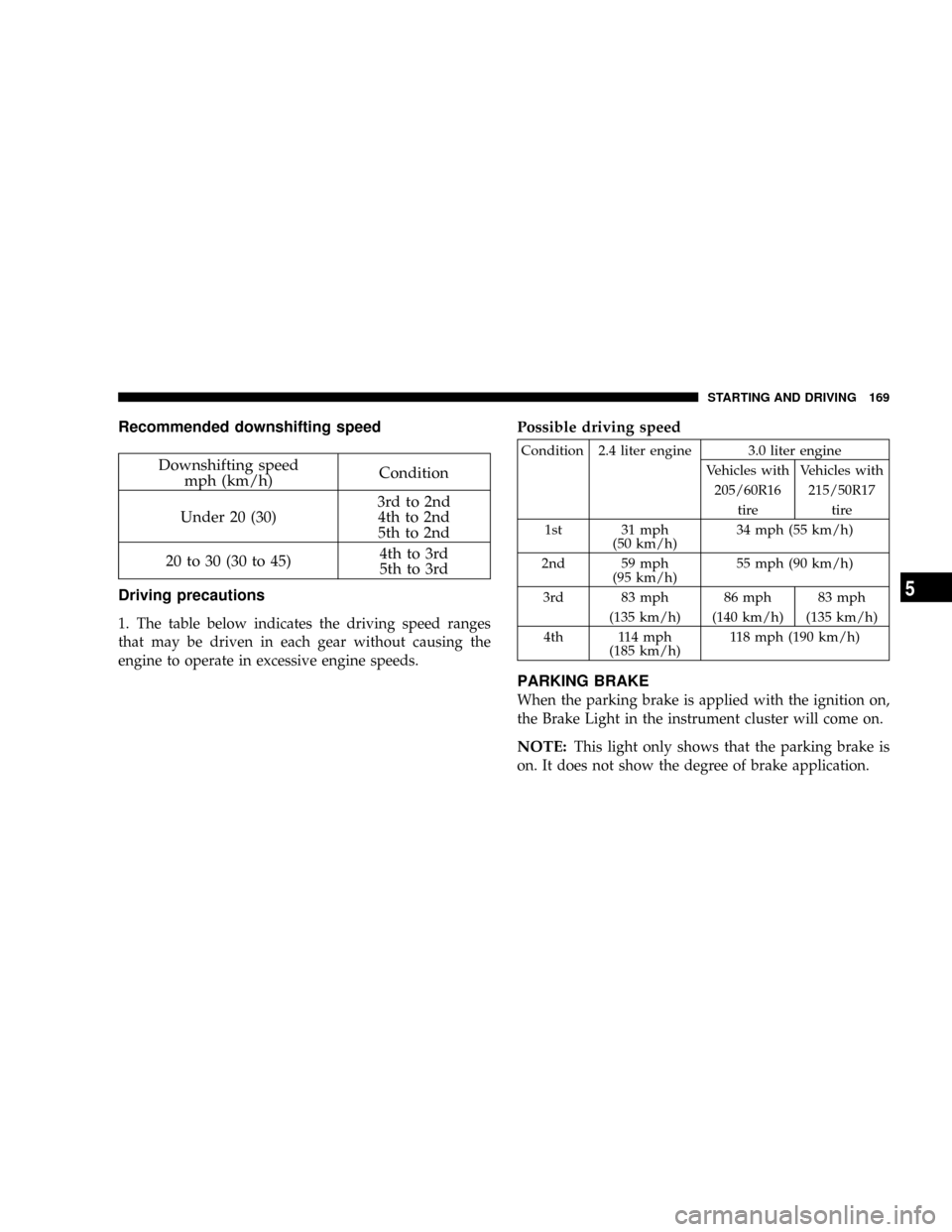
Recommended downshifting speed
Downshifting speed
mph (km/h)Condition
Under 20 (30)3rd to 2nd
4th to 2nd
5th to 2nd
20 to 30 (30 to 45)4th to 3rd
5th to 3rd
Driving precautions
1. The table below indicates the driving speed ranges
that may be driven in each gear without causing the
engine to operate in excessive engine speeds.
Possible driving speed
Condition 2.4 liter engine 3.0 liter engine
Vehicles with Vehicles with
205/60R16 215/50R17
tire tire
1st 31 mph
(50 km/h)34 mph (55 km/h)
2nd 59 mph
(95 km/h)55 mph (90 km/h)
3rd 83 mph 86 mph 83 mph
(135 km/h) (140 km/h) (135 km/h)
4th 114 mph
(185 km/h)118 mph (190 km/h)
PARKING BRAKE
When the parking brake is applied with the ignition on,
the Brake Light in the instrument cluster will come on.
NOTE:This light only shows that the parking brake is
on. It does not show the degree of brake application.
STARTING AND DRIVING 169
5
Page 173 of 388

WARNING!
Driving on worn brake pads can reduce your ability
to stop, and can result in an accident.
ANTI-LOCK BRAKING (ABS) SYSTEM (IF SO
EQUIPPED)
The ABS gives increased vehicle stability and brake
performance under most braking conditions. The system
automatically ªpumpsº the brakes during severe braking
conditions to prevent wheel lock up.
All vehicle wheels and tires must be the same size and
tires must be properly inflated to produce optimal signals
for the computer. However, the system will compensate
when the compact spare is in use.
During stops where ABS is activated, a vibration of the
brake pedal may be felt and associated system noises
may be heard.
NOTE:Pumping of the brake pedal will diminish the
effectiveness of Anti-lock brakes and may lead to anaccident. Pumping makes the stopping distance longer.
Just press firmly on your brake pedal when you need to
slow down or stop.
General driving hints (standard/anti-lock brakes)
1. During anti-lock braking, steering differs slightly from
normal driving conditions. Be sure to operate steering
wheel carefully.
2. The anti-lock braking system is not restricted to situ-
ations where brakes are applied suddenly. This system
may also operate to prevent wheel lock when driving
over manholes, steel roadwork plates, road markings, or
any uneven road surface.
3. Always maintain a safe distance from vehicles in front
of you. If your vehicle is equipped with Anti-lock braking
system, allow for a greater braking distance when:
·Driving on gravel or snow-covered roads.
·Driving with tire chains installed.
·Driving on uneven road surfaces.
STARTING AND DRIVING 173
5
Page 174 of 388
CAUTION!
²Anti-lock braking system can not prevent acci-
dents. It remains the driver's task to exercise
safety precautions and to drive prudently.
²To prevent failure of the anti-lock braking system,
be sure all 4-wheels and tires are the same size
and type (space saver spare excluded).
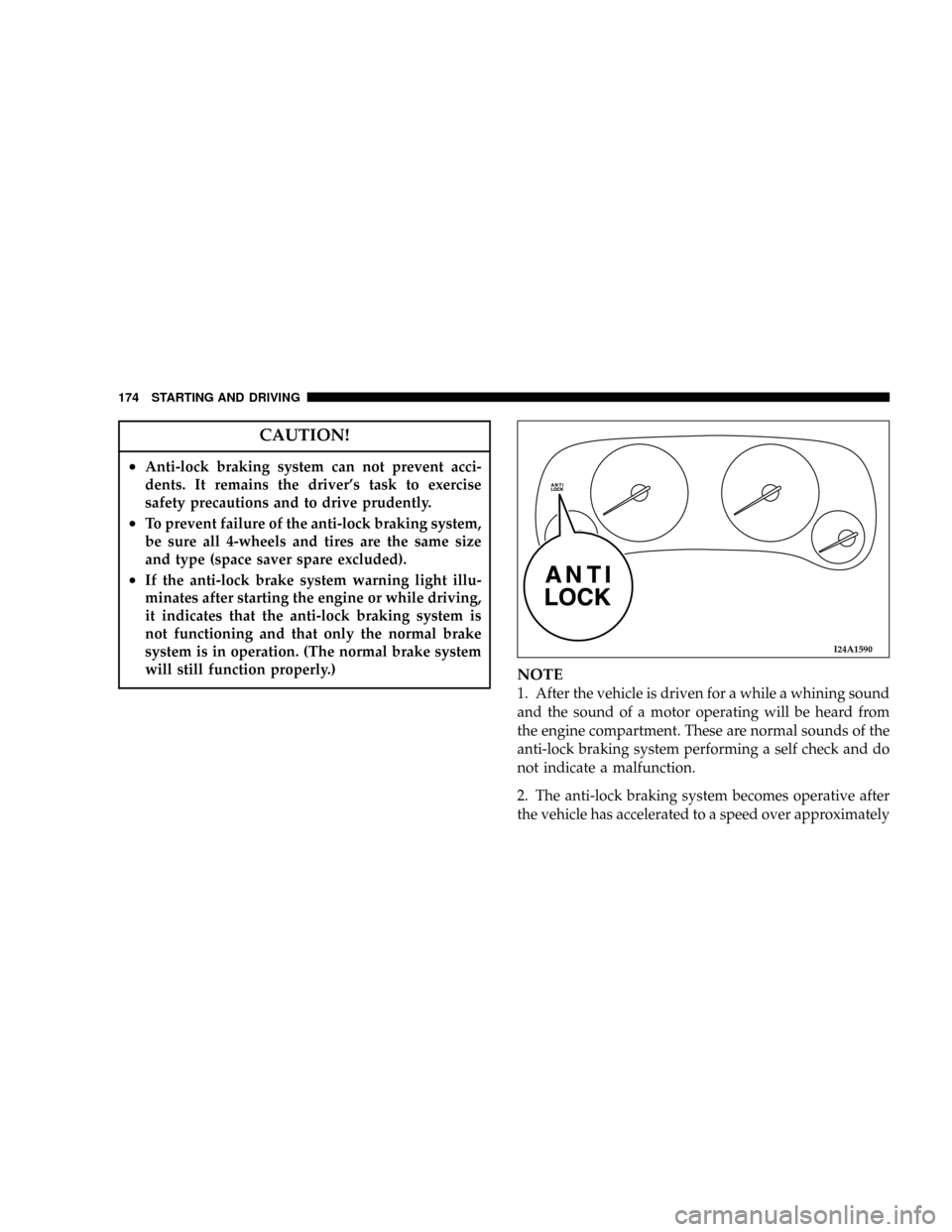
²If the anti-lock brake system warning light illu-
minates after starting the engine or while driving,
it indicates that the anti-lock braking system is
not functioning and that only the normal brake
system is in operation. (The normal brake system
will still function properly.)
NOTE
1. After the vehicle is driven for a while a whining sound
and the sound of a motor operating will be heard from
the engine compartment. These are normal sounds of the
anti-lock braking system performing a self check and do
not indicate a malfunction.
2. The anti-lock braking system becomes operative after
the vehicle has accelerated to a speed over approximately
I24A1590
174 STARTING AND DRIVING
Page 195 of 388
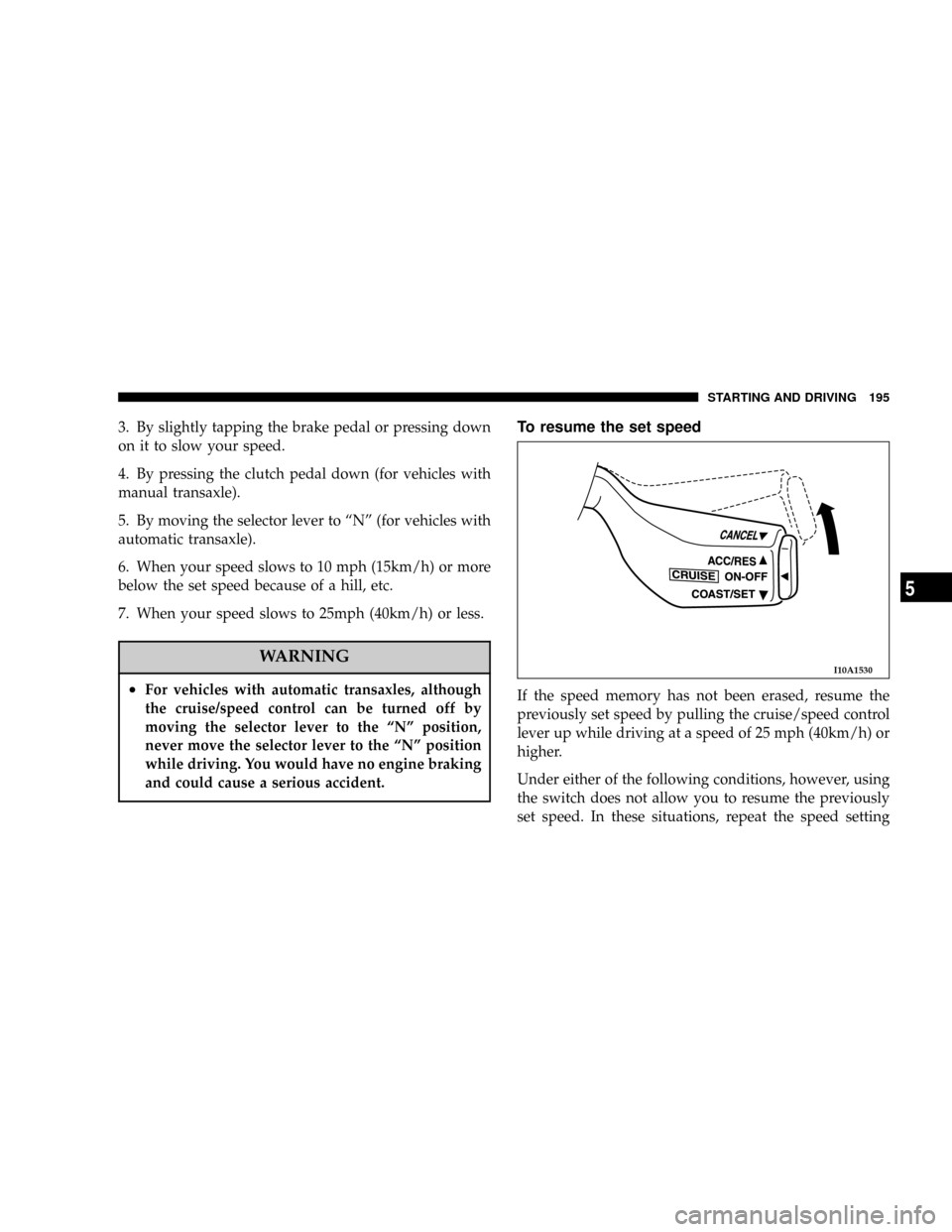
3. By slightly tapping the brake pedal or pressing down
on it to slow your speed.
4. By pressing the clutch pedal down (for vehicles with
manual transaxle).
5. By moving the selector lever to ªNº (for vehicles with
automatic transaxle).
6. When your speed slows to 10 mph (15km/h) or more
below the set speed because of a hill, etc.
7. When your speed slows to 25mph (40km/h) or less.
WARNING
²For vehicles with automatic transaxles, although
the cruise/speed control can be turned off by
moving the selector lever to the ªNº position,
never move the selector lever to the ªNº position
while driving. You would have no engine braking
and could cause a serious accident.
To resume the set speed
If the speed memory has not been erased, resume the
previously set speed by pulling the cruise/speed control
lever up while driving at a speed of 25 mph (40km/h) or
higher.
Under either of the following conditions, however, using
the switch does not allow you to resume the previously
set speed. In these situations, repeat the speed setting
I10A1530
STARTING AND DRIVING 195
5
Page 200 of 388

Check wheel nuts for tightness and tires (including spare
tire) for proper pressure. Maintain specified tire inflation
pressures. Replace tires before they are excessively worn.
Lights
Have someone observe the operation of all exterior lights
while you activate the controls. Check the turn signals
and highbeam indicators on the instrument panel.
Fluid leaks
Check the area under the vehicle after overnight parking
for fuel, water, oil, or other fluid leaks. Make sure all fluid
levels are at the proper levels. Also, if fuel leaks are
detected, the cause should be located and corrected
immediately.
Driver
Do not drive if you are tired or sleepy. Do not drive if you
have been drinking or taking drugs. Unless you are alert
and able to concentrate on your driving, you could have
an accident, resulting in serious or fatal injury to yourself
and others.
SAFE DRIVING TECHNIQUES
Even this vehicle's safety equipment, and your safest
driving, cannot guarantee that you can avoid accident or
injury. However, we recommend that you give extra
attention to the following, to help maximize the safety of
you and your passengers:
1. Drive defensively. Be aware of traffic, road and
weather conditions. Leave adequate stopping distance
for your vehicle.
2. Before changing lanes, check your mirrors and flash
the proper turn-signal light.
3. While driving, watch the behavior of other drivers,
bicyclists and pedestrians.
4. During an emergency stop, switch on the hazard
warning flasher.
5. When leaving the vehicle, set the parking brake and
place the gearshift lever into low gear.
In vehicles with an automatic transaxle, place the selector
lever in the ªPº (PARK) position. Remove the key.
200 STARTING AND DRIVING
Page 203 of 388

WARNING!
Never open the radiator cap when the radiator is hot.
You could be seriously burned.
TRAILER TOWING
Warranty Requirements
The Manufacturer's Passenger Vehicle Warranty will
apply to vehicles used to tow trailers for non-commercial
use. However the following conditions must be met:
²The maximum trailer load for vehicles with manual
transaxles is 1,000 lbs (454 kg).
²The maximum trailer load for vehicles with automatic
transaxles is 1,000 lbs (454 kg).
²The maximum frontal area of the trailer cannot exceed
20 square feet (1.86 square meters).
²If using a manual transaxle vehicle for trailer towing,
all starts must be in FIRST gear to avoid excessive
clutch slippage.The trailer tongue load must be considered as part of the
tow vehicle load capacity when loading the vehicle.
NOTE:Check the automatic transmission fluid level
before towing. Fluid discoloration, or a burnt odor,
shows the need for transmission fluid replacement.
WARNING!
Connecting trailer brakes to your vehicle's hydraulic
brake lines can overload your brake system and
cause it to fail. You might not have brakes when you
need them and could have an accident.
Whenever you pull a trailer, regardless of the trailer size,
stop lights and turn signals on the trailer are recom-
mended for motoring safety.
STARTING AND DRIVING 203
5
Page 243 of 388

Air conditioning switch
The air conditioning can be operated while the engine is
running.
Push the switch, and the air conditioning (cooling/
dehumidifying function) will operate. When ªONº, the
operation indicator lamp (A) will illuminate.
Push the switch again and the air conditioning will stop.
CAUTION!
When using the air conditioning, the idle speed is
slightly increased. Therefore, make sure your foot is
firmly on the brake pedal when shifting the trans-
mission to drive.
For the 3.0 liter engine model, if the air conditioning
indicator (A) blinks, it is suspected that something is
wrong with the air conditioning. Move the vehicle to
a safe place and stop the engine. Then run the engine
again and see the air conditioning indicator (A). If
the indicator goes out, there is nothing wrong with
the air conditioning. If it blinks again, have the
system checked by the authorized dealer.
H23A3260
FOR PLEASANT DRIVING 243
6