radio DODGE TRUCK 1993 Service Repair Manual
[x] Cancel search | Manufacturer: DODGE, Model Year: 1993, Model line: TRUCK, Model: DODGE TRUCK 1993Pages: 1502, PDF Size: 80.97 MB
Page 325 of 1502
8A
- 4
ELECTRICAL
•
IGNITION
OFF
DRAW
(IOD)
Ignition off draw refers to power being drained
from the battery with the ignition turned off. A nor
mal vehicle electrical system will draw from 5 to 20
milliamps. A vehicle that has not been operated for
an extended period of time (approximately 20 days)
may discharge the battery to an inadequate level.
Battery drain should not exceed approximately 20
MA (20 milliamps = 0.020 amps). The 20 MA are needed to supply PCM memory,
digital clock memory, and ETR (electronically tuned
radio) memory. Excessive battery drain is caused by items left
turned on, internally shorted generator, or intermit
tent short in wiring.
If the IOD is excessive (over 20 milliamperes), the
defect must be found and corrected before replacing a
battery. In most cases the battery can be charged and returned to service.
TEST PROCEDURE Testing for higher amperage IOD must be per
formed first to prevent damage to most milliamp
meters.
Verify that all electrical accessories are OFF. Turn
off all lights, remove ignition key, and close all
doors.
If the vehicle is equipped with electronic acces
sories (illuminated entry, high line radio), allow the
systems to automatically shut off (time out), up to 3
minutes.
(1) After determining that the underhood lamp is
operating properly then disconnect bulb. (2) Disconnect negative cable from battery.
(3) Connect a typical 12 volt test light (low watt
age bulb) between the negative cable clamp and the
battery negative terminal. The test light may light brightly for up to 3 min
utes or may not light at all (depending on the elec
trical equipment). The term brightly being used
throughout the following tests, implies the bright ness of the test light will be the same as if it were
connected across the battery.
The test light must be securely clamped to the neg
ative cable and battery terminal. If the test light be
comes disconnected during any of the IOD test, the electronic timer function will be activated and all
tests must be repeated.
(4) After 3 minutes, the test light should turn OFF
or be DIMLY lit (depending on the electrical equip
ment).
If the test light remains brightly lit do not
disconnect it. Remove each fuse or circuit breaker (refer to Group 8 - Wiring Diagrams) until test light
is either OFF or DIMLY lit. This will eliminate the
higher amperage draw.
If test light is still bright after disconnecting each
fuse and circuit breaker, disconnect the wiring har ness from the generator. Refer to Generator Testing
in this group. Do not disconnect the test light. After higher amperage IOD has been corrected, low
amperage IOD may be checked.
It is now safe to install milliamp meter to check for
low amperage IOD.
(5) With test light still connected, securely clamp
an ammeter between battery negative terminal and
negative battery cable.
If the test light or the milliamp meter circuit is
broken the various timer circuits will start. Do
not open any doors or turn on any electrical ac cessories with the test light disconnected or the
meter may be damaged.
(6) Disconnect test light. The current draw should
not exceed 0.020 amp. If it exceeds 20 milliamps iso
late each circuit by removing circuit breakers and
fuses.
The meter reading drops once the high current
problem is found. Repair this section of the circuit,
whether it is a wiring short or component failure.
BATTERY
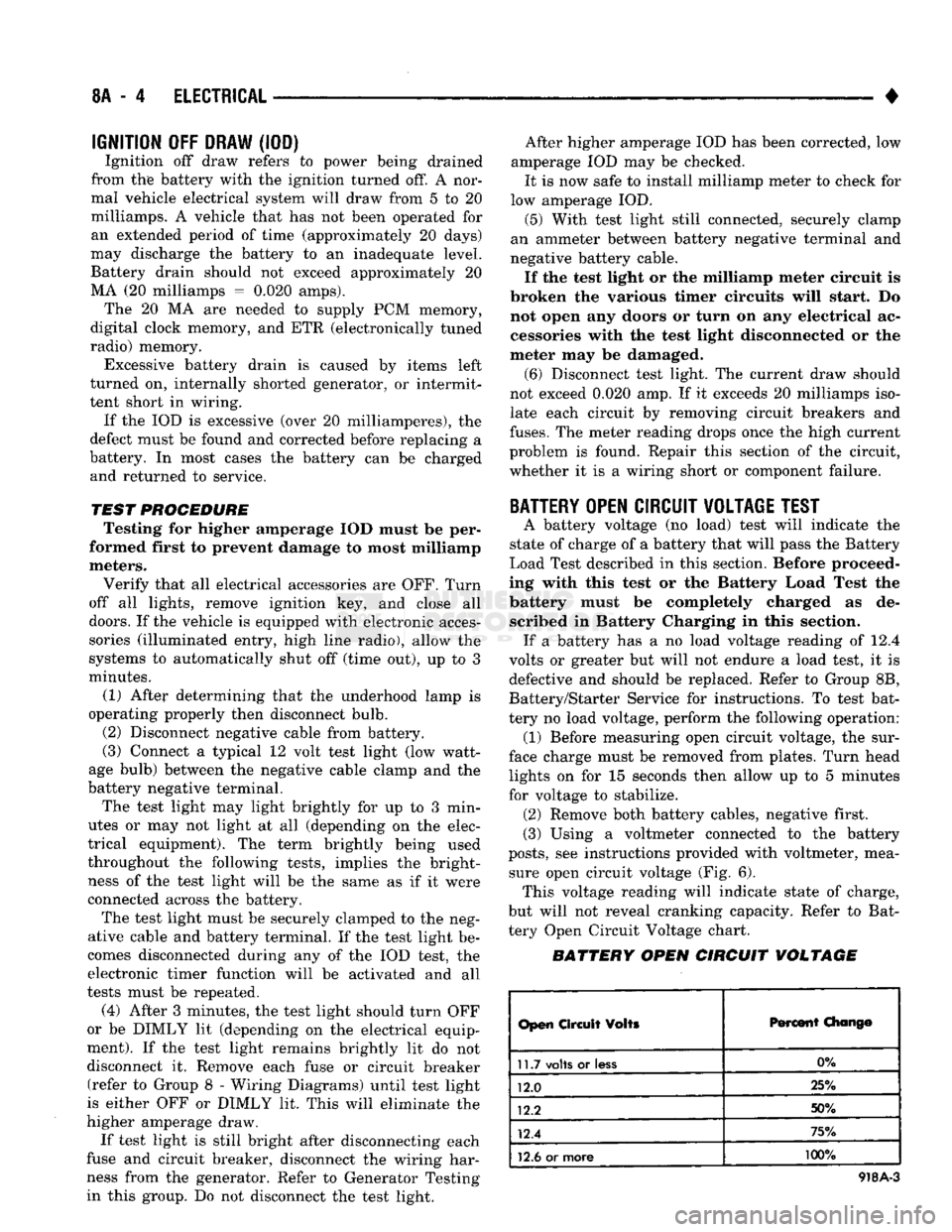
OPEN CIRCUIT VOLTAGE TEST
A battery voltage (no load) test will indicate the
state of charge of a battery that will pass the Battery
Load Test described in this section. Before proceed
ing with this test or the Battery Load Test the
battery must be completely charged as de scribed in Battery Charging in this section. If a battery has a no load voltage reading of 12.4
volts or greater but will not endure a load test, it is
defective and should be replaced. Refer to Group 8B,
Battery/Starter Service for instructions. To test bat
tery no load voltage, perform the following operation: (1) Before measuring open circuit voltage, the sur
face charge must be removed from plates. Turn head lights on for 15 seconds then allow up to 5 minutes
for voltage to stabilize. (2) Remove both battery cables, negative first.
(3) Using a voltmeter connected to the battery
posts,
see instructions provided with voltmeter, mea sure open circuit voltage (Fig. 6). This voltage reading will indicate state of charge,
but will not reveal cranking capacity. Refer to Bat
tery Open Circuit Voltage chart.
BATTERY OPEN CIRCUIT VOLTAGE
Open
Circuit
Volts
Percent
Chang©
11.7
volts
or
less
0%
12.0 25%
12.2 50%
12.4 75%
12.6
or more 100%
918A-3
Page 359 of 1502
8D
- 8
IGNITION
SYSTEMS
• If sync pulse signal is not present, replacement of
the camshaft position sensor is necessary. For removal or installation of ignition system com
ponents, refer to the Component Removal/Installa
tion section of this group.
For system operation and component identification,
refer to the Component Identification/System Opera
tion section of this group.
CRANKSHAFT POSITION
SENSOR
TEST
To perform a complete test of this sensor and its
circuitry, refer to the DRB II diagnostic scan tool.
Also refer to the appropriate Powertrain Diagnostics
Procedures manual. To test the sensor only, refer to
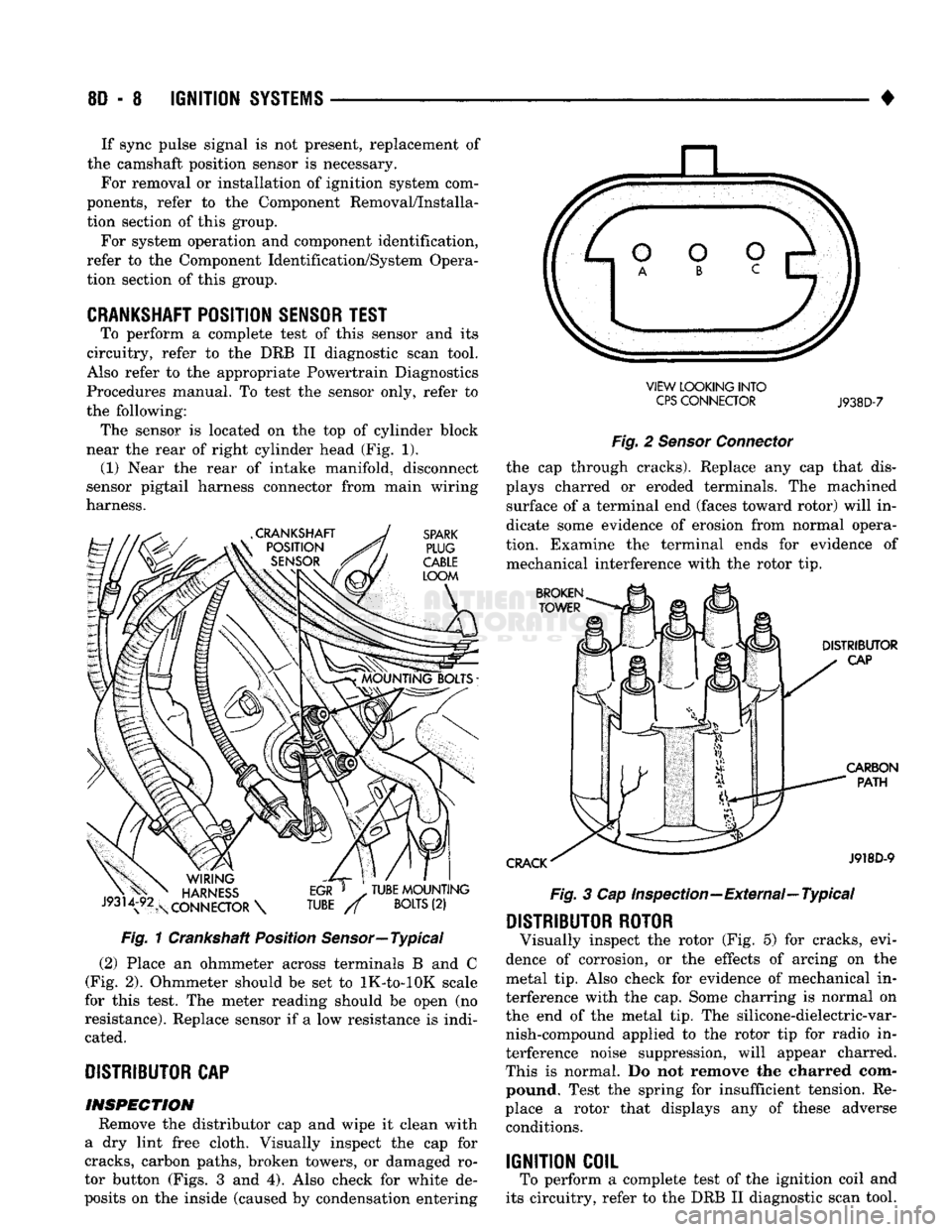
the following: The sensor is located on the top of cylinder block
near the rear of right cylinder head (Fig. 1). (1) Near the rear of intake manifold, disconnect
sensor pigtail harness connector from main wiring
harness. Fig. 1 Crankshaft Position Sensor—Typical
(2) Place an ohmmeter across terminals B and C
(Fig. 2). Ohmmeter should be set to lK-to-lOK scale
for this test. The meter reading should be open (no
resistance). Replace sensor if a low resistance is indi cated.
DISTRIBUTOR
CAP INSPECTION Remove the distributor cap and wipe it clean with
a dry lint free cloth. Visually inspect the cap for
cracks, carbon paths, broken towers, or damaged ro
tor button (Figs. 3 and 4). Also check for white de
posits on the inside (caused by condensation entering VIEW LOOKING INTO
CPS
CONNECTOR
J938D-7
Fig. 2 Sensor Connector the cap through cracks). Replace any cap that dis
plays charred or eroded terminals. The machined surface of a terminal end (faces toward rotor) will in
dicate some evidence of erosion from normal opera
tion. Examine the terminal ends for evidence of mechanical interference with the rotor tip. Fig. 3 Cap Inspection—External—Typical
DISTRIBUTOR ROTOR
Visually inspect the rotor (Fig. 5) for cracks, evi
dence of corrosion, or the effects of arcing on the
metal tip. Also check for evidence of mechanical in
terference with the cap. Some charring is normal on
the end of the metal tip. The silicone-dielectric-var nish-compound applied to the rotor tip for radio in
terference noise suppression, will appear charred.
This is normal. Do not remove the charred com pound. Test the spring for insufficient tension. Re
place a rotor that displays any of these adverse conditions.
IGNITION COIL
To perform a complete test of the ignition coil and
its circuitry, refer to the DRB II diagnostic scan tool.
Page 367 of 1502
8D
- 16
IGNITION
SYSTEMS
• other operating conditions are causing engine over
heating. (The heat range rating refers to the operat
ing temperature of a particular type spark plug.
Spark plugs are designed to operate within specific
temperature ranges. This depends upon the thickness and length of the center electrodes porcelain insula
tor.)
GROUND
ELECTRODE
CENTER
ELECTRODE
DISSOLVED
J908D-14 Fig. 26 Preignition Damage
SPARK
PLUG
OVERHEATING
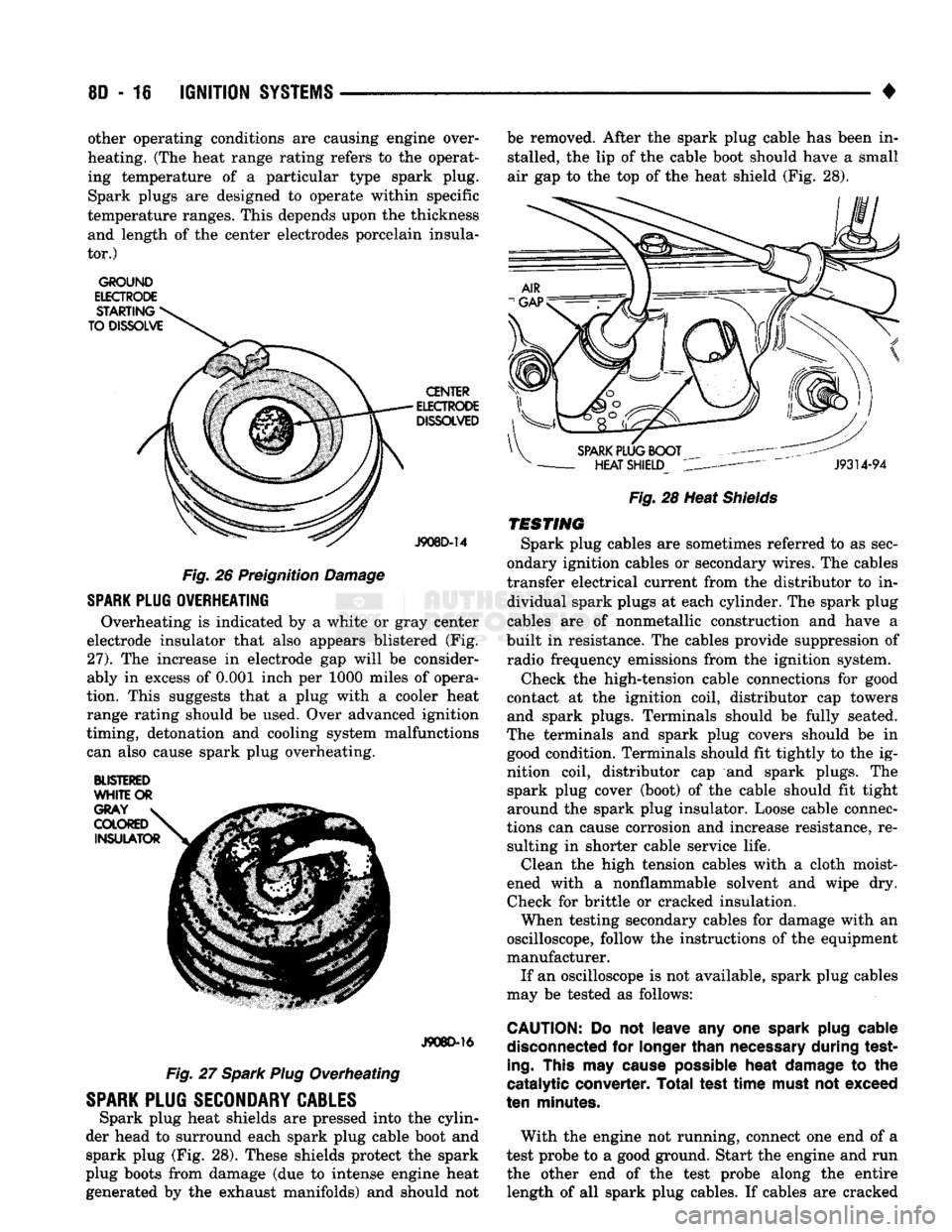
Overheating is indicated by a white or gray center
electrode insulator that also appears blistered (Fig.
27).
The increase in electrode gap will be consider
ably in excess of 0.001 inch per 1000 miles of opera
tion. This suggests that a plug with a cooler heat
range rating should be used. Over advanced ignition
timing, detonation and cooling system malfunctions can also cause spark plug overheating.
BLISTERED
WHITE
OR
J908D-16
Fig. 27 Spark Plug Overheating
SPARK
PLUG
SECONDARY
CABLES
Spark plug heat shields are pressed into the cylin
der head to surround each spark plug cable boot and spark plug (Fig. 28). These shields protect the spark
plug boots from damage (due to intense engine heat
generated by the exhaust manifolds) and should not be removed. After the spark plug cable has been in
stalled, the lip of the cable boot should have a small
air gap to the top of the heat shield (Fig. 28).
Fig.
28 Heat
Shields
TESTING
Spark plug cables are sometimes referred to as sec
ondary ignition cables or secondary wires. The cables
transfer electrical current from the distributor to in dividual spark plugs at each cylinder. The spark plug
cables are of nonmetallic construction and have a
built in resistance. The cables provide suppression of radio frequency emissions from the ignition system.
Check the high-tension cable connections for good
contact at the ignition coil, distributor cap towers and spark plugs. Terminals should be fully seated.
The terminals and spark plug covers should be in good condition. Terminals should fit tightly to the ig
nition coil, distributor cap and spark plugs. The spark plug cover (boot) of the cable should fit tight
around the spark plug insulator. Loose cable connec
tions can cause corrosion and increase resistance, re sulting in shorter cable service life. Clean the high tension cables with a cloth moist
ened with a nonflammable solvent and wipe dry.
Check for brittle or cracked insulation. When testing secondary cables for damage with an
oscilloscope, follow the instructions of the equipment
manufacturer. If an oscilloscope is not available, spark plug cables
may be tested as follows:
CAUTION:
Do not leave any one
spark
plug
cable
disconnected
for
longer
than
necessary
during test
ing.
This
may
cause
possible
heat
damage
to the
catalytic converter. Total test
time
must
not exceed
ten
minutes.
With the engine not running, connect one end of a
test probe to a good ground. Start the engine and run the other end of the test probe along the entire length of all spark plug cables. If cables are cracked
Page 374 of 1502
•
IGNITION
SYSTEMS
80 - 23
PCM
MOUNTING
PCM CONNECTOR CONNECTOR
MOUNTING
BOLT
J9314-165
Fig.
14 PCM Removal/Installation
(6) Remove PCM from vehicle.
INSTALLATION
(1) Check pins in PCM 60-way connector for dam
age.
Repair as necessary. (2) Position PCM and install mounting bolts.
Tighten bolts to 4 N»m (35 in. lbs.) torque. (3) Connect 60-way electrical connector to the
PCM. (4) Install battery.
(5) Connect battery cables to battery (positive ca
ble first).
SPARK
PLUGS
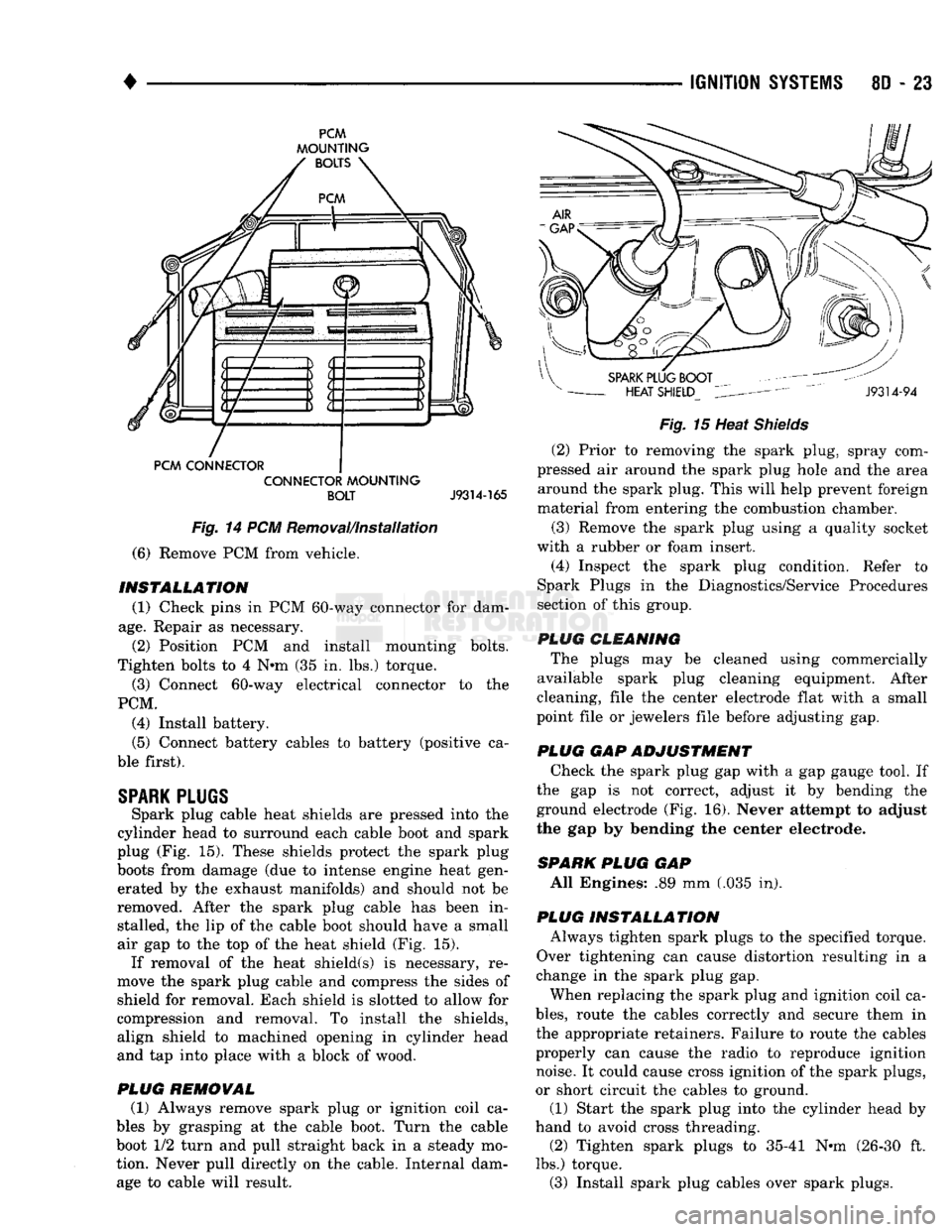
Spark plug cable heat shields are pressed into the
cylinder head to surround each cable boot and spark
plug (Fig. 15). These shields protect the spark plug
boots from damage (due to intense engine heat gen erated by the exhaust manifolds) and should not be
removed. After the spark plug cable has been in stalled, the lip of the cable boot should have a small
air gap to the top of the heat shield (Fig. 15). If removal of the heat shield(s) is necessary, re
move the spark plug cable and compress the sides of
shield for removal. Each shield is slotted to allow for
compression and removal. To install the shields, align shield to machined opening in cylinder head
and tap into place with a block of wood.
PLUG
REMOVAL
(1) Always remove spark plug or ignition coil ca
bles by grasping at the cable boot. Turn the cable
boot 1/2 turn and pull straight back in a steady mo
tion. Never pull directly on the cable. Internal dam age to cable will result.
Fig.
15 Heat
Shields
(2) Prior to removing the spark plug, spray com
pressed air around the spark plug hole and the area around the spark plug. This will help prevent foreign
material from entering the combustion chamber.
(3) Remove the spark plug using a quality socket
with a rubber or foam insert. (4) Inspect the spark plug condition. Refer to
Spark Plugs in the Diagnostics/Service Procedures
section of this group.
PLUG CLEANING The plugs may be cleaned using commercially
available spark plug cleaning equipment. After
cleaning, file the center electrode flat with a small
point file or jewelers file before adjusting gap.
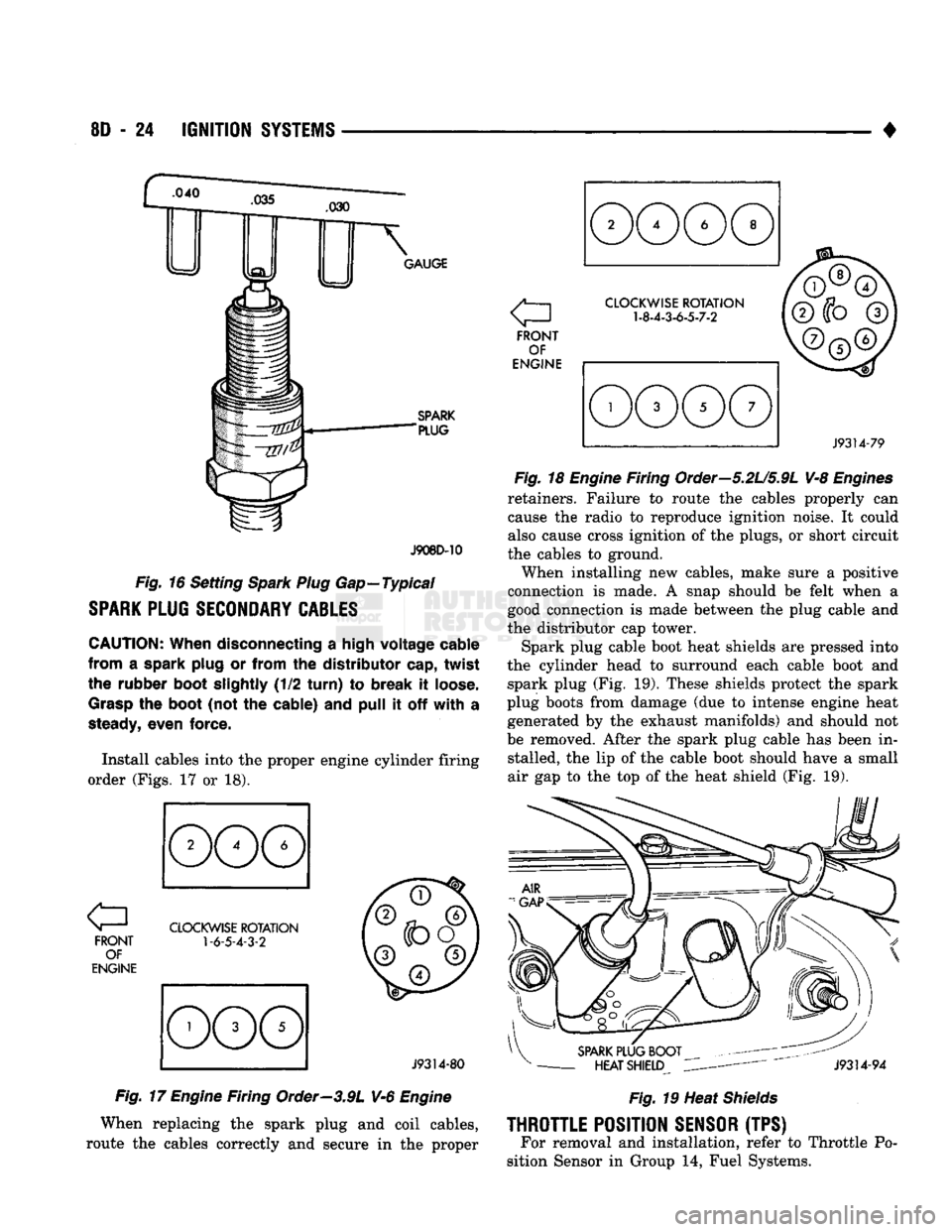
PLUG GAP ADJUSTMENT Check the spark plug gap with a gap gauge tool. If
the gap is not correct, adjust it by bending the
ground electrode (Fig. 16). Never attempt to adjust
the gap by bending the center electrode.
SPARK
PLUG
GAP All Engines: .89 mm (.035 in).
PLUG INSTALLATION Always tighten spark plugs to the specified torque.
Over tightening can cause distortion resulting in a
change in the spark plug gap.
When replacing the spark plug and ignition coil ca
bles,
route the cables correctly and secure them in
the appropriate retainers. Failure to route the cables
properly can cause the radio to reproduce ignition noise. It could cause cross ignition of the spark plugs,
or short circuit the cables to ground.
(1) Start the spark plug into the cylinder head by
hand to avoid cross threading. (2) Tighten spark plugs to 35-41 N-m (26-30 ft.
lbs.) torque. (3) Install spark plug cables over spark plugs.
Page 375 of 1502
8D
- 24
IGNITION
SYSTEMS
•
.040
GAUGE
SPARK
"PLUG
J908D-10
Fig.
16 Setting
Spark Plug
Gap—Typical
SPARK
PLUG
SECONDARY
CABLES
CAUTION:
When disconnecting
a
high voltage cable
from
a
spark plug
or
from
the
distributor cap, twist
the rubber boot slightly
(1/2
turn)
to
break
it
loose.
Grasp
the
boot
(not
the
cable)
and
pull
it off
with
a
steady,
even force.
Install cables into
the
proper engine cylinder firing
order (Figs.
17 or 18).
FRONT OF
ENGINE
CLOCKWISE
ROTATION
1-6-5-4-3-2
J9314-80
Fig.
17
Engine
Firing Order—3.9L V-6
Engine
When replacing
the
spark plug
and
coil cables,
route
the
cables correctly
and
secure
in the
proper a
FRONT OF
ENGINE
CLOCKWISE
ROTATION
1-8-4-3-6-5-7-2
J9314-79
Fig.
18
Engine
Firing Order—5.2U5.9L V-8
Engines
retainers. Failure
to
route
the
cables properly
can
cause
the
radio
to
reproduce ignition noise.
It
could
also cause cross ignition
of the
plugs,
or
short circuit
the cables
to
ground.
When installing
new
cables, make sure
a
positive
connection
is
made.
A
snap should
be
felt when
a
good connection
is
made between
the
plug cable
and
the distributor
cap
tower.
Spark plug cable boot heat shields
are
pressed into
the cylinder head
to
surround each cable boot
and
spark plug
(Fig. 19).
These shields protect
the
spark
plug boots from damage
(due to
intense engine heat generated
by the
exhaust manifolds)
and
should
not
be removed. After
the
spark plug cable
has
been
in
stalled,
the lip of the
cable boot should have
a
small
air
gap to the top of the
heat shield
(Fig. 19).
SPARK
PLUG BOOT
-
HEAT SHIELD
J9314-94
Fig.
19 Heat
Shields
THROTTLE
POSITION
SENSOR
(TPS) For removal
and
installation, refer
to
Throttle
Po
sition Sensor
in
Group
14,
Fuel Systems.
Page 384 of 1502
•
INSTRUMENT PANEL
AND
GAUGES
8E - 3
MALFUNCTION INDICATOR (CHECK ENGINE)
Fig.
5
Distance Sensor
If
the
input from
one of the
following sensors fails
an internal Powertrain Control Module
(PCM)
self
check,
the PCM
turns
on the
Check Engine Lamp. The
PCM
then substitutes
a
modified signal
in
place
of
the one
that failed until
a
repair
is
made:
• Manifold Absolute Pressure (MAP) Sensor
• Throttle Position Sensor
• Coolant Temperature Sensor
• Battery Voltage Sense
• Battery Voltage
Too
High
Refer
to the
appropriate Powertrain Diagnostic
Test Procedures manual
for
further information.
ELECTRONIC DIGITAL CLOCK
The electronic digital clock
is in the
radio.
The
clock
and
radio each
use the
display panel built into
the radio.
A
digital readout indicates
the
time
in
hours
and
minutes whenever
the
ignition switch
is in
the
ON or ACC
position. When
the
ignition switch
is in the OFF
position
or
when
the
radio frequency
is
being displayed, time keeping
is
accurately maintained. The procedure
for
setting
the
clock varies slightly
with each radio.
The
correct procedure
is
described under
the
individual radio operating instructions
re
ferred
to in the
Owner Manual supplied with
the ve
hicle.
MESSAGE CENTER—GAS ENGINE
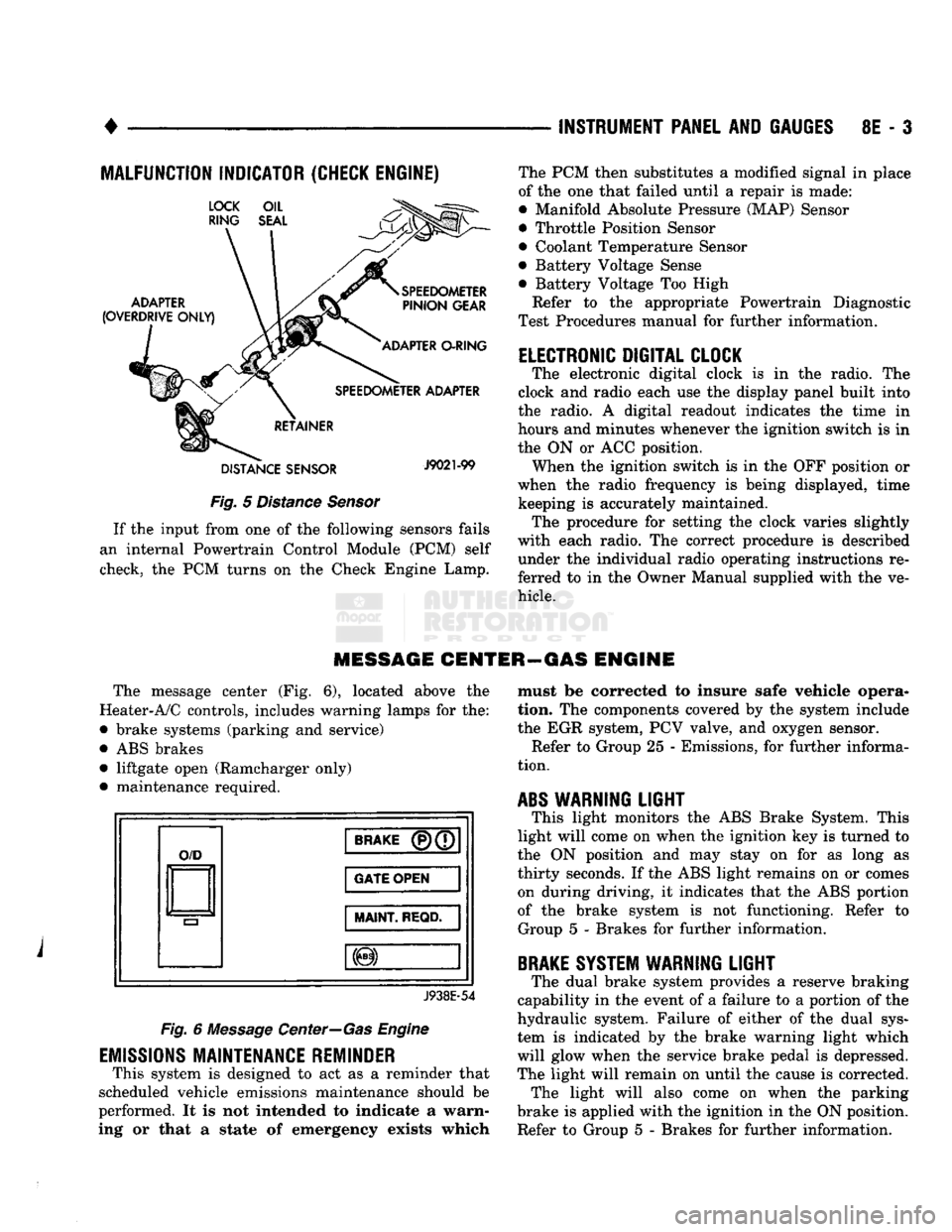
The message center
(Fig. 6),
located above
the
Heater-A/C controls, includes warning lamps
for the:
• brake systems (parking
and
service)
•
ABS
brakes • liftgate open (Ramcharger only)
• maintenance required.
O/D
BRAKE
(P)(7
GATE OPEN
MAINT
REQD.
J938E-54
Fig.
6
Message Center—Gas Engine
EMISSIONS
MAINTENANCE REMINDER
This system
is
designed
to act as a
reminder that
scheduled vehicle emissions maintenance should
be
performed.
It is not
intended
to
indicate
a
warn
ing
or
that
a
state
of
emergency exists which must
be
corrected
to
insure safe vehicle opera
tion.
The
components covered
by the
system include
the
EGR
system,
PCV
valve,
and
oxygen sensor. Refer
to
Group
25 -
Emissions,
for
further informa
tion.
ABS
WARNING
LIGHT
This light monitors
the ABS
Brake System. This
light will come
on
when
the
ignition
key is
turned
to
the
ON
position
and may
stay
on for as
long
as
thirty seconds.
If the ABS
light remains
on or
comes on during driving,
it
indicates that
the ABS
portion
of
the
brake system
is not
functioning. Refer
to
Group
5 -
Brakes
for
further information.
BRAKE
SYSTEM WARNING
LIGHT
The dual brake system provides
a
reserve braking
capability
in the
event
of a
failure
to a
portion
of the
hydraulic system. Failure
of
either
of the
dual sys
tem
is
indicated
by the
brake warning light which
will glow when
the
service brake pedal
is
depressed.
The light will remain
on
until
the
cause
is
corrected. The light will also come
on
when
the
parking
brake
is
applied with
the
ignition
in the ON
position.
Refer
to
Group
5 -
Brakes
for
further information.
Page 404 of 1502
AUDIO SYSTEMS
CONTENTS
SERVICE
PROCEDURES
page
.. 7
TEST PROCEDURES
page
.. 2
GENERAL
INFORMATION
For operation of the factory installed radios, refer
to the Owner Manual supplied with the vehicle. When connecting or disconnecting the Ignition Off
Draw (IOD) connector, it is important that the igni
tion switch be in the OFF position. Failure to place the ignition switch in the OFF po
sition can cause the radio display to become scram
bled when the IOD is disconnected. Connecting the IOD will correct the scrambled display.
INTERFERENCE
ELIMINATION
Many components are used on vehicles equipped
with a radio to suppress radio frequency interference (static). A capacitor is mounted inside the generator and
ground straps are utilized from cab to box and from
the engine to cowl. The previously mentioned Capacitor and Ground
Straps should be securely mounted to a clean ground
surface to work effectively. Radio resistance spark plug wires complete the in
terference suppression system. Faulty or deteriorated spark plug wires should be replaced.
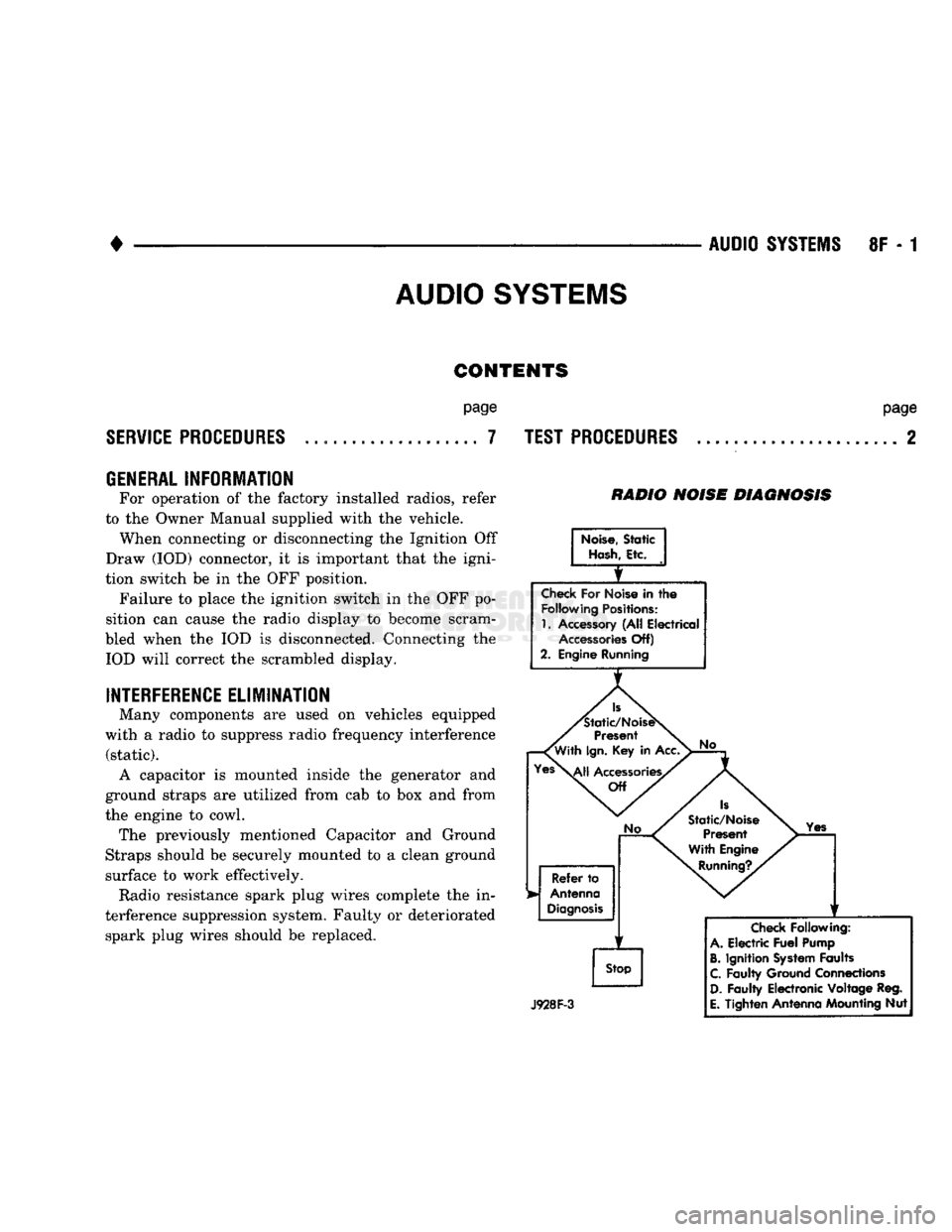
RADIO NOISE DIAGNOSIS
Noise,
Static
Hash,
Etc.
Check
For Noise in
the
Following
Positions:
1.
Accessory (All Electrical
Accessories
Off)
2. Engine Running
Is
'Static/NoiseS
Present
'With
Ign.
Key in Acc.
Yes\^|j
Accessories/
Off
No
Refer
to
Antenna
Diagnosis
f
Stop
No
Is
Static/Noise Present
With Engine
Running?.
Yes
J928F-3
Check
Following:
A.
Electric
Fuel
Pump
B.
Ignition
System
Faults
C.
Faulty Ground Connections
D.
Faulty Electronic Voltage Reg.
E.
Tighten Antenna Mounting Nut
Page 405 of 1502
![DODGE TRUCK 1993 Service Repair Manual
8F
- 2
AUDIO
SYSTEMS
• RADIO CONNECTOR PINS
BLACK
CHRYSLER
AM/FM STEREO
RADIOS
4 SPEAKERS
GRAY
BLACK
XL
GRAY
0@[3]S[3]@[D
X52 X54 VIEWED
FROM
X58
WIRE
END X56
E2](/img/12/56922/w960_56922-404.png "DODGE TRUCK 1993 Service Repair Manual
8F
- 2
AUDIO
SYSTEMS
• RADIO CONNECTOR PINS
BLACK
CHRYSLER
AM/FM STEREO
RADIOS
4 SPEAKERS
GRAY
BLACK
XL
GRAY
0@[3]S[3]@[D
X52 X54 VIEWED
FROM
X58
WIRE
END X56
E2")
8F
- 2
AUDIO
SYSTEMS
• RADIO CONNECTOR PINS
BLACK
CHRYSLER
AM/FM STEREO
RADIOS
4 SPEAKERS
GRAY
BLACK
XL
GRAY
0@[3]S[3]@[D
X52 X54 VIEWED
FROM
X58
WIRE
END X56
E2 Ml
X51
X53 X57
X55
L7 XI2
AM/FM STEREO
RADIOS
2 SPEAKERS
BLACK
GRAY
4
BLACK
GRAY
[ZlSmEIULIlLT]
X54 X54 VIEWED
FROM
X56 WIRE END X56
E2
Ml
X53
X53 X55
X55
L7 X12
LEGEND:
E2-
ILLUMINATION
X51-LEFT
REAR FEED
X55-LEFT
DR RETURN L7-
PARK
LAMPS
X52-RIGHT
REAR FEED
X56-RIGHT
DR RETURN
Ml- BATTERY
X53-LEFT
DR FEED
X57-LEFT
REAR RETURN X12-ACC/RUN
X54-RIGHT
DR FEED
X58-RIGHT
REAR RETURN
J938F-8
TEST
PROCEDURES
RADIO DIAGNOSIS
Turn Ign. Key to
ACC.
T
Check
AM, FM and
Tape
Player
Operation
NOTE: FOR WIRE COLORS REFER TO
SECTION 8W-WIRING DIAGRAMS
Page 406 of 1502
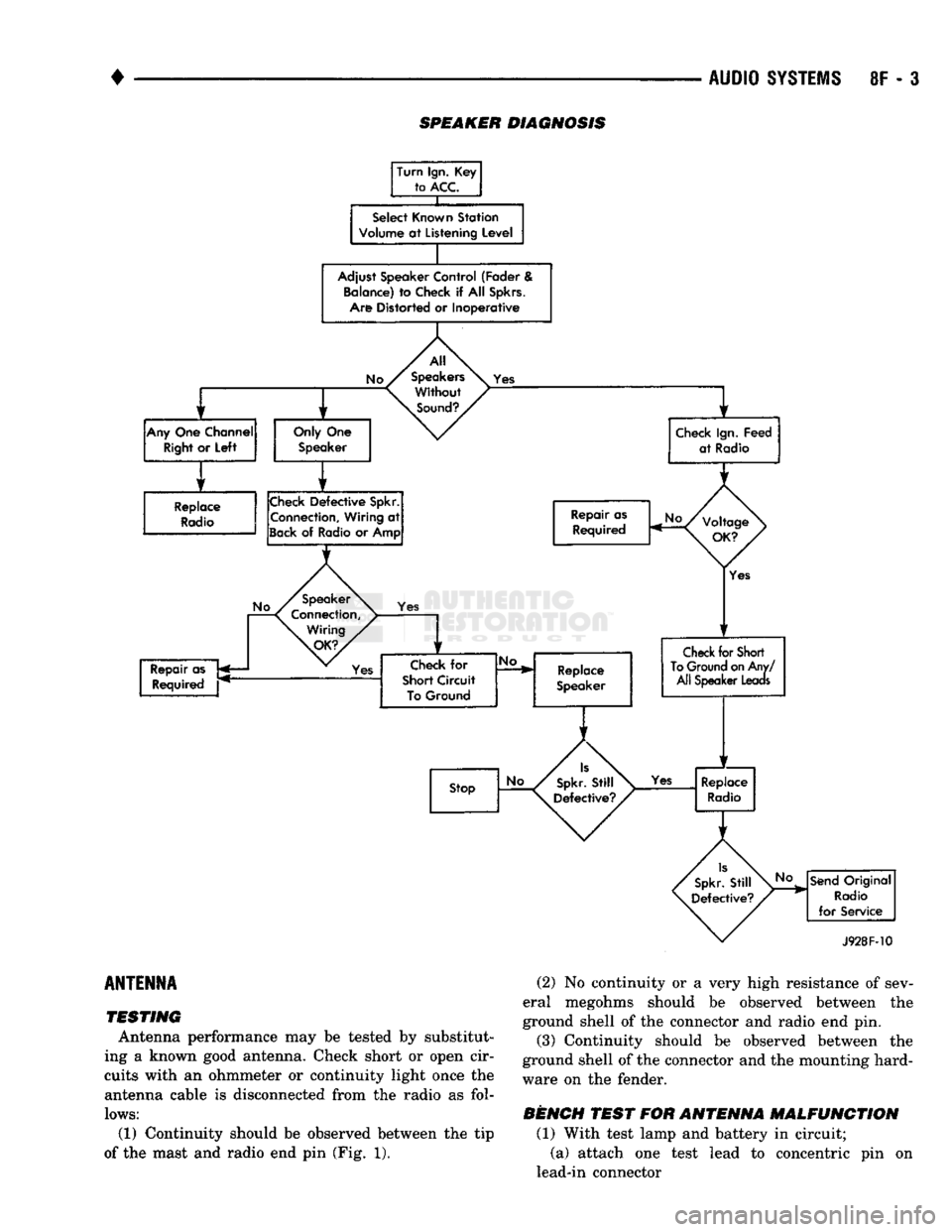
SPEAKER DIAGNOSIS
Turn Ign. Key to
ACC.
X
Select Known Station
Volume
at
Listening Level
Adjust Speaker Control (Fader & Balance) to Check
if
All
Spkrs.
Am Distorted or Inoperative
y r y
r
Any
One Channel
Right
or
Left
Only One
Speaker
1 r
Replace
Radio
Check
Defective
Spkr.
Connection, Wiring
at
Sack
of
Radio or Amp
Check
Defective
Spkr.
Connection, Wiring
at
Sack
of
Radio or Amp All
Speakers Without
Sound?,
Yes
Check Ign. Feed
at Radio
Repair as Required Repair as
Required
Yes Yes
Check
for
Short Circuit To Ground
No.
Replace
Speaker
Yes
Check
for
Short
To
Ground
on
Any/ All Speaker
Leaas
Stop
Yes
Replace
Radio
No
Send
Original
Radio
for Service
J928F-10
ANTENNA
TESTING
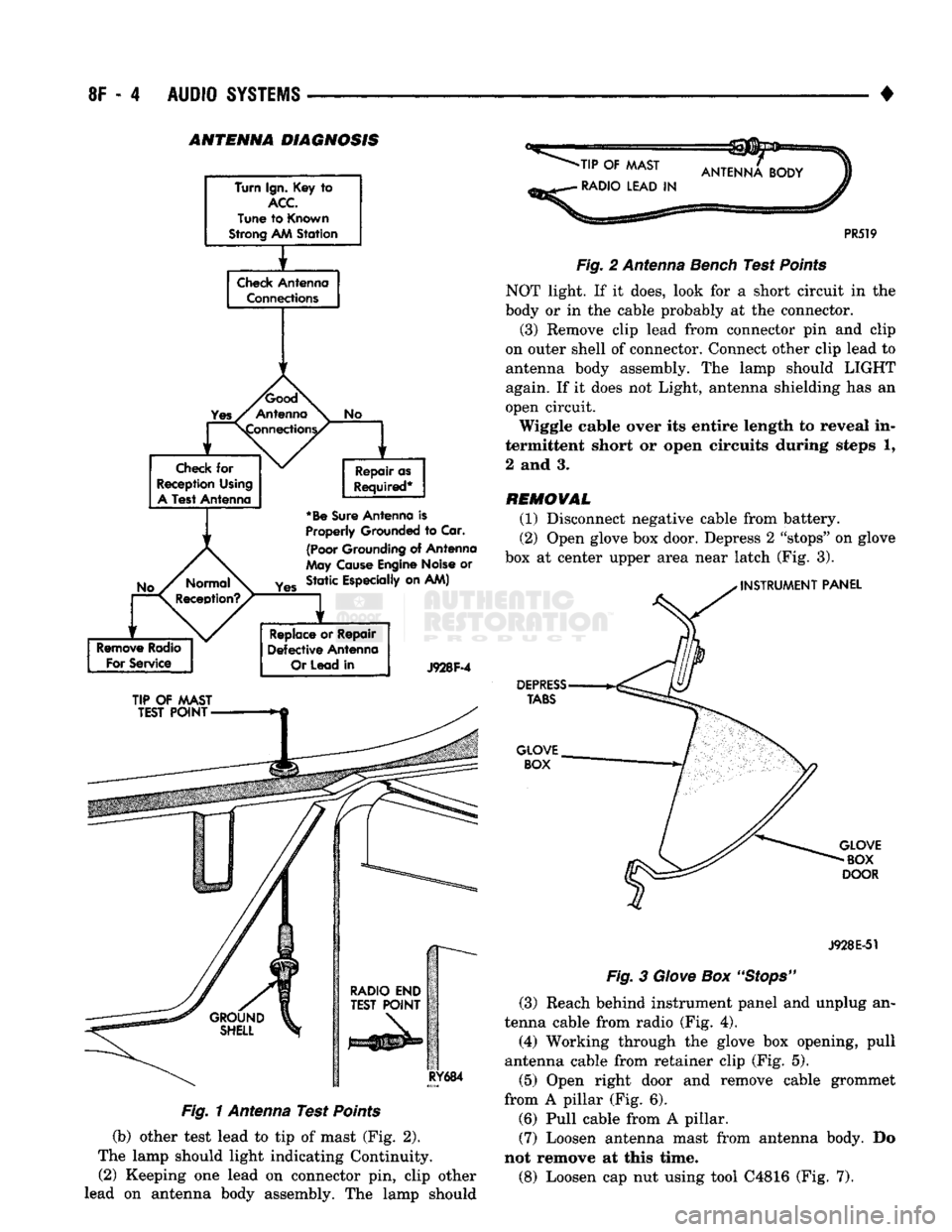
Antenna performance may be tested by substitut
ing a known good antenna. Check short or open cir
cuits with an ohmmeter or continuity light once the antenna cable is disconnected from the radio as fol
lows:
(1) Continuity should be observed between the tip
of the mast and radio end pin (Fig. 1).
(2)
No continuity or a very high resistance of sev
eral megohms should be observed between the
ground shell of the connector and radio end pin.
(3)
Continuity should be observed between the
ground shell of the connector and the mounting hard
ware on the fender.
BENCH
TEST
FOR
ANTENNA
MALFUNCTION
(1) With test lamp and battery in circuit; (a) attach one test lead to concentric pin on
lead-in connector
Page 407 of 1502
8F - 4
AUDIO SYSTEMS
• ANTENNA DIAGNOSIS
Turn Ign. Key
to
ACC
Tune
to
Known
Strong AM
Station
f
Check
Antenna Connections
1
1
No
Check
for
Reception Using
A
Test Antenna Repair as
Required*
*Be
Sure
Antenna
is
Properly
Grounded
to
Car.
(Poor
Grounding
of
Antenna
May
Cause
Engine Noise
or
Yes
Static Especially on AM)
Remove
Radio
For
Service
Replace
or
Repair
Defective
Antenna
Or
Lead
in
J928F-4
TIP
OF
MAST
TEST
POINT
RY684
Fig. 1 Antenna Test Points
(b) other test lead to tip of mast (Fig. 2).
The lamp should light indicating Continuity. (2) Keeping one lead on connector pin, clip other
lead on antenna body assembly. The lamp should
-TIP
OF
MAST
•
RADIO LEAD
IN
PR519
Fig.
2 Antenna Bench Test
Points
NOT light. If it does, look for a short circuit in the
body or in the cable probably at the connector.
(3) Remove clip lead from connector pin and clip
on outer shell of connector. Connect other clip lead to
antenna body assembly. The lamp should LIGHT
again. If it does not Light, antenna shielding has an
open circuit.
Wiggle cable over its entire length to reveal in
termittent short or open circuits during steps 1,
2 and 3.
REMOVAL
(1) Disconnect negative cable from battery.
(2) Open glove box door. Depress 2 "stops" on glove
box at center upper area near latch (Fig. 3).
INSTRUMENT
PANEL
DEPRESS
TABS
GLOVE BOX
GLOVE
BOX
DOOR
J928E-51
Fig.
3
Glove
Box
"Stops"
(3) Reach behind instrument panel and unplug an
tenna cable from radio (Fig. 4).
(4) Working through the glove box opening, pull
antenna cable from retainer clip (Fig. 5).
(5) Open right door and remove cable grommet
from A pillar (Fig. 6). (6) Pull cable from A pillar. (7) Loosen antenna mast from antenna body. Do
not remove at this time.
(8) Loosen cap nut using tool C4816 (Fig. 7).