key DODGE VIPER 2004 ZB / 2.G User Guide
[x] Cancel search | Manufacturer: DODGE, Model Year: 2004, Model line: VIPER, Model: DODGE VIPER 2004 ZB / 2.GPages: 236, PDF Size: 4.18 MB
Page 22 of 236

Security System Disarm
There are two ways to disarm the system:
1. Driver door key cylinder: Insert the key in the cylinder
located under the driver's door mirror. This will disarm
the Vehicle Theft Alarm System and open the driver's
door.2. Or, press the UNLOCK button on the Remote Keyless
Entry transmitter. The front and rear park and turn signal
lights will flash to acknowledge the signal. (See the
Remote Keyless Entry Section of this manual for opera-
tion)
NOTE:The vehicle will not start unless the Vehicle
Theft Alarm System is disarmed by either of the two
methods above. Inserting the key in the ignition WILL
NOT disarm the system (it will start the alarming pro-
cess!)
22 THINGS TO KNOW BEFORE STARTING YOUR VEHICLE
Page 23 of 236

Tamper Alert
If the horn sounds 3 times when you unlock the vehicle
using the Remote Keyless Entry transmitter or key, the
alarm has been activated. Check the vehicle for tamper-
ing.
NOTE:If the Security lamp flashes twice every 6
seconds, then the vehicle was tampered with.
WINDOWS
Power Windows
The power window switches are located between the
driver and passenger seats on the center tunnel bezel, just
to the left of the parking brake. The switch on the left side
controls the driver's window and the switch on the right
controls the passenger's window. The power window
switches are active when the ignition is in RUN or
ACCESSORY.The power window switch also works during accessory
delay. This delay feature will allow the windows to be
functional up to 2 minutes after the vehicle has been
turned off. This feature can be disabled at the dealership
if desired.
NOTE:Windows cannot be driven up during accessory
delay with a door open.
NOTE:If the windows are completely closed, each
respective window will drop slightly when either door is
opened. The windows return to their full up position
when the door is again closed. This is necessary to clear
the seal when either door is opened.
THINGS TO KNOW BEFORE STARTING YOUR VEHICLE 23
2
Page 24 of 236

Auto Down Feature
Both windows have an auto down feature. Press the
window switch to the second detent, release, and the
window will go down automatically. Press the switch a
second time in either direction to stop the window.To open the window to a desired positon, press and hold
the window switch in the first detent until the window
has reached the desired position and then release it when
you want the window to stop.
Power Accessory Delay Feature
The Power Accessory Delay feature provides the cus-
tomer with the ability to operate the power windows,
and the radio for 2 minutes after the ignition switch is
turned off. If the key is removed from the ignition and the
driver door is opened prior to the completion of the
2±minute timer, the feature is immediately cancelled. The
Power Accessory Delay feature is initially enabled, but
may be enabled or disabled at the dealership.
NOTE:The Window Up switch will not function with
the door open and while the system is in the Power
Accessory Delay mode. If the window is in the process of
going up, opening the door will stop the window move-
ment immediately.
24 THINGS TO KNOW BEFORE STARTING YOUR VEHICLE
Page 44 of 236

To turn OFF the passenger side airbag, use the on/off
switch located in the center console.
NOTE:When the passenger airbag is turned off the
airbag off light will illuminateTo Shut Off the Passenger Airbag:
²Place only the tip of the ignition key in the on/off
switch, turn the key clockwise, and remove the key
from the switch. This will shut off the passenger side
airbag. The PASS AIRBAG OFF light on the instrument
panel will illuminate when the ignition switch is
turned to the ON position.
44 THINGS TO KNOW BEFORE STARTING YOUR VEHICLE
Page 45 of 236

To Turn On The Passenger Airbag:
²Place the ignition key in the on/off switch, turn the
key counterclockwise, and remove the key from the
switch. This will turn on the passenger side airbag.
The light on the instrument panel will be off when the
ignition switch is turned to the ON position.
WARNING!
The airbag may malfunction and serious injury
could result if key is left in the airbag shut off
switch. Always remove the key.
Maintaining Your Airbag System
WARNING!
²Modifications to any part of the airbag system
could cause it to fail when you need it. You could
be injured because the airbag is not there to
protect you. Do not modify the components or
wiring, including adding any kind of badges or
stickers to the airbag covers. Do not modify the
front bumper or vehicle body structure.
²You need proper knee impact protection in a
collision. Do not mount or locate any aftermarket
equipment on or behind the knee impact bolsters.
²You can be injured if you are too close to either
airbag cover when the airbags inflate. It is dan-
gerous to try to repair any part of the airbag
system yourself. Don't try to repair the airbag
system. Be sure to tell anyone who works on your
vehicle that it has airbags.
THINGS TO KNOW BEFORE STARTING YOUR VEHICLE 45
2
Page 60 of 236

LIGHTS
Courtesy/Reading Lights
These lights, located under the rearview mirror, come on
whenever a door is opened or the illuminated entry
system is activated. The lights can also be turned on with
the doors closed by means of switches located on the
bottom of the rearview mirror. These lights also function
by rotating the dimmer control in the multi-function
control lever.
There are also courtesy lights located in both the driver
and passenger footwell areas. They will turn on as part of
the illuminated entry system by either opening a door,
unlocking the door from the remote keyless entry, or by
the multi-function control lever dimmer control.
60 UNDERSTANDING THE FEATURES OF YOUR VEHICLE
Page 63 of 236

To change the brightness of the instrument panel lights,
rotate the center portion of the Multi-Function Control
Lever up or down.
Daytime Running Lights
The fog lights will come on as Daytime Running Lights
whenever the ignition switch is on, the headlights are off,
and the parking brake is off. The headlight switch must
be used for normal night time driving.
NOTE:This feature is standard on all Canadian vehicles
and cannot be disabled. For US vehicles, this feature is
shipped disabled and can be enabled (or disabled) at a
dealership if so desired.
Lights-On Reminder
If the headlights or parking lights are on after the ignition
is turned OFF, a chime will sound to alert the driver
when the driver's door is opened.
Headlight Time Delay
This feature provides the safety of headlight illumination
for about 90 seconds.
To activate the delay, turn off the ignition while the
headlights are still on. Then turn off the headlights within
45 seconds. The delay interval begins when the headlamp
switch is turned off.
If the headlights are turned off before the ignition, they
will go off in the normal manner.
This feature can be disabled at the dealership if so
desired.
Battery Saver Feature Ð Exterior Lights
If an exterior light is left on when the ignition switch is
moved to the Off position (with the key in or out), it will
automatically turn off after 3 minutes. Normal operation
will resume when the ignition is turned On or when the
headlight switch is turned to another position.
UNDERSTANDING THE FEATURES OF YOUR VEHICLE 63
3
Page 76 of 236

WARNING!
If both ABS and/or Brake Warning lamps become
illuminated, please seek service immediately! Your
Viper will have diminished braking capability and
control if ABS and/or service brake systems are not
working properly. Have your brake system serviced
immediately.
Skip Shift Indicator
This indicator is located in the Tachometer. There
are two LED lights. The amber LED light will come
on when you are being prevented from shifting from First
to Second or Third gear. The tachometer's shift arrow also
houses a red LED light that activates when the tachom-
eter gauge pointer goes above 5600 RPM and it shuts off
when the tachometer pointer falls below 5500 RPM. The
indicator serves as a visual aid to shift before reaching the
red line.
Malfunction Indicator Light
This light is part of an onboard diagnostic
system called OBD II which provides in-field
emissions inspection tests required in some
states. If certain self-diagnostic monitors are
not complete, the light starts flashing 14 seconds after the
key is switched on and will continue to flash for approxi-
mately 11 seconds. If the OBD II monitors have com-
pleted, the malfunction indicator lamp will not flash as
described above.
The light will illuminate when the key is turned to the
ON position before engine start. The light will remain on
steady until the engine has started. If the bulb does not
come on when turning the key from OFF to ON have the
condition checked promptly. The light will turn off after
the engine has started, unless a malfunction is present.
76 UNDERSTANDING YOUR INSTRUMENT PANEL
Page 97 of 236
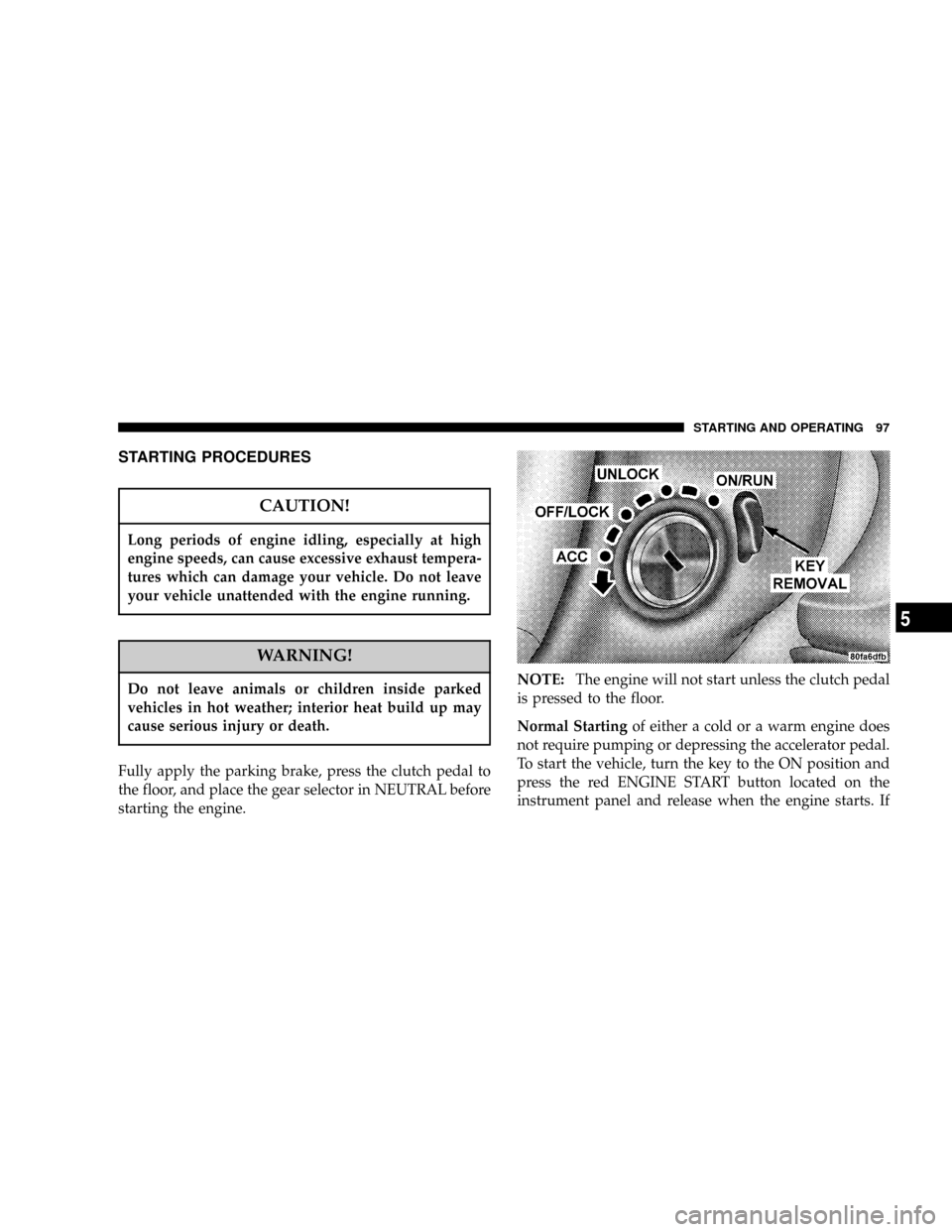
STARTING PROCEDURES
CAUTION!
Long periods of engine idling, especially at high
engine speeds, can cause excessive exhaust tempera-
tures which can damage your vehicle. Do not leave
your vehicle unattended with the engine running.
WARNING!
Do not leave animals or children inside parked
vehicles in hot weather; interior heat build up may
cause serious injury or death.
Fully apply the parking brake, press the clutch pedal to
the floor, and place the gear selector in NEUTRAL before
starting the engine.NOTE:The engine will not start unless the clutch pedal
is pressed to the floor.
Normal Startingof either a cold or a warm engine does
not require pumping or depressing the accelerator pedal.
To start the vehicle, turn the key to the ON position and
press the red ENGINE START button located on the
instrument panel and release when the engine starts. If
STARTING AND OPERATING 97
5
Page 98 of 236

the engine has not started within 3 seconds, slightly
depress the accelerator pedal while continuing to crank.
If the engine fails to start within 10 seconds, turn the key
to the ªOFFº position, wait 5 seconds, then repeat the
normal starting procedure.If Engine Fails to Start
NOTE:The Remote Keyless Entry Transmitter MUST be
used to unlock the vehicle and disarm the alarm system.
In the event of a lost or defective Remote Keyless
Transmitter, the security system can be momentarily
disarmed to allow the vehicle to be started.
See the paragraph on the Vehicle Theft Security System in
Section 2 of this manual
98 STARTING AND OPERATING