radio DODGE VIPER 2004 ZB / 2.G User Guide
[x] Cancel search | Manufacturer: DODGE, Model Year: 2004, Model line: VIPER, Model: DODGE VIPER 2004 ZB / 2.GPages: 236, PDF Size: 4.18 MB
Page 87 of 236

CD Diagnostic Indicators
When driving over a very rough road, the CD player may
skip momentarily. Skipping will not damage the disc or
the player, and play will resume automatically.
As a safeguard and to protect your CD player, one of the
following warning symbols may appear on your display.
A ªCD HOTº symbol indicates that player is too hot. In
this case, the CD player will switch to the radio mode.
Play can be resumed when the operating temperature is
corrected.The ªERRORº symbol will appear on the display if the
laser is unable to read the disc data for the following
reasons:
²Excessive vibration
²Disc inserted upside down
²Damaged disc
²Water condensation on optics
PTY (Program Type) Button
Pressing this button once will turn on the PTY mode for
5 seconds. If no action is taken during the 5 second time
out the PTY icon will turn off. Pressing the PTY button
within 5 seconds will allow the program format type to
be selected. Many radio stations do not currently broad-
cast PTY information.
UNDERSTANDING YOUR INSTRUMENT PANEL 87
4
Page 88 of 236
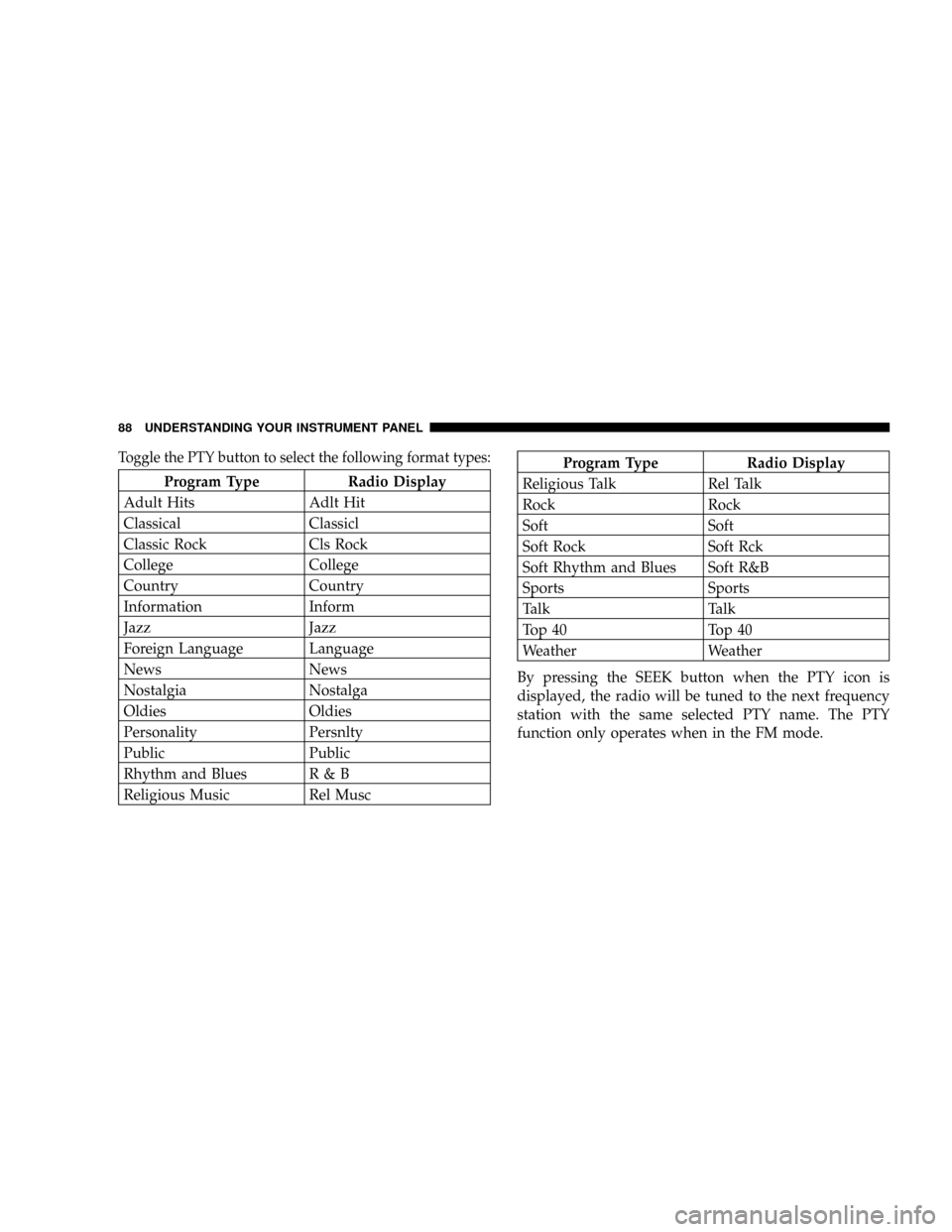
Toggle the PTY button to select the following format types:
Program Type Radio Display
Adult Hits Adlt Hit
Classical Classicl
Classic Rock Cls Rock
College College
Country Country
Information Inform
Jazz Jazz
Foreign Language Language
News News
Nostalgia Nostalga
Oldies Oldies
Personality Persnlty
Public Public
Rhythm and Blues R & B
Religious Music Rel Musc
Program Type Radio Display
Religious Talk Rel Talk
Rock Rock
Soft Soft
Soft Rock Soft Rck
Soft Rhythm and Blues Soft R&B
Sports Sports
Talk Talk
Top 40 Top 40
Weather Weather
By pressing the SEEK button when the PTY icon is
displayed, the radio will be tuned to the next frequency
station with the same selected PTY name. The PTY
function only operates when in the FM mode.
88 UNDERSTANDING YOUR INSTRUMENT PANEL
Page 89 of 236

The radio display will flash ªSEEKº and the selected PTY
program type when searching for the next PTY station. If
no station is found with the selected PTY program type,
the radio will return to the last station.
If a preset button is activated while in the PTY (Program
Type) mode, the PTY mode will be exited and the radio
will tune to the preset station.
By pressing the SCAN button when the PTY icon is
displayed, the radio will stop at every PTY station on the
band and list each corresponding program type in the
radio display.
Time
Press the TIME button to change the display from
elapsed CD playing time to time of day.
CD/DVD DISC MAINTENANCE
To keep the CD/DVD discs in good condition, take the
following precautions:
1. Handle the disc by its edge; avoid touching the
surface.
2. If the disc is stained, clean the surface with a soft cloth,
wiping from center to edge.
3. Do not apply paper, paper CD labels, or tape to the
disc; avoid scratching the disc.
4. Do not use solvents such as benzine, thinner, cleaners,
or antistatic sprays.
5. Store the disc in its case after playing.
6. Do not expose the disc to direct sunlight.
7. Do not store the disc where temperatures may become
too high.
UNDERSTANDING YOUR INSTRUMENT PANEL 89
4
Page 90 of 236

RADIO ANTENNA
The radio antenna is located in the windshield.
RADIO OPERATION AND CELLULAR PHONES
Under certain conditions, the operation of a cellular phone
in your vehicle can cause erratic or noisy performance from
your radio. This condition may be lessened or eliminated
by relocating the cellular phone antenna. This condition is
not harmful to the radio. If your radio performance does
not satisfactorily ªclearº by the repositioning of the an-
tenna, it is recommended that the radio volume be turned
down or off during cellular phone operation.
VENTILATION
When the ventilation mode is selected, outside air comes
through the panel outlets. Air will enter the vehicle with
or without the blower in operation.
CLIMATE CONTROLS
The Air Conditioning System allows you to balance the
temperature, amount and direction of the air circulating
throughout the vehicle.
90 UNDERSTANDING YOUR INSTRUMENT PANEL
Page 105 of 236
CAUTION!
The Anti-Lock Brake System is subject to possible
detrimental effects of electronic interference caused
by improperly installed after-market radios or tele-
phones.
WARNING!
²Anti-lock system (ABS) cannot prevent the natu-
ral laws of physics from acting on the vehicle, nor
can it increase braking or steering efficiency be-
yond that afforded by the condition of the vehicle
brakes and tires or the traction afforded.
²The ABS cannot prevent accidents, including
those resulting from excessive speed in turns,
following another vehicle too closely, or hydro-
planing. Only a safe, attentive, and skillful driver
can prevent accidents.
²The capabilities of an ABS equipped vehicle must
never be exploited in a reckless or dangerous
manner which could jeopardize the user's safety
or the safety of others.
STARTING AND OPERATING 105
5
Page 136 of 236

without letting the vehicles touch. Set the parking brake,
place the transmission in neutral and turn the ignition
OFF for both vehicles.
3. Turn off the heater, radio and all unnecessary electrical
loads.
4. If you are jump starting your Viper, connect one end of
a jumper cable to the positive terminal of the booster
battery. Connect the other end of the same cable to the
remote battery positive terminal after removing the plas-
tic cover.
5. If you are jump starting another vehicle, connect one
end of a jumper cable to the remote battery positive
terminal post on the Power Distribution Center. Connect
the other end of the same cable to the positive terminal of
the discharged battery after removing the plastic cover.6. Connect the other cable, first to the negative terminal
of the booster battery and then to the ground (on the ear
of the Thermostat Housing) of your Viper as shown.
Make sure you have a good contact.
7. If you are jump starting another vehicle, connect one
end of a jumper cable to the ground (on the ear of the
Thermostat Housing shown in illustration) of your Viper
136 WHAT TO DO IN EMERGENCIES
Page 158 of 236

CAUTION!
It is essential when replacing the cables on the
battery that you attach the positive cable to the
positive post and the negative cable to the negative
post. Battery posts are marked positive (+) and
negative (-) and identified on the battery case. Cable
clamps should be tight on the terminal posts and
free of corrosion. Apply grease to post and clamps
after tightening. If using a ªfast chargerº while the
battery is in the vehicle, disconnect both vehicle
battery cables before connecting the charger to bat-
tery. Do not use a ªfast chargerº to provide starting
voltage.
Battery Save Feature
The Battery Save feature conserves battery power when
storing the vehicle up to 3 months without losing radio
and engine controller memory. This is an alternative to
disconnecting the battery.
NOTE:This vehicle is designed to sit in storage for up
to 30 days on a fully charged battery. If this vehicle is to
be stored for longer than 30 days the following is
recommended:
1. Disconnect the battery
2. Use the battery charger
3. Put the vehicle into Battery Save mode (3 month
charge).
Start the battery save feature by doing the following:
1. Insert the key into the ignition.
158 MAINTAINING YOUR VEHICLE
Page 233 of 236

Pets.................................. 46
Pets, Transporting........................ 46
Placard, Tire and Loading Information......... 112
Power
Accessory Delay......................13,24
Steering..........................107,161
Windows............................. 23
Pregnant Women and Seat Belts.............. 32
Programming Transmitters.................. 18
Radial Ply Tires......................... 120
Radiator Cap........................... 168
Radio................................. 82
Radio Antenna.......................... 90
Radio Operation......................... 90
Rear Axle............................. 176
Rear Wheel Bearings..................... 177
Reclining Front Seats...................... 57
Reformulated Gasoline.................... 127Refrigerant............................ 160
Reminder, Seat Belt.....................30,77
Remote Keyless Entry..................... 15
Replacement Tires....................... 122
Reporting Safety Defects................... 220
Restraints, Child......................... 33
Restraints, Infant......................... 33
Restraints, Occupant...................... 26
Rotation, Tires.......................... 126
Safety Checks Inside Vehicle................. 48
Safety Checks Outside Vehicle............... 48
Safety Defects, Reporting.................. 220
Safety Information, Tire................... 108
Safety Tips............................. 47
Schedule, Maintenance.................... 200
Scheduled Maintenance................... 148
Seat Belt Maintenance.................... 178
Seat Belt Reminder.....................30,77
INDEX 233
10