ignition DODGE VIPER 2004 ZB / 2.G Owner's Manual
[x] Cancel search | Manufacturer: DODGE, Model Year: 2004, Model line: VIPER, Model: DODGE VIPER 2004 ZB / 2.GPages: 236, PDF Size: 4.18 MB
Page 64 of 236

If the ignition switch is turned to any position other than
the Off position at any time during the 3 minute delay
period the battery saver feature will be disabled.
Fog Lights
The front fog light switch is on the Multi-Function
Control Lever. To activate the front fog lights, turn
on the parking lights or the low beam headlights
and pull out the end of the control lever.
NOTE:The fog lights will only operate with the head-
lights on low beam. Selecting high beam headlights will
turn off the fog lights.
Turn Signals
Move the Multi-Function Control Lever up or down and
the arrows on each side of the instrument cluster flash to
show proper operation of the front and rear turn signal
lights. You can signal a lane change by moving the lever
partially up or down without moving beyond the detent.
64 UNDERSTANDING THE FEATURES OF YOUR VEHICLE
Page 75 of 236

Turn Signal Indicators
The arrows will flash in unison with the corresponding
exterior turn signal when using the signal lever.
Hazard Indicator
Both turn signal arrows will flash in unison with all front
and rear turn signals when the hazard warning switch is
used.
NOTE:Leaving the hazard flashers on for extended
periods of time will wear down the battery.
Message Center
Message Center Components
Anti-Lock Warning Light
The amber ABS Warning Light will come on when
the ignition is first turned on, and stay on briefly
as a bulb check. If the bulb does not come on during
starting, have the bulb repaired promptly. This light also
illuminates to indicate that the Antilock Brake System
self-check is in process at vehicle start-up. If the light
remains on after start-up, or comes on and stays on at
road speeds, it may indicate that the ABS has detected a
malfunction or has become inoperative. In this case, the
system reverts to standard non-antilock brakes. Turn the
engine off and on again to reset the Antilock Brake
System. If the light remains on, see your authorized
dealer. If both the red BRAKE and amber ABS warning
lights are on and the parking brake is fully released, see
your authorized dealer immediately.
UNDERSTANDING YOUR INSTRUMENT PANEL 75
4
Page 79 of 236
Brake System Warning Light
The dual brake system provides a reserve
braking capability in the event of a failure to a
portion of the hydraulic system. The warning
light should be checked frequently to assure
that it is operating properly. This can be done by turning
the ignition switch to a point midway between ON and
START. The light should come on. The red Brake Warning
Light will come on when the ignition is first turned on,
and stay on briefly as a bulb check. If the bulb does not
come on during starting, have the bulb repaired
promptly. If the light stays on longer, it may be an
indication that the parking brake has not been released. If
the light remains on when the parking brake is off it
indicates a possible brake hydraulic system malfunction.
Immediate repair is necessary and continued operation of
the vehicle in this condition is dangerous.WARNING!
Driving a vehicle with the brake light on is danger-
ous. Part of the brake system has failed. It will take
longer to stop the vehicle. You could have a accident.
Have the brakes checked immediately.
Airbag Light
This light will come on and remain on for 6 to
8 seconds as a bulb check when the ignition
switch is first turned on. If the bulb is not lit
during starting, have it replaced. If the light
stays on or comes on while driving, have the system
checked by an authorized dealer.
UNDERSTANDING YOUR INSTRUMENT PANEL 79
4
Page 81 of 236

This gauge does not indicate the amount of oil in the
engine. The engine oil level must be checked under the
hood. Check the level often during severe usage.
Fuel Gauge
This gauge shows the amount of fuel in the gas
tank. The reaction time of the gauge has been
slowed to avoid needle fluctuation during pe-
riods of high G force cornering.
Voltage Gauge
This gauge shows the electrical system voltage.
The normal operating voltage is from 12 to 14
volts with the engine running. If the pointer
remains at either the high or low ends of the
scale, the electrical system should be serviced.
ELECTRONIC DIGITAL CLOCK
The clock and radio each use the display panel built into
the radio. A digital readout shows the time in hours and
minutes whenever the ignition switch is in the ON or
ACC position.
When the ignition switch is in the OFF position, or when
the radio frequency is being displayed, time keeping is
accurately maintained.
Press and release the Time button to display the time.
Press and release the button a second time to turn off the
time display.
UNDERSTANDING YOUR INSTRUMENT PANEL 81
4
Page 82 of 236

Clock Setting Procedure
1. Turn the ignition switch to the ªONº or ªACCº
position. Using the point of a ballpoint pen or similar
object, press either the ªHº (Hour) or ªMº (Minute)
buttons on the radio. The display will show the time.
2. Press the ªHº button to set hours or the ªMº button to
set minutes. The time setting will increase each time you
press a button.
SALES CODE RBQÐAM & FM STEREO RADIO
WITH 6- DISC CD CHANGER
Radio Operation
Power/Volume Control
Press the PWR/VOL control to turn the radio on. Turn
the volume control clockwise to increase the volume.
82 UNDERSTANDING YOUR INSTRUMENT PANEL
Page 83 of 236

NOTE:Power to operate the radio is controlled by the
ignition switch. It must be in the ON or ACC position to
operate the radio.
Mode
Press the MODE button repeatedly to select between AM,
FM, and the CD changer.
Seek
Press and release the SEEK button to search for the next
station in either the AM or FM mode. Press the top of the
button to seek up and the bottom to seek down. The
radio will remain tuned to the new station until you
make another selection. Holding the button in will by-
pass stations without stopping until you release it.
Tune
Press the TUNE control up or down to increase or
decrease the frequency. If the button is pressed and held,
the radio will continue to tune until the button isreleased. The frequency will be displayed and continu-
ously updated while the button is pressed.
Balance Ð BAL
The Balance control adjusts the left-to-right speaker bal-
ance. Press the BAL button in and it will pop out. Adjust
the balance and push the button back in.
Fade
The Fade control provides for balance between the front
and rear speakers. Press the FADE button in and it will
pop out. Adjust the balance and push the button back in.
Tone Control
The tone controls affect the Bass and Treble frequency
bands. Each is controlled by a slider control with a detent
at the mid position. Moving a control up or down
increases or decreases amplification of the band. The mid
position provides a nominal frequency response.
UNDERSTANDING YOUR INSTRUMENT PANEL 83
4
Page 85 of 236
CD Player Operation
NOTE:The ignition switch must be in the ON or ACC
position and the Power / Volume control pushed ON
before the CD player will operate.
Inserting The Compact Disc
CAUTION!
This CD player will accept 43¤4inch (12cm) discs
only. The use of other sized discs may damage the
CD player mechanism.
You may either insert or eject a disc with the radio OFF.
If you insert a disc with the ignition ON and the radio
OFF, the display will show the time of day. If you insert
a disc with the ignition OFF, the display will show the
time of day for about 5 seconds, then go out.
If the power is ON, the unit will switch from radio to CD
mode and begin to play when you insert the disc. The
display will show the track number and index time in
minutes and seconds. Play will begin at the start of track 1.
LOAD/ EJT Ð Load
Press the LOAD/ EJT button and the button with the
corresponding number where the CD is being loaded.
After the radio displays ªloadº insert the CD into the
player.
Radio display will show ªloadingº when it is being
loaded.
LOAD / EJT Ð Eject
Press the LOAD/ EJT button and the button with the
corresponding number where the CD was loaded and the
disc will unload and move to the entrance for easy
removal. The unit will switch to the radio mode.
UNDERSTANDING YOUR INSTRUMENT PANEL 85
4
Page 86 of 236

Radio display will show ªejectingº when it is being
ejected.
If you have ejected a disc and have not removed it within
15 seconds, it will be reloaded. The unit will continue in
radio mode.
The disc can be ejected with the radio and ignition OFF.
Seek
Press the top of the SEEK button for the next selection on
the CD. Press the bottom of the button to return to the
beginning of the current selection, or return to the
beginning of the previous selection if the CD is within the
first second of the current selection.
Scan
Press the Scan button to scan through each track on the
CD currently playing.
FF/TUNE/RW
Press FF (Fast Forward) and the CD player will begin to
fast forward until FF is released. The RW ( Reverse)
button works in a similar manner.
Random Play Ð SET / RND
Press the RND button while the CD is playing to activate
Random Play. This feature plays the selections on the
compact disc in random order to provide an interesting
change of pace.
Press the SEEK button to move to the next randomly
selected track.
Press TUNE FF to fast forward through the tracks. Press
the FF button a second time to stop the fast forward
feature. If TUNE RW is pressed, the current track will
reverse to the beginning of the track and begin playing.
Press the SET / RND button a second time to stop
Random Play.
86 UNDERSTANDING YOUR INSTRUMENT PANEL
Page 102 of 236
To maintain a safe speed and prolong brake life, down-
shift to maintain a safe speed when descending a steep
grade.
WARNING!
Skipping more than one gear while downshifting,
could cause you to lose control of your vehicle. You
could have an accident.
CAUTION!
If you skip more than one gear while downshifting
or downshift at too high an engine speed, you could
damage the engine, transmission, or clutch.
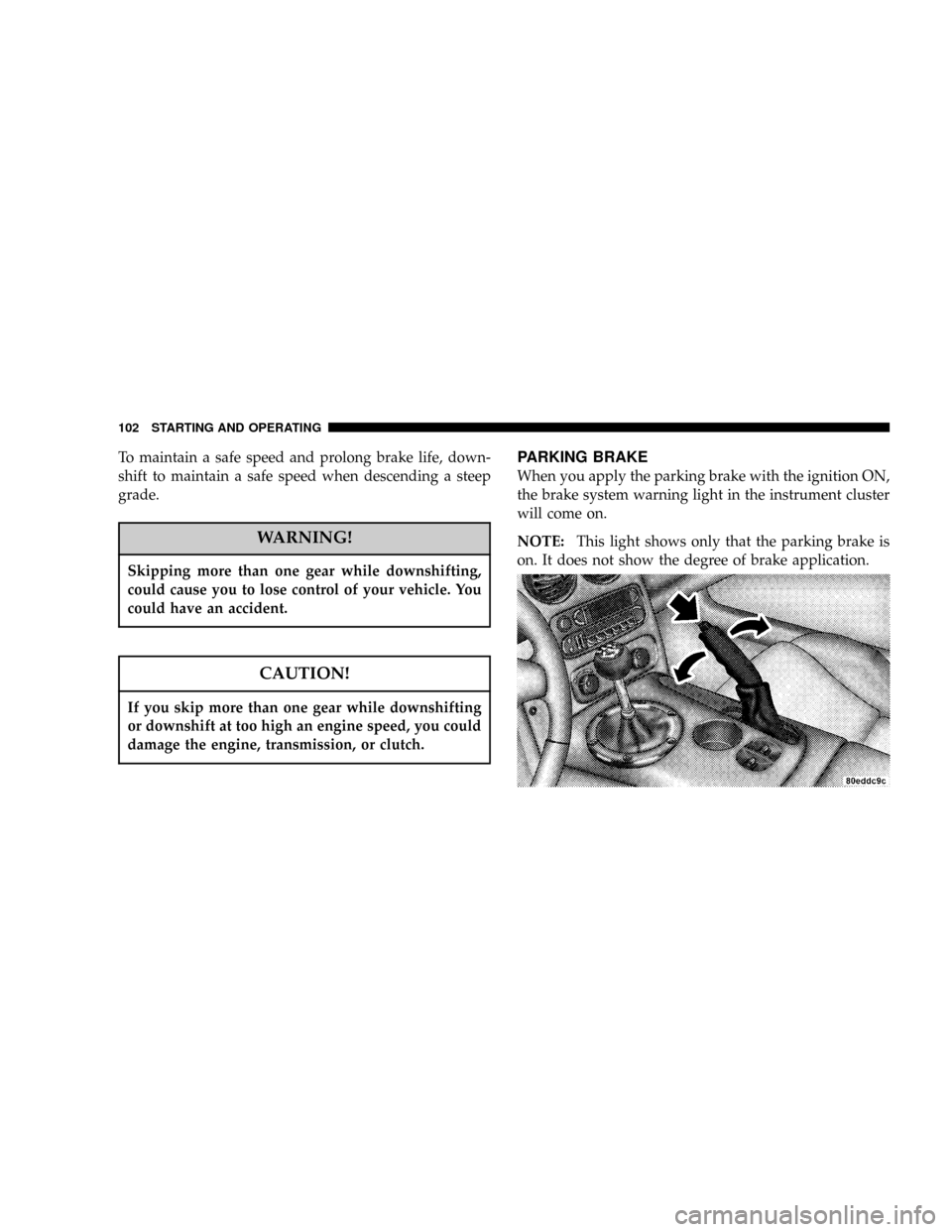
PARKING BRAKE
When you apply the parking brake with the ignition ON,
the brake system warning light in the instrument cluster
will come on.
NOTE:This light shows only that the parking brake is
on. It does not show the degree of brake application.
102 STARTING AND OPERATING
Page 103 of 236
Before leaving the vehicle, make sure you fully apply the
parking brake. Place the transmission in REVERSE. Fail-
ure to do so may cause the vehicle to roll and cause
damage or injury.
As an added precaution, turn the front wheels toward the
curb on a downhill grade and away from the curb on an
uphill grade.
Always apply the parking brake whenever you are not in
the vehicle.WARNING!
Leaving children in a vehicle unattended is danger-
ous for a number of reasons. A child or others could
be injured. Children should be warned not to touch
the parking brake release lever or the gear selection
lever as doing so may move the vehicle. Don't leave
the keys in the ignition. Be sure the parking brake is
fully disengaged before driving: failure to do so can
lead to brake failure, and an accident.
STARTING AND OPERATING 103
5