battery DODGE VIPER 2008 ZB II / 2.G Owner's Manual
[x] Cancel search | Manufacturer: DODGE, Model Year: 2008, Model line: VIPER, Model: DODGE VIPER 2008 ZB II / 2.GPages: 303, PDF Size: 2.65 MB
Page 209 of 303
WARNING!
²Battery fluid is a corrosive acid solution and can
burn or even blind you. Don't allow battery fluid
to contact your eyes, skin, or clothing. Don't lean
over a battery when attaching clamps. If acid
splashes in eyes or on skin, flush the area imme-
diately with large amounts of water.
²Battery gas is flammable and explosive. Keep
flame or sparks away from the battery. Don't use a
booster battery or any other booster source with an
output greater than 12 volts. Don't allow cable
clamps to touch each other.
²Battery posts, terminals, and related accessories
contain lead and lead compounds. Wash hands
after handling.
CAUTION!
²It is essential when replacing the cables on the
battery that the positive cable is attached to the
positive post and the negative cable is attached to
the negative post. Battery posts are marked posi-
tive (+) and negative (-) and identified on the
battery case. Cable clamps should be tight on the
terminal posts and free of corrosion.
²If a ªfast chargerº is used while battery is in
vehicle, disconnect both vehicle battery cables
before connecting the charger to battery. Do not
use a ªfast chargerº to provide starting voltage.
208 MAINTAINING YOUR VEHICLE
Page 210 of 303
To Service the Battery:
1. Remove the floor portion of the rear compartment
carpet to access the battery compartment.
2. Remove the battery cover mounting screws and re-
move the battery cover.
3. Disconnect the negative battery cable from the battery.
NOTE:The negative battery terminal is marked with a
(-) symbol. The positive battery terminal is marked with
a (+) symbol.
4. Disconnect the positive battery cable from the battery.
5. Remove or loosen the battery retainer clamp and bolt.
6. Lift out the battery.
7. Clean out the battery tray area, freeing area of dirt,
stones, and battery acid.8. Clean and inspect the battery terminals and replace if
parts are damaged or unusable.
9. Place the battery in the tray.
10. Tighten the battery retainer clamp and bolt down.
11. Connect the positive battery cable to the battery
positive terminal and tighten.
NOTE:The negative battery terminal is marked with a
(-) symbol. The positive battery terminal is marked with
a (+) symbol.
12. Connect the negative battery cable to the battery
negative terminal and tighten.
13. Install the battery cover and tighten down the screws.
14. Install the carpet in the floor portion of the rear
compartment.
MAINTAINING YOUR VEHICLE 209
7
Page 211 of 303
Battery Save Feature
The Battery Save feature conserves battery power when
storing the vehicle. It allows for up to 3 months of storage
time without losing radio and engine controller memory.
Using this feature is an alternative to disconnecting the
battery.
NOTE:This vehicle is designed to sit in storage with a
fully charged battery for up to 30 days. If you plan to
store the vehicle longer than 30 days, we recommend
doing one of the following:
²Disconnect the battery.
²Use the battery charger.
²Put the vehicle into Battery Save mode (3-month
charge).
To Activate the Battery Save Feature:
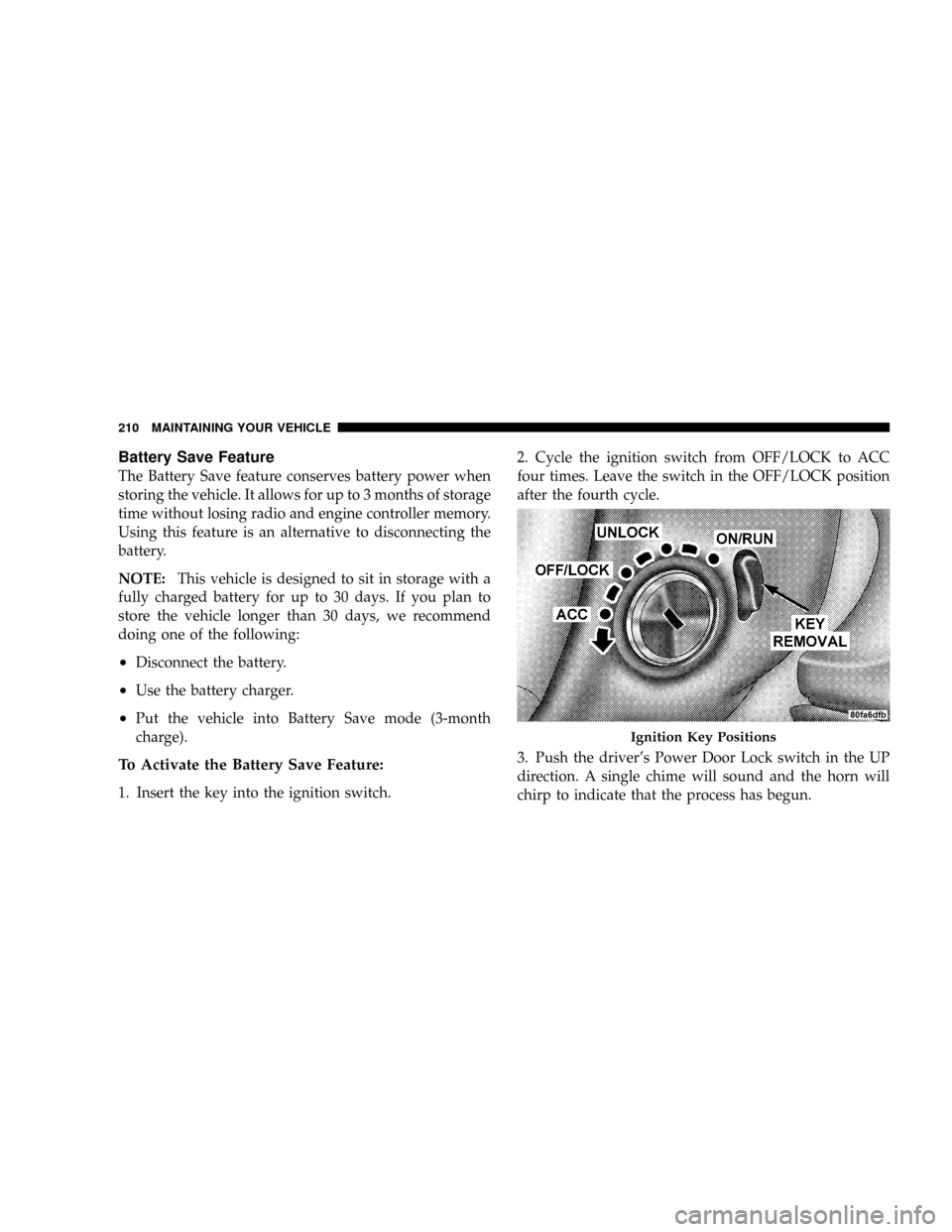
1. Insert the key into the ignition switch.2. Cycle the ignition switch from OFF/LOCK to ACC
four times. Leave the switch in the OFF/LOCK position
after the fourth cycle.
3. Push the driver's Power Door Lock switch in the UP
direction. A single chime will sound and the horn will
chirp to indicate that the process has begun.
Ignition Key Positions
210 MAINTAINING YOUR VEHICLE
Page 212 of 303
4. Remove the key from the ignition switch and exit the
vehicle. The Battery Save Feature will be enabled 45
seconds after all doors are closed.
NOTE:
²Turning the ignition switch to the ON/RUN position
at any time will cancel activation of the Battery Save
Feature.
²The remote keyless entry and the exterior passenger
door handle will not work when the Battery Save
feature is enabled. Enter the vehicle by using the key to
unlock the door manually and by using the exterior
driver door handle to open the door.
²The Vehicle Security Alarm is disabled when the
Battery Save Feature is enabled. Therefore, the vehicle
is not protected when the Battery Save Feature is
enabled.
²The exterior and interior lighting functions will not
work when the Battery Save Feature is enabled.
To Deactivate the Battery Save Feature:
1. Press the exterior driver's door handle once to wake
up the vehicle. Then, press the handle again to open the
door.
NOTE:If the door does not open (vehicle is armed),
press the remote keyless entry unlock button to unlock
the vehicle.
2. Insert the key into the ignition switch.
3. Turn the ignition switch to the ON/RUN position. The
Battery Save Feature will turn off.
NOTE:If the ignition switch is NOT turned to ON/
RUN position, the Battery Save Feature will be enabled
45 seconds after the driver's door is closed.
MAINTAINING YOUR VEHICLE 211
7
Page 235 of 303
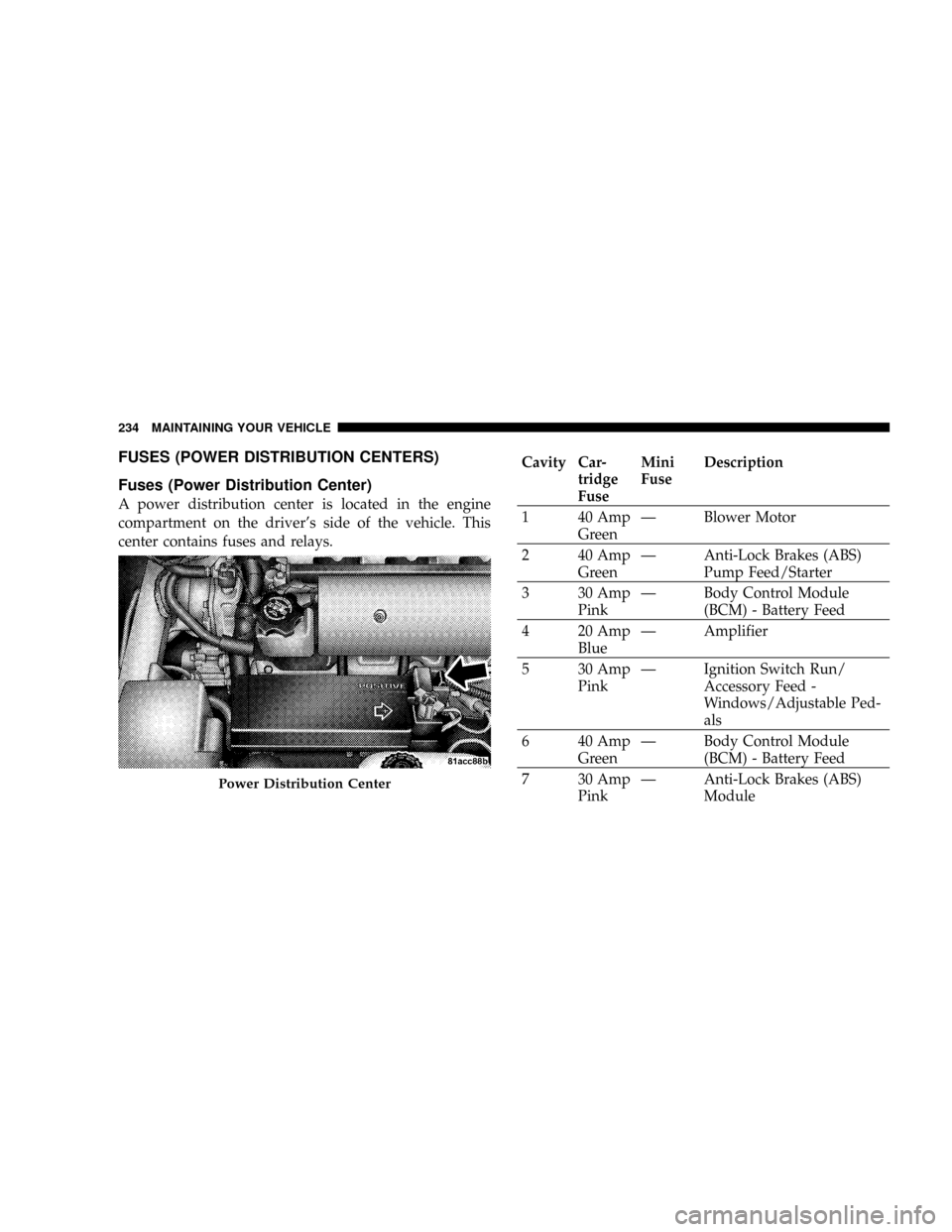
FUSES (POWER DISTRIBUTION CENTERS)
Fuses (Power Distribution Center)
A power distribution center is located in the engine
compartment on the driver's side of the vehicle. This
center contains fuses and relays.
Cavity Car-
tridge
FuseMini
FuseDescription
1 40 Amp
GreenÐ Blower Motor
2 40 Amp
GreenÐ Anti-Lock Brakes (ABS)
Pump Feed/Starter
3 30 Amp
PinkÐ Body Control Module
(BCM) - Battery Feed
4 20 Amp
BlueÐ Amplifier
5 30 Amp
PinkÐ Ignition Switch Run/
Accessory Feed -
Windows/Adjustable Ped-
als
6 40 Amp
GreenÐ Body Control Module
(BCM) - Battery Feed
7 30 Amp
PinkÐ Anti-Lock Brakes (ABS)
Module
Power Distribution Center
234 MAINTAINING YOUR VEHICLE
Page 239 of 303
VEHICLE STORAGE
We recommend that you follow these guidelines for
storing your vehicle for extended periods.
²Fill the fuel tank. This will prevent water condensation
inside the tank. If you plan to store your vehicle more
than 2 months, add an anti-oxidant fuel stabilizer to
the fuel tank.
²Change the oil to remove any corrosive combustion
related acids in the crankcase.
²Check that the radiator coolant level of protection is to
at least -20ÉF (-29ÉC).
²Make sure that all tires are inflated to the optimum
pressure. (See page 158 for more information.)
²Wash and wax the vehicle to protect the finish.
²Store the vehicle in a dry, well-ventilated location.
²Move the wiper blades away from the windshield.
²Block the wheels. Do not apply the Parking Brake.
²Cut blocks of plywood about the same size of the tires.
Cover each block with indoor/outdoor carpeting and
place them between the tires and concrete. This will
prevent tire flat spotting.
²For long-term storage, remove the tires and put the
vehicle up on blocks. Stack the tires on plywood and
cover with a tarp to prevent flat spotting.
²If the vehicle will be subjected to freezing tempera-
tures, either remove the battery and store it in a dry,
well ventilated area or connect a trickle charger (1.5
Amp) with automatic shutdown / overcharge protec-
tion to the battery. However, do not leave the trickle
charger hooked up to the battery without being
plugged in to a 110 volt AC outlet, as this will result in
further drain on the vehicle's battery. If the vehicle is
not going to be driven in the next 3 weeks, perform the
battery recharge procedure in the Service Manual.
238 MAINTAINING YOUR VEHICLE
Page 240 of 303
Then, either disconnect the battery at the negative
terminal or use the ªBattery Save Featureº to conserve
battery power. Refer to ªBattery Save Featureº under
ªMaintenance Proceduresº in this section for details.
NOTE:Disconnecting the battery causes the engine
control system to lose memory of some ªlearnedº func-
tions. After reconnecting the battery, the engine may run
rough until the control module ªrelearnsº these func-
tions. Using the Battery Save Feature will prevent the
engine controller from loosing its memory.CAUTION!
Use care when disconnecting the remote positive
cable. It is connected to the battery and can short out
to any metal on the vehicle. Always tape or wrap the
exposed cable end to prevent electrical shorts.
²Check the battery every 4 to 6 weeks to ensure that the
voltage is above 12.40 volts. The voltage will drop
more rapidly in hot temperatures. If battery voltage
drops below 12.40 volts, follow the battery recharge
procedure in the Service Manual.
MAINTAINING YOUR VEHICLE 239
7
Page 241 of 303
NOTE:To help prevent the battery from discharging
during shorter periods of inactivity, perform the follow-
ing:
1. Make sure that the trunk/liftgate, hood, doors, win-
dows, and convertible top are completely closed.
2. Make sure that remote transmitter is operating and
that the battery is good.
3. Make sure that the hood, trunk/liftgate, and door
switches are in adjustment. Perform the quick system
check, which follows:
Use the remote transmitter to set the alarm. If the alarm
SET light comes on and flashes, the system is operating
properly. If not, there is a problem with a switch or the
system. See your dealer for service.
²Cover the vehicle whenever possible to prevent acci-
dental damage to the finish.
REPLACEMENT BULBS
LIGHT BULBS Ð Interior Bulb Number
Message Center Indicators.................. 103
Cluster................................ 103
Gauge Pack............................ 103
Heater Control........................... 37
Interior Light..........................212±2
Courtesy Foot Well Lights.................. 194
Cargo Light (Coupe Liftgate)................ 168
240 MAINTAINING YOUR VEHICLE
Page 259 of 303
At Each Stop for Fuel
²Check the engine oil level about 5 minutes after a fully
warmed engine is shut off. Checking the oil level while
the vehicle is on level ground will improve the accu-
racy of the oil level reading. Add oil only when the
level is at or below the ADD or MIN mark.
²Check the windshield washer solvent and add if
required.
Once a Month
²Check tire pressure and look for unusual wear or
damage.
²Inspect the battery, and clean and tighten the terminals
as required.
²Check the fluid levels of the coolant reservoir, brake
master cylinder, power steering, and transmission,
and add as needed.
²Check all lights and all other electrical items for correct
operation.
At Each Oil Change
²Change the engine oil filter.
²Inspect the exhaust system.
NOTE:Also, inspect the exhaust system if you notice a
change in the sound of the exhaust system, or if the
exhaust fumes can be detected inside the vehicle.
²Inspect the brake hoses.
²Inspect the suspension components.
²Lubricate door hinges and check springs.
²Check the engine coolant level, hoses, and clamps.
²Check power steering fluid level.
258 MAINTENANCE SCHEDULES
8
M
A
I
N
T
E
N
A
N
C
E
S
C
H
E
D
U
L
E
S
Page 287 of 303
About Your Brakes....................... 144
ABS (Anti-Lock Brake System)............97,145
Accessory Delay, Power..................13,26
Adding Engine Coolant (Antifreeze).......... 221
Adding Fuel........................... 171
Adding Washer Fluid...................89,217
Adjustable Pedals........................ 90
Aiming Headlights....................... 251
Air Cleaner, Engine (Engine Air Cleaner Filter) . . . 203
Air Conditioner Maintenance............... 212
Air Conditioning................122,123,125,212
Air Conditioning Controls................. 123
Air Conditioning, Operating Tips............ 127
Air Conditioning Refrigerant.............212,213
Air Conditioning System.............123,125,212
Air Pressure, Tires....................101,158
Airbag................................ 40
Airbag Deployment.....................43,48
Airbag Light......................44,50,58,99Airbag Maintenance....................... 49
Airbag On/Off Switch..................... 51
Alarm System (Security Alarm)............... 13
Alignment and Balance................... 163
Alterations/Modifications, Vehicle............. 7
Antenna.............................. 122
Antenna, Satellite Radio................... 121
Antifreeze (Engine Coolant)...........220,221,251
Capacities........................... 251
Disposal............................ 222
Anti-Lock Brake System (ABS).............. 145
Anti-Lock Warning Light................97,147
Anti-Theft Security Alarm (Theft Alarm)........ 13
Appearance Care........................ 230
Auto Down Power Windows................ 27
Automatic Door Locks..................... 25
Ball Joints............................. 214
Battery............................106,206
286 INDEX