keyless entry DODGE VIPER 2015 VX / 3.G User Guide
[x] Cancel search | Manufacturer: DODGE, Model Year: 2015, Model line: VIPER, Model: DODGE VIPER 2015 VX / 3.GPages: 400, PDF Size: 9.59 MB
Page 32 of 400
3. Push the window switch down firmly to the second
detent to open the window completely and continue
to hold the switch down for an additional two seconds
after the window is fully open.
LIFTGATE
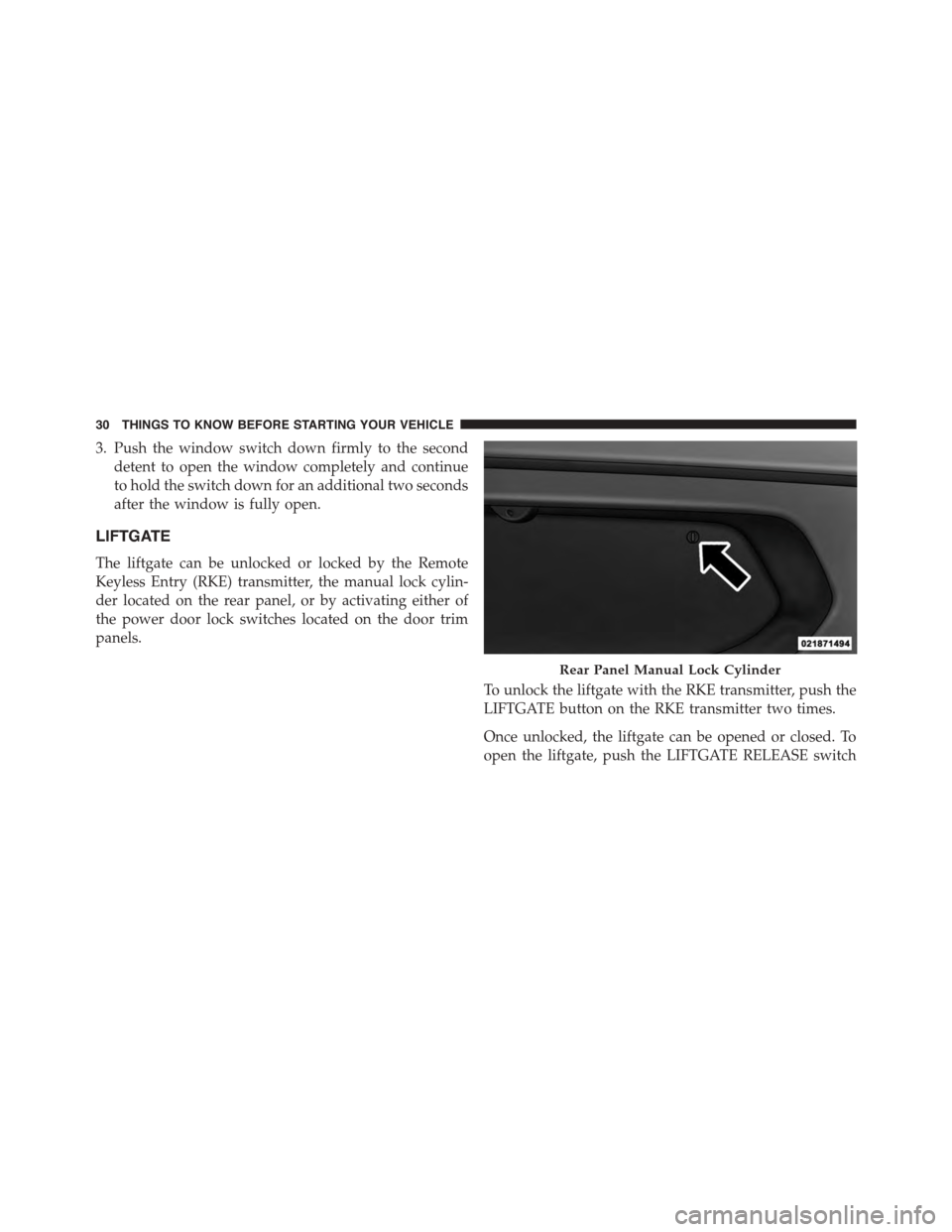
The liftgate can be unlocked or locked by the Remote
Keyless Entry (RKE) transmitter, the manual lock cylin-
der located on the rear panel, or by activating either of
the power door lock switches located on the door trim
panels.
To unlock the liftgate with the RKE transmitter, push the
LIFTGATE button on the RKE transmitter two times.
Once unlocked, the liftgate can be opened or closed. To
open the liftgate, push the LIFTGATE RELEASE switch
Rear Panel Manual Lock Cylinder
30 THINGS TO KNOW BEFORE STARTING YOUR VEHICLE
Page 184 of 400
arrow button on the touchscreen to return to the previous
menu, or push the back button on the faceplate.
•Headlight Illumination On Approach
When this feature is selected, the headlights will activate
and remain on for 0, 30, 60, or 90 seconds when the doors
are unlocked with the Remote Keyless Entry (RKE)
transmitter. To change the Illuminated Approach status,
press the “+” or “-” button on the touchscreen to select
your desired time interval. Press the back arrow button
on the touchscreen to return to the previous menu, or
push the back button on the faceplate.
•Headlights With Wipers
When this feature is selected, and the headlight switch is
in the AUTO position, the headlights will turn on ap-
proximately 10 seconds after the wipers are turned on.
The headlights will also turn off when the wipers are
turned off if they were turned on by this feature. To make
your selection, press the Headlights With Wipers button
on the touchscreen, until a check-mark appears next to
setting, showing that setting has been selected. Press the
back arrow button on the touchscreen to return to the
previous menu, or push the back button on the faceplate.
•Daytime Running Lights
When this feature is selected, the headlights will turn on
whenever the vehicle is set in motion. To make your
selection, press the Daytime Running Lights button on
the touchscreen, until a check-mark appears next to
setting, showing that setting has been selected. Press the
back arrow button on the touchscreen to return to the
previous menu, or push the back button on the faceplate.
•Flash Lights With Lock
When this feature is selected, the exterior lights will flash
when the doors are locked or unlocked with the Remote
Keyless Entry (RKE) transmitter. This feature may be
selected with or without the sound horn on lock feature
selected. To make your selection, press the Flash Lights
182 UNDERSTANDING YOUR INSTRUMENT PANEL
Page 185 of 400
with Lock button on the touchscreen, until a check-mark
appears next to setting, showing that setting has been
selected. Press the back arrow button on the touchscreen
to return to the previous menu, or push the back button
on the faceplate.
Doors & Locks
After pressing the Doors & Locks button on the touch-
screen the following settings will be available.
•Auto Door Locks
When this feature is selected, all doors will lock auto-
matically when the vehicle reaches a speed of 15 mph
(24 km/h). To make your selection, press the “Auto Door
Locks” button on the touchscreen, until a check-mark
appears next to setting, showing that setting has been
selected. Press the back arrow button on the touchscreen
to return to the previous menu, or push the back button
on the faceplate.
•Auto Unlock On Exit
When this feature is selected, all doors will unlock when
the vehicle is stopped, the transmission is in the PARK or
NEUTRAL position and the driver’s door is opened. To
make your selection, press the Auto Unlock On Exit
button on the touchscreen, until a check-mark appears
next to setting, showing that setting has been selected.
Press the back arrow button on the touchscreen to return
to the previous menu, or push the back button on the
faceplate.
•Flash Lights With Lock
When this feature is selected, the exterior lights will flash
when the doors are locked or unlocked with the Remote
Keyless Entry (RKE) transmitter or the Passive Entry
Feature. To make your selection, press the Flash Lights
With Lock button on the touchscreen, until a check-mark
appears next to setting, showing that setting has been
4
UNDERSTANDING YOUR INSTRUMENT PANEL 183
Page 186 of 400
selected. Press the back arrow button on the touchscreen
to return to the previous menu, or push the back button
on the faceplate.
•Sound Horn With Lock
When this feature is selected, the horn will sound when
the Key Fob Lock button is pressed. To make your
selection, push the Sound Horn With Remote Lock
button on the touchscreen, until a check-mark appears
next to setting, showing that setting has been selected.
Press the back arrow button on the touchscreen to return
to the previous menu, or push the back button on the
faceplate.
•1st Press Of Key Fob Unlocks
When#Driver Door#is selected with 1st Press Of Key Fob
Unlocks, only the driver’s door will unlock with the first
press of the Remote Keyless Entry (RKE) transmitter
UNLOCK button. You must press the RKE transmitter
UNLOCK button twice to unlock the passenger’s doors.
When#All Doors#is selected for 1st Press Of Key Fob
Unlocks, all doors will unlock on the first press of the
RKE transmitter UNLOCK button.
NOTE:If the vehicle is programmed 1st Press Of Key Fob
Unlocks “All Doors,” all doors will unlock no matter
which Passive Entry equipped door handle is grasped. If
1st Press Of Key Fob Unlocks “Driver Door” is pro-
grammed, only the driver ’s door will unlock when the
driver ’s door is grasped. With Passive Entry, if 1st Press
Of Key Fob Unlocks “Driver Door” is programmed,
touching the handle more than once will only result in
the driver ’s door opening. If “Driver Door” is selected,
once the driver door is opened, the interior door lock/
unlock switch can be used to unlock all doors (or use
RKE transmitter).
•Passive Entry
This feature allows you to lock and unlock the vehicles
door(s) without having to press the Remote Keyless
184 UNDERSTANDING YOUR INSTRUMENT PANEL
Page 187 of 400
Entry (RKE) transmitter lock or unlock buttons. To make
your selection, press the “Passive Entry” button on the
touchscreen, until a check-mark appears next to setting,
showing that setting has been selected. Press the back
arrow button on the touchscreen to return to the previous
menu, or push the back button on the faceplate. Refer to
“Keyless Enter-N-Go™” in “Things To Know Before
Starting Your Vehicle”.
Engine Off Options
After pressing the Engine Off Options button on the
touchscreen the following settings will be available.
•Engine Off Power Delay
When this feature is selected, the power window
switches, radio, Uconnect® phone system (if equipped),
DVD video system (if equipped), power sunroof (if
equipped), and power outlets will remain active for up to
10 minutes after the ignition is cycled to OFF. Opening
either front door will cancel this feature. To change the
“Engine Off Power Delay” status, press the 0 seconds, 45
seconds, 5 minutes or 10 minutes button on the touch-
screen. Then press the back arrow/Done button on the
touchscreen.
•Headlight Off Delay
When this feature is selected, the driver can choose to
have the headlights remain on for 0, 30, 60, or 90 seconds
when exiting the vehicle. To change the “Headlight Off
Delay” status, press the#Up#or#Down#arrow button on
the touchscreen to select your desired time interval. Press
the back arrow/Done button on the touchscreen to return
to the previous menu.
4
UNDERSTANDING YOUR INSTRUMENT PANEL 185
Page 355 of 400
Check the battery every four to six weeks to ensure that
the voltage is above 12.10 Volts. The voltage will drop
more rapidly in hot temperatures. If battery voltage
drops below 12.10 Volts, follow the battery recharge
procedure in the Service Manual.
NOTE:To help prevent the battery from discharging
during shorter periods of inactivity, perform the follow-
ing:
1. Make sure that the liftgate, hood, doors, windows are
completely closed.
2. Make sure that Remote Keyless Entry (RKE) transmit-
ter is operating and that the battery is good.
3. Make sure that the HOOD, LIFTGATE, and DOOR
switches are in adjustment. Perform the quick system
check, which follows:
Use the remote transmitter to set the alarm. If the alarm
SET light comes on and flashes, the system is operating
properly. If not, there is a problem with a switch or the
system. See your authorized dealer for service.
If you plan to store the vehicle longer than 30 days, we
recommend using Hibernation Mode to conserve bat-
tery power. Refer to “Hibernation Mode” in Mainte-
nance Procedures for further information.7
MAINTAINING YOUR VEHICLE 353
Page 389 of 400
Remote Battery Replacement................22
Key-In Reminder..........................13
Keyless Entry System.......................11
Keyless Go...............................11
Key, Replacement..........................15
Key, Sentry (Immobilizer)....................14
Lane Change And Turn Signals...............105
Lap/Shoulder Belts.........................35
Latches.................................85
Hood................................100
Lead Free Gasoline........................277
Leaks, Fluid..............................85
Life Of Tires.............................268
Liftgate.................................30
Light Bulbs..............................85
Lights..................................85
Air Bag . . . . . . . . . . . . . . . . . . . . . . . . . . . . . . .67
Alarm...............................148
Anti-Lock.............................155
Automatic Headlights....................103
Brake Warning.........................146
Bulb Replacement.......................354
Cruise...............................152
Daytime Running.......................104
Dimmer Switch, Headlight.................105
Exterior...............................85
Hazard Warning Flasher..................290
Headlights............................102
Headlights On Reminder..................104
Headlights On With Wipers................103
Headlight Switch.......................102
High Beam............................106
High Beam Indicator.....................149
High Beam/Low Beam Select...............106
Illuminated Entry........................19
Instrument Cluster......................102
Intensity Control........................107
10
INDEX 387
Page 392 of 400
Pets....................................81
Placard, Tire And Loading Information..........255
Power
Brakes...............................239
Door Locks............................25
Mirrors...............................92
Outlet (Auxiliary Electrical Outlet)...........129
Steering..............................235
Windows..............................27
Pregnant Women And Seat Belts...............40
Pretensioners
Seat Belts..............................41
Programming Transmitters (Remote Keyless Entry) . .22
Radial Ply Tires..........................261
Radiator Cap (Coolant Pressure Cap)...........330
Radio Antenna...........................195
Radio Operation..........................196
Radio (Sound Systems).....................193
Rear Camera.............................118
Rear Liftgate.............................30
Rear Window Defroster.....................138
Rear Window Features.....................138
Reclining Front Seats.......................96
Recorder, Event Data.......................69
Recreational Towing.......................287
Reformulated Gasoline.....................278
Refrigerant..............................322
Reminder, Lights On.......................104
Reminder, Seat Belt.........................34
Remote Keyless Entry (RKE)..................20
FCC General Information..................24
Programming Additional Key Fobs...........16
Programming Additional Transmitters.........16
Remote Battery Replacement................22
Transmitter Battery Replacement.............22
Remote Sound System (Radio) Controls.........194
Replacement Keys.........................15
390 INDEX
Page 396 of 400
Trailer Towing...........................286
Transmission............................335
Fluid................................360
Shifting..............................225
Transmitter Battery Service (Remote Keyless Entry) . .22
Transmitter Programming (Remote Keyless Entry) . . .22
Transmitter, Remote Keyless Entry (RKE).........20
Transporting Pets..........................81
Tread Wear Indicators......................267
Turn Signals.............................105
Uconnect®
Operation.............................193
Uconnect® Settings.........................27
Uconnect® Voice Command..................205
Uniform Tire Quality Grades.................377
Universal Transmitter......................120
Unleaded Gasoline........................277
Untwisting Procedure, Seat Belt................39
Upholstery Care..........................339
Vanity Mirrors............................93
Vehicle Identification Number (VIN).............6
Vehicle Loading..........................255
Vehicle Modifications/Alterations...............7
Vehicle Security Alarm (Security Alarm)..........17
Vehicle Storage...........................203
Vinyl Trim..............................339
Viscosity, Engine Oil.......................317
Voice Recognition System (VR)................205
Warning Flasher, Hazard....................290
Warning Lights (Instrument Cluster Description) . . .144
Warnings And Cautions......................6
Warranty Information......................374
Washer
Adding Fluid..........................323
Washers, Windshield.......................110
394 INDEX