light DODGE VIPER 2017 VX / 3.G Owners Manual
[x] Cancel search | Manufacturer: DODGE, Model Year: 2017, Model line: VIPER, Model: DODGE VIPER 2017 VX / 3.GPages: 329, PDF Size: 2.83 MB
Page 241 of 329
NOTE:A funnel is provided (located in the trunk in the
spare tire area) to open the flapper door to allow for
emergency refueling with a gas can.
CAUTION!
To avoid fuel spillage and overfilling, do not “top off”
the fuel tank after filling.
WARNING!
• Never have any smoking materials lit in or near the
vehicle when the fuel door is open or the tank is
being filled.
• Never add fuel when the engine is running. This is
in violation of most state and federal fire regulations
and may cause the “Malfunction Indicator Light” to
turn on.
• A fire may result if fuel is pumped into a portable
container that is inside of a vehicle. You could be
burned. Always place fuel containers on the ground
while filling.
Emergency Fuel Filler Door Release
If you are unable to open the fuel filler door, use the fuel
filler door emergency release procedure by following the
proceeding steps.
1. Open the liftgate.
2. Locate the carpet access door (on the right side inner trim panel of the trunk).
Carpet Access Door
5
STARTING AND OPERATING 239
Page 266 of 329
ONBOARD DIAGNOSTIC SYSTEM (OBD II)
To meet new government regulations and promote cleaner
air, your vehicle is equipped with a sophisticated onboard
diagnostic system called OBD II. This system monitors the
performance of the emissions and engine control systems.
When these systems are operating properly, your vehicle
will provide excellent performance and fuel economy, as
well as engine emissions well within current government
regulations.
If any of these systems require service, the OBD II system
will turn on the Malfunction Indicator Light. It will also
store diagnostic codes and other information to assist your
service technician in making repairs. Although your ve-
hicle will usually be drivable and not need towing, see
your authorized dealer for service as soon as possible.
CAUTION!
Prolonged driving with the light on could cause fur-
ther damage to the emission control system. It could
also affect fuel economy and driveability. The vehicle
must be serviced before any state emissions tests can
be performed.If the light is flashing, severe catalytic converter damage
and power loss will soon occur. Immediate service is
required.
Onboard Diagnostic System (OBD II) Cybersecurity
Your vehicle is required to have an Onboard Diagnostic
system (OBD II) and a connection port to allow access to
information related to the performance of your emissions
controls. Authorized service technicians may need to ac-
cess this information to assist with the diagnosis and
service of your vehicle and emissions system.
WARNING!
•
ONLY an authorized service technician should con-
nect equipment to the OBD II connection port in
order to diagnose or service your vehicle.
• If unauthorized equipment is connected to the OBD
II connection port, such as a driver-behavior tracking
device, it may:
• Be possible that vehicle systems, including safety
related systems, could be impaired or a loss of
vehicle control could occur that may result in an
accident involving serious injury or death.
(Continued)
264 MAINTAINING YOUR VEHICLE
Page 267 of 329
WARNING!(Continued)
•Access, or allow others to access, information
stored in your vehicle systems, including personal
information.
For further information, refer to “Privacy Practices — If
Equipped With Uconnect 8.4 Radio” and “Uconnect Cy-
berSecurity” in “All About Uconnect Access” in your
Owner ’s Manual Radio Supplement and “Cybersecurity”
in “Understanding Your Instrument Panel”.
EMISSIONS INSPECTION AND MAINTENANCE
PROGRAMS
In some localities, it may be a legal requirement to pass an
inspection of your vehicle’s emissions control system.
Failure to pass could prevent vehicle registration. For states that require an Inspection and Mainte-
nance (I/M), this check verifies the “Malfunction
Indicator Light (MIL)” is functioning and is not on
when the engine is running, and that the OBD II system is
ready for testing.
Normally, the OBD II system will be ready. The OBD II
system may notbe ready if your vehicle was recently
serviced, or recently had a dead battery or a battery replacement. If the OBD II system should be determined
not ready
for the I/M test, your vehicle may fail the test.
Your vehicle has a simple ignition actuated test, which you
can use prior to going to the test station. To check if your
vehicle’s OBD II system is ready, you must do the follow-
ing:
1. Cycle the ignition to the ON mode, but do not crank or start the engine.
NOTE: If you crank or start the engine, you will have to
start this test over.
2. As soon as you cycle the ignition to the ON mode, you will see the “Malfunction Indicator Light (MIL)” symbol
come on as part of a normal bulb check.
3. Approximately 15 seconds later, one of two things will happen:
• The MIL will flash for about 10 seconds and then return
to being fully illuminated until you cycle the ignition
OFF or start the engine. This means that your vehicle’s
OBD II system is not readyand you should notproceed
to the I/M station.
7
MAINTAINING YOUR VEHICLE 265
Page 282 of 329
Master Cylinder — Brake Fluid Level Check
Check the fluid level in the master cylinder immediately if
the brake system warning light indicates system failure.
Check the fluid level in the master cylinder when perform-
ing underhood services.
Clean the top of the master cylinder area before removing
the cap. If necessary, add fluid to bring the fluid level up to
the requirements described on the brake fluid reservoir.
Overfilling of fluid is not recommended because it may
cause leaking in the system.
With disc brakes, fluid level can be expected to fall as the
brake pads wear. However, low fluid level may be caused
by a leak and a checkup may be needed.
Use only the manufacturer’s recommended brake fluid.
Refer to “Fluids, Lubricants, And Genuine Parts” in “Main-
taining Your Vehicle” for further information. Use of a
brake fluid that may have a lower initial boiling point or
unidentified as to specification, may result in sudden brake
failure during hard prolonged braking.
WARNING!
•Use only manufacturer ’s recommended brake fluid.
Refer to “Fluids, Lubricants, And Genuine Parts” in
“Maintaining Your Vehicle” for further information.
Using the wrong type of brake fluid can severely
damage your brake system and/or impair its perfor-
mance. The proper type of brake fluid for your
vehicle is also identified on the original factory
installed hydraulic master cylinder reservoir.
• To avoid contamination from foreign matter or mois-
ture, use only new brake fluid or fluid that has been
in a tightly closed container. Keep the master cylin-
der reservoir cap secured at all times. Brake fluid in
a open container absorbs moisture from the air
resulting in a lower boiling point. This may cause it
to boil unexpectedly during hard or prolonged brak-
ing, resulting in sudden brake failure. This could
result in a accident.
• Overfilling the brake fluid reservoir can result in
spilling brake fluid on hot engine parts, causing the
brake fluid to catch fire. Brake fluid can also damage
painted and vinyl surfaces, care should be taken to
avoid its contact with these surfaces.
(Continued)
280 MAINTAINING YOUR VEHICLE
Page 289 of 329
Aero Group (Front Splitter) — If Equipped
The front splitter will not flex or compress against impacts
from the front. If an impact does occur, have the splitter
inspected. A cracked or delaminated splitter should be
replaced.
Always leave ample room and be sure to educate anyone
you allow to operate the vehicle.
CAUTION!
Use care when approaching parking blocks, tall speed
bumps and garage curbs. These surfaces can damage
your splitter and fascia.
Use caution when driving up to sloped surfaces or over
speed bumps. Approaching a speed bump or a slope at a
slight angle may improve your clearance.
CAUTION!
• Hard contact with steep ramps may cause damage to
your splitter and fascia.
• Replace rub strips when they are worn down to 1/8
inch (3 mm) on the front edge. This will avoid
damage to the carbon fiber panel.
Refer to the ACR Owner ’s Manual Supplement for infor-
mation specific to the ACR.
Front Splitter
7
MAINTAINING YOUR VEHICLE 287
Page 292 of 329
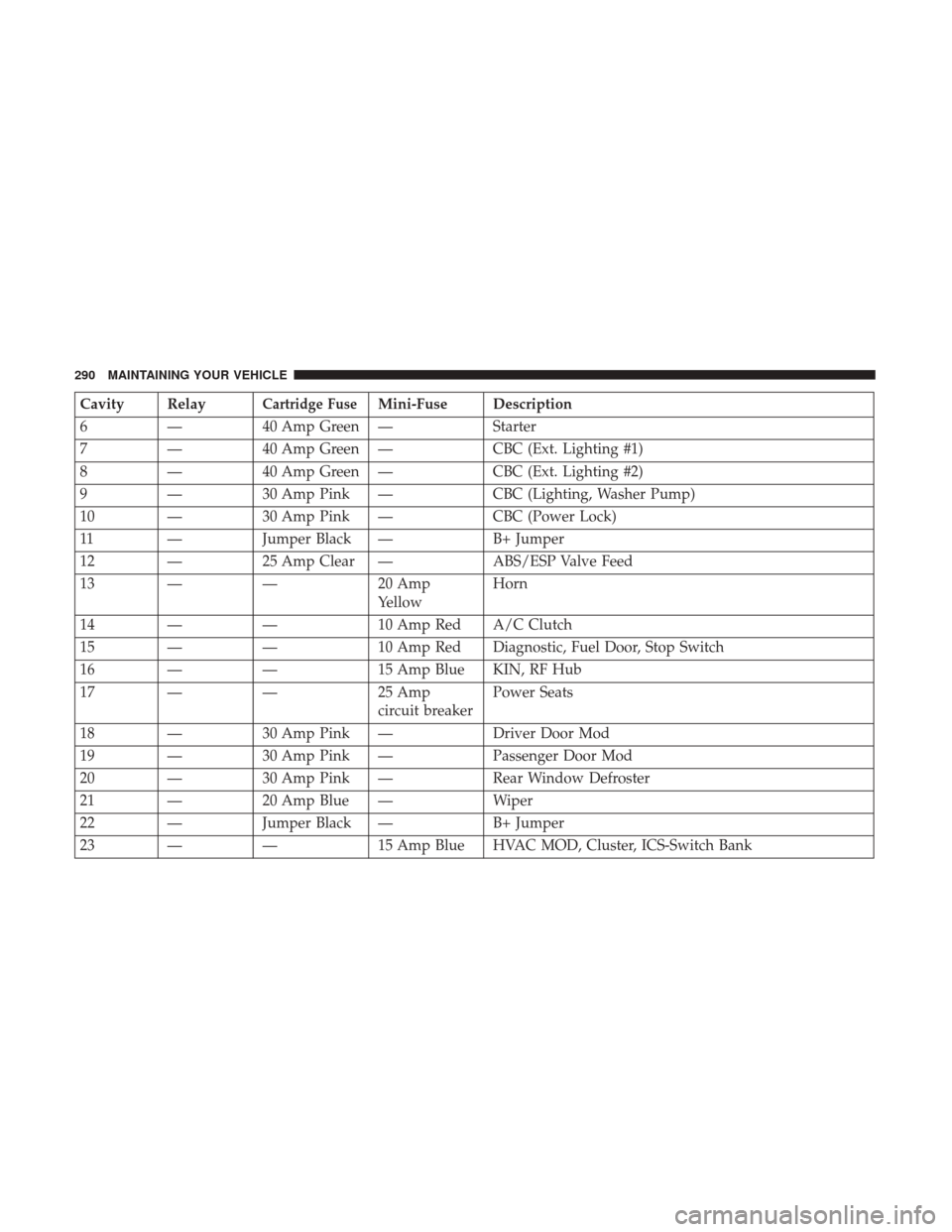
Cavity RelayCartridge FuseMini-Fuse Description
6 — 40 Amp Green — Starter
7 — 40 Amp Green — CBC (Ext. Lighting #1)
8 — 40 Amp Green — CBC (Ext. Lighting #2)
9 — 30 Amp Pink — CBC (Lighting, Washer Pump)
10 — 30 Amp Pink — CBC (Power Lock)
11 — Jumper Black — B+ Jumper
12 — 25 Amp Clear — ABS/ESP Valve Feed
13 — —20 Amp
YellowHorn
14 — —10 Amp Red A/C Clutch
15 — —10 Amp Red Diagnostic, Fuel Door, Stop Switch
16 — —15 Amp Blue KIN, RF Hub
17 — —25 Amp
circuit breakerPower Seats
18 — 30 Amp Pink — Driver Door Mod
19 — 30 Amp Pink — Passenger Door Mod
20 — 30 Amp Pink — Rear Window Defroster
21 — 20 Amp Blue — Wiper
22 — Jumper Black — B+ Jumper
23 — —15 Amp Blue HVAC MOD, Cluster, ICS-Switch Bank
290 MAINTAINING YOUR VEHICLE
Page 297 of 329
the vehicle’s battery. If the vehicle is not going to be
driven in the next three weeks, perform the battery
recharge procedure in the Service Manual. Then, either
disconnect the battery at the negative terminal or use
“Hibernation Mode” to conserve battery power. Refer to
“Maintenance Procedures/Hibernation Mode” in
“Maintaining Your Vehicle” for further information.
• Cover the vehicle whenever possible to prevent acciden-
tal damage to the finish.
NOTE: Disconnecting the battery causes the engine control
system to lose memory of some “learned” functions. After
reconnecting the battery, the engine may run rough until
the control module “relearns” these functions. Using the
Battery Save Feature will prevent the engine controller
from loosing its memory.
CAUTION!
Use care when disconnecting the remote positive cable.
It is connected to the battery and can short out to any
metal on the vehicle. Always tape or wrap the exposed
cable end to prevent electrical shorts.
Check the battery every four to six weeks to ensure that the
voltage is above 12.10 Volts. The voltage will drop more rapidly in hot temperatures. If battery voltage drops below
12.10 Volts, follow the battery recharge procedure in the
Service Manual.
NOTE:
To help prevent the battery from discharging dur-
ing shorter periods of inactivity, perform the following:
1. Make sure that the liftgate, hood, doors, windows are completely closed.
2. Make sure that the key fob is operating and that the battery is good.
3. Make sure that the HOOD, LIFTGATE, and DOOR switches are in adjustment. Perform the quick system
check, which follows:
Use the key fob to set the alarm. If the alarm SET light
comes on and flashes, the system is operating properly. If
not, there is a problem with a switch or the system. See
your authorized dealer for service.
If you plan to store the vehicle longer than 30 days, we
recommend using Hibernation Mode to conserve battery
power. Refer to “Hibernation Mode” in Maintenance
Procedures for further information.
7
MAINTAINING YOUR VEHICLE 295
Page 298 of 329
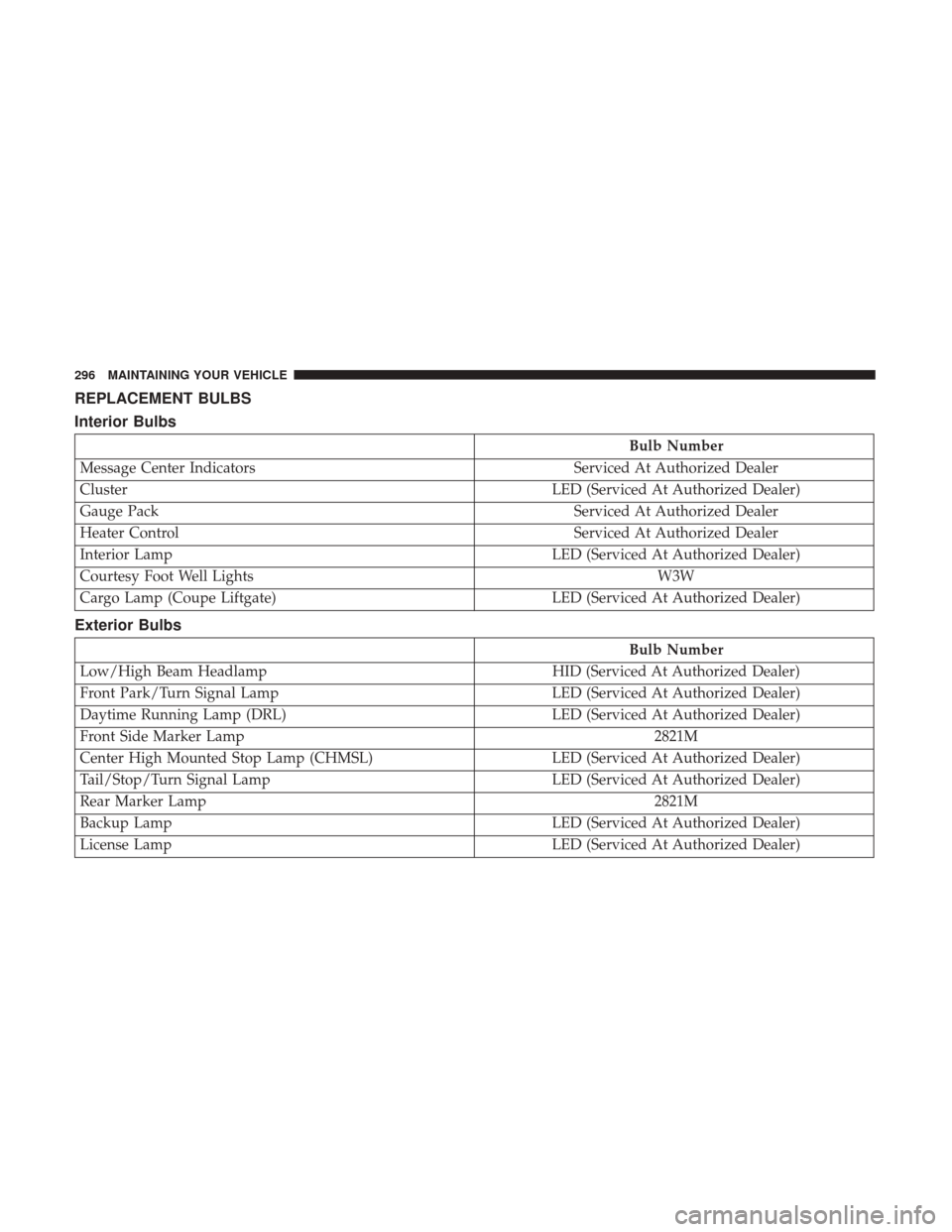
REPLACEMENT BULBS
Interior Bulbs
Bulb Number
Message Center Indicators Serviced At Authorized Dealer
Cluster LED (Serviced At Authorized Dealer)
Gauge Pack Serviced At Authorized Dealer
Heater Control Serviced At Authorized Dealer
Interior Lamp LED (Serviced At Authorized Dealer)
Courtesy Foot Well Lights W3W
Cargo Lamp (Coupe Liftgate) LED (Serviced At Authorized Dealer)
Exterior Bulbs
Bulb Number
Low/High Beam Headlamp HID (Serviced At Authorized Dealer)
Front Park/Turn Signal Lamp LED (Serviced At Authorized Dealer)
Daytime Running Lamp (DRL) LED (Serviced At Authorized Dealer)
Front Side Marker Lamp 2821M
Center High Mounted Stop Lamp (CHMSL) LED (Serviced At Authorized Dealer)
Tail/Stop/Turn Signal Lamp LED (Serviced At Authorized Dealer)
Rear Marker Lamp 2821M
Backup Lamp LED (Serviced At Authorized Dealer)
License Lamp LED (Serviced At Authorized Dealer)
296 MAINTAINING YOUR VEHICLE
Page 304 of 329
MAINTENANCE SCHEDULES
The Scheduled Maintenance services listed in this manual
must be done at the times or mileages specified to protect
your vehicle warranty and ensure the best vehicle perfor-
mance and reliability. More frequent maintenance may be
needed for vehicles in severe operating conditions, such as
dusty areas and very short trip driving. Inspection and
service should also be done anytime a malfunction is
suspected.
NOTE: Under no circumstances should oil change inter-
vals exceed 6,000 miles (10 000 km) or six months,
whichever comes first.
CAUTION!
Failure to perform the required maintenance items
may result in damage to the vehicle.At Each Stop For Fuel
•
Check the engine oil level about five minutes after a
fully warmed engine is shut off. Checking the oil level
while the vehicle is on level ground will improve the
accuracy of the oil level reading. Add oil only when the
level is at or below the ADD or MIN mark.
• Check the windshield washer solvent, and add if re-
quired.
Once A Month
• Check tire pressure and look for unusual wear or
damage. Rotate tires at the first sign of irregular wear,
even if it occurs before your next scheduled service.
• Inspect the battery, and clean and tighten the terminals
as required.
• Check the fluid levels of the coolant reservoir, brake
master cylinder, power steering, and transmission, and
add as needed.
• Check all lights and all other electrical items for correct
operation.
302 MAINTENANCE SCHEDULES
Page 312 of 329
questions about the service contract, call the manufactur-
er’s Service Contract National Customer Hotline at 1-800-
521-9922 (Canadian residents, call (800) 465-2001 English /
(800) 387-9983 French).
The manufacturer will not stand behind any service con-
tract that is not the manufacturer’s service contract. It is not
responsible for any service contract other than the manu-
facturer’s service contract. If you purchased a service
contract that is not a manufacturer’s service contract, and
you require service after the manufacturer’s New Vehicle
Limited Warranty expires, please refer to the contract
documents, and contact the person listed in those docu-
ments.
We appreciate that you have made a major investment
when you purchased the vehicle. An authorized dealer has
also made a major investment in facilities, tools, and
training to assure that you are absolutely delighted with
the ownership experience. You will be pleased with their
sincere efforts to resolve any warranty issues or related
concerns.WARNING!
Engine exhaust (internal combustion engines only),
some of its constituents, and certain vehicle compo-
nents contain, or emit, chemicals known to the State of
California to cause cancer and birth defects, or other
reproductive harm. In addition, certain fluids con-
tained in vehicles and certain products of component
wear contain, or emit, chemicals known to the State of
California to cause cancer and birth defects, or other
reproductive harm.
WARRANTY INFORMATION
See the Warranty Information Booklet, for the terms and
provisions of FCA US LLC warranties applicable to this
vehicle and market.
MOPAR PARTS
MOPAR fluids, lubricants, parts, and accessories are avail-
able from an authorized dealer. They are recommended for
your vehicle in order to help keep the vehicle operating at
its best.
310 IF YOU NEED CONSUMER ASSISTANCE