automatic transmission FIAT 124 SPIDER 2016 2.G User Guide
[x] Cancel search | Manufacturer: FIAT, Model Year: 2016, Model line: 124 SPIDER, Model: FIAT 124 SPIDER 2016 2.GPages: 216, PDF Size: 3.1 MB
Page 76 of 216
Tire Pressure Monitoring System
initialization
(versions with conventional tires)
In the following cases, system
initialization must be performed so that
the system operates normally:
a tire pressure is adjusted;
tire rotation is performed;
a tire or wheel is replaced;
the battery is replaced or completely
drained;
the tire pressure monitoring system
warning light is illuminated.
Initialization method
Proceed as follows:
park the car in a safe place and firmly
apply the parking brake;
let the tires cool, then adjust the tire
pressure of all four (4) tires to the
specified pressure indicated on the tire
pressure label located on the driver's
door frame (door open);
switch the ignition ON;
while the vehicle is parked, press and
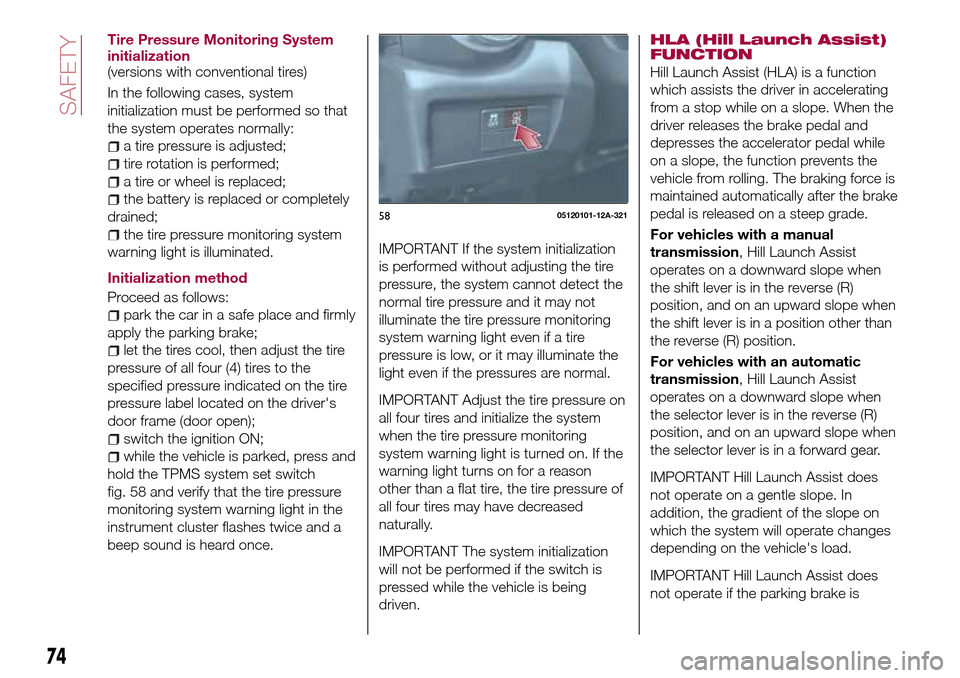
hold the TPMS system set switch
fig. 58 and verify that the tire pressure
monitoring system warning light in the
instrument cluster flashes twice and a
beep sound is heard once.
IMPORTANT If the system initialization
is performed without adjusting the tire
pressure, the system cannot detect the
normal tire pressure and it may not
illuminate the tire pressure monitoring
system warning light even if a tire
pressure is low, or it may illuminate the
light even if the pressures are normal.
IMPORTANT Adjust the tire pressure on
all four tires and initialize the system
when the tire pressure monitoring
system warning light is turned on. If the
warning light turns on for a reason
other than a flat tire, the tire pressure of
all four tires may have decreased
naturally.
IMPORTANT The system initialization
will not be performed if the switch is
pressed while the vehicle is being
driven.HLA (Hill Launch Assist)
FUNCTION
Hill Launch Assist (HLA) is a function
which assists the driver in accelerating
from a stop while on a slope. When the
driver releases the brake pedal and
depresses the accelerator pedal while
on a slope, the function prevents the
vehicle from rolling. The braking force is
maintained automatically after the brake
pedal is released on a steep grade.
For vehicles with a manual
transmission, Hill Launch Assist
operates on a downward slope when
the shift lever is in the reverse (R)
position, and on an upward slope when
the shift lever is in a position other than
the reverse (R) position.
For vehicles with an automatic
transmission, Hill Launch Assist
operates on a downward slope when
the selector lever is in the reverse (R)
position, and on an upward slope when
the selector lever is in a forward gear.
IMPORTANT Hill Launch Assist does
not operate on a gentle slope. In
addition, the gradient of the slope on
which the system will operate changes
depending on the vehicle's load.
IMPORTANT Hill Launch Assist does
not operate if the parking brake is
5805120101-12A-321
74
SAFETY
Page 77 of 216
applied, the vehicle has not stopped
completely, or the clutch pedal is
released.
IMPORTANT While Hill Launch Assist is
operating, the brake pedal may feel stiff
and vibrate, however, this does not
indicate a malfunction.
IMPORTANT Hill Launch Assist does
not operate while the TCS/DSC
indicator light is illuminated. Refer to
“Warning lights and messages”
paragraph in “Knowing the instrument
panel” chapter.
IMPORTANT Hill Launch Assist (HLA)
does not turn off even if the DSC OFF
switch is pressed to turn off the
TCS/DSC.
IMPORTANT For vehicles with an
automatic transmission although the Hill
Launch Assist does not operate during
idling stop, the vehicle roll prevention
function operates to prevent vehicle roll.
IMPORTANT Do not rely completely on
Hill Launch Assist. Hill Launch Assist is
an auxiliary device for accelerating from
a stop on a slope. The system only
operates for about two seconds and
therefore, relying only on the system,
when accelerating from a stop is
dangerous because the vehicle may
move (roll) unexpectedly and cause anaccident. The vehicle could roll
depending on the vehicle's load or if it
is towing something. In addition, for
vehicles with a manual transmission,
the vehicle could still roll depending on
how the clutch pedal or the accelerator
pedal is operated. Always confirm the
safety around the vehicle before starting
to drive the vehicle.
WARNING
76)The presence of the TPMS does not
permit the driver to neglect regular checks
of the tire pressure, including for the spare
wheel, and correct maintenance: the
system is not used to signal a possible fault
to a tire. Tire pressure must be checked
with tires rested and cold. Should it
become necessary for whatever reason to
check pressure with warm tires, do not
reduce pressure even though it is higher
than the prescribed value. Repeat the
check when the tires are cold.
77)Replacing the normal tires with winter
tires and vice versa requires an inspection
of the TPMS, which should be carried out
only by a Fiat Dealership.
78)Changes in outside temperature may
cause tire pressures to vary. The system
may temporarily indicate insufficient
pressure. In this case check the tire
inflation pressure with the tires cold and, if
necessary top up the inflation pressure.
OCCUPANT
PROTECTION
SYSTEMS
The most important safety equipment
of the vehicle comprise the following
protection systems:
seat belts;
SBA (Seat Belt Alert) system;
head restraints;
child restraint systems;
front air bags and side air bags.
Read the information given the following
pages with the utmost care.
It is of fundamental importance that the
protection systems are used in the
correct way to guarantee the maximum
possible safety level for the driver and
the passengers.
75
Page 110 of 216
STARTING AND OPERATING
Let’s get to the "heart" of the vehicle:
seeing how you can exploit all of its
potential to the full.
We’ll look at how to drive it safely in any
situation, so that it can be a welcome
companion, with our comfort and our
wallets in mind.STARTING THE ENGINE.......109
PARKING BRAKE............109
MANUAL TRANSMISSION......110
AUTOMATIC TRANSMISSION. . . .111
CRUISE CONTROL...........114
SPEED LIMITER.............117
PARKING SENSOR SYSTEM.....118
REFUELLING THE VEHICLE.....120
REAR CAMERA (PARKVIEW REAR
BACKUP CAMERA)...........121
TOWING TRAILERS..........125
108
STARTING AND OPERATING
Page 111 of 216
STARTING THE
ENGINE
130) 131) 132)
24)
Before starting the engine, adjust the
seat, the interior rear view mirrors, the
door mirrors and fasten the seat belt
correctly.
Never press the accelerator pedal for
starting the engine.
For starting procedure see “Starting the
engine” in “Getting to know your
vehicle” chapter.
STOPPING THE ENGINE
Proceed as follows:
park the car in a position that is not
dangerous for oncoming traffic; engage
a gear (versions with manual
transmission) or position the gear lever
to P (Parking) (versions with automatic
transmission);
turn the ignition device to STOP with
the engine idling.
WARNING
130)It is dangerous to run the engine in
enclosed areas. The engine takes in
oxygen and releases carbon dioxide,
carbon monoxide and other toxic gases.131)The brake servo is not active until the
engine is started, so you would need to
apply much more force than usual to the
brake pedal.
132)Do not start the engine by pushing,
towing or driving downhill. These
manoeuvres may damage the catalytic
converter.
IMPORTANT
24)A quick burst on the accelerator before
turning off the engine serves absolutely no
practical purpose; it wastes fuel and is
damaging for the engine.
PARKING BRAKE
133) 134) 135)
IMPORTANT Driving with the parking
brake on will cause excessive wear of
the brake parts.
Setting the parking brake
Depress the brake pedal and then firmly
pull the parking brake lever fully
upwards with sufficient force to hold the
vehicle in a stationary position.
Releasing the parking brake
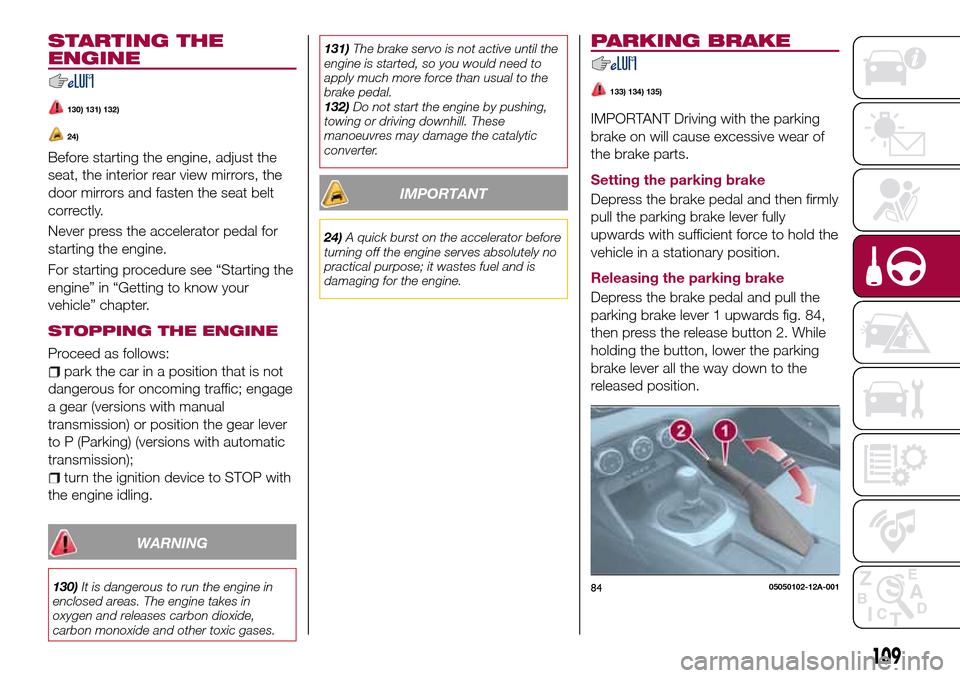
Depress the brake pedal and pull the
parking brake lever 1 upwards fig. 84,
then press the release button 2. While
holding the button, lower the parking
brake lever all the way down to the
released position.
8405050102-12A-001
109
Page 113 of 216
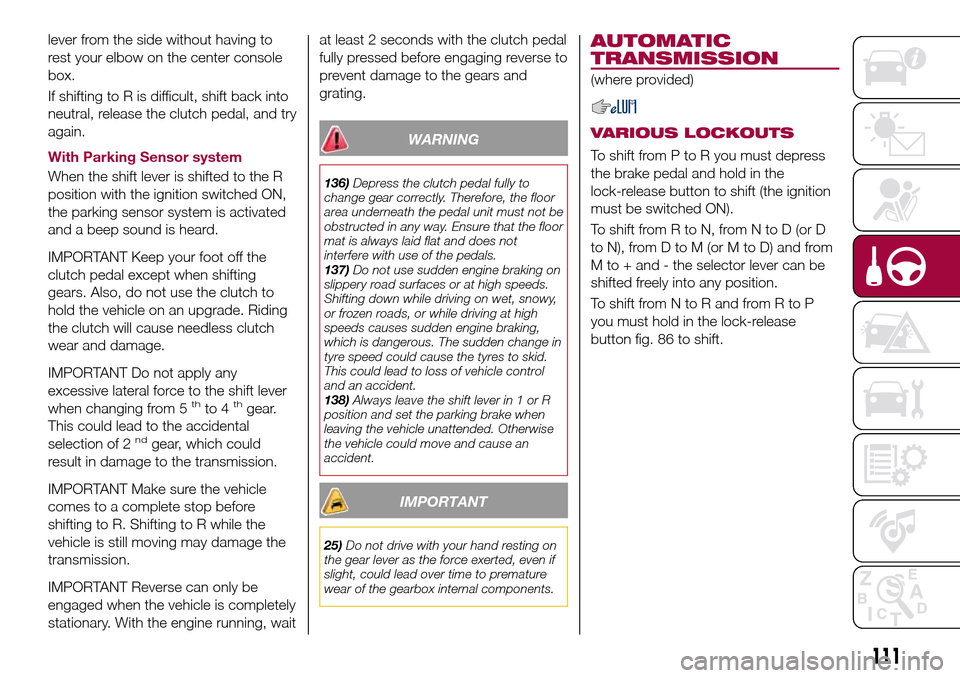
lever from the side without having to
rest your elbow on the center console
box.
If shifting to R is difficult, shift back into
neutral, release the clutch pedal, and try
again.
With Parking Sensor system
When the shift lever is shifted to the R
position with the ignition switched ON,
the parking sensor system is activated
and a beep sound is heard.
IMPORTANT Keep your foot off the
clutch pedal except when shifting
gears. Also, do not use the clutch to
hold the vehicle on an upgrade. Riding
the clutch will cause needless clutch
wear and damage.
IMPORTANT Do not apply any
excessive lateral force to the shift lever
when changing from 5
thto 4thgear.
This could lead to the accidental
selection of 2
ndgear, which could
result in damage to the transmission.
IMPORTANT Make sure the vehicle
comes to a complete stop before
shifting to R. Shifting to R while the
vehicle is still moving may damage the
transmission.
IMPORTANT Reverse can only be
engaged when the vehicle is completely
stationary. With the engine running, waitat least 2 seconds with the clutch pedal
fully pressed before engaging reverse to
prevent damage to the gears and
grating.
WARNING
136)Depress the clutch pedal fully to
change gear correctly. Therefore, the floor
area underneath the pedal unit must not be
obstructed in any way. Ensure that the floor
mat is always laid flat and does not
interfere with use of the pedals.
137)Do not use sudden engine braking on
slippery road surfaces or at high speeds.
Shifting down while driving on wet, snowy,
or frozen roads, or while driving at high
speeds causes sudden engine braking,
which is dangerous. The sudden change in
tyre speed could cause the tyres to skid.
This could lead to loss of vehicle control
and an accident.
138)Always leave the shift lever in 1 or R
position and set the parking brake when
leaving the vehicle unattended. Otherwise
the vehicle could move and cause an
accident.
IMPORTANT
25)Do not drive with your hand resting on
the gear lever as the force exerted, even if
slight, could lead over time to premature
wear of the gearbox internal components.
AUTOMATIC
TRANSMISSION
(where provided)
VARIOUS LOCKOUTS
To shift from P to R you must depress
the brake pedal and hold in the
lock-release button to shift (the ignition
must be switched ON).
To shift from R to N, from N to D (or D
to N), from D to M (or M to D) and from
M to + and - the selector lever can be
shifted freely into any position.
To shift from N to R and from R to P
you must hold in the lock-release
button fig. 86 to shift.
111
Page 114 of 216
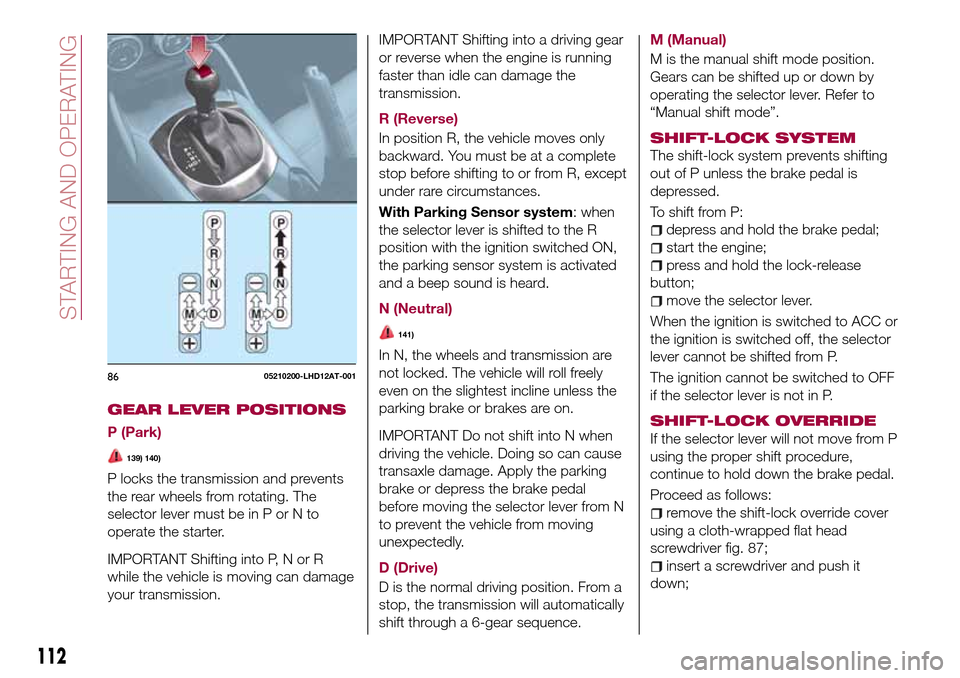
GEAR LEVER POSITIONS
P (Park)
139) 140)
P locks the transmission and prevents
the rear wheels from rotating. The
selector lever must be in P or N to
operate the starter.
IMPORTANT Shifting into P, N or R
while the vehicle is moving can damage
your transmission.IMPORTANT Shifting into a driving gear
or reverse when the engine is running
faster than idle can damage the
transmission.
R (Reverse)
In position R, the vehicle moves only
backward. You must be at a complete
stop before shifting to or from R, except
under rare circumstances.
With Parking Sensor system: when
the selector lever is shifted to the R
position with the ignition switched ON,
the parking sensor system is activated
and a beep sound is heard.
N (Neutral)
141)
In N, the wheels and transmission are
not locked. The vehicle will roll freely
even on the slightest incline unless the
parking brake or brakes are on.
IMPORTANT Do not shift into N when
driving the vehicle. Doing so can cause
transaxle damage. Apply the parking
brake or depress the brake pedal
before moving the selector lever from N
to prevent the vehicle from moving
unexpectedly.
D (Drive)
D is the normal driving position. From a
stop, the transmission will automatically
shift through a 6-gear sequence.M (Manual)
M is the manual shift mode position.
Gears can be shifted up or down by
operating the selector lever. Refer to
“Manual shift mode”.
SHIFT-LOCK SYSTEM
The shift-lock system prevents shifting
out of P unless the brake pedal is
depressed.
To shift from P:
depress and hold the brake pedal;
start the engine;
press and hold the lock-release
button;
move the selector lever.
When the ignition is switched to ACC or
the ignition is switched off, the selector
lever cannot be shifted from P.
The ignition cannot be switched to OFF
if the selector lever is not in P.
SHIFT-LOCK OVERRIDE
If the selector lever will not move from P
using the proper shift procedure,
continue to hold down the brake pedal.
Proceed as follows:
remove the shift-lock override cover
using a cloth-wrapped flat head
screwdriver fig. 87;
insert a screwdriver and push it
down;
8605210200-LHD12AT-001
112
STARTING AND OPERATING
Page 115 of 216
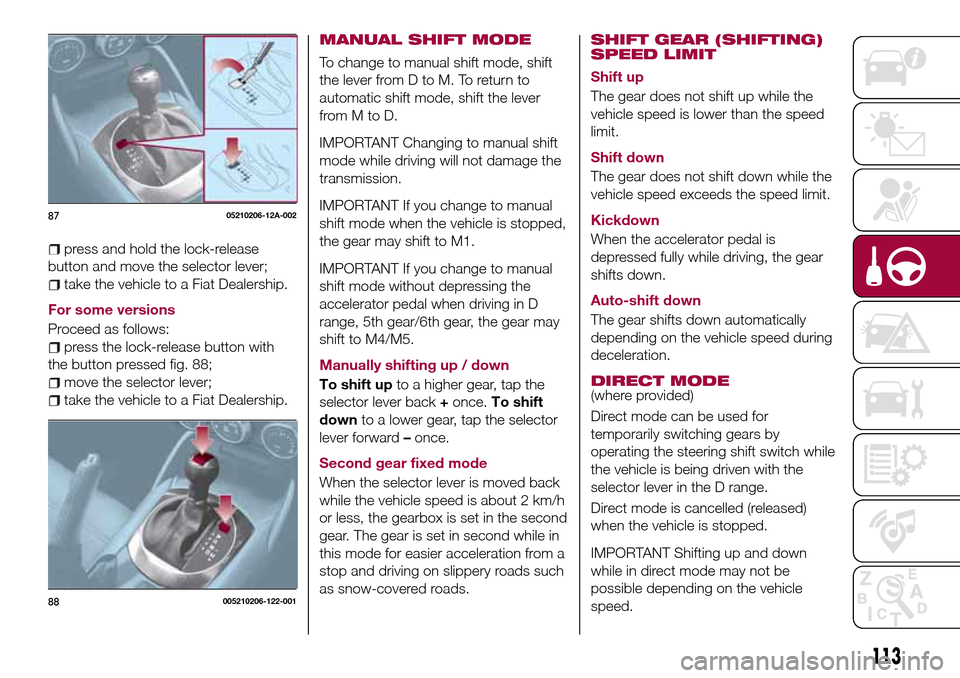
press and hold the lock-release
button and move the selector lever;
take the vehicle to a Fiat Dealership.
For some versions
Proceed as follows:
press the lock-release button with
the button pressed fig. 88;
move the selector lever;
take the vehicle to a Fiat Dealership.
MANUAL SHIFT MODE
To change to manual shift mode, shift
the lever from D to M. To return to
automatic shift mode, shift the lever
fromMtoD.
IMPORTANT Changing to manual shift
mode while driving will not damage the
transmission.
IMPORTANT If you change to manual
shift mode when the vehicle is stopped,
the gear may shift to M1.
IMPORTANT If you change to manual
shift mode without depressing the
accelerator pedal when driving in D
range, 5th gear/6th gear, the gear may
shift to M4/M5.
Manually shifting up / down
To shift upto a higher gear, tap the
selector lever back+once.To shift
downto a lower gear, tap the selector
lever forward–once.
Second gear fixed mode
When the selector lever is moved back
while the vehicle speed is about 2 km/h
or less, the gearbox is set in the second
gear. The gear is set in second while in
this mode for easier acceleration from a
stop and driving on slippery roads such
as snow-covered roads.
SHIFT GEAR (SHIFTING)
SPEED LIMIT
Shift up
The gear does not shift up while the
vehicle speed is lower than the speed
limit.
Shift down
The gear does not shift down while the
vehicle speed exceeds the speed limit.
Kickdown
When the accelerator pedal is
depressed fully while driving, the gear
shifts down.
Auto-shift down
The gear shifts down automatically
depending on the vehicle speed during
deceleration.
DIRECT MODE(where provided)
Direct mode can be used for
temporarily switching gears by
operating the steering shift switch while
the vehicle is being driven with the
selector lever in the D range.
Direct mode is cancelled (released)
when the vehicle is stopped.
IMPORTANT Shifting up and down
while in direct mode may not be
possible depending on the vehicle
speed.
8705210206-12A-002
88005210206-122-001
113
Page 117 of 216
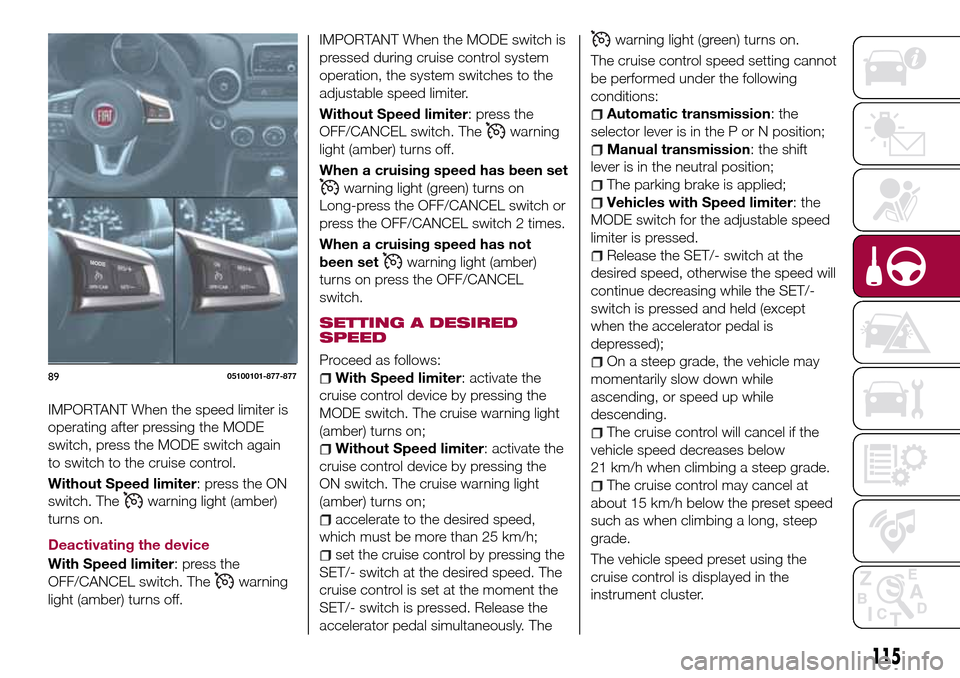
IMPORTANT When the speed limiter is
operating after pressing the MODE
switch, press the MODE switch again
to switch to the cruise control.
Without Speed limiter: press the ON
switch. The
warning light (amber)
turns on.
Deactivating the device
With Speed limiter: press the
OFF/CANCEL switch. The
warning
light (amber) turns off.
IMPORTANT When the MODE switch is
pressed during cruise control system
operation, the system switches to the
adjustable speed limiter.
Without Speed limiter: press the
OFF/CANCEL switch. The
warning
light (amber) turns off.
When a cruising speed has been set
warning light (green) turns on
Long-press the OFF/CANCEL switch or
press the OFF/CANCEL switch 2 times.
When a cruising speed has not
been set
warning light (amber)
turns on press the OFF/CANCEL
switch.
SETTING A DESIRED
SPEED
Proceed as follows:
With Speed limiter: activate the
cruise control device by pressing the
MODE switch. The cruise warning light
(amber) turns on;
Without Speed limiter: activate the
cruise control device by pressing the
ON switch. The cruise warning light
(amber) turns on;
accelerate to the desired speed,
which must be more than 25 km/h;
set the cruise control by pressing the
SET/- switch at the desired speed. The
cruise control is set at the moment the
SET/- switch is pressed. Release the
accelerator pedal simultaneously. The
warning light (green) turns on.
The cruise control speed setting cannot
be performed under the following
conditions:
Automatic transmission: the
selector lever is in the P or N position;
Manual transmission: the shift
lever is in the neutral position;
The parking brake is applied;
Vehicles with Speed limiter: the
MODE switch for the adjustable speed
limiter is pressed.
Release the SET/- switch at the
desired speed, otherwise the speed will
continue decreasing while the SET/-
switch is pressed and held (except
when the accelerator pedal is
depressed);
On a steep grade, the vehicle may
momentarily slow down while
ascending, or speed up while
descending.
The cruise control will cancel if the
vehicle speed decreases below
21 km/h when climbing a steep grade.
The cruise control may cancel at
about 15 km/h below the preset speed
such as when climbing a long, steep
grade.
The vehicle speed preset using the
cruise control is displayed in the
instrument cluster.
8905100101-877-877
115
Page 118 of 216
INCREASING /
DECREASING SPEED
To increase speed
With cruise control switch: press the
RESUME/+ switch and hold it your
vehicle will accelerate. Release the
switch at the desired speed. Press the
RESUME/+ switch and release it
immediately to adjust the preset speed.
Multiple operations will increase the
preset speed according to the number
of times it is operated.
Using accelerator pedal: depress the
accelerator pedal to accelerate to the
desired speed. Press the SET/- switch
and release it immediately.
IMPORTANT Accelerate if you want to
speed up temporarily when the cruise
control is on. Greater speed will not
interfere with or change the set speed.
Take your foot off the accelerator to
return to the set speed.
RESUME SPEED
If some other method besides the
OFF/CANCEL switch was used to
cancel cruising speed (such as applying
the brake pedal) and the system is still
activated, the most recent set speed
will automatically resume when the
RESUME/+ switch is pressed.
If vehicle speed is below 25 km/h,
increase the vehicle speed up to25 km/h or more and press the
RESUME/+ switch.
TEMPORARILY
CANCELLING THE
SYSTEM
To temporarily cancel the system, use
one of these methods: slightly depress
the brake pedal/depress the clutch
pedal (versions with manual
transmission)/press the OFF/CANCEL
switch.
If the RESUME/+ switch is pressed
when the vehicle speed is 25 km/h or
higher, the system reverts to the
previously set speed.
Note
If any of the following conditions occur,
the cruise control system is temporarily
canceled:
the parking brake is applied;
Versions with Speed limiter: the
MODE switch for the adjustable speed
limiter is pressed;
Automatic transmission: the
selector lever is in the P or N position or
on versions withmanual
transmission: the shift lever is in the
neutral position;
Automatic transmission: the cruise
control cannot be cancelled while
driving in manual mode (selector lever
shifted from D to M position). Therefore,
engine braking will not be applied evenif the transaxle is shifted down to a
lower gear. If deceleration is required,
lower the set speed or depress the
brake pedal;
When the cruise control system is
temporarily canceled by even one of the
applicable cancel conditions, the speed
cannot be reset.
WARNING
144)Always turn off the cruise control
system when it is not in use: leaving the
cruise control system in an activation-ready
state while the cruise control is not in use is
dangerous as the cruise control could
unexpectedly activate if the activation
button is accidentally pressed, and result in
loss of vehicle control and an accident.
145)While travelling with the device
activated, do not move the gear lever to
neutral.
146)In the event of device faults or failures,
go to a Fiat Dealership.
147)The cruise control can be dangerous
if the system cannot keep a constant
speed. In specific conditions speed may be
excessive, resulting in the risk of losing
control of the vehicle and causing
accidents. Do not use the device in heavy
traffic or on winding, icy, snowy or slippery
roads.
116
STARTING AND OPERATING
Page 120 of 216
The set speed can be set by pressing
the SET/- switch while the system is in
stand-by status.
WARNING
148)Always turn off the system when
changing drivers. If the driver is changed
and the new driver is unaware of the
adjustable speed limiter function, the
vehicle may not accelerate when the driver
depresses the accelerator pedal, leading to
an accident.
149)Always verify the safety of the
surrounding area when setting the
adjustable speed limiter. If the speed is set
lower than the current vehicle speed, the
vehicle speed is decreased to the set
speed. Verify the safety of the surrounding
area and keep a safer distance between
vehicles ahead and behind you.
PARKING SENSOR
SYSTEM
(where provided)
150) 151)
26) 27) 28)
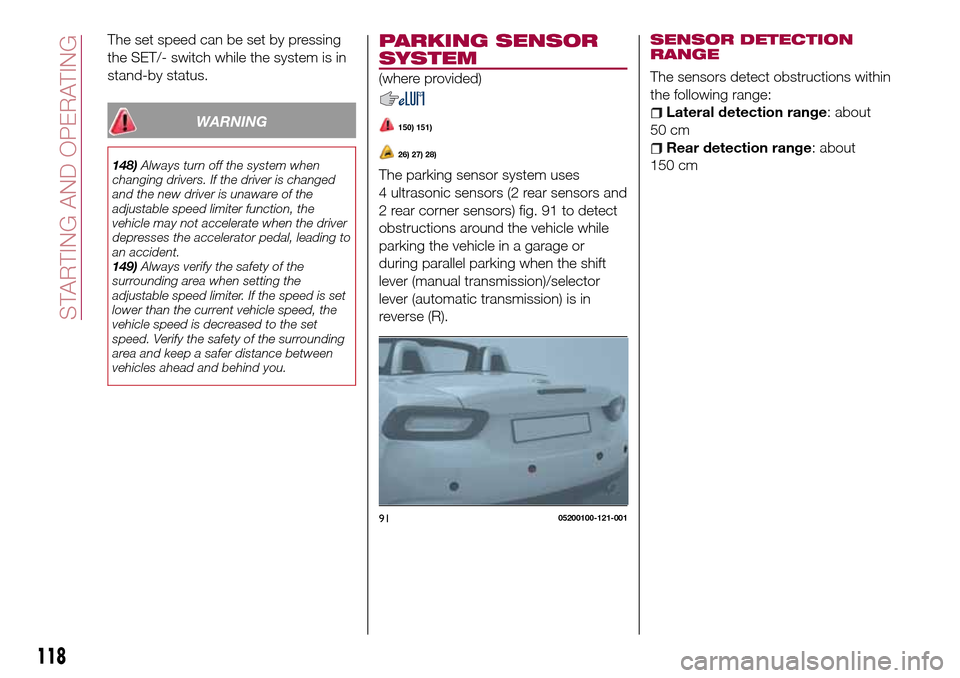
The parking sensor system uses
4 ultrasonic sensors (2 rear sensors and
2 rear corner sensors) fig. 91 to detect
obstructions around the vehicle while
parking the vehicle in a garage or
during parallel parking when the shift
lever (manual transmission)/selector
lever (automatic transmission) is in
reverse (R).
SENSOR DETECTION
RANGE
The sensors detect obstructions within
the following range:
Lateral detection range: about
50 cm
Rear detection range: about
150 cm
9105200100-121-001
118
STARTING AND OPERATING