stop start FIAT 124 SPIDER 2016 2.G User Guide
[x] Cancel search | Manufacturer: FIAT, Model Year: 2016, Model line: 124 SPIDER, Model: FIAT 124 SPIDER 2016 2.GPages: 216, PDF Size: 3.1 MB
Page 116 of 216
DRIVING TIPS
142) 143)
Passing
For extra power when passing another
vehicle or climbing steep grades,
depress the accelerator fully. The
transmission will shift to a lower gear,
depending on vehicle speed.
Climbing steep grades from a stop
To climb a steep grade from a stopped
position depress the brake pedal, shift
to D or M1, depending on the load
weight and grade steepness, release
the brake pedal while gradually
accelerating.
Descending steep grades
When descending a steep grade, shift
to lower gears, depending on load
weight and grade steepness.
Descend slowly, using the brakes only
occasionally to prevent them from
overheating.
WARNING
139)Always set the selector lever to P and
set the parking brake. Only setting the
selector lever to the P position without
using the parking brake to hold the vehicle
is dangerous. If P fails to hold, the vehicle
could move and cause an accident.140)If the engine is running faster than
idle, do not shift from N or P into a driving
gear. It's dangerous to shift from N or P
into a driving gear when the engine is
running faster than idle. If this is done, the
vehicle could move suddenly, causing an
accident or serious injury.
141)Do not shift into N when driving the
vehicle. Shifting into N while driving is
dangerous. Engine braking cannot be
applied when decelerating which could
lead to an accident or serious injury.
142)Do not use engine braking on slippery
road surfaces or at high speeds. Shifting
down while driving on wet, snowy, or
frozen roads, or while driving at high
speeds causes sudden engine braking,
which is dangerous. The sudden change in
tire speed could cause the tires to skid.
This could lead to loss of vehicle control
and an accident.
143)Do not let the vehicle move in a
direction opposite to the direction selected
by the selector lever. Do not let the vehicle
move backward with the selector lever in a
forward position, or do not let the vehicle
move forward with the selector lever in the
reverse position. Otherwise, the engine
may stop, causing the loss of the power
brake and power steering functions, and
make it difficult to control the vehicle which
could result in an accident.
CRUISE CONTROL
This is an electronically controlled
driving assistance device that allows the
desired vehicle speed to be maintained,
without having to press the accelerator
pedal.
This device can be used at a speed
above 25 km/h on long stretches of dry,
straight roads with few variations (e.g.
motorways).
It is therefore not recommended to use
this device on extra-urban roads with
traffic. Do not use it in town.
ACTIVATION /
DEACTIVATION
144) 145) 146) 147)
IMPORTANT When the ignition is
switched off, the system status before it
was turned off is maintained. For
example, if the ignition is switched off
while the cruise control is operating, the
system will be operable when the
ignition is switched ON the next time.
Activating the device
With Speed limiter: press the MODE
switch. The
warning light (amber)
turns on.
114
STARTING AND OPERATING
Page 122 of 216
REFUELLING THE
VEHICLE
152) 153) 154) 155) 156) 157)
Always stop the engine before
refuelling.
FUEL REQUIREMENTS
Only use premium unleaded fuel
(conforming to EN 228 specification
within E10) with a number of octanes
not lower than 95.
IMPORTANT USE ONLY UNLEADED
FUEL. Leaded fuel is harmful to the
catalytic converter and oxygen sensors
and will lead to deterioration of the
emission control system and or failures.
IMPORTANT The use of E10 fuel with
10% ethanol in Europe is safe for your
vehicle. Damage to your vehicle may
occur when ethanol exceeds this
recommendation.
IMPORTANT Never add fuel system
additives, otherwise the emission
control system could be damaged.
Contact a Fiat Dealership for details.
REFUELLING
PROCEDURE
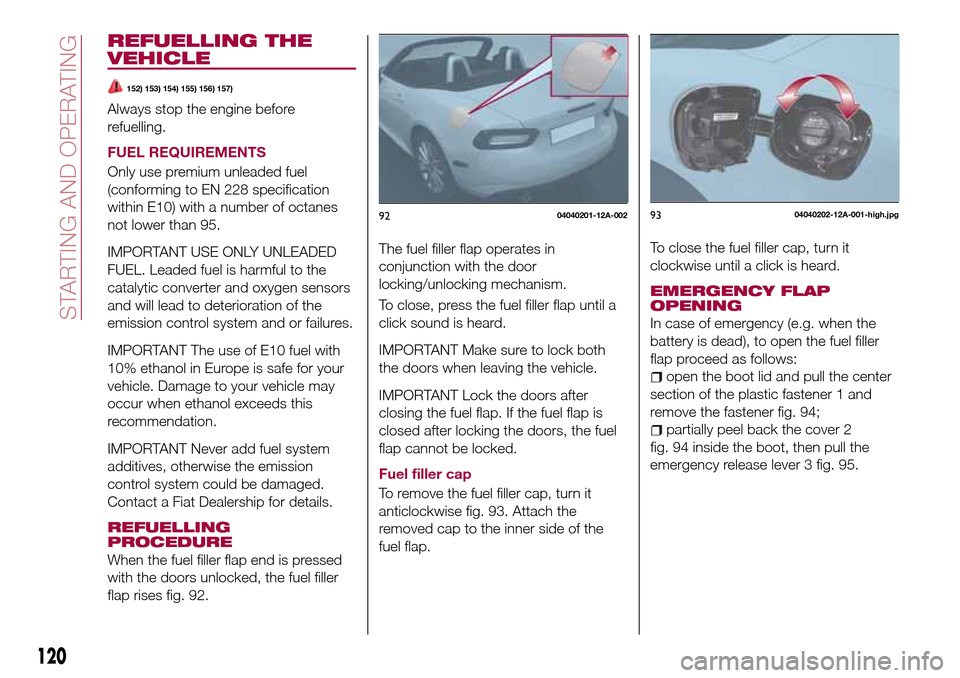
When the fuel filler flap end is pressed
with the doors unlocked, the fuel filler
flap rises fig. 92.The fuel filler flap operates in
conjunction with the door
locking/unlocking mechanism.
To close, press the fuel filler flap until a
click sound is heard.
IMPORTANT Make sure to lock both
the doors when leaving the vehicle.
IMPORTANT Lock the doors after
closing the fuel flap. If the fuel flap is
closed after locking the doors, the fuel
flap cannot be locked.
Fuel filler cap
To remove the fuel filler cap, turn it
anticlockwise fig. 93. Attach the
removed cap to the inner side of the
fuel flap.To close the fuel filler cap, turn it
clockwise until a click is heard.
EMERGENCY FLAP
OPENING
In case of emergency (e.g. when the
battery is dead), to open the fuel filler
flap proceed as follows:
open the boot lid and pull the center
section of the plastic fastener 1 and
remove the fastener fig. 94;
partially peel back the cover 2
fig. 94 inside the boot, then pull the
emergency release lever 3 fig. 95.
9204040201-12A-0029304040202-12A-001-high.jpg
120
STARTING AND OPERATING
Page 126 of 216
between the displayed image, such as
indicated below, and the actual
conditions when parking, always verify
the safety at the rear of the vehicle and
the surrounding area directly with your
eyes:
in the image of the parking space (or
garage) displayed on the screen, the
back end and distance guide lines may
appear aligned in the monitor, but they
may not actually be aligned on the
ground;
when parking in a space with a
division line on only one side of the
parking space, the division line and the
vehicle width guide line appear aligned
in the monitor, but they may not actually
be aligned on the ground.
PICTURE QUALITY
ADJUSTMENT
159)
Picture quality adjustment can be done
while the selector lever or shift lever is in
reverse (R).
There are four settings which can be
adjusted including, brightness, contrast,
tint, and color. When adjusting, pay
sufficient attention to the vehicle
surroundings:
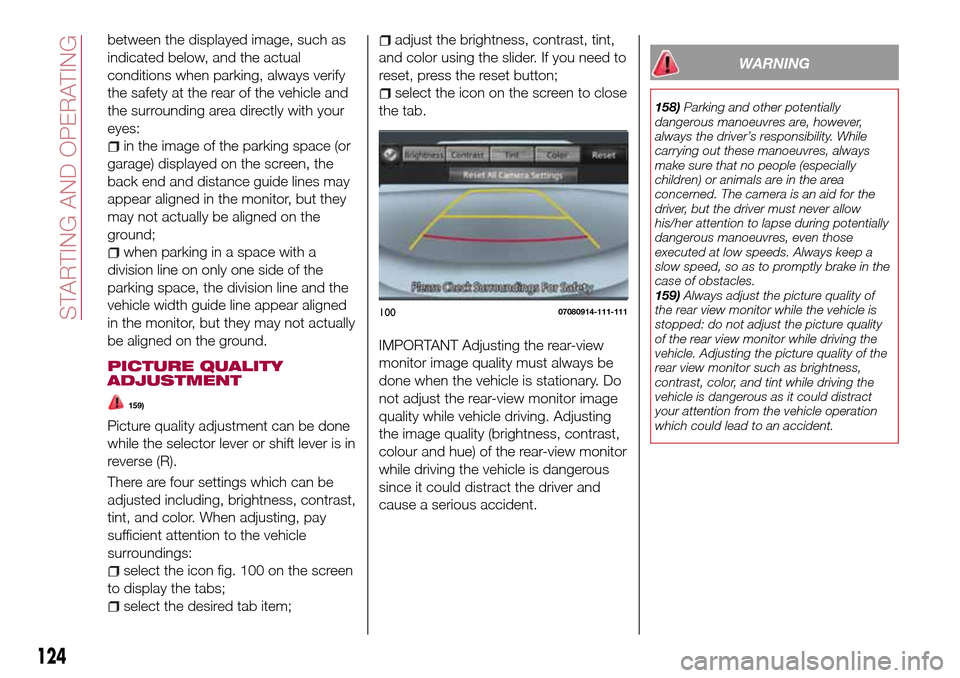
select the icon fig. 100 on the screen
to display the tabs;
select the desired tab item;
adjust the brightness, contrast, tint,
and color using the slider. If you need to
reset, press the reset button;
select the icon on the screen to close
the tab.
IMPORTANT Adjusting the rear-view
monitor image quality must always be
done when the vehicle is stationary. Do
not adjust the rear-view monitor image
quality while vehicle driving. Adjusting
the image quality (brightness, contrast,
colour and hue) of the rear-view monitor
while driving the vehicle is dangerous
since it could distract the driver and
cause a serious accident.
WARNING
158)Parking and other potentially
dangerous manoeuvres are, however,
always the driver’s responsibility. While
carrying out these manoeuvres, always
make sure that no people (especially
children) or animals are in the area
concerned. The camera is an aid for the
driver, but the driver must never allow
his/her attention to lapse during potentially
dangerous manoeuvres, even those
executed at low speeds. Always keep a
slow speed, so as to promptly brake in the
case of obstacles.
159)Always adjust the picture quality of
the rear view monitor while the vehicle is
stopped: do not adjust the picture quality
of the rear view monitor while driving the
vehicle. Adjusting the picture quality of the
rear view monitor such as brightness,
contrast, color, and tint while driving the
vehicle is dangerous as it could distract
your attention from the vehicle operation
which could lead to an accident.
10007080914-111-111
124
STARTING AND OPERATING
Page 166 of 216
45)Do not mix alcohol or methanol with the
coolant. This could damage the cooling
system.
46)Do not use a solution that contains
more than 60% antifreeze. This would
reduce effectiveness.
47)Avoid allowing brake fluid, which is
extremely corrosive, to come into contact
with painted areas. Should it happen, wash
immediately with water.
48)Incorrect assembly of electrical and
electronic accessories may cause severe
damage to your vehicle. Go to a Fiat
Dealership if you want to install accessories
(e.g. anti-theft, radio phone, etc.): they will
suggest the most suitable devices and
advise you whether a higher capacity
battery needs to be installed.
IMPORTANT
4)Used engine oil and oil filters contain
substances which are harmful to the
environment. You are advised to contact a
Fiat Dealership to have the oil and filters
changed.
5)Used transmission fluid contains
substances that are harmful to the
environment. It is advisable to contact a
Fiat Dealership to have the fluid changed.
6)Batteries contain substances which are
very dangerous for the environment. For
battery replacement, contact a Fiat
Dealership.
BATTERY
RECHARGING
204) 205)
BATTERY RECHARGING
PROCEDURE
Charge battery as follows:
remove the caps before recharging
the battery;
connect the charger cables to the
battery terminals, observing the polarity;
turn on the charger;
when finished, turn the charger off
before disconnecting the battery;
reconnect the negative battery
terminal.
IMPORTANT Before recharging the
battery, turn off all accessories and stop
the engine.
IMPORTANT Make sure that the cables
of the electrical system are correctly
reconnected to the battery, i.e. the
positive cable (+) to the positive
terminal and the negative cable (-) to
the negative terminal. The battery
terminals are marked with the positive
(+) and negative (-) symbols, and are
shown on the battery cover. The battery
terminals must also be corrosion-free
and firmly secured to the terminals. If a
“quick-type” battery charger is usedwith the battery fitted on the vehicle,
before connecting it disconnect both
cables of the battery itself. Do not use a
“quick-type” battery charger to provide
the starting voltage.
IMPORTANT The battery recharging
procedure is given as information only.
You are advised to contact a Fiat
Dealership to have this operation
carried out.
IMPORTANT Charging should be slow
at a low ampere rating for
approximately 24 hours. Charging for a
longer time may damage the battery.
WARNING
204)Battery fluid is poisonous and
corrosive: avoid contact with skin and
eyes. The battery recharging operation
must be performed in a ventilated place,
away from naked flames or possible
sources of sparks to avoid the risk of
explosion and fire.
205)Do not try to recharge a frozen
battery: it must be thawed first, otherwise it
may explode. If the battery was frozen,
have it inspected by specialized personnel
before recharging to check that the internal
elements are not damaged and that the
casing is not cracked, which causes the
risk of leakage of poisonous, corrosive
acid.
164
MAINTENANCE AND CARE
Page 170 of 216
IMPORTANT Do not spray water in the
engine compartment. Otherwise, it
could result in engine-starting problems
or damage to electrical parts.
IMPORTANT When washing and
waxing the vehicle, be careful not to
apply excessive force to any single area
of the vehicle bonnet. Otherwise, you
could dent the vehicle.
IMPORTANT Do not use automatic car
washing machines and car washing
devices using high water pressure.
IMPORTANT Make sure that the fuel
flap is closed and lock the doors.
Otherwise, the fuel flap may be
forcefully opened by water pressure
causing damage to the vehicle or fuel
flap.
IMPORTANT Do not use steel wool,
abrasive cleaners, or strong detergents
containing highly alkaline or caustic
agents on chromeplated or anodised
aluminium parts. This may damage the
protective coating; also, cleaners and
detergents may discolour or deteriorate
the paint.
Thoroughly rinse off all soap with
lukewarm or cold water. Do not allow
soap to dry on the finish.
211)
WARNING
211)Dry off brakes that have become wet
by driving slowly, releasing the accelerator
pedal and lightly applying the brakes
several times until the brake performance
returns to normal. Driving with wet brakes
is dangerous. Increased stopping distance
or the vehicle pulling to one side when
braking could result in a serious accident.
Light braking will indicate whether the
brakes have been affected.
IMPORTANT
52)In order to preserve the appearance of
the paint abrasive products and/or polishes
should not be used for cleaning the vehicle.53)Avoid washing with rollers and/or
brushes in washing stations. Wash the
vehicle only by hand using neutral pH
detergents; dry it with a wet chamois
leather. Abrasive products and/or polishes
should not be used for cleaning the car.
Bird droppings must be washed off
immediately and thoroughly as the acid
they contain is particularly aggressive.
Avoid (if at all possible) parking the vehicle
under trees; remove vegetable resins
immediately as, when dried, it may only be
possible to remove them with abrasive
products and/or polishes, which is highly
inadvisable as they could alter the typical
opaqueness of the paint. Do not use pure
windscreen washer fluid for cleaning the
front windscreen and rear window; dilute it
min. 50% with water. Only use pure screen
washer fluid when strictly necessary due to
outside temperature conditions.
IMPORTANT
7)Detergents cause water pollution. Only
wash your vehicle in areas equipped to
collect and treat wastewater from this type
of activity.
168
MAINTENANCE AND CARE
Page 192 of 216
AF (Alternative Frequency);
REG (Regional Programme);
ALC (Automatic volume adjustment);
BASS (Low pitch sound);
TREB (Treble sound);
FADE (Front/back volume balance);
BAL (Left/right volume balance);
BEEP (Audio operation sound);
12Hr < > 24Hr (12 Hr/24 Hr time
adjustment).
CLOCK
Setting the time
The clock can be set at any time when
the ignition is switched to ACC or ON.
To adjust the time, press the clock
buttonFM/AMfor about 2 seconds
until a beep is heard. The clock's
current time will flash.
Time adjustment
To adjust the time, press the
hour/minute set button
/
while the clock's current time is
flashing.
The hours advance while the hour set
button
is pressed. The minutes
advance while the minute
set
button is pressed.
Press the clock buttonFM/AMagain
to start the clock.
OPERATING THE RADIO
Radio ON: press a band selector
button FM/AM to turn the radio on.
Band selection: press the band
selector buttonFM/AMto switch the
bands as follows: M1–FM2–MW/LW
Manual tuning: select the station by
pressing the tuning button
/
lightly.
Seek tuning: press tuning button
/. The search stops when a
station is found.
Scan tuning: press and hold the scan
buttonMEDIAto automatically sample
strong stations. Scanning stops at each
station for about 5 seconds. To hold a
station, press and hold the scan button
MEDIA again during this interval.
Preset channel tuning
The 6 preset channels can be used to
store 6 MW/LW and 12 FM stations.
To set a channel first select MW/LW,
FM1, or FM2. Tune to the desired
station.
Press a channel preset button for
about 2 seconds until a beep is heard.
The preset channel number or station
frequency will be displayed. The station
is now held in the memory.
Repeat this operation for the other
stations and bands you want to store.
To tune one in the memory, selectMW/LW, FM1, or FM2 and then press
its channel preset button. The station
frequency or the channel number will be
displayed.
AUX / USB / iPod MODE
Auxiliary jack / USB port
Audio can be heard from the vehicle's
speakers by connecting a commercially
available portable audio unit to the
auxiliary jack. A commercially-available,
non-impedance (3.5 Ø) stereo mini plug
lead is required. In addition, audio can
be played from the vehicle audio device
by connecting a USB device or an iPod
to the USB port.
How to use AUX mode
Switch the ignition to ACC or ON, press
the power/volume dial to turn the audio
system on and press theMEDIA
button of the audio unit to change to
the AUX mode.
How to use USB mode
This unit does not support a USB
3.0 device. In addition, other devices
may not be supported depending on
the model or OS version.
Playback
Switch the ignition to ACC or ON, press
the power/volume dial to turn the audio
system on and press theMEDIA
190
MULTIMEDIA
Page 212 of 216
INDEX
ABS system................67
Active bonnet precautions........68
Active safety systems...........67
Advanced Keyless Entry System....14
AFS (Adaptive Front Lighting
System)..................27
Attaching the tow hooks........150
Auto-wiper control............29
Automatic climate control system.......................34
Automatic lighting.............25
Automatic transmission.........111
Auxiliary driving systems.........71
Battery (maintenance).........162
Battery recharging............164
Bodywork (care and
maintenance).............167
Bonnet....................40
Boot lid...................38
Boot lid (opening).............38
Brake Assist................110
Brake/clutch fluid (level check). . . .162
Checking levels.............160
Child restraint system suitability
for various seat position.......85
Child seat installation position.....84
Child-restraint precautions.......80
Child-restraint system types......83
Climate control system..........31CO2 emissions..............184
Coming Home light system.......25
Constant monitoring..........107
Control panel and instruments.....46
Convertible Top (lowering)........41
Convertible Top (Soft Top)........41
Cruise Control..............114
Dashboard..................8
Dimensions................177
Doors.....................16
Double locking system..........16
Driver Air Bag................95
DRL (Daytime Running Lights).....24
DSC system................67
Emergency flap opening.......120
Emergency stop signal system. . . .127
Emergency towing............152
Engine...................172
Engine compartment..........160
Engine coolant (level check)......161
Engine oil (level check).........161
Essential information............3
Exterior lights................24
Flash to pass...............25
Fluid capacities..............178
Fluids and lubricants..........179
Front fog lights...............25
Fuel consumption............183
Fuel filler cap...............120Fuse block (engine compartment)......................138
Fuse block (left side of the vehicle)......................141
Fuses (under the bonnet)........137
Fuses (vehicle's left side)........136
Gear lever positions..........112
Gear Shift Indicator............50
Hazard warning lights.........127
Hazard warning lights (control). . . .127
Head restraints...............21
Headlight washer.............30
Headlights..................24
Heated seats................19
Heavy-dute use of the vehicle
(scheduled servicing)........155
High beams.................25
HLA function................74
How the SRS Air bags work......95
How to use this manual..........3
Identification data............171
Ignition switch...............11
Immobilizer system............15
INFO switch.................49
Installing child restraint systems....89
Interiors..................169
Jump starting..............148
Jump starting (procedure).......148
Key battery replacement........10
Keyless Entry System...........9
Keys......................9
INDEX