Instrument panel warning lights FIAT 124 SPIDER 2017 2.G Owners Manual
[x] Cancel search | Manufacturer: FIAT, Model Year: 2017, Model line: 124 SPIDER, Model: FIAT 124 SPIDER 2017 2.GPages: 300, PDF Size: 121.24 MB
Page 13 of 300
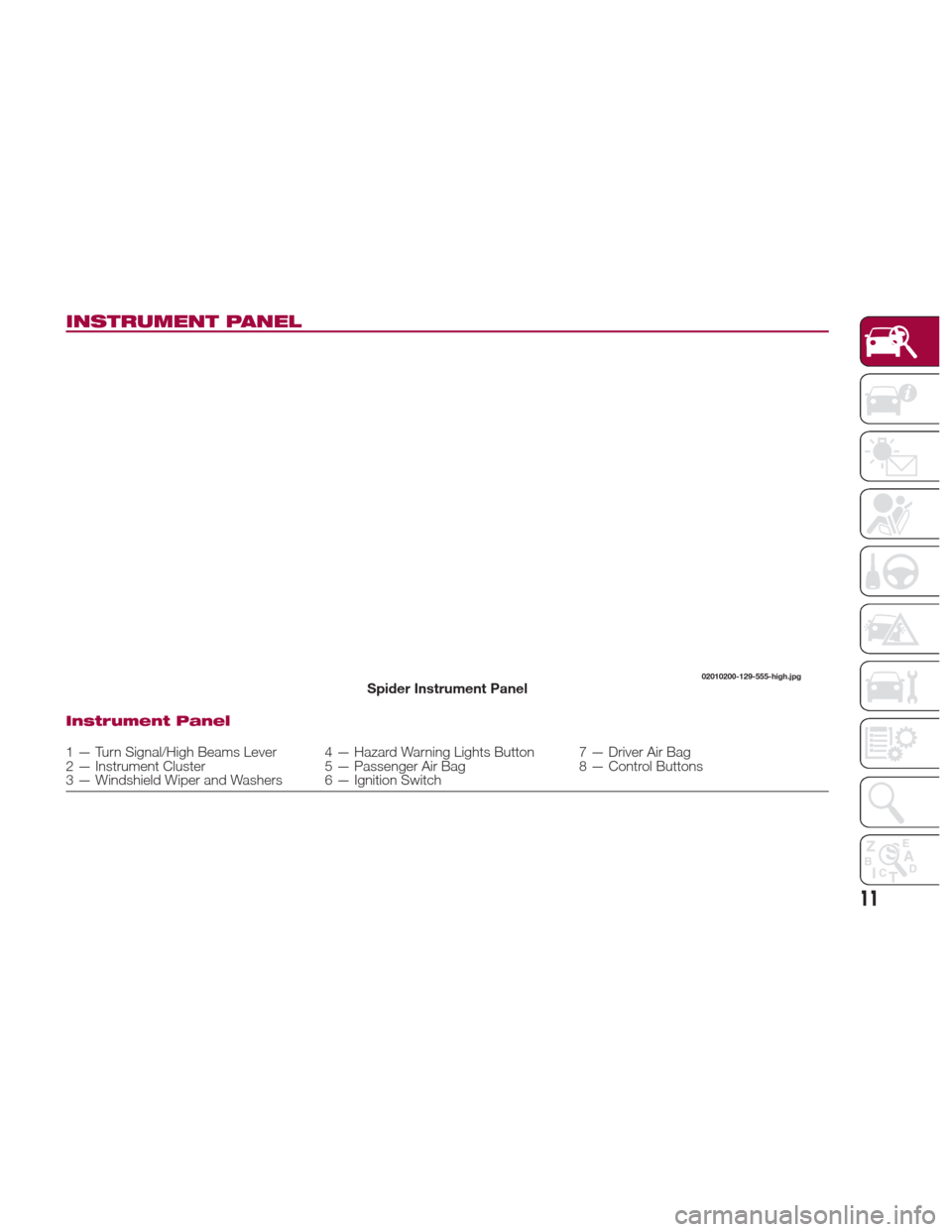
INSTRUMENT PANEL
Instrument Panel
1 — Turn Signal/High Beams Lever 4 — Hazard Warning Lights Button 7 — Driver Air Bag
2 — Instrument Cluster 5 — Passenger Air Bag 8 — Control Buttons
3 — Windshield Wiper and Washers 6 — Ignition Switch
02010200-129-555-high.jpgSpider Instrument Panel
11
Page 17 of 300
Keyless Entry System
The Keyless Entry System is an
enhancement that allows you to
lock/unlock the doors, trunk lid, fuel
filler door, and opens the trunk lid with
the slow and careful push of a button .
The Keyless Entry System allows the
driver to START/STOP the ignition with
the push of a button as long as the key
fob is in the passenger compartment.
If equipped, the Vehicle Security Alarm
System may be armed/disarmed with
the push of the lock/unlock button
located on the key fob.
System Malfunctions/Warnings
System malfunctions or warnings are
indicated by the following warning lights
or beeps (refer to “Knowing Your
Instrument Panel” for further
information) :
Warning Light (Red)
Ignition Not Turned OFF Warning
Beep
Key Fob Removed From Vehicle
Warning Beep
If you have a problem with the key fob,
or the key fob is lost or stolen, contact
an Authorized Dealership as soon as
possible for a replacement and to make
the lost or stolen key fob inoperative. Note:
Changes or modifications not
expressly approved by the party
responsible for compliance could void
the user's authority to operate the
equipment.
Note:
The Keyless Entry System
operational range may vary due to
local weather conditions.
The Keyless Entry System is fully
operational (door/trunk lid/fuel filler
door lock/unlock) when the ignition is
placed in the OFF position. The
Keyless Entry System does not
operate if the ignition is placed to any
position other than the OFF position.
If the key fob does not operate
when pushing a button, the operational
range becomes too small, or warning
light may not illuminate or flash the
battery may be weak or discharged. To
install a new battery, refer to “Key Fob
Battery Replacement.”
Battery life is about one year.
Replace the battery with a new one if
the
Warning light (green) flashes in
the instrument cluster. Replacing the
battery about once a year is
recommended because the
Warning light may not illuminate or
flash if the battery is low or discharged.
Additional key fobs may be
obtained at an Authorized Dealership.
Up to six key fobs may be used with
the Keyless Entry System per vehicle.
Bring all key fobs to an Authorized
Dealership when additional keys are
required.
Key Fob Functions
With A Vehicle Security Alarm
System
The hazard warning lights flash when
the Vehicle Security Alarm System is
armed or disarmed.
With Advanced Keyless Function
A beep can be heard for confirmation
when the doors, trunk lid, and the fuel
filler door are locked/unlocked using the
key fob. The beep indication volume
can be adjusted or turned off.
Use the following procedure to change
the beep setting:
1. Verify or place the ignition in the OFF
position and close both of the doors
and the trunk lid.
2. Open the driver's door.
3. Within 30 seconds of opening the
driver's door, push and hold the lock
button on the key fob for 5 seconds
or longer.
15
Page 27 of 300
Cycle the ignition off, and then restart
the engine. If the engine does not start
after three or more tries, contact an
Authorized Dealership.
Note:
If thewarning light flashes
continuously while you are driving, do
not turn the engine OFF. Contact an
Authorized Dealership and have it
checked. If the engine is shut off while
the
warning light is flashing, you
will not be able to restart it.
Because the electronic codes are
reset when the immobilizer system is
repaired, the keys are needed. Make
sure to bring all the key fobs to an
Authorized Dealership so that they can
be programmed.
Vehicle Security Alarm
System — If Equipped
If the Vehicle Security Alarm System
detects an inappropriate entry into the
vehicle or the intrusion sensor detects
movement in the vehicle which could
result in the vehicle or its contents
being stolen, the alarm alerts the
surrounding area of an abnormality by
sounding the siren/horn and flashing
the hazard warning lights.
The system will not function unless it's
properly armed. So when you leave the
vehicle, follow the arming procedure
correctly. Siren/Horn Triggering Conditions
The siren/horn sounds intermittently
and the hazard warning lights flash for
about 30 seconds when the system is
triggered by any one of the following:
Unlocking a door with an inside
door-lock knob.
Forcing open a door, the engine
compartment or the trunk lid.
Opening the hood by operating the
hood release handle.
Placing the ignition in the ON position
without starting the engine.
With the intrusion sensor: the
intrusion sensor detects a movement in
the vehicle.
The system will be triggered again (up
to 10 times) if one of the above
conditions remains.
The trunk lid will not open when the
Vehicle Security Alarm is activated.
If the battery becomes drained while
the Vehicle Security Alarm is armed, the
siren will activate and the hazard
warning lights will flash during the
battery charging or replacement
process. How To Arm The System
Close the windows and the
convertible top securely.
Place the ignition in the OFF position.
Make sure the engine compartment,
convertible top, the doors, and the
trunk lid are closed.
Push the lock button on the key fob
or lock the driver's door from the
outside with the emergency key. The
hazard warning lights will flash once.
With the Advanced Keyless Entry
function: push a request switch. The
warning light in the instrument
panel flashes twice per second for
20 seconds. After 20 seconds the
system is fully armed.
The Vehicle Security Alarm System can
also be armed by activating the auto
re-lock function with all the doors, the
trunk lid and the engine compartment
closed.
The system will disarm if one of the
following operations takes place within
20 seconds after pushing the lock
button: To rearm the system, preform
the arming procedure again.
1. Unlocking any door
2. Opening any door
3. Opening the engine compartment
4. Placing the ignition in the ON
position
25
Page 31 of 300
To Unlock
Driver's door request switch located on
the exterior door handle.
To unlock the doors, trunk lid, and the
fuel filler door, push the request switch
on the exterior door handle and the
hazard warning lights will flash twice.
To unlock both doors and the fuel filler
door, push the request switch on the
exterior door handle again within three
seconds and two more beep sounds
will be heard.
Front Passenger Door Request
Switch:
To unlock both doors and the fuel filler
door, push the request switch on the
exterior door handle. A beep sound will
be heard twice and the hazard warning
lights will flash twice.
Note:
Confirm that both doors, and the
fuel filler door are securely locked.
Confirm that both doors, and the
fuel filler door are securely locked. For
the trunk lid, move it without pushing
the electric trunk lid opener to verify
that the trunk lid has not been left
open.
Both doors and the fuel filler door
cannot be locked when any door is
open.
It may require a few seconds for the
doors to unlock after the request
switch on the exterior door handle is
pushed.
A beep sound is heard for confirmation
when the doors, and fuel filler door are
locked/unlocked using the request
switch on the exterior door handle. If
you prefer, the beep sound can be
turned off.
The volume of the beep sound can also
be changed. Use the following
procedure to change the setting:
1. Place the ignition in the OFF position
and close both of the doors and the
trunk lid.
2. Open the driver's door.
3. Within 30 seconds of opening the
driver's door, push and hold the lock
button on the key fob for five
seconds or longer. The doors, and fuel
filler door will lock, an audible beep will
activate at the currently set volume (if
the beep sound is currently set to not
activate, it will not activate). The setting
changes each time the lock
button
on the key fob is pushed and the beep
sound activates at the set volume (if the
beep sound has been set to not
activate, it will not activate). 4. The setting change is completed by
doing any one of the following:
Place the ignition in the ACC or ON
position.
Closing the driver's door.
Opening the trunk lid.
Not operating the key fob for
10 seconds.
Pushing any button except the
lockbutton on the key fob.
pushing a request switch on the
exterior door handle.
With Vehicle Security Alarm System
The hazard warning lights flash when
the Vehicle Security Alarm System is
armed or disarmed (refer to “Vehicle
Security Alarm System” found in
“Getting To Know Your Vehicle”.
The setting can be changed so that the
doors and the fuel filler door are locked
automatically without pushing the
request switch on the exterior door
handle, (refer to “Personalization
Features” paragraph in “Knowing The
Instrument Panel” chapter).
29
Page 32 of 300
Auto-Lock Function
A beep sound is heard when both
doors are closed while the key is being
carried. Both doors, the trunk lid, and
fuel door are locked automatically after
about three seconds when the
Advanced Keyless Entry key fob is out
of the operational range.
The hazard warning lights will flash
once (even if the driver is in the
operational range, both doors, trunk lid,
and the fuel filler door are locked
automatically after about 30 seconds).
If you are out of the operational range
before the doors and the trunk lid are
completely closed or another key fob is
left in the vehicle, the auto-lock function
will not work.
Always make sure that both doors and
the trunk lid are closed and locked
before leaving the vehicle. The
auto-lock function does not close the
power windows.Auto Re-Lock Function
After unlocking with the request switch
on the exterior door handle, both doors,
and the fuel filler door will automatically
lock if any of the following operations
are not performed within about
60 seconds.
If your vehicle has a Vehicle Security
Alarm System, the hazard warning
lights will flash for confirmation.
The time required for the doors to lock
automatically can be changed (refer to
“Personalization Features” paragraph in
“Knowing the instrument panel”
chapter).
Opening a door or the trunk lid.
Placing the ignition in any position
other than the OFF position.
Locking/Unlocking With A Key Fob
Both doors, trunk lid, and the fuel filler
door can be locked/unlocked by
operating the keyless entry system key
fob: refer to “Keyless Entry System” in
“Keys” paragraph. Locking/Unlocking With Door-Lock
Switch
Both doors and the fuel filler door lock
automatically when the lock side is
pushed. They unlock when the unlock
side is pushed.
To lock both the doors and the fuel filler
door from an open door, push the lock
side of the door lock switch and then
close the door.
Note:
When locking the doors this
way, be careful not to leave the key fob
inside the vehicle.
30
GETTING TO KNOW YOUR VEHICLE
Page 78 of 300
GETTING TO KNOW YOUR INSTRUMENT PANEL
ONBOARD DIAGNOSTIC
SYSTEM — OBD II...........77
CONTROL PANEL AND
INSTRUMENTS..............78
MAINTENANCE MONITOR —
IF EQUIPPED ...............85
FUEL ECONOMY MONITOR —
IF EQUIPPED ...............88
WARNING LIGHTS AND
MESSAGES ................90
PERSONALIZATION FEATURES . .108
76
GETTING TO KNOW YOUR INSTRUMENT PANEL
Page 81 of 300
Odometer / Trip
Computer
The display mode can be changed from
odometer to “Trip computer A” to “Trip
computer B” and then back to
odometer by pushing the selector while
one of them is displayed.
The selected mode will be displayed.
When the ignition is placed in the ACC
or OFF position, the odometer or trip
cannot be displayed. Pushing the
selector can switch the trip or reset it
for a ten-minute period in the following
cases:
After the ignition is cycled to OFF
from ON.
After the driver's door is opened. Odometer
The odometer records the total
distance the vehicle has been driven.
Trip Computer
The trip computer can record the total
distance of two trips. One is recorded in
“Trip A”, and the other is recorded in
“Trip B”.
For instance, “Trip A” can record the
distance from the point of origin, and
“Trip B” can record the distance from
where the fuel tank is filled.
When “Trip A” is selected, pushing the
selector again within one second will
change to “Trip B” mode. When “Trip A”
is selected, TRIP A will be displayed.
When “Trip B” is selected, TRIP B will
be displayed.
The trip computer records the total
distance the vehicle is driven until the
meter is again reset. Return it to “0.0”
by depressing and holding the selector
for one second or more.
Use this meter to measure trip
distances and to compute fuel
consumption.
Versions With Fiat Connect 7.0
:if
the fuel economy data is reset using the
fuel economy monitor or Trip A is reset
using the trip meter, the fuel economy
data and Trip A are reset simultaneously
when the fuel economy monitor with
the trip meter is on, .
Note: Only the trip records tenths of
miles (kilometers). Trip Computer Reset
The trip computer will be erased when:
The power supply is interrupted
(blown fuse or the battery is
disconnected).
The vehicle is driven over
9999.9 miles.
Speedometer
The speedometer indicates the speed
of the vehicle.
Instrument Panel
Illumination
When the position lights are turned on
with the ignition switched ON, the
brightness of the instrument panel
illumination is dimmed. When the
position lights are turned on,
the
warning light in the instrument
cluster turns on (see “Headlights” in
“Getting To Know Your Vehicle”
chapter).
Brightness Adjustment
The brightness of the instrument panel
and dashboard illuminations can be
adjusted by rotating the knob:
The brightness decreases by
rotating the knob to the left. A beep
sound will be heard when the knob has
been rotated to the maximum dim
position.
05020102-121-001Spider Instrument Cluster
1 — Trip Selector/Reset Button
79
Page 82 of 300
The brightness increasesby
rotating the knob to the right.
Cancelling Illumination Dimmer
Rotate the knob to the right until a beep
is heard while the instrument cluster is
dimmed with the ignition switched ON.
If the instrument cluster's visibility is
reduced due to glare from surrounding
brightness, cancel the illumination
dimmer.
When the illumination dimmer is
canceled, the instrument cluster cannot
be dimmed even if the position lights
are turned on. When the illumination
dimmer is canceled, the screen in the
center display switches to constant
display of the daytime screen.Trip Computer And Info
Switch
The following information can be
selected by pushing the INFO switch
with the ignition in the ON position:
Distance-to-empty (approximate
distance you can travel on the available
fuel).
Average fuel economy.
Current fuel economy.
Average vehicle speed.
If you have any problems with your trip
computer, contact an Authorized
Dealership. Distance-To-Empty Mode
This mode displays the approximate
distance you can travel on the
remaining fuel based on the fuel
economy.
The distance-to-empty will be
calculated and displayed every second.
Note:
Even though the distance-to-empty
display may indicate a sufficient
amount of remaining driving distance
before refueling is required, refuel as
soon as possible if the fuel level is very
low or the low fuel warning light
illuminates.
The display may not change unless
you add more than approximately
2.3 gallons (9 liters) of fuel.
05020102-121-001Spider Instrument Cluster
1 — Instrument Cluster Illumination
Dimmer Knob
0620500-122-001Spider Instrument Cluster Display Controls
GUID-0502011019A019Distance To Empty Display Screen
80
GETTING TO KNOW YOUR INSTRUMENT PANEL
Page 92 of 300
WARNING LIGHTS
AND MESSAGES
Warning Lights And
Messages
Note:
The warning light in the instrument
panel appears together with a
dedicated message and/or acoustic
signal when applicable. These
indications are indicative and
precautionary and as such must not be
considered as exhaustive and/or
alternative to the information contained
in the Owner’s Manual, which you are
advised to read carefully in all cases.
Always refer to the information in this
chapter in the event of a failure
indication.
Failure indications displayed are
divided into two categories: serious
and less serious failures. Serious
failures are indicated by a repeated
and prolonged warning "cycle". Less
serious failures are indicated by a
warning "cycle" with a shorter duration.
The display cycle of both categories
can be interrupted. The instrument
panel warning light will stay on until the
cause of the failure is eliminated. Vehicles With Fiat Connect 7.0
The warning contents can be verified
on the audio system.
Proceed as follows:
If the warning light is turned on,
selecticon on the home screen to
display the application screen.
Select “ Warning Guidance ”to
display the current warnings.
Select the applicable warning to view
the warning details.
For the following warning/indicator lights:
Master Warning Light
Brake System Warning Light
ABS Warning Light
Charging System Warning Light
Engine Oil Warning Light
Electric Throttle Warning Light
Cold Start Warning Light
Check Engine Warning Light
Coolant Temperature Warning Light
Automatic Transmission Warning
Light
Power Steering Malfunction Indicator
Light
Air Bag/Seat Belt Pretensioner
System Warning Light
Check Fuel Cap Warning Light
Low Fuel Warning Light
Seat Belt Warning Light
Door Ajar Warning Light
Low Washer Fluid Level Warning
Light
Tire Pressure Monitoring System
Warning Light
KEY Warning Light
LED Headlight KEY Warning Light
BSM (Blind Spot Monitoring) OFF
Indicator Light
Wrench Indicator Light
TCS/DSC Indicator Light
DSC OFF Indicator Light
Security Indicator Light
Indicator Light
Passenger Air Bag Deactivation
Warning Light
The light turns on when the ignition is
switched on for an operation check,
and turns off a few seconds later or
when the engine is started. If the light
does not turn on or remains turned on,
have the vehicle inspected at an
Authorized Dealership.
Note:
Only for “Brake System Warning Light”:
the light turns on continuously when the
parking brake is applied.
90
GETTING TO KNOW YOUR INSTRUMENT PANEL
Page 96 of 300
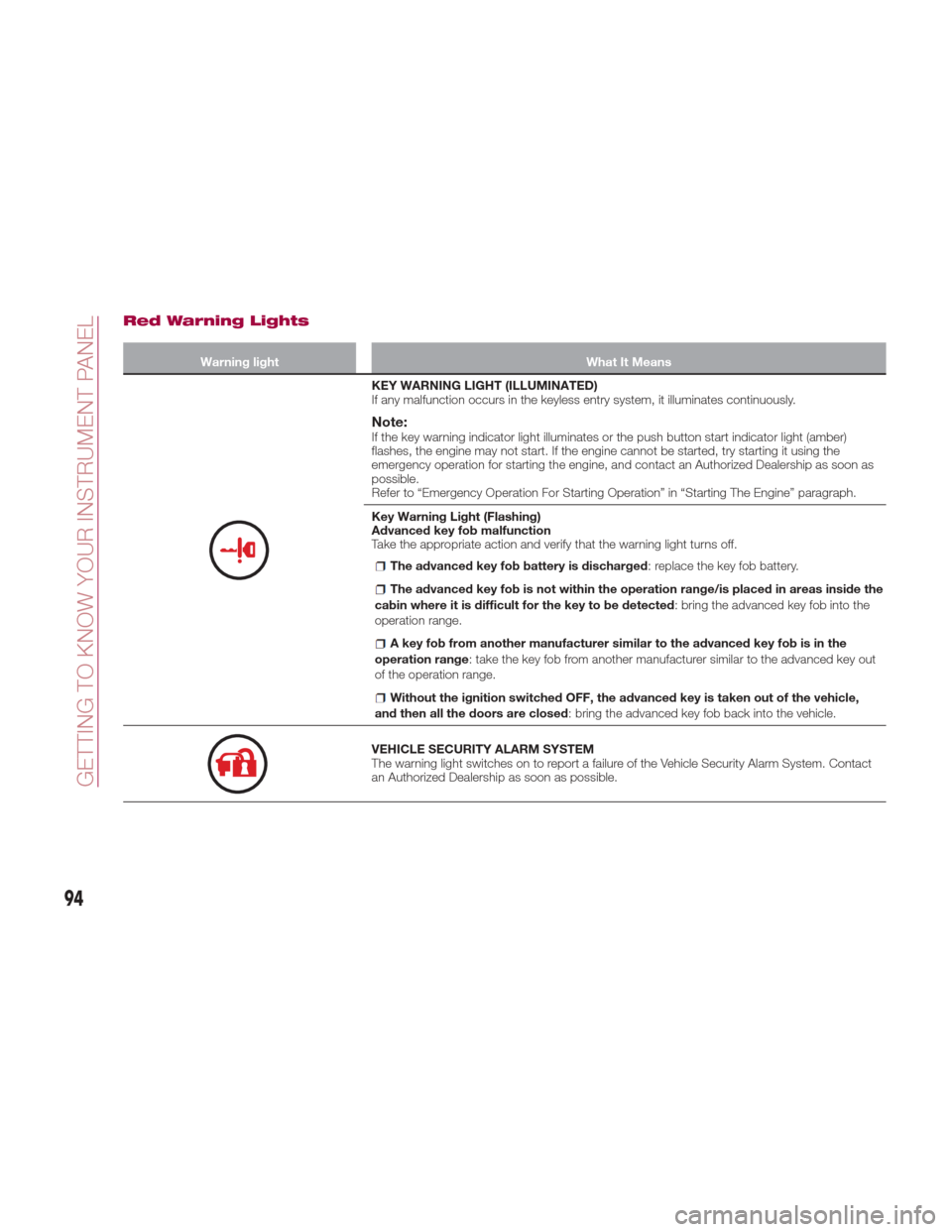
Red Warning Lights
Warning lightWhat It Means
KEY WARNING LIGHT (ILLUMINATED)
If any malfunction occurs in the keyless entry system, it illuminates continuously.
Note:If the key warning indicator light illuminates or the push button start indicator light (amber)
flashes, the engine may not start. If the engine cannot be started, try starting it using the
emergency operation for starting the engine, and contact an Authorized Dealership as soon as
possible.
Refer to “Emergency Operation For Starting Operation” in “Starting The Engine” paragraph.
Key Warning Light (Flashing)
Advanced key fob malfunction
Take the appropriate action and verify that the warning light turns off.
The advanced key fob battery is discharged: replace the key fob battery.
The advanced key fob is not within the operation range/is placed in areas inside the
cabin where it is difficult for the key to be detected : bring the advanced key fob into the
operation range.
A key fob from another manufacturer similar to the advanced key fob is in the
operation range : take the key fob from another manufacturer similar to the advanced key out
of the operation range.
Without the ignition switched OFF, the advanced key is taken out of the vehicle,
and then all the doors are closed : bring the advanced key fob back into the vehicle.
VEHICLE SECURITY ALARM SYSTEM
The warning light switches on to report a failure of the Vehicle Security Alarm System. Contact
an Authorized Dealership as soon as possible.
94
GETTING TO KNOW YOUR INSTRUMENT PANEL