key FIAT 124 SPIDER 2017 2.G Owner's Guide
[x] Cancel search | Manufacturer: FIAT, Model Year: 2017, Model line: 124 SPIDER, Model: FIAT 124 SPIDER 2017 2.GPages: 300, PDF Size: 121.24 MB
Page 109 of 300
Key Left-In-Vehicle Warning Beep
(with the advanced keyless function)
If a key fob is left in the vehicle and all
the doors and the trunk are locked
using a separate key fob, a beep sound
is heard for about 10 seconds to
remind the driver that the key fob has
been left in the vehicle.
If this happens, open the door and
remove the key fob. A key fob removed
from the vehicle this way may not
function because its functions may
have been temporarily suspended.
Perform the applicable procedure to
restore the functions of the key fob (see
paragraph “Keys” in “Getting To Know
Your Vehicle” chapter).
Vehicle Speed Alarm — If equipped
The vehicle speed alarm function is
designed to alarm the driver via a single
beep sound and a warning indication in
the instrument cluster that the
previously set vehicle speed has been
exceeded.
You can change the vehicle speed
setting at which the warning is triggered
(see paragraph “Trip Computer” in
“Getting To Know Your Vehicle”
chapter).Tire Inflation Pressure Warning
Beep — If Equipped
Vehicle With Conventional Tires
: the
warning beep sound will be heard for
about 3 seconds when there is any
abnormality in tire inflation pressures
(see “TMPS” in “Safety” chapter).
Vehicle With Run-Flat Tires (If
Equipped): the warning beep sound will
be heard for about 3 seconds if the tire
pressures decrease. If the tire pressure
decreases extremely, a beep sound will
be heard for approximately 30 seconds
(see “TMPS” in “Safety” chapter).
Blind Spot Monitoring (BSM)
System Warning Beep — If
Equipped
Driving Forward : the warning beep
operates when the direction indicator
lever is operated to the side where the
Blind Spot Monitoring (BSM) warning
light is illuminated.
Note: A personalized function is
available to change the Blind Spot
Monitoring (BSM) warning beep sound
volume. Reversing
: if a moving object such as
a vehicle or two-wheeled vehicle
approaches on the left or right from
behind your vehicle, the Blind Spot
Monitoring (BSM) warning sound is
activated.
Electronic Steering Lock Warning
Beep
The warning beep operates if the
steering wheel is not unlocked after the
keyless ignition START/STOP button is
pushed.
Speed Limiter Warning Beep — If
Equipped
If the vehicle speed exceeds the set
speed by about 2 MPH (3 km/h) or
more, a warning beep operates
continuously.
The warning beep operates until the
vehicle speed decreases to the set
speed or less.
107
Page 110 of 300
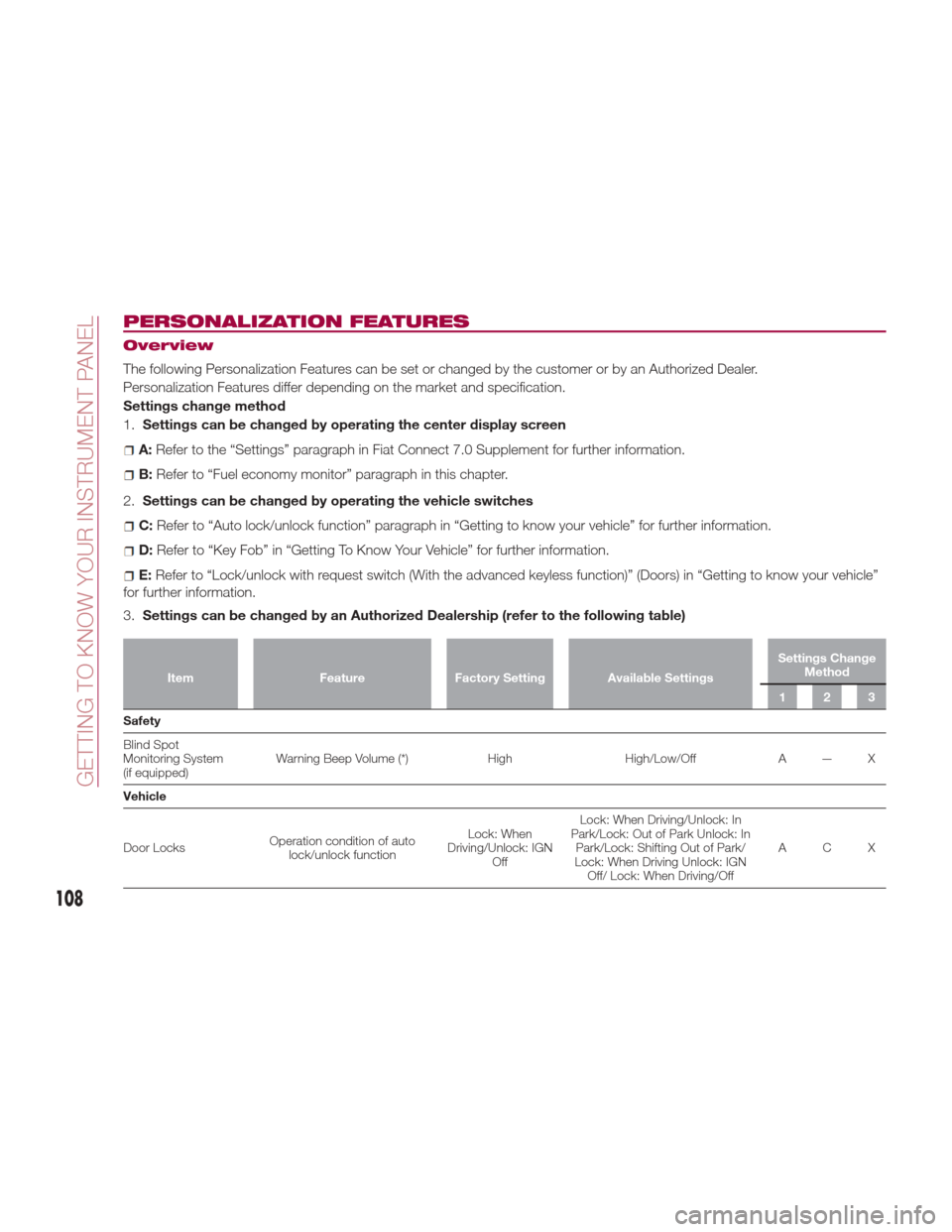
PERSONALIZATION FEATURES
Overview
The following Personalization Features can be set or changed by the customer or by an Authorized Dealer.
Personalization Features differ depending on the market and specification.
Settings change method
1.Settings can be changed by operating the center display screen
A:Refer to the “Settings” paragraph in Fiat Connect 7.0 Supplement for further information.
B: Refer to “Fuel economy monitor” paragraph in this chapter.
2. Settings can be changed by operating the vehicle switches
C:Refer to “Auto lock/unlock function” paragraph in “Getting to know your vehicle” for further information.
D:Refer to “Key Fob” in “Getting To Know Your Vehicle” for further information.
E:Refer to “Lock/unlock with request switch (With the advanced keyless function)” (Doors) in “Getting to know your vehicle”
for further information.
3. Settings can be changed by an Authorized Dealership (refer to the following table)
Item FeatureFactory Setting Available Settings Settings Change
Method
123
Safety
Blind
Spot
Monitoring System
(if equipped) Warning Beep Volume (*)
HighHigh/Low/Off A — X
Vehicle
Door Locks Operation condition of auto
lock/unlock function Lock: When
Driving/Unlock: IGN Off Lock: When Driving/Unlock: In
Park/Lock: Out of Park Unlock: In Park/Lock: Shifting Out of Park/
Lock: When Driving Unlock: IGN Off/ Lock: When Driving/Off ACX
108
GETTING TO KNOW YOUR INSTRUMENT PANEL
Page 111 of 300
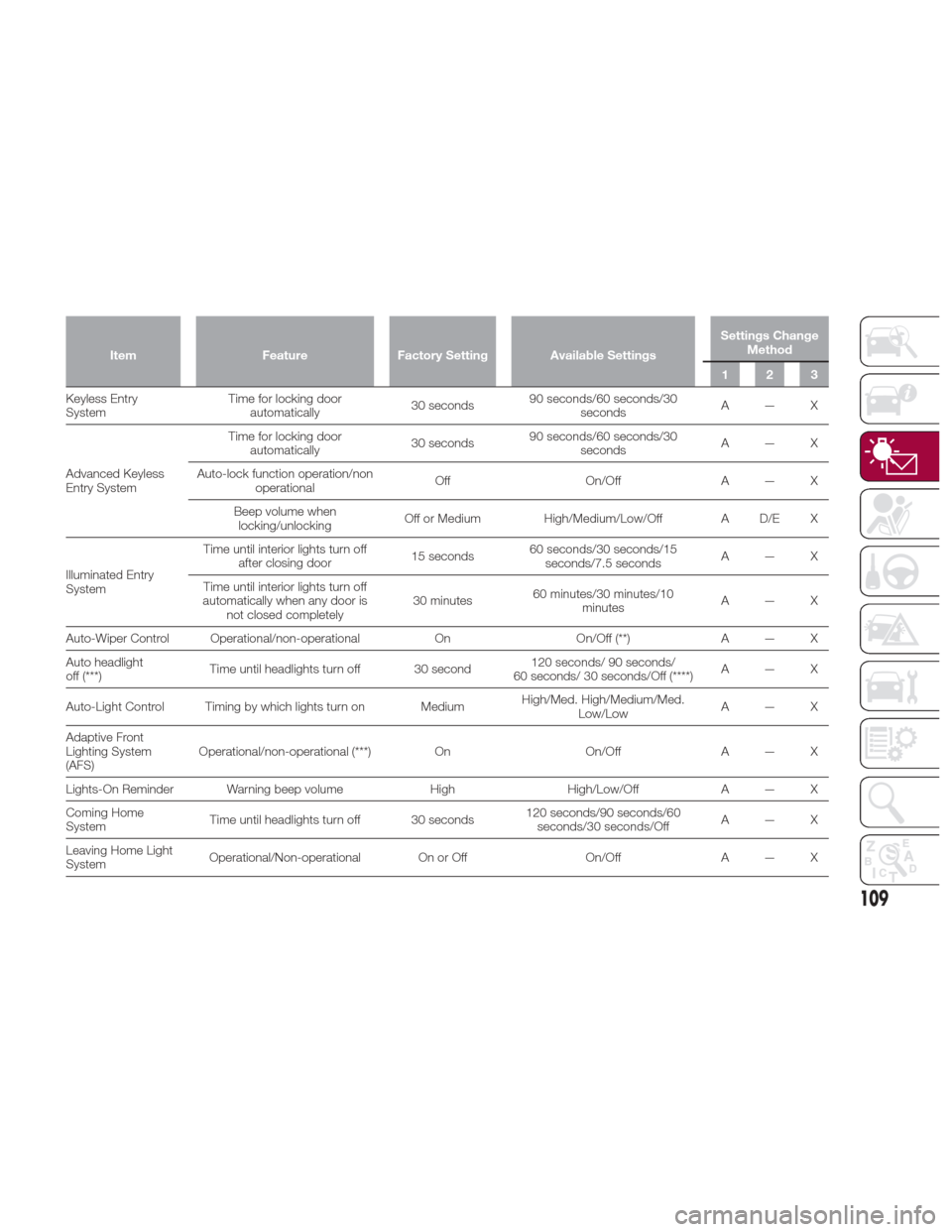
ItemFeatureFactory Setting Available Settings Settings Change
Method
123
Keyless Entry
System T
ime for locking door
automatically 30 seconds90 seconds/60 seconds/30
seconds A—X
Advanced Keyless
Entry System Time for locking door
automatically 30 seconds90 seconds/60 seconds/30
seconds A—X
Auto-lock function operation/non operational Off
On/OffA — X
Beep volume when locking/unlocking Off or Medium
High/Medium/Low/Off A D/E X
Illuminated Entry
System Time until interior lights turn off
after closing door 15 seconds60 seconds/30 seconds/15
seconds/7.5 seconds A—X
Time until interior lights turn off
automatically when any door is not closed completely 30 minutes
60 minutes/30 minutes/10
minutes A—X
Auto-Wiper Control Operational/non-operational OnOn/Off (**) A — X
Auto headlight
off (***) Time until headlights turn off 30 second 120 seconds/ 90 seconds/
60 seconds/ 30 seconds/Off (****) A—X
Auto-Light Control Timing by which lights turn on Medium High/Med. High/Medium/Med.
Low/Low A—X
Adaptive Front
Lighting System
(AFS) Operational/non-operational (***)
OnOn/OffA — X
Lights-On Reminder Warning beep volume HighHigh/Low/Off A — X
Coming Home
System Time until headlights turn off 30 seconds 120 seconds/90 seconds/60
seconds/30 seconds/Off A—X
Leaving Home Light
System Operational/Non-operational On or Off
On/OffA — X
109
Page 151 of 300
STARTING THE
ENGINE
Starting The Engine
Before starting the engine, adjust the
seat, the interior rear view mirrors, the
door mirrors and fasten the seat belt
correctly.
Warning!
When leaving the vehicle, always remove
the key fob from the vehicle and lock your
vehicle.
Never leave children alone in a vehicle,
or with access to an unlocked vehicle.
Allowing children to be in a vehicle
unattended is dangerous for a number of
reasons. A child or others could be
seriously or fatally injured. Children should
be warned not to touch the parking brake,
brake pedal or the transmission gear
selector.
Do not leave the key fob in or near the
vehicle, or in a location accessible to
children, and do not leave the ignition of a
vehicle equipped with Advanced Keyless
Entry in the ACC or ON/RUN mode. A child
could operate power windows, other
controls, or move the vehicle.
Do not leave children or animals inside
parked vehicles in hot weather. Interior heat
build-up may cause serious injury or death.
Never press the accelerator pedal for
starting the engine.
Models Equipped With A
Manual Transmission
Proceed as follows:
1. Engage the parking brake and place
the gear selector in NEUTRAL.
2. Place the start button in the ACC
mode.
3. Fully depress the clutch pedal
without touching the accelerator.
4. Place the start button in the ON
mode, push and release it as soon as
the engine starts. If the engine does not
start within 10 seconds, push the start
button to OFF mode and wait for
10-15 seconds before repeating the
starting procedure.
Models Equipped With
An Automatic
Transmission
Proceed as follows:
1. Engage the parking brake and place
the gear selector to P (PARK) or N
(NEUTRAL).
2. Fully depress the brake pedal
without touching the accelerator.
3. Place the start button in the ACC
mode. 4. Place the start button in the ON
mode, push and release it as soon as
the engine starts. If the engine does not
start within 10 seconds, push the start
button to OFF mode and wait for
10-15 seconds before repeating the
starting procedure.
Cold Weather Operation
Regarding Cold Start Disable
When the ambient temperature is
extremely low, the engine may not
crank even when the engine starting
procedure is performed. At this time,
the Cold Start Disable Indicator light in
the instrument cluster flashes. However,
this does not indicate a problem.
Perform the necessary procedures (see
“Warning lights And Messages”
paragraph in “Getting To Know Your
Instrument Panel” chapter).
Regarding Ice Breaker
When the ambient temperature is low,
the start of cranking may be delayed
after engine starting procedure is
performed. At this time, the Cold Start
Disable Indicator light in the instrument
cluster illumintes. However, this does
not indicate a problem.
Refer to your authorized dealer
regarding other related parts which are
to be input such as function name,
operating scenario (condition) of each
function, indicator operation, and user
operation/procedure information.
149
Page 153 of 300
Warning!
Riding the brakes can lead to brake
failure and possibly a collision. Driving with
your foot resting or riding on the brake
pedal can result in abnormally high brake
temperatures, excessive lining wear, and
possible brake damage. You would not
have your full braking capacity in an
emergency.
Driving a vehicle with the “Brake
Warning Light” on is dangerous. A
significant decrease in braking performance
or vehicle stability during braking may
occur. It will take you longer to stop the
vehicle or will make your vehicle harder to
control. You could have a collision. Have
the vehicle checked immediately.
Caution!
Wear shoes appropriate for driving in order
to avoid your shoe contacting the brake
pedal when depressing the accelerator
pedal.
Parking Brake
Note: Driving with the parking brake on
will cause excessive wear of the brake
parts.
Warning!
Never leave children alone in a vehicle,
or with access to an unlocked vehicle.
Allowing children to be in a vehicle
unattended is dangerous for a number of
reasons. A child or others could be
seriously or fatally injured. Children should
be warned not to touch the park brake,
brake pedal or the gear selector.
Do not leave the key fob in or near the
vehicle or in a location accessible to
children. A child could operate power
windows, other controls, or move the
vehicle.
Be sure the park brake is fully
disengaged before driving; failure to do so
can lead to brake failure and a collision.
Always fully apply the park brake when
leaving your vehicle, or it may roll and
cause damage or injury. Also be certain to
leave a manual transmission in REVERSE
(R) or FIRST (1st) gear. Failure to do so may
allow the vehicle to roll and cause damage
or injury.
Setting the Parking Brake
Depress the brake pedal and then firmly
pull the parking brake lever fully
upwards with sufficient force to hold the
vehicle in a stationary position. Releasing the Parking Brake
Depress the brake pedal and pull the
parking brake lever upwards, then
press the release button. While holding
the button, lower the parking brake
lever all the way down to the released
position.
Warning Light
The warning light turns on when the
system has a malfunction. Refer to
“Warning Lights And Messages”
paragraph in “Getting to Know Your
Instrument Panel” chapter.
Brake Pad Wear Indicator
When the disc brake pads become
worn, the built-in wear indicators
contact the rotors. This causes a
screeching noise to warn that the pads
05050102-12A-001Parking Brake
1 — Parking Brake Lever
2 — Parking Brake Release Button
151
Page 155 of 300
Caution!
Keep your foot off the clutch pedal
except when shifting gears. Also, do not
use the clutch to hold the vehicle on an hill
or grade. Riding the clutch will cause
needless clutch wear and damage.
Do not apply any excessive lateral force
to the gear selector when changing from
fifth to fourth gear. This could lead to the
accidental selection of second gear, which
could result in damage to the transmission.
Make sure the vehicle comes to a
complete stop before shifting to REVERSE
(R). Shifting to REVERSE (R) while the
vehicle is still moving may damage the
transmission.
Reverse can only be engaged when the
vehicle is completely stationary. With the
engine running, wait at least two seconds
with the clutch pedal fully pressed before
engaging reverse to prevent damage to the
gears.
AUTOMATIC
TRANSMISSION — IF
EQUIPPED
Shift Interlock
Warning!
It is dangerous to shift out of PARK or
NEUTRAL if the engine speed is higher
than idle speed. If your foot is not firmly
pressing the brake pedal, the vehicle could
accelerate quickly forward or in reverse.
You could lose control of the vehicle and hit
someone or something. Only shift into gear
when the engine is idling normally and your
foot is firmly pressing the brake pedal.
Unintended movement of a vehicle
could injure those in or near the vehicle. As
with all vehicles, you should never exit a
vehicle while the engine is running. Before
exiting a vehicle, always apply the park
brake, shift the transmission into PARK
and, turn the ignition OFF. When the
ignition is in the OFF mode, the
transmission is locked in PARK, securing
the vehicle against unwanted movement.
When leaving the vehicle, always make
sure the ignition is in the OFF mode,
remove the key fob from the vehicle, and
lock the vehicle.
Never leave children alone in a vehicle,
or with access to an unlocked vehicle.
Allowing children to be in a vehicle
unattended is dangerous for a number of
reasons. A child or others could be seriously or fatally injured. Children should
be warned not to touch the park brake,
brake pedal or the transmission gear
selector.
Do not leave the key fob in or near the
vehicle (or in a location accessible to
children), and do not leave the ignition in
the ACC or ON/RUN mode. A child could
operate power windows, other controls, or
move the vehicle.
Caution!
Damage to the transmission may occur if
the following precautions are not observed:
Shift into or out of PARK or REVERSE
only after the vehicle has come to a
complete stop.
Do not shift between PARK, REVERSE,
NEUTRAL, or DRIVE when the engine is
above idle speed.
Before shifting into any gear, make sure
your foot is firmly pressing the brake pedal.
This vehicle is equipped with an
interlock system that holds the
transmission gear selector in PARK (P)
unless the brakes are applied. To shift
the transmission out of PARK (P), the
ignition must be placed in the ON/RUN
mode (engine running or not) and the
brake pedal must be pressed.
The transmission gear selector has
PARK (P), REVERSE (R), NEUTRAL (N),
153
Page 156 of 300
DRIVE (D), and MANUAL (M)(+/–) shift
positions.
The transmission may be shifted freely
from REVERSE (R), to NEUTRAL (N), to
DRIVE (D), to MANUAL (M)(+/–).
Note:
Even if you intend to use the automatic
transmission functions as a traditional
automatic, you should also be aware
that you can inadvertently shift into
manual shift mode and an inappropriategear may be retained as the vehicle
speed increases. If you notice the
engine speed going higher or hear the
engine racing, confirm you have not
accidentally slipped into manual shift
mode (refer to “Manual Shift Mode”
paragraph in this section).
Shift Position Indication
The gear selector position PARK (P) is
indicated when the ignition is placed in
the ON mode.
Note:
If one of the following actions is
performed, the gear selector position is
displayed for five minutes even if the
ignition is placed in a mode other
than ON.
The ignition is placed in the OFF
mode.
The driver's door is opened.
Gear Position Indication
In MANUAL (M) shift mode, the “M” of
the shift position indication illuminates
and the number of the selected gear is
displayed.
Gear Selector Positions
The gear selector position indicator light
in the instrument cluster illuminates.
The gear selector must be in PARK (P)
or NEUTRAL (N) to operate the starter.
Park (P)
PARK (P) locks the transmission and
prevents the rear wheels from rotating.
Warning!
Never use the PARK position as a
substitute for the park brake. Always apply
the park brake fully when parked to guard
against vehicle movement and possible
injury or damage.
Your vehicle could move and injure you
and others if it is not in PARK. Check by
trying to move the gear selector out of
PARK with the brake pedal released. Make
sure the transmission is in PARK before
leaving the vehicle.
It is dangerous to shift out of PARK or
NEUTRAL if the engine speed is higher than
idle speed. If your foot is not firmly pressing
the brake pedal, the vehicle could accelerate
quickly forward or in reverse. You could lose
control of the vehicle and hit someone or
something. Only shift into gear when the
engine is idling normally and your foot is
firmly pressing the brake pedal.
Unintended movement of a vehicle
could injure those in or near the vehicle. As
with all vehicles, you should never exit a
vehicle while the engine is running. Before
exiting a vehicle, always apply the park
brake, shift the transmission into PARK,
and turn the ignition OFF. When the ignition
is in the OFF mode, the transmission is
locked in PARK, securing the vehicle
against unwanted movement.
When leaving the vehicle, always make
sure the ignition is in the OFF mode,
remove the key fob from the vehicle, and
lock the vehicle.
GUID-05210200LHD12AT001Gear Selector And Pattern
154
STARTING AND OPERATING
Page 157 of 300
Never leave children alone in a vehicle,
or with access to an unlocked vehicle.
Allowing children to be in a vehicle
unattended is dangerous for a number of
reasons. A child or others could be
seriously or fatally injured. Children should
be warned not to touch the park brake,
brake pedal or the transmission gear
selector.
Do not leave the key fob in or near the
vehicle (or in a location accessible to
children), and do not leave the ignition in
the ACC or ON/RUN mode. A child could
operate power windows, other controls, or
move the vehicle.
Caution!
Before moving the transmission gear
selector out of PARK, you must place the
ignition from the LOCK/OFF mode to the
ON/RUN mode, and also press the brake
pedal. Otherwise, damage to the gear
selector could result.
DO NOT race the engine when shifting
from PARK or NEUTRAL into another gear
range, as this can damage the drivetrain.
Note:
Shifting into PARK (P), NEUTRAL (N)
or REVERSE (R) while the vehicle is
moving can damage your transmission.
Shifting into a gear or reverse when
the engine is running faster than idle
can damage the transmission. REVERSE (R)
In position REVERSE (R), the vehicle
moves only backward. You must be at
a complete stop before shifting to or
from REVERSE (R), except under rare
circumstances.
With Parking Sensor system
: when
the gear selector is shifted to the
REVERSE (R) position with the ignition
placed in the ON mode, the parking
sensor system is activated and an
audible sound is heard.
NEUTRAL (N)
In NEUTRAL (N), the wheels and
transmission are not locked. The vehicle
will roll freely even on the slightest
incline unless the parking brake or
brakes are on.
Warning!
Do not coast in NEUTRAL and never turn
off the ignition to coast down a hill. These
are unsafe practices that limit your
response to changing traffic or road
conditions. You might lose control of the
vehicle and have a collision.
Note: Do not shift into NEUTRAL (N)
when driving the vehicle. Doing so can
cause transaxle damage. Apply the
parking brake or depress the brake
pedal before moving the gear selector
from NEUTRAL (N) to prevent the
vehicle from moving unexpectedly. DRIVE (D)
DRIVE (D) is the normal driving position.
From a stop, the transmission will
automatically shift through all six gears
in sequence.
MANUAL (M)
MANUAL (M) is the manual shift mode
position. Gears can be shifted up or
down by operating the gear selector.
(Refer to “Manual Shift Mode”
paragraph in this section).
Warning!
Do not downshift for additional engine
braking on a slippery surface. The drive
wheels could lose their grip and the vehicle
could skid, causing a collision or personal
injury.
Active Adaptive Shift
(AAS)
Active Adaptive Shift (AAS)
automatically controls the transmission
shift points to best suit the road
conditions and driver input. This
improves driving feel.
The transmission may switch to AAS
mode when driving up and down
slopes, cornering, driving at high
elevations, or depressing the
accelerator pedal quickly while the gear
selector is in the Drive (D) position.
155
Page 182 of 300
ONLY use the driver’s side floor mat on
the driver’s side floor area. To check for
interference, with the vehicle properly
parked with the engine off, fully depress the
accelerator, the brake, and the clutch pedal
(if present) to check for interference. If your
floor mat interferes with the operation of
any pedal, or is not secure to the floor,
remove the floor mat from the vehicle and
place the floor mat in your trunk.
ONLY use the passenger’s side floor
mat on the passenger’s side floor area.
ALWAYS make sure objects cannot fall
or slide into the driver’s side floor area
when the vehicle is moving. Objects can
become trapped under accelerator, brake,
or clutch pedals and could cause a loss of
vehicle control.
NEVER place any objects under the
floor mat (e.g., towels, keys, etc.). These
objects could change the position of the
floor mat and may cause interference with
the accelerator, brake, or clutch pedals.
If the vehicle carpet has been removed
and re-installed, always properly attach
carpet to the floor and check the floor mat
fasteners are secure to the vehicle carpet.
Fully depress each pedal to check for
interference with the accelerator, brake, or
clutch pedals then re-install the floor mats.
It is recommended to only use mild soap
and water to clean your floor mats. After
cleaning, always check your floor mat has
been properly installed and is secured to
your vehicle using the floor mat fasteners
by lightly pulling mat.
Rocking The Vehicle
Note: Too much rocking may cause
engine overheating, transmission failure,
and tire damage.
If you must rock the vehicle to free it
from snow, sand or mud, depress the
accelerator slightly and slowly move the
gear selector from 1 (D) to R.
Warning!
Fast spinning tires can be dangerous.
Forces generated by excessive wheel
speeds may cause damage, or even
failure, of the axle and tires. A tire could
explode and injure someone. Do not spin
your vehicle's wheels faster than 30 mph
(48 km/h) or for longer than 30 seconds
continuously without stopping when you
are stuck and do not let anyone near a
spinning wheel, no matter what the speed.
Caution!
When “rocking” a stuck vehicle by
shifting between DRIVE and REVERSE, do
not spin the wheels faster than 15 mph
(24 km/h), or drivetrain damage may result.
Revving the engine or spinning the
wheels too fast may lead to transmission
overheating and failure. It can also damage
the tires. Do not spin the wheels above
30 mph (48 km/h) while in gear (no
transmission shifting occurring).
Winter Driving
Carry emergency gear, including tire
chains, window scraper, flares, a small
shovel, jumper leads, and a small bag
of sand or salt.
Contact an Authorized Dealer to check
the following:
Have the proper ratio of antifreeze in
the radiator.
Inspect the battery and its leads.
Cold reduces battery capacity.
Use an engine oil appropriate for the
lowest ambient temperatures that the
vehicle will be driven in.
Inspect the ignition system for
damage and loose connections.
Use winter windshield washer fluid
that will not freeze.
180
STARTING AND OPERATING
Page 209 of 300
5. Insert the jack lever and attach the
lug wrench to tire jack.
Warning!
Being under a jacked-up vehicle is
dangerous. The vehicle could slip off the
jack and fall on you. You could be crushed.
Never get any part of your body under a
vehicle that is on a jack. If you need to get
under a raised vehicle, take it to a service
center where it can be raised on a lift.
6. Turn the jack handle clockwise and
raise the vehicle high enough so that
the tire is raised off the ground and can
be removed. Before removing the lug
nuts, make sure your vehicle is firmly in
position and that it cannot slip or move.
Warning!
Raising the vehicle higher than necessary
can make the vehicle less stable. It could
slip off the jack and hurt someone near it.
Raise the vehicle only enough to remove
the tire.
7. Remove the wheel nuts by turning
them counterclockwise; then remove
the wheel.Locking Lug Nuts — If Equipped
If your vehicle has optional antitheft
wheel lug nuts, one on each wheel will
lock the tires and you must use a
special key to unlock them. This key will
attach to the lug wrench.
Register them with the lock
manufacturer by filling out the card
provided in the glove compartment and
mailing it in the accompanying
envelope. If you lose this key, contact
an Authorized Dealer or use the lock
manufacturer's order form, which is
with the registration card.
Accessory wheel locks cannot be used
on steel wheels. This includes situations
when the spare tire is installed. If the
spare tire is installed, one of the original
lug nuts (which should still be in the
vehicle) must be installed in place of the
wheel lock.
To Remove An Antitheft Lug Nut
Proceed as follows:
1. Obtain the special key for the
antitheft lug nut.
2. Place the special key on top of the
antitheft lug nut, and be sure to hold
the key square to it. If you hold the key
at an angle, you may damage both key
and nut. Do not use a power impact
wrench.
3. Place the lug wrench on top of the
key and apply pressure. Turn the
wrench counterclockwise.
08020301-121-001-high.jpgFront Jacking Location
08020301-ALL-006-high.jpgJack With Lug Wrench Attached
207