lock FIAT 124 SPIDER 2017 2.G Service Manual
[x] Cancel search | Manufacturer: FIAT, Model Year: 2017, Model line: 124 SPIDER, Model: FIAT 124 SPIDER 2017 2.GPages: 300, PDF Size: 121.24 MB
Page 109 of 300
Key Left-In-Vehicle Warning Beep
(with the advanced keyless function)
If a key fob is left in the vehicle and all
the doors and the trunk are locked
using a separate key fob, a beep sound
is heard for about 10 seconds to
remind the driver that the key fob has
been left in the vehicle.
If this happens, open the door and
remove the key fob. A key fob removed
from the vehicle this way may not
function because its functions may
have been temporarily suspended.
Perform the applicable procedure to
restore the functions of the key fob (see
paragraph “Keys” in “Getting To Know
Your Vehicle” chapter).
Vehicle Speed Alarm — If equipped
The vehicle speed alarm function is
designed to alarm the driver via a single
beep sound and a warning indication in
the instrument cluster that the
previously set vehicle speed has been
exceeded.
You can change the vehicle speed
setting at which the warning is triggered
(see paragraph “Trip Computer” in
“Getting To Know Your Vehicle”
chapter).Tire Inflation Pressure Warning
Beep — If Equipped
Vehicle With Conventional Tires
: the
warning beep sound will be heard for
about 3 seconds when there is any
abnormality in tire inflation pressures
(see “TMPS” in “Safety” chapter).
Vehicle With Run-Flat Tires (If
Equipped): the warning beep sound will
be heard for about 3 seconds if the tire
pressures decrease. If the tire pressure
decreases extremely, a beep sound will
be heard for approximately 30 seconds
(see “TMPS” in “Safety” chapter).
Blind Spot Monitoring (BSM)
System Warning Beep — If
Equipped
Driving Forward : the warning beep
operates when the direction indicator
lever is operated to the side where the
Blind Spot Monitoring (BSM) warning
light is illuminated.
Note: A personalized function is
available to change the Blind Spot
Monitoring (BSM) warning beep sound
volume. Reversing
: if a moving object such as
a vehicle or two-wheeled vehicle
approaches on the left or right from
behind your vehicle, the Blind Spot
Monitoring (BSM) warning sound is
activated.
Electronic Steering Lock Warning
Beep
The warning beep operates if the
steering wheel is not unlocked after the
keyless ignition START/STOP button is
pushed.
Speed Limiter Warning Beep — If
Equipped
If the vehicle speed exceeds the set
speed by about 2 MPH (3 km/h) or
more, a warning beep operates
continuously.
The warning beep operates until the
vehicle speed decreases to the set
speed or less.
107
Page 110 of 300
PERSONALIZATION FEATURES
Overview
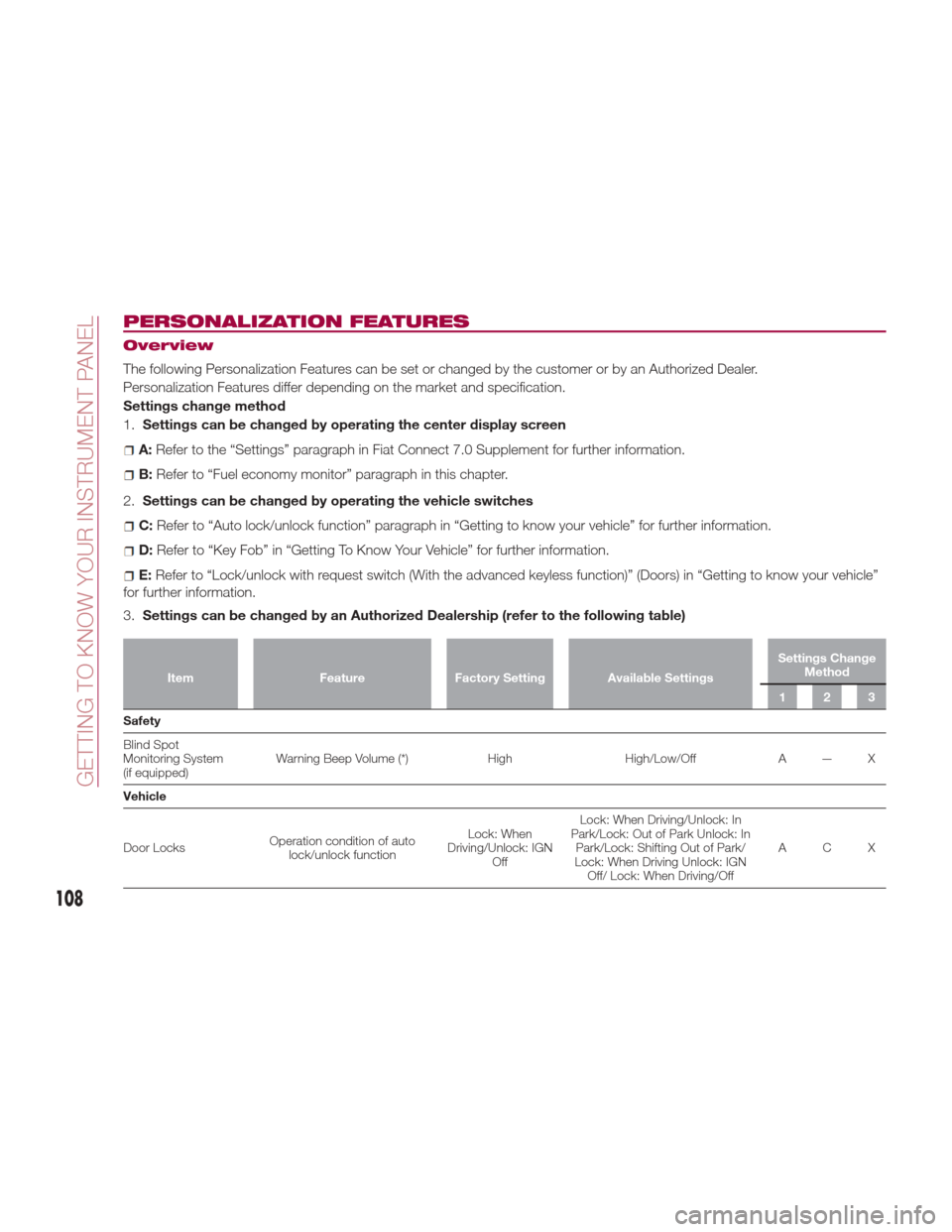
The following Personalization Features can be set or changed by the customer or by an Authorized Dealer.
Personalization Features differ depending on the market and specification.
Settings change method
1.Settings can be changed by operating the center display screen
A:Refer to the “Settings” paragraph in Fiat Connect 7.0 Supplement for further information.
B: Refer to “Fuel economy monitor” paragraph in this chapter.
2. Settings can be changed by operating the vehicle switches
C:Refer to “Auto lock/unlock function” paragraph in “Getting to know your vehicle” for further information.
D:Refer to “Key Fob” in “Getting To Know Your Vehicle” for further information.
E:Refer to “Lock/unlock with request switch (With the advanced keyless function)” (Doors) in “Getting to know your vehicle”
for further information.
3. Settings can be changed by an Authorized Dealership (refer to the following table)
Item FeatureFactory Setting Available Settings Settings Change
Method
123
Safety
Blind
Spot
Monitoring System
(if equipped) Warning Beep Volume (*)
HighHigh/Low/Off A — X
Vehicle
Door Locks Operation condition of auto
lock/unlock function Lock: When
Driving/Unlock: IGN Off Lock: When Driving/Unlock: In
Park/Lock: Out of Park Unlock: In Park/Lock: Shifting Out of Park/
Lock: When Driving Unlock: IGN Off/ Lock: When Driving/Off ACX
108
GETTING TO KNOW YOUR INSTRUMENT PANEL
Page 111 of 300
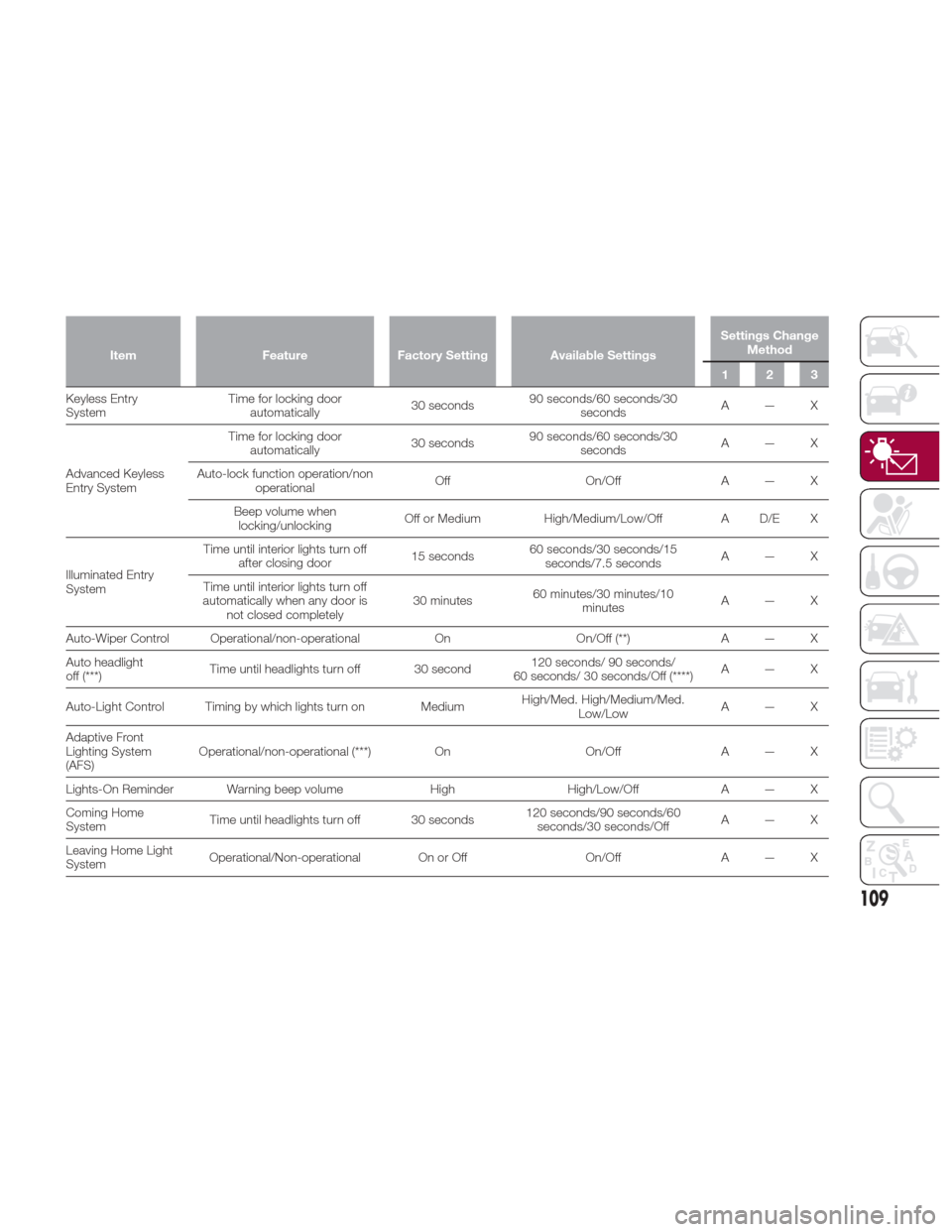
ItemFeatureFactory Setting Available Settings Settings Change
Method
123
Keyless Entry
System T
ime for locking door
automatically 30 seconds90 seconds/60 seconds/30
seconds A—X
Advanced Keyless
Entry System Time for locking door
automatically 30 seconds90 seconds/60 seconds/30
seconds A—X
Auto-lock function operation/non operational Off
On/OffA — X
Beep volume when locking/unlocking Off or Medium
High/Medium/Low/Off A D/E X
Illuminated Entry
System Time until interior lights turn off
after closing door 15 seconds60 seconds/30 seconds/15
seconds/7.5 seconds A—X
Time until interior lights turn off
automatically when any door is not closed completely 30 minutes
60 minutes/30 minutes/10
minutes A—X
Auto-Wiper Control Operational/non-operational OnOn/Off (**) A — X
Auto headlight
off (***) Time until headlights turn off 30 second 120 seconds/ 90 seconds/
60 seconds/ 30 seconds/Off (****) A—X
Auto-Light Control Timing by which lights turn on Medium High/Med. High/Medium/Med.
Low/Low A—X
Adaptive Front
Lighting System
(AFS) Operational/non-operational (***)
OnOn/OffA — X
Lights-On Reminder Warning beep volume HighHigh/Low/Off A — X
Coming Home
System Time until headlights turn off 30 seconds 120 seconds/90 seconds/60
seconds/30 seconds/Off A—X
Leaving Home Light
System Operational/Non-operational On or Off
On/OffA — X
109
Page 114 of 300
SAFETY SYSTEMS
Safety Systems
The vehicle has the following safety
systems:
Anti-lock Braking System (ABS)
Traction Contol System (TCS)
Dynamic Stability Control (DSC)
For the operation of the systems, see
the following pages.
ABS System (Anti-lock
Braking System)
The ABS control unit continuously
monitors the speed of each wheel. If
one wheel is about to lock up, the ABS
responds by automatically releasing
and reapplying that wheel's brake. The
driver will feel a slight vibration in the
brake pedal and may hear a chattering
noise from the brake system. This is
normal ABS system operation.
Continue to depress the brake pedal
without pumping the brakes. The
warning light turns on when the system
has a malfunction. Refer to “Warning
Lights And Messages” paragraph in
“Getting To Know Your Instrument
Panel” chapter. Note:
Braking distances may be longer on
loose surfaces (snow or gravel, for
example) which usually have a hard
foundation. A vehicle with a normal
braking system may require less
distance to stop under these
conditions because the tires will build
up a wedge of surface layer when the
wheels skid.
The sound of the ABS operating
may be heard when starting the engine
or immediately after starting the
vehicle, however, it does not indicate a
malfunction
Warning!
The ABS contains sophisticated
electronic equipment that may be
susceptible to interference caused by
improperly installed or high output radio
transmitting equipment. This interference
can cause possible loss of anti-lock braking
capability. Installation of such equipment
should be performed by qualified
professionals.
Pumping of the Anti-Lock Brakes will
diminish their effectiveness and may lead to
a collision. Pumping makes the stopping
distance longer. Just press firmly on your
brake pedal when you need to slow down
or stop.
The ABS cannot prevent the natural
laws of physics from acting on the vehicle,
nor can it increase braking or steering
efficiency beyond that afforded by the
condition of the vehicle brakes and tires or
the traction afforded.
The ABS cannot prevent collisions,
including those resulting from excessive
speed in turns, following another vehicle
too closely, or hydroplaning.
The capabilities of an ABS equipped
vehicle must never be exploited in a
reckless or dangerous manner that could
jeopardize the user’s safety or the safety of
others.
TCS System (Traction
Control System)
Warning!
The capability of the TCS must never be
tested irresponsibly and dangerously, in
such a way as to compromise personal
safety and the safety of others.
The Traction Control System (TCS)
enhances traction and safety by
controlling engine torque and braking.
When the TCS detects driving wheel
slippage, it lowers engine torque and
operates the brakes to prevent loss of
traction. This means that on a slick
surface, the engine adjusts
automatically to provide optimum
112
SAFETY
Page 115 of 300
power to the drive wheels, limiting
wheel spin and loss of traction.
The indicator light turns on when the
system has a malfunction. Refer to
“Warning Lights And Messages”
paragraph in “Getting To Know Your
Instrument Panel” chapter.
TCS / DSC Indicator Light
The
indicator light stays on for a few
seconds when the ignition is placed in
the ON mode.
If the TCS or DSC is operating, the
indicator light flashes.
If the
indicator light stays on, the
TCS, DSC or the brake assist system
may have a malfunction and they may
not operate correctly. Contact an
Authorized Dealer.
Note:
In addition to the indicator light
flashing, a slight sound will come from
the engine. This indicates that the
TCS/DSC is operating properly.
On slippery surfaces, such as fresh
snow, it will be impossible to achieve
high rpm when the TCS is on.
DSC System (Dynamic
Stability Control)
The Dynamic Stability Control (DSC)
automatically controls braking and
engine torque in conjunction with
systems such as ABS and TCS to help control side slip when driving on
slippery surfaces, or during sudden or
evasive maneuvering, enhancing vehicle
safety. Refer to “ABS System (Antilock
Brake System)” and “TCS System
(Traction Control System)”.
DSC operation is possible at speeds
greater than 12 mph (20 km/h).
The indicator light turns on when the
system has a malfunction. Refer to
“Warning Lights And Messages”
paragraph in “Getting To Know Your
Instrument Panel” chapter.
Note:
The DSC may not operate correctly
unless the following are observed:
Use tires of the correct size
specified for your vehicle on all four
wheels.
Use tires of the same manufacturer,
brand and tread pattern on all four
wheels.
Do not mix worn tires.
Note:
The DSC may not operate correctly
when tire chains are used.
TCS / DSC Indicator Light
The
indicator light stays on for a few
seconds when the ignition is placed in
the ON mode. It also illuminates when
the DSC OFF switch is pressed and
TCS/DSC is switched off. If the light stays on, the TCS, DSC or
the brake assist system may have a
malfunction and they may not operate
correctly. Take your vehicle to an
Authorized Dealer.
DSC OFF Indicator Light
The
indicator light stays on for a few
seconds when the ignition is placed in
the ON mode. It also illuminates when
the DSC OFF switch is pressed and
TCS/DSC is switched off.
If the light remains illuminated and the
TCS/DSC is not switched off, contact
an Authorized Dealer. The DSC may
have a malfunction.
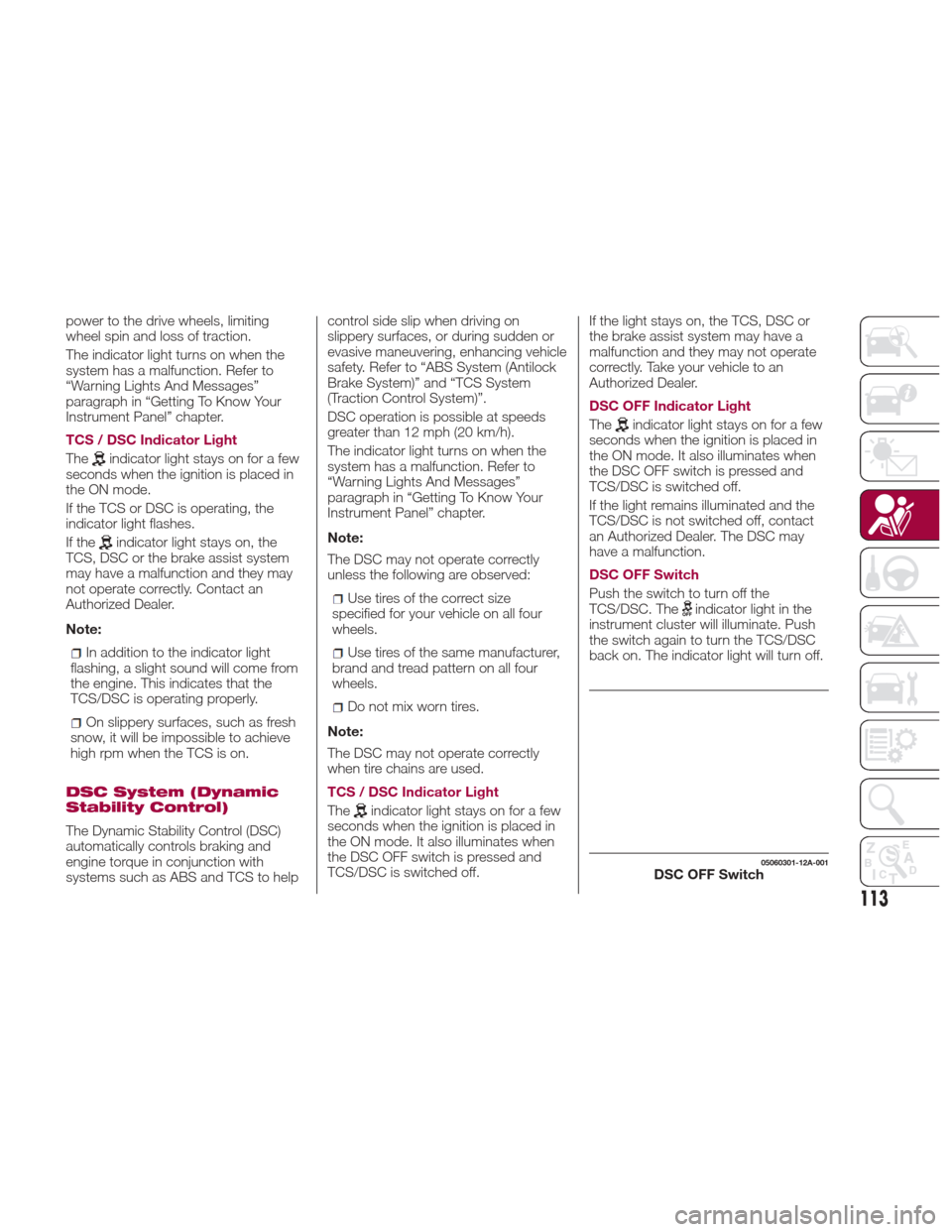
DSC OFF Switch
Push the switch to turn off the
TCS/DSC. The
indicator light in the
instrument cluster will illuminate. Push
the switch again to turn the TCS/DSC
back on. The indicator light will turn off.
05060301-12A-001DSC OFF Switch
113
Page 118 of 300
beep may not occur or they may be
delayed:
A vehicle makes a lane change from
a driving lane two lanes over to an
adjacent lane.
Driving on steep slopes.
Crossing the summit of a hill or
mountain pass.
The turning radius is small (making a
sharp turn, turning at intersections).
Whenthereisadifferenceinthe
height between your driving lane and
the adjacent lane.
Directly after pushing the BSM
switch and the system becomes
operable.
If the road width is extremely narrow,
vehicles two lanes over may be
detected. The detection area of the
radar sensors (rear) is set according to
the road width of expressways.
The BSM warning lights may turn on in
reaction to stationary objects on the
road or the roadside such as guardrails,
tunnels, sidewalls, and parked vehicles.
A BSM warning lights may flash or the
warning beep may be activated several
times when making a turn at a city
intersection.
Turn off the BSM system while pulling a
trailer or while an accessory such as a
bicycle carrier is installed to the rear of
the vehicle. Otherwise, the radar’s sound system waves will be blocked
causing the system to not operate
normally.
In the following cases, it may be difficult
to view the illumination/flashing of the
BSM warning lights equipped on the
door mirrors:
Snow or ice is adhering to the door
mirrors.
The door glass is fogged or covered
in snow, frost or dirt.
The system switches to the Rear Cross
Traffic Alert function when the gear
selector is shifted to the Reverse (R)
position.
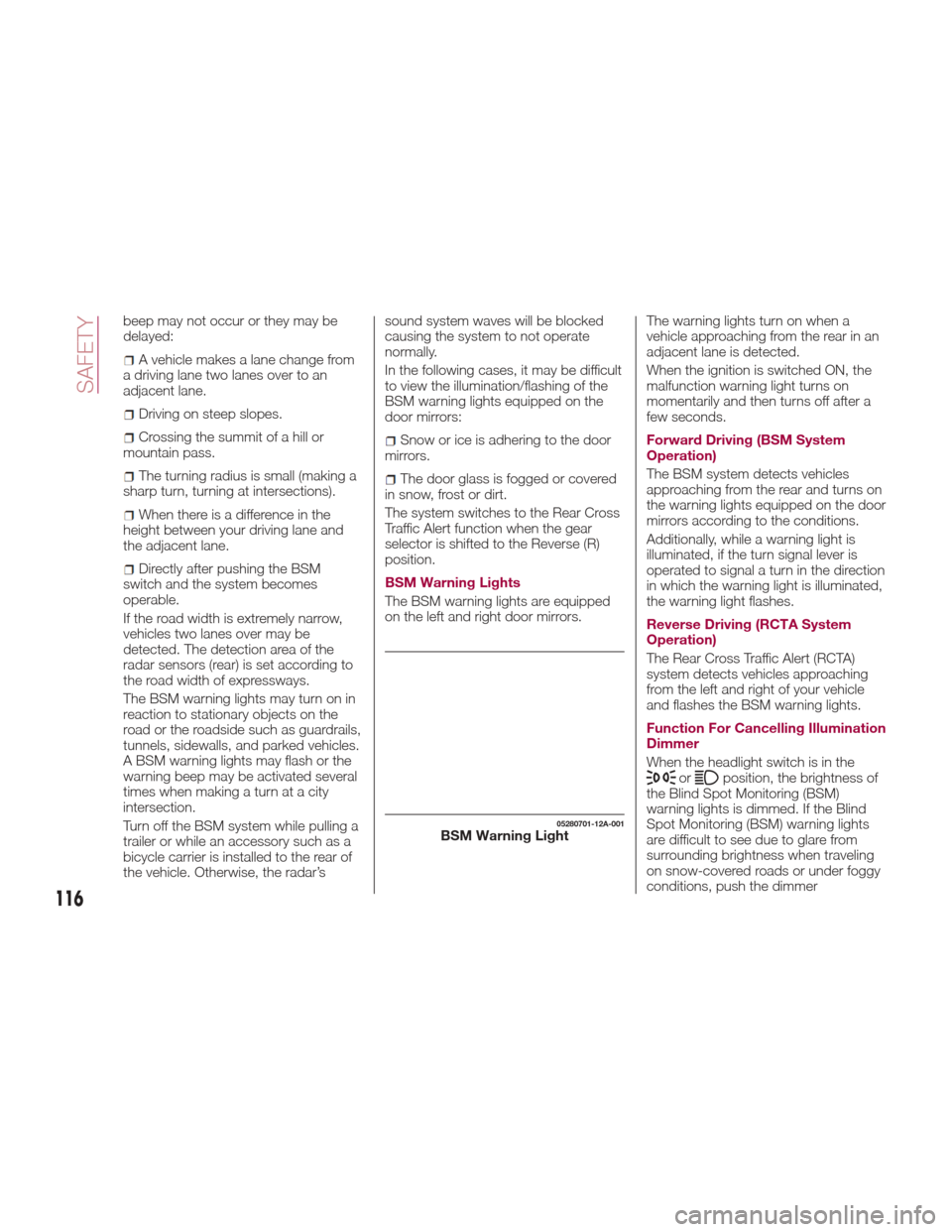
BSM Warning Lights
The BSM warning lights are equipped
on the left and right door mirrors. The warning lights turn on when a
vehicle approaching from the rear in an
adjacent lane is detected.
When the ignition is switched ON, the
malfunction warning light turns on
momentarily and then turns off after a
few seconds.
Forward Driving (BSM System
Operation)
The BSM system detects vehicles
approaching from the rear and turns on
the warning lights equipped on the door
mirrors according to the conditions.
Additionally, while a warning light is
illuminated, if the turn signal lever is
operated to signal a turn in the direction
in which the warning light is illuminated,
the warning light flashes.
Reverse Driving (RCTA System
Operation)
The Rear Cross Traffic Alert (RCTA)
system detects vehicles approaching
from the left and right of your vehicle
and flashes the BSM warning lights.
Function For Cancelling Illumination
Dimmer
When the headlight switch is in the
orposition, the brightness of
the Blind Spot Monitoring (BSM)
warning lights is dimmed. If the Blind
Spot Monitoring (BSM) warning lights
are difficult to see due to glare from
surrounding brightness when traveling
on snow-covered roads or under foggy
conditions, push the dimmer
05280701-12A-001BSM Warning Light
116
SAFETY
Page 121 of 300
In the following cases, it may be difficult
to view the illumination/flashing of the
BSM warning lights equipped on the
door mirrors:
Snow or ice adheres to the door
mirrors.
The door glass is fogged or covered
in snow, frost or dirt.
Turn off the RCTA system while pulling
a trailer or while an accessory such as a
bicycle carrier is installed to the rear of
the vehicle.
Otherwise, the sound system waves
emitted by the radar will be blocked
causing the system to not operate
normally.
TPMS (Tire Pressure
Monitoring System)
Tire Pressure Monitoring System —
Lo/Hi Grade
The TPMS (Tire Pressure Monitoring
System) monitors the air pressure of all
four tires.
If the air pressure of one or more tires is
too low, the system warns the driver by
indicating the
warning light in the
instrument cluster and operating a
beep.
The system monitors the tire pressures
indirectly using the data sent from the
ABS wheel speed sensors.
To allow the system to operate
correctly, the system needs to be
initialized with the specified tire pressure
(value on the tire placard label). Follow
the procedure and perform the
initialization (refer to “Tire Pressure
Monitoring System Initialization”
paragraph).
The
warning light flashes when the
system has a malfunction.
Because this system detects slight
changes in tire conditions, the timing of
the warning may be faster or slower in
the following cases:
The size, manufacturer, or the type of
tires is different from the specification.
The size, manufacturer, or the type of
a tire is different from the others, or the
level of tire wear is excessively different
between them.
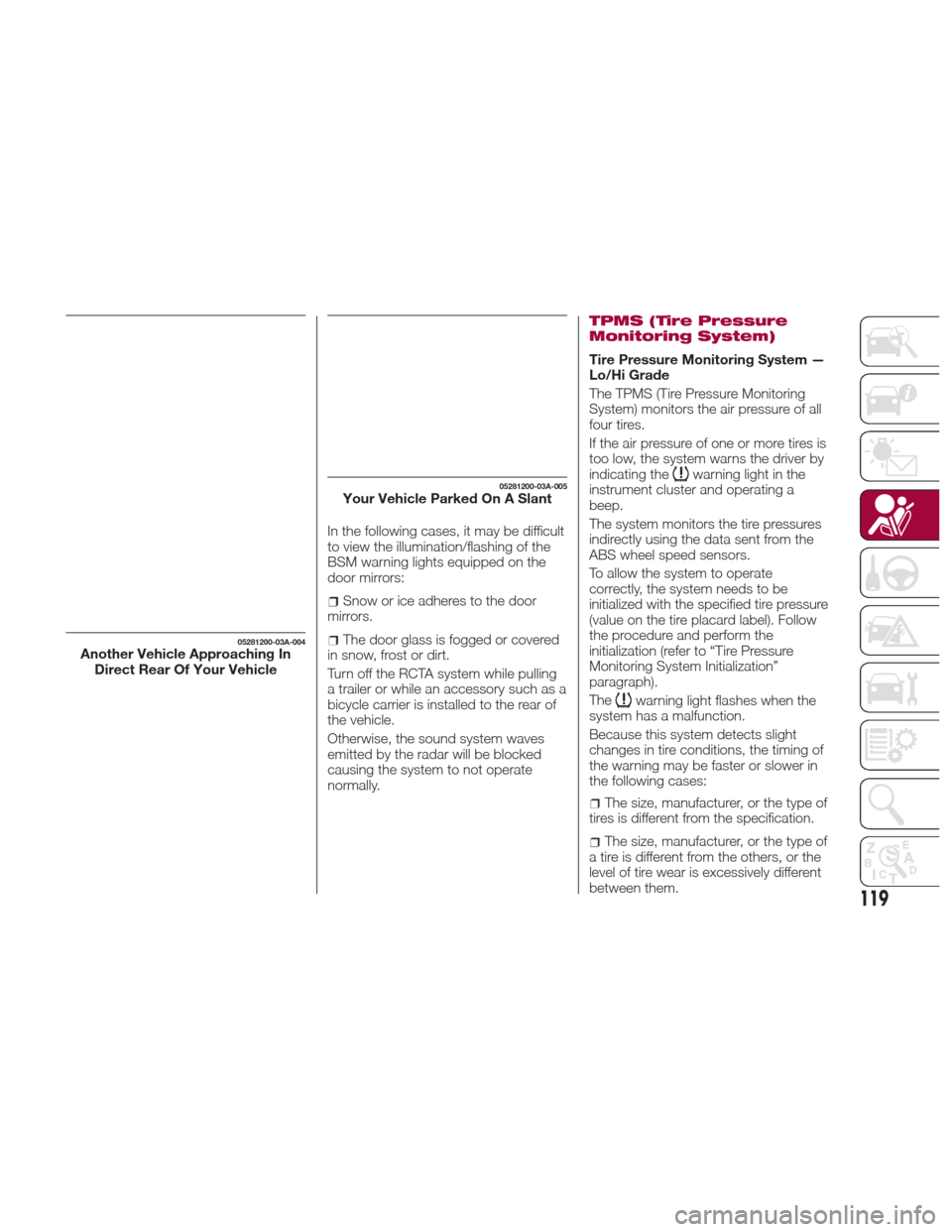
05281200-03A-004Another Vehicle Approaching In Direct Rear Of Your Vehicle
05281200-03A-005Your Vehicle Parked On A Slant
119
Page 123 of 300
Tire Pressure Monitoring System —
Sport Grade
The TPMS system monitors the
pressure for each tire.
If tire pressure is too low in one or more
tires, the system will inform the driver
via the
warning light in the
instrument cluster and by the warning
beep sound.
The tire pressure sensors installed on
each wheel send tire pressure data by
radio signal to the receiver unit in the
vehicle.
TPMS does not alleviate your need to
check the pressure and condition of all
four tires regularly.
Each tire, including the spare (if
provided), should be checked monthly
when cold and inflated to the inflation
pressure recommended by the vehicle
manufacturer on the vehicle placard or
tire inflation pressure label. (If your
vehicle has tires of a different size than
the size indicated on the vehicle placard
or tire inflation pressure label, you
should determine the proper tire
inflation pressure for those tires.)
As an added safety feature, your vehicle
has been equipped with a tire pressure
monitoring system (TPMS) that
illuminates a low tire pressure telltale
when one or more of your tires is
significantly under-inflated. Accordingly,
when the low tire pressure telltale
illuminates, you should stop and check
your tires as soon as possible, and inflate them to the proper pressure.
Driving on a significantly under-inflated
tire causes the tire to overheat and can
lead to tire failure. Under-inflation also
reduces fuel efficiency and tire tread life,
and may affect the vehicle's handling
and stopping ability. Please note that
the TPMS is not a substitute for proper
tire maintenance, and it is the driver's
responsibility to maintain correct tire
pressure, even if under-inflation has not
reached the level to trigger illumination
of the TPMS low tire pressure telltale.
Your vehicle has also been equipped
with a TPMS malfunction indicator to
indicate when the system is not
operating properly. [For vehicles with a
dedicated MIL telltale, add the following
statement: The TPMS malfunction
indicator is provided by a separate
telltale, which displays the symbol
“TPMS” when illuminated.] [For vehicles
with a combined low tire pressure/MIL
telltale, add the following statement:
The TPMS malfunction indicator is
combined with the low tire pressure
telltale. When the system detects a
malfunction, the telltale will flash for
approximately one minute and then
remain continuously illuminated. This
sequence will continue upon
subsequent vehicle start-ups as long as
the malfunction exists.] When the
malfunction indicator is illuminated, the
system may not be able to detect or
signal low tire pressure as intended.
TPMS malfunctions may occur for a
variety of reasons, including the
installation of replacement or alternate
tires or wheels on the vehicle that
prevent the TPMS from functioning
properly. Always check the TPMS
malfunction telltale after replacing one
or more tires or wheels on your vehicle
to ensure that the replacement or
alternate tires and wheels allow the
TPMS to continue to function properly.
System Error Activation
When the
warning light flashes,
there may be a system malfunction.
Contact your Authorized Dealer.
A system error activation may occur in
the following cases:
When there is equipment or a device
near the vehicle using the same radio
frequency as that of the tire pressure
sensors.
When a metallic device such as a
non-genuine navigation system is
equipped near the center of the
dashboard, which may block radio
signals from the tire pressure sensor to
the receiver unit.
When using the following devices in
the vehicle that may cause radio
interference with the receiver unit.
A digital device such as a personal
computer.
A current converter device such as a
DC-AC converter.
121
Page 126 of 300
SEAT BELT
SYSTEMS
Buckle up even though you are an
excellent driver, even on short trips.
Someone on the road may be a poor
driver and could cause a collision that
includes you. This can happen far away
from home or on your own street.
Research has shown that seat belts
save lives, and they can reduce the
seriousness of injuries in a collision.
Some of the worst injuries happen
when people are thrown from the
vehicle. Seat belts reduce the possibility
of ejection and the risk of injury caused
by striking the inside of the vehicle.
Everyone in a motor vehicle should be
belted at all times.
Seat Belt Precautions
Seat belts help to decrease the
possibility of severe injury during
accidents and sudden stops. FCA
recommends that the driver and
passengers always wear seat belts.
Mexico
All the seats have lap/shoulder belts.
These belts have retractors with inertia
locks that keep them out of the way
when not in use.
The locks allow the belts to remain
comfortable on users, but they will lock
in position during a collision.Except Mexico
All of the seat belt retractors are
designed to keep the lap/shoulder belts
out of the way when not in use.
The driver's seat belt has no provisions
for child-restraint systems and has only
an emergency locking mode.
The driver may wear it comfortably, and
it will lock during a collision.
However, the passenger's seat
lap/shoulder belt retractor operates in
two modes: emergency locking mode,
and for child-restraint systems,
automatic locking mode. If you must
use the passenger seat for a child, slide
the passenger seat as far back as
possible and make sure any child
restraint system is secured properly.
Belt retraction may become difficult if
the belts and seat belt guides are
soiled, so try to keep them clean. Refer
to “Cleaning the lap/shoulder belt
webbing” in “Maintenance and care” for
further information.
Warning!
Relying on the air bags alone could lead
to more severe injuries in a collision. The air
bags work with your seat belt to restrain
you properly. In some collisions, the air
bags won’t deploy at all. Always wear your
seat belt even though you have air bags.
In a collision, you and your passengers
can suffer much greater injuries if you are
not properly buckled up. You can strike the
interior of your vehicle or other passengers,
or you can be thrown out of the vehicle.
Always be sure you and others in your
vehicle are buckled up properly.
It is dangerous to ride in a cargo area,
inside or outside of a vehicle. In a collision,
people riding in these areas are more likely
to be seriously injured or killed.
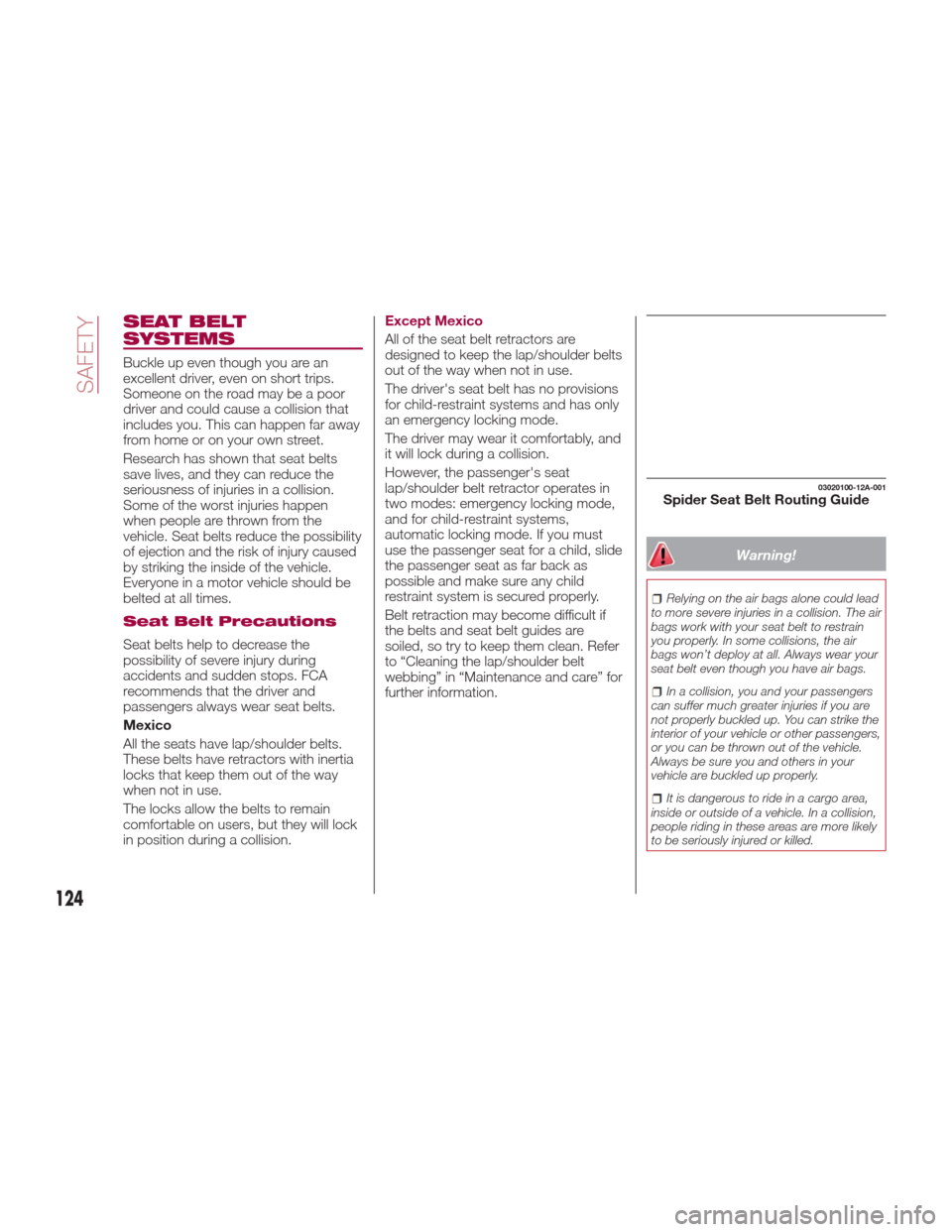
03020100-12A-001Spider Seat Belt Routing Guide
124
SAFETY
Page 128 of 300
Emergency Locking
Mode
When the seat belt is fastened, it will
always be in the emergency locking
mode.
In the emergency locking mode, the
belt remains comfortable on the
occupant and the retractor will lock in
position during a collision.
If the belt is locked and cannot be
pulled out, retract the belt once, and
then try pulling it out slowly. If this fails,
pull the belt strongly one time and
loosen, then pull it out again slowly.
Seat Belt With Automatic Locking
Mode
When the seat belt is fastened, it will
always be in the emergency locking
mode until it is switched to automatic
locking mode by pulling it all the way
out to its full length.
If the belt feels tight and hinders
comfortable movement while the
vehicle is stopped or in motion, it may
be in the automatic locking mode
because the belt has been pulled too
far out.
To return the belt to the more
comfortable emergency locking mode,
wait until the vehicle has stopped in a
safe, level area, retract the belt fully to
convert it back to emergency locking
mode and then extend it around you
again.Automatic Locking Mode
Always use the automatic locking mode
to keep the child-restraint system from
shifting to an unsafe position in the
event of an accident.
To enable seat belt automatic locking
mode, pull it all the way out and
connect it as instructed on the child
restraint system. It will retract down to
the child restraint system and stay
locked on it.
Warning!
The seat belt assembly must be
replaced if the switchable Automatic
Locking Retractor (ALR) feature or any
other seat belt function is not working
properly when checked according to the
procedures in the Service Manual.
Failure to replace the seat belt assembly
could increase the risk of injury in collisions.
Do not use the Automatic Locking Mode
to restrain occupants who are wearing the
seat belt or children who are using booster
seats. The locked mode is only used to
install rear-facing or forward-facing child
restraints that have a harness for
restraining the child.
Lap/Shoulder Belts
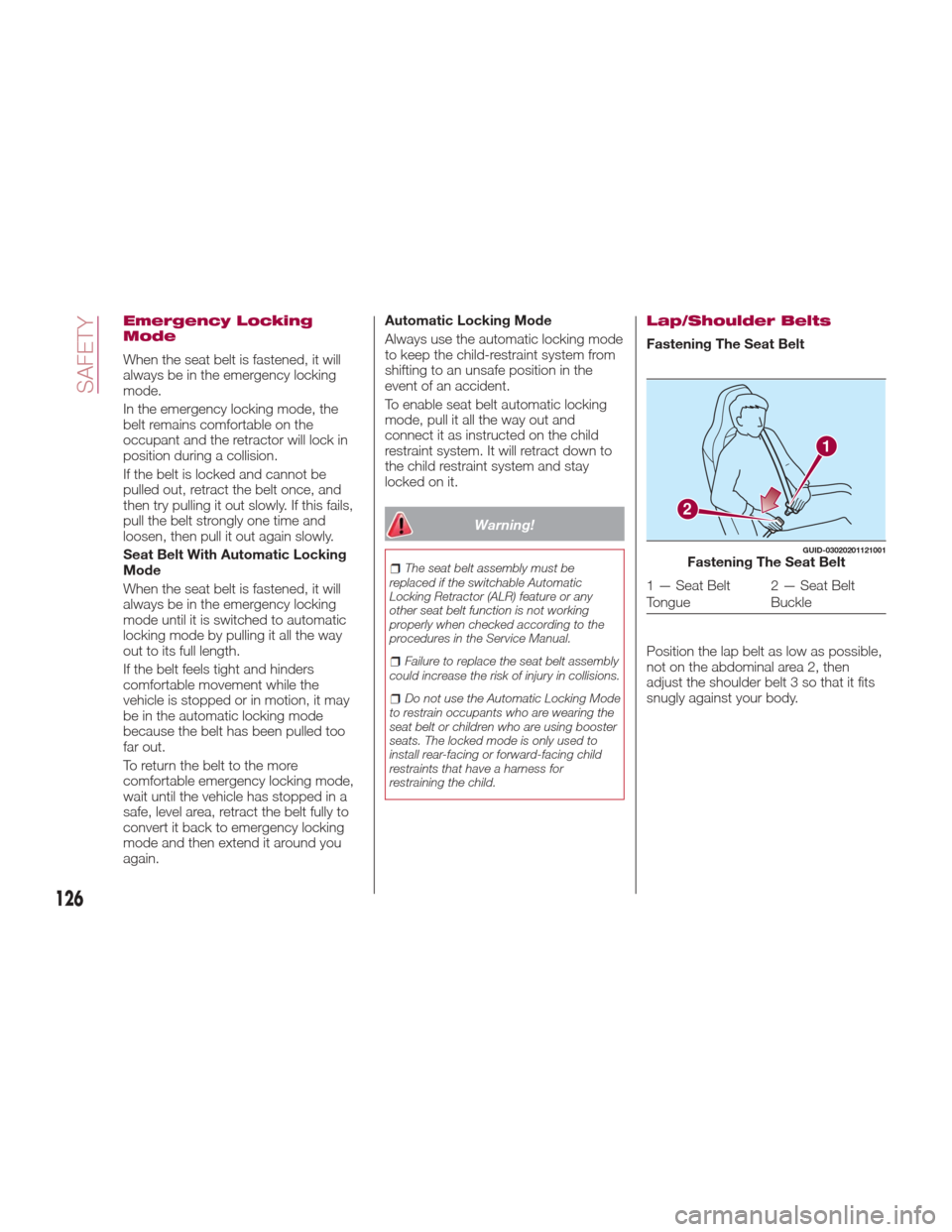
Fastening The Seat Belt
Position the lap belt as low as possible,
not on the abdominal area 2, then
adjust the shoulder belt 3 so that it fits
snugly against your body.
1
2
GUID-03020201121001Fastening The Seat Belt
1 — Seat Belt
Tongue 2 — Seat Belt
Buckle
126
SAFETY