change time FIAT 124 SPIDER ABARTH 2017 2.G User Guide
[x] Cancel search | Manufacturer: FIAT, Model Year: 2017, Model line: 124 SPIDER ABARTH, Model: FIAT 124 SPIDER ABARTH 2017 2.GPages: 292, PDF Size: 121.25 MB
Page 43 of 292
Follow Me Home
The follow me home light system turns
on the headlights (low beams) when the
lever is operated.
System Activation
When the lever is pulled with the ignition
switched to ACC or OFF, the low beam
headlights turn on.
The headlights turn off after a certain
period of time has elapsed after the
doors are closed.
The time until the headlights turn off
after all of the doors are closed can be
changed. If no operations are done for
three minutes after the lever is pulled,
the headlights turn off.
The headlights turn off if the lever is
pulled again while the headlights are on.
Front Fog Lights
The front fog light can be used when
the ignition is switched to ON and the
headlights or parking lights are on.
Activation
Turn the headlight switch in
orposition before activate front fog
lights.
Rotate the fog light switch to
position. The
fog light indicator in the
instrument cluster illuminates while the
front fog lights are on.
Deactivation
Perform one of the following operations
to turn off the front fog lights:
Rotate the fog light switch to OFF
position.
Turn the headlight switch to OFF
position.
Switch the ignition to a position other
than ON.
The
fog light indicator in the
instrument cluster goes off when the
front fog light is turned off. With auto-light control
When the fog light switch is in
position and the headlight switch is
in AUTO position, the front fog lights will
stay on.
Turn Signals
The ignition must be switched to the
ON position to use the turn and
lane-change signals.
Move the signal lever down (for a left
turn) or up (for a right turn). The signal
will self-cancel after the turn is
completed.
If the indicator light continues to flash
after a turn, manually return the lever to
its original position.
The turn signal indicators (green)
in the instrument cluster flash
according to the operation of the turn
signal lever to show which signal is
working.
Note: If an indicator light stays on
without flashing or if it flashes
abnormally, one of the turn signal bulbs
may be burned out.
Lane Change Assist
Move the lever halfway toward the
direction of the lane change (until the
indicator flashes) and hold it there. It will
return to the off position when released.
Three-flash turn signal
After releasing the turn signal lever, the
turn signal indicator flashes three times.
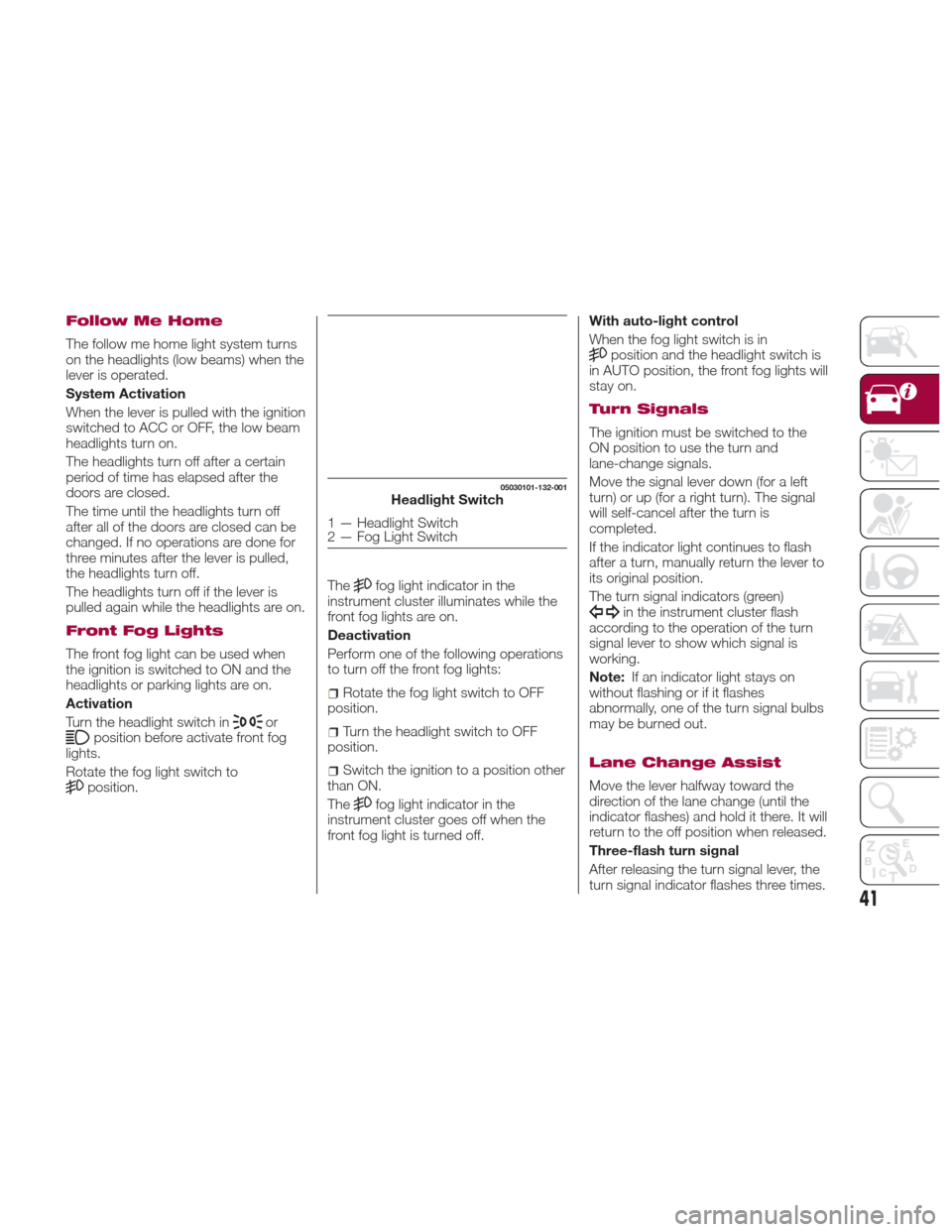
05030101-132-001Headlight Switch
1 — Headlight Switch
2 — Fog Light Switch
41
Page 62 of 292
4. After the HomeLink indicator light
changesfromaslowtoarapidly
blinking light, release both the
HomeLink and hand-held transmitter
buttons.
5. Connect power to the device being
programmed.
6. Firmly press and hold the
programmed HomeLink button for five
seconds, and then release it. Perform
this operation two times to activate the
door or gate. If the door or gate does
not activate, press and hold the
just-trained HomeLink button and
observe the indicator light. If the
indicator light stays on constantly,
programming is complete and your
device should activate when the
HomeLink button is pressed and
released;
Note:To program the remaining two
HomeLink buttons, begin with
“Programming” - step one.
7. If the indicator light blinks rapidly for
two seconds and then turns to a
constant light, continue with
“Programming” steps (see below) to
complete the programming of a rolling
code equipped device (most commonly
a garage door opener). 8. At the garage door opener receiver
(motor-head unit) in the garage, locate
the “learn” or “smart” button. This can
usually be found where the hanging
antenna wire is attached to the
motorhead unit.
9. Firmly press and release the “learn”
or “smart” button (the name and color
of the button may vary by
manufacturer).
Note:
Complete the programming
within 30 seconds.
10. Return to the vehicle and firmly
press, hold for two seconds and
release the programmed HomeLink
button. Repeat the “ press/hold/
release” sequence a second time, and,
depending on the brand of the garage
door opener (or other rolling code
equipped device), repeat this sequence
a third time to complete the
programming process. HomeLink
should now activate your rolling code
equipped device.
Note:
To program the remaining two
HomeLink buttons, begin with
“Programming” - step one.
For questions or comments, please
contact HomeLink at
www.homelink.com or
1-800-355-3515 .Gate Operator/Canadian
Programming
Canadian radio-frequency laws require
transmitter signals to “time-out” (or quit)
after several seconds of transmission -
which may not be long enough for
HomeLink to pick up the signal during
programming.
Similar to this Canadian law, some U.S.
gate operators are designed to
“time-out” in the same manner.
If you live in Canada or you are having
difficulties programming a gate operator
by using the “Programming”
procedures (regardless of where you
live), replace “Programming HomeLink”
step three with the following:
Note:If programming a garage door
opener or gate operator, it is advised to
unplug the device during the “cycling”
process to prevent possible
overheating.
1. Continue to press and hold the
HomeLink button while you press and
release -every two seconds (“cycle”)
your hand-held transmitter until the
frequency signal has successfully been
accepted by HomeLink (the indicator
light will flash slowly and then rapidly).
2. Proceed with the “Programming”
steps to complete.
60
GETTING TO KNOW YOUR VEHICLE
Page 85 of 292
immediately and take appropriate
measures. If the vehicle continues to be
driven, it could cause damage to the
engine.
Fuel Gauge
The fuel gauge 2 shows approximately
how much fuel is remaining in the tank
when the ignition is in the ON position.
We recommend keeping the tank over
1/4 full.
E= Empty
F= Full
If the low fuel warning light illuminates
or the fuel level is very low, refuel as
soon as possible.
Note:
After refueling, it may require some
time for the indicator to stabilize. In
addition, the indicator may deviate
while driving on a slope or curve since
the fuel moves in the tank.
The display indicating a quarter or
less remaining fuel has more segments
to show the remaining fuel level in
greater detail.
The direction of the arrow on the
fuel gauge indicates that the fuel door
lid is on the left side of the vehicle.
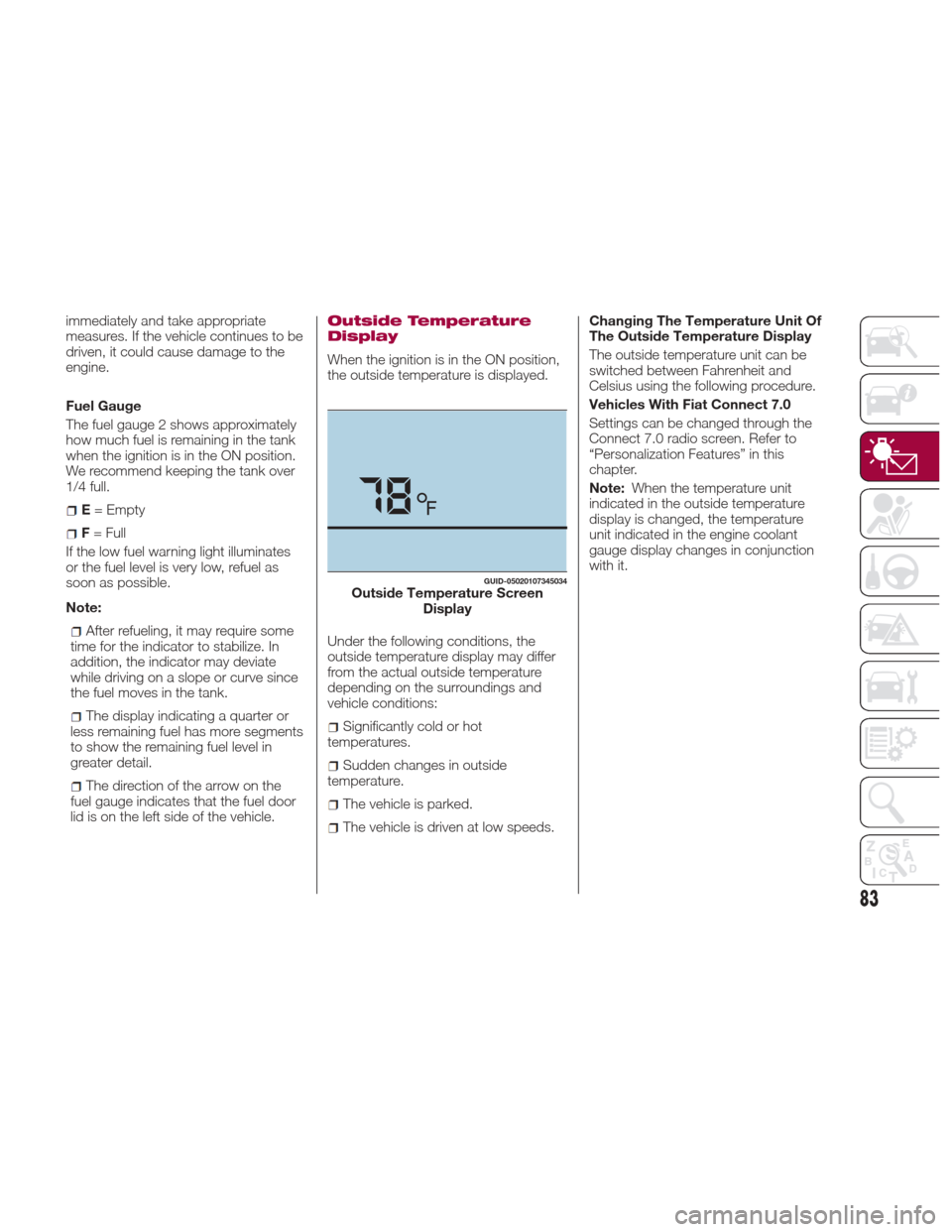
Outside Temperature
Display
When the ignition is in the ON position,
the outside temperature is displayed.
Under the following conditions, the
outside temperature display may differ
from the actual outside temperature
depending on the surroundings and
vehicle conditions:
Significantly cold or hot
temperatures.
Sudden changes in outside
temperature.
The vehicle is parked.
The vehicle is driven at low speeds. Changing The Temperature Unit Of
The Outside Temperature Display
The outside temperature unit can be
switched between Fahrenheit and
Celsius using the following procedure.
Vehicles With Fiat Connect 7.0
Settings can be changed through the
Connect 7.0 radio screen. Refer to
“Personalization Features” in this
chapter.
Note:
When the temperature unit
indicated in the outside temperature
display is changed, the temperature
unit indicated in the engine coolant
gauge display changes in conjunction
with it.
GUID-05020107345034Outside Temperature Screen Display
83
Page 87 of 292
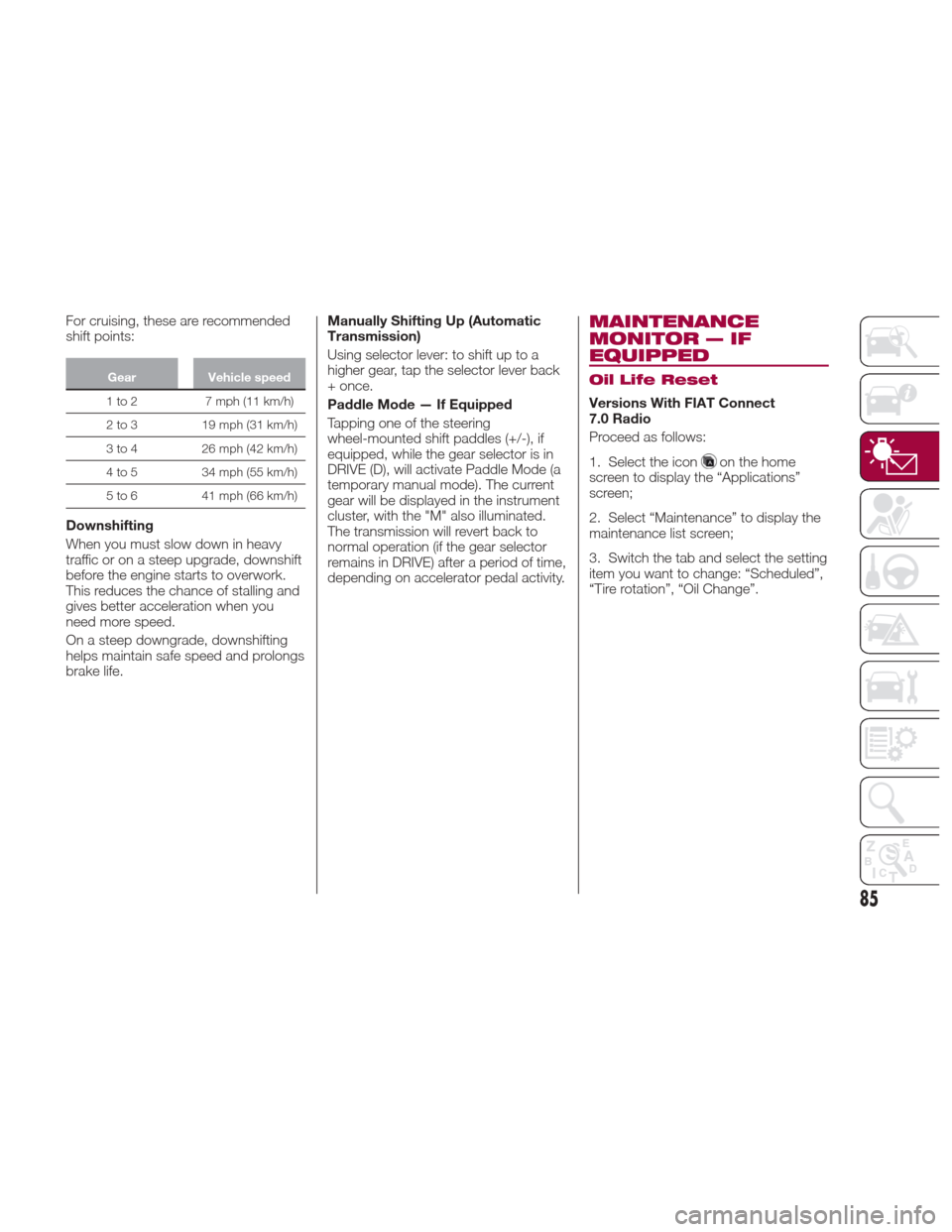
For cruising, these are recommended
shift points:
GearVehicle speed
1to2 7mph(11km/h)
2
to 3 19 mph (31 km/h)
3 to 4 26 mph (42 km/h)
4 to 5 34 mph (55 km/h)
5 to 6 41 mph (66 km/h)
Downshifting
When you must slow down in heavy
traffic or on a steep upgrade, downshift
before the engine starts to overwork.
This reduces the chance of stalling and
gives better acceleration when you
need more speed.
On a steep downgrade, downshifting
helps maintain safe speed and prolongs
brake life. Manually Shifting Up (Automatic
Transmission)
Using selector lever: to shift up to a
higher gear, tap the selector lever back
+ once.
Paddle Mode — If Equipped
Tapping one of the steering
wheel-mounted shift paddles (+/-), if
equipped, while the gear selector is in
DRIVE (D), will activate Paddle Mode (a
temporary manual mode). The current
gear will be displayed in the instrument
cluster, with the "M" also illuminated.
The transmission will revert back to
normal operation (if the gear selector
remains in DRIVE) after a period of time,
depending on accelerator pedal activity.
MAINTENANCE
MONITOR — IF
EQUIPPED
Oil Life Reset
Versions With FIAT Connect
7.0 Radio
Proceed as follows:
1. Select the icon
on the home
screen to display the “Applications”
screen;
2. Select “Maintenance” to display the
maintenance list screen;
3. Switch the tab and select the setting
item you want to change: “Scheduled”,
“Tire rotation”, “Oil Change”.
85
Page 88 of 292
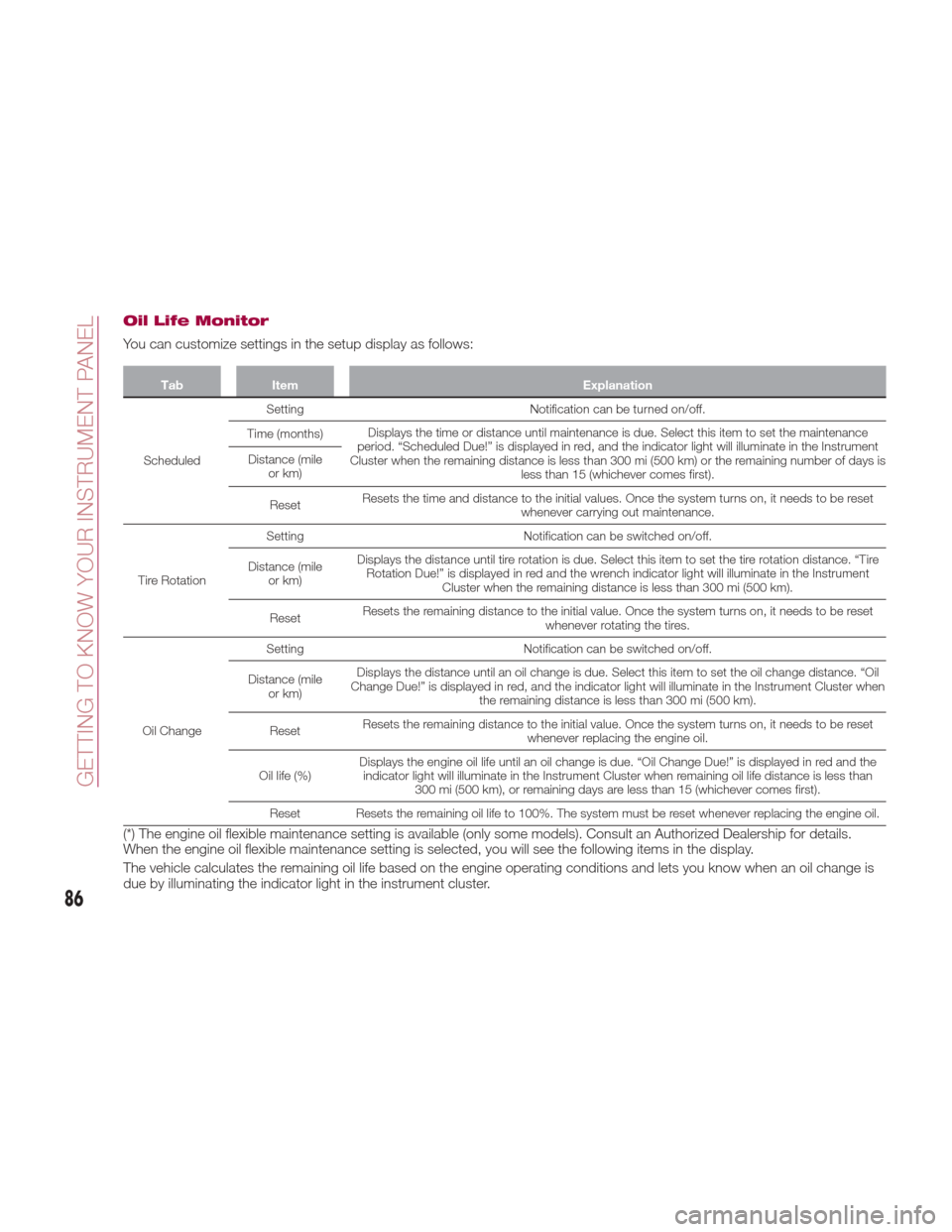
Oil Life Monitor
You can customize settings in the setup display as follows:
TabItem Explanation
Scheduled Setting
Notification can be turned on/off.
Time (months) Displays the time or distance until maintenance is due. Select this item to set the maintenance
period. “Scheduled Due!” is displayed in red, and the indicator light will illuminate in the Instrument
Cluster when the remaining distance is less than 300 mi (500 km) or the remaining number of days is less than 15 (whichever comes first).
Distance (mile
or km)
Reset Resets the time and distance to the initial values. Once the system turns on, it needs to be reset
whenever carrying out maintenance.
Tire Rotation Setting
Notification can be switched on/off.
Distance (mile or km) Displays the distance until tire rotation is due. Select this item to set the tire rotation distance. “Tire
Rotation Due!” is displayed in red and the wrench indicator light will illuminate in the Instrument Cluster when the remaining distance is less than 300 mi (500 km).
Reset Resets the remaining distance to the initial value. Once the system turns on, it needs to be reset
whenever rotating the tires.
Oil Change Setting
Notification can be switched on/off.
Distance (mile or km) Displays the distance until an oil change is due. Select this item to set the oil change distance. “Oil
Change Due!” is displayed in red, and the indicator light will illuminate in the Instrument Cluster when the remaining distance is less than 300 mi (500 km).
Reset Resets the remaining distance to the initial value. Once the system turns on, it needs to be reset
whenever replacing the engine oil.
Oil life (%) Displays the engine oil life until an oil change is due. “Oil Change Due!” is displayed in red and the
indicator light will illuminate in the Instrument Cluster when remaining oil life distance is less than 300 mi (500 km), or remaining days are less than 15 (whichever comes first).
Reset Resets the remaining oil life to 100%. The system must be reset whenever replacing the engine oil.
(*) The engine oil flexible maintenance setting is available (only some models). Consult an Authorized Dealership for details.
When the engine oil flexible maintenance setting is selected, you will see the following items in the display.
The vehicle calculates the remaining oil life based on the engine operating conditions and lets you know when an oil change is
due by illuminating the indicator light in the instrument cluster.
86
GETTING TO KNOW YOUR INSTRUMENT PANEL
Page 106 of 292
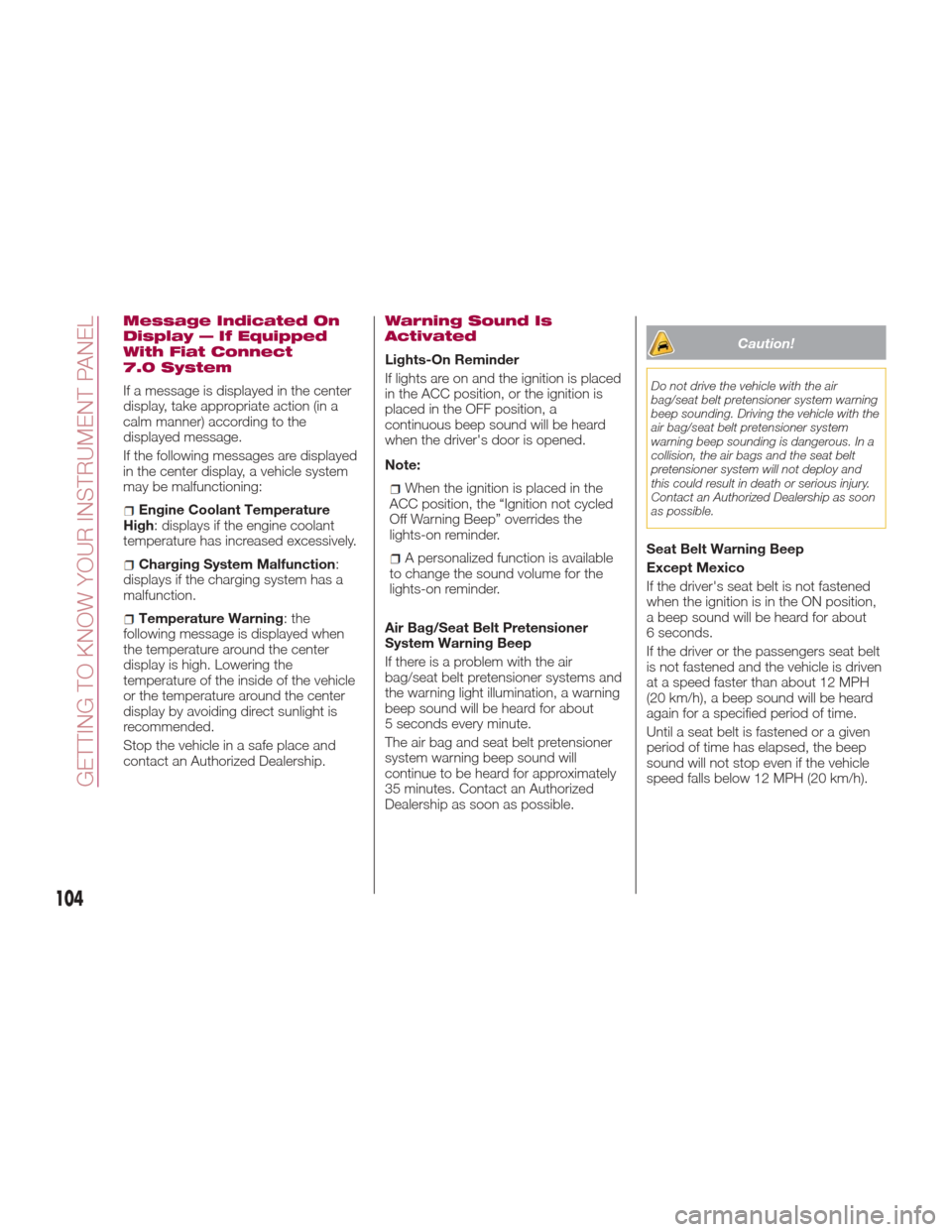
Message Indicated On
Display — If Equipped
With Fiat Connect
7.0 System
If a message is displayed in the center
display, take appropriate action (in a
calm manner) according to the
displayed message.
If the following messages are displayed
in the center display, a vehicle system
may be malfunctioning:
Engine Coolant Temperature
High: displays if the engine coolant
temperature has increased excessively.
Charging System Malfunction :
displays if the charging system has a
malfunction.
Temperature Warning :the
following message is displayed when
the temperature around the center
display is high. Lowering the
temperature of the inside of the vehicle
or the temperature around the center
display by avoiding direct sunlight is
recommended.
Stop the vehicle in a safe place and
contact an Authorized Dealership.
Warning Sound Is
Activated
Lights-On Reminder
If lights are on and the ignition is placed
in the ACC position, or the ignition is
placed in the OFF position, a
continuous beep sound will be heard
when the driver's door is opened.
Note:
When the ignition is placed in the
ACC position, the “Ignition not cycled
Off Warning Beep” overrides the
lights-on reminder.
A personalized function is available
to change the sound volume for the
lights-on reminder.
Air Bag/Seat Belt Pretensioner
System Warning Beep
If there is a problem with the air
bag/seat belt pretensioner systems and
the warning light illumination, a warning
beep sound will be heard for about
5 seconds every minute.
The air bag and seat belt pretensioner
system warning beep sound will
continue to be heard for approximately
35 minutes. Contact an Authorized
Dealership as soon as possible.
Caution!
Do not drive the vehicle with the air
bag/seat belt pretensioner system warning
beep sounding. Driving the vehicle with the
air bag/seat belt pretensioner system
warning beep sounding is dangerous. In a
collision, the air bags and the seat belt
pretensioner system will not deploy and
this could result in death or serious injury.
Contact an Authorized Dealership as soon
as possible.
Seat Belt Warning Beep
Except Mexico
If the driver's seat belt is not fastened
when the ignition is in the ON position,
a beep sound will be heard for about
6 seconds.
If the driver or the passengers seat belt
is not fastened and the vehicle is driven
at a speed faster than about 12 MPH
(20 km/h), a beep sound will be heard
again for a specified period of time.
Until a seat belt is fastened or a given
period of time has elapsed, the beep
sound will not stop even if the vehicle
speed falls below 12 MPH (20 km/h).
104
GETTING TO KNOW YOUR INSTRUMENT PANEL
Page 110 of 292
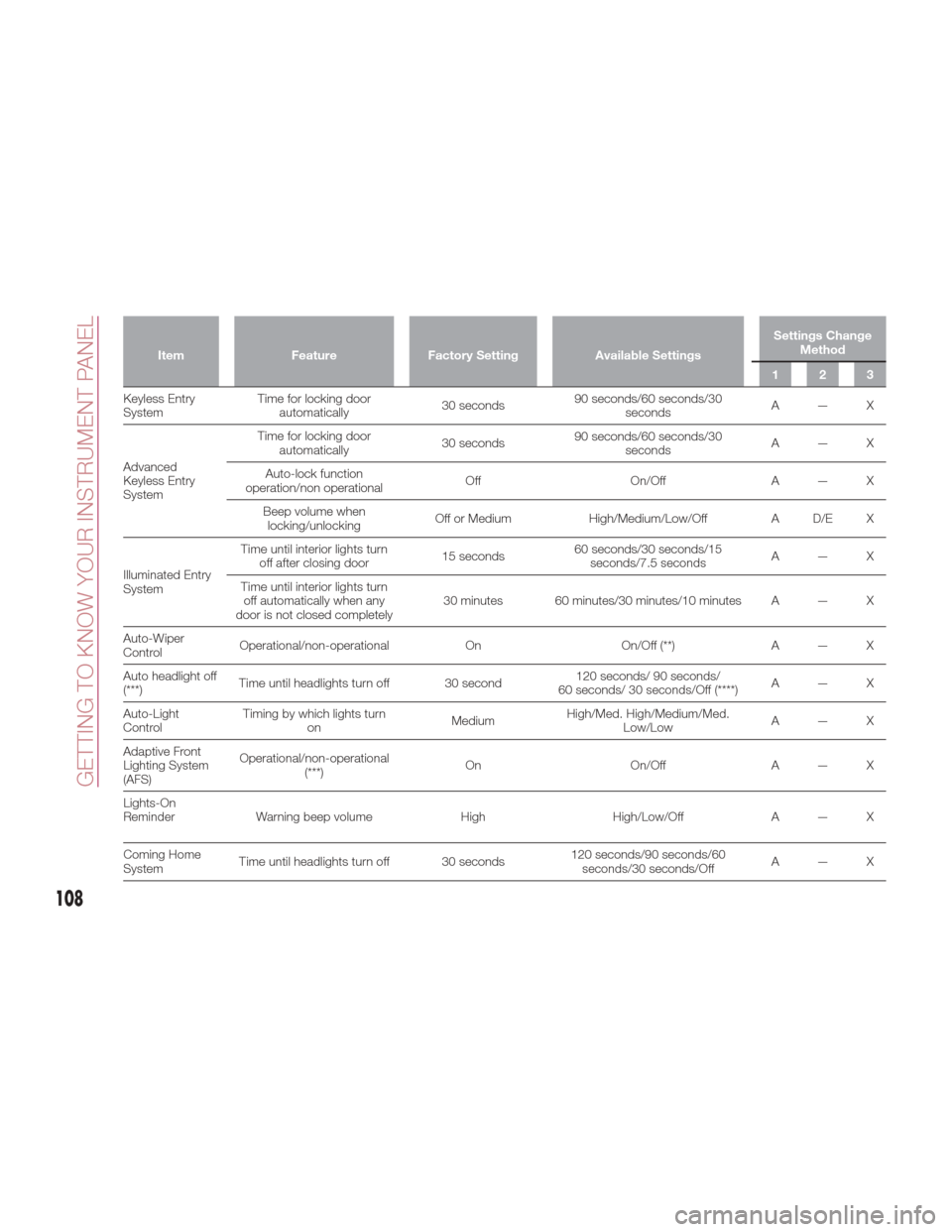
ItemFeature Factory Setting Available Settings Settings Change
Method
123
Keyless Entry
System T
ime for locking door
automatically 30 seconds90 seconds/60 seconds/30
seconds A—X
Advanced
Keyless Entry
System Time for locking door
automatically 30 seconds90 seconds/60 seconds/30
seconds A—X
Auto-lock function
operation/non operational Off
On/OffA — X
Beep volume when locking/unlocking Off or Medium
High/Medium/Low/Off A D/E X
Illuminated Entry
System Time until interior lights turn
off after closing door 15 seconds60 seconds/30 seconds/15
seconds/7.5 seconds A—X
Time until interior lights turn off automatically when any
door is not closed completely 30 minutes 60 minutes/30 minutes/10 minutes A — X
Auto-Wiper
Control Operational/non-operational
OnOn/Off (**)A — X
Auto headlight off
(***) Time until headlights turn off 30 second 120 seconds/ 90 seconds/
60 seconds/ 30 seconds/Off (****) A—X
Auto-Light
Control Timing by which lights turn
on MediumHigh/Med. High/Medium/Med.
Low/Low A—X
Adaptive Front
Lighting System
(AFS) Operational/non-operational
(***) On
On/OffA — X
Lights-On
Reminder Warning beep volume HighHigh/Low/Off A — X
Coming Home
System Time until headlights turn off 30 seconds 120 seconds/90 seconds/60
seconds/30 seconds/Off A—X
108
GETTING TO KNOW YOUR INSTRUMENT PANEL
Page 116 of 292
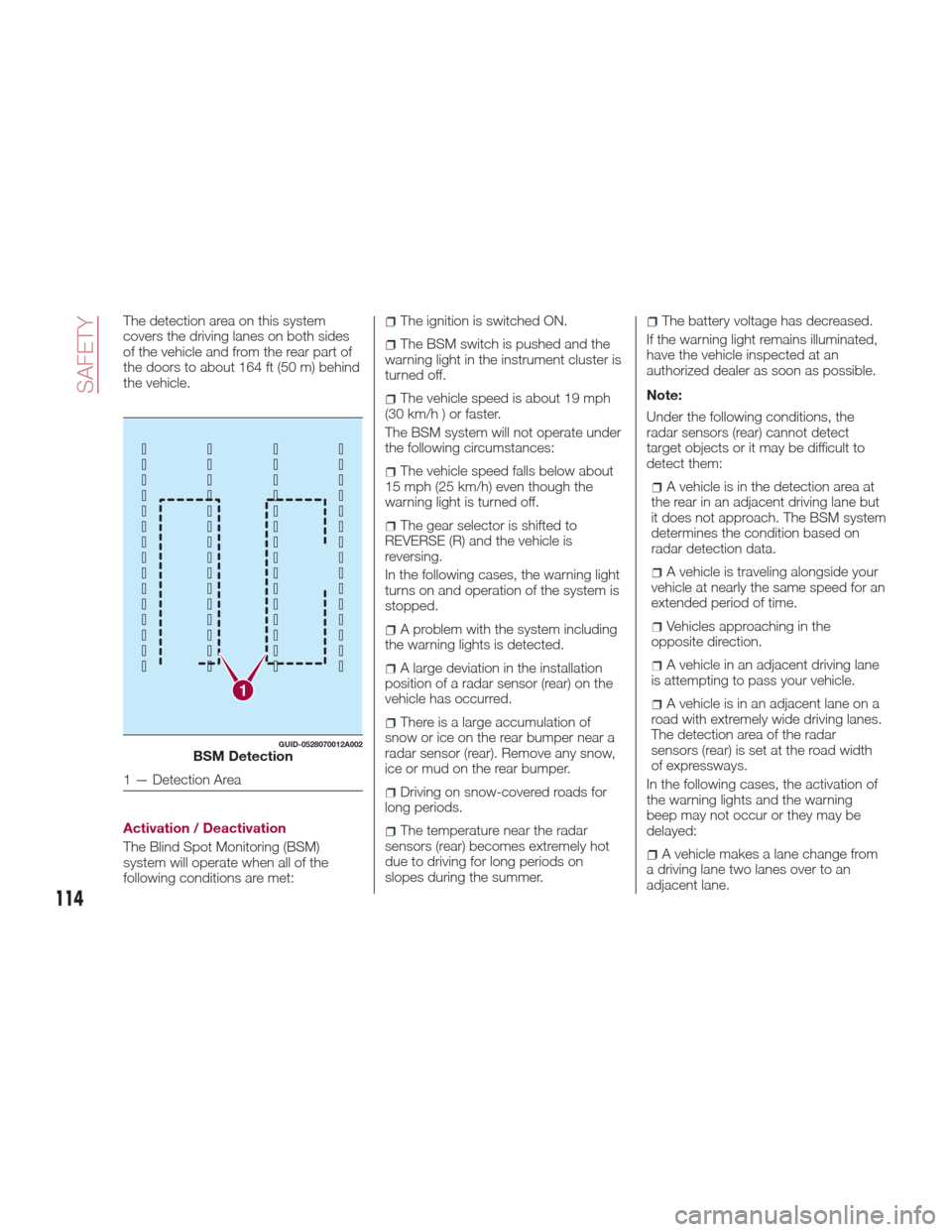
The detection area on this system
covers the driving lanes on both sides
of the vehicle and from the rear part of
the doors to about 164 ft (50 m) behind
the vehicle.
Activation / Deactivation
The Blind Spot Monitoring (BSM)
system will operate when all of the
following conditions are met:The ignition is switched ON.
The BSM switch is pushed and the
warning light in the instrument cluster is
turned off.
The vehicle speed is about 19 mph
(30 km/h ) or faster.
The BSM system will not operate under
the following circumstances:
The vehicle speed falls below about
15 mph (25 km/h) even though the
warning light is turned off.
The gear selector is shifted to
REVERSE (R) and the vehicle is
reversing.
In the following cases, the warning light
turns on and operation of the system is
stopped.
A problem with the system including
the warning lights is detected.
A large deviation in the installation
position of a radar sensor (rear) on the
vehicle has occurred.
There is a large accumulation of
snow or ice on the rear bumper near a
radar sensor (rear). Remove any snow,
ice or mud on the rear bumper.
Driving on snow-covered roads for
long periods.
The temperature near the radar
sensors (rear) becomes extremely hot
due to driving for long periods on
slopes during the summer.
The battery voltage has decreased.
If the warning light remains illuminated,
have the vehicle inspected at an
authorized dealer as soon as possible.
Note:
Under the following conditions, the
radar sensors (rear) cannot detect
target objects or it may be difficult to
detect them:
A vehicle is in the detection area at
the rear in an adjacent driving lane but
it does not approach. The BSM system
determines the condition based on
radar detection data.
A vehicle is traveling alongside your
vehicle at nearly the same speed for an
extended period of time.
Vehicles approaching in the
opposite direction.
A vehicle in an adjacent driving lane
is attempting to pass your vehicle.
A vehicle is in an adjacent lane on a
road with extremely wide driving lanes.
The detection area of the radar
sensors (rear) is set at the road width
of expressways.
In the following cases, the activation of
the warning lights and the warning
beep may not occur or they may be
delayed:
A vehicle makes a lane change from
a driving lane two lanes over to an
adjacent lane.
1
GUID-0528070012A002BSM Detection
1 — Detection Area
114
SAFETY
Page 158 of 292
2. Move the gear selector.
3. Take the vehicle to an Authorized
Dealer.
Manual Shift Mode
The manual shift mode gives you the
feel of driving a manual transmission
vehicle by allowing you to operate the
gear selector manually.
This allows you to control engine rpm
and torque to the drive wheels much
like a manual transmission when more
control is desired.
To change to MANUAL (M) shift mode,
shift the gear selector from DRIVE (D) to
MANUAL (M). To return to automatic
shift mode, shift the gear selector from
MANUAL (M) to DRIVE (D).
You can shift between DRIVE (D) and
MANUAL (M) mode at any time, without
taking your foot off the accelerator.Note:
If you change to manual shift mode
when the vehicle is stopped, the gear
will shift to M1.
If you change to manual shift mode
while the vehicle is moving it will remain
in the current gear until a manual shift
request is made.
Indicators
Manual Shift Mode Indication
In manual shift mode, the “M” of the
shift position indication in the
instrument panel illuminates.
Gear Position Indication
The numeral for the selected gear
illuminates. Manually Shifting Up/Down
To shift up
to a higher gear, tap the
gear selector rearward once (or tap the
[+] shift paddle on the steering wheel, if
equipped).
To shift down to a lower gear, tap the
gear selector forward once (or tap the
[-] shift paddle on the steering wheel, if
equipped).
Note:
If a requested downshift would
cause the engine to over-speed, that
shift will not occur.
The system will ignore attempts to
upshift at too low of a vehicle speed.
The transmission will switch to
automatic shift mode while the
accelerator pedal is completely
depressed (unless Dynamic Stability
Control is turned off).
Do not drive the vehicle with the
tachometer needle in the red zone
while in manual shift mode. If the
vehicle is continuously driven at a high
rpm, the transmission may
automatically shift up to protect the
engine.
During deceleration, the
transmission may automatically shift
down depending on vehicle speed.
005210206-122-001Shift - Lock Override
05210207-12A-002Instrument Panel
1 — Manual Shift Mode Indication
2 — Gear Position Indication
156
STARTING AND OPERATING
Page 159 of 292
You can start out, from a stop, in
first or second gear. Tapping the gear
selector rearward (+) (at a stop) will
allow starting in second gear. Starting
out in second gear can be helpful in
snowy or icy conditions.
Paddle Mode — If
Equipped
Tapping one of the steering
wheel-mounted shift paddles (+/-), if
equipped, while the gear selector is in
DRIVE (D), will activate Paddle Mode (a
temporary manual mode). The current
gear will be displayed in the instrument
cluster, with the "M" also illuminated.
The transmission will revert back to
normal operation (if the gear selector
remains in DRIVE) after a period of time,
depending on accelerator pedal activity.
Note: Because Paddle mode is only
temporary, use of the MANUAL (M)
position is recommended if you need to
drive the vehicle in a particular gear for
long periods.
Driving Tips
Overtaking
For extra power when passing another
vehicle or climbing steep grades, press
the accelerator fully. The transmission
will shift to a lower gear, depending on
vehicle speed. Note:
The accelerator pedal may initially
feel heavy as it is being pressed, then
feel lighter as it is pressed further. This
change in pedal force controls whether
or not kickdown should be performed.
While the gear selector is in the
MANUAL (M) position and the Dynamic
Stability Control (DSC) is turned off,
manual shift mode does not switch to
automatic shift mode even if the
accelerator pedal is completely
pressed. Tap the gear selector forward
or rearward to select the appropriate
gear.
Climbing steep grades from a stop
To climb a steep grade from a stopped
position:
1. Press the brake pedal.
2. Shift to DRIVE (D) or M1, depending
on the load weight and grade
steepness.
3. Release the brake pedal while
gradually accelerating.
Descending steep grades
When descending a steep grade, shift
to lower gears, depending on load
weight and grade steepness.
Descend slowly, using the brakes only
occasionally to prevent them from
overheating.
ELECTRONIC SPEED
CONTROL
Electronic Speed
Control
This is an electronically controlled
driving assistance feature that allows
the desired vehicle speed to be
maintained, without having to press the
accelerator pedal.
This feature can be used at a speed
above 25 mph (40 km/h) on long
stretches of dry, straight roads with few
variations (e.g. motorways).
It is therefore not recommended to use
this feature on city roads with traffic. Do
not use it in town.
Warning!
Do not use the cruise control under the
following conditions:
hilly terrain
steep inclines
heavy or unsteady traffic
slippery or winding roads
similar restrictions that require
inconsistent speed
Using the cruise control under the following
conditions is dangerous and could result in
loss of vehicle control.
157