ad blue FIAT 500 2013 2.G User Guide
[x] Cancel search | Manufacturer: FIAT, Model Year: 2013, Model line: 500, Model: FIAT 500 2013 2.GPages: 423, PDF Size: 9.86 MB
Page 181 of 423
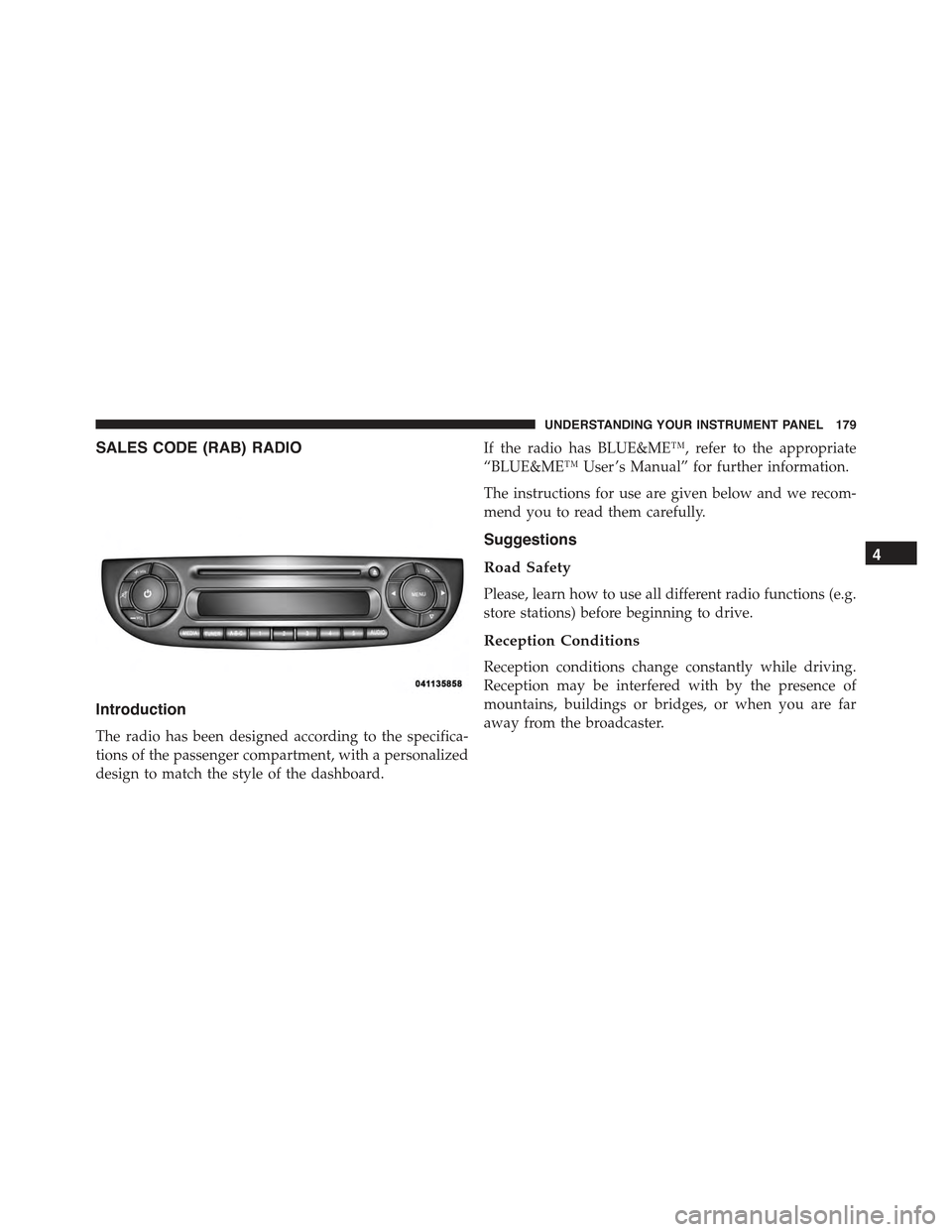
SALES CODE (RAB) RADIO
Introduction
The radio has been designed according to the specifica-
tions of the passenger compartment, with a personalized
design to match the style of the dashboard.
If the radio has BLUE&ME™, refer to the appropriate
“BLUE&ME™ User ’s Manual” for further information.
The instructions for use are given below and we recom-
mend you to read them carefully.
Suggestions
Road Safety
Please, learn how to use all different radio functions (e.g.
store stations) before beginning to drive.
Reception Conditions
Reception conditions change constantly while driving.
Reception may be interfered with by the presence of
mountains, buildings or bridges, or when you are far
away from the broadcaster.
4
UNDERSTANDING YOUR INSTRUMENT PANEL 179
Page 197 of 423
Manual Tuning
This is used to manually search for stations in the
preselected band.
Select the desired frequency band and then press briefly
and repeatedly theorbutton to start the search in
the desired direction. If theorbutton is pressed
longer, the fast search starts and then stops when the
button is released.
Stereophonic Broadcasters
If the incoming signal is weak, the reproduction is
automatically switched from Stereo to Mono.
SiriusXM Satellite Radio — If Equipped
Satellite Radio Antenna — If Equipped
The antenna for the satellite radio is mounted on the roof
of the vehicle. Do not place items on the roof around the
roof top antenna location. Objects placed within the line
of sight of the antenna will cause decreased performance.
Larger luggage items should be placed as far from the
antenna as possible. Do not place items directly on or
above the antenna.
SiriusXM Satellite Radio
With over 130 channels, SiriusXM Satellite Radio brings
you more of what you love. Get 69 channels of 100%
commercial-free music, plus all of your favorite sports,
news, talk and entertainment. Hear every NFL game,
every NASCAR race, college sports and more. The big-
gest and most compelling names in talk with Howard
Stern and Martha Stewart, laugh-out-loud comedy with
Jamie Foxx’s The Foxxhole and Blue Collar Comedy, plus
kids’ programming, world-class news, local traffic and
weather. All of this with crystal clear, coast-to-coast
coverage. Everything worth listening to is now on
SiriusXM. A one-year SiriusXM Satellite Radio subscrip-
tion is included. SiriusXM and all related marks and
4
UNDERSTANDING YOUR INSTRUMENT PANEL 195
Page 206 of 423
Operating Instructions — Hands-Free Phone
(If Equipped)
Refer to the appropriate “BLUE&ME™ User ’s Manual”
for further information.
Personal/Portable Navigation Device (PND) —
If Equipped
A Personal/Portable Navigation Device (PND) is avail-
able as optional equipment for this vehicle, refer to the
Navigation User Guide for further information.
iPod®/USB/MEDIA PLAYER CONTROL —
IF EQUIPPED
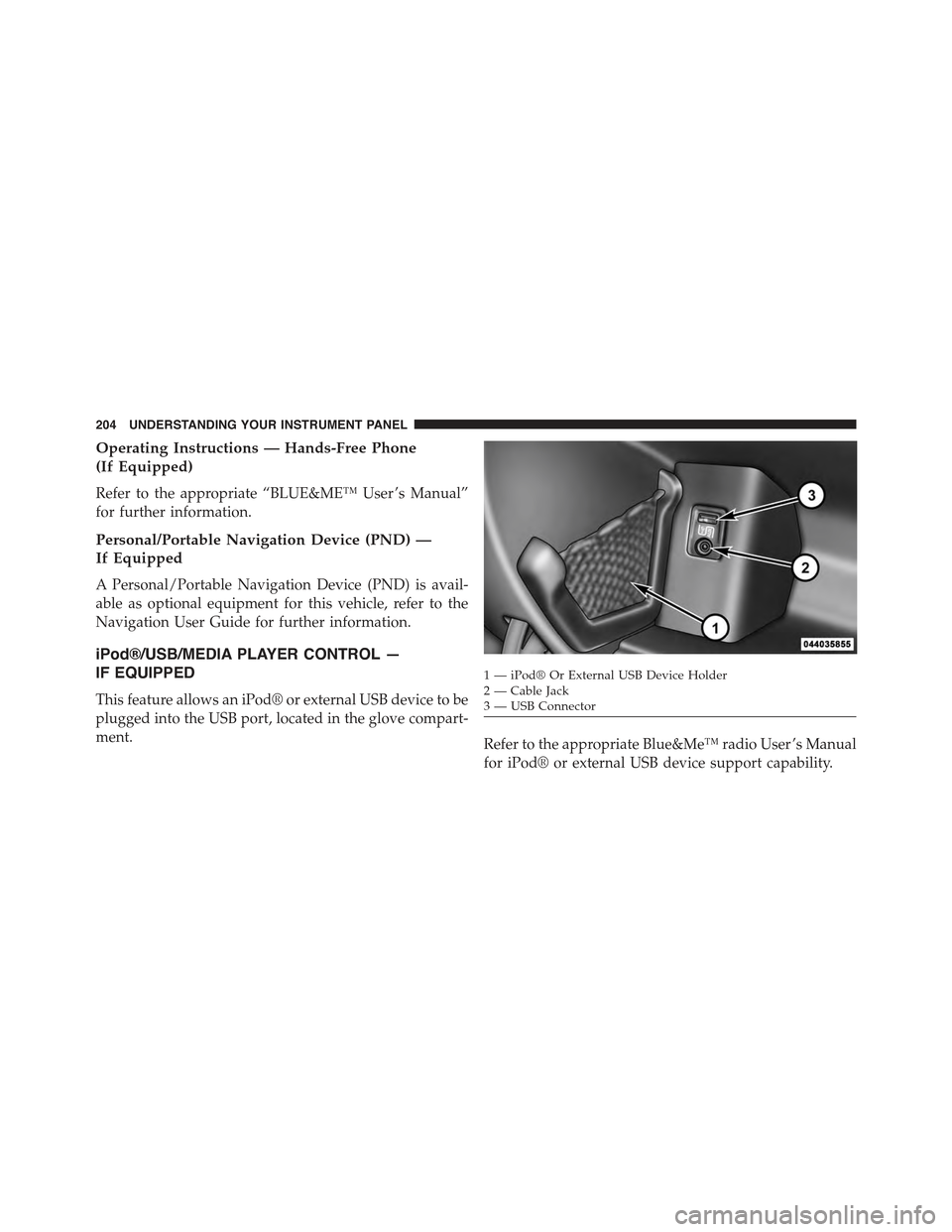
This feature allows an iPod® or external USB device to be
plugged into the USB port, located in the glove compart-
ment.Refer to the appropriate Blue&Me™ radio User ’s Manual
for iPod® or external USB device support capability.
1 — iPod® Or External USB Device Holder2 — Cable Jack3—USBConnector
204 UNDERSTANDING YOUR INSTRUMENT PANEL
Page 208 of 423
Radio Operation
Pressing the top of the switch will “Seek” up for the next
listenable station and pressing the bottom of the switch
will “Seek” down for the next listenable station.
The button located in the center of the left-hand control
will tune to the next preset station that you have pro-
grammed in the radio preset pushbutton.
CD Player Operation
Pressing the top of the switch once will go to the next
track on the CD. Pressing the bottom of the switch once
will go to the beginning of the current track, or to the
beginning of the previous track if it is within one second
after the current track begins to play.
If you press the switch up or down twice, it plays the
second track; three times, it will play the third, etc.
Operating Instructions — Hands-Free Phone
(If Equipped)
Refer to the appropriate Blue&Me™ User ’s Manual for
further information.
CD/DVD DISC MAINTENANCE
To keep a CD/DVD in good condition, take the following
precautions:
1. Handle the disc by its edge; avoid touching the
surface.
2. If the disc is stained, clean the surface with a soft cloth,
wiping from center to edge.
3. Do not apply paper or tape to the disc; avoid scratch-
ing the disc.
4. Do not use solvents such as benzene, thinner, cleaners,
or anti-static sprays.
206 UNDERSTANDING YOUR INSTRUMENT PANEL
Page 210 of 423
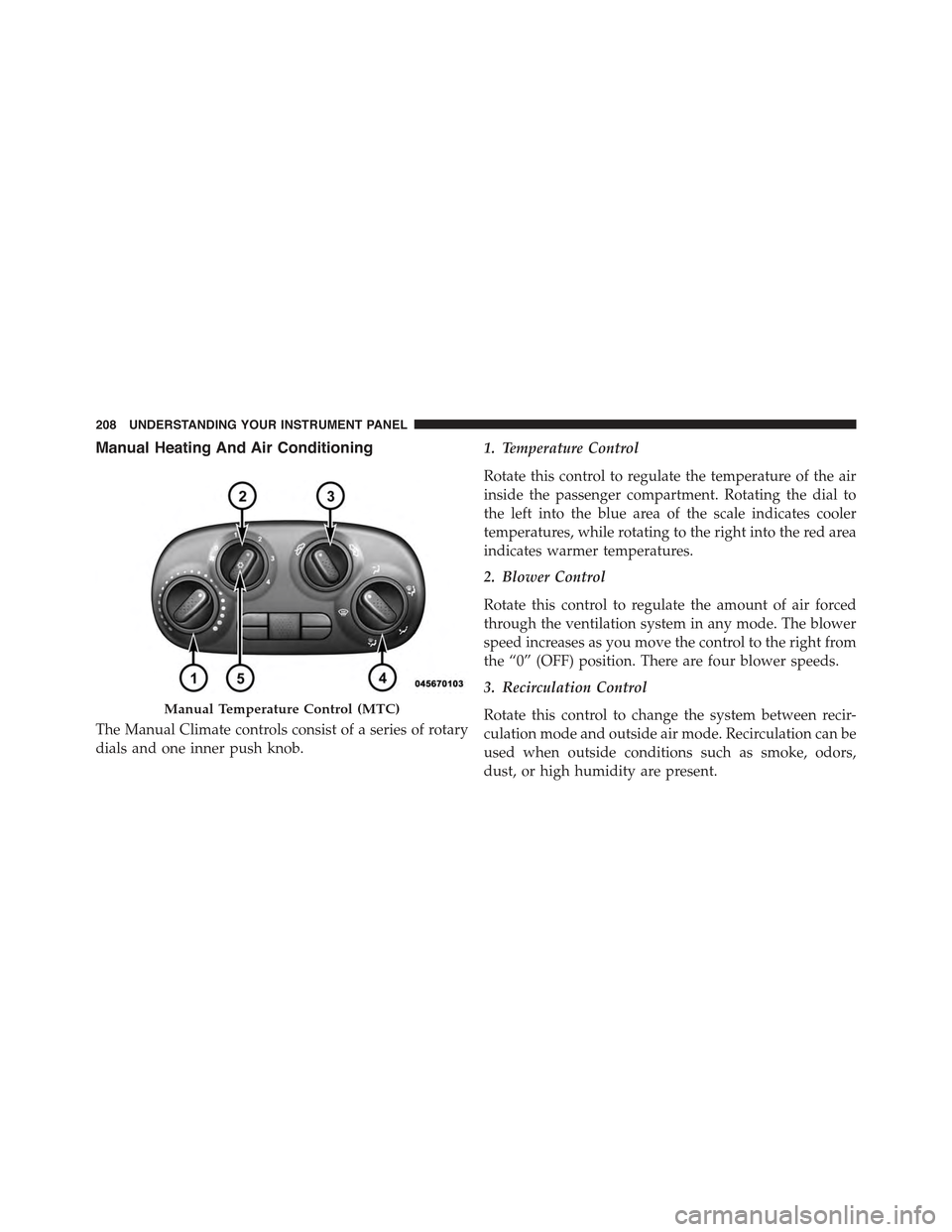
Manual Heating And Air Conditioning
The Manual Climate controls consist of a series of rotary
dials and one inner push knob.
1. Temperature Control
Rotate this control to regulate the temperature of the air
inside the passenger compartment. Rotating the dial to
the left into the blue area of the scale indicates cooler
temperatures, while rotating to the right into the red area
indicates warmer temperatures.
2. Blower Control
Rotate this control to regulate the amount of air forced
through the ventilation system in any mode. The blower
speed increases as you move the control to the right from
the “0” (OFF) position. There are four blower speeds.
3. Recirculation Control
Rotate this control to change the system between recir-
culation mode and outside air mode. Recirculation can be
used when outside conditions such as smoke, odors,
dust, or high humidity are present.
Manual Temperature Control (MTC)
208 UNDERSTANDING YOUR INSTRUMENT PANEL
Page 379 of 423
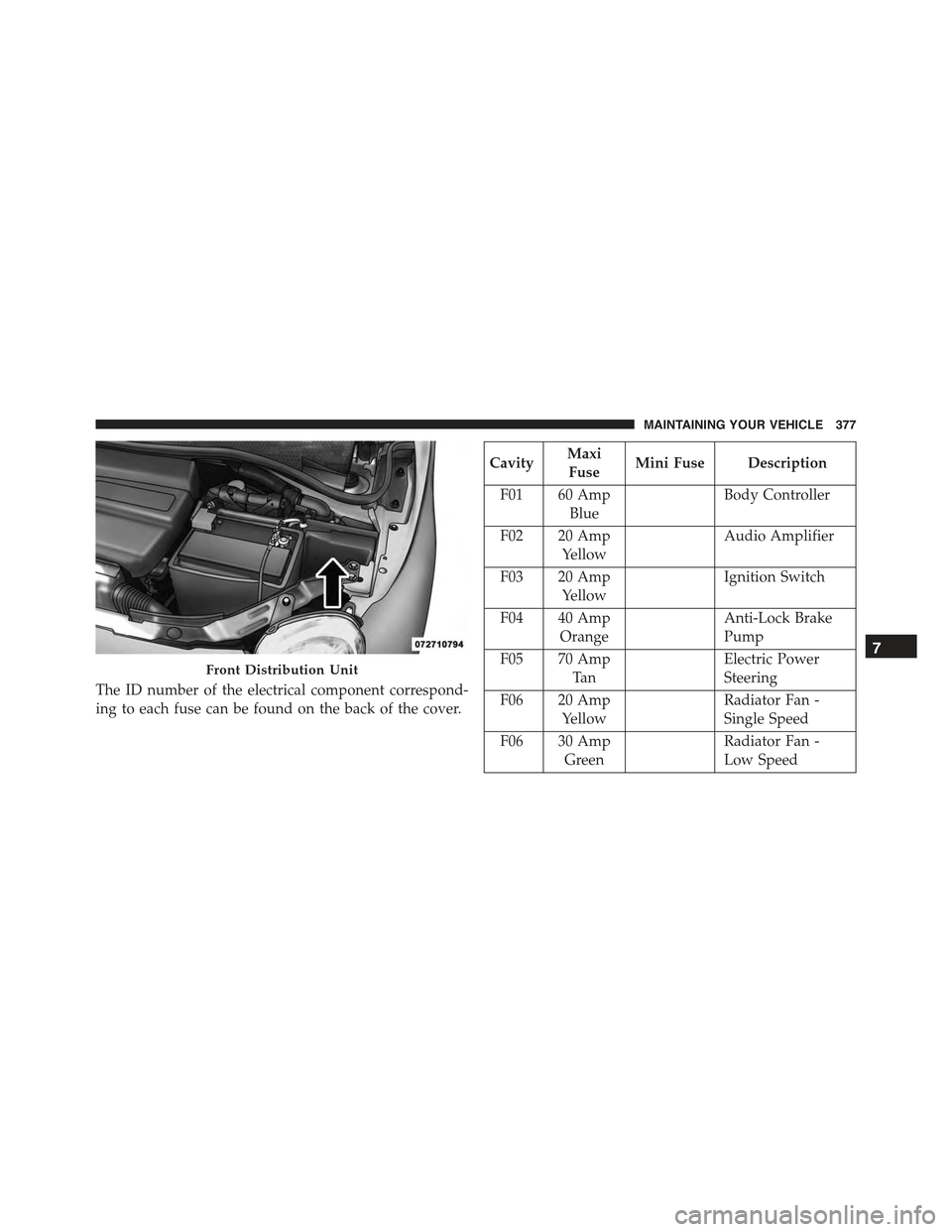
The ID number of the electrical component correspond-
ing to each fuse can be found on the back of the cover.
CavityMaxi
FuseMini Fuse Description
F01 60 Amp
Blue
Body Controller
F02 20 Amp
Yellow
Audio Amplifier
F03 20 Amp
Yellow
Ignition Switch
F04 40 Amp
Orange
Anti-Lock Brake
Pump
F05 70 Amp
Ta n
Electric Power
Steering
F06 20 Amp
Yellow
Radiator Fan -
Single Speed
F06 30 Amp
Green
Radiator Fan -
Low Speed
Front Distribution Unit
7
MAINTAINING YOUR VEHICLE 377
Page 380 of 423
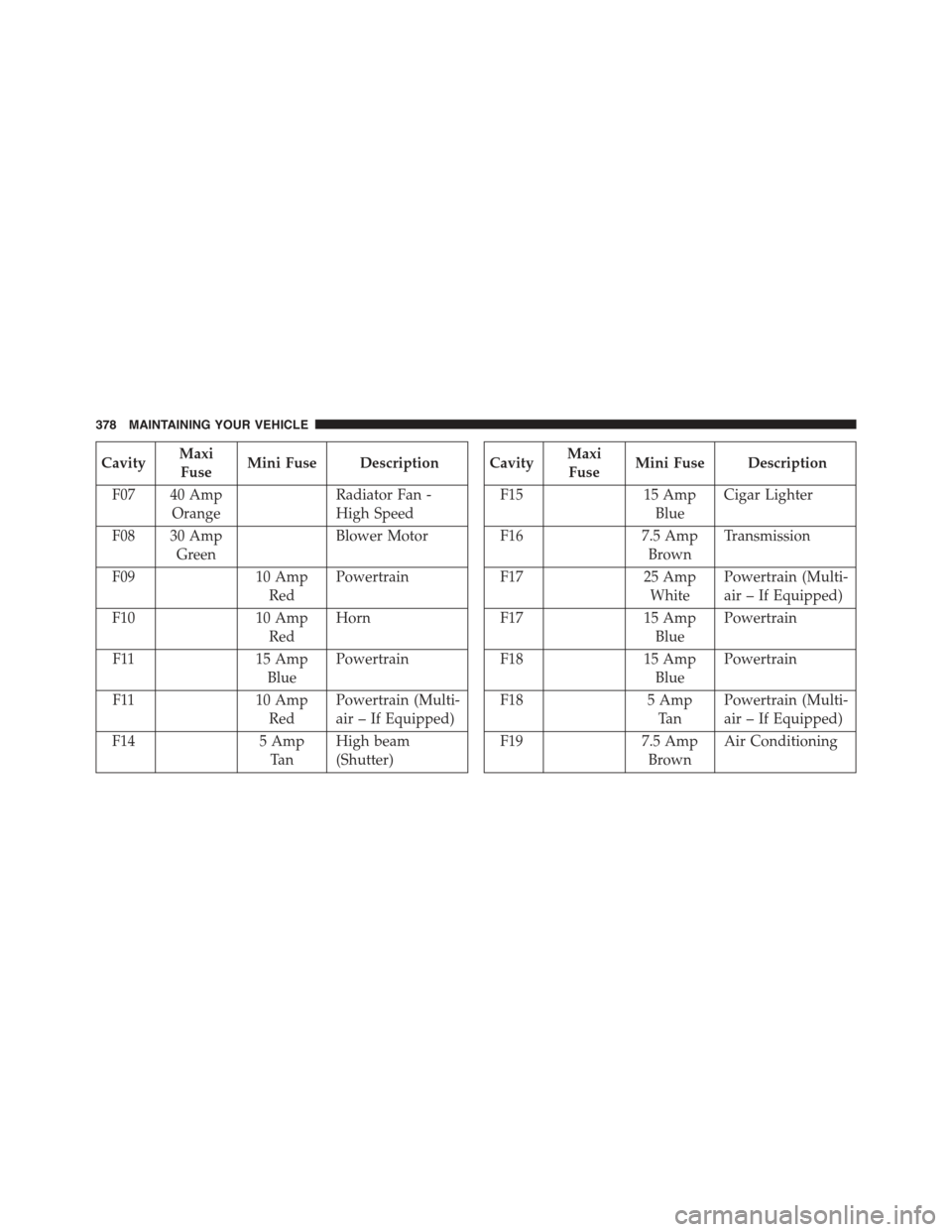
CavityMaxi
FuseMini Fuse Description
F07 40 Amp
Orange
Radiator Fan -
High Speed
F08 30 Amp
Green
Blower Motor
F0910 Amp
Red
Powertrain
F1010 Amp
Red
Horn
F1115 Amp
Blue
Powertrain
F1110 Amp
Red
Powertrain (Multi-
air – If Equipped)
F145 Amp
Ta n
High beam
(Shutter)
CavityMaxi
FuseMini Fuse Description
F1515 Amp
Blue
Cigar Lighter
F167.5 Amp
Brown
Transmission
F1725 Amp
White
Powertrain (Multi-
air – If Equipped)
F1715 Amp
Blue
Powertrain
F1815 Amp
Blue
Powertrain
F185 Amp
Ta n
Powertrain (Multi-
air – If Equipped)
F197.5 Amp
Brown
Air Conditioning
378 MAINTAINING YOUR VEHICLE
Page 381 of 423
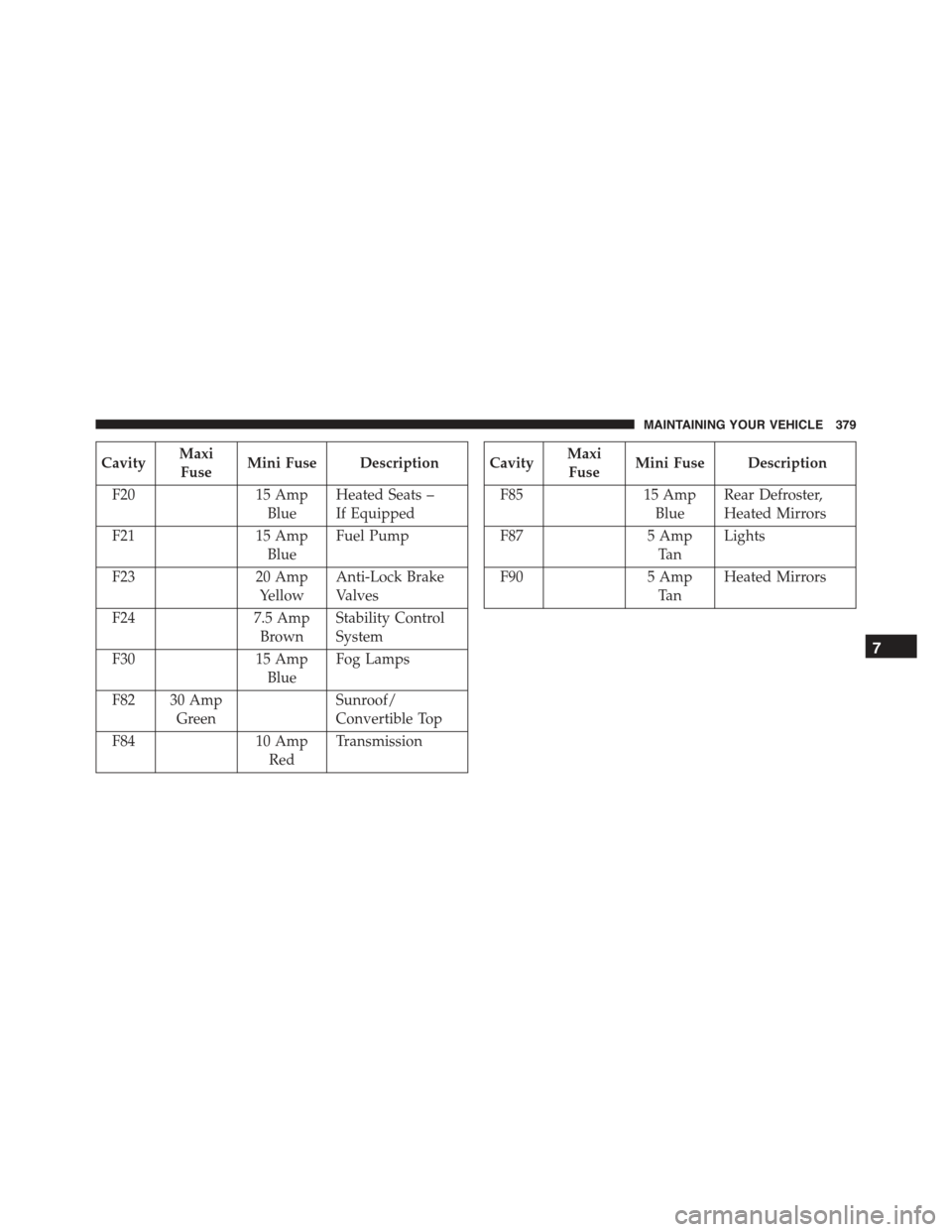
CavityMaxi
FuseMini Fuse Description
F2015 Amp
Blue
Heated Seats –
If Equipped
F2115 Amp
Blue
Fuel Pump
F2320 Amp
Yellow
Anti-Lock Brake
Valves
F247.5 Amp
Brown
Stability Control
System
F3015 Amp
Blue
Fog Lamps
F82 30 Amp
Green
Sunroof/
Convertible Top
F8410 Amp
Red
Transmission
CavityMaxi
FuseMini Fuse Description
F8515 Amp
Blue
Rear Defroster,
Heated Mirrors
F875 Amp
Ta n
Lights
F905 Amp
Ta n
Heated Mirrors
7
MAINTAINING YOUR VEHICLE 379