on off FIAT 500 2013 2.G User Guide
[x] Cancel search | Manufacturer: FIAT, Model Year: 2013, Model line: 500, Model: FIAT 500 2013 2.GPages: 423, PDF Size: 9.86 MB
Page 55 of 423
Enhanced Accident Response System
In the event of an impact causing air bag deployment, if
the communication network remains intact, and the
power remains intact, depending on the nature of the
event, the ORC will determine whether to have the
Enhanced Accident Response System perform the follow-
ing functions:
•Cut off fuel to the engine.
•Flash hazard lights as long as the battery has power or
until the ignition key is turned off.
•Turn on the interior lights, which remain on as long as
the battery has power or until the ignition key is
removed.
•Unlock the doors automatically.
After the event occurs, when the system is active, the
message#Fuel Cutoff See Handbook#is displayed.
Carefully check the vehicle for fuel leaks in the engine
compartment and on the ground near the engine com-
partment and fuel tank before resetting the system and
starting the engine.
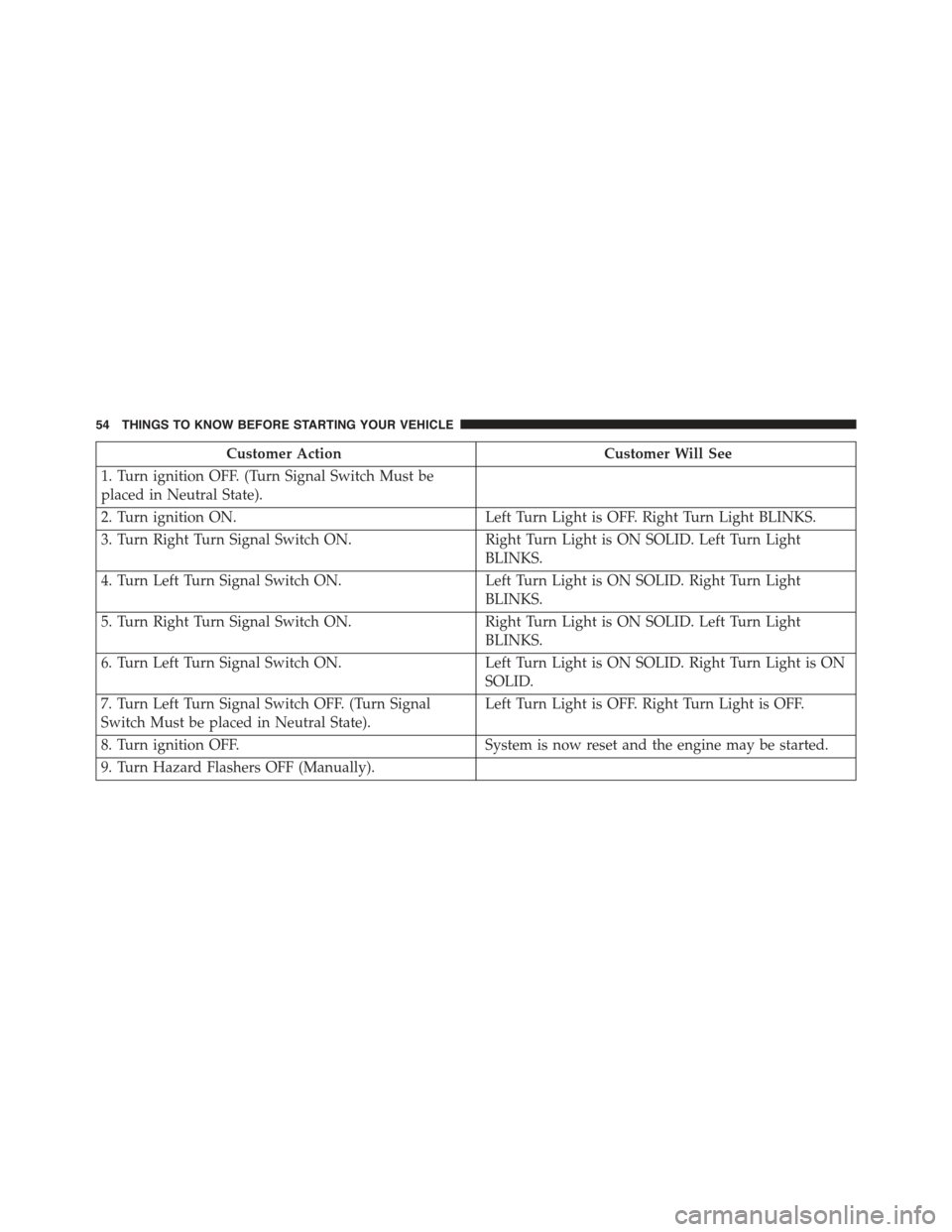
System Reset Procedure
After an impact causing air bag deployment, the left and
right turn signal lights, located in the instrument panel
cluster, will both be blinking, until the ignition is turned
off. In order to move your vehicle to the side of the road
you must follow the system reset procedure.
2
THINGS TO KNOW BEFORE STARTING YOUR VEHICLE 53
Page 56 of 423
Customer ActionCustomer Will See
1. Turn ignition OFF. (Turn Signal Switch Must be
placed in Neutral State).
2. Turn ignition ON.Left Turn Light is OFF. Right Turn Light BLINKS.
3. Turn Right Turn Signal Switch ON.Right Turn Light is ON SOLID. Left Turn Light
BLINKS.
4. Turn Left Turn Signal Switch ON.Left Turn Light is ON SOLID. Right Turn Light
BLINKS.
5. Turn Right Turn Signal Switch ON.Right Turn Light is ON SOLID. Left Turn Light
BLINKS.
6. Turn Left Turn Signal Switch ON.Left Turn Light is ON SOLID. Right Turn Light is ON
SOLID.
7. Turn Left Turn Signal Switch OFF. (Turn Signal
Switch Must be placed in Neutral State).
Left Turn Light is OFF. Right Turn Light is OFF.
8. Turn ignition OFF.System is now reset and the engine may be started.
9. Turn Hazard Flashers OFF (Manually).
54 THINGS TO KNOW BEFORE STARTING YOUR VEHICLE
Page 57 of 423
If a reset procedure step is not completed within 45
seconds, then the turn signal lights will turn off and the
reset procedure must be performed again in order to be
successful.
If A Deployment Occurs
The Advanced Front Air Bags are designed to deflate
immediately after deployment.
NOTE:In a rollover the pretensioners and/or SAB and
SABIC - if equipped air bags may deploy on both sides of
the vehicle.
If you do have a collision which deploys the air bags, any
or all of the following may occur:
•The nylon air bag material may sometimes cause
abrasions and/or skin reddening to the driver and
front passenger as the air bags deploy and unfold. The
abrasions are similar to friction rope burns or those
you might get sliding along a carpet or gymnasium
floor. They are not caused by contact with chemicals.
They are not permanent and normally heal quickly.
However, if you haven’t healed significantly within a
few days, or if you have any blistering, see your doctor
immediately.
•As the air bags deflate, you may see some smoke-like
particles. The particles are a normal by-product of the
process that generates the non-toxic gas used for air
bag inflation. These airborne particles may irritate the
skin, eyes, nose, or throat. If you have skin or eye
irritation, rinse the area with cool water. For nose or
throat irritation, move to fresh air. If the irritation
continues, see your doctor. If these particles settle on
your clothing, follow the garment manufacturer’s in-
structions for cleaning.
Do not drive your vehicle after the air bags have de-
ployed. If you are involved in another collision, the air
bags will not be in place to protect you.
2
THINGS TO KNOW BEFORE STARTING YOUR VEHICLE 55
Page 95 of 423

Automatic Dimming Mirror — If Equipped
This mirror automatically adjusts for headlight glare
from vehicles behind you. You can turn the feature on or
off by pressing the button at the base of the mirror. A light
to the left of the button will illuminate to indicate when
the dimming feature is activated. The sensor to the right
of the button does not illuminate.
NOTE:This feature is disabled when the vehicle is
moving in reverse.
CAUTION!
To avoid damage to the mirror during cleaning, never
spray any cleaning solution directly onto the mirror.
Apply the solution onto a clean cloth and wipe the
mirror clean.
Automatic Dimming Mirror
3
UNDERSTANDING THE FEATURES OF YOUR VEHICLE 93
Page 98 of 423
Sun Visors
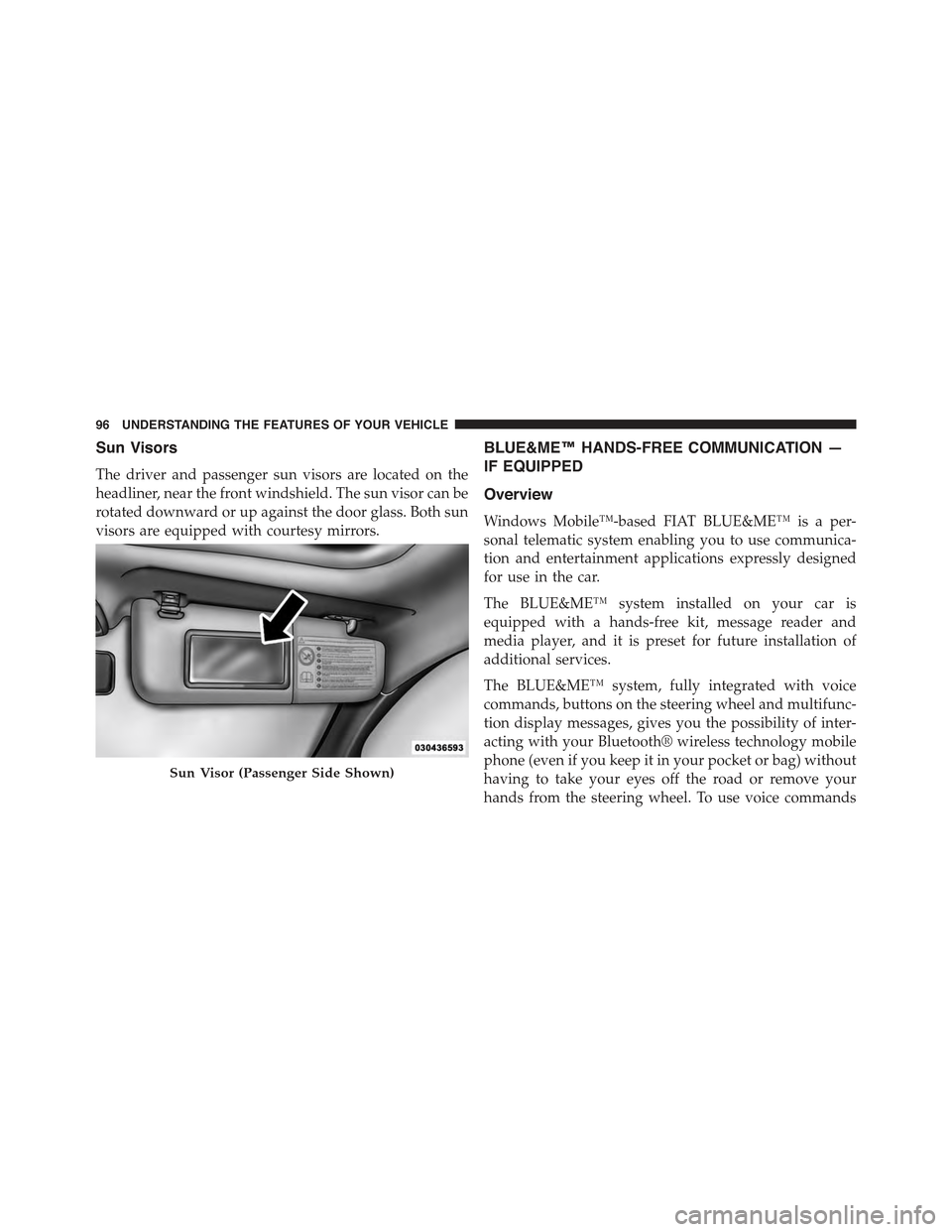
The driver and passenger sun visors are located on the
headliner, near the front windshield. The sun visor can be
rotated downward or up against the door glass. Both sun
visors are equipped with courtesy mirrors.
BLUE&ME™ HANDS-FREE COMMUNICATION —
IF EQUIPPED
Overview
Windows Mobile™-based FIAT BLUE&ME™ is a per-
sonal telematic system enabling you to use communica-
tion and entertainment applications expressly designed
for use in the car.
The BLUE&ME™ system installed on your car is
equipped with a hands-free kit, message reader and
media player, and it is preset for future installation of
additional services.
The BLUE&ME™ system, fully integrated with voice
commands, buttons on the steering wheel and multifunc-
tion display messages, gives you the possibility of inter-
acting with your Bluetooth® wireless technology mobile
phone (even if you keep it in your pocket or bag) without
having to take your eyes off the road or remove your
hands from the steering wheel. To use voice commands
Sun Visor (Passenger Side Shown)
96 UNDERSTANDING THE FEATURES OF YOUR VEHICLE
Page 99 of 423
you are not required to train the voice recognition system
to recognize your voice. This implies that the system is
nearly equally performing with different persons, i.e.: the
voice recognition system is of the “speaker independent”
type.
With this system you can also play your favorite music
stored on USB device and select tracks and playback
modes with both voice commands or buttons on the
steering wheel.
This device complies with Part 15 of the FCC rules
subject to the following two conditions:
•This device may not cause harmful interference.
•This device must accept all interference received, includ-
ing interference that may cause undesired operation.
The Hands-Free Kit
The basic characteristic of this hands-free kit is voice
recognition with Bluetooth® wireless technology. With
this system you can make and receive calls safely and
securely by using either voice commands or buttons on
the steering wheel. This can be done under any driving
condition without ever having to take your eyes off the
road or remove your hands from the steering wheel, as
required by current laws.
Bluetooth® wireless technology enables wireless connec-
tion between your mobile phone and the hands-free kit
installed on your car.
To use the hands-free kit, you need a Bluetooth® wireless
technology enabled mobile phone. This hands-free kit
gives you the possibility of interacting vocally with your
mobile phone while driving, even if your mobile device
does not feature this capability. You can also interact with
your mobile phone manually and visually using the
steering wheel controls and the instrument panel multi-
function display.
3
UNDERSTANDING THE FEATURES OF YOUR VEHICLE 97
Page 109 of 423
Lift the seatback upright and push the seat rearward to
its locked position once the rear passengers are seated.
Memory Feature
The driver seat also has a memory feature, which can
operate in two ways:
Memory Function Option 1 — Full Seat Back And
Track Fore/Aft Position Memory:
After using the EZ entry function, the seatback angle and
the Track fore/aft adjuster can both re-lock into the
position they were most recently adjusted to. This is
accomplished if the seat is moved fully rearward to its
last fore/aft position on the tracks before the seat back is
returned upright.
Memory Function Option 2 — Seat Back Only
Memory:
After using the EZ entry function, the seat back may first
be returned upright prior to going back to the last
fore/aft (memory) position on the tracks. This results in
the seat back memory being set only – The track will then
be locked forward of its last set fore/aft memory posi-
tion. To then reset the fore/aft track memory feature (to
reestablish memory function option 1), the seat has to be
returned fully rearward to its last fore/aft memory track
position as described in Memory function option 1.
Heated Seats — If Equipped
On some models, the front driver and passenger seats
may be equipped with heaters in both the seat cushions
and seatbacks. The controls for the front heated seats are
located on the center instrument panel area.
Press the switch once to turn on the heated
seats. Press the switch a second time to shut the
heating elements off.
NOTE:Once a heat setting is selected, heat will be felt
within two to five minutes.
3
UNDERSTANDING THE FEATURES OF YOUR VEHICLE 107
Page 115 of 423

Headlights
Rotate the end of the multifunction lever up-
ward to the first detent for headlight operation.
NOTE:When the headlights are turned on, the Daytime
Running Lights will be deactivated.
High Beams
With the low beams activated, push the multi-
function lever towards the instrument panel to
turn on the high beams. Pull the multifunction lever
toward the steering wheel to turn off the high beams.
Flash-To-Pass
You can signal another vehicle with your headlights by
partially pulling the multifunction lever toward the steer-
ing wheel. This will cause the high beam headlights to
turn on until the lever is released.
Headlight Operation
3
UNDERSTANDING THE FEATURES OF YOUR VEHICLE 113
Page 116 of 423
Parking Lights
To turn on the parking lights, remove the key
or turn the ignition to OFF/LOCK position and
turn on the headlights.
Daytime Running Lights — If Equipped
To activate the Daytime Running Lights (DRL), rotate the
end of the multifunction lever to theOsymbol.
NOTE:The low beams and side/taillights will not be on
with DRL.
The DRL function can be turned on or off using the
display menus. Refer to “Electronic Vehicle Information
Center (EVIC)” in “Understanding Your Instrument
Panel” for further information.
Turn Signals
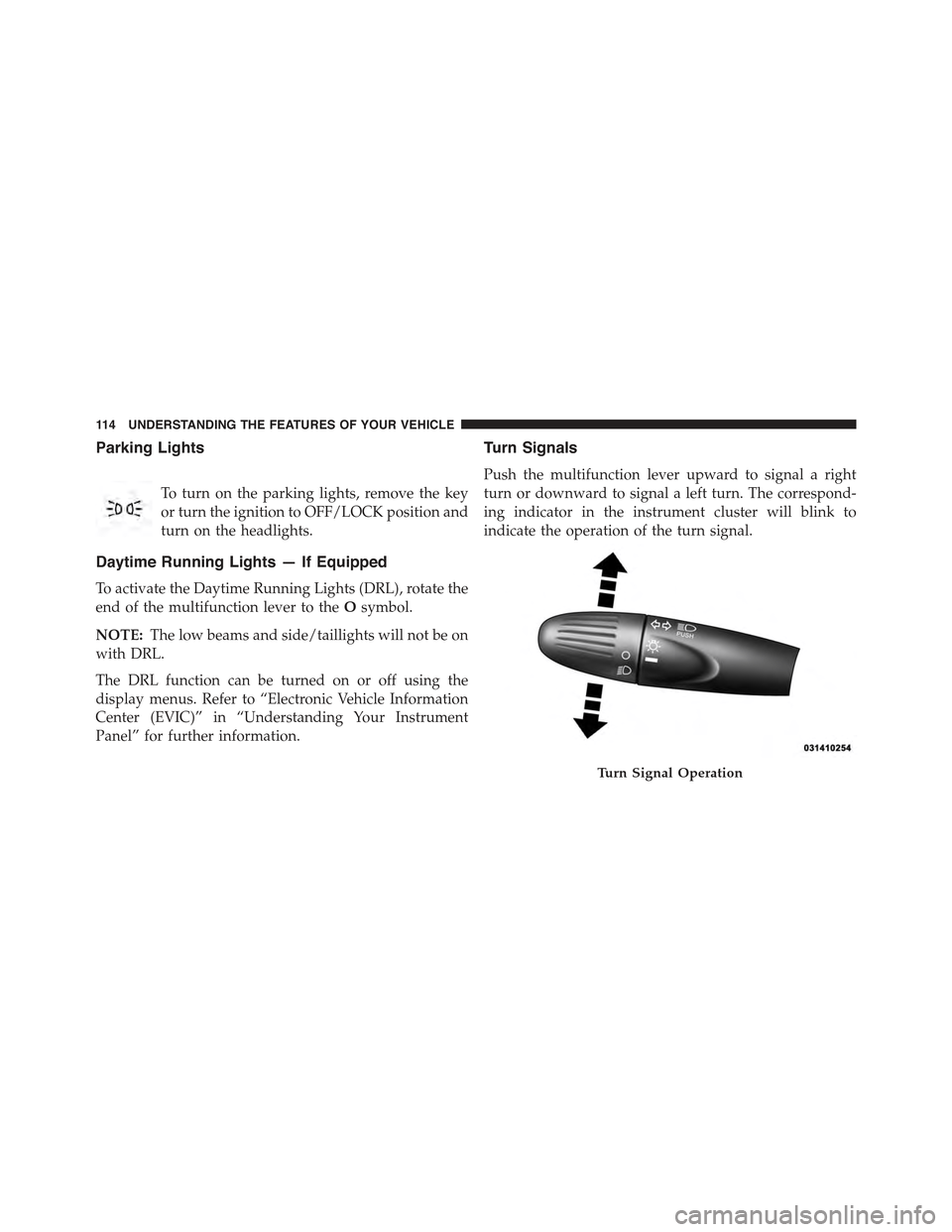
Push the multifunction lever upward to signal a right
turn or downward to signal a left turn. The correspond-
ing indicator in the instrument cluster will blink to
indicate the operation of the turn signal.
Turn Signal Operation
11 4 U N D E R S TA N D I N G T H E F E AT U R E S O F Y O U R V E H I C L E
Page 117 of 423
NOTE:The indicators will automatically turn off when
the turn has been completed and the steering wheel is
returned to a straight position.
Lane Change Assist
Tap the lever up or down once, without moving beyond
the detent, and the turn signal (right or left) will flash
three times then automatically turn off.
Follow Me Home/Headlight Delay
When this feature is selected the driver can choose to
have the headlights remain on for a preset period of time.
Activation
Remove the key or turn the ignition to the OFF/LOCK
position, and pull the multifunction lever toward the
steering wheel, within two minutes. Each time the lever
is pulled, the activation of the lights will be extended by
30 seconds. The activation of the lights can be extended to
a maximum of 210 seconds.
Deactivation
Pull the multifunction lever toward the steering wheel
and hold it for more than two seconds.
Interior Lights
The interior light switches are located in the overhead
console. The interior lights can be set to three different
positions (Off/Left Position, Center Position, On/Right Po-
sition).
Using the switch on the left overhead, press the switch to
the right from its center position and the lights are always
on. Press the switch to the left from its center position and
the lights are always off. Leave the switch in the center
position, and the lights are turned on and off when the
doors are opened or closed. The switch on the right side
of the overhead console controls the map or reading
function of the lights. Press the switch to the right to turn
on the right light and press the switch to the left to turn
on the left light.
3
UNDERSTANDING THE FEATURES OF YOUR VEHICLE 115