battery FIAT 500 2013 2.G Owner's Manual
[x] Cancel search | Manufacturer: FIAT, Model Year: 2013, Model line: 500, Model: FIAT 500 2013 2.GPages: 423, PDF Size: 9.86 MB
Page 332 of 423
•Turn on the interior lights, which remain on as long as
the battery has power or until the ignition key is
removed.
•Unlock the doors automatically.
After the event occurs, when the system is active, the
message#Fuel Cutoff See Handbook#is displayed.
Carefully check the vehicle for fuel leaks in the engine
compartment and on the ground near the engine com-
partment and fuel tank before resetting the system and
starting the engine.
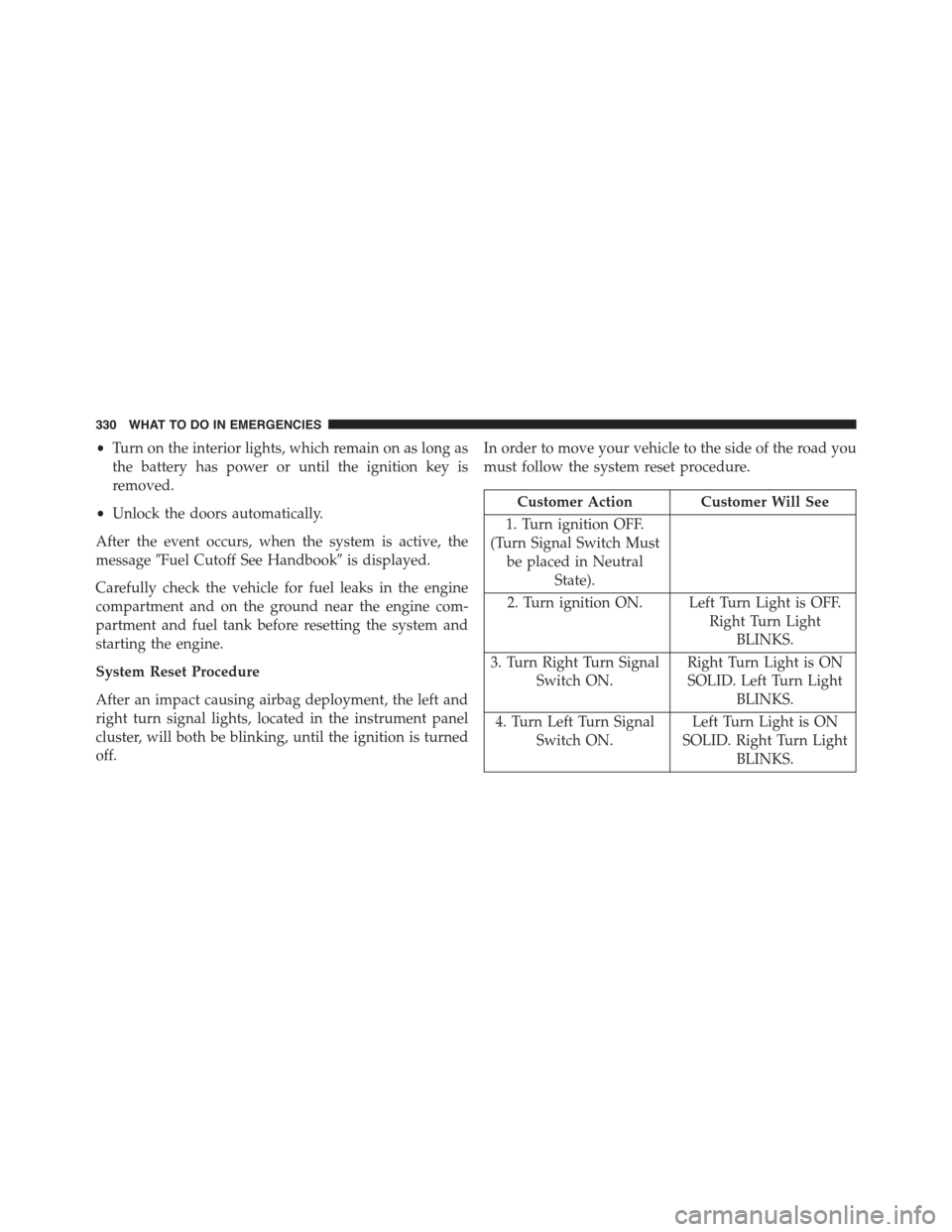
System Reset Procedure
After an impact causing airbag deployment, the left and
right turn signal lights, located in the instrument panel
cluster, will both be blinking, until the ignition is turned
off.
In order to move your vehicle to the side of the road you
must follow the system reset procedure.
Customer Action Customer Will See
1. Turn ignition OFF.
(Turn Signal Switch Must
be placed in Neutral
State).
2. Turn ignition ON. Left Turn Light is OFF.
Right Turn Light
BLINKS.
3. Turn Right Turn Signal
Switch ON.
Right Turn Light is ON
SOLID. Left Turn Light
BLINKS.
4. Turn Left Turn Signal
Switch ON.
Left Turn Light is ON
SOLID. Right Turn Light
BLINKS.
330 WHAT TO DO IN EMERGENCIES
Page 335 of 423
MAINTAINING YOUR VEHICLE
CONTENTS
!ENGINE COMPARTMENT — 1.4L..........335
!ENGINE COMPARTMENT — 1.4L TURBO . . . .336
!ONBOARD DIAGNOSTIC SYSTEM — OBD II . . .337
!EMISSIONS INSPECTION AND
MAINTENANCE PROGRAMS.............337
!REPLACEMENT PARTS..................339
!STUDIO SERVICE......................339
!MAINTENANCE PROCEDURES............340
▫Engine Oil..........................340
▫Engine Oil Filter......................344
▫Engine Air Cleaner Filter................344
▫Maintenance-Free Battery................345
▫Air Conditioner Maintenance.............346
▫Body Lubrication.....................350
▫Wiper Blades........................350
▫Adding Washer Fluid..................353
▫Exhaust System......................353
▫Cooling System......................356
▫Brake System........................362
▫Manual Transmission – If Equipped........365
7
Page 337 of 423
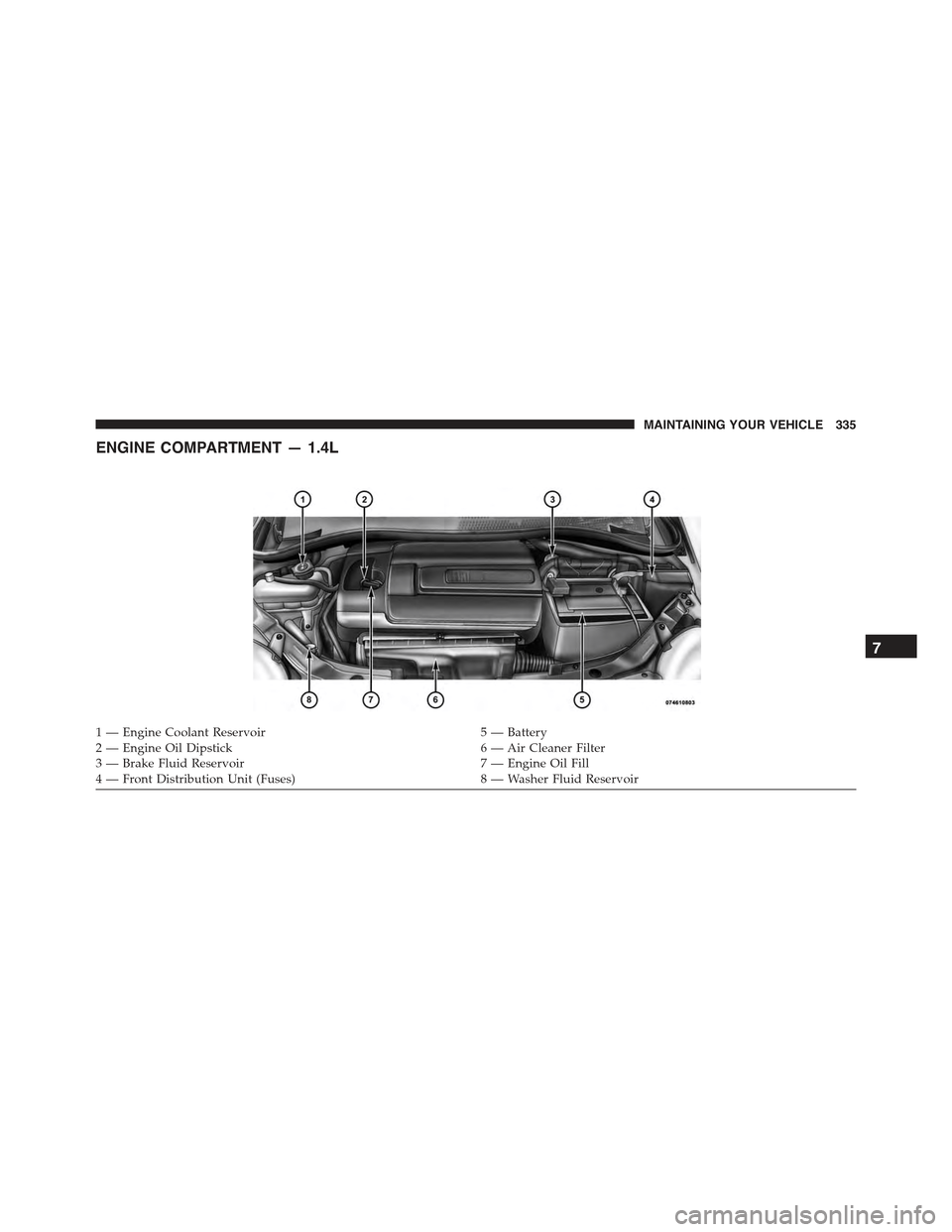
ENGINE COMPARTMENT — 1.4L
1 — Engine Coolant Reservoir5 — Battery2 — Engine Oil Dipstick6 — Air Cleaner Filter3 — Brake Fluid Reservoir7 — Engine Oil Fill4 — Front Distribution Unit (Fuses)8 — Washer Fluid Reservoir
7
MAINTAINING YOUR VEHICLE 335
Page 338 of 423
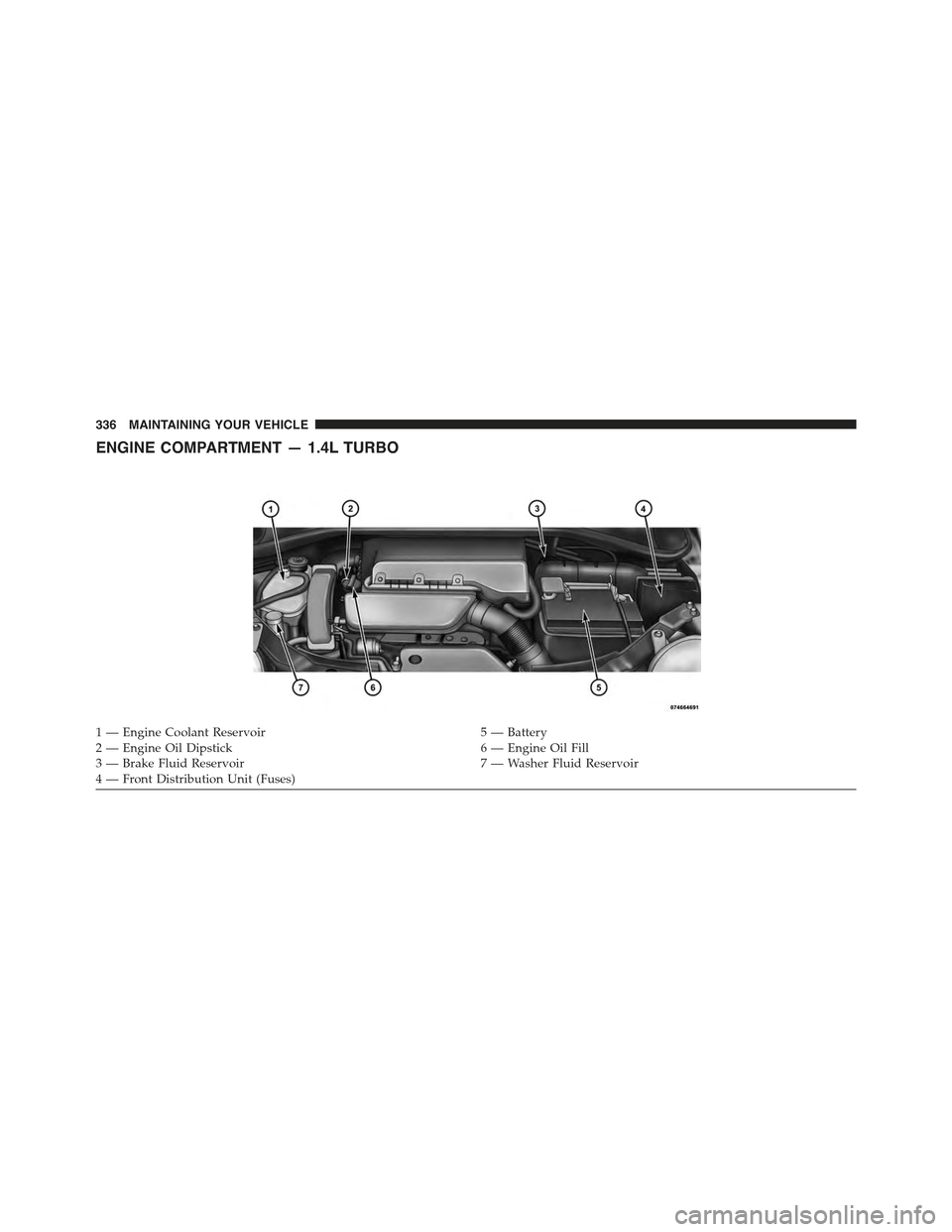
ENGINE COMPARTMENT — 1.4L TURBO
1 — Engine Coolant Reservoir5 — Battery2—EngineOilDipstick6—EngineOilFill3 — Brake Fluid Reservoir7 — Washer Fluid Reservoir4—FrontDistributionUnit(Fuses)
336 MAINTAINING YOUR VEHICLE
Page 340 of 423
Indicator Light (MIL)” is functioning and is not on when
the engine is running, and that the OBD II system is
ready for testing.
Normally, the OBD II system will be ready. The OBD II
system maynotbe ready if your vehicle was recently
serviced, recently had a dead battery or a battery replace-
ment. If the OBD II system should be determined not
ready for the I/M test, your vehicle may fail the test.
Your vehicle has a simple ignition key-actuated test,
which you can use prior to going to the test station. To
check if your vehicle’s OBD II system is ready, you must
do the following:
1. Turn the ignition switch to the ON position, but do not
crank or start the engine.
2. If you crank or start the engine, you will have to start
this test over.
3. As soon as you turn the ignition switch to the ON
position, you will see the MIL symbol come on as part
of a normal bulb check.
4. Approximately 15 seconds later, one of two things will
happen:
•The MIL will flash for about 10 seconds and then
return to being fully illuminated until you turn OFF
the ignition or start the engine. This means that your
vehicle’s OBD II system isnot readyand you should
notproceed to the I/M station.
•The MIL will not flash at all and will remain fully
illuminated until you turn OFF the ignition or start the
engine. This means that your vehicle’s OBD II system
isreadyand you can proceed to the I/M station.
If your OBD II system isnot ready,you should see your
authorized studio or repair facility. If your vehicle was
recently serviced or had a battery failure or replacement,
338 MAINTAINING YOUR VEHICLE
Page 347 of 423
Maintenance-Free Battery
Your vehicle is equipped with a maintenance-free battery.
You will never have to add water, nor is periodic main-
tenance required.
WARNING!
•Battery fluid is a corrosive acid solution and can
burn or even blind you. Do not allow battery fluid
to contact your eyes, skin, or clothing. Do not lean
over a battery when attaching clamps. If acid
splashes in eyes or on skin, flush the area imme-
diately with large amounts of water. Refer to
“Jump-Starting Procedures” in “What To Do In
Emergencies” for further information.
(Continued)
WARNING!(Continued)
•Battery gas is flammable and explosive. Keep
flame or sparks away from the battery. Do not use
a booster battery or any other booster source with
an output greater than 12 Volts. Do not allow cable
clamps to touch each other.
•Battery posts, terminals, and related accessories
contain lead and lead compounds. Wash hands
after handling.
•The battery in this vehicle has a vent hose that
should not be disconnected and should only be
replaced with a battery of the same type (vented).
7
MAINTAINING YOUR VEHICLE 345
Page 348 of 423
CAUTION!
•It is essential when replacing the cables on the
battery that the positive cable is attached to the
positive post and the negative cable is attached to
the negative post. Battery posts are marked positive
(+) and negative (-) and are identified on the
battery case. Cable clamps should be tight on the
terminal posts and free of corrosion.
•If a “fast charger” is used while the battery is in the
vehicle, disconnect both vehicle battery cables be-
fore connecting the charger to the battery. Do not
use a “fast charger” to provide starting voltage.
Air Conditioner Maintenance
For best possible performance, your air conditioner
should be checked and serviced by an authorized studio
at the start of each warm season. This service should
include cleaning of the condenser fins and a performance
test. Drive belt tension should also be checked at this
time.
CAUTION!
Do not use chemical flushes in your air conditioning
system as the chemicals can damage your air condi-
tioning components. Such damage is not covered by
the New Vehicle Limited Warranty.
346 MAINTAINING YOUR VEHICLE
Page 378 of 423
Cavity
Vehicle
Fuse
Number
Mini
FuseDescription
6 F43 20 Amp
Yellow
Bi-Directional
Washer
7 F48 20 Amp
Yellow
Passenger Power
Window
8 F13 7.5
Amp
Brown
Left Low Beam,
Headlamp Leveling
9 F50 7.5
Amp
Brown
Airbag
10 F51 5 Amp
Ta n
Car Radio Switch,
Climate Control
System, Stop Light,
Clutch
Cavity
Vehicle
Fuse
Number
Mini
FuseDescription
11 F37 5 Amp
Ta n
Stop Light Switch,
Instrument Panel
Node
12 F49 5 Amp
Ta n
Exterior Mirror,
GPS, Electric Mir-
ror, Parking Sensor
13 F31 5 Amp
Ta n
Ignition, Climate
Control
14 F47 20 Amp
Yellow
Driver Power
Window
Underhood Fuses
The Front Distribution Unit is located on the right side of
the engine compartment, next to the battery. To access the
fuses, press the release tabs and remove the cover.
376 MAINTAINING YOUR VEHICLE
Page 382 of 423
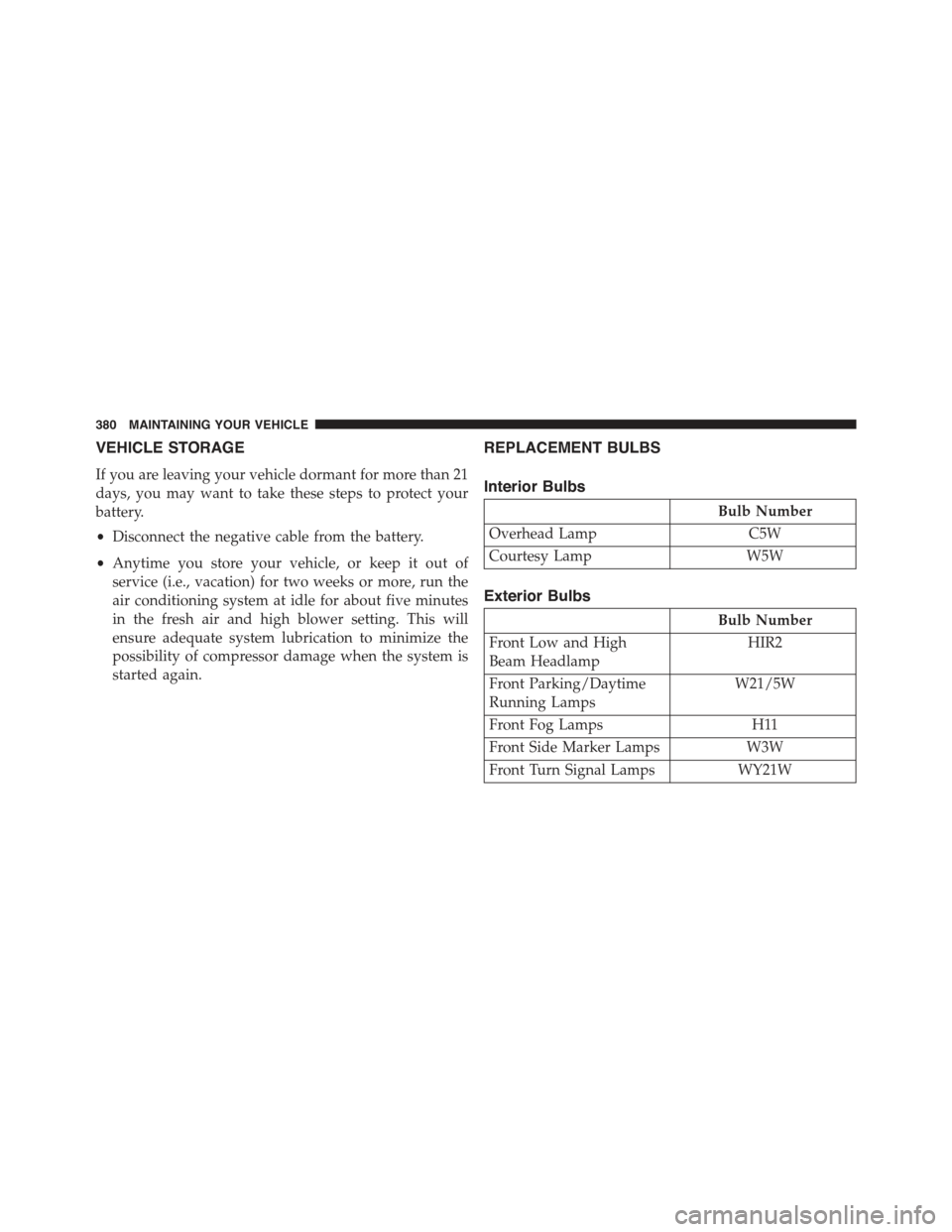
VEHICLE STORAGE
If you are leaving your vehicle dormant for more than 21
days, you may want to take these steps to protect your
battery.
•Disconnect the negative cable from the battery.
•Anytime you store your vehicle, or keep it out of
service (i.e., vacation) for two weeks or more, run the
air conditioning system at idle for about five minutes
in the fresh air and high blower setting. This will
ensure adequate system lubrication to minimize the
possibility of compressor damage when the system is
started again.
REPLACEMENT BULBS
Interior Bulbs
Bulb Number
Overhead LampC5W
Courtesy LampW5W
Exterior Bulbs
Bulb Number
Front Low and High
Beam Headlamp
HIR2
Front Parking/Daytime
Running Lamps
W21/5W
Front Fog Lamps H11
Front Side Marker Lamps W3W
Front Turn Signal Lamps WY21W
380 MAINTAINING YOUR VEHICLE
Page 393 of 423
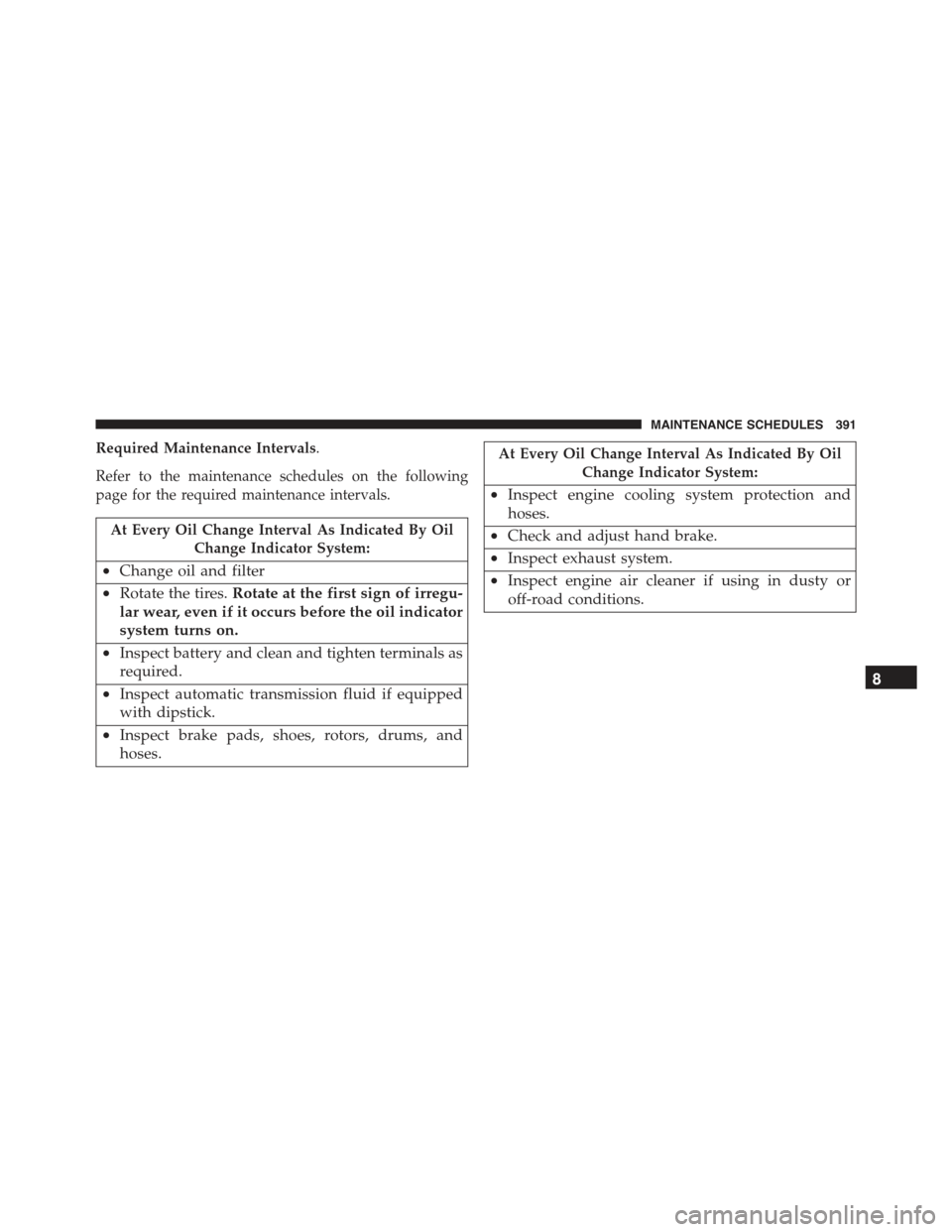
Required Maintenance Intervals.
Refer to the maintenance schedules on the following
page for the required maintenance intervals.
At Every Oil Change Interval As Indicated By Oil
Change Indicator System:
•Change oil and filter
•Rotate the tires.Rotate at the first sign of irregu-
lar wear, even if it occurs before the oil indicator
system turns on.
•Inspect battery and clean and tighten terminals as
required.
•Inspect automatic transmission fluid if equipped
with dipstick.
•Inspect brake pads, shoes, rotors, drums, and
hoses.
At Every Oil Change Interval As Indicated By Oil
Change Indicator System:
•Inspect engine cooling system protection and
hoses.
•Check and adjust hand brake.
•Inspect exhaust system.
•Inspect engine air cleaner if using in dusty or
off-road conditions.
8
MAINTENANCE SCHEDULES 391