on off FIAT 500 2013 2.G Repair Manual
[x] Cancel search | Manufacturer: FIAT, Model Year: 2013, Model line: 500, Model: FIAT 500 2013 2.GPages: 423, PDF Size: 9.86 MB
Page 218 of 423
outlets. If Economy mode is desired, press the A/C
button to turn off the A/C mode in the ATC display and
deactivate the A/C system.
NOTE:
•If the system is in Mix or Defrost Mode, the A/C can
be turned off, but the A/C system shall remain active
to prevent fogging of the windows.
•If fog or mist appears on the windshield or side glass,
select Defrost mode and increase blower speed.
Recirculation Control
When outside air contains smoke, odors, or
high humidity, or if rapid cooling is desired,
you may wish to recirculate interior air by
pressing the RECIRCULATION control button.
Recirculation mode should only be used temporarily. The
recirculation LED will illuminate when this button is
selected. Push the button a second time to turn off the
Recirculation mode LED and allow outside air into the
vehicle.
NOTE:Automatic Temperature Controls (ATC) will au-
tomatically adjust the climate control settings to reduce
or eliminate window fogging on the front windshield.
When this occurs, recirculation will be unavailable.
Operating Tips
Window Fogging
Windows will fog on the inside when the humidity inside
the vehicle is high. This often occurs in mild or cool
temperatures when it’s rainy or humid. In most cases,
turning the air conditioning (pressing the A/C button) on
will clear the fog. Adjust the temperature control, air
direction, and blower speed to maintain comfort.
As the temperature gets colder, it may be necessary to
direct air onto the windshield. Adjust the temperature
216 UNDERSTANDING YOUR INSTRUMENT PANEL
Page 222 of 423
▫Acceleration.........................239
▫Traction............................239
!DRIVING THROUGH WATER.............240
▫Flowing/Rising Water..................240
▫Shallow Standing Water.................240
!POWER STEERING.....................242
!PARKING BRAKE......................244
!SPORT MODE.........................246
▫Manual Transmission – If Equipped........246
▫Automatic Transmission – If Equipped......247
!BRAKE SYSTEM.......................248
▫Four-Wheel Anti-Lock Brake System (ABS) . . .248
!ELECTRONIC BRAKE CONTROL SYSTEM . . . .249
▫Anti-Lock Brake System (ABS)............250
▫Brake Assist System (BAS)...............250
▫Traction Control System (TCS)............251
▫Hill Start Assist (HSA).................251
▫Electronic Stability Control (ESC)..........252
▫ESC Activation/Malfunction Indicator Light
And ESC OFF Indicator Light............255
!TIRE SAFETY INFORMATION.............257
▫Tire Markings........................257
▫Tire Identification Number (TIN)...........260
▫Tire Terminology And Definitions..........262
▫Tire Loading And Tire Pressure...........263
!TIRES — GENERAL INFORMATION........268
220 STARTING AND OPERATING
Page 226 of 423
Turn the ignition switch to the AVV (START) position and
release it when the engine starts. If the engine fails to start
within 10 seconds, turn the ignition switch to the STOP
(OFF/LOCK) position, wait 10 to 15 seconds, then repeat
the “Normal Starting” procedure.
Cold Weather Operation
To prevent possible engine damage while starting at low
temperatures, this vehicle will inhibit engine cranking
when the ambient temperature is less than –22° F (–30° C)
and the oil temperature sensor reading indicates an
engine block heater has not been used. An externally-
powered electric engine block heater is available as
optional equipment or from your authorized studio.
The message “plug in engine heater” will be displayed in the
instrument cluster when the ambient temperature is below
5° F (–15° C) at the time the engine is shut off as a reminder
to avoid possible crank delays at the next cold start.
CAUTION!
Use of the recommended SAE 5W-30 oil and adher-
ing to the prescribed oil change intervals is important
to prevent engine damage and ensure satisfactory
starting in cold conditions.
If Engine Fails To Start
WARNING!
Never pour fuel or other flammable liquids into the
throttle body air inlet opening in an attempt to start
the vehicle. This could result in a flash fire causing
serious personal injury.
224 STARTING AND OPERATING
Page 232 of 423
WARNING!(Continued)
•Unintended movement of a vehicle could injure
those in or near the vehicle. As with all vehicles,
you should never exit a vehicle while the engine is
running. Before exiting a vehicle, always apply the
parking brake, shift the transmission into PARK,
turn the engine OFF, and remove the ignition key.
Once the key is removed, the shift lever is locked in
PARK, securing the vehicle against unwanted
movement.
•When leaving the vehicle, always remove the igni-
tion key and lock your vehicle.
(Continued)
WARNING!(Continued)
•Never leave children alone in a vehicle, or with
access to an unlocked vehicle. Allowing children to
be in a vehicle unattended is dangerous for a
number of reasons. A child or others could be
seriously or fatally injured. Children should be
warned not to touch the parking brake, brake pedal
or the shift lever.
•Do not leave the key fob in or near the vehicle (or
in a location accessible to children), or in a location
accessible to children. A child could operate power
windows, other controls, or move the vehicle.
Key Ignition Park Interlock
This vehicle is equipped with a Key Ignition Park Inter-
lock which requires the shift lever to be placed in PARK
before the ignition switch can be turned to the OFF
position. The key can only be removed from the ignition
230 STARTING AND OPERATING
Page 233 of 423
when the ignition is in the OFF position, and once
removed, the shift lever is locked in PARK.
Brake/Transmission Shift Interlock System
This vehicle is equipped with a Brake Transmission Shift
Interlock System (BTSI) that holds the shift lever in PARK
unless the brakes are applied. To move the shift lever out
of PARK, the ignition switch must be turned to the
ON/RUN position (engine running or not) and the brake
pedal must be pressed.
Six-Speed Automatic Transmission
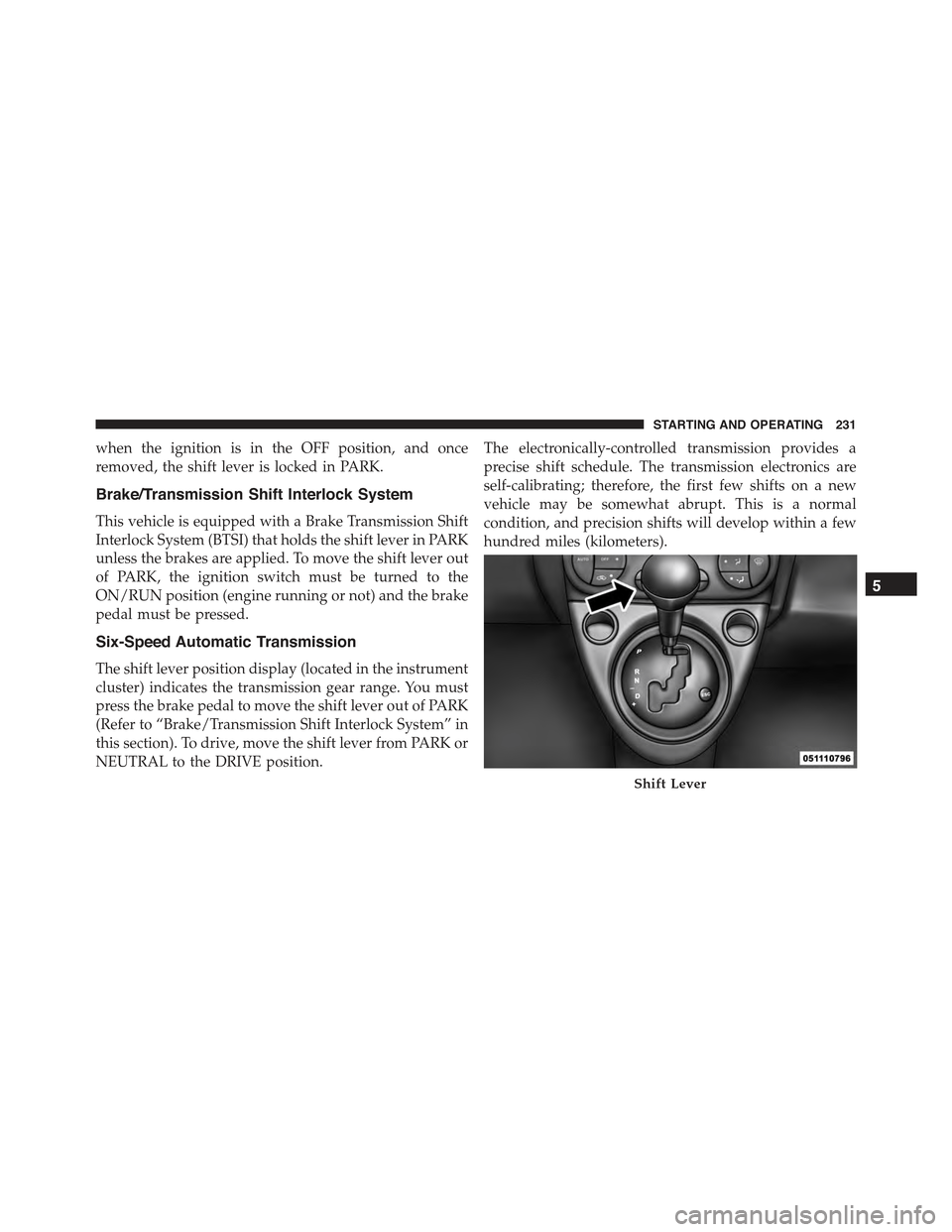
The shift lever position display (located in the instrument
cluster) indicates the transmission gear range. You must
press the brake pedal to move the shift lever out of PARK
(Refer to “Brake/Transmission Shift Interlock System” in
this section). To drive, move the shift lever from PARK or
NEUTRAL to the DRIVE position.
The electronically-controlled transmission provides a
precise shift schedule. The transmission electronics are
self-calibrating; therefore, the first few shifts on a new
vehicle may be somewhat abrupt. This is a normal
condition, and precision shifts will develop within a few
hundred miles (kilometers).
Shift Lever
5
STARTING AND OPERATING 231
Page 236 of 423
WARNING!(Continued)
•When leaving the vehicle, always remove the igni-
tion key and lock your vehicle.
•Never leave children alone in a vehicle, or with
access to an unlocked vehicle. Allowing children to
be in a vehicle unattended is dangerous for a
number of reasons. A child or others could be
seriously or fatally injured. Children should be
warned not to touch the parking brake, brake pedal
or the shift lever.
•Do not leave the ignition key in or near the vehicle,
or in a location accessible to children. A child could
operate power windows, other controls, or move
the vehicle.
CAUTION!
•Before moving the shift lever out of PARK, you
must turn the ignition switch from the OFF posi-
tion to the ON/RUN position, and also press the
brake pedal. Otherwise, damage to the shift lever
could result.
•DO NOT race the engine when shifting from
PARK or NEUTRAL into another gear range, as this
can damage the drivetrain.
The following indicators should be used to ensure that
you have engaged the shift lever in the PARK position:
•When shifting into PARK, firmly move the shift lever
all the way forward and to the left until it stops and is
fully seated.
•Look at the shift lever position display and verify that
it indicates the PARK position.
234 STARTING AND OPERATING
Page 237 of 423
•With brake pedal released, verify that the shift lever
will not move out of PARK.
REVERSE
This range is for moving the vehicle backward. Shift into
REVERSE only after the vehicle has come to a complete
stop.
NEUTRAL
Use this range when the vehicle is standing for prolonged
periods with the engine running. The engine may be
started in this range. Apply the parking brake and shift
the transmission into PARK if you must leave the vehicle.
WARNING!
Do not coast in NEUTRAL and never turn off the
ignition to coast down a hill. These are unsafe
(Continued)
WARNING!(Continued)
practices that limit your response to changing traffic
or road conditions. You might lose control of the
vehicle and have a collision.
CAUTION!
Towing the vehicle, coasting, or driving for any other
reason with the transmission in NEUTRAL can cause
severe transmission damage. Refer to “Recreational
Towing” in “Starting And Operating” and “Towing A
Disabled Vehicle” in “What To Do In Emergencies”
for further information.
DRIVE
This range should be used for most city and highway
driving. It provides the smoothest upshifts and down-
shifts, and the best fuel economy. The transmission
5
STARTING AND OPERATING 235
Page 239 of 423
In the event of a momentary problem, the transmission
can be reset to regain all forward gears by performing the
following steps:
1. Stop the vehicle.
2. Shift the transmission into PARK.
3. Turn the ignition switch to the LOCK/OFF position.
4. Wait approximately 10 seconds.
5. Restart the engine.
6. Shift into the desired gear range. If the problem is no
longer detected, the transmission will return to normal
operation.
NOTE:Even if the transmission can be reset, we recom-
mend that you visit your authorized studio at your
earliest possible convenience. Your authorized studio has
diagnostic equipment to determine if the problem could
recur.
If the transmission cannot be reset, authorized studio
service is required.
AUTOSTICK® — IF EQUIPPED
AutoStick® is a driver-interactive transmission feature
providing manual shift control, giving you more control
of the vehicle. AutoStick® allows you to maximize en-
gine braking, eliminate undesirable upshifts and down-
shifts, and improve overall vehicle performance. This
system can also provide you with more control during
passing, city driving, cold slippery conditions, mountain
driving, and many other situations.
Operation
When the shift lever is in the AutoStick® position (beside the
Drive position), it can be moved forward and rearward. This
allows the driver to manually select the transmission gear
being used. Moving the shift lever forward (-) triggers a
downshift, and rearward (+) an upshift. The current gear
will be displayed in the instrument cluster.
5
STARTING AND OPERATING 237
Page 240 of 423
NOTE:In AutoStick® mode, the transmission will only
shift up or down when the driver moves the shift lever
rearward (+) or forward (-), except as described below.
•The transmission will automatically downshift as the
vehicle slows (to prevent engine lugging) and will
display the current gear.
•The transmission will automatically downshift to first
gear when coming to a stop. After a stop, the driver
should manually upshift (+) the transmission as the
vehicle is accelerated.
•Starting out in second or third gear can be helpful in
snow or icy conditions. To select second or third gear
after the vehicle is brought to a stop, tap the shift lever
rearward (+) once or twice.
•The transmission will automatically upshift when nec-
essary to prevent engine over-speed.
•The system will ignore shift commands that would
cause engine lugging or overspeed. An audible beep
will sound if an inappropriate gear is requested.
•Avoid using speed control when AutoStick® is en-
gaged because the transmission will not shift auto-
matically.
•Transmission shifting will be more noticeable when
AutoStick® is engaged.
•If the system detects powertrain overheating, the
transmission will revert to a automatic shift mode and
remain in that mode until the powertrain cools off.
•If the system detects a problem, it will disable
AutoStick® mode and the transmission will return to
automatic mode until the problem is corrected.
•To disengage AutoStick® mode, return the shift lever
to the DRIVE position. You can shift in or out of the
238 STARTING AND OPERATING
Page 241 of 423
AutoStick® position at any time without taking your
foot off the accelerator pedal.
WARNING!
Do not downshift for additional engine braking on a
slippery surface. The drive wheels could lose their
grip and the vehicle could skid, causing a collision or
personal injury.
DRIVING ON SLIPPERY SURFACES
Acceleration
Rapid acceleration on snow covered, wet, or other slip-
pery surfaces may cause the driving wheels to pull
erratically to the right or left. This phenomenon occurs
when there is a difference in the surface traction under
the front (driving) wheels.
WARNING!
Rapid acceleration on slippery surfaces is dangerous.
Unequal traction can cause sudden pulling of the
front wheels. You could lose control of the vehicle
and possibly have a collision. Accelerate slowly and
carefully whenever there is likely to be poor traction
(ice, snow, wet, mud, loose sand, etc.).
Traction
When driving on wet or slushy roads, it is possible for a
wedge of water to build up between the tire and road
surface. This is hydroplaning and may cause partial or
complete loss of vehicle control and stopping ability. To
reduce this possibility, the following precautions should
be observed:
1. Slow down during rainstorms or when the roads are
slushy.
5
STARTING AND OPERATING 239