instrument panel FIAT 500 2013 2.G Manual Online
[x] Cancel search | Manufacturer: FIAT, Model Year: 2013, Model line: 500, Model: FIAT 500 2013 2.GPages: 423, PDF Size: 9.86 MB
Page 205 of 423

•If the MP3 files on a CD-ROM are structured in
sub-folders their structure is compressed to a single
level structure, where the sub-folders are taken to the
level of the main folders.
Troubleshooting
General
Sound Volume Low
The Fader function should be adjusted to the values “F”
(front) only to prevent the reduction in radio output
power and the cancelling of the volume if the Fader level
adjustment is equal to R+9.
Source Can Not Be Selected
Nothing has been loaded. Load the CD or the MP3 CD to
be listened to.
CD Player
The CD Does Not Play
The CD is dirty. Clean the CD.
The CD is scratched. Try using another CD.
The CD Can Not Be Loaded
A CD is already loaded. Press thebutton and remove
the CD.
MP3 File Reading
Track Skips While Playing Mp3 Files
The CD is scratched or dirty.
The Duration Of The Mp3 Tracks Is Not Correctly
Displayed.
In some cases (due to the recording mode) the duration of
the MP3 tracks can be displayed incorrectly.
4
UNDERSTANDING YOUR INSTRUMENT PANEL 203
Page 206 of 423
Operating Instructions — Hands-Free Phone
(If Equipped)
Refer to the appropriate “BLUE&ME™ User ’s Manual”
for further information.
Personal/Portable Navigation Device (PND) —
If Equipped
A Personal/Portable Navigation Device (PND) is avail-
able as optional equipment for this vehicle, refer to the
Navigation User Guide for further information.
iPod®/USB/MEDIA PLAYER CONTROL —
IF EQUIPPED
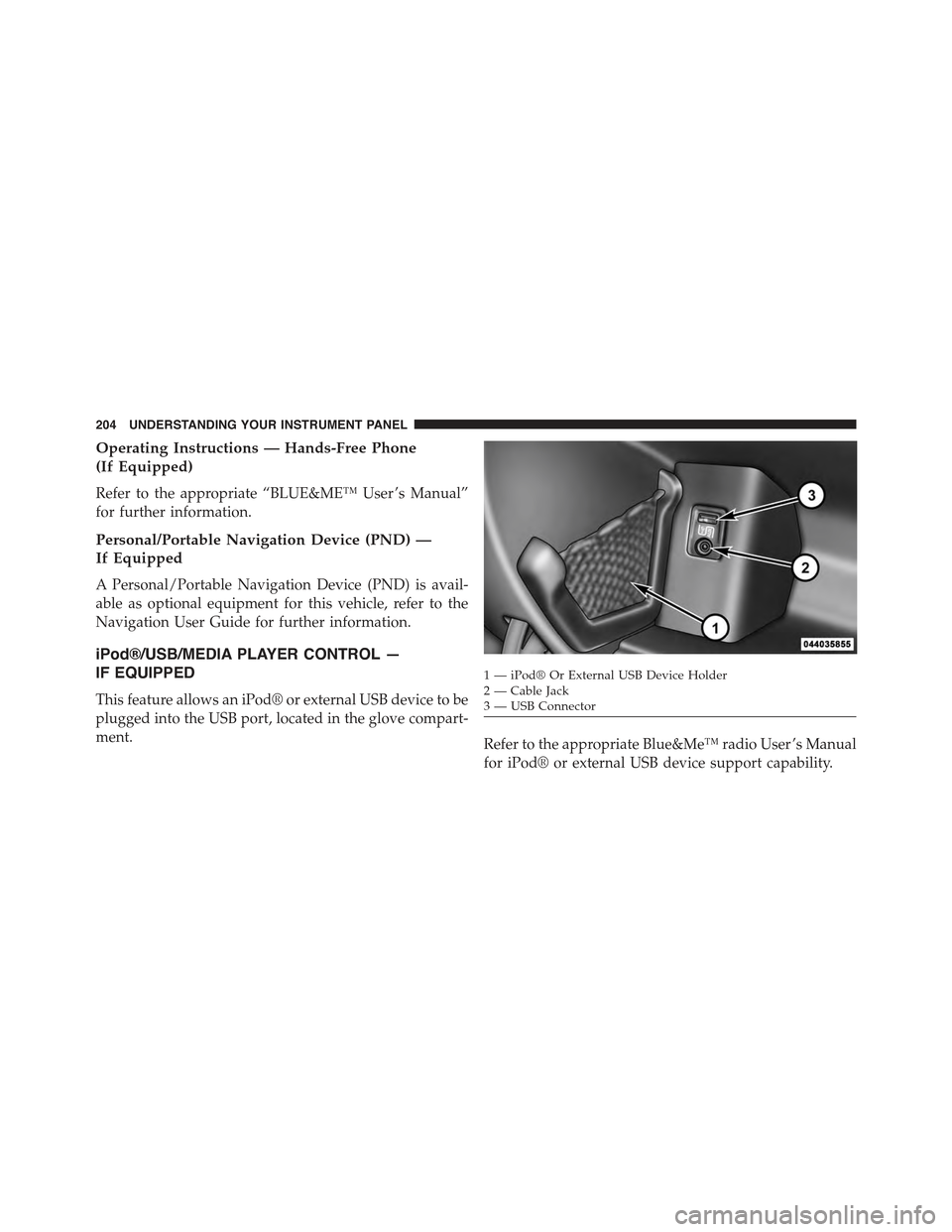
This feature allows an iPod® or external USB device to be
plugged into the USB port, located in the glove compart-
ment.Refer to the appropriate Blue&Me™ radio User ’s Manual
for iPod® or external USB device support capability.
1 — iPod® Or External USB Device Holder2 — Cable Jack3—USBConnector
204 UNDERSTANDING YOUR INSTRUMENT PANEL
Page 207 of 423
STEERING WHEEL AUDIO CONTROLS
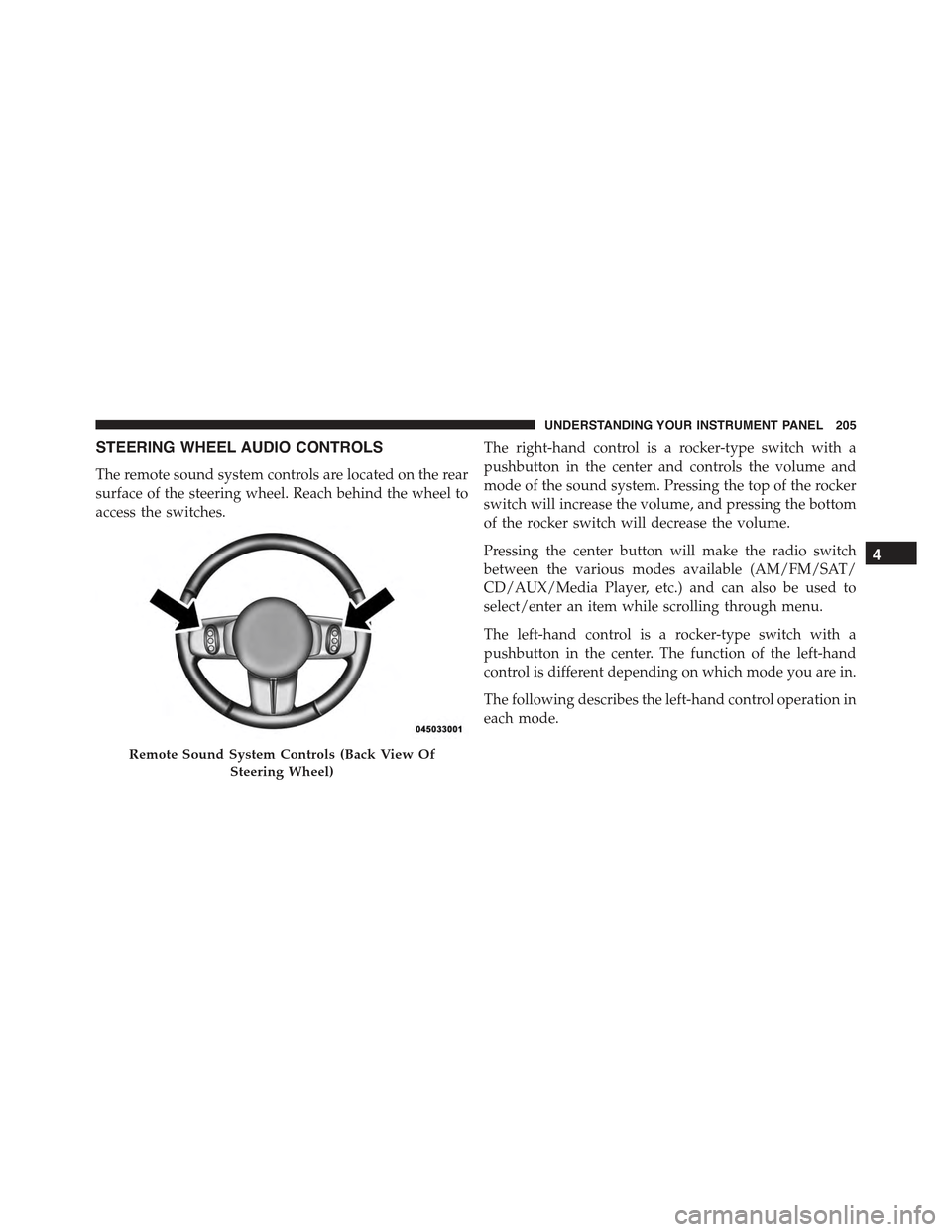
The remote sound system controls are located on the rear
surface of the steering wheel. Reach behind the wheel to
access the switches.
The right-hand control is a rocker-type switch with a
pushbutton in the center and controls the volume and
mode of the sound system. Pressing the top of the rocker
switch will increase the volume, and pressing the bottom
of the rocker switch will decrease the volume.
Pressing the center button will make the radio switch
between the various modes available (AM/FM/SAT/
CD/AUX/Media Player, etc.) and can also be used to
select/enter an item while scrolling through menu.
The left-hand control is a rocker-type switch with a
pushbutton in the center. The function of the left-hand
control is different depending on which mode you are in.
The following describes the left-hand control operation in
each mode.
Remote Sound System Controls (Back View Of
Steering Wheel)
4
UNDERSTANDING YOUR INSTRUMENT PANEL 205
Page 208 of 423
Radio Operation
Pressing the top of the switch will “Seek” up for the next
listenable station and pressing the bottom of the switch
will “Seek” down for the next listenable station.
The button located in the center of the left-hand control
will tune to the next preset station that you have pro-
grammed in the radio preset pushbutton.
CD Player Operation
Pressing the top of the switch once will go to the next
track on the CD. Pressing the bottom of the switch once
will go to the beginning of the current track, or to the
beginning of the previous track if it is within one second
after the current track begins to play.
If you press the switch up or down twice, it plays the
second track; three times, it will play the third, etc.
Operating Instructions — Hands-Free Phone
(If Equipped)
Refer to the appropriate Blue&Me™ User ’s Manual for
further information.
CD/DVD DISC MAINTENANCE
To keep a CD/DVD in good condition, take the following
precautions:
1. Handle the disc by its edge; avoid touching the
surface.
2. If the disc is stained, clean the surface with a soft cloth,
wiping from center to edge.
3. Do not apply paper or tape to the disc; avoid scratch-
ing the disc.
4. Do not use solvents such as benzene, thinner, cleaners,
or anti-static sprays.
206 UNDERSTANDING YOUR INSTRUMENT PANEL
Page 209 of 423
5. Store the disc in its case after playing.
6. Do not expose the disc to direct sunlight.
7. Do not store the disc where temperatures may become
too high.
NOTE:If you experience difficulty in playing a particular
disc, it may be damaged (i.e., scratched, reflective coating
removed, a hair, moisture or dew on the disc) oversized,
or have protection encoding. Try a known good disc
before considering disc player service.
RADIO OPERATION AND MOBILE PHONES
Under certain conditions, the mobile phone being on in
your vehicle can cause erratic or noisy performance from
your radio. This condition may be lessened or eliminated
by relocating the mobile phone antenna. This condition is
not harmful to the radio. If your radio performance does
not satisfactorily “clear” by the repositioning of the
antenna, it is recommended that the radio volume be
turned down or off during mobile phone operation.
CLIMATE CONTROLS
The air conditioning and heating system is designed to
make you comfortable in all types of weather.
4
UNDERSTANDING YOUR INSTRUMENT PANEL 207
Page 210 of 423
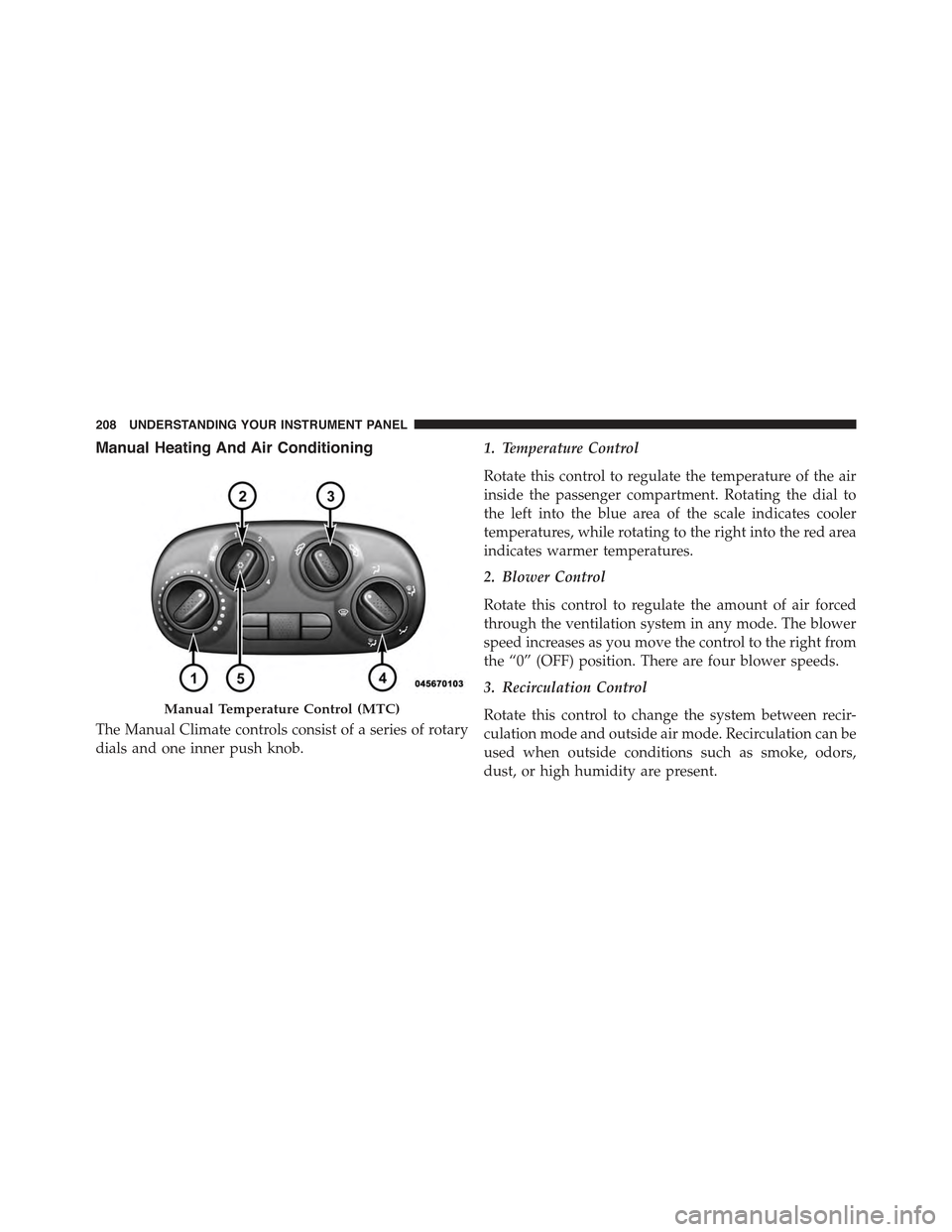
Manual Heating And Air Conditioning
The Manual Climate controls consist of a series of rotary
dials and one inner push knob.
1. Temperature Control
Rotate this control to regulate the temperature of the air
inside the passenger compartment. Rotating the dial to
the left into the blue area of the scale indicates cooler
temperatures, while rotating to the right into the red area
indicates warmer temperatures.
2. Blower Control
Rotate this control to regulate the amount of air forced
through the ventilation system in any mode. The blower
speed increases as you move the control to the right from
the “0” (OFF) position. There are four blower speeds.
3. Recirculation Control
Rotate this control to change the system between recir-
culation mode and outside air mode. Recirculation can be
used when outside conditions such as smoke, odors,
dust, or high humidity are present.
Manual Temperature Control (MTC)
208 UNDERSTANDING YOUR INSTRUMENT PANEL
Page 211 of 423
NOTE:
•Continuous use of the Recirculation mode may make
the inside air stuffy and window fogging may occur.
Extended use of this mode is not recommended.
•The use of the Recirculation mode in cold or damp
weather could cause windows to fog on the inside,
because of moisture buildup inside the vehicle. Se-
lect the outside air position for maximum defogging.
•Recirculation can be used in all modes except for
Defrost.
•The A/C can be deselected manually without dis-
turbing the mode control selection.
4. Mode Control
Rotate this control to change the system between Modes
(Panel, Bi-Level, Floor, Mix, Defrost).
•Panel
Air is directed through the outlets in the instru-
ment panel. These outlets can be adjusted to direct
airflow.
NOTE:The center instrument panel outlets can be aimed
so that they are directed toward the rear seat passengers
for maximum airflow to the rear.
•Bi-Level
Air is directed through the panel and floor outlets.
•Floor
Air is directed through the floor outlets with a
small amount flowing through the defrost and
side window demister outlets.
•Mix
Air is directed through the floor, defrost, and side
window demister outlets. This setting works best
in cold or snowy conditions that require extra heat
4
UNDERSTANDING YOUR INSTRUMENT PANEL 209
Page 212 of 423
to the windshield. This setting is good for maintaining
comfort while reducing moisture on the windshield.
•Defrost
Air is directed through the windshield and side
window demister outlets. Use this mode with
maximum blower and temperature settings for best
windshield and side window defrosting.
NOTE:The air conditioning compressor operates in Mix
or Defrost, even if the Air Conditioning (A/C) button is
not pressed. This dehumidifies the air to help dry the
windshield. To improve fuel economy, use these modes
only when necessary.
5. A/C Button
Press this button to engage the Air Conditioning. A light
will illuminate when the Air Conditioning system is
engaged.
MAX A/C
For maximum cooling, use the A/C and recirculation
modes at the same time.
ECONOMY MODE
If economy mode is desired, press the A/C button to turn
OFF the indicator light and the A/C compressor. Then,
move the temperature control to the desired temperature.
Automatic Temperature Control (ATC) — If
Equipped
•The Automatic Temperature Control (ATC) allows the
driver to select individual comfort settings.
•The system provides set-and-forget operation for op-
timum comfort and convenience.
•The system can be controlled manually, if desired.
The ATC system automatically maintains the interior
comfort level desired by the driver and passenger.
210 UNDERSTANDING YOUR INSTRUMENT PANEL
Page 213 of 423
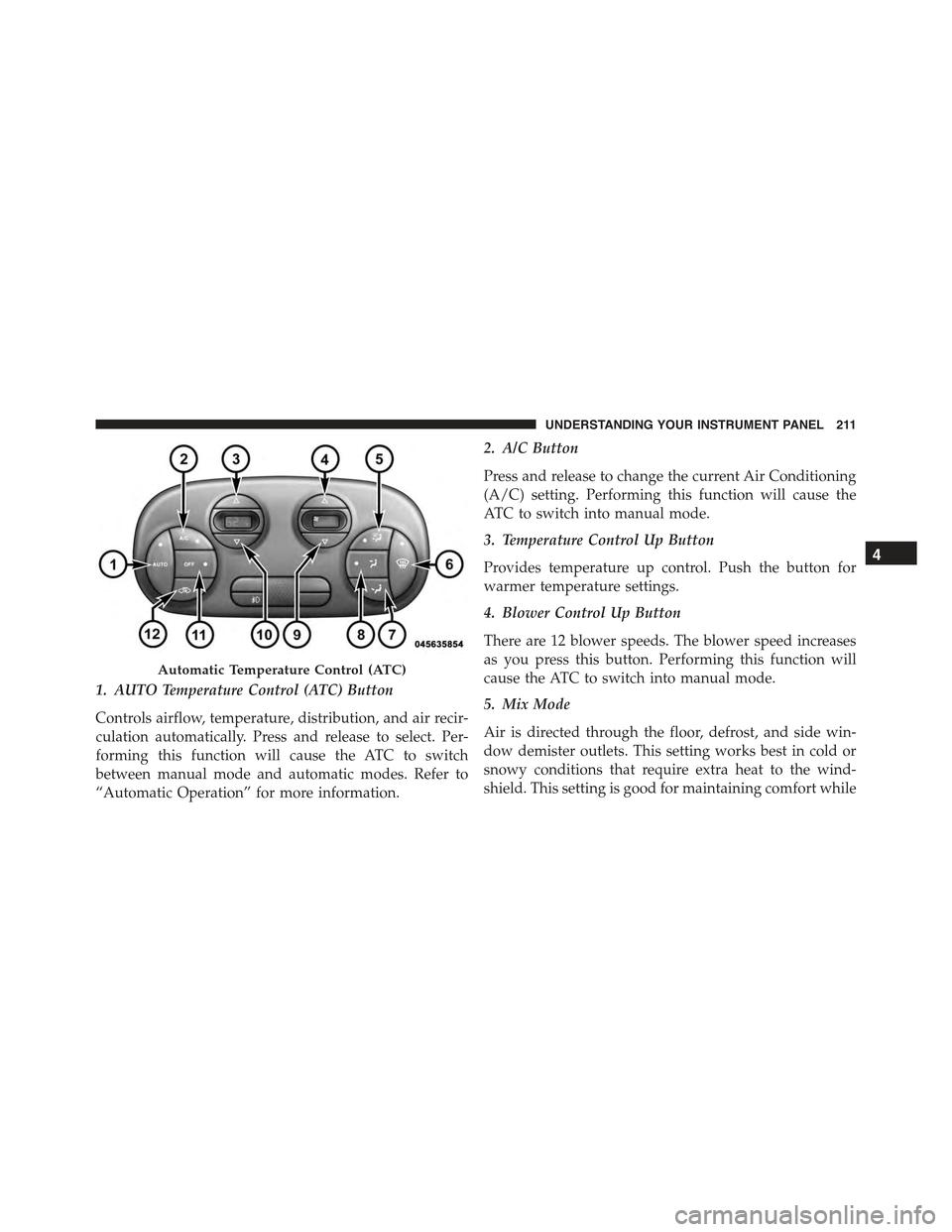
1. AUTO Temperature Control (ATC) Button
Controls airflow, temperature, distribution, and air recir-
culation automatically. Press and release to select. Per-
forming this function will cause the ATC to switch
between manual mode and automatic modes. Refer to
“Automatic Operation” for more information.
2. A/C Button
Press and release to change the current Air Conditioning
(A/C) setting. Performing this function will cause the
ATC to switch into manual mode.
3. Temperature Control Up Button
Provides temperature up control. Push the button for
warmer temperature settings.
4. Blower Control Up Button
There are 12 blower speeds. The blower speed increases
as you press this button. Performing this function will
cause the ATC to switch into manual mode.
5. Mix Mode
Air is directed through the floor, defrost, and side win-
dow demister outlets. This setting works best in cold or
snowy conditions that require extra heat to the wind-
shield. This setting is good for maintaining comfort while
Automatic Temperature Control (ATC)
4
UNDERSTANDING YOUR INSTRUMENT PANEL 211
Page 214 of 423
reducing moisture on the windshield. Performing this
function will cause the ATC to switch into manual mode.
6. Front Defrost
Press and release to change the current setting. The
indicator illuminates when ON. The blower will auto-
matically default to medium-high if the Defrost mode is
selected. Performing this function will cause the ATC to
switch into manual mode.
7. Floor Mode
Air is directed through the floor outlets with a small
amount flowing through the defrost and side window
demister outlets.
8. Panel Mode
Air is directed through the outlets in the instrument
panel. These outlets can be adjusted to direct airflow.
Performing this function will cause the ATC to switch
into manual mode.
NOTE:The center instrument panel outlets can be aimed
so that they are directed toward the rear seat passengers
for maximum airflow to the rear.
9. Blower Control Down Button
There are 12 blower speeds. The blower speed decreases
as you press this button. Performing this function will
cause the ATC to switch into manual mode.
10. Temperature Control Down Button
Provides temperature down control. Push the button for
cooler temperature settings.
11. Climate Control ON/OFF Button
Press and release to turn the Climate Control ON or OFF.
12. Recirculation Control Button
Press and release to change the current setting. The
indicator illuminates when ON.
212 UNDERSTANDING YOUR INSTRUMENT PANEL