instrument panel FIAT 500 2015 2.G Repair Manual
[x] Cancel search | Manufacturer: FIAT, Model Year: 2015, Model line: 500, Model: FIAT 500 2015 2.GPages: 438, PDF Size: 2.96 MB
Page 173 of 438
4. When accessing the “Distance” submenu, briefly pushand release the MENUbutton. Either “mi” or “km”
will appear on the display (according to the previous
setting).
5. Push and release the UP
or DOWNbutton for
setting.
6. Briefly push and release the MENUbutton to return to
the sub-menu.
7. When accessing the “Fuel Economy” submenu, briefly push and release the MENUbutton. Either “mpg,”
“km/l ” or “l/100km” will appear on the display
(according to the previous setting).
If the distance unit set is “mi,” the fuel economy unit will
be displayed in “mpg.”
If the distance unit set is “km,” the fuel economy unit will
be displayed in either km/l or l/100km. 1. Push and release the UP
or DOWNbutton for
setting.
2. Briefly push and release the MENUbutton to return to
the sub-menu.
3. When accessing the “Temperature” submenu: briefly push and release the MENUbutton. Either “°F” or
“°C” will appear on the display (according to the
previous setting).
4. Push and release the UP
or DOWNbutton for
setting.
5. Briefly push and release the MENUbutton to return to
the Tire Pressure — PSI/KPA sub-menu.
When you have made the required settings, briefly push
and release the MENUbutton to go back to the sub-menu
screen, or push and hold the MENUbutton (approxi-
mately one second) to go back to the main screen without
storing the settings.
4
UNDERSTANDING YOUR INSTRUMENT PANEL 171
Page 174 of 438
Language (Selecting The Language)
The messages can be displayed in the following lan-
guages: Italian, English, Turkce, Nederlands, Spanish,
French, Dutch, Polish, Brasilian.
To set the required language, proceed as follows:
1. Briefly push and release theMENUbutton. Push and
release the UP
or DOWNbutton to highlight
Language. Push and release the MENUbutton to
enter the Language MENU.
2. Push and release the UPor DOWNbutton for
setting.
3. Briefly push and release the MENUbutton to go back
to the menu screen, or push and hold the MENU
button (approximately one second) to go back to the
main screen without storing the settings.
Buzzer Volume (Adjusting The Failure/Warning
Buzzer Volume)
With this function the volume of the buzzer accompany-
ing any failure/warning indication can be adjusted to
one of eight volume levels.
To adjust the volume proceed as follows:
1. Briefly push and release the MENUbutton. Push and
release the UP
or DOWNbutton, then high-
light the Buzzer Volume. Push and release the
MENU button to enter the Buzzer Volume MENU.
2. Push and release the UPor DOWNbutton for
setting.
3. Briefly push and release the MENUbutton to go back
to the menu screen, or push and hold the MENU
button (approximately one second) to go back to the
main screen without storing the settings.
172 UNDERSTANDING YOUR INSTRUMENT PANEL
Page 175 of 438
Button Volume (Button Volume Adjustment)
This function may be used to adjust the volume of the
beep accompanying the buttons.MENU,UP
or
DOWN
buttons can be adjusted according to 8
levels.
To adjust the volume, proceed as follows:
1. Briefly push and release the MENUbutton. Push and
release the UP
or DOWNbutton to highlight
the Buzzer Volume, push and release the MENU
button.
2. Push and release the UPor DOWNbutton for
setting.
3. Briefly push and release the MENUbutton to go back
to the menu screen, or push and hold the MENU
button (approximately one second) to go back to the
main screen without storing the settings.
Belt Buzzer (Buzzer Activation For S.B.R.
Indication)
This function will only be displayed after a FIAT Group
Automobiles dealership has deactivated the S.B.R. sys-
tem.
Daytime Running Lamps (DRL)
This function may be used to activate / deactivate the
Daytime Running Lamps.
Proceed as follows to switch this function on or off:
1. Briefly push and release the MENUbutton. Push and
release the Up
or DOWNbutton to highlight
Daytime Running Lamps (DRL). Push and release
the MENU button to enter the DRL MENU.
2. Briefly push and release theMENUbutton. “On” or
“Off” will flash on the display (according to previous
setting).
4
UNDERSTANDING YOUR INSTRUMENT PANEL 173
Page 176 of 438
3. Push and release the UPor DOWNbutton for
setting.
4. Briefly push and release the MENUbutton to go back
to the menu screen, or push and hold the button
(approximately one second) to go back to the main
screen without storing the settings.
GSI (Gear Shift Indicator)
This function may be used to set the Gear Shift Indicator
in two submenus: “Fuel Econ On” and “Fuel Econ Off.”
• Fuel Econ On – turns on a fuel economy upshift light
in the instrument cluster, for optimum fuel economy,
when operating in base driving mode.
• Fuel Econ Off – the fuel economy upshift light is
disabled. To set the required unit, proceed as follows:
1. Briefly push and release the
MENUbutton to display
the two sub-menus.
2. Push and release the UP
or DOWNbutton to
navigate the two sub-menus.
3. Select the required sub-menu and then briefly push and release the MENUbutton.
4. Push and release the UP
or DOWNbutton for
setting.
5. Briefly push and release the MENUbutton to return to
the sub-menu.
When you have made the required settings, briefly push
and release the MENUbutton to go back to the sub-menu
screen, or push and hold the MENUbutton (approxi-
mately one second) to go back to the main screen without
storing the settings.
174 UNDERSTANDING YOUR INSTRUMENT PANEL
Page 177 of 438
Hill Start Assist
This function is used when starting a vehicle from a stop
on a hill. Hill Start Assist maintains the same level of
brake pressure the driver applied for a short period of
time after the foot has been removed from the brake
pedal.
Proceed as follows to switch this function on or off:
1. Briefly push and release theMENUbutton. Push and
release the UP
or DOWNbutton to highlight
the Hill Start Assist. Push and release the MENU
button to enter the Hill Start Assist MENU.
2. Push and release the UPor DOWNbutton for
setting.
3. Briefly push and release the MENUbutton to go back
to the menu screen, or push and hold the button
(approximately one second) to go back to the main
screen without storing the settings.
Tire Pressure
This function will be used to display the tire pressures
individually for all four tires by location.
Proceed as follows:
1. Briefly push and release the MENUbutton. Push and
release the UP
or DOWNbutton to highlight
the Tire Pressure. Push and release the MENU
button to enter the Tire Pressure MENU.
2. Push and release the UP or DOWN button to scroll
through all four tire pressure value locations.
3. Briefly push and release the MENUbutton to go back
to the menu screen, or push and hold the button
(approximately one second) to go back to the main
screen.
4
UNDERSTANDING YOUR INSTRUMENT PANEL 175
Page 178 of 438
Lock
WhenUnlock Driver Door is selected, only the driver’s
door will unlock on the first push of the Remote Keyless
Entry (RKE) transmitter UNLOCK button. When Unlock
Drivers Door is selected, you must push the RKE trans-
mitter UNLOCK button twice to unlock the passenger
door. When All Doorsis selected, both of the doors will
unlock on the first push of the RKE transmitter UNLOCK
button. To make your selection, push and release the
SELECT button until “Unlock Driver Door” or “All
Doors” appears.
Exit Menu
This function closes the initial menu screen.
Briefly push and release the MENUbutton to go back to
the main screen.
Push and release the
button to return to the first
menu option (Speed Beep).
Push and release thebutton to return to the last
menu option (Daylights).
176 UNDERSTANDING YOUR INSTRUMENT PANEL
Page 179 of 438
SALES CODE (RAB) RADIO
Introduction
The radio has been designed according to the specifica-
tions of the passenger compartment, with a personalized
design to match the style of the dashboard.If the radio has BLUE&ME™, refer to the appropriate
“BLUE&ME™ User ’s Manual” for further information.
The instructions for use are given below and we recom-
mend you to read them carefully.
Suggestions
Road Safety
Please, learn how to use all different radio functions (e.g.
store stations) before beginning to drive.
Reception Conditions
Reception conditions change constantly while driving.
Reception may be interfered with by the presence of
mountains, buildings or bridges, or when you are far
away from the broadcaster.
RAB Radio
4
UNDERSTANDING YOUR INSTRUMENT PANEL 177
Page 180 of 438
WARNING!
Having the volume turned up high can cause the
driver to not be able to hear important traffic sounds,
i.e. sirens, horns, etc. Failure to hear traffic sounds
and other important audible information can result
in serious injury or death. Always adjust the volume
so that you can still hear background noises.
Care And Maintenance
Clean the cover with a soft antistatic cloth only. Cleaning
and polishing products could damage the surface.
CDs
The presence of dirt, scratches or distortions on the CDs
could cause skipping and poor sound quality while it is
playing. For optimal playback conditions, follow these
guidelines:
•Only use branded CDs. •
Clean every CD thoroughly removing any finger
marks or dust using a soft cloth. Hold CDs by the
outside and clean them from the middle outwards.
• Never use chemicals (e.g. antistatics or thinners or
sprays) for cleaning as they could damage the surface
of the CDs.
• After listening to them place CDs back in their boxes to
prevent them from being damaged.
• Do not expose CDs to direct sunlight, high tempera-
tures or moisture for long periods.
• Do not stick labels on the CD surface or write on the
recorded surface with pencils or pens.
• Do not use CDs that are very scratched, flawed,
distorted, etc. Using discs like these will result in
malfunctions or damage to the player.
178 UNDERSTANDING YOUR INSTRUMENT PANEL
Page 181 of 438
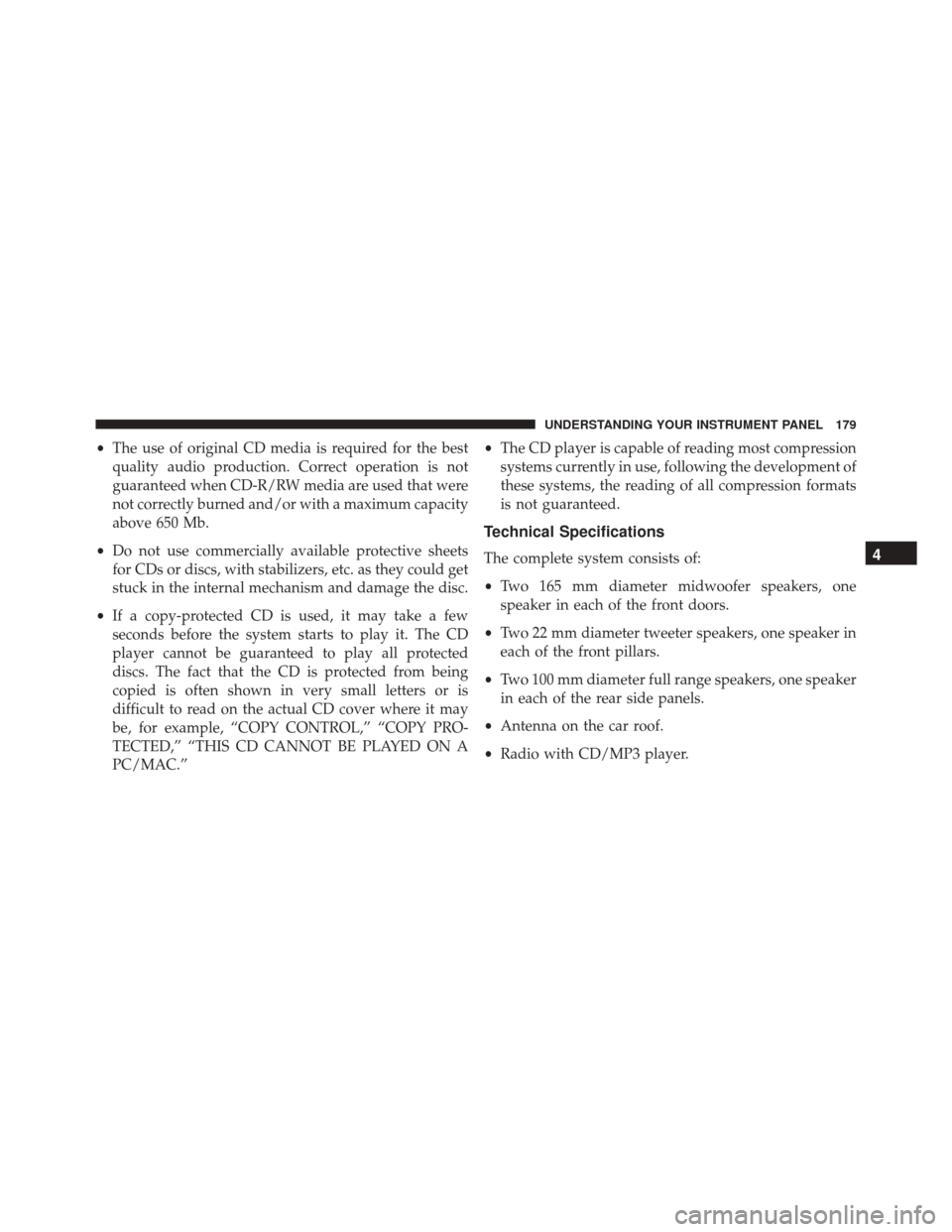
•The use of original CD media is required for the best
quality audio production. Correct operation is not
guaranteed when CD-R/RW media are used that were
not correctly burned and/or with a maximum capacity
above 650 Mb.
• Do not use commercially available protective sheets
for CDs or discs, with stabilizers, etc. as they could get
stuck in the internal mechanism and damage the disc.
• If a copy-protected CD is used, it may take a few
seconds before the system starts to play it. The CD
player cannot be guaranteed to play all protected
discs. The fact that the CD is protected from being
copied is often shown in very small letters or is
difficult to read on the actual CD cover where it may
be, for example, “COPY CONTROL,” “COPY PRO-
TECTED,” “THIS CD CANNOT BE PLAYED ON A
PC/MAC.” •
The CD player is capable of reading most compression
systems currently in use, following the development of
these systems, the reading of all compression formats
is not guaranteed.
Technical Specifications
The complete system consists of:
• Two 165 mm diameter midwoofer speakers, one
speaker in each of the front doors.
• Two 22 mm diameter tweeter speakers, one speaker in
each of the front pillars.
• Two 100 mm diameter full range speakers, one speaker
in each of the rear side panels.
• Antenna on the car roof.
• Radio with CD/MP3 player.4
UNDERSTANDING YOUR INSTRUMENT PANEL 179
Page 182 of 438
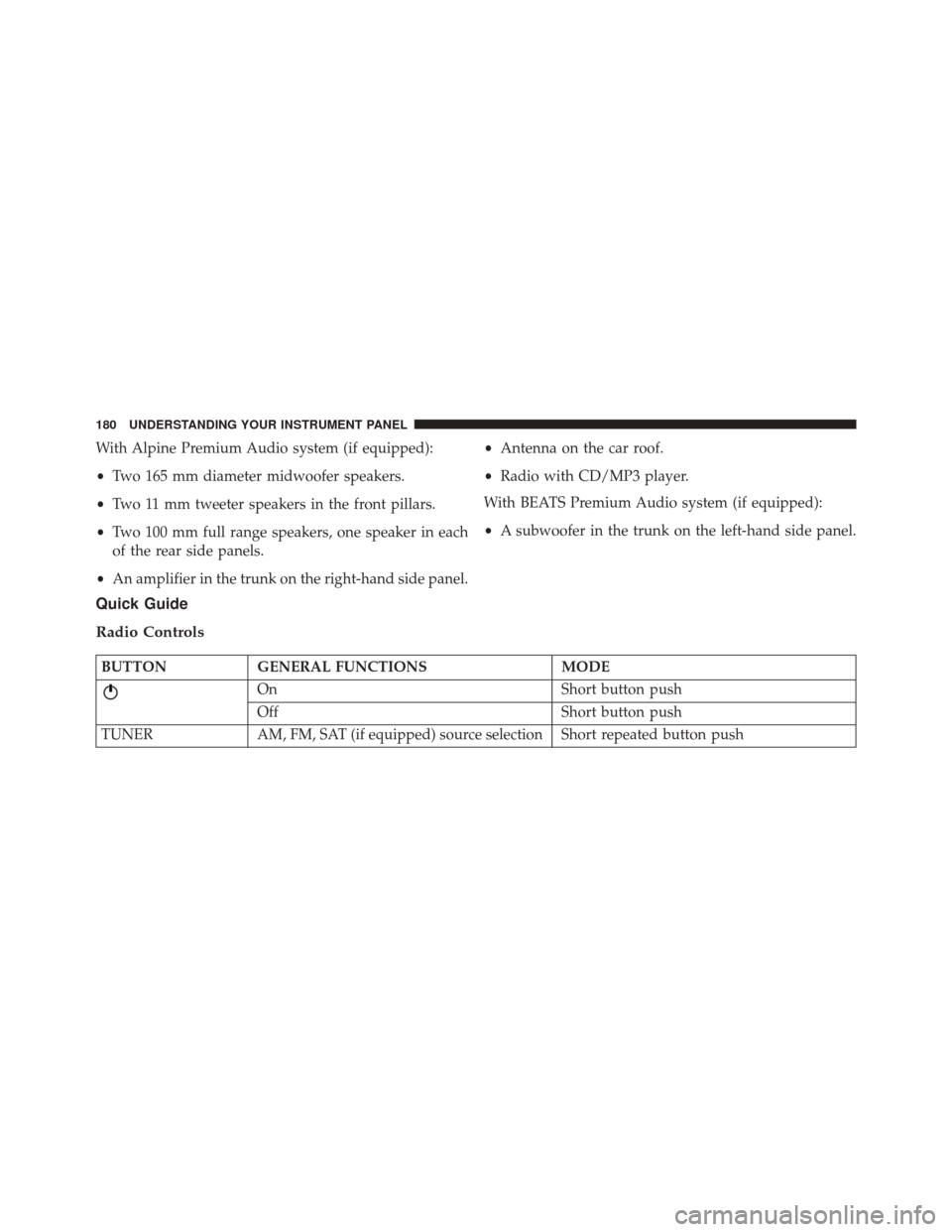
With Alpine Premium Audio system (if equipped):
•Two 165 mm diameter midwoofer speakers.
• Two 11 mm tweeter speakers in the front pillars.
• Two 100 mm full range speakers, one speaker in each
of the rear side panels.
• An amplifier in the trunk on the right-hand side panel. •
Antenna on the car roof.
• Radio with CD/MP3 player.
With BEATS Premium Audio system (if equipped):
• A subwoofer in the trunk on the left-hand side panel.
Quick Guide
Radio Controls
BUTTON GENERAL FUNCTIONS MODE
On Short button push
Off Short button push
TUNER AM, FM, SAT (if equipped) source selection Short repeated button push
180 UNDERSTANDING YOUR INSTRUMENT PANEL