door lock FIAT 500 2017 2.G User Guide
[x] Cancel search | Manufacturer: FIAT, Model Year: 2017, Model line: 500, Model: FIAT 500 2017 2.GPages: 350, PDF Size: 3.01 MB
Page 41 of 350
WARNING!
Deployed air bags and seat belt pretensioners can-
not protect you in another collision. Have the air
bags, seat belt pretensioners, and the seat belt
retractor assemblies replaced by an authorized
dealer immediately. Also, have the Occupant Re-
straint Controller System serviced as well.
NOTE:
• Air bag covers may not be obvious in the interior
trim, but they will open during air bag deployment.
• After any collision, the vehicle should be taken to an
authorized dealer immediately.
Enhanced Accident Response System
In the event of an impact, if the communication net-
work remains intact, and the power remains intact,
depending on the nature of the event, the ORC will
determine whether to have the Enhanced Accident
Response System perform the following functions:
• Cut off fuel to the engine. •
Flash hazard lights as long as the battery has power
or until the hazard light button is pressed. The
hazard lights can be deactivated by pressing the
hazard light button.
• Turn on the interior lights, which remain on as long
as the battery has power or for 15 minutes from the
intervention of the Enhanced Accident Response
System.
• Unlock the power door locks.
Enhanced Accident Response System Reset
Procedure
After the event occurs, when the system is active, a
message regarding fuel cutoff is displayed. Turn the
ignition switch from ignition AVV/START or MAR/
ACC/ON/RUN to ignition STOP/OFF/LOCK. Care-
fully check the vehicle for fuel leaks in the engine
compartment and on the ground near the engine com-
partment and fuel tank before resetting the system and
starting the engine.
Depending on the nature of the event the left and right
turn signal lights, located in the instrument panel, may
both be blinking and will continue to blink. In order to
2
THINGS TO KNOW BEFORE STARTING YOUR VEHICLE 39
Page 65 of 350
WARNING!(Continued)
•NEVER place any objects under the floor mat
(e.g., towels, keys, etc.). These objects could
change the position of the floor mat and may
cause interference with the accelerator, brake, or
clutch pedals.
• If the vehicle carpet has been removed and re-
installed, always properly attach carpet to the
floor and check the floor mat fasteners are secure
to the vehicle carpet. Fully depress each pedal to
check for interference with the accelerator, brake,
or clutch pedals then re-install the floor mats.
• It is recommended to only use mild soap and
water to clean your floor mats. After cleaning,
always check your floor mat has been properly
installed and is secured to your vehicle using the
floor mat fasteners by lightly pulling mat.
Periodic Safety Checks You Should Make
Outside The Vehicle
Tires
Examine tires for excessive tread wear and uneven wear
patterns. Check for stones, nails, glass, or other objects
lodged in the tread or sidewall. Inspect the tread for cuts and cracks. Inspect sidewalls for cuts, cracks and
bulges. Check the wheel bolts for tightness. Check the
tires (including spare) for proper cold inflation pres-
sure.
Lights
Have someone observe the operation of brake lights
and exterior lights while you work the controls. Check
turn signal and high beam indicator lights on the
instrument panel.
Door Latches
Check for proper closing, latching, and locking.
Fluid Leaks
Check area under vehicle after overnight parking for
fuel, engine coolant, oil, or other fluid leaks. Also, if
gasoline fumes are detected or if fuel, power steering
fluid (if equipped), or brake fluid leaks are suspected.
The cause should be located and corrected immediately.
2
THINGS TO KNOW BEFORE STARTING YOUR VEHICLE 63
Page 87 of 350
Interior Lights
The interior light switches are located in the overhead
console. The interior lights can be set to three different
positions (Off/Left Position, Center Position, On/Right
Position).
Using the switch on the left overhead, push the switch
to the right from its center position and the lights are
always on. Push the switch to the left from its center
position and the lights are always off. Leave the switch
in the center position, and the lights are turned on and
off when the doors are opened or closed. The switch on
the right side of the overhead console controls the map
or reading function of the lights. Push the switch to the
right to turn on the right light and push the switch to
the left to turn on the left light.
CAUTION!
Before getting out of the vehicle be sure that the
switch is in the center position or that the lights are
off to avoid draining the battery.
Interior Light Timing (Center Position)
There are four different modes of operation that can be
activated in this position:
•When one door is opened a three minute timer is
activated.
• When the key is removed from the ignition (within
two minutes of the ignition being turned off), a 10
second timer is activated.
• When the doors are unlocked with the key fob a 10
second timer is activated.
• When the doors are locked with the key fob the lights
will turn off.
Interior Light Timing (On/Right Position)
• When all doors are closed a 15 minute timer is
activated.
NOTE: The timer is deactivated when the key is moved
into the ON/RUN position.
3
UNDERSTANDING THE FEATURES OF YOUR VEHICLE 85
Page 141 of 350
Instrument Cluster Display Control Buttons
Push and release theMENU
button briefly to
access the Instrument Cluster Display. Push and hold
the MENU
button (approximately one second) to
return to the main screen.
Push and release the UParrow button to scroll
upward through the displayed menu and the related
options or to increase the displayed value.
Push and release the DOWNarrow button to scroll
downward through the displayed menu and the
related options or to decrease the value displayed.
NOTE: UPand DOWNarrow buttons activate
different functions according to the following situa-
tions:
• To scroll the menu options upwards or downwards.
• To increase or decrease values during settings.
NOTE: When opening one of the front doors, the
Instrument Cluster Display will turn on the clock and
the miles or kilometers covered (if equipped) for a few
seconds.
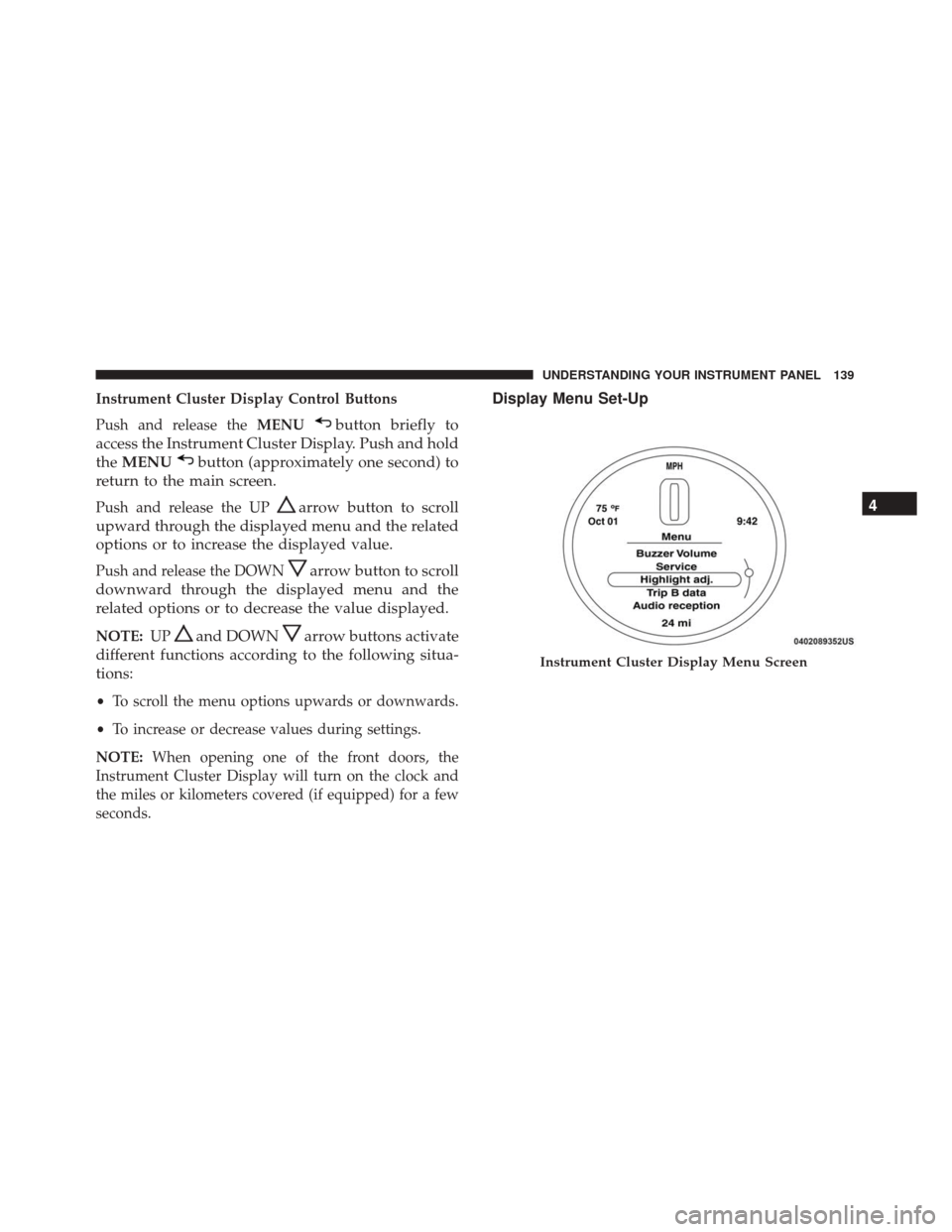
Display Menu Set-Up
Instrument Cluster Display Menu Screen
4
UNDERSTANDING YOUR INSTRUMENT PANEL 139
Page 158 of 350
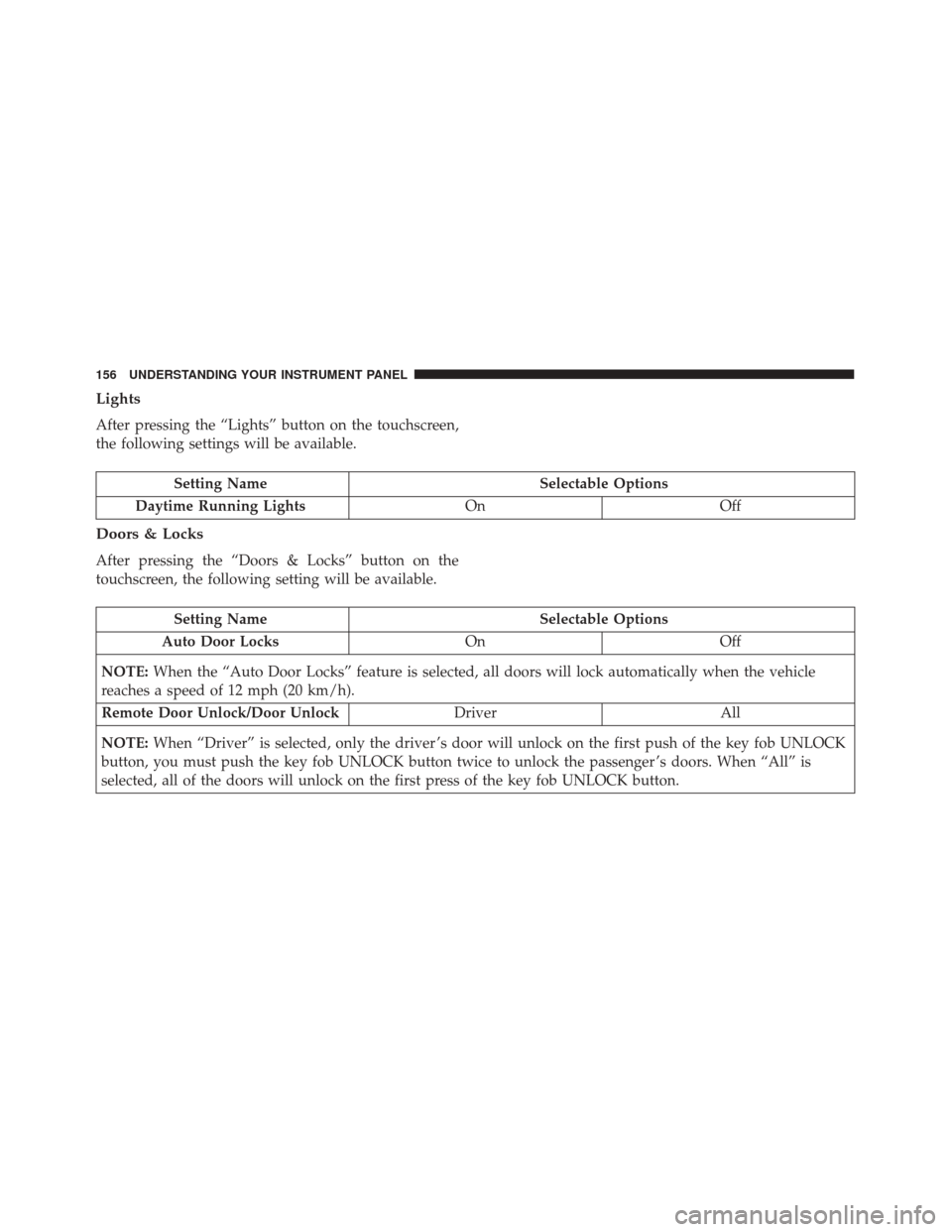
Lights
After pressing the “Lights” button on the touchscreen,
the following settings will be available.
Setting NameSelectable Options
Daytime Running Lights OnOff
Doors & Locks
After pressing the “Doors & Locks” button on the
touchscreen, the following setting will be available.
Setting Name Selectable Options
Auto Door Locks OnOff
NOTE: When the “Auto Door Locks” feature is selected, all doors will lock automatically when the vehicle
reaches a speed of 12 mph (20 km/h).
Remote Door Unlock/Door Unlock DriverAll
NOTE: When “Driver” is selected, only the driver ’s door will unlock on the first push of the key fob UNLOCK
button, you must push the key fob UNLOCK button twice to unlock the passenger ’s doors. When “All” is
selected, all of the doors will unlock on the first press of the key fob UNLOCK button.
156 UNDERSTANDING YOUR INSTRUMENT PANEL
Page 293 of 350
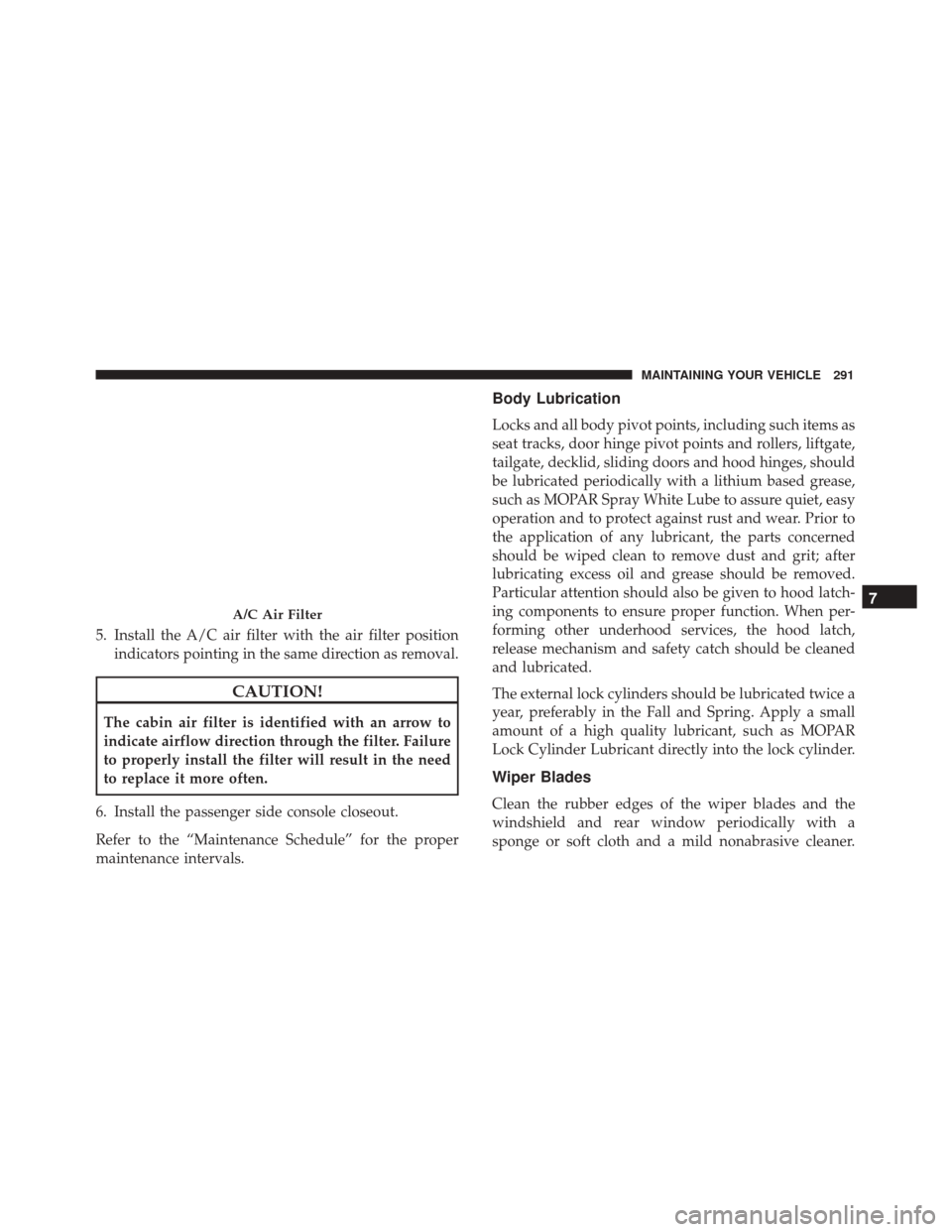
5. Install the A/C air filter with the air filter positionindicators pointing in the same direction as removal.
CAUTION!
The cabin air filter is identified with an arrow to
indicate airflow direction through the filter. Failure
to properly install the filter will result in the need
to replace it more often.
6. Install the passenger side console closeout.
Refer to the “Maintenance Schedule” for the proper
maintenance intervals.
Body Lubrication
Locks and all body pivot points, including such items as
seat tracks, door hinge pivot points and rollers, liftgate,
tailgate, decklid, sliding doors and hood hinges, should
be lubricated periodically with a lithium based grease,
such as MOPAR Spray White Lube to assure quiet, easy
operation and to protect against rust and wear. Prior to
the application of any lubricant, the parts concerned
should be wiped clean to remove dust and grit; after
lubricating excess oil and grease should be removed.
Particular attention should also be given to hood latch-
ing components to ensure proper function. When per-
forming other underhood services, the hood latch,
release mechanism and safety catch should be cleaned
and lubricated.
The external lock cylinders should be lubricated twice a
year, preferably in the Fall and Spring. Apply a small
amount of a high quality lubricant, such as MOPAR
Lock Cylinder Lubricant directly into the lock cylinder.
Wiper Blades
Clean the rubber edges of the wiper blades and the
windshield and rear window periodically with a
sponge or soft cloth and a mild nonabrasive cleaner.
A/C Air Filter7
MAINTAINING YOUR VEHICLE 291
Page 313 of 350
WARNING!(Continued)
•If the replaced fuse blows again, contact an au-
thorized dealer.
• If a general protection fuse for safety systems (air
bag system, braking system), power unit systems
(engine system, gearbox system) or steering sys-
tem blows, contact an authorized dealer.
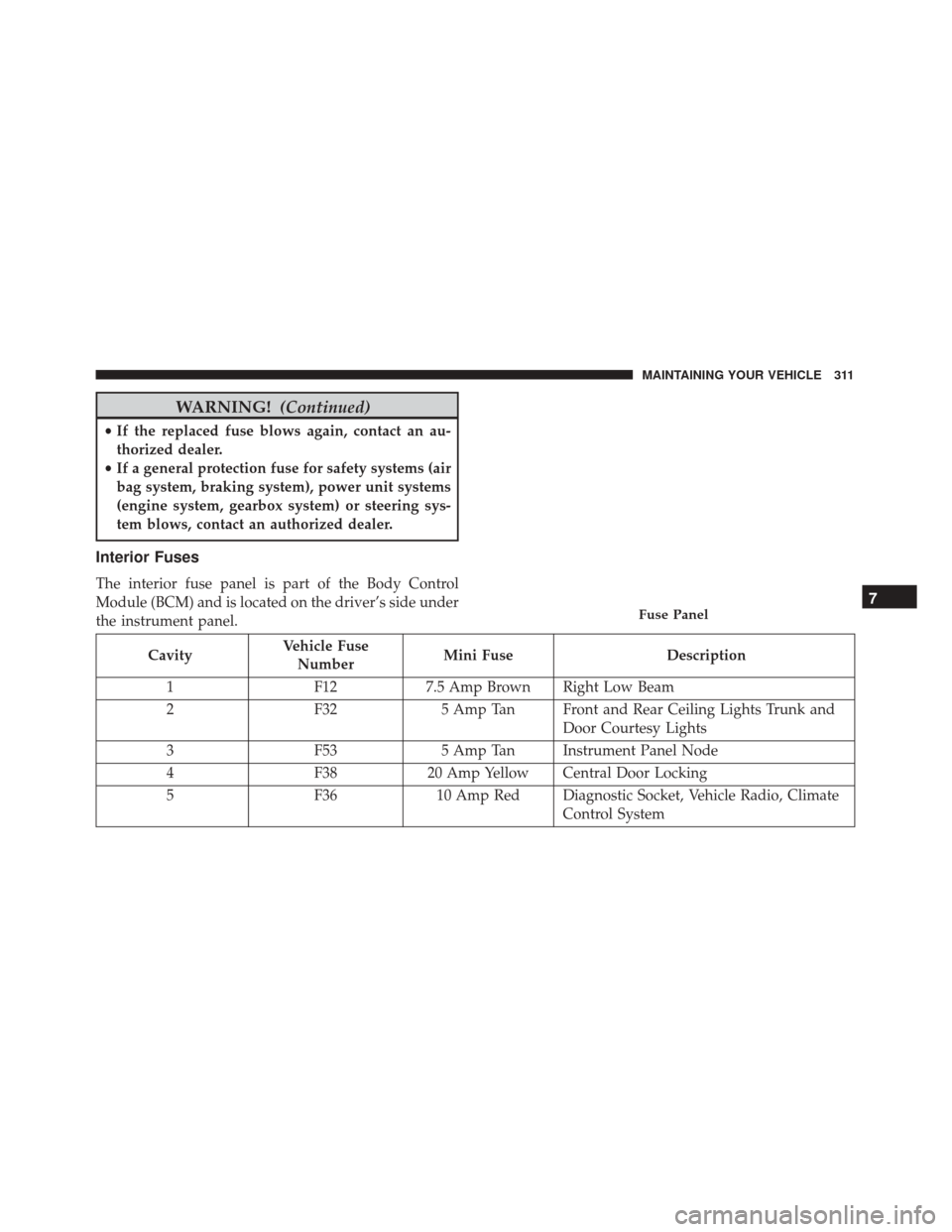
Interior Fuses
The interior fuse panel is part of the Body Control
Module (BCM) and is located on the driver’s side under
the instrument panel.
Cavity Vehicle Fuse
Number Mini Fuse
Description
1 F127.5 Amp Brown Right Low Beam
2 F325 Amp Tan Front and Rear Ceiling Lights Trunk and
Door Courtesy Lights
3 F535 Amp Tan Instrument Panel Node
4 F3820 Amp Yellow Central Door Locking
5 F3610 Amp Red Diagnostic Socket, Vehicle Radio, Climate
Control System
Fuse Panel7
MAINTAINING YOUR VEHICLE 311
Page 319 of 350
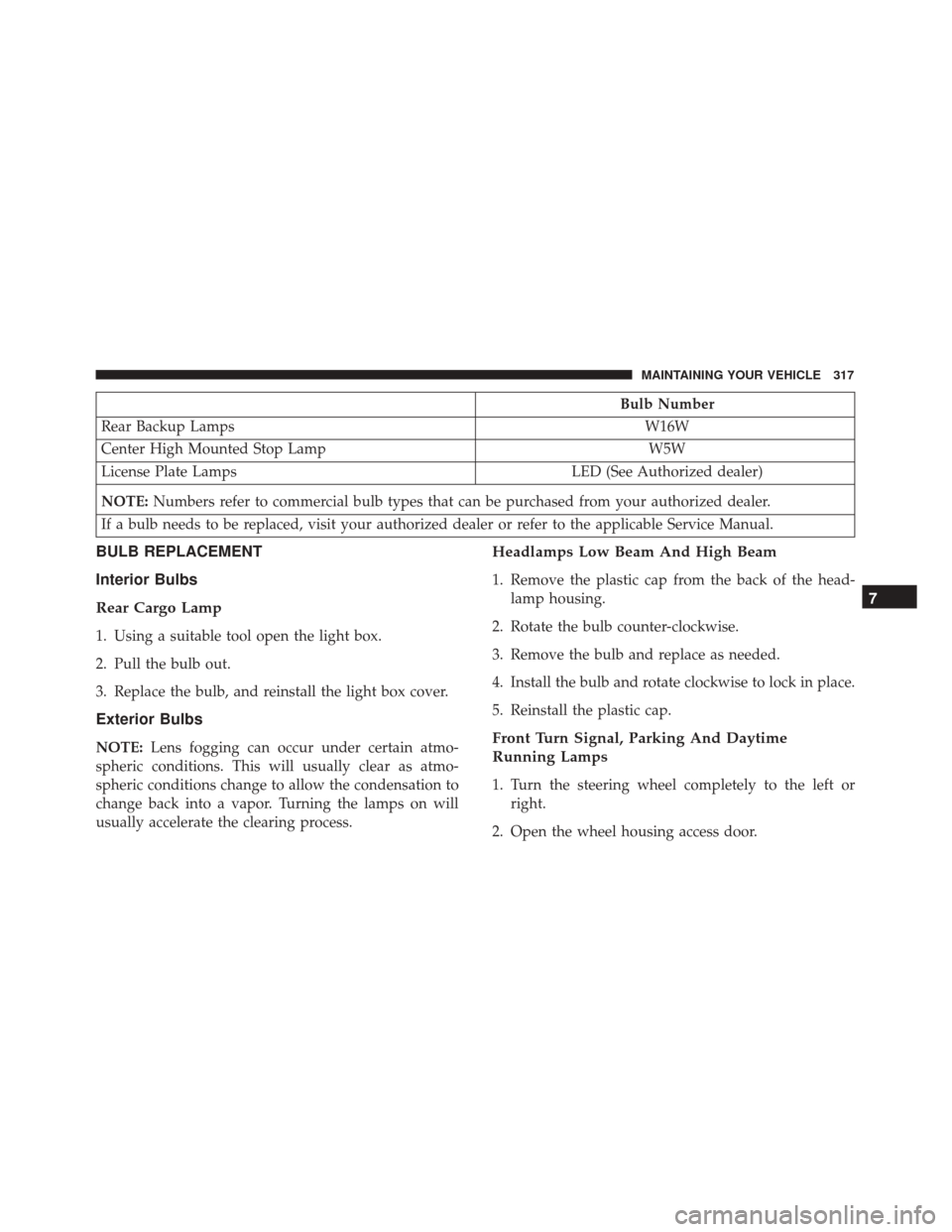
Bulb Number
Rear Backup Lamps W16W
Center High Mounted Stop Lamp W5W
License Plate Lamps LED (See Authorized dealer)
NOTE: Numbers refer to commercial bulb types that can be purchased from your authorized dealer.
If a bulb needs to be replaced, visit your authorized dealer or refer to the applicable Service Manual.
BULB REPLACEMENT
Interior Bulbs
Rear Cargo Lamp
1. Using a suitable tool open the light box.
2. Pull the bulb out.
3. Replace the bulb, and reinstall the light box cover.
Exterior Bulbs
NOTE: Lens fogging can occur under certain atmo-
spheric conditions. This will usually clear as atmo-
spheric conditions change to allow the condensation to
change back into a vapor. Turning the lamps on will
usually accelerate the clearing process.
Headlamps Low Beam And High Beam
1. Remove the plastic cap from the back of the head- lamp housing.
2. Rotate the bulb counter-clockwise.
3. Remove the bulb and replace as needed.
4. Install the bulb and rotate clockwise to lock in place.
5. Reinstall the plastic cap.
Front Turn Signal, Parking And Daytime
Running Lamps
1. Turn the steering wheel completely to the left or right.
2. Open the wheel housing access door.
7
MAINTAINING YOUR VEHICLE 317
Page 320 of 350
3. Remove the plastic cap from the back of the lamphousing.
4. Rotate bulb/socket counter-clockwise.
5. Remove the bulb and replace as needed.
6. Install the bulb into socket, and rotate bulb/socket clockwise into lamp locking it in place.
7. Reinstall the plastic cap.
Front Fog Lamps
To replace the front fog lights, see your authorized
dealer.
Front/Rear Side Marker Lamps
1. Remove portion of the wheel liner to allow hand access to side marker lamp.
2. Rotate the bulb socket counterclockwise, and remove the bulb and socket assembly from the housing.
3. Pull the bulb from the socket and insert the replace- ment bulb.
4. Install the bulb and socket assembly into the hous- ing, and rotate the socket clockwise to lock it in place.
5. Reinstall the wheel liner.
Rear Tail, Stop, Backup And Turn Signal Lamps
1. Open the liftgate.
2. Remove the two screws and remove the tail lamp assembly.
Wheel Housing Access Door
318 MAINTAINING YOUR VEHICLE
Page 340 of 350
CleaningWheels ............................... .305
Windshield Wiper Blades ...................291
Climate Control ........................... .167
Manual ............................... .167
Clutch ................................. .300
Clutch Fluid ............................. .300
Compact Spare Tire ........................ .224
Connector UCI ................................. .151
Universal Consumer Interface (UCI) ...........151
Contract, Service .......................... .332
Convertible Top Maintenance ..................309
Coolant (Antifreeze) .....................320, 321
Cooling System ........................... .295
Adding Coolant (Antifreeze) .................297
Coolant Capacity ........................ .321
Coolant Level ....................... .296, 299
Disposal Of Used Coolant ..................298
Drain, Flush, And Refill ....................296
Inspection ............................. .299
Points To Remember ...................298, 299
Pressure Cap ........................... .298
Selection Of Coolant (Antifreeze) .............296
Corrosion Protection ....................... .304Cruise Light
.......................... .136, 137
Cupholders .............................. .103
Customer Assistance ....................... .330
Customer Programmable Features ...............152
Daytime Running Lights ......................83
Dealer Service ............................ .282
Defroster, Windshield ........................61
Diagnostic System, Onboard ...................280
Dipsticks Automatic Transmission ....................303
Disarming, Security System ....................12
Disposal Antifreeze (Engine Coolant) .................298
Door
Ajar ............................... .124
Door Ajar Light ........................... .124
Door Locks ................................17
Door Locks, Automatic .......................19
Downshifting ............................ .189
Driving Through Flowing, Rising, Or Shallow Standing
Water ................................ .198
Electrical Power Outlets ..................... .100
Electric Remote Mirrors .......................72
338 INDEX