instrument panel FIAT 500 ABARTH 2012 2.G Owners Manual
[x] Cancel search | Manufacturer: FIAT, Model Year: 2012, Model line: 500 ABARTH, Model: FIAT 500 ABARTH 2012 2.GPages: 358, PDF Size: 2.59 MB
Page 191 of 358
NOTE:While operating in the other modes, the system
will not automatically sense the presence of fog, mist or
ice on the windshield. Defrost mode must be manually
selected to clear the windshield and side glass.
Air Conditioning (A/C)
The Air Conditioning (A/C) button allows the operator
to manually activate or deactivate the air conditioning
system. When in A/C mode with the ATC set to a cool
temperature, dehumidified air flows through the air
outlets. If Economy mode is desired, press the A/C
button to turn off the A/C mode in the ATC display and
deactivate the A/C system.
NOTE:
•If the system is in Mix or Defrost Mode, the A/C can
be turned off, but the A/C system shall remain active
to prevent fogging of the windows.
•If fog or mist appears on the windshield or side glass,
select Defrost mode and increase blower speed.
Recirculation Control
When outside air contains smoke, odors, or
high humidity, or if rapid cooling is desired,
you may wish to recirculate interior air by
pressing the RECIRCULATION control button.
Recirculation mode should only be used temporarily. The
recirculation LED will illuminate when this button is
selected. Push the button a second time to turn off the
Recirculation mode LED and allow outside air into the
vehicle.
NOTE: In cold weather, use of Recirculation mode may
lead to excessive window fogging. The Recirculation
mode is not allowed in the Defrost mode to improve
window clearing operation. Recirculation will be dis-
abled automatically if this mode is selected.
4
UNDERSTANDING YOUR INSTRUMENT PANEL 189
Page 192 of 358
Operating Tips
Window Fogging
Windows will fog on the inside when the humidity inside
the vehicle is high. This often occurs in mild or cool
temperatures when it’s rainy or humid. In most cases,
turning the air conditioning (pressing the A/C button) on
will clear the fog. Adjust the temperature control, air
direction, and blower speed to maintain comfort.
As the temperature gets colder, it may be necessary to
direct air onto the windshield. Adjust the temperature
control and blower speed to maintain comfort. Higher
blower speeds will reduce fogging. Interior fogging on
the windshield can be quickly removed by selecting the
DEFROST mode.
Regular cleaning of the inside of the windows with a
non-filming cleaning solution (vinegar and water works
very well) will help prevent contaminates (cigarettesmoke, perfumes, etc.) from sticking to the windows.
Contaminates increase the rate of window fogging.Summer Operation
NOTE:
In some cases during high temperature opera-
tion, the air conditioning system performance may be
reduced. This is to help protect the engine from overheat-
ing during the high load condition.
Your air conditioning system is also equipped with an
automatic recirculation system. When the system senses
a heavy load or high heat conditions, it may use Recir-
culation A/C mode to provide additional comfort while
in automatic mode.
Winter Operation
When operating the system during the winter months,
make sure the air intake, located directly in front of the
windshield, is free of ice, slush, snow, or other
obstructions.
190 UNDERSTANDING YOUR INSTRUMENT PANEL
Page 193 of 358
Vacation Storage
Anytime you store your vehicle, or keep it out of service
(i.e., vacation) for two weeks or more, run the air
conditioning system at idle for about five minutes in the
fresh air using the high blower setting. This will ensure
adequate system lubrication to minimize the possibility
of compressor damage when the system is started again.
4
UNDERSTANDING YOUR INSTRUMENT PANEL 191
Page 212 of 358
WARNING!
There may be situations on minor hills (i.e., less than
2.5%), with a loaded vehicle, or while pulling a
trailer, when the system will not activate and slight
rolling may occur. This could cause a collision with
another vehicle or object. Always remember the
driver is responsible for braking the vehicle.
Disabling/Enabling HSA
If you wish to turn the HSA system on or off, it can be
done using the Customer Programmable Features in the
Electronic Vehicle Information Center (EVIC). Refer to
“Electronic Vehicle Information Center (EVIC)” in “Un-
derstanding Your Instrument Panel” for further
information.
Electronic Stability Control (ESC)
This system enhances directional control and stability of
the vehicle under various driving conditions. ESC cor-
rects for oversteering or understeering of the vehicle by
applying the brake of the appropriate wheel to assist in
counteracting the oversteering or understeering condi-
tion. Engine power may also be reduced to help the
vehicle maintain the desired path. ESC uses sensors in
the vehicle to determine the vehicle path intended by the
driver and compares it to the actual path of the vehicle.
When the actual path does not match the intended path,
ESC applies the brake of the appropriate wheel to assist
in counteracting the oversteer or understeer condition.
•Oversteer - when the vehicle is turning more than
appropriate for the steering wheel position.
•Understeer - when the vehicle is turning less than
appropriate for the steering wheel position.
210 STARTING AND OPERATING
Page 250 of 358
HAZARD WARNING FLASHERS
The Hazard Warning flasher switch is located on the
instrument panel below the radio.Press the switch to turn on the Hazard Warning
flashers. When the switch is activated, all direc-
tional turn signals will flash on and off to warn
oncoming traffic of an emergency. Press the switch a
second time to turn off the Hazard Warning flashers.
Do not use this emergency warning system when the
vehicle is in motion. Use it when your vehicle is disabled
and it is creating a safety hazard for other motorists.
If it is necessary to leave the vehicle to go for service, the
Hazard Warning flashers will continue to operate with
the ignition key removed and the vehicle locked.
NOTE: With extended use, the Hazard Warning flashers
may wear down your battery.
IF YOUR ENGINE OVERHEATS
In any of the following situations, you can reduce the
potential for overheating by taking the appropriate ac-
tion.
•On the highways — slow down.
•In city traffic — while stopped, place the transmission
in NEUTRAL, but do not increase engine idle speed.
NOTE: There are steps that you can take to slow down
an impending overheat condition:
•If your air conditioner (A/C) is on, turn it off. The A/C
system adds heat to the engine cooling system and
turning the A/C off can help remove this heat.
•You can also turn the temperature control to maximum
heat, the mode control to floor and the blower control
to high. This allows the heater core to act as a
supplement to the radiator and aids in removing heat
from the engine cooling system.
248 WHAT TO DO IN EMERGENCIES
Page 258 of 358
If the sealant (white fluid) does flowthrough the
Sealant Hose (6):
1. Continue to operate the pump until sealant is no
longer flowing through hose (typically takes 30 - 70 sec-
onds). As the sealant flows through the Sealant Hose (6),
the Pressure Gauge (3) can read as high as 70 psi (5 Bar).
The Pressure Gauge (3) will decrease quickly from ap-
proximately 70 psi (5 Bar) to the actual tire pressure when
the Sealant Bottle (1) is empty.
2. The pump will start to inject air into the tire immedi-
ately after the Sealant Bottle (1) is empty. Continue to
operate the pump and inflate the tire to the pressure
indicated on the tire pressure label on the driver-side
latch pillar (recommended pressure). Check the tire pres-
sure by looking at the Pressure Gauge (3). If the tire does not inflate to at least 26 psi (1.8 Bar)
pressure within 15 minutes:
•The tire is too badly damaged. Do not attempt to drive
the vehicle further. Call for assistance.
NOTE: If the tire becomes over-inflated, press the
Deflation Button to reduce the tire pressure to the recom-
mended inflation pressure before continuing.
If the tire inflates to the recommended pressure or is at
least 26 psi (1.8 Bar) pressure within 15 minutes:
1. Press the Power Button (4) to turn off the TIREFIT kit.
2. Remove the Speed Limit sticker from the top of the
Sealant Bottle (1) and place the sticker on the instrument
panel.
3. Immediately disconnect the Sealant Hose (6) from the
valve stem, reinstall the cap on the fitting at the end of the
hose, and place the TIREFIT kit in the vehicle storage
location. Quickly proceed to (D) “Drive Vehicle”.
256 WHAT TO DO IN EMERGENCIES
Page 307 of 358
Instrument Panel Cover
The instrument panel cover has a low glare surface which
minimizes reflections on the windshield. Do not use
protectants or other products which may cause undesir-
able reflections. Use soap and warm water to restore the
low glare surface.
Instrument Panel Bezels
CAUTION!
When installing hanging air fresheners in your ve-
hicle, read the installation instructions carefully.
Some air fresheners will damage the finish of
painted or decorated parts if allowed to directly
contact any surface.
Cleaning Plastic Instrument Cluster Lenses
The lenses in front of the instruments in this vehicle are
molded in clear plastic. When cleaning the lenses, care
must be taken to avoid scratching the plastic.
1.
Clean with a wet, soft rag. A mild soap solution may be
used, but do not use high alcohol content or abrasive
cleaners. If soap is used, wipe clean with a clean, damp rag.
2. Dry with a soft cloth.
Seat Belt Maintenance
Do not bleach, dye or clean the seat belts with chemical
solvents or abrasive cleaners. This will weaken the fabric.
Sun damage can also weaken the fabric.
If the seat belts need cleaning, use a mild soap solution or
lukewarm water. Do not remove the seat belts from the
car to wash them. Dry with a soft cloth.
Replace the seat belts if they appear frayed or worn or if
the buckles do not work properly.
7
MAINTAINING YOUR VEHICLE 305
Page 308 of 358
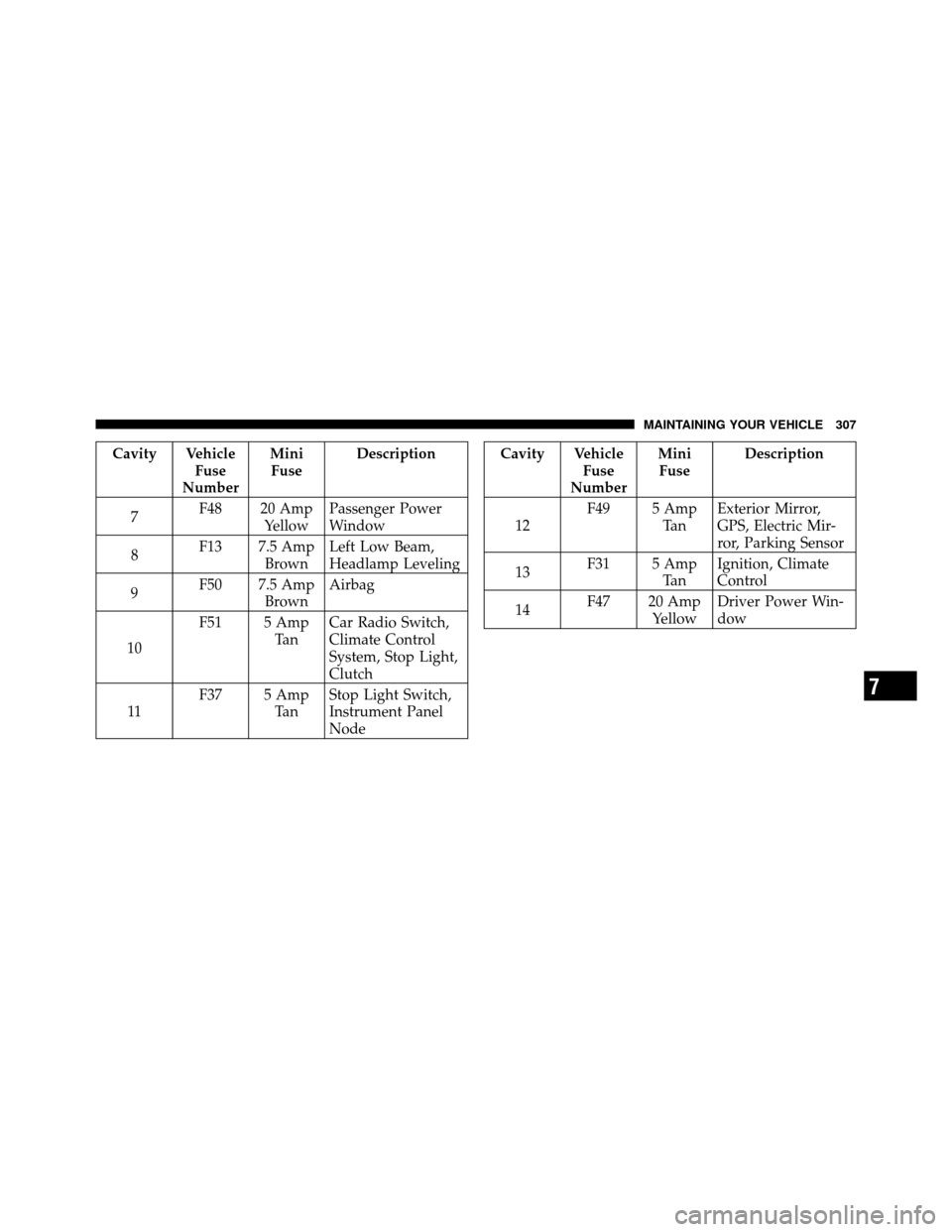
FUSES
Interior Fuses
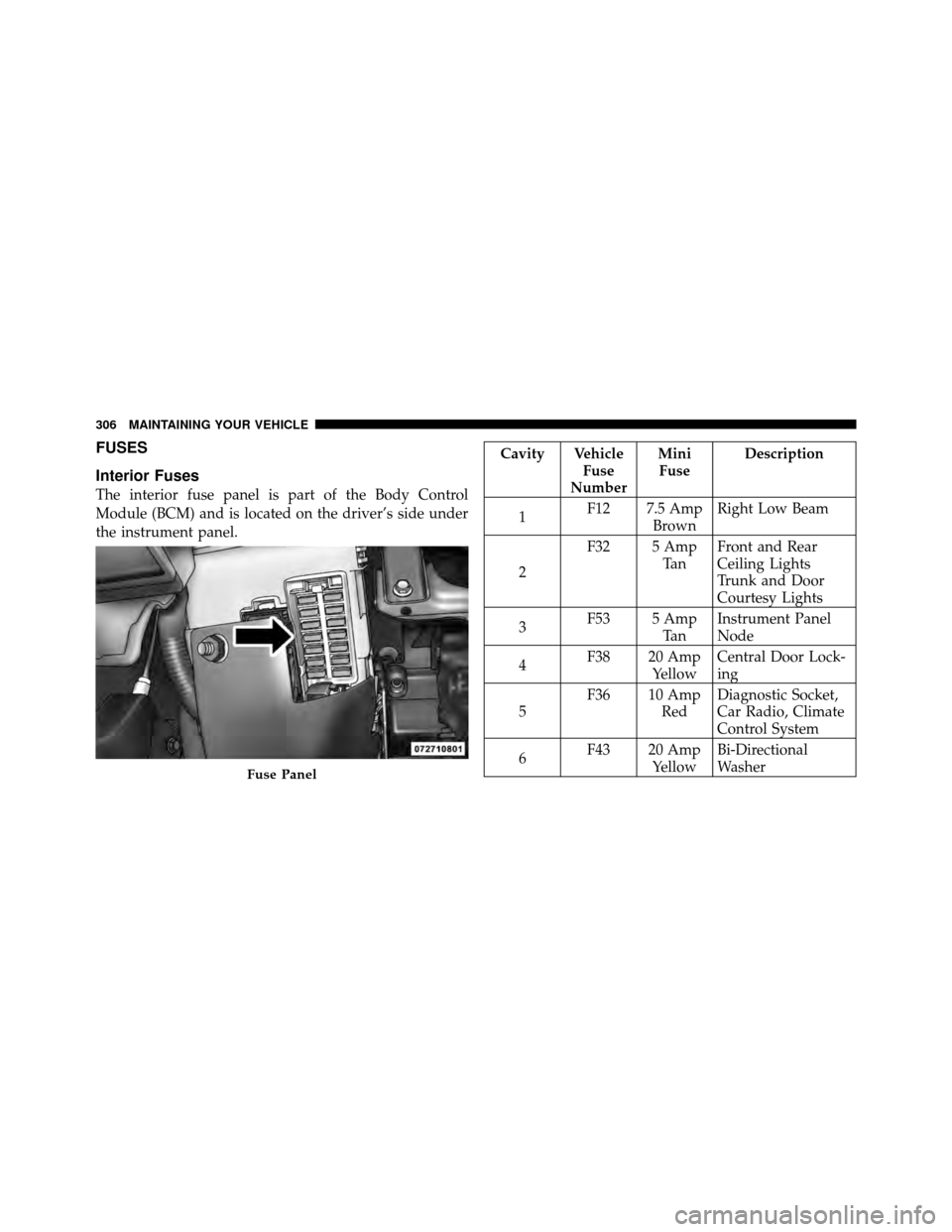
The interior fuse panel is part of the Body Control
Module (BCM) and is located on the driver’s side under
the instrument panel.
Cavity VehicleFuse
Number Mini
Fuse Description
1 F12 7.5 Amp
BrownRight Low Beam
2 F32 5 Amp
Ta nFront and Rear
Ceiling Lights
Trunk and Door
Courtesy Lights
3 F53 5 Amp
Ta nInstrument Panel
Node
4 F38 20 Amp
YellowCentral Door Lock-
ing
5 F36 10 Amp
RedDiagnostic Socket,
Car Radio, Climate
Control System
6 F43 20 Amp
YellowBi-Directional
Washer
Fuse Panel
306 MAINTAINING YOUR VEHICLE
Page 309 of 358
Cavity VehicleFuse
Number Mini
Fuse Description
7 F48 20 Amp
YellowPassenger Power
Window
8 F13 7.5 Amp
BrownLeft Low Beam,
Headlamp Leveling
9 F50 7.5 Amp
BrownAirbag
10 F51 5 Amp
Ta nCar Radio Switch,
Climate Control
System, Stop Light,
Clutch
11 F37 5 Amp
Ta nStop Light Switch,
Instrument Panel
NodeCavity Vehicle
Fuse
Number Mini
Fuse Description
12 F49 5 Amp
Ta nExterior Mirror,
GPS, Electric Mir-
ror, Parking Sensor
13 F31 5 Amp
Ta nIgnition, Climate
Control
14 F47 20 Amp
YellowDriver Power Win-
dow
7
MAINTAINING YOUR VEHICLE 307
Page 320 of 358
MAINTENANCE SCHEDULE
The Scheduled Maintenance services listed in this
manual must be done at the times or mileages specified
to protect your vehicle warranty and ensure the best
vehicle performance and reliability. More frequent main-
tenance may be needed for vehicles in severe operating
conditions, such as dusty areas and very short trip
driving. Inspection and service should also be done
anytime a malfunction is suspected.
The oil change indicator system will remind you that it is
time to take your vehicle in for scheduled maintenance.
Based on engine operation conditions the oil change
indicator message will illuminate, this means that service
is required for your vehicle. Have your vehicle serviced
as soon as possible, within the next 500 miles (805 km).
NOTE:
•The oil change indicator message will not monitor the
time since the last oil change. Change your vehicles oilif it has been 6 months since your last oil change even
if the oil change indicator message is NOT illumi-
nated.
•Change your engine oil more often if you drive your
vehicle off-road for an extended period of time.
•Under no circumstances should oil change intervals
exceed 8,000 miles (13,000 km) or six months, which-
ever comes first.
Your authorized dealer will reset the oil change indicator
message after completing the scheduled oil change. If a
scheduled oil change is performed by someone other
than your authorized dealer, the message can be reset by
referring to the steps described under “Electronic Vehicle
Information Center (EVIC)/Change Engine Oil” in “Un-
derstanding Your Instrument Panel” for further informa-
tion.
8
M A I
N T
E
N A
N CE
S
C
H E
D
U L
E
S318 MAINTENANCE SCHEDULES