ECU FIAT 500 ABARTH 2014 2.G User Guide
[x] Cancel search | Manufacturer: FIAT, Model Year: 2014, Model line: 500 ABARTH, Model: FIAT 500 ABARTH 2014 2.GPages: 392, PDF Size: 8.74 MB
Page 83 of 392
Safety Checks You Should Make Inside The
Vehicle
Seat Belts
Inspect the belt system periodically, checking for cuts,
frays, and loose parts. Damaged parts must be replaced
immediately. Do not disassemble or modify the system.
Front seat belt assemblies must be replaced after a
collision. Rear seat belt assemblies must be replaced after
a collision if they have been damaged (i.e., bent retractor,
torn webbing, etc.). If there is any question regarding belt
or retractor condition, replace the belt.
Air Bag Warning Light
The light should come on and remain on for
four to eight seconds as a bulb check when the
ignition switch is first turned ON. If the light is
not lit during starting, see your authorized
dealer. If the light stays on, flickers, or comes on while
driving, have the system checked by an authorized
dealer.
Defroster
Check operation by selecting the defrost mode and place
the blower control on high speed. You should be able to
feel the air directed against the windshield. See your
authorized dealer for service if your defroster is inoper-
able.
Floor Mat Safety Information
Always use floor mats designed to fit the footwell of your
vehicle. Use only floor mats that leave the pedal area
unobstructed and that are firmly secured so that they
cannot slip out of position and interfere with the pedals
or impair safe operation of your vehicle in other ways.
2
THINGS TO KNOW BEFORE STARTING YOUR VEHICLE 81
Page 84 of 392
WARNING!
Pedals that cannot move freely can cause loss of
vehicle control and increase the risk of serious per-
sonal injury.
•Always make sure that floor mats are properly
attached to the floor mat fasteners.
•Never place or install floor mats or other floor
coverings in the vehicle that cannot be properly
secured to prevent them from moving and interfer-
ing with the pedals or the ability to control the
vehicle.
•Never put floor mats or other floor coverings on top
of already installed floor mats. Additional floor
mats and other coverings will reduce the size of the
pedal area and interfere with the pedals.
(Continued)
WARNING!(Continued)
•Check mounting of mats on a regular basis. Always
properly reinstall and secure floor mats that have
been removed for cleaning.
•Always make sure that objects cannot fall into the
driver footwell while the vehicle is moving. Ob-
jects can become trapped under the brake pedal
and accelerator pedal causing a loss of vehicle
control.
•If required, mounting posts must be properly in-
stalled, if not equipped from the factory.
Failure to properly follow floor mat installation or
mounting can cause interference with the brake
pedal and accelerator pedal operation causing loss of
control of the vehicle.
82 THINGS TO KNOW BEFORE STARTING YOUR VEHICLE
Page 99 of 392
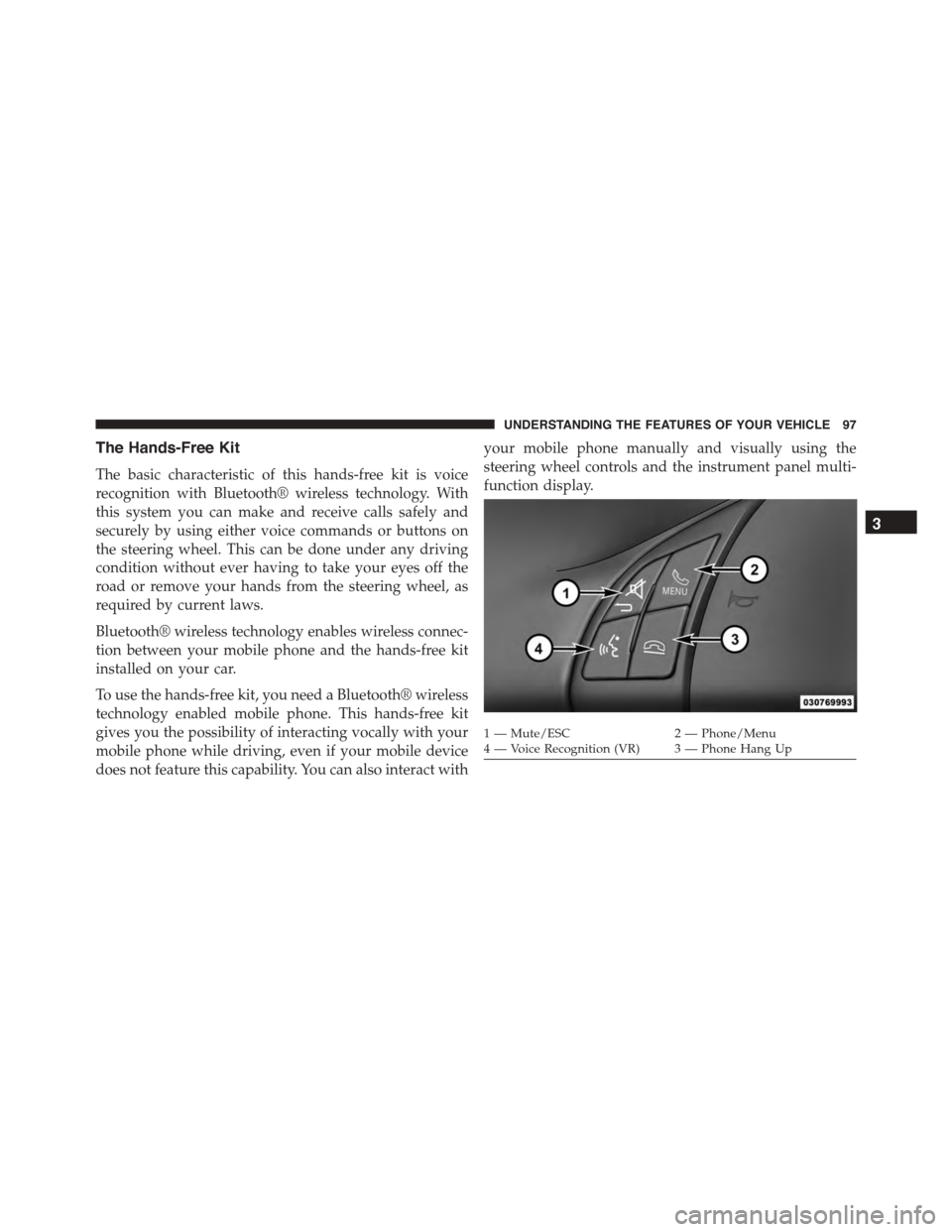
The Hands-Free Kit
The basic characteristic of this hands-free kit is voice
recognition with Bluetooth® wireless technology. With
this system you can make and receive calls safely and
securely by using either voice commands or buttons on
the steering wheel. This can be done under any driving
condition without ever having to take your eyes off the
road or remove your hands from the steering wheel, as
required by current laws.
Bluetooth® wireless technology enables wireless connec-
tion between your mobile phone and the hands-free kit
installed on your car.
To use the hands-free kit, you need a Bluetooth® wireless
technology enabled mobile phone. This hands-free kit
gives you the possibility of interacting vocally with your
mobile phone while driving, even if your mobile device
does not feature this capability. You can also interact with
your mobile phone manually and visually using the
steering wheel controls and the instrument panel multi-
function display.
1—Mute/ESC2—Phone/Menu4—VoiceRecognition(VR) 3—PhoneHangUp
3
UNDERSTANDING THE FEATURES OF YOUR VEHICLE 97
Page 111 of 392
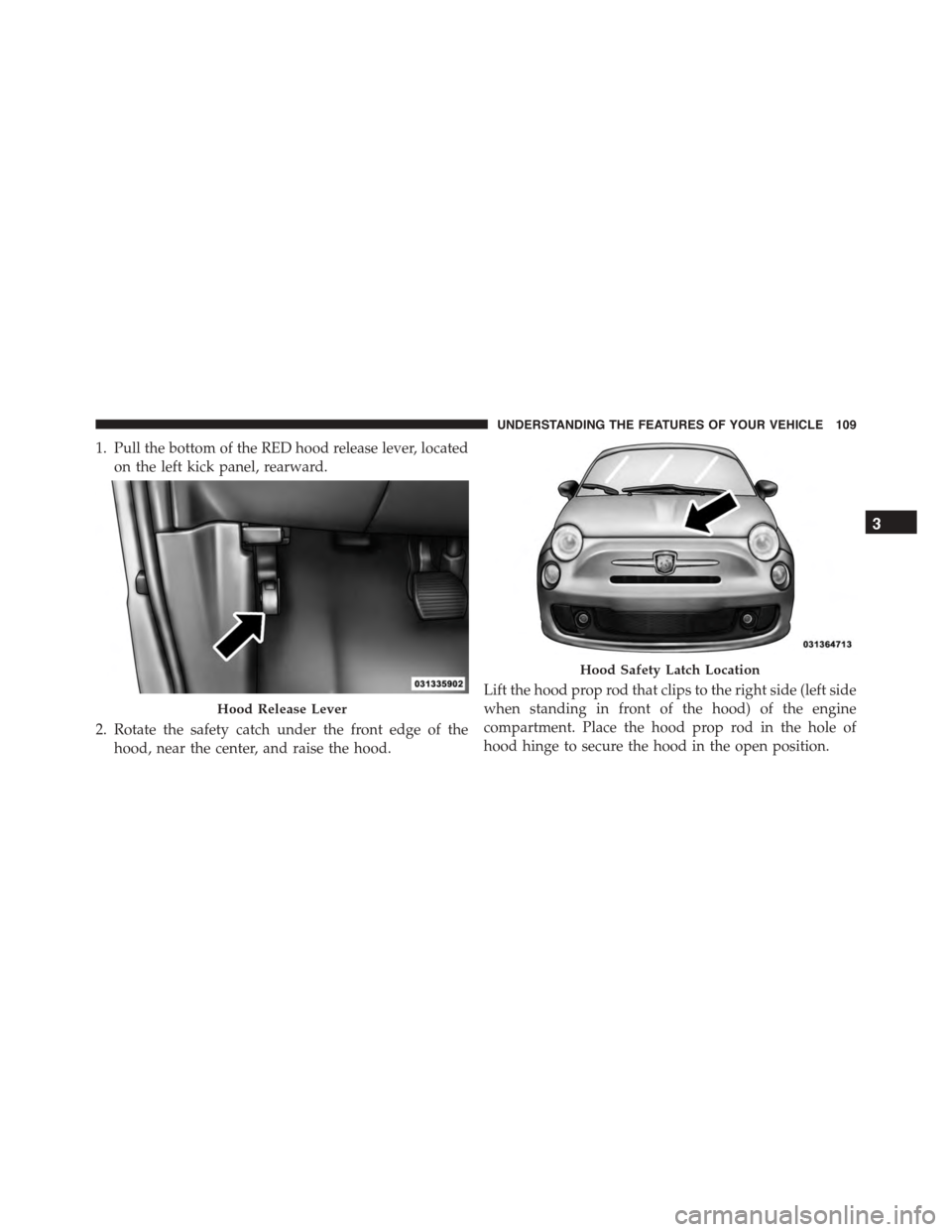
1. Pull the bottom of the RED hood release lever, located
on the left kick panel, rearward.
2. Rotate the safety catch under the front edge of the
hood, near the center, and raise the hood.
Lift the hood prop rod that clips to the right side (left side
when standing in front of the hood) of the engine
compartment. Place the hood prop rod in the hole of
hood hinge to secure the hood in the open position.
Hood Release Lever
Hood Safety Latch Location
3
UNDERSTANDING THE FEATURES OF YOUR VEHICLE 109
Page 112 of 392
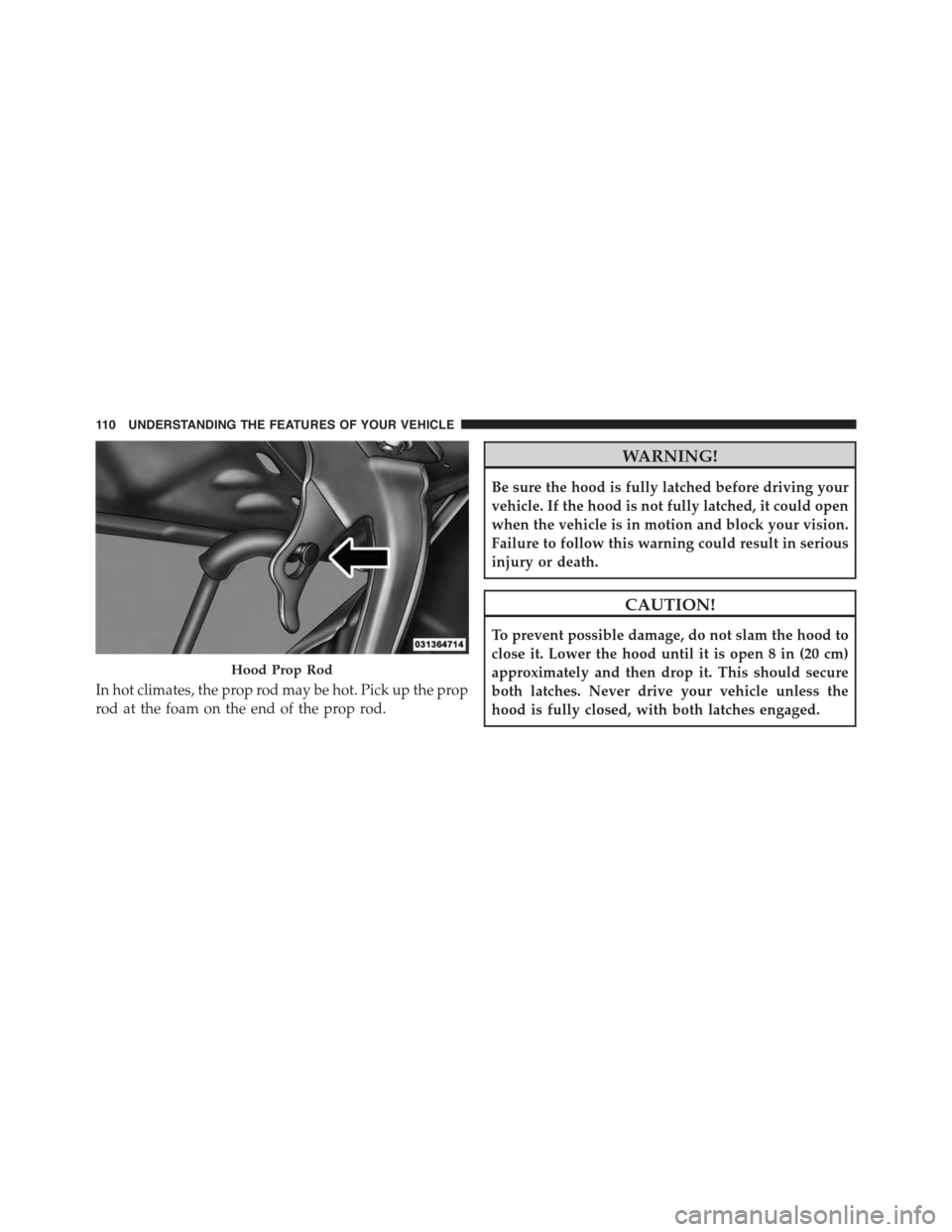
In hot climates, the prop rod may be hot. Pick up the prop
rod at the foam on the end of the prop rod.
WARNING!
Be sure the hood is fully latched before driving your
vehicle. If the hood is not fully latched, it could open
when the vehicle is in motion and block your vision.
Failure to follow this warning could result in serious
injury or death.
CAUTION!
To prevent possible damage, do not slam the hood to
close it. Lower the hood until it is open 8 in (20 cm)
approximately and then drop it. This should secure
both latches. Never drive your vehicle unless the
hood is fully closed, with both latches engaged.
Hood Prop Rod
11 0 U N D E R S TA N D I N G T H E F E AT U R E S O F Y O U R V E H I C L E
Page 131 of 392
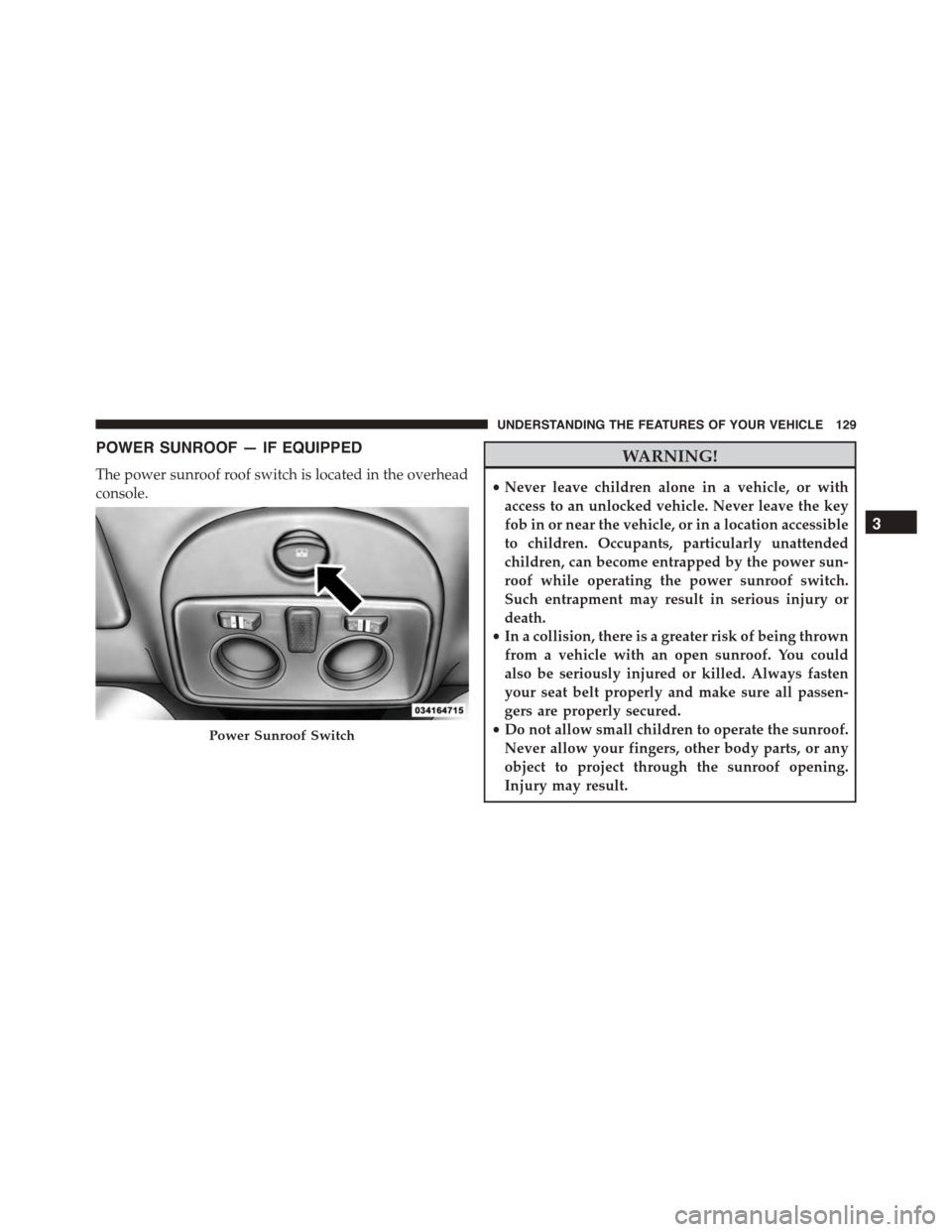
POWER SUNROOF — IF EQUIPPED
The power sunroof roof switch is located in the overhead
console.
WARNING!
•Never leave children alone in a vehicle, or with
access to an unlocked vehicle. Never leave the key
fob in or near the vehicle, or in a location accessible
to children. Occupants, particularly unattended
children, can become entrapped by the power sun-
roof while operating the power sunroof switch.
Such entrapment may result in serious injury or
death.
•In a collision, there is a greater risk of being thrown
from a vehicle with an open sunroof. You could
also be seriously injured or killed. Always fasten
your seat belt properly and make sure all passen-
gers are properly secured.
•Do not allow small children to operate the sunroof.
Never allow your fingers, other body parts, or any
object to project through the sunroof opening.
Injury may result.
Power Sunroof Switch
3
UNDERSTANDING THE FEATURES OF YOUR VEHICLE 129
Page 155 of 392
If the ABS light remains on or turns on while driving, it
indicates that the Anti-Lock portion of the brake system
is not functioning and that service is required. However,
the conventional brake system will continue to operate
normally if the BRAKE warning light is not on.
If the ABS light is on, the brake system should be serviced
as soon as possible to restore the benefits of Anti-Lock
brakes. If the ABS light does not turn on when the
ignition switch is turned to the ON/RUN position, have
the light inspected by an authorized dealer.
24. Door Ajar
This light will turn on to indicate that one or
more doors or the trunk may be ajar.
25. Vehicle Security Light
If during starting, the key code is not correctly
recognized, the Vehicle Security Light comes
on in the instrument panel. In this case, turn
the key to OFF and then to ON/RUN; if it is
still locked, try again with the other keys that come with
the vehicle. Contact a Fiat dealer if you still cannot start
the engine.
If with the engine running the warning light flashes, this
means that the car is not protected by the engine inhibitor
device. Contact Fiat dealer to have all the keys
programmed.
26. Temperature Gauge
The temperature digital scale shows engine coolant tem-
perature. Any reading within the normal range indicates
that the engine cooling system is operating satisfactorily.
4
UNDERSTANDING YOUR INSTRUMENT PANEL 153
Page 197 of 392
A CD which cannot be read will not be ejected until these
functions are over. At the end, with the CD mode
activated, the display will show the wording “CD Disc
error” for a few seconds and then the CD will be ejected.
Display Information
When the CD player is operating, information will ap-
pear on the display with the following meaning:
•“Track 5” indicates the CD track number.
•“03:42” indicates the time elapsed since the start of the
track (if the relevant Menu function is activated).
Track Selection
Briefly press thebutton to play the previous CD
track and thebutton to play the next track. The
tracks are selected cyclically: the first track is selected
after the last track and vice versa.
If the track has been played for more than 3 seconds,
pressing thebutton, starts the track again from the
beginning. In this case, if you want to play the
previous track, press thebutton twice consecu-
tively.
Track Fast Forward/Rewind
Keep thebutton pressed down to fast forward the
selected track and keep thebutton pressed down to
fast rewind the track. The fast forward/rewind will
stop once the button is released.
Pause Function
To pause the CD player, press thebutton. The word-
ing “CD Pause” appears on the display.
To resume listening to the track, press thebutton
again.
4
UNDERSTANDING YOUR INSTRUMENT PANEL 195
Page 298 of 392
Jacking Instructions
WARNING!
Carefully follow these tire changing warnings to
help prevent personal injury or damage to your
vehicle:
•Always park on a firm, level surface as far from the
edge of the roadway as possible before raising the
vehicle.
•Turn on the Hazard Warning flashers.
•Block the wheel diagonally opposite the wheel to
be raised.
•Set the parking brake firmly and set an automatic
transmission in PARK; a manual transmission in
REVERSE.
•Never start or run the engine with the vehicle on a
jack.
(Continued)
WARNING!(Continued)
•Do not let anyone sit in the vehicle when it is on a
jack.
•Do not get under the vehicle when it is on a jack. If
you need to get under a raised vehicle, take it to a
service center where it can be raised on a lift.
•Only use the jack in the positions indicated and for
lifting this vehicle during a tire change.
•If working on or near a roadway, be extremely
careful of motor traffic.
•To assure that spare tires, flat or inflated, are
securely stowed, spares must be stowed with the
valve stem facing the ground.
296 WHAT TO DO IN EMERGENCIES
Page 300 of 392
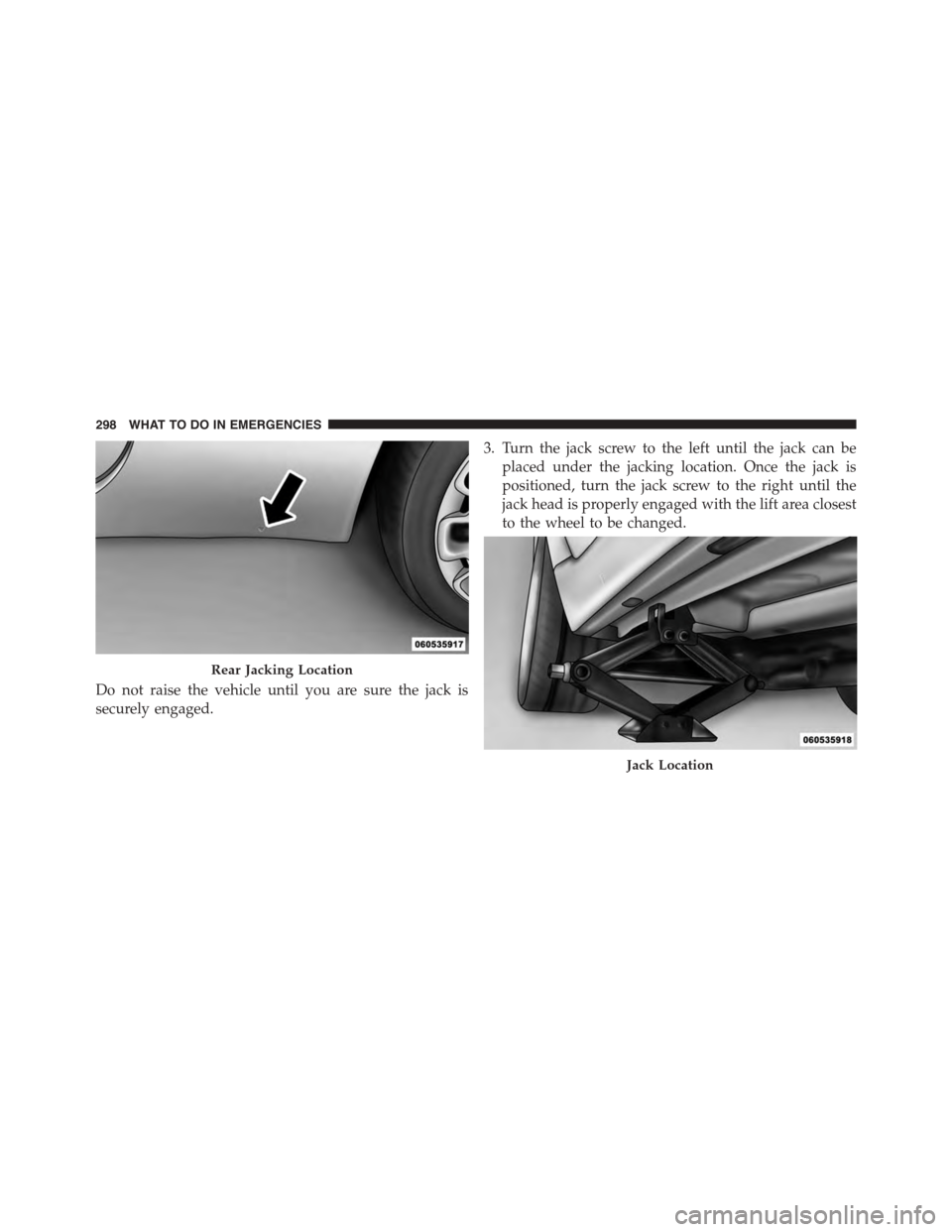
Do not raise the vehicle until you are sure the jack is
securely engaged.
3. Turn the jack screw to the left until the jack can be
placed under the jacking location. Once the jack is
positioned, turn the jack screw to the right until the
jack head is properly engaged with the lift area closest
to the wheel to be changed.
Rear Jacking Location
Jack Location
298 WHAT TO DO IN EMERGENCIES