door lock FIAT 500 ABARTH 2014 2.G User Guide
[x] Cancel search | Manufacturer: FIAT, Model Year: 2014, Model line: 500 ABARTH, Model: FIAT 500 ABARTH 2014 2.GPages: 392, PDF Size: 8.74 MB
Page 27 of 392
second, release, and the window will go down automati-
cally. To cancel the Auto-Down movement, operate the
switch in either the up or down direction and release the
switch.
Wind Buffeting
Wind buffeting can be described as the perception of
pressure on the ears or a helicopter-type sound in the
ears. Your vehicle may exhibit wind buffeting with the
windows down, or the sunroof (if equipped) in certain
open or partially open positions. This is a normal occur-
rence and can be minimized. If the buffeting occurs with
the sunroof open, adjust the sunroof opening to minimize
the buffeting or open any window.
LIFTGATE
To unlock the liftgate, use the Remote Keyless Entry
(RKE) transmitter or activate the power door lock
switches located on the front door handles.
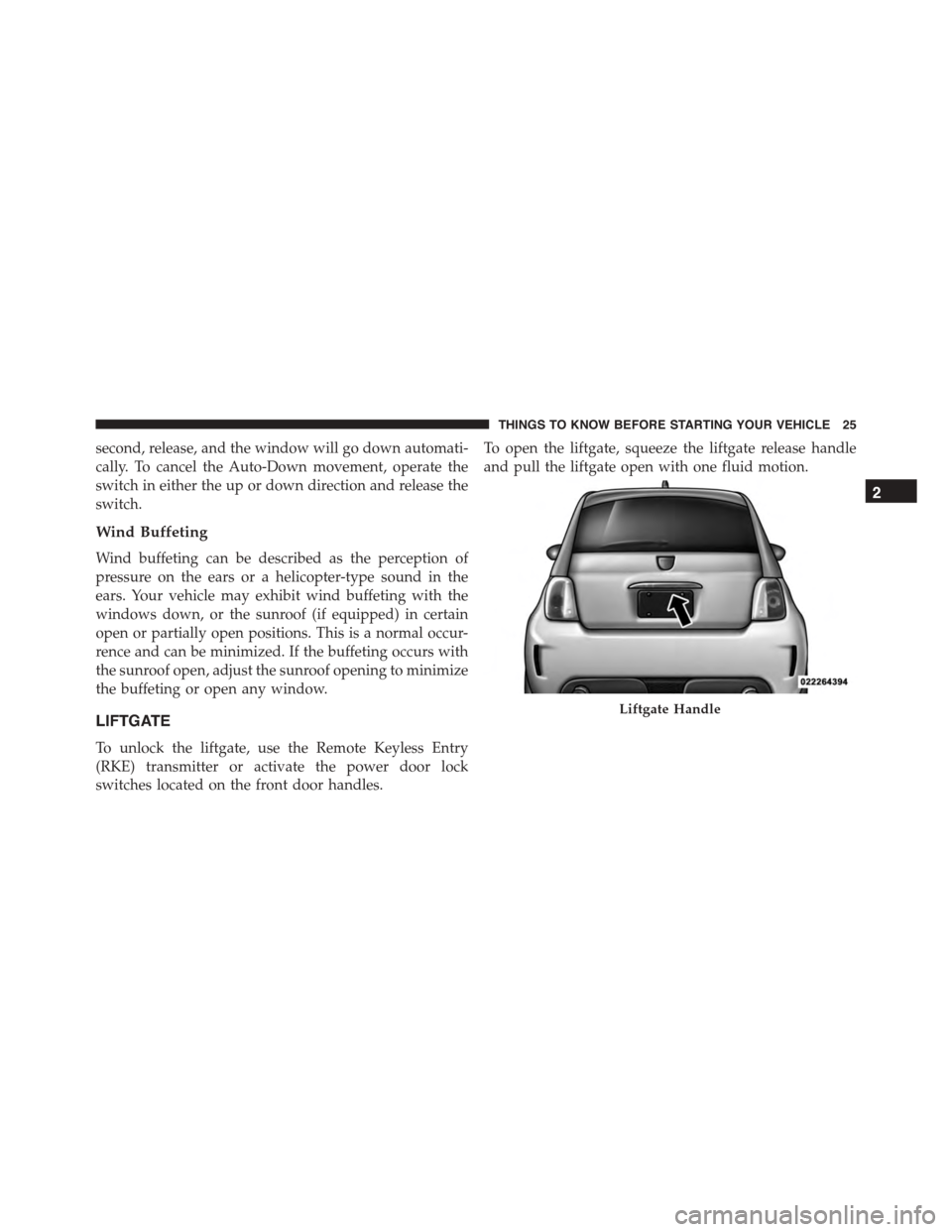
To open the liftgate, squeeze the liftgate release handle
and pull the liftgate open with one fluid motion.
Liftgate Handle
2
THINGS TO KNOW BEFORE STARTING YOUR VEHICLE 25
Page 31 of 392
WARNING!(Continued)
•Being too close to the steering wheel or instrument
panel during Advanced Front Air Bag deployment
could cause serious injury, including death. Air
bags need room to inflate. Sit back, comfortably
extending your arms to reach the steering wheel or
instrument panel.
•Side air bags also need room to inflate. Do not lean
against the door or window. Sit upright in the
center of the seat.
•In a collision, you and your passengers can suffer
much greater injuries if you are not properly buck-
led up. You can strike the interior of your vehicle or
other passengers, or you can be thrown out of the
vehicle. Always be sure you and others in your
vehicle are buckled up properly.
Buckle up even though you are an excellent driver, even
on short trips. Someone on the road may be a poor driver
and cause a collision that includes you. This can happen
far away from home or on your own street.
Research has shown that seat belts save lives, and they
can reduce the seriousness of injuries in a collision. Some
of the worst injuries happen when people are thrown
from the vehicle. Seat belts reduce the possibility of
ejection and the risk of injury caused by striking the
inside of the vehicle. Everyone in a motor vehicle should
be belted at all times.
Lap/Shoulder Belts
All the seating positions in your vehicle are equipped
with combination lap/shoulder belts.
The belt webbing retractor is designed to lock during
very sudden stops or collisions. This feature allows the
shoulder part of the belt to move freely with you under
normal conditions. However in a collision, the belt will
2
THINGS TO KNOW BEFORE STARTING YOUR VEHICLE 29
Page 32 of 392
lock and reduce the risk of you striking the inside of the
vehicle or being thrown out.
WARNING!
•It is dangerous to ride in a cargo area, inside or
outside of a vehicle. In a collision, people riding in
these areas are more likely to be seriously injured
or killed.
•Do not allow people to ride in any area of your
vehicle that is not equipped with seats and seat
belts.
•Be sure everyone in your vehicle is in a seat and
using a seat belt properly.
•Wearing a seat belt incorrectly is dangerous. Seat
belts are designed to go around the large bones of
your body. These are the strongest parts of your
body and can take the forces of a collision the best.
(Continued)
WARNING!(Continued)
•Wearing your belt in the wrong place could make
your injuries in a collision much worse. You might
suffer internal injuries, or you could even slide out
of part of the belt. Follow these instructions to wear
your seat belt safely and to keep your passengers
safe, too.
•Two people should never be belted into a single
seat belt. People belted together can crash into one
another in a collision, hurting one another badly.
Never use a lap/shoulder belt or lap belt for more
than one person, no matter what their size.
Lap/Shoulder Belt Operating Instructions
1. Enter the vehicle and close the door. Sit back and
adjust the seat.
2. The seat belt latch plate is along side the pillar near the
back of your seat. Grasp the latch plate and pull out
30 THINGS TO KNOW BEFORE STARTING YOUR VEHICLE
Page 53 of 392
Front And Side Impact Sensors
In front and side impacts, impact sensors can aid the
ORC in determining appropriate response to impact
events.
Enhanced Accident Response System
In the event of an impact causing air bag deployment, if
the communication network remains intact, and the
power remains intact, depending on the nature of the
event, the ORC will determine whether to have the
Enhanced Accident Response System perform the follow-
ing functions:
•Cut off fuel to the engine.
•Flash hazard lights as long as the battery has power or
until the ignition key is turned off.
•Turn on the interior lights, which remain on as long as
the battery has power or until the ignition key is
removed.
•Unlock the doors automatically.
After the event occurs, when the system is active, the
message#Fuel Cutoff See Handbook#is displayed.
Carefully check the vehicle for fuel leaks in the engine
compartment and on the ground near the engine com-
partment and fuel tank before resetting the system and
starting the engine.
System Reset Procedure
After an impact causing air bag deployment, the left and
right turn signal lights, located in the instrument panel
cluster, will both be blinking, until the ignition is turned
off. In order to move your vehicle to the side of the road
you must follow the system reset procedure.
2
THINGS TO KNOW BEFORE STARTING YOUR VEHICLE 51
Page 85 of 392
Periodic Safety Checks You Should Make Outside
The Vehicle
Tires
Examine tires for excessive tread wear and uneven wear
patterns. Check for stones, nails, glass, or other objects
lodged in the tread or sidewall. Inspect the tread for cuts
and cracks. Inspect sidewalls for cuts, cracks and bulges.
Check the wheel bolts for tightness. Check the tires for
proper cold inflation pressure.
Lights
Have someone observe the operation of brake lights and
exterior lights while you work the controls. Check turn
signal and high beam indicator lights on the instrument
panel.
Door Latches
Check for positive closing, latching, and locking.
Fluid Leaks
Check area under vehicle after overnight parking for fuel,
engine coolant, oil, or other fluid leaks. Also, if gasoline
fumes are detected or if fuel, power steering fluid (if
equipped), or brake fluid leaks are suspected, the cause
should be located and corrected immediately.
2
THINGS TO KNOW BEFORE STARTING YOUR VEHICLE 83
Page 117 of 392
•When the doors are unlocked with the Key Fob a 10
second timer is activated.
•When the doors are locked with the Key Fob the lights
will turn off.
Interior Light Timing (On/Right Position)
•When all doors are closed a 15 minute timer is
activated.
NOTE:The timer is deactivated when the key is moved
into the ON/RUN position.
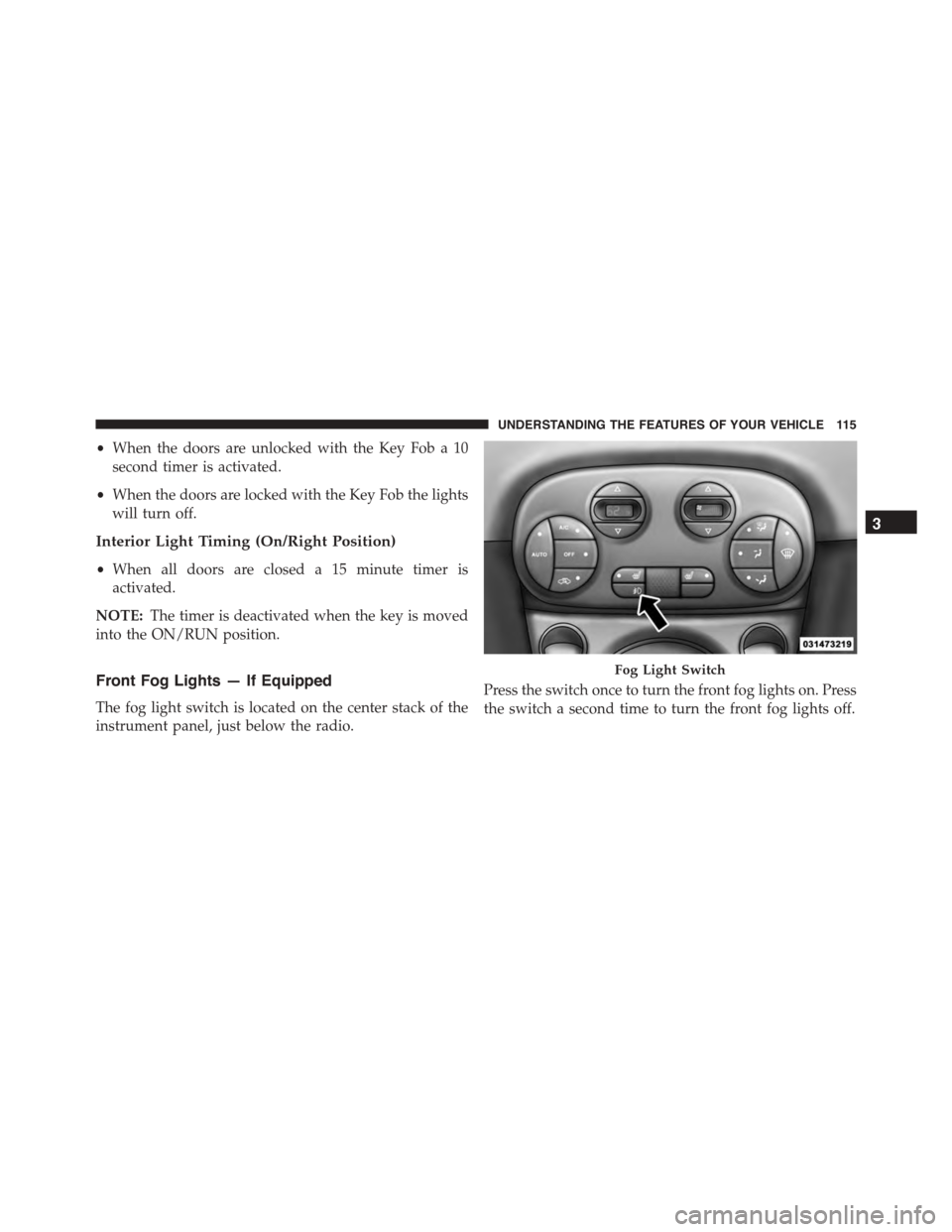
Front Fog Lights — If Equipped
The fog light switch is located on the center stack of the
instrument panel, just below the radio.
Press the switch once to turn the front fog lights on. Press
the switch a second time to turn the front fog lights off.
Fog Light Switch
3
UNDERSTANDING THE FEATURES OF YOUR VEHICLE 115
Page 155 of 392
If the ABS light remains on or turns on while driving, it
indicates that the Anti-Lock portion of the brake system
is not functioning and that service is required. However,
the conventional brake system will continue to operate
normally if the BRAKE warning light is not on.
If the ABS light is on, the brake system should be serviced
as soon as possible to restore the benefits of Anti-Lock
brakes. If the ABS light does not turn on when the
ignition switch is turned to the ON/RUN position, have
the light inspected by an authorized dealer.
24. Door Ajar
This light will turn on to indicate that one or
more doors or the trunk may be ajar.
25. Vehicle Security Light
If during starting, the key code is not correctly
recognized, the Vehicle Security Light comes
on in the instrument panel. In this case, turn
the key to OFF and then to ON/RUN; if it is
still locked, try again with the other keys that come with
the vehicle. Contact a Fiat dealer if you still cannot start
the engine.
If with the engine running the warning light flashes, this
means that the car is not protected by the engine inhibitor
device. Contact Fiat dealer to have all the keys
programmed.
26. Temperature Gauge
The temperature digital scale shows engine coolant tem-
perature. Any reading within the normal range indicates
that the engine cooling system is operating satisfactorily.
4
UNDERSTANDING YOUR INSTRUMENT PANEL 153
Page 159 of 392
•Outside Temperature Display
•Trip Computer Functions
EVIC Control Buttons
Press theMENUbutton briefly to access the menu
and/or go to next screen or to confirm the required menu
option. Press and hold theMENUbutton (approximately
one second) to return to the main screen.
Press the UPbutton to scroll upward through the
displayed menu and the related options or to increase
the displayed value.
Press the DOWNbutton to scroll downward
through the displayed menu and the related options
or to decrease the value displayed.
NOTE:UPand DOWNbuttons activate differ-
ent functions according to the following situations:
•To scroll the menu options upwards or downwards.
•To increase or decrease values during settings.
NOTE:When opening one of the front doors, the EVIC
display will turn on the clock and the miles or kilometers
covered (for versions/markets, where provided) for a
few seconds.
Electronic Vehicle Information Center (EVIC)
Setup Menu
The menu comprises a series of functions arranged in a
cycle. Press the UPand DOWNbuttons to access
the different options and settings (setup).
The setup menu can be activated by pressing theMENU
button. Single presses on the UPor DOWNbut-
tons will scroll through the setup menu options. The
menu includes the following functions:
•Speed Beep
•Trip B Data
4
UNDERSTANDING YOUR INSTRUMENT PANEL 157
Page 170 of 392
3. Briefly press theMENUbutton to go back to the menu
screen, or press and hold theMENUbutton (approxi-
mately one second) to go back to the main screen.
Autoclose
With this function active, the doors will automatically
lock at when the vehicle’s speed exceeds 15 mph
(24 km/h).
To change the setting proceed as follows:
1. Briefly press theMENUbutton “On” or “Off” will
flash on the display (according to the previous set-
ting).
2. Press the UPor DOWNbutton for setting.
3. Briefly press theMENUbutton to go back to the menu
screen, or press and hold theMENUbutton (approxi-
mately one second) to go back to the main screen
without storing the settings.
Units (Set Units)
This function may be used to set the measurement unit in
three submenus: “Distance,” “Temperature” and “Fuel
Economy.”
To set the required unit, proceed as follows:
1. Briefly press theMENUbutton to display the three
sub-menus.
2. Press the UPor DOWNbutton to navigate
the three sub-menus.
3. Select the required sub-menu and then briefly press
theMENUbutton.
4. When accessing the “Distance” submenu: briefly press
theMENUbutton. Either “mi” or “km” will appear on
the display (according to the previous setting).
5. Press the UPor DOWNbutton for setting.
168 UNDERSTANDING YOUR INSTRUMENT PANEL
Page 326 of 392
CAUTION!
The A/C air filter is identified with an arrow to
indicate airflow direction through the filter. Failure
to properly install the filter will result in the need to
replace it more often.
6. Install the passenger side console closeout.
Refer to the “Maintenance Schedule” for the proper
maintenance intervals.
Body Lubrication
Locks and all body pivot points, including such items as
seat tracks, door hinge pivot points and rollers, liftgate,
tailgate, sliding doors and hood hinges, should be lubri-
cated periodically with a lithium based grease, such as
MOPAR® Spray White Lube to assure quiet, easy opera-
tion and to protect against rust and wear. Prior to the
application of any lubricant, the parts concerned should
be wiped clean to remove dust and grit; after lubricating
excess oil and grease should be removed. Particular
attention should also be given to hood latching compo-
nents to ensure proper function. When performing other
underhood services, the hood latch, release mechanism
and safety catch should be cleaned and lubricated.
The external lock cylinders should be lubricated twice a
year, preferably in the Fall and Spring. Apply a small
amount of a high quality lubricant, such as MOPAR®
Lock Cylinder Lubricant directly into the lock cylinder.
Windshield Wiper Blades
Clean the rubber edges of the wiper blades and the
windshield periodically with a sponge or soft cloth and a
mild nonabrasive cleaner. This will remove accumula-
tions of salt or road film.
324 MAINTAINING YOUR VEHICLE