lights FIAT 500 ABARTH 2014 2.G User Guide
[x] Cancel search | Manufacturer: FIAT, Model Year: 2014, Model line: 500 ABARTH, Model: FIAT 500 ABARTH 2014 2.GPages: 392, PDF Size: 8.74 MB
Page 116 of 392
Deactivation
Pull the multifunction lever toward the steering wheel
and hold it for more than two seconds.
Interior Lights
The interior light switches are located in the overhead
console. The interior lights can be set to three different
positions (Off/Left Position, Center Position, On/Right
Position).
Using the switch on the left overhead, press the switch to
the right from its center position and the lights are always
on. Press the switch to the left from its center position and
the lights are always off. Leave the switch in the center
position, and the lights are turned on and off when the
doors are opened or closed. The switch on the right side
of the overhead console controls the map or reading
function of the lights. Press the switch to the right to turn
on the right light and press the switch to the left to turn
on the left light.
CAUTION!
Before getting out of the vehicle be sure that the
switch is in the center position or that the lights are
off to avoid draining the battery.
Interior Light Timing (Center Position)
There are four different modes of operation that can be
activated in this position:
•When one door is opened a three minute timer is
activated.
•When the key is removed from the ignition (within
two minutes of the ignition being turned off), a 10
second timer is activated.
11 4 U N D E R S TA N D I N G T H E F E AT U R E S O F Y O U R V E H I C L E
Page 117 of 392
•When the doors are unlocked with the Key Fob a 10
second timer is activated.
•When the doors are locked with the Key Fob the lights
will turn off.
Interior Light Timing (On/Right Position)
•When all doors are closed a 15 minute timer is
activated.
NOTE:The timer is deactivated when the key is moved
into the ON/RUN position.
Front Fog Lights — If Equipped
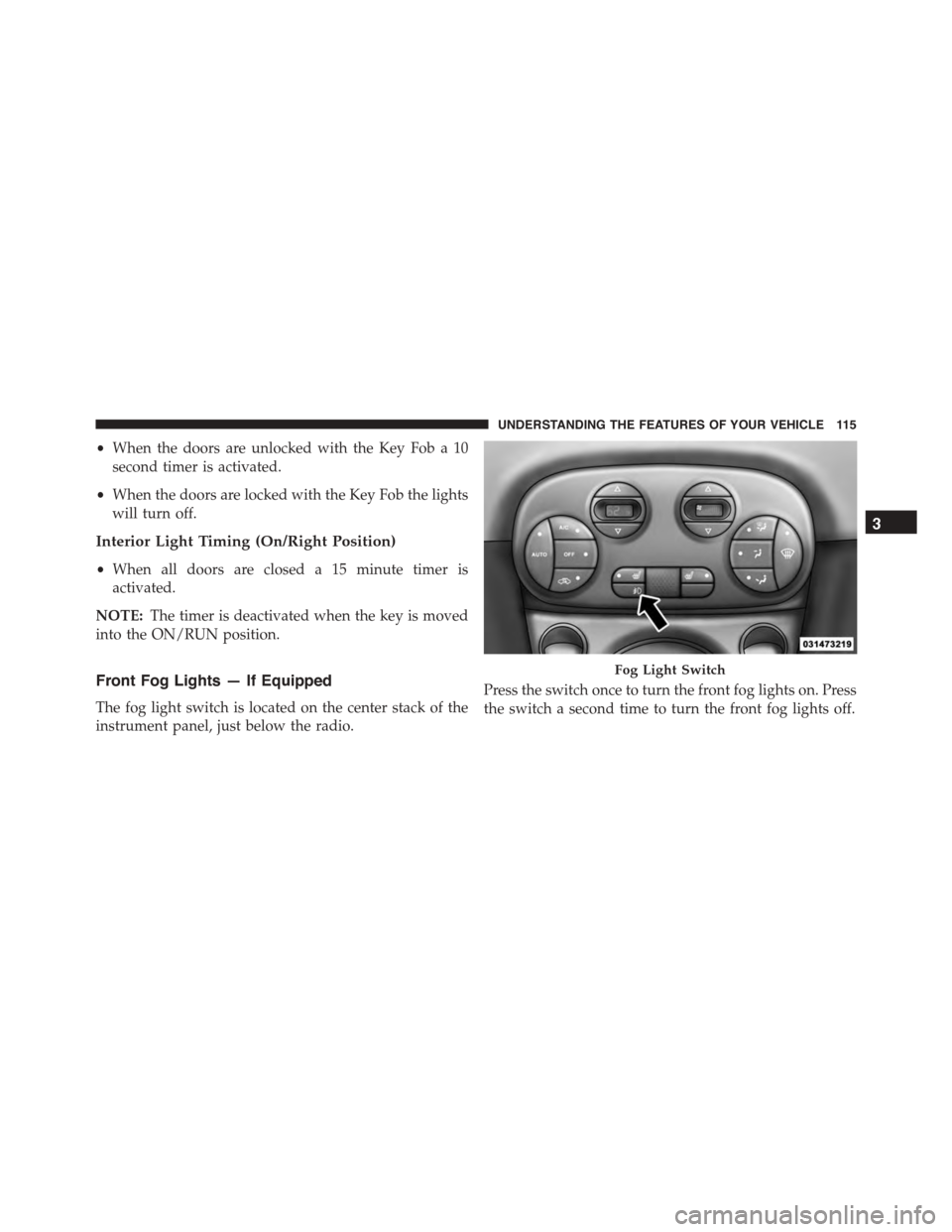
The fog light switch is located on the center stack of the
instrument panel, just below the radio.
Press the switch once to turn the front fog lights on. Press
the switch a second time to turn the front fog lights off.
Fog Light Switch
3
UNDERSTANDING THE FEATURES OF YOUR VEHICLE 115
Page 136 of 392
CAUTION!
•Many accessories that can be plugged in draw
power from the vehicle’s battery, even when not in
use (i.e., cellular phones, etc.). Eventually, if
plugged in long enough, the vehicle’s battery will
discharge sufficiently to degrade battery life and/or
prevent the engine from starting.
•Accessories that draw higher power (i.e., coolers,
vacuum cleaners, lights, etc.) will degrade the bat-
tery even more quickly. Only use these intermit-
tently and with great caution.
•After the use of high power draw accessories, or
long periods of the vehicle not being started (with
accessories still plugged in), the vehicle must be
driven a sufficient length of time to allow the
generator to recharge the vehicle’s battery.
CIGAR LIGHTER — IF EQUIPPED
WARNING!
When the cigar lighter is in use it becomes very hot.
To avoid serious injury, handle the cigar lighter with
care. Always check that the cigar lighter has turned
off.
134 UNDERSTANDING THE FEATURES OF YOUR VEHICLE
Page 143 of 392
INSTRUMENT PANEL FEATURES
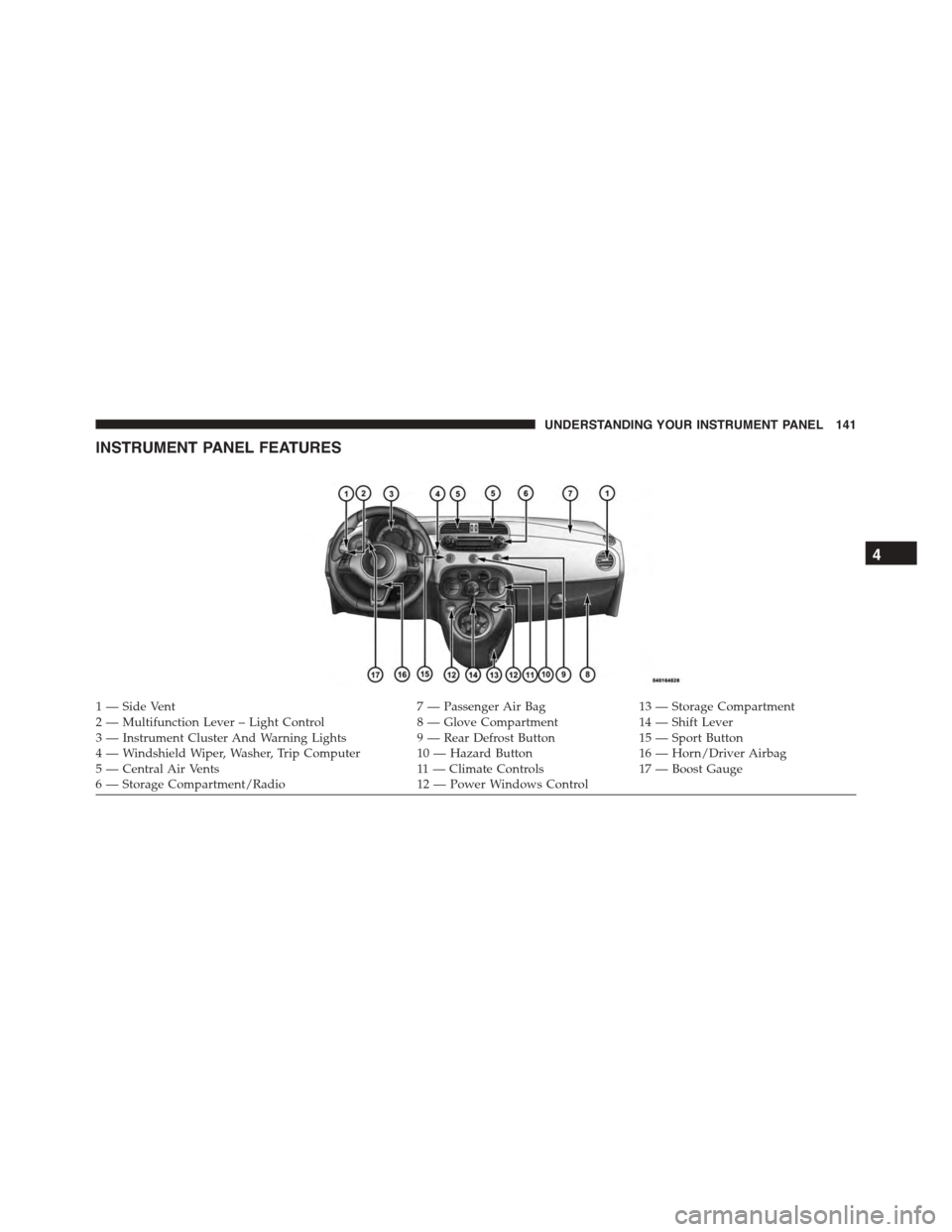
1—SideVent7—PassengerAirBag13 — Storage Compartment2—MultifunctionLever–LightControl8—GloveCompartment14 — Shift Lever3 — Instrument Cluster And Warning Lights9 — Rear Defrost Button15 — Sport Button4 — Windshield Wiper, Washer, Trip Computer 10 — Hazard Button16 — Horn/Driver Airbag5 — Central Air Vents11 — Climate Controls17 — Boost Gauge6—StorageCompartment/Radio12 — Power Windows Control
4
UNDERSTANDING YOUR INSTRUMENT PANEL 141
Page 147 of 392
CAUTION!(Continued)
•Do not use scrapers, sharp instruments, or abrasive
window cleaners on the interior surface of the
window.
•Keep all objects a safe distance from the window.
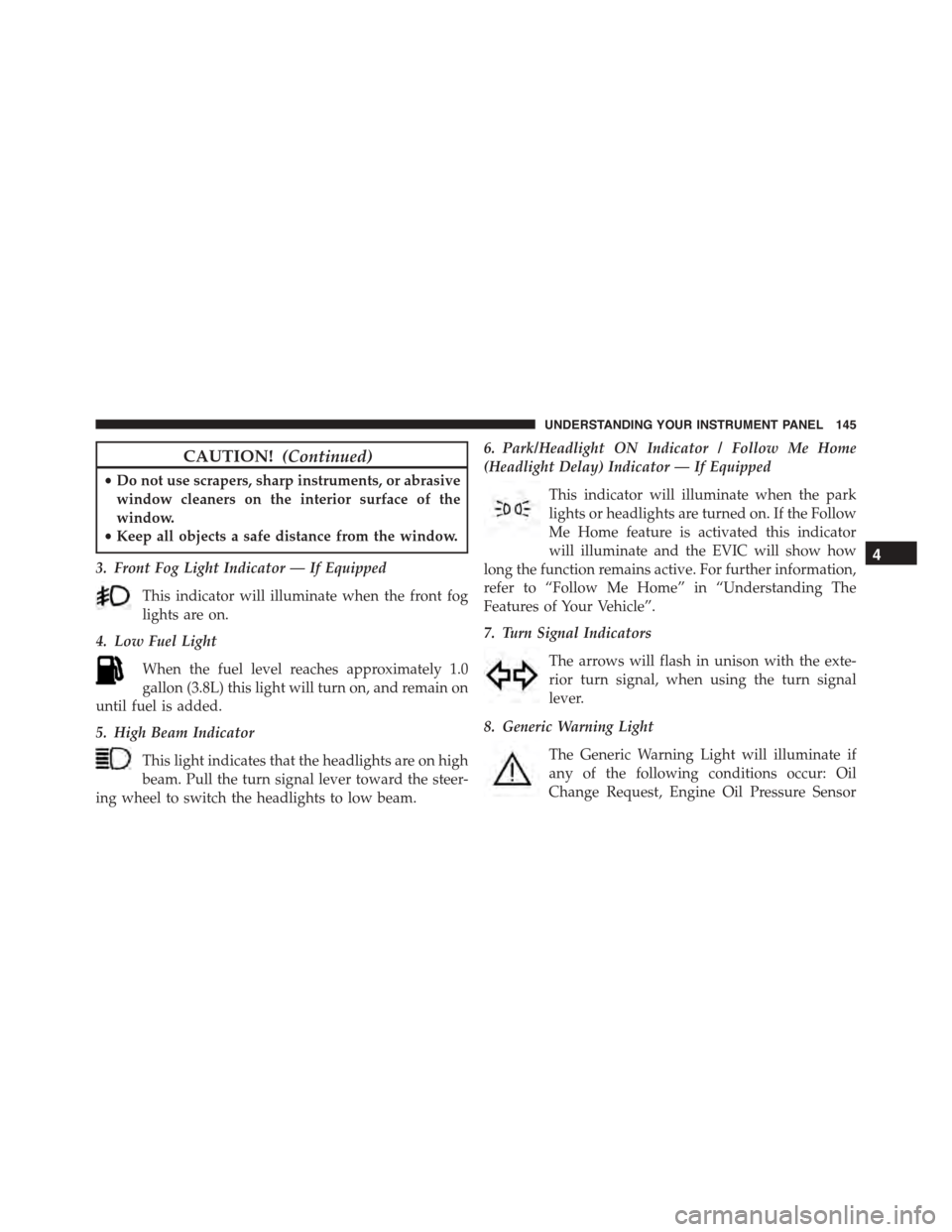
3. Front Fog Light Indicator — If Equipped
This indicator will illuminate when the front fog
lights are on.
4. Low Fuel Light
When the fuel level reaches approximately 1.0
gallon (3.8L) this light will turn on, and remain on
until fuel is added.
5. High Beam Indicator
This light indicates that the headlights are on high
beam. Pull the turn signal lever toward the steer-
ing wheel to switch the headlights to low beam.
6. Park/Headlight ON Indicator / Follow Me Home
(Headlight Delay) Indicator — If Equipped
This indicator will illuminate when the park
lights or headlights are turned on. If the Follow
Me Home feature is activated this indicator
will illuminate and the EVIC will show how
long the function remains active. For further information,
refer to “Follow Me Home” in “Understanding The
Features of Your Vehicle”.
7. Turn Signal Indicators
The arrows will flash in unison with the exte-
rior turn signal, when using the turn signal
lever.
8. Generic Warning Light
The Generic Warning Light will illuminate if
any of the following conditions occur: Oil
Change Request, Engine Oil Pressure Sensor
4
UNDERSTANDING YOUR INSTRUMENT PANEL 145
Page 160 of 392
•Set Time
•Set Date
•See Radio
•Speed Display
•Autoclose
•Units
•Language
•Buzzer Volume
•Button Volume
•Hill Start
•Tire Pressure
•GSI Shift Up
•Daylights (D.R.L.)
•Exit Menu
1. Selecting An Option Of The Main Menu Without
Submenu
1. Briefly press theMENUbutton to select the main
menu option to set.
2. Press the UPor DOWNbutton (by single
presses) to select the new setting.
3. Briefly press theMENUbutton to store the new
setting and go back to the main menu option previ-
ously selected.
1. Selecting An Option Of The Main Menu With Sub-
menu
1. Briefly press theMENUbutton to display the first
submenu option.
2. Press the UPor DOWNbutton (by single
presses) to scroll through all the submenu options.
158 UNDERSTANDING YOUR INSTRUMENT PANEL
Page 175 of 392
Daytime Running Lamps (DRL)
This function may be used to activate / deactivate the
Daytime Running Lamps.
Proceed as follows to switch this function on or off:
1. Briefly press theMENUbutton to display the three
sub-menus.
2. Briefly press theMENUbutton. “On” or “Off” will
flash on the display (according to previous setting).
3. Press the UPor DOWNbutton for setting.
4. Briefly press theMENUbutton to go back to the menu
screen, or press and hold the button (approximately
one second) to go back to the main screen without
storing the settings.
Exit Menu
This function closes the initial menu screen.
Briefly press theMENUbutton to go back to the main
screen.
Press thebutton to return to the first menu option
(Speed Beep).
Press thebutton to return to the last menu option
(Daylights).
4
UNDERSTANDING YOUR INSTRUMENT PANEL 173
Page 188 of 392
•“Jazz” (equalizer preset for optimal jazz music sound)
When one of the equalizer adjustments is activated the
wording “EQ” lights up.
User EQ Settings Function — If Equipped
To set a personalized equalizer adjustment:
1. Press AUDIO button.
2. Use theorbuttons to set EQ function.
3. Useorbuttons to select#EQ User.#
4. Press MENU button to start adjusting equalizer.
5. On the display a seven bar graph will appear, in which
each bar represents a frequency. Select the bar to be
adjusted by using theorbuttons. The selected
bar will start to flash and it can be adjusted using
orbuttons.
6. To store the setting, press the MENU or AUDIO
buttons.
Menu
MENU Button Functions
Press the MENU button briefly to activate the Menu
function.
Use theorbuttons to scroll through the menu
functions. To change the setting of the selected func-
tion, use theorbuttons.
The current status of the selected function appears on the
display.
The functions managed by the Menu are:
•Speech Volume
•Aux Audio Offset
•Radio Off
186 UNDERSTANDING YOUR INSTRUMENT PANEL
Page 345 of 392
CAUTION!
Do not use Alcohol and Alcohol-based and/or Keton
based cleaning products to clean leather seats, as
damage to the seat may result.
Cleaning Headlights
Your vehicle has plastic headlights that are lighter and
less susceptible to stone breakage than glass headlights.
Plastic is not as scratch resistant as glass and therefore
different lens cleaning procedures must be followed.
To minimize the possibility of scratching the lenses and
reducing light output, avoid wiping with a dry cloth. To
remove road dirt, wash with a mild soap solution fol-
lowed by rinsing.
Do not use abrasive cleaning components, solvents, steel
wool or other aggressive material to clean the lenses.
Glass Surfaces
All glass surfaces should be cleaned on a regular basis
with MOPAR® Glass Cleaner, or any commercial
household-type glass cleaner. Never use an abrasive type
cleaner. Use caution when cleaning the inside rear win-
dow equipped with electric defrosters or the right rear
quarter window equipped with the radio antenna. Do
not use scrapers or other sharp instrument that may
scratch the elements.
When cleaning the rear view mirror, spray cleaner on the
towel or rag that you are using. Do not spray cleaner
directly on the mirror.
Instrument Panel Cover
The instrument panel cover has a low glare surface which
minimizes reflections on the windshield. Do not use
protectants or other products which may cause undesir-
able reflections. Use soap and warm water to restore the
low glare surface.
7
MAINTAINING YOUR VEHICLE 343
Page 348 of 392
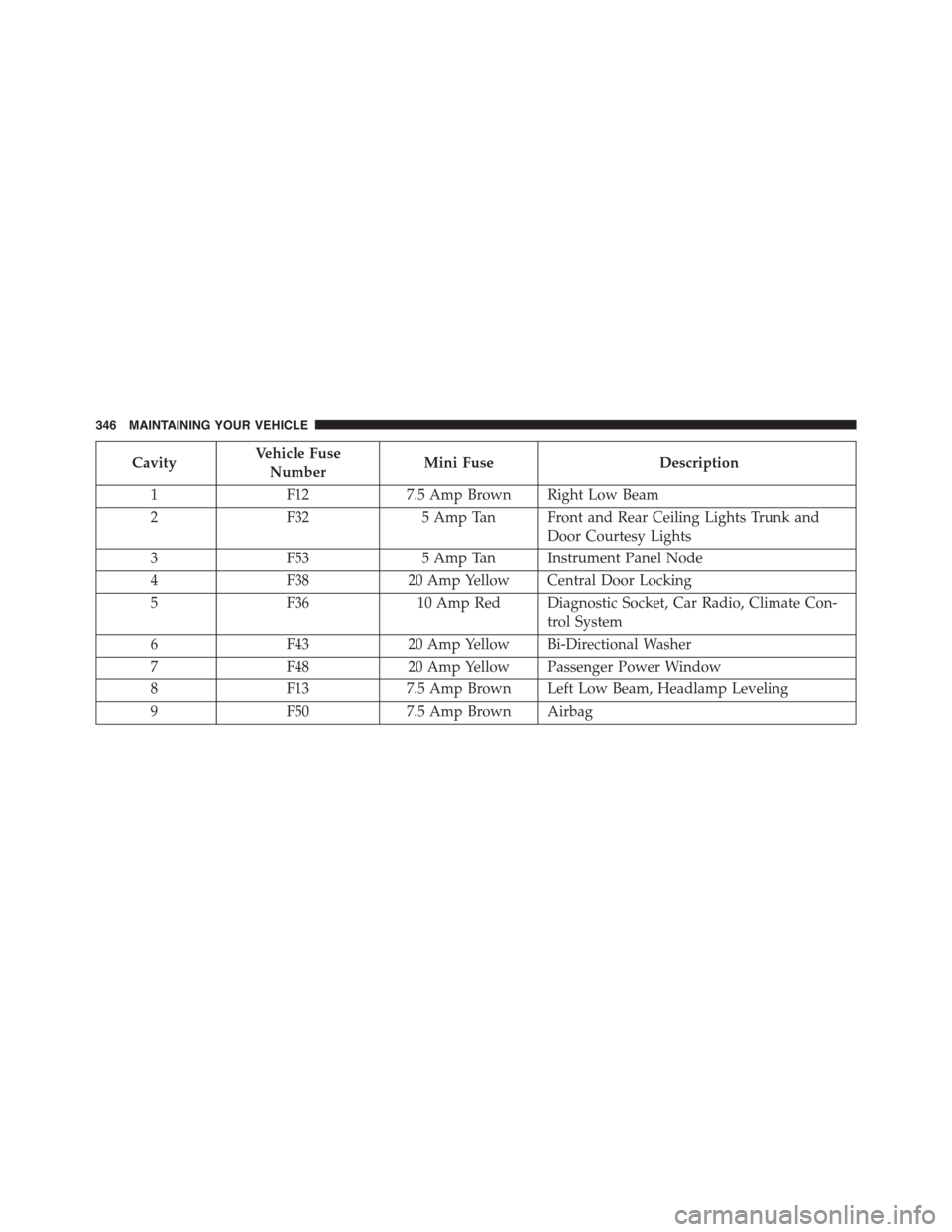
CavityVehicle Fuse
NumberMini FuseDescription
1F127.5 Amp Brown Right Low Beam
2F325 Amp Tan Front and Rear Ceiling Lights Trunk and
Door Courtesy Lights
3F535 Amp Tan Instrument Panel Node
4F3820 Amp Yellow Central Door Locking
5F3610 Amp Red Diagnostic Socket, Car Radio, Climate Con-
trol System
6F4320 Amp Yellow Bi-Directional Washer
7F4820 Amp Yellow Passenger Power Window
8F137.5 Amp Brown Left Low Beam, Headlamp Leveling
9F507.5 Amp Brown Airbag
346 MAINTAINING YOUR VEHICLE