tow FIAT 500 ABARTH 2014 2.G User Guide
[x] Cancel search | Manufacturer: FIAT, Model Year: 2014, Model line: 500 ABARTH, Model: FIAT 500 ABARTH 2014 2.GPages: 392, PDF Size: 8.74 MB
Page 119 of 392
NOTE:The Intermittent function only has one detent
but wiper delay will vary with changes in vehicle speed.
As vehicle speed increases the delay time will decrease.
Low Speed
Push the lever downward to the second detent. The
wipers will operate at low speed.
High Speed
Push the lever downward to the third detent. The wipers
will operate at high speed.
Manual High Speed/Mist
Push the lever upward from the off position. The wipers
will operate at high speed to clear off road mist or spray
from a passing vehicle. This operation will continue until
the lever is released. When the lever is released, the
wipers will return to the off position and automatically
shut off.
Front Windshield Washer Operation
Pull the windshield wiper/washer lever toward the
steering wheel to activate the washers. The wipers will
activate automatically for three cycles after the lever is
released.
CAUTION!
•Turn the windshield wipers off when driving
through an automatic car wash. Damage to the
windshield wipers may result if the wiper control
is left in any position other than off.
•In cold weather, always turn off the wiper switch
and allow the wipers to return to the “Park” posi-
tion before turning off the engine. If the wiper
switch is left on and the wipers freeze to the
windshield, damage to the wiper motor may occur
when the vehicle is restarted.
(Continued)
3
UNDERSTANDING THE FEATURES OF YOUR VEHICLE 117
Page 121 of 392
Rear Windshield Washer Operation
Push the windshield wiper/washer lever toward the
instrument panel to activate the rear washer. Push and
hold the lever for more than a half second and the wipers
will activate automatically for three cycles after the lever
is released.
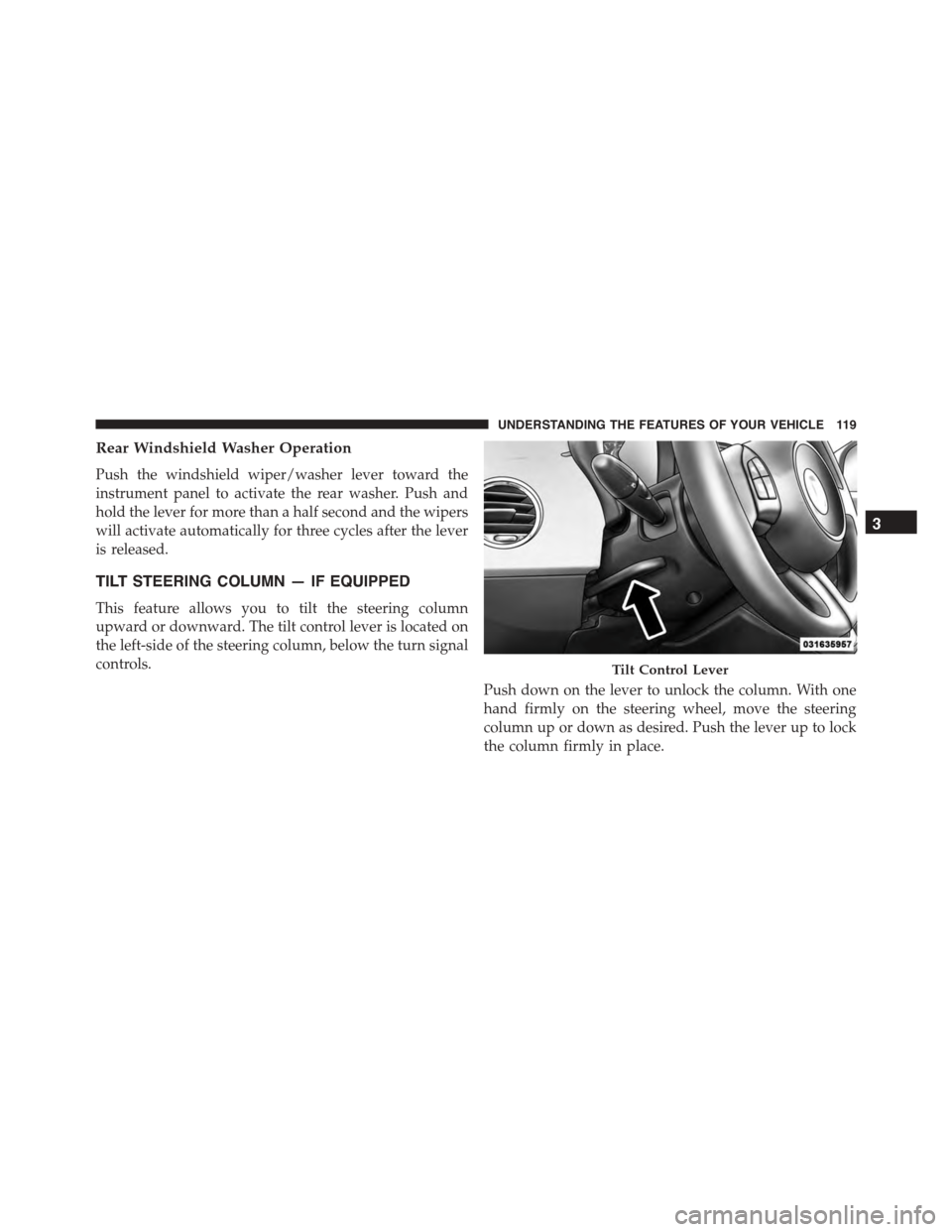
TILT STEERING COLUMN — IF EQUIPPED
This feature allows you to tilt the steering column
upward or downward. The tilt control lever is located on
the left-side of the steering column, below the turn signal
controls.
Push down on the lever to unlock the column. With one
hand firmly on the steering wheel, move the steering
column up or down as desired. Push the lever up to lock
the column firmly in place.
Tilt Control Lever
3
UNDERSTANDING THE FEATURES OF YOUR VEHICLE 119
Page 130 of 392
CAUTION!(Continued)
•The vehicle must be driven slowly when using
Rear Park Assist in order to be able to stop in time
when an obstacle is detected. It is recommended
that the driver looks over his/her shoulder when
using Rear Park Assist.
WARNING!
•Drivers must be careful when backing up even
when using ParkSense®. Always check carefully
behind your vehicle, look behind you, and be sure
to check for pedestrians, animals, other vehicles,
obstructions, and blind spots before backing up.
You are responsible for safety and must continue to
pay attention to your surroundings. Failure to do so
can result in serious injury or death.
(Continued)
WARNING!(Continued)
•Before using ParkSense®, it is strongly recom-
mended that the ball mount and hitch ball assem-
bly is disconnected from the vehicle when the
vehicle is not used for towing. Failure to do so can
result in injury or damage to vehicles or obstacles
because the hitch ball will be much closer to the
obstacle than the rear fascia when the loudspeaker
sounds the continuous tone. Also, the sensors
could detect the ball mount and hitch ball assem-
bly, depending on its size and shape, giving a false
indication that an obstacle is behind the vehicle.
128 UNDERSTANDING THE FEATURES OF YOUR VEHICLE
Page 147 of 392
CAUTION!(Continued)
•Do not use scrapers, sharp instruments, or abrasive
window cleaners on the interior surface of the
window.
•Keep all objects a safe distance from the window.
3. Front Fog Light Indicator — If Equipped
This indicator will illuminate when the front fog
lights are on.
4. Low Fuel Light
When the fuel level reaches approximately 1.0
gallon (3.8L) this light will turn on, and remain on
until fuel is added.
5. High Beam Indicator
This light indicates that the headlights are on high
beam. Pull the turn signal lever toward the steer-
ing wheel to switch the headlights to low beam.
6. Park/Headlight ON Indicator / Follow Me Home
(Headlight Delay) Indicator — If Equipped
This indicator will illuminate when the park
lights or headlights are turned on. If the Follow
Me Home feature is activated this indicator
will illuminate and the EVIC will show how
long the function remains active. For further information,
refer to “Follow Me Home” in “Understanding The
Features of Your Vehicle”.
7. Turn Signal Indicators
The arrows will flash in unison with the exte-
rior turn signal, when using the turn signal
lever.
8. Generic Warning Light
The Generic Warning Light will illuminate if
any of the following conditions occur: Oil
Change Request, Engine Oil Pressure Sensor
4
UNDERSTANDING YOUR INSTRUMENT PANEL 145
Page 149 of 392
vehicle is experiencing a problem with the charging
system. Obtain SERVICE IMMEDIATELY. See an autho-
rized dealer.
If jump starting is required, refer to “Jump Starting
Procedures” in “What To Do In Emergencies”.
13. Power Steering System Warning
This light is used to manage the electrical
warning of the EPS (Power Steering System).
Refer to “Power Steering” in “Starting and
Operating” for further information.
14. Electronic Throttle Control (ETC) Light
This light informs you of a problem with the
Electronic Throttle Control (ETC) system. If a
problem is detected, the light will come on
while the engine is running. Cycle the ignition
key when the vehicle has completely stopped and the
shift lever is placed in the NEUTRAL position. The light
should turn off. If the light remains lit with the engine
running, your vehicle will usually be drivable; however,
see an authorized dealer for service as soon as possible. If
the light is flashing when the engine is running, imme-
diate service is required and you may experience reduced
performance, an elevated/rough idle or engine stall and
your vehicle may require towing. The light will come on
when the ignition is first turned to ON/RUN and remain
on briefly as a bulb check. If the light does not come on
during starting, have the system checked by an autho-
rized dealer.
15. Tire Pressure Monitoring Telltale Light
Each tire, including the spare (if provided),
should be checked monthly when cold and
inflated to the inflation pressure recommended
by the vehicle manufacturer on the vehicle
placard or tire inflation pressure label. (If your vehicle
has tires of a different size than the size indicated on the
4
UNDERSTANDING YOUR INSTRUMENT PANEL 147
Page 152 of 392
Certain conditions, such as a loose or missing gas cap,
poor fuel quality, etc., may illuminate the MIL after
engine start. The vehicle should be serviced if the light
stays on through several of your typical driving cycles. In
most situations, the vehicle will drive normally and will
not require towing.
CAUTION!
Prolonged driving with the Malfunction Indicator
Light (MIL) on could cause damage to the engine
control system. It also could affect fuel economy and
driveability. If the MIL is flashing, severe catalytic
converter damage and power loss will soon occur.
Immediate service is required.
WARNING!
A malfunctioning catalytic converter, as referenced
above, can reach higher temperatures than in normal
operating conditions. This can cause a fire if you
drive slowly or park over flammable substances such
as dry plants, wood, cardboard, etc. This could result
in death or serious injury to the driver, occupants or
others.
19. Engine Temperature Warning Light
This light warns of an overheated engine condi-
tion. The engine coolant temperature indicator
will illuminate and a single chime will sound after
reaching a set threshold.
If the light turns on while driving, safely pull over and
stop the vehicle. If the A/C system is on, turn it off. Also,
shift the transmission into NEUTRAL and idle the ve-
hicle. If the temperature reading does not return to
150 UNDERSTANDING YOUR INSTRUMENT PANEL
Page 156 of 392
The gauge pointer will likely indicate a higher tempera-
ture when driving in hot weather, up mountain grades,
or when towing a trailer. It should not be allowed to
exceed the upper limits of the normal operating range.
CAUTION!
Driving with a hot engine cooling system could
damage your vehicle. If the temperature gauge reads
“260“, pull over and stop the vehicle. Idle the vehicle
with the air conditioner turned off until the pointer
drops back into the normal range. If the pointer
remains on the “260”, and you hear continuous
chimes, turn the engine off immediately and call an
authorized dealer for service.
WARNING!
A hot engine cooling system is dangerous. You or
others could be badly burned by steam or boiling
coolant. You may want to call an authorized dealer
for service if your vehicle overheats. If you decide to
look under the hood yourself, see “Maintaining Your
Vehicle.” Follow the warnings under the “Cooling
System Pressure Cap” paragraph.
27. Odometer / Trip Odometer / Electronic Vehicle Infor-
mation Center (EVIC) Display Area
This display indicates the total distance the vehicle has
been driven.
U.S. Federal regulations require that upon transfer of
vehicle ownership, the seller certify to the purchaser the
correct mileage that the vehicle has been driven. If your
odometer needs to be repaired or serviced, the repair
technician should leave the odometer reading the same
154 UNDERSTANDING YOUR INSTRUMENT PANEL
Page 207 of 392
4. Mode Control
Rotate this control to change the system between Modes
(Panel, Bi-Level, Floor, Mix, Defrost).
•Panel
Air is directed through the outlets in the
instrument panel. These outlets can be ad-
justed to direct airflow.
NOTE:The center instrument panel outlets can be aimed
so that they are directed toward the rear seat passengers
for maximum airflow to the rear.
•Bi-Level
Air is directed through the panel and floor
outlets.
•Floor
Air is directed through the floor outlets with a
small amount flowing through the defrost and
side window demister outlets.
•Mix
Air is directed through the floor, defrost, and
side window demister outlets. This setting
works best in cold or snowy conditions that
require extra heat to the windshield. This setting is
good for maintaining comfort while reducing mois-
ture on the windshield.
4
UNDERSTANDING YOUR INSTRUMENT PANEL 205
Page 212 of 392
NOTE:The center instrument panel outlets can be aimed
so that they are directed toward the rear seat passengers
for maximum airflow to the rear.
9. Blower Control Down Button
There are 12 blower speeds. The blower speed decreases
as you press this button. Performing this function will
cause the ATC to switch into manual mode.
10. Temperature Control Down Button
Provides temperature down control. Push the button for
cooler temperature settings.
11. Climate Control ON/OFF Button
Press and release to turn the Climate Control ON or OFF.
12. Recirculation Control Button
Press and release to change the current setting. The
indicator illuminates when ON.
NOTE:
•When in Defrost mode, the Recirculation button will
flash if pressed. This indicates that you can not
proceed to this mode due to fogging risk.
•When the Auto indicator is on and the Recirculation
indicator is off, the Recirculation is in AUTO mode. If
the Recirculation indicator is on, the Recirculation
setting is manual and Recirculation is on.
Automatic Operation
1. Press the AUTO button on the Automatic Temperature
Control (ATC) Panel, the indicator will illuminate
when on.
2. Next, adjust the temperature you would like the
system to maintain by adjusting the temperature con-
trol buttons. Once the desired temperature is dis-
played, the system will achieve and automatically
maintain that comfort level.
210 UNDERSTANDING YOUR INSTRUMENT PANEL
Page 223 of 392
▫Tire Spinning........................259
▫Tread Wear Indicators..................260
▫Life Of Tire.........................260
▫Replacement Tires.....................261
!TIRE CHAINS (TRACTION DEVICES).......262
!TIRE ROTATION RECOMMENDATIONS.....263
!TIRE PRESSURE MONITORING SYSTEM
(TPMS)..............................264
▫Base System.........................267
▫General Information...................269
!FUEL REQUIREMENTS..................270
▫Reformulated Gasoline.................270
▫Gasoline/Oxygenate Blends..............271
▫E-85 Usage In Non-Flex Fuel Vehicles.......271
▫MMT In Gasoline.....................272
▫Materials Added To Fuel................272
▫Fuel System Cautions...................273
▫Carbon Monoxide Warnings.............274
!ADDING FUEL........................275
▫Fuel Filler Cap (Gas Cap)...............275
▫Loose Fuel Filler Cap Message............276
!TRAILER TOWING.....................276
!RECREATIONAL TOWING (BEHIND
MOTORHOME, ETC.)...................277
▫Towing This Vehicle Behind Another Vehicle . .277
5
STARTING AND OPERATING 221