lock FIAT 500 ABARTH 2014 2.G Service Manual
[x] Cancel search | Manufacturer: FIAT, Model Year: 2014, Model line: 500 ABARTH, Model: FIAT 500 ABARTH 2014 2.GPages: 392, PDF Size: 8.74 MB
Page 131 of 392
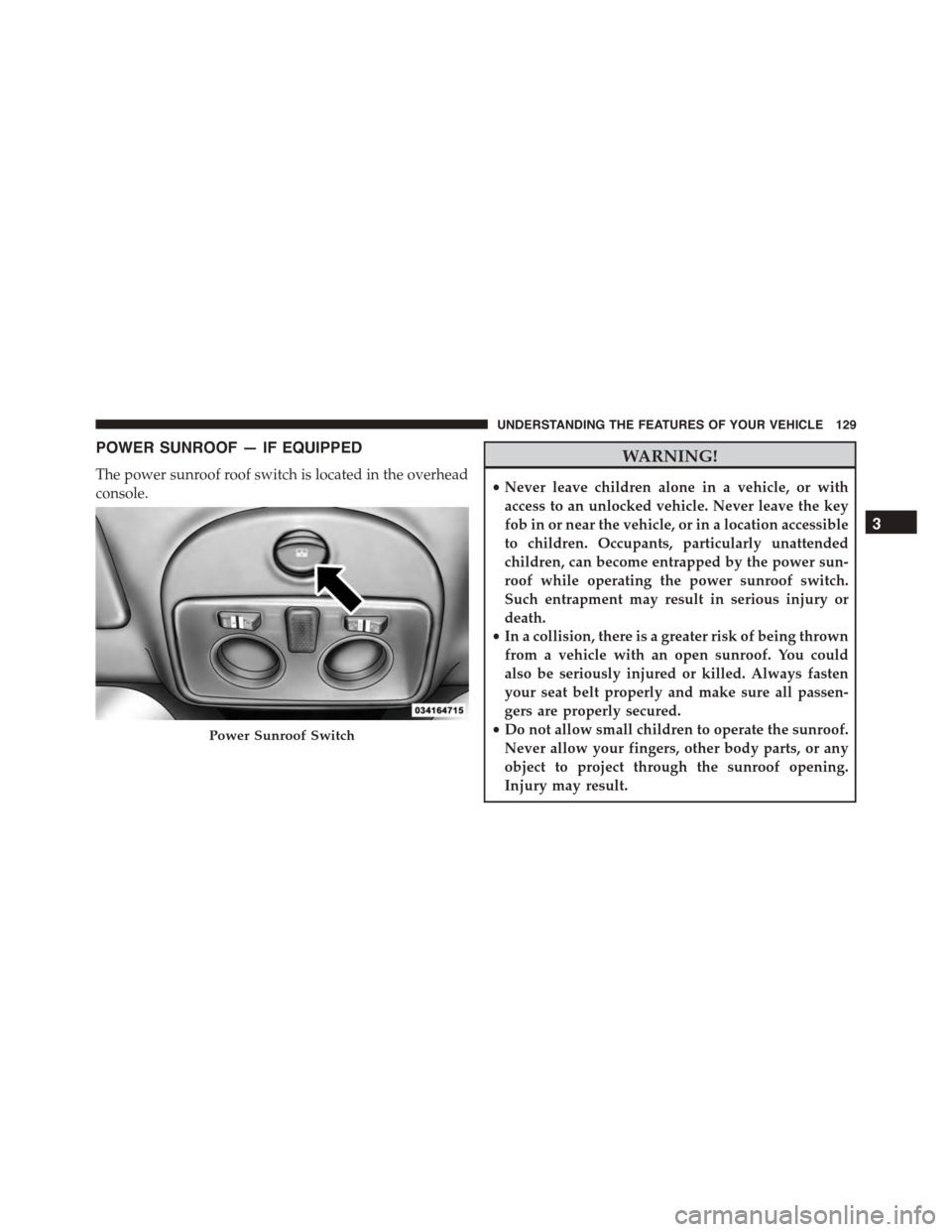
POWER SUNROOF — IF EQUIPPED
The power sunroof roof switch is located in the overhead
console.
WARNING!
•Never leave children alone in a vehicle, or with
access to an unlocked vehicle. Never leave the key
fob in or near the vehicle, or in a location accessible
to children. Occupants, particularly unattended
children, can become entrapped by the power sun-
roof while operating the power sunroof switch.
Such entrapment may result in serious injury or
death.
•In a collision, there is a greater risk of being thrown
from a vehicle with an open sunroof. You could
also be seriously injured or killed. Always fasten
your seat belt properly and make sure all passen-
gers are properly secured.
•Do not allow small children to operate the sunroof.
Never allow your fingers, other body parts, or any
object to project through the sunroof opening.
Injury may result.
Power Sunroof Switch
3
UNDERSTANDING THE FEATURES OF YOUR VEHICLE 129
Page 146 of 392
INSTRUMENT CLUSTER DESCRIPTIONS
1. Glow Plug Light — If Equipped
The Glow Plug light will flash during engine oil
viscosity sensor measurement in cold weather.
During this measurement (up to 10 seconds), the starter
will be disabled. If the measured oil viscosity is OK, the
light will turn off and the engine will be allowed to crank.
If the measured oil viscosity is too high, engine cranking
will be disabled and the light will blink repeatedly until
the oil temperature is raised, preferably by an externally-
powered electric engine block heater (available from
your authorized dealer).
The message#Plug In Engine Heater#, will be displayed
in the instrument cluster when the ambient temperature
is below 5°F (-15°C) at the time the engine is shut off as
a reminder to avoid possible crank delays at the next cold
start.
2. Rear Defrost Button
Press and release this button to turn on the rear
window defroster. This indicator will illuminate
when the rear window defroster is on. The rear window
defroster automatically turns off after 20 minutes.
CAUTION!
Failure to follow these cautions can cause damage to
the heating elements:
•Use care when washing the inside of the rear
window. Do not use abrasive window cleaners on
the interior surface of the window. Use a soft cloth
and a mild washing solution, wiping parallel to the
heating elements. Labels can be peeled off after
soaking with warm water.
(Continued)
144 UNDERSTANDING YOUR INSTRUMENT PANEL
Page 151 of 392
CAUTION!
The TPMS has been optimized for the original
equipment tires and wheels. TPMS pressures and
warning have been established for the tire size
equipped on your vehicle. Undesirable system opera-
tion or sensor damage may result when using re-
placement equipment that is not of the same size,
type, and/or style. Aftermarket wheels can cause
sensor damage. Do not use tire sealant from a can or
balance beads if your vehicle is equipped with a
TPMS, as damage to the sensors may result.
16. Automatic Gearbox Fault
This light will illuminate when there is an
automatic transmission fault.
17. Oil Pressure Warning Light
This light indicates low engine oil pressure. The
light should turn on momentarily when the engine is
started. If the light turns on while driving, stop the
vehicle and shut off the engine as soon as possible. A
chime will sound when this light turns on.
Do not operate the vehicle until the cause is corrected.
This light does not indicate how much oil is in the engine.
The engine oil level must be checked under the hood.
18. Malfunction Indicator Light (MIL)
The Malfunction Indicator Light (MIL) is part of
an onboard diagnostic system, called OBDII, that
monitors engine and automatic transmission con-
trol systems. The light will illuminate when the key is in
the ON/RUN position before engine start. If the bulb
does not come on when turning the key from OFF/LOCK
to ON/RUN, have the condition checked promptly.
4
UNDERSTANDING YOUR INSTRUMENT PANEL 149
Page 153 of 392
normal, turn the engine off immediately and call for
service. Refer to “If Your Engine Overheats” in “What To
Do In Emergencies” for further information.
20. Brake Warning Light
This light monitors various brake functions,
including brake fluid level and parking brake
application. If the Brake Warning Light turns
on it may indicate that the parking brake is
applied, that the brake fluid level is low, or that there is
a problem with the brake system reservoir.
The light will remain on until the cause is corrected.
If brake fault is indicated, immediate repair is necessary.
WARNING!
Driving a vehicle with the red brake light on is
dangerous. You could have a collision. Have the
vehicle checked immediately.
Vehicles equipped with the Anti-Lock Brake System
(ABS), are also equipped with Electronic Brake Force
Distribution (EBD). In the event of an EBD fault, the
Brake Warning Light will turn on along with the ABS
Light. Immediate repair to the ABS system is required.
Operation of the Brake Warning Light can be checked by
turning the ignition switch from the OFF/LOCK position
to the ON/RUN position. The light should illuminate for
approximately two seconds. The light should then turn
off unless the parking brake is applied or a brake fault is
detected. If the light does not illuminate, have the light
inspected by an authorized dealer.
The light also will turn on when the parking brake is
applied with the ignition switch in the ON/RUN posi-
tion.
4
UNDERSTANDING YOUR INSTRUMENT PANEL 151
Page 154 of 392
NOTE:This light shows only that the parking brake is
applied. It does not show the degree of brake application.
21. Electronic Stability Control OFF (ESC OFF) Indica-
tor Light
This light indicates the Electronic Stability Con-
trol system (ESC) has been turned off by the
driver.
22. Electronic Stability Control (ESC) Activation / Mal-
function Indicator Light
The ESC Activation/Malfunction Indicator
Light in the instrument cluster will come on for
four seconds when the ignition switch is
turned to the ON/RUN position. If the ESC
Activation/Malfunction Indicator Light comes on con-
tinuously with the engine running, a malfunction has
been detected in the ESC system. If this light remains on,
see your authorized dealer as soon as possible to have the
problem diagnosed and corrected.
NOTE:
•The ESC Off Indicator Light and the ESC Activation/
Malfunction Indicator Light come on momentarily
each time the ignition switch is turned to ON/RUN.
•Each time the ignition is turned to ON/RUN, the
ESC system will be on, even if it was turned off
previously.
23. Anti-Lock Brake (ABS) Light
This light monitors the Anti-Lock Brake System
(ABS). The light will turn on when the ignition
switch is turned to the ON/RUN position and
may stay on for as long as four seconds.
152 UNDERSTANDING YOUR INSTRUMENT PANEL
Page 155 of 392
If the ABS light remains on or turns on while driving, it
indicates that the Anti-Lock portion of the brake system
is not functioning and that service is required. However,
the conventional brake system will continue to operate
normally if the BRAKE warning light is not on.
If the ABS light is on, the brake system should be serviced
as soon as possible to restore the benefits of Anti-Lock
brakes. If the ABS light does not turn on when the
ignition switch is turned to the ON/RUN position, have
the light inspected by an authorized dealer.
24. Door Ajar
This light will turn on to indicate that one or
more doors or the trunk may be ajar.
25. Vehicle Security Light
If during starting, the key code is not correctly
recognized, the Vehicle Security Light comes
on in the instrument panel. In this case, turn
the key to OFF and then to ON/RUN; if it is
still locked, try again with the other keys that come with
the vehicle. Contact a Fiat dealer if you still cannot start
the engine.
If with the engine running the warning light flashes, this
means that the car is not protected by the engine inhibitor
device. Contact Fiat dealer to have all the keys
programmed.
26. Temperature Gauge
The temperature digital scale shows engine coolant tem-
perature. Any reading within the normal range indicates
that the engine cooling system is operating satisfactorily.
4
UNDERSTANDING YOUR INSTRUMENT PANEL 153
Page 159 of 392
•Outside Temperature Display
•Trip Computer Functions
EVIC Control Buttons
Press theMENUbutton briefly to access the menu
and/or go to next screen or to confirm the required menu
option. Press and hold theMENUbutton (approximately
one second) to return to the main screen.
Press the UPbutton to scroll upward through the
displayed menu and the related options or to increase
the displayed value.
Press the DOWNbutton to scroll downward
through the displayed menu and the related options
or to decrease the value displayed.
NOTE:UPand DOWNbuttons activate differ-
ent functions according to the following situations:
•To scroll the menu options upwards or downwards.
•To increase or decrease values during settings.
NOTE:When opening one of the front doors, the EVIC
display will turn on the clock and the miles or kilometers
covered (for versions/markets, where provided) for a
few seconds.
Electronic Vehicle Information Center (EVIC)
Setup Menu
The menu comprises a series of functions arranged in a
cycle. Press the UPand DOWNbuttons to access
the different options and settings (setup).
The setup menu can be activated by pressing theMENU
button. Single presses on the UPor DOWNbut-
tons will scroll through the setup menu options. The
menu includes the following functions:
•Speed Beep
•Trip B Data
4
UNDERSTANDING YOUR INSTRUMENT PANEL 157
Page 161 of 392
3. Briefly press theMENUbutton to select the displayed
submenu option and to open the relevant setup menu.
4. Press the UPor DOWNbutton (by single
presses) to select the new setting for this submenu
option.
5. Briefly press theMENUbutton to store the new
setting and go back to the previously selected sub-
menu option.
6. Press and hold theMENUbutton to return to the main
menu (short hold) or the main screen (longer hold).
Change Engine Oil Indicator System
Change Engine Oil
Your vehicle is equipped with an engine oil change
indicator system. The “Change Engine Oil” message will
flash in the EVIC display for approximately 10 seconds
after a single chime has sounded to indicate the next
scheduled oil change interval. The engine oil change
indicator system is duty cycle based, which means the
engine oil change interval may fluctuate, dependent
upon your personal driving style.
Unless reset, this message will continue to display each
time you turn the ignition switch to the ON/RUN
position. To turn off the message temporarily, press and
release theMENUbutton. To reset the oil change indica-
tor system (after performing the scheduled maintenance),
refer to the following procedure.
1. Turn the ignition switch to the ON position. (do not
start the engine.)
2. Fully depress the accelerator pedal slowly, three times
within 10 seconds.
3. Turn the ignition switch to the OFF/LOCK position.
4
UNDERSTANDING YOUR INSTRUMENT PANEL 159
Page 167 of 392
3. Briefly press theMENUbutton to go back to the menu
screen, or press and hold theMENUbutton (approxi-
mately one second) to go back to the main screen
without storing the settings.
Set Time (Clock)
This function may be used to set the clock through two
sub-menu items: “Time” and “Mode.”
Proceed as follows:
1. Briefly press theMENUbutton. The display will show
the two sub-menu items “Time” and “Mode.”
2. Press the UPor DOWNbutton to navigate
the two sub-menu items.
3. Select the required option and then press theMENU
button.
4. When accessing the “Time” sub-menu item, briefly
press theMENUbutton and “hours” will flash on the
display.
5. Press the UPor DOWNbutton for setting.
6. Briefly press theMENUbutton and “minutes” will
flash on the display.
7. Press the UPor DOWNbutton for setting.
NOTE:
•The setting will increase or decrease by one unit each
time the UPor DOWNbutton is pressed.
Press and hold the button to increase/decrease the
setting rapidly. Save the setting by briefly pressing
the button when you approach the required set-
ting.
•Briefly press theMENUbutton to return to the
“Time” sub-function.
4
UNDERSTANDING YOUR INSTRUMENT PANEL 165
Page 170 of 392
3. Briefly press theMENUbutton to go back to the menu
screen, or press and hold theMENUbutton (approxi-
mately one second) to go back to the main screen.
Autoclose
With this function active, the doors will automatically
lock at when the vehicle’s speed exceeds 15 mph
(24 km/h).
To change the setting proceed as follows:
1. Briefly press theMENUbutton “On” or “Off” will
flash on the display (according to the previous set-
ting).
2. Press the UPor DOWNbutton for setting.
3. Briefly press theMENUbutton to go back to the menu
screen, or press and hold theMENUbutton (approxi-
mately one second) to go back to the main screen
without storing the settings.
Units (Set Units)
This function may be used to set the measurement unit in
three submenus: “Distance,” “Temperature” and “Fuel
Economy.”
To set the required unit, proceed as follows:
1. Briefly press theMENUbutton to display the three
sub-menus.
2. Press the UPor DOWNbutton to navigate
the three sub-menus.
3. Select the required sub-menu and then briefly press
theMENUbutton.
4. When accessing the “Distance” submenu: briefly press
theMENUbutton. Either “mi” or “km” will appear on
the display (according to the previous setting).
5. Press the UPor DOWNbutton for setting.
168 UNDERSTANDING YOUR INSTRUMENT PANEL