brake FIAT 500 ABARTH 2014 2.G User Guide
[x] Cancel search | Manufacturer: FIAT, Model Year: 2014, Model line: 500 ABARTH, Model: FIAT 500 ABARTH 2014 2.GPages: 88, PDF Size: 5.56 MB
Page 5 of 88
VEHICLES SOLD IN CANADA
With respect to any vehicles sold in Canada, the name Chrysler Group LLC shall be
deemed to be deleted and the name Chrysler Canada Inc. used in substitution.
WARNING!
• Pedals that cannot move freely can cause loss of vehicle control and in-
crease the risk of serious personal injury.
• Always make sure that objects cannot fall into the driver foot well while the
vehicle is moving. Objects can become trapped under the brake pedal and
accelerator pedal causing a loss of vehicle control.
• Failure to properly follow floor mat installation or mounting can cause inter-
ference with the brake pedal and accelerator pedal operation causing loss of
control of the vehicle.
• Never leave children alone in a vehicle, or with access to an unlocked ve-
hicle. Allowing children to be in a vehicle unattended is dangerous for a num-
ber of reasons. A child or others could be seriously or fatally injured. Children
should be warned not to touch the parking brake, brake pedal or the shift
lever.
• Never use the ‘PARK’ position as a substitute for the parking brake. Always
apply the parking brake fully when parked to guard against vehicle move-
ment and possible injury or damage.
• Refer to your Owner's Manual on the DVD for further details.
Use Of Aftermarket Products (Electronics)
The use of aftermarket devices including cell phones, MP3 players, GPS systems,
or chargers may affect the performance of on-board wireless features including Re-
mote Start range. If you are experiencing difficulties with any of your wireless fea-
tures, try disconnecting your aftermarket devices to see if the situation improves. If
your symptoms persist, please see an authorized dealer.
FIAT is a registered trademark of FIAT Group Marketing & Corporate Communica-
tion SpA, used under license by Chrysler Group LLC.
COPYRIGHT ©2013 Chrysler Group LLC
INTRODUCTION/WELCOME
3
Page 8 of 88
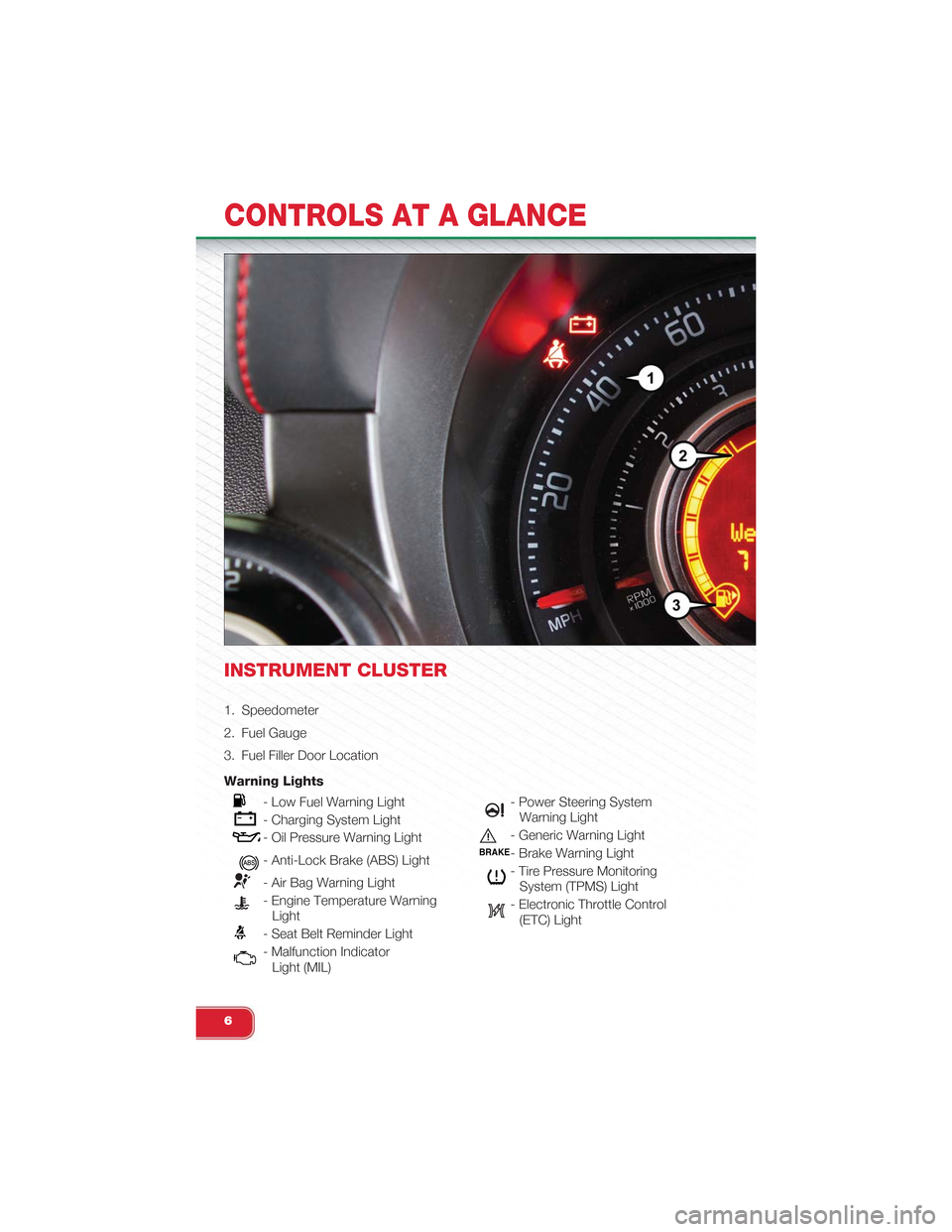
INSTRUMENT CLUSTER
1. Speedometer
2. Fuel Gauge
3. Fuel Filler Door Location
Warning Lights
- Low Fuel Warning Light
- Charging System Light
- Oil Pressure Warning Light
- Anti-Lock Brake (ABS) Light
- Air Bag Warning Light
- Engine Temperature WarningLight
- Seat Belt Reminder Light
- Malfunction IndicatorLight (MIL)
- Power Steering SystemWarning Light
- Generic Warning Light
BRAKE- Brake Warning Light
- Tire Pressure MonitoringSystem (TPMS) Light
- Electronic Throttle Control(ETC) Light
CONTROLS AT A GLANCE
6
Page 11 of 88
WARNING!
Failure to follow these warnings can result in injuries that are serious or fatal to
you, your passengers, and others around you:
• Before operating the power top, make sure that no moving parts of the con-
vertible top can injure a person or animal.
•Never place any extremities (hands, feet, etc.) near the convertible top compo-
nents, the upper windshield area, the shelf area behind the rear seats, or the
convertible top stowage area while raising or lowering the convertible top.
• When using the power top button on RKE transmitter, if potential danger
exists while lowering the top, release the button immediately to interrupt the
operation.
• Only drive the vehicle with the convertible top completely closed and latched
or fully lowered into its stowage compartment.
• Do not operate the power top when the vehicle is in motion.
Opening The Liftgate
• To open the liftgate, press the LIFTGATE release handle located on the underside
of the license plate bar and pull the liftgate open with one fluid motion.
• Press the LIFGATE button located on the key fob.
WARNING!
Never leave children alone in a vehicle, or with access to an unlocked vehicle.
Allowing children to be in a vehicle unattended is dangerous for a number of rea-
sons. A child or others could be severely injured or killed. Children should be
warned not to touch the parking brake, brake pedal, or the shift lever. Do not
leave the Key Fob in the vehicle, or in a location accessible to children. A child
could operate power windows, other controls, or move the vehicle.
GETTING STARTED
9
Page 26 of 88
To Decrease Speed
• When the Electronic Speed Control is set, you can decrease speed by pushing
the SET-button.
• The speed denomination shown is dependant on the speed of English or Metric:
English Speed (mph)
• Pressing the SET-button once will result in a 1 mph decrease in set speed.
Each subsequent tap of the button results in a decrease of 1 mph.
• If the button is continually pressed, the set speed will continue to decrease until
the button is released, then the new set speed will be established.
Metric Speed (km/h)
• Pressing the SET-button once will result in a 2 km/h decrease in set speed.
Each subsequent tap of the button results in a decrease of 2 km/h.
• If the button is continually pressed, the set speed will continue to decrease until
the button is released, then the new set speed will be established.
Resume
• To resume a previously selected set speed in memory, push the RES + button
and release.
Cancel
• Push the CANCEL button, apply the brakes, or depress the clutch to cancel the
set speed and maintain the set speed memory.
• Push the ON/OFF button to turn the system off and erase the set speed memory.
WARNING!
• Leaving the Electronic Speed Control system on when not in use is danger-
ous. You could accidentally set the system or cause it to go faster than you
want. You could lose control and have a collision. Always leave the Elec-
tronic Speed Control system off when you are not using it.
• Electronic Speed Control can be dangerous where the system cannot main-
tain a constant speed. Your vehicle could go too fast for the conditions, and
you could lose control. A collision could be the result. Do not use Electronic
Speed Control in heavy traffic or on roads that are winding, icy, snow-
covered or slippery.
OPERATING YOUR VEHICLE
24
Page 52 of 88
TTC (Torque Transfer Control)
• The TTC system uses the brakes to prevent unwanted wheelspin during corner-
ing, to maximize acceleration and minimize understeering during aggressive driv-
ing. This feature is active in all modes. While TTC is active, the “ESC” lamp in the
instrument cluster may flash.
- Tire Pressure Monitoring System (TPMS) Light
• Each tire, including the spare (if provided), should be checked monthly when cold
and inflated to the inflation pressure recommended by the vehicle manufacturer
on the vehicle placard or tire inflation pressure label. (If your vehicle has tires of a
different size than the size indicated on the vehicle placard or tire inflation pres-
sure label, you should determine the proper tire inflation pressure for those tires.)
• As an added safety feature, your vehicle has been equipped with a Tire Pressure
Monitoring System (TPMS) that illuminates a low tire pressure telltale when one or
more of your tires is significantly under-inflated. Accordingly, when the low tire
pressure telltale illuminates, you should stop and check your tires as soon as
possible, and inflate them to the proper pressure. Driving on a significantly under-
inflated tire causes the tire to overheat and can lead to tire failure. Under-inflation
also reduces fuel efficiency and tire tread life, and may affect the vehicle’s han-
dling and stopping ability.
•IF THE LIGHT STARTS FLASHING INDICATING A LOW TIRE PRES-
SURE, ADJUST THE AIR PRESSURE IN THE LOW TIRE TO THE AIR
PRESSURE SHOWN ON THE VEHICLE PLACARD OR TIRE INFLATION
PRESSURE LABEL LOCATED ON THE DRIVER'S DOOR. NOTE: AFTER
INFLATION, THE VEHICLE MAY NEED TO BE DRIVEN FOR 20 MIN-
UTES BEFORE THE FLASHING LIGHT WILL TURN OFF.
•Please note that the TPMS is not a substitute for proper tire maintenance, and it is
the driver’s responsibility to maintain correct tire pressure, even if under-inflation has
not reached the level to trigger illumination of the TPMS low tire pressure telltale.
• Your vehicle has also been equipped with a TPMS malfunction indicator to indi-
cate when the system is not operating properly. The TPMS malfunction indicator
is combined with the low tire pressure telltale. When the system detects a mal-
function, the telltale will flash for approximately one minute and then remain con-
tinuously illuminated. This sequence will continue upon subsequent vehicle start-
ups as long as the malfunction exists.
• When the malfunction indicator is illuminated, the system may not be able to de-
tect or signal low tire pressure as intended. TPMS malfunctions may occur for a
variety of reasons, including the installation of replacement or alternate tires or
wheels on the vehicle that prevent the TPMS from functioning properly. Always
check the TPMS malfunction telltale after replacing one or more tires or wheels
on your vehicle, to ensure that the replacement or alternate tires and wheels al-
low the TPMS to continue to function properly.
WHAT TO DO IN EMERGENCIES
50
Page 53 of 88
NOTE:
Tire pressures change by approximately 1 psi (7 kPa) per 12° F (7° C) of air tem-
perature change. Keep this in mind when checking tire pressure inside a garage,
especially in the winter. Example: If garage temperature is 68°F (20°C) and the out-
side temperature is 32°F (0°C), then the cold tire inflation pressure should be in-
creased by 3 psi (21 kPa), which equals 1 psi (7 kPa) for every 12°F (7°C) for this
outside temperature condition.
CAUTION!
The TPMS has been optimized for the original equipment tires and wheels. TPMS
pressures and warning have been established for the tire size equipped on your
vehicle. Undesirable system operation or sensor damage may result when using
replacement equipment that is not of the same size, type, and/or style. Aftermar-
ket wheels can cause sensor damage. Do not use tire sealant from a can, or bal-
ance beads if your vehicle is equipped with a TPMS, as damage to the sensors
may result.
BRAKE- Brake Warning Light
• The Brake Warning light illuminates when there is either a system malfunction or
the parking brake is applied. If the light is on and the parking brake is not applied,
it indicates a possible brake hydraulic malfunction, brake booster problem or an
Anti-Lock Brake System problem.
• Please have your vehicle serviced immediately.
WARNING!
Driving a vehicle with the red brake light on is dangerous. Part of the brake sys-
tem may have failed. It will take longer to stop the vehicle. You could have a colli-
sion. Have the vehicle checked immediately.
WHAT TO DO IN EMERGENCIES
51
Page 54 of 88
- Malfunction Indicator Light (MIL)
• Certain conditions, such as a loose or missing gas cap, poor fuel quality, etc.,
may illuminate the MIL after engine start. The vehicle should be serviced if the
light stays on through several typical driving cycles. In most situations, the vehicle
will drive normally and not require towing.
• If the MIL flashes when the engine is running, serious conditions may exist that
could lead to immediate loss of power or severe catalytic converter damage.
We recommend you do not operate the vehicle. Have the vehicle serviced
immediately.
- Charging System Light
• This light shows the status of the electrical charging system. If the charging sys-
tem light remains on, it means that the vehicle is experiencing a problem with the
charging system.
• We recommend you do not continue driving if the charging system light is on.
Have the vehicle serviced immediately.
- Oil Pressure Warning Light
• This light indicates low engine oil pressure. If the light turns on while driving, stop
the vehicle and shut off the engine as soon as possible. A chime will sound when
this light turns on.
• We recommend you do not operate the vehicle or engine damage will occur.
Have the vehicle serviced immediately.
- Anti-Lock Brake (ABS) Light
• This light monitors the Anti-Lock Brake System (ABS).
• If the light is not on during starting, stays on, or turns on while driving, we recom-
mend you drive to the nearest authorized dealer and have the vehicle serviced
immediately.
- Air Bag Warning Light
• If the light is not on during starting, stays on, or turns on while driving, have the
vehicle serviced by an authorized dealer immediately.
WHAT TO DO IN EMERGENCIES
52
Page 57 of 88
Using The Power Button
• Push and release the Power Button (4) once to turn On the TIREFIT kit. Push and
release the Power Button (4) again to turn Off the TIREFIT kit.
Using The Deflation Button
• Press the Deflation Button (2) to reduce the air pressure in the tire if it becomes
over-inflated.
TIREFIT Usage Precautions
•Replace the TIREFIT Sealant Bottle (1) and Sealant Hose (6) prior to the expiration
date (printed on the bottle label) to assure optimum operation of the system. Refer
to “Sealing a Tire with TIREFIT” section (F) “Sealant Bottle and Hose Replacement.”
• The Sealant Bottle (1) and Sealant Hose (6) are a one tire application use. After
each use, always replace these components immediately at an authorized dealer.
• When the TIREFIT sealant is in a liquid form, clean water, and a damp cloth will
remove the material from the vehicle or tire and wheel components. Once the
sealant dries, it can easily be peeled off and properly discarded.
• For optimum performance, make sure the valve stem on the wheel is free of de-
bris before connecting the TIREFIT kit.
•You can use the TIREFIT air pump to inflate bicycle tires. The kit also comes with
two needles, located in the Accessory Storage Compartment (on the bottom of the
air pump) for inflating sport balls, rafts, or similar inflatable items. However, use only
the Air Pump Hose (7) and make sure the Mode Select Knob (5) is in the Air Mode
when inflating such items to avoid injecting sealant into them. The TIREFIT Sealant is
only intended to seal punctures less than 1/4” (6 mm) diameter in the tread of your
vehicle.
• Do not lift or carry the TIREFIT kit by the hoses.
Sealing A Tire With TIREFIT
(A) Whenever You Stop To Use TIREFIT:
1. Pull over to a safe location and turn on the vehicle’s Hazard Warning flashers.
2. Verify that the valve stem (on the wheel with the deflated tire) is in a position that
is near to the ground. This will allow the TIREFIT Hoses (6) and (7) to reach the
valve stem and keep the TIREFIT kit flat on the ground. This will provide the best
positioning of the kit when injecting the sealant into the deflated tire and running
the air pump. Move the vehicle as necessary to place the valve stem in this posi-
tion before proceeding.
3. Place the transmission in PARK (auto transmission) or in Gear (manual transmis-
sion) and cycle the ignition to the OFF position.
4. Set the parking brake.
WHAT TO DO IN EMERGENCIES
55
Page 58 of 88
(B) Setting Up To Use TIREFIT:
1. Turn the Mode Select Knob (5) to the Sealant Mode position.
2. Uncoil the Sealant Hose (6) and then remove the cap from the fitting at the end
of the hose.
3. Place the TIREFIT kit flat on the ground next to the deflated tire.
4. Remove the cap from the valve stem and then screw the fitting at the end of the
Sealant Hose (6) onto the valve stem.
5. Uncoil the Power Plug (8) and insert the plug into the vehicle’s 12 Volt power
outlet.
6. Do not remove foreign objects (e.g., screws or nails) from the tire.
(C) Injecting TIREFIT Sealant Into The Deflated Tire:
• Always start the engine before turning ON the TIREFIT kit.
NOTE:Manual transmission vehicles must have the parking brake engaged and the shift lever inNEUTRAL.
• After pressing the Power Button (4), the sealant (white fluid) will flow from the
Sealant Bottle (1) through the Sealant Hose (6) and into the tire.
NOTE:Sealant may leak out through the puncture in the tire.
•If the sealant (white fluid) does not flow within 0 – 10seconds
through the Sealant Hose (6):
1. Press the Power Button (4) to turn Off the TIREFIT kit. Disconnect the Sealant
Hose (6) from the valve stem. Make sure the valve stem is free of debris. Recon-
nect the Sealant Hose (6) to the valve stem. Check that the Mode Select Knob
(5) is in the Sealant Mode position and not Air Mode. Press the Power Button (4)
to turn On the TIREFIT kit.
2. Connect the Power Plug (8) to a different 12 Volt power outlet in your vehicle or
another vehicle, if available. Make sure the engine is running before turning ON
the TIREFIT kit.
3. The Sealant Bottle (1) may be empty due to previous use. Call for assistance.
NOTE:If the Mode Select Knob (5) is on Air Mode and the pump is operating, air will dispensefrom the Air Pump Hose (7) only, not the Sealant Hose (6).
WHAT TO DO IN EMERGENCIES
56
Page 62 of 88
JUMP-STARTING PROCEDURE
• If your vehicle has a discharged battery, it can be jump-started using a set of
jumper cables and a battery in another vehicle or by using a portable battery
booster pack. Jump-starting can be dangerous if done improperly so please fol-
low the procedures in this section carefully.
NOTE:When using a portable battery booster pack, follow the manufacturer’s operating instruc-tions and precautions.
Preparations For Jump-Start
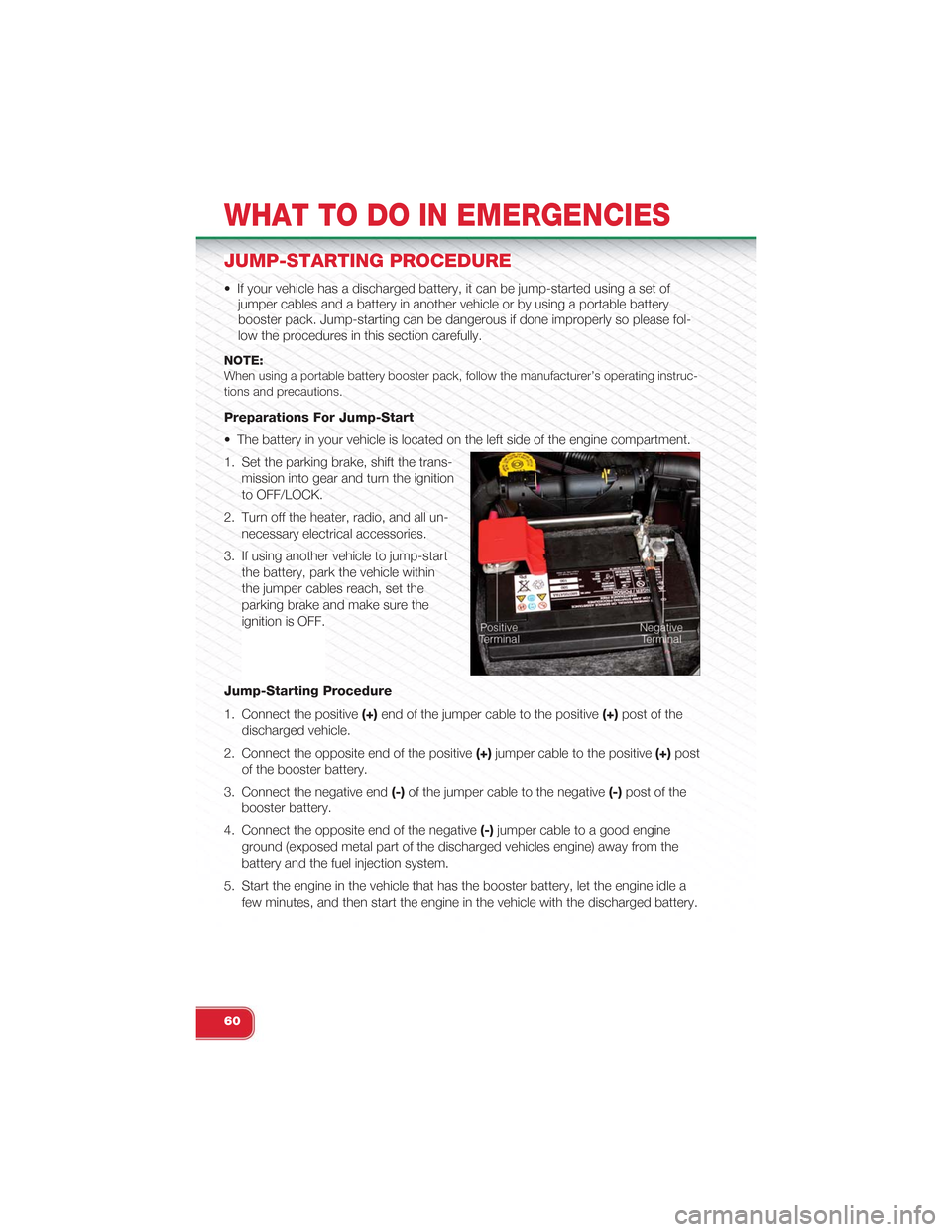
• The battery in your vehicle is located on the left side of the engine compartment.
1. Set the parking brake, shift the trans-
mission into gear and turn the ignition
to OFF/LOCK.
2. Turn off the heater, radio, and all un-
necessary electrical accessories.
3. If using another vehicle to jump-start
the battery, park the vehicle within
the jumper cables reach, set the
parking brake and make sure the
ignition is OFF.
Jump-Starting Procedure
1. Connect the positive(+)end of the jumper cable to the positive(+)post of the
discharged vehicle.
2. Connect the opposite end of the positive(+)jumper cable to the positive(+)post
of the booster battery.
3. Connect the negative end(-)of the jumper cable to the negative(-)post of the
booster battery.
4. Connect the opposite end of the negative(-)jumper cable to a good engine
ground (exposed metal part of the discharged vehicles engine) away from the
battery and the fuel injection system.
5. Start the engine in the vehicle that has the booster battery, let the engine idle a
few minutes, and then start the engine in the vehicle with the discharged battery.
WHAT TO DO IN EMERGENCIES
60