display FIAT 500 ABARTH 2015 2.G User Guide
[x] Cancel search | Manufacturer: FIAT, Model Year: 2015, Model line: 500 ABARTH, Model: FIAT 500 ABARTH 2015 2.GPages: 426, PDF Size: 9.89 MB
Page 129 of 426
•Objects such as bicycle carriers, etc., must not be
placed within 12 in (30 cm) from the rear fascia/
bumper while driving the vehicle. Failure to do so can
result in the system misinterpreting a close object as a
sensor problem, causing a failure indication to be
displayed in the instrument cluster.
CAUTION!
•Rear Park Assist is only a parking aid and it is
unable to recognize every obstacle, including small
obstacles. Parking curbs might be temporarily de-
tected or not detected at all. Obstacles located
above or below the sensors will not be detected
when they are in close proximity.
(Continued)
CAUTION!(Continued)
•The vehicle must be driven slowly when using
Rear Park Assist in order to be able to stop in time
when an obstacle is detected. It is recommended
that the driver looks over his/her shoulder when
using Rear Park Assist.
3
UNDERSTANDING THE FEATURES OF YOUR VEHICLE 127
Page 130 of 426
WARNING!
•Drivers must be careful when backing up even
when using the Rear Park Assist system. Always
check carefully behind your vehicle, look behind
you, and be sure to check for pedestrians, animals,
other vehicles, obstructions, and blind spots before
backing up. You are responsible for safety and
must continue to pay attention to your surround-
ings. Failure to do so can result in serious injury or
death.
(Continued)
WARNING!(Continued)
•Before using the Rear Park Assist System, it is
strongly recommended that the ball mount and
hitch ball assembly is disconnected from the ve-
hicle when the vehicle is not used for towing.
Failure to do so can result in injury or damage to
vehicles or obstacles because the hitch ball will be
much closer to the obstacle than the rear fascia
when the warning display turns on the single
flashing arc and sounds the continuous tone. Also,
the sensors could detect the ball mount and hitch
ball assembly, depending on its size and shape,
giving a false indication that an obstacle is behind
the vehicle.
128 UNDERSTANDING THE FEATURES OF YOUR VEHICLE
Page 143 of 426
UNDERSTANDING YOUR INSTRUMENT PANEL
CONTENTS
!INSTRUMENT PANEL FEATURES..........143
!TURBO BOOST GAUGE..................144
!INSTRUMENT CLUSTER — ECO...........145
!INSTRUMENT CLUSTER — POP, LOUNGE,
500C................................146
!INSTRUMENT CLUSTER.................147
!INSTRUMENT CLUSTER DESCRIPTIONS.....148
!ELECTRONIC VEHICLE INFORMATION CENTER
(EVIC)..............................161
▫EVIC Displays.......................162
▫EVIC Control Buttons..................163
▫Electronic Vehicle Information Center (EVIC)
Setup Menu.........................164
▫Change Engine Oil Indicator System........165
▫Trip Computer.......................166
▫Trip Button..........................166
▫Trip Functions.......................167
▫Values Displayed......................168
▫Personal Settings (Customer-Programmable
Features)............................169
4
Page 158 of 426
16. Gas Pedal Percentage Gauge/Turbo Gauge/ECO In-
dex Gauge
Depending on what options and trim level, your vehicle
is equipped with there are three gauges available.
•Gas Pedal Percentage Gauge: This gauge shows
what percent the gas pedal is currently depressed at.
•Turbo Gauge: This gauge shows the current turbo
usage.
•ECO Index Gauge: The ECO Index gauge allows the
driver to monitor their driving style in order to
increase fuel economy. The efficiency of the driving
style is displayed on a gauge located on the right
side of the instrument cluster and ranges from a
minimum value of 0 up to a maximum value of 5 (0
= low, 5 = high). A higher “ECO” index indicates a
more fuel efficient drive style and will increase your
fuel economy. A lower “ECO” index indicates fre-
quent accelerations/decelerations and will decrease
your fuel economy. The index is recalculated ap-
proximately every second and takes into account a
combination of the instant fuel economy and your
driving style during the current trip.
NOTE:Different trips may have different values even if
the same driving style is maintained. Some factors that
may impact the calculated index value are:
•Traffic conditions
•Trip duration
•Temperature (engine and ambient)
17. Fuel Gauge
Shows level of fuel in tank when ignition switch is in the
ON/RUN position.
156 UNDERSTANDING YOUR INSTRUMENT PANEL
Page 159 of 426
18. Electronic Vehicle Information Center (EVIC)
The EVIC features a driver-interactive display that is
located in the instrument cluster. For further information,
refer to “Electronic Vehicle Information Center (EVIC)” in
“Understanding Your Instrument Panel.”
19. Temperature Gauge
The temperature gauge shows engine coolant tempera-
ture. Any reading within the normal range indicates that
the engine cooling system is operating satisfactorily.
The gauge pointer will likely indicate a higher tempera-
ture when driving in hot weather, up mountain grades,
or when towing a trailer. It should not be allowed to
exceed the upper limits of the normal operating range.
CAUTION!
Driving with a hot engine cooling system could
damage your vehicle. If the temperature gauge reads
“H” pull over and stop the vehicle. Idle the vehicle
with the air conditioner turned off until the pointer
drops back into the normal range. If the pointer
remains on the “H” and you hear continuous chimes,
turn the engine off immediately and call an autho-
rized dealer for service.
WARNING!
A hot engine cooling system is dangerous. You or
others could be badly burned by steam or boiling
coolant. You may want to call an authorized dealer
for service if your vehicle overheats. If you decide to
look under the hood yourself, see “Maintaining Your
(Continued)
4
UNDERSTANDING YOUR INSTRUMENT PANEL 157
Page 160 of 426
WARNING!(Continued)
Vehicle.” Follow the warnings under the “Cooling
System Pressure Cap” paragraph.
20. Tachometer
The tachometer indicates engine speed in Revolutions
Per Minute (RPM x 1000).
21. Speedometer / Trip Odometer / Electronic Vehicle
Information Center (EVIC) Display Area
This display indicates the total distance the vehicle has
been driven.
U.S. Federal regulations require that upon transfer of
vehicle ownership, the seller certify to the purchaser the
correct mileage that the vehicle has been driven. If your
odometer needs to be repaired or serviced, the repair
technician should leave the odometer reading the same
as it was before the repair or service. If s/he cannot do so,
then the odometer must be set at zero, and a sticker must
be placed in the door jamb stating what the mileage was
before the repair or service. It is a good idea for you to
make a record of the odometer reading before the repair/
service, so that you can be sure that it is properly reset, or
that the door jamb sticker is accurate if the odometer
must be reset at zero.
NOTE:If the vehicle is equipped with the Electronic
Vehicle Information Center (EVIC) in the instrument
cluster, all warnings including “door” and “gate” and
“Change Engine Oil” will only be displayed in the EVIC
display. Refer to “Electronic Vehicle Information Center
(EVIC) in “Understanding Your Instrument Panel.”
22. Low Fuel Light
When the fuel level reaches approximately 1.0
gallon (3.8L), this light will turn on, and remain
on until fuel is added.
158 UNDERSTANDING YOUR INSTRUMENT PANEL
Page 163 of 426
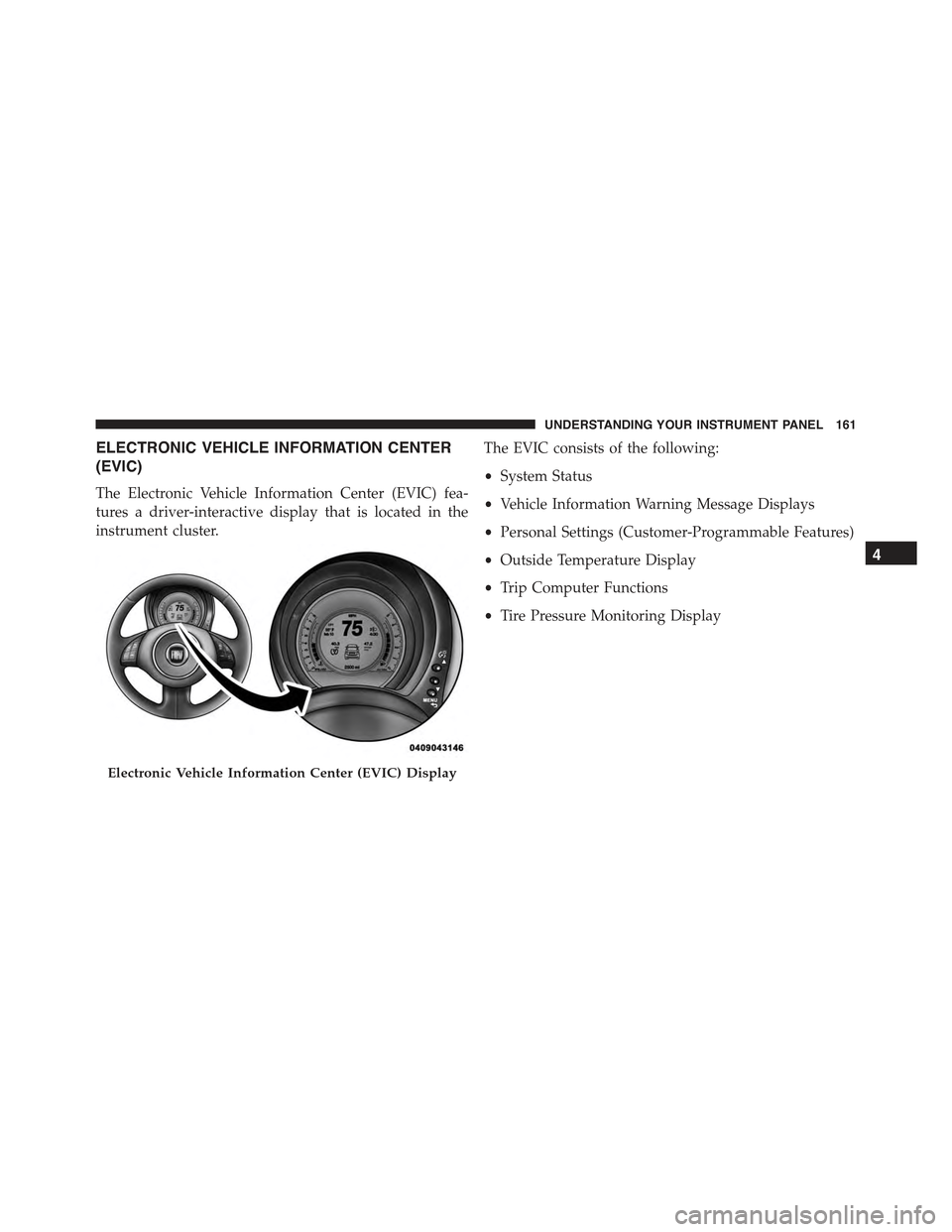
ELECTRONIC VEHICLE INFORMATION CENTER
(EVIC)
The Electronic Vehicle Information Center (EVIC) fea-
tures a driver-interactive display that is located in the
instrument cluster.
The EVIC consists of the following:
•System Status
•Vehicle Information Warning Message Displays
•Personal Settings (Customer-Programmable Features)
•Outside Temperature Display
•Trip Computer Functions
•Tire Pressure Monitoring Display
Electronic Vehicle Information Center (EVIC) Display
4
UNDERSTANDING YOUR INSTRUMENT PANEL 161
Page 164 of 426
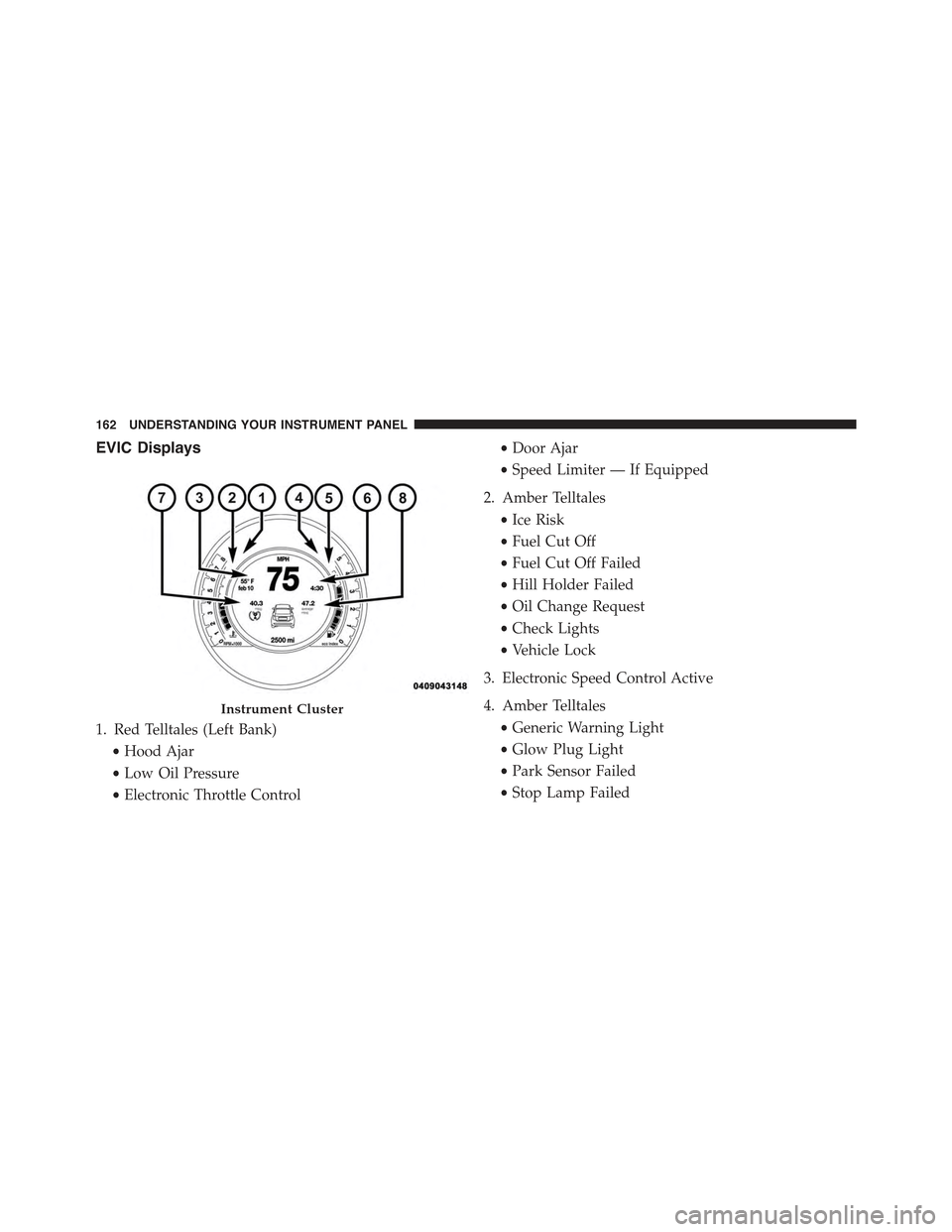
EVIC Displays
1. Red Telltales (Left Bank)
•Hood Ajar
•Low Oil Pressure
•Electronic Throttle Control
•Door Ajar
•Speed Limiter — If Equipped
2. Amber Telltales
•Ice Risk
•Fuel Cut Off
•Fuel Cut Off Failed
•Hill Holder Failed
•Oil Change Request
•Check Lights
•Vehicle Lock
3. Electronic Speed Control Active
4. Amber Telltales
•Generic Warning Light
•Glow Plug Light
•Park Sensor Failed
•Stop Lamp Failed
Instrument Cluster
162 UNDERSTANDING YOUR INSTRUMENT PANEL
Page 165 of 426
5. Red Telltales (Right Bank)
•Trunk Ajar
•Transmission Failure
•Battery Charge Indicator
6. Exceeded Speed Limiter
7. Shift Up or Down Indicators
8. Gear Indicator
EVIC Control Buttons
Push and release theMENUbutton briefly to access the
EVIC. Push and hold theMENUbutton (approximately
one second) to return to the main screen.
Push and release the UPbutton to scroll upward
through the displayed menu and the related options
or to increase the displayed value.
Push and release the DOWNbutton to scroll down-
ward through the displayed menu and the related
options or to decrease the value displayed.
NOTE:UPand DOWNbuttons activate differ-
ent functions according to the following situations:
•To scroll the menu options upwards or downwards.
•To increase or decrease values during settings.
NOTE:When opening one of the front doors, the EVIC
display will turn on the clock and the miles or kilometers
covered (for versions/markets, where provided) for a
few seconds.
4
UNDERSTANDING YOUR INSTRUMENT PANEL 163
Page 166 of 426
Electronic Vehicle Information Center (EVIC)
Setup Menu
The menu comprises a series of functions arranged in a
cycle. Push and release the UPand DOWNbut-
tons to access the different options and settings
(setup).
The setup menu can be activated by pushing theMENU
button. A single push on the UPor DOWNbut-
tons will scroll through the setup menu options. The
menu includes the following functions:
•Speed Beep
•Trip B Data
•Set Time
•Set Date
•See Radio
•Speed Display
•Autoclose
•Units
•Language
•Buzzer Volume
•Button Volume
•Daylights (D.R.L.)
•Hill Start
•Tire Pressure
•Unlock Driver Door First
•Unlock All Doors
•Exit Menu
164 UNDERSTANDING YOUR INSTRUMENT PANEL