instrument panel FIAT 500 ABARTH 2015 2.G User Guide
[x] Cancel search | Manufacturer: FIAT, Model Year: 2015, Model line: 500 ABARTH, Model: FIAT 500 ABARTH 2015 2.GPages: 426, PDF Size: 9.89 MB
Page 56 of 426
Maintaining Your Air Bag System
WARNING!
•Modifications to any part of the air bag system
could cause it to fail when you need it. You could
be injured if the air bag system is not there to
protect you. Do not modify the components or
wiring, including adding any kind of badges or
stickers to the steering wheel hub trim cover or the
upper right side of the instrument panel. Do not
modify the front bumper, vehicle body structure, or
add aftermarket side steps or running boards.
•It is dangerous to try to repair any part of the air
bag system yourself. Be sure to tell anyone who
works on your vehicle that it has an air bag system.
(Continued)
WARNING!(Continued)
•Do not attempt to modify any part of your air bag
system. The air bag may inflate accidentally or may
not function properly if modifications are made.
Take your vehicle to an authorized dealer for any
air bag system service. If your seat, including your
trim cover and cushion, needs to be serviced in any
way (including removal or loosening/tightening of
seat attachment bolts), take the vehicle to your
authorized dealer. Only manufacturer approved
seat accessories may be used. If it is necessary to
modify the air bag system for persons with dis-
abilities, contact your authorized dealer.
54 THINGS TO KNOW BEFORE STARTING YOUR VEHICLE
Page 83 of 426
Periodic Safety Checks You Should Make Outside
The Vehicle
Tires
Examine tires for excessive tread wear and uneven wear
patterns. Check for stones, nails, glass, or other objects
lodged in the tread or sidewall. Inspect the tread for cuts
and cracks. Inspect sidewalls for cuts, cracks and bulges.
Check the wheel bolts for tightness. Check the tires for
proper cold inflation pressure.
Lights
Have someone observe the operation of brake lights and
exterior lights while you work the controls. Check turn
signal and high beam indicator lights on the instrument
panel.
Door Latches
Check for positive closing, latching, and locking.
Fluid Leaks
Check area under vehicle after overnight parking for fuel,
engine coolant, oil, or other fluid leaks. Also, if gasoline
fumes are detected or if fuel, power steering fluid (if
equipped), or brake fluid leaks are suspected. The cause
should be located and corrected immediately.
2
THINGS TO KNOW BEFORE STARTING YOUR VEHICLE 81
Page 97 of 426
The Hands-Free Kit
The basic characteristic of this hands-free kit is voice
recognition with Bluetooth® wireless technology. With
this system you can make and receive calls safely and
securely by using either voice commands or buttons on
the steering wheel. This can be done under any driving
condition without ever having to take your eyes off the
road or remove your hands from the steering wheel, as
required by current laws.
Bluetooth® wireless technology enables wireless connec-
tion between your mobile phone and the hands-free kit
installed on your car.
To use the hands-free kit, you need a Bluetooth® wireless
technology enabled mobile phone. This hands-free kit
gives you the possibility of interacting vocally with your
mobile phone while driving, even if your mobile device
does not feature Voice Recognition. You can also interact
with your mobile phone manually and visually using the
steering wheel controls and the instrument panel multi-
function display. Please refer to the Fiat Blue & Me Radio
Supplement for further information.
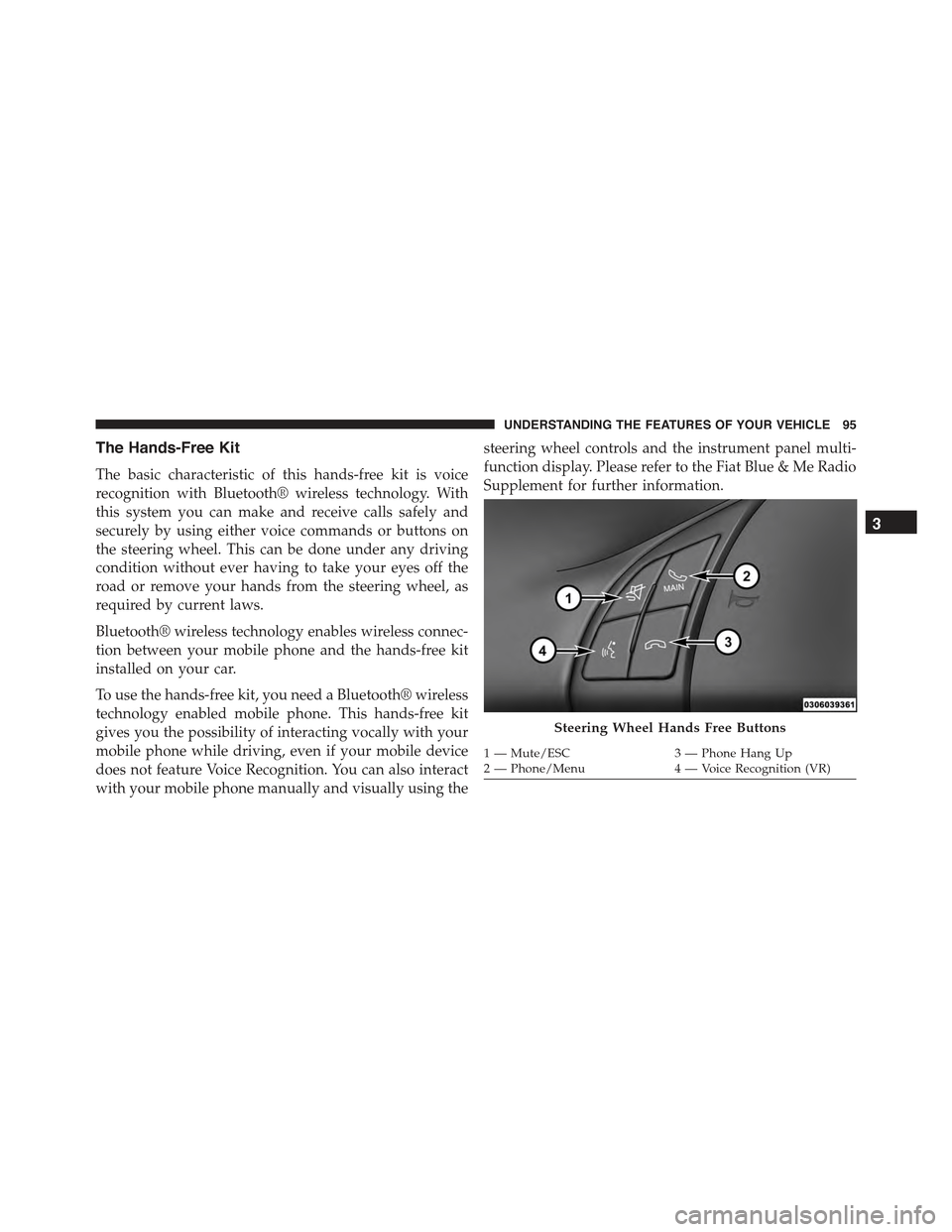
Steering Wheel Hands Free Buttons
1—Mute/ESC3—PhoneHangUp2—Phone/Menu4—VoiceRecognition(VR)
3
UNDERSTANDING THE FEATURES OF YOUR VEHICLE 95
Page 100 of 426
Message Reader
The BLUE&ME™ message reader enables automatic
reading, through the car sound system, of the SMS texts
you receive on your Bluetooth® wireless technology
mobile phone that are received when the phone is paired
and connected to the BLUE&ME™ system. It does not
provide access to messages that were received before the
device was connected with the BLUE&ME™ system. The
message reader will also interpret many abbreviations
and emoticons contained in the SMS text.
NOTE:Not all mobile phones support the SMS text
message reader function or automatic phonebook transfer
via Bluetooth®. For further information on the list of
compatible mobile phones go to http://www.fiatusa.com,
find the SUPPORT section near the bottom of web page
and click on the Bluetooth® logo.
Message reader functions are managed by the control
buttons on the steering wheel or by the BLUE&ME™
voice commands.
The BLUE&ME™ message reader enables the following
operations:
•To display an indicator on the instrument panel that
indicates you have received a new SMS text. It will
display the sender’s number/name and will ask you
whether to read the text of the message to you.
•To manage the list of SMS texts received on your
BLUE&ME™ paired mobile phone.
•To read the messages received and stored. Messages
can be read multiple times.
•To call the SMS text sender using the buttons on the
steering wheel or voice commands.
98 UNDERSTANDING THE FEATURES OF YOUR VEHICLE
Page 107 of 426
fore/aft (memory) position on the tracks. This results in
the seat back memory being set only – The track will then
be locked forward of its last set fore/aft memory posi-
tion. To then reset the fore/aft track memory feature (to
reestablish Memory Function Option 1), the seat has to be
returned fully rearward to its last fore/aft memory track
position as described in Memory Function Option 1.
Heated Seats — If Equipped
On some models, the front driver and passenger seats
may be equipped with heaters in both the seat cushions
and seatbacks. The controls for the front heated seats are
located on the center instrument panel area.
Press the switch once to turn on the heated
seats. Press the switch a second time to shut the
heating elements off.
NOTE:Once a heat setting is selected, heat will be felt
within two to five minutes.
WARNING!
•Persons who are unable to feel pain to the skin
because of advanced age, chronic illness, diabetes,
spinal cord injury, medication, alcohol use, exhaus-
tion or other physical condition must exercise care
when using the seat heater. It may cause burns
even at low temperatures, especially if used for
long periods of time.
•Do not place anything on the seat or seatback that
insulates against heat, such as a blanket or cushion.
This may cause the seat heater to overheat. Sitting
in a seat that has been overheated could cause
serious burns due to the increased surface tempera-
ture of the seat.
3
UNDERSTANDING THE FEATURES OF YOUR VEHICLE 105
Page 112 of 426
High Beams
With the low beams activated, push the multi-
function lever towards the instrument panel to
turn on the high beams. Pull the multifunction lever
toward the steering wheel to turn off the high beams.
Flash-To-Pass
You can signal another vehicle with your headlights by
lightly pulling the multifunction lever toward the steer-
ing wheel. This will turn on the high beams until the
lever is released.
Parking Lights
To turn on the parking lights, remove the key
or turn the ignition to OFF/LOCK position and
turn on the headlights.
Daytime Running Lights — If Equipped
To activate the Daytime Running Lights (DRL), rotate the
end of the multifunction lever to theOsymbol.
NOTE:The low beams and side/taillights will not be on
with DRL.
If allowed by law in the country in which the vehicle was
purchased the DRL function can be turned on or off using
the display menus. Refer to “Electronic Vehicle Informa-
tion Center (EVIC)” in “Understanding Your Instrument
Panel” for further information.
Turn Signals
Push the multifunction lever upward to signal a right
turn or downward to signal a left turn. The correspond-
ing indicator in the instrument cluster will blink to
indicate the operation of the turn signal.
11 0 U N D E R S TA N D I N G T H E F E AT U R E S O F Y O U R V E H I C L E
Page 115 of 426
•When the doors are locked with the Key Fob the lights
will turn off.
Interior Light Timing (On/Right Position)
•When all doors are closed a 15 minute timer is
activated.
NOTE:The timer is deactivated when the key is moved
into the ON/RUN position.
Front Fog Lights — If Equipped
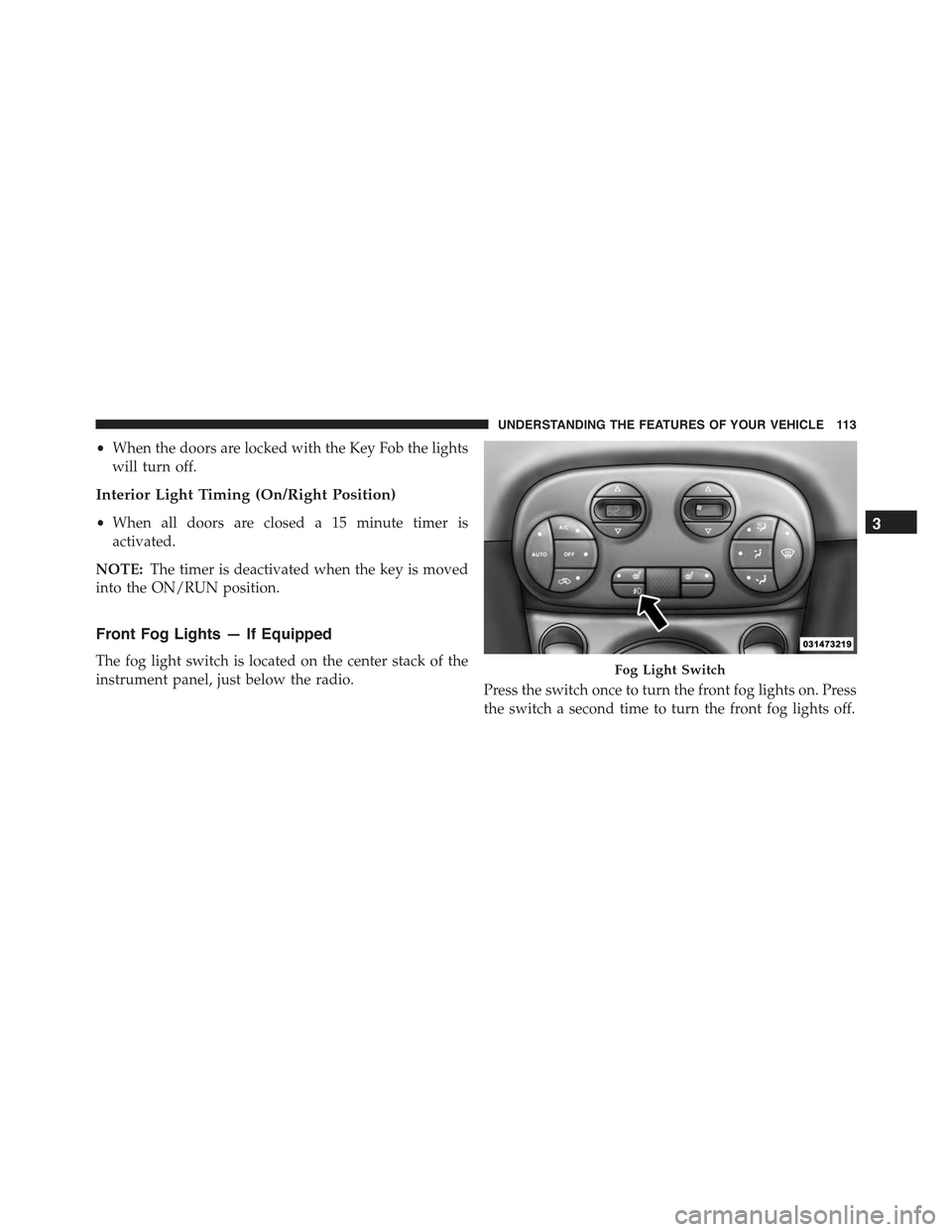
The fog light switch is located on the center stack of the
instrument panel, just below the radio.Press the switch once to turn the front fog lights on. Press
the switch a second time to turn the front fog lights off.
Fog Light Switch
3
UNDERSTANDING THE FEATURES OF YOUR VEHICLE 113
Page 118 of 426
CAUTION!(Continued)
•Always remove any buildup of snow that prevents
the windshield wiper blades from returning to the
off position. If the windshield wiper control is
turned off and the blades cannot return to the off
position, damage to the wiper motor may occur.
Rear Windshield Wiper
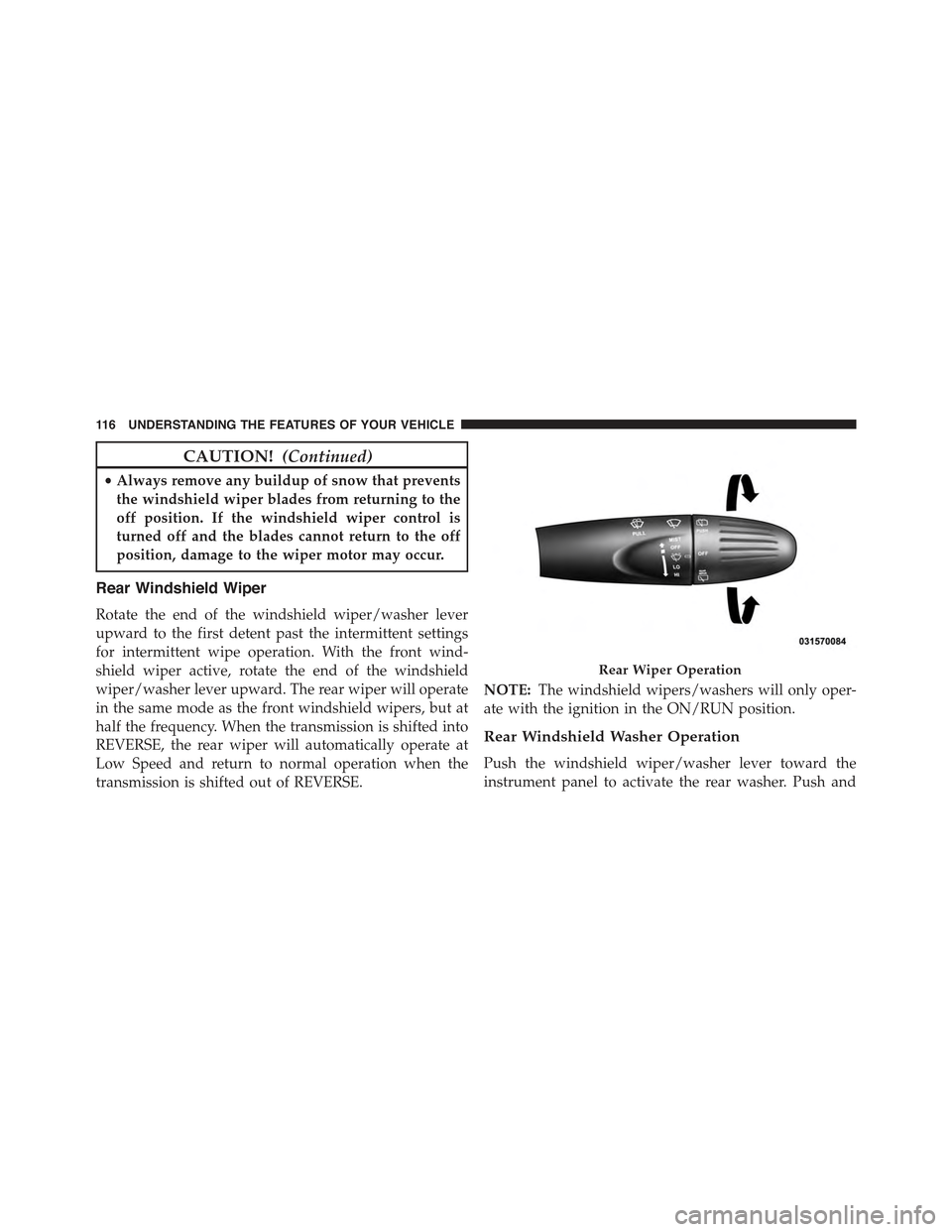
Rotate the end of the windshield wiper/washer lever
upward to the first detent past the intermittent settings
for intermittent wipe operation. With the front wind-
shield wiper active, rotate the end of the windshield
wiper/washer lever upward. The rear wiper will operate
in the same mode as the front windshield wipers, but at
half the frequency. When the transmission is shifted into
REVERSE, the rear wiper will automatically operate at
Low Speed and return to normal operation when the
transmission is shifted out of REVERSE.
NOTE:The windshield wipers/washers will only oper-
ate with the ignition in the ON/RUN position.
Rear Windshield Washer Operation
Push the windshield wiper/washer lever toward the
instrument panel to activate the rear washer. Push and
Rear Wiper Operation
11 6 U N D E R S TA N D I N G T H E F E AT U R E S O F Y O U R V E H I C L E
Page 122 of 426
To Resume Speed
To resume a previously set speed, push the RES (+)
button and release. Resume can be used at any speed
above 25 mph (40 km/h).
To Vary The Speed Setting
To Increase Speed
When the Electronic Speed Control is set, you can in-
crease speed by pushing the RES (+) button.
The drivers preferred units can be selected through the
instrument panel settings if equipped. Refer to “ Under-
standing Your Instrument Panel” for more information.
The speed increment shown is dependent on the selected
speed unit of U.S. (mph) or Metric (km/h):
U.S. Speed (mph)
•Pressing the RES (+) button once will result ina1mph
increase in set speed. Each subsequent tap of the
button results in an increase of 1 mph.
•If the button is continually pressed, the set speed will
continue to increase until the button is released, then
the new set speed will be established.
Metric Speed (km/h)
•Pressing the RES (+) button once will result in a
1 km/h increase in set speed. Each subsequent tap of
the button results in an increase of 1 km/h.
•If the button is continually pressed, the set speed will
continue to increase until the button is released, then
the new set speed will be established.
To Decrease Speed
When the Electronic Speed Control is set, you can de-
crease speed by pushing the SET (-) button.
The drivers preferred units can be selected through the
instrument panel settings if equipped. Refer to “ Under-
standing Your Instrument Panel” for more information.
120 UNDERSTANDING THE FEATURES OF YOUR VEHICLE
Page 125 of 426
Rear Park Assist Warning Display
The Rear Park Assist Warning screen is located within the
Electronic Vehicle Information Center (EVIC). It provides
audible and visual warnings to indicate the distance
between the rear fascia/bumper and the detected ob-
stacle. Refer to#Electronic Vehicle Information Center
(EVIC)#in “Understanding Your Instrument Panel#for
further information.
Rear Park Assist Display
When the vehicle is in REVERSE, the warning display
will turn ON indicating the system status.
The system will indicate a detected obstacle by showing
arcs in one or more regions based on the obstacle’s
distance and location relative to the vehicle.
If an obstacle is detected in the center rear region, the
display will show solid arcs in the center rear region and
will produce an audible alert. As the vehicle moves closer
to the obstacle, the display will show fewer arcs and the
audible alert becomes more frequent.
If an obstacle is detected in the left and/or right rear
region, the display will show solid arcs in the left and/or
right rear region and will produce an audible alert. As the
vehicle moves closer to the obstacle, the display will show
fewer arcs and the audible alert becomes more frequent.
Rear Park Assist Audible Alerts
If an obstacle is behind the vehicle when the transmission
is placed into REVERSE, an audible alert is activated.
The tones emitted by the loudspeaker inform the driver
that the vehicle is approaching an obstacle. The pauses
between the tones are directly proportional to the dis-
tance from the obstacle. Pulses emitted in quick succes-
sion indicate the presence of a very close obstacle. A
continuous tone indicates that the obstacle is less than 12
in (30 cm) away.
3
UNDERSTANDING THE FEATURES OF YOUR VEHICLE 123