ESP FIAT 500 ABARTH CABRIO 2017 2.G User Guide
[x] Cancel search | Manufacturer: FIAT, Model Year: 2017, Model line: 500 ABARTH CABRIO, Model: FIAT 500 ABARTH CABRIO 2017 2.GPages: 338, PDF Size: 2.78 MB
Page 156 of 338
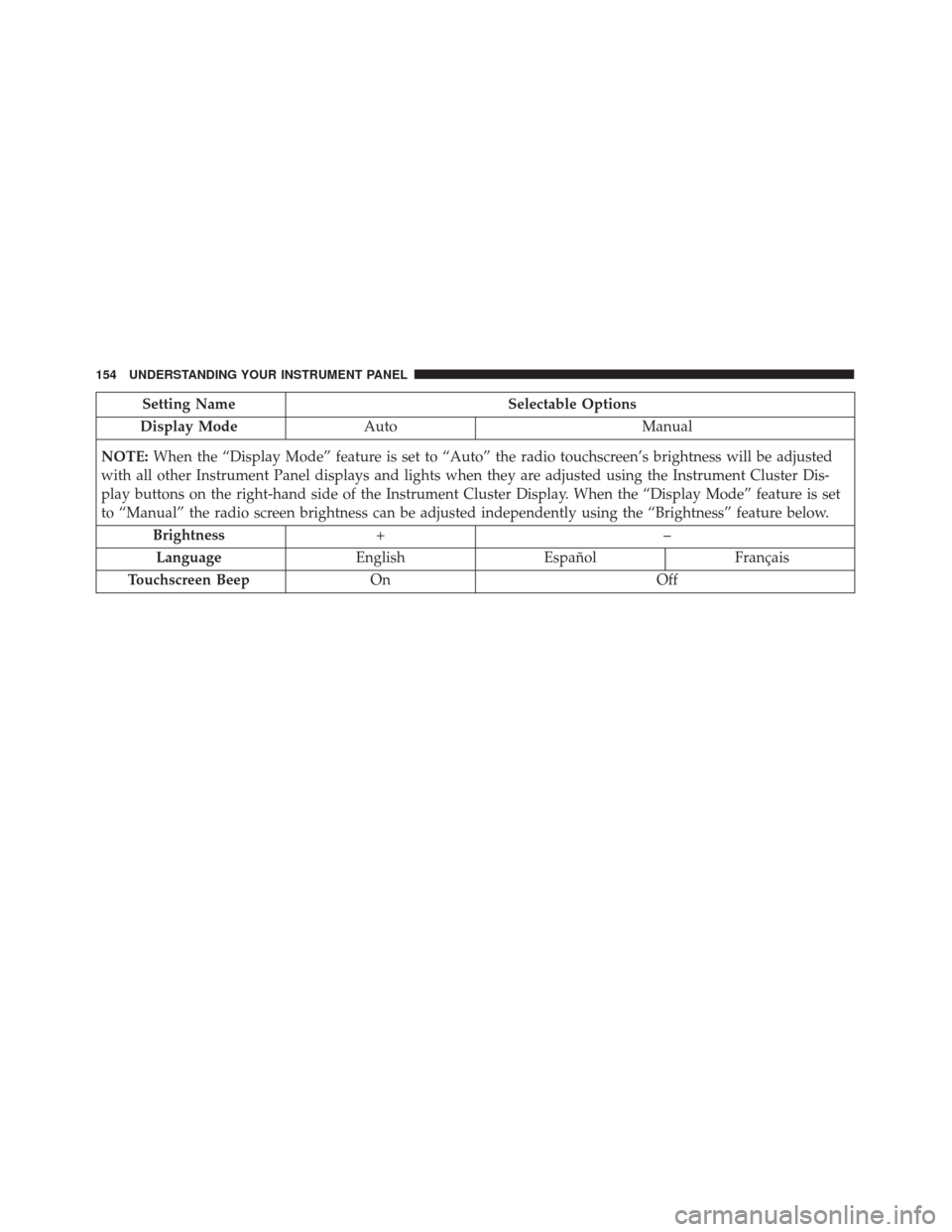
Setting NameSelectable Options
Display Mode Auto Manual
NOTE: When the “Display Mode” feature is set to “Auto” the radio touchscreen’s brightness will be adjusted
with all other Instrument Panel displays and lights when they are adjusted using the Instrument Cluster Dis-
play buttons on the right-hand side of the Instrument Cluster Display. When the “Display Mode” feature is set
to “Manual” the radio screen brightness can be adjusted independently using the “Brightness” feature below.
Brightness +–
Language EnglishEspañol Français
Touchscreen Beep On Off
154 UNDERSTANDING YOUR INSTRUMENT PANEL
Page 157 of 338
Units
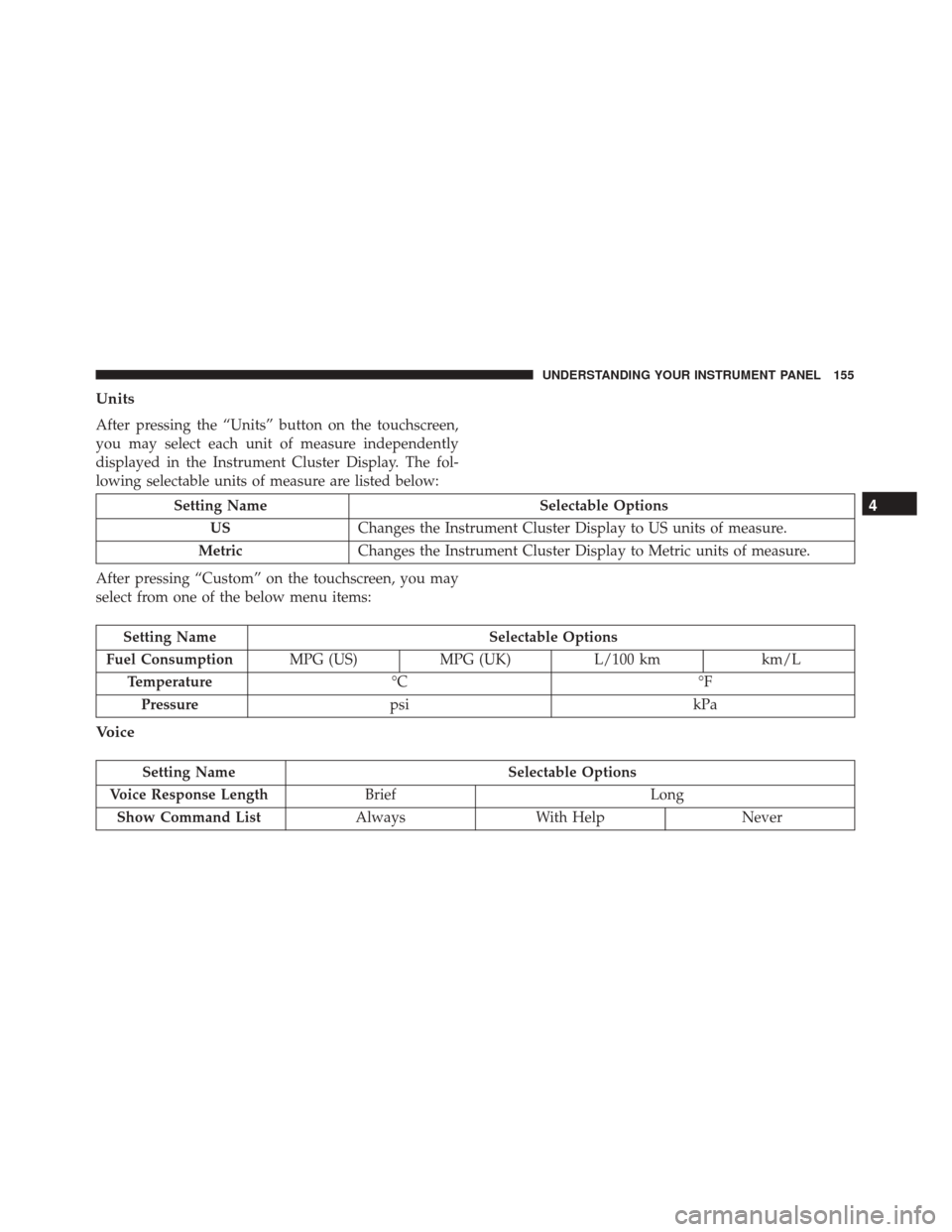
After pressing the “Units” button on the touchscreen,
you may select each unit of measure independently
displayed in the Instrument Cluster Display. The fol-
lowing selectable units of measure are listed below:
Setting NameSelectable Options
US Changes the Instrument Cluster Display to US units of measure.
Metric Changes the Instrument Cluster Display to Metric units of measure.
After pressing “Custom” on the touchscreen, you may
select from one of the below menu items:
Setting Name Selectable Options
Fuel Consumption MPG (US)MPG (UK) L/100 km km/L
Temperature °C °F
Pressure psi kPa
Voice
Setting Name Selectable Options
Voice Response Length Brief Long
Show Command List AlwaysWith Help Never
4
UNDERSTANDING YOUR INSTRUMENT PANEL 155
Page 158 of 338
Clock & Date
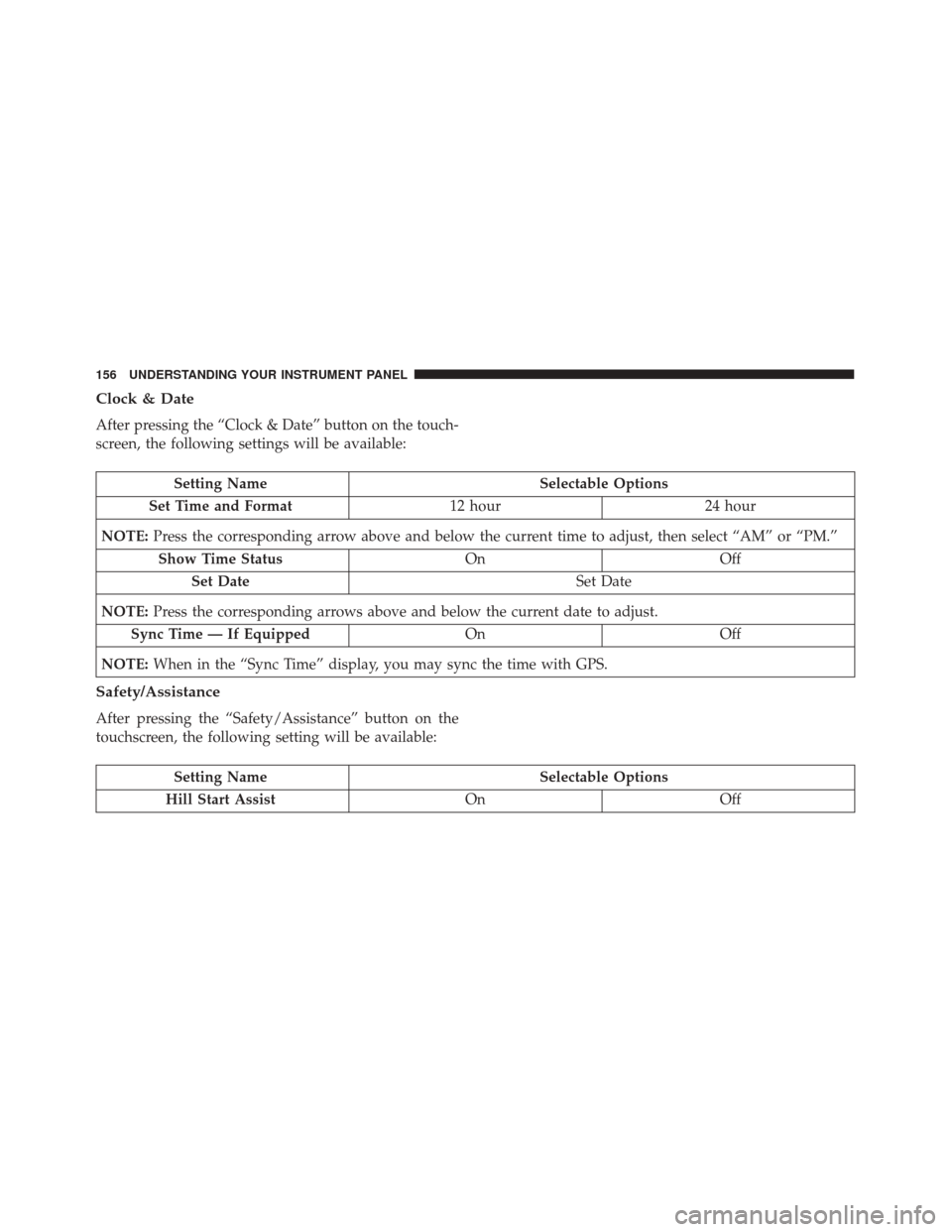
After pressing the “Clock & Date” button on the touch-
screen, the following settings will be available:
Setting NameSelectable Options
Set Time and Format 12 hour24 hour
NOTE: Press the corresponding arrow above and below the current time to adjust, then select “AM” or “PM.”
Show Time Status OnOff
Set Date Set Date
NOTE: Press the corresponding arrows above and below the current date to adjust.
Sync Time — If Equipped OnOff
NOTE: When in the “Sync Time” display, you may sync the time with GPS.
Safety/Assistance
After pressing the “Safety/Assistance” button on the
touchscreen, the following setting will be available:
Setting Name Selectable Options
Hill Start Assist OnOff
156 UNDERSTANDING YOUR INSTRUMENT PANEL
Page 167 of 338
Voice Text Reply
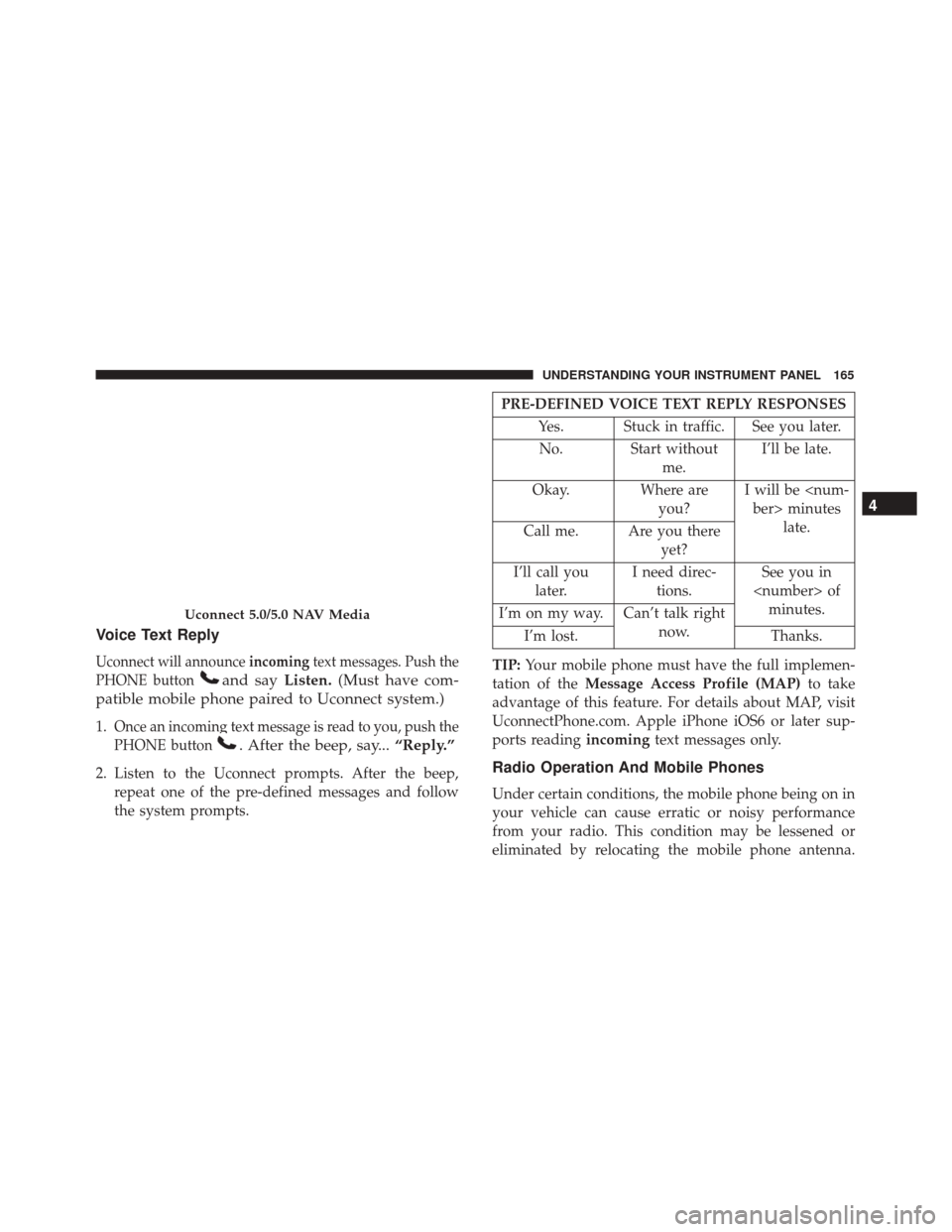
Uconnect will announceincomingtext messages. Push the
PHONE button
and say Listen.(Must have com-
patible mobile phone paired to Uconnect system.)
1.Once an incoming text message is read to you, push the
PHONE button
. After the beep, say... “Reply.”
2. Listen to the Uconnect prompts. After the beep,
repeat one of the pre-defined messages and follow
the system prompts.
PRE-DEFINED VOICE TEXT REPLY RESPONSES
Yes. Stuck in traffic. See you later.No. Start without me.I’ll be late.
Okay. Where are you?I will be
Call me. Are you there
yet?
I’ll call you later. I need direc-
tions. See you in
I’m on my way. Can’t talk right
now.
I’m lost. Thanks.
TIP: Your mobile phone must have the full implemen-
tation of the Message Access Profile (MAP) to take
advantage of this feature. For details about MAP, visit
UconnectPhone.com. Apple iPhone iOS6 or later sup-
ports reading incomingtext messages only.
Radio Operation And Mobile Phones
Under certain conditions, the mobile phone being on in
your vehicle can cause erratic or noisy performance
from your radio. This condition may be lessened or
eliminated by relocating the mobile phone antenna.
Uconnect 5.0/5.0 NAV Media
4
UNDERSTANDING YOUR INSTRUMENT PANEL 165
Page 168 of 338
This condition is not harmful to the radio. If your radio
performance does not satisfactorily “clear” by the repo-
sitioning of the antenna, it is recommended that the
radio volume be turned down or off during mobile
phone operation.
Harmful Interference Statement
This device complies with Part 15 of the FCC rules and
RSS 210 of Industry Canada. Operation is subject to the
following conditions:
•This device may not cause harmful interference.
• This device must accept any interference received,
including interference that may cause undesired op-
eration.
NOTE: Changes or modifications not expressly ap-
proved by the party responsible for compliance could
void the user ’s authority to operate the equipment.
Additional Information
© 2016 FCA US LLC. All rights reserved. Mopar and
Uconnect are registered trademarks and Mopar Owner
Connect is a trademark of FCA US LLC. Android is a
trademark of Google Inc. SiriusXM and all related
marks and logos are trademarks of SiriusXM Radio Inc. For Uconnect system support, call 1-877-855-8400 (24
hours a day 7 days a week) or visit DriveUconnect.com.
STEERING WHEEL AUDIO CONTROLS
The remote sound system controls are located on the
rear surface of the steering wheel. Reach behind the
wheel to access the switches.
The right-hand control is a rocker-type switch with a
pushbutton in the center and controls the volume and
mode of the sound system. Pushing the top of the
rocker switch will increase the volume, and pushing the
bottom of the rocker switch will decrease the volume.
Remote Sound System Controls (Back View Of
Steering Wheel)
166 UNDERSTANDING YOUR INSTRUMENT PANEL
Page 188 of 338
If Engine Fails To Start
WARNING!
Never pour fuel or other flammable liquid into the
throttle body air inlet opening in an attempt to start
the vehicle. This could result in flash fire causing
serious personal injury.
CAUTION!
•Do not attempt to push or tow your vehicle to get
it started. Unburned fuel could enter the catalytic
converter and once the engine has started, ignite
and damage the converter and vehicle.
•
To prevent damage to the starter, do not continu-
ously crank the engine for more than 15 seconds at a
time. Wait 10 to 15 seconds before trying again.
After Starting
The idle speed will automatically decrease as the engine
warms up.
Turbocharger “Cool Down”
This vehicle is equipped with an after-run pump to cool
the turbocharger after the engine is shut off. Depending
on the type of driving and the amount of cargo, the
pump will run for up to 10 minutes after the engine has
been shut off to circulate coolant through the turbo-
charger. Although the pump is rubber-mounted for
quiet operation, it is normal to hear it running during
this time.
MANUAL TRANSMISSION — IF EQUIPPED
Five-Speed Manual Transmission
WARNING!
You or others could be injured if you leave the
vehicle unattended without having the parking
brake fully applied. The parking brake should
always be applied when the driver is not in the
vehicle, especially on an incline.
186 STARTING AND OPERATING
Page 193 of 338
Manual shifts can be made using the AutoStick shift
control (refer to “AutoStick” in this section for further
information). Toggling the gear selector forward (-) or
rearward (+) while in the AutoStick position (beside the
DRIVE position) will manually select the transmission
gear, and will display the current gear in the instrument
cluster as 1, 2, 3, etc.
NOTE:If the gear selector cannot be moved to the
PARK, REVERSE, or NEUTRAL position (when pushed
forward) it is probably in the AutoStick (+/-) position
(beside the DRIVE position). In AutoStick mode, the
transmission gear (1, 2, 3, etc.) is displayed in the
instrument cluster. Move the gear selector to the right
(into the DRIVE [D] position) for access to PARK,
REVERSE, and NEUTRAL.
Gear Ranges
DO NOT race the engine when shifting from PARK or
NEUTRAL into another gear range.
NOTE: After selecting any gear range, wait a moment
to allow the selected gear to engage before accelerating.
This is especially important when the engine is cold.
PARK (P)
This range supplements the parking brake by locking
the transmission. The engine can be started in this
range. Never attempt to use PARK while the vehicle is
in motion. Apply the parking brake when leaving the
vehicle in this range.
When parking on a level surface, you may shift the
transmission into PARK first, and then apply the park-
ing brake.
When parking on a hill, apply the parking brake before
shifting the transmission to PARK, otherwise the load
on the transmission locking mechanism may make it
difficult to move the gear selector out of PARK. As an
added precaution, turn the front wheels toward the
curb on a downhill grade and away from the curb on an
uphill grade.
When exiting the vehicle, always:
• Apply the parking brake.
• Shift the transmission into PARK.
• Turn the engine OFF.
• Remove the ignition key.
5
STARTING AND OPERATING 191
Page 195 of 338
CAUTION!
•Before moving the transmission gear selector out
of PARK, you must turn the ignition to the
ON/RUN mode, and also press the brake pedal.
Otherwise, damage to the gear selector could
result.
• DO NOT race the engine when shifting from
PARK or NEUTRAL into another gear range, as
this can damage the drivetrain.
The following indicators should be used to ensure that
you have engaged the transmission into the PARK
position:
• When shifting into PARK, push the lock button on
the gear selector and firmly move the gear selector all
the way forward and to the left until it stops and is
fully seated.
• Look at the transmission gear position display and
verify that it indicates the PARK position (P).
• With brake pedal released, verify that the gear selec-
tor will not move out of PARK.
REVERSE (R)
This range is for moving the vehicle backward. Shift
into REVERSE only after the vehicle has come to a
complete stop.
NEUTRAL (N)
Use this range when the vehicle is standing for pro-
longed periods with the engine running. The engine
may be started in this range. Apply the parking brake
and shift the transmission into PARK if you must leave
the vehicle.
WARNING!
Do not coast in NEUTRAL and never turn off the
ignition to coast down a hill. These are unsafe
practices that limit your response to changing traf-
fic or road conditions. You might lose control of the
vehicle and have a collision.
5
STARTING AND OPERATING 193
Page 201 of 338
POWER STEERING
The electric power steering system will give you good
vehicle response and increased ease of maneuverability
in tight spaces. The system will vary its assist to provide
light efforts while parking and good feel while driving.
If the electric steering system experiences a fault that
prevents it from providing assist, you will still have the
ability to steer the vehicle manually.
WARNING!
Continued operation with reduced or no power
steering assist could pose a safety risk to yourself
and others. Service should be obtained as soon as
possible.
If the Steering icon is flashing, it indicates that the
vehicle needs to be taken to an authorized dealer for
service. It is likely the vehicle has lost power steering
assistance.
If the Steering icon is displayed and the “POWER
STEERING SYSTEM OVER TEMP” message is dis-
played on the instrument cluster screen, they indicate
that extreme steering maneuvers may have occurred
which caused an over temperature condition in the power steering system. Once driving conditions are
safe, pull over and let the vehicle idle for a few
moments until the icon and message turn off. Refer to
“Instrument Cluster Display” in “Understanding Your
Instrument Panel” for further information.
If the Steering icon is displayed and the “SERVICE
POWER STEERING – ASSIST OFF” message is displayed
on the instrument cluster screen, they indicate the vehicle
needs to be taken to an authorized dealer for service. Refer
to “Instrument Cluster Display” in “Understanding Your
Instrument Panel” for further information.
NOTE:
•
Even if the power steering assistance is no longer
operational, it is still possible to steer the vehicle.
Under these conditions there will be a substantial
increase in steering effort, especially at low speeds
and during parking maneuvers.
• If the condition persists, see your authorized dealer
for service.
5
STARTING AND OPERATING 199
Page 203 of 338
WARNING!(Continued)
•Be sure the parking brake is fully disengaged
before driving; failure to do so can lead to brake
failure and a collision.
• Always fully apply the parking brake when leav-
ing your vehicle, or it may roll and cause damage
or injury. Also be certain to leave a manual
transmission in FIRST gear or REVERSE gear.
Failure to do so may allow the vehicle to roll and
cause damage or injury.
CAUTION!
If the Brake Warning Light remains on with the
parking brake released, a brake system malfunction
is indicated. Have the brake system serviced by an
authorized dealer immediately.
SPORT MODE
Manual Transmission — If Equipped
In Sport mode, the engine is more responsive to the
throttle pedal, and provides more maximum torque by
increasing turbo boost pressure. Steering feedback is improved, and steering effort is slightly higher. This
driving mode is useful for spirited driving.
1. To activate the Sport mode, push the SPORT button.
Once activated, a SPORT message will be displayed in
the instrument cluster.
2. Momentarily release the accelerator pedal.
3. Press the accelerator pedal again to activate.
SPORT Button
5
STARTING AND OPERATING 201