display FIAT 500 ABARTH CABRIO 2017 2.G User Guide
[x] Cancel search | Manufacturer: FIAT, Model Year: 2017, Model line: 500 ABARTH CABRIO, Model: FIAT 500 ABARTH CABRIO 2017 2.GPages: 338, PDF Size: 2.78 MB
Page 114 of 338
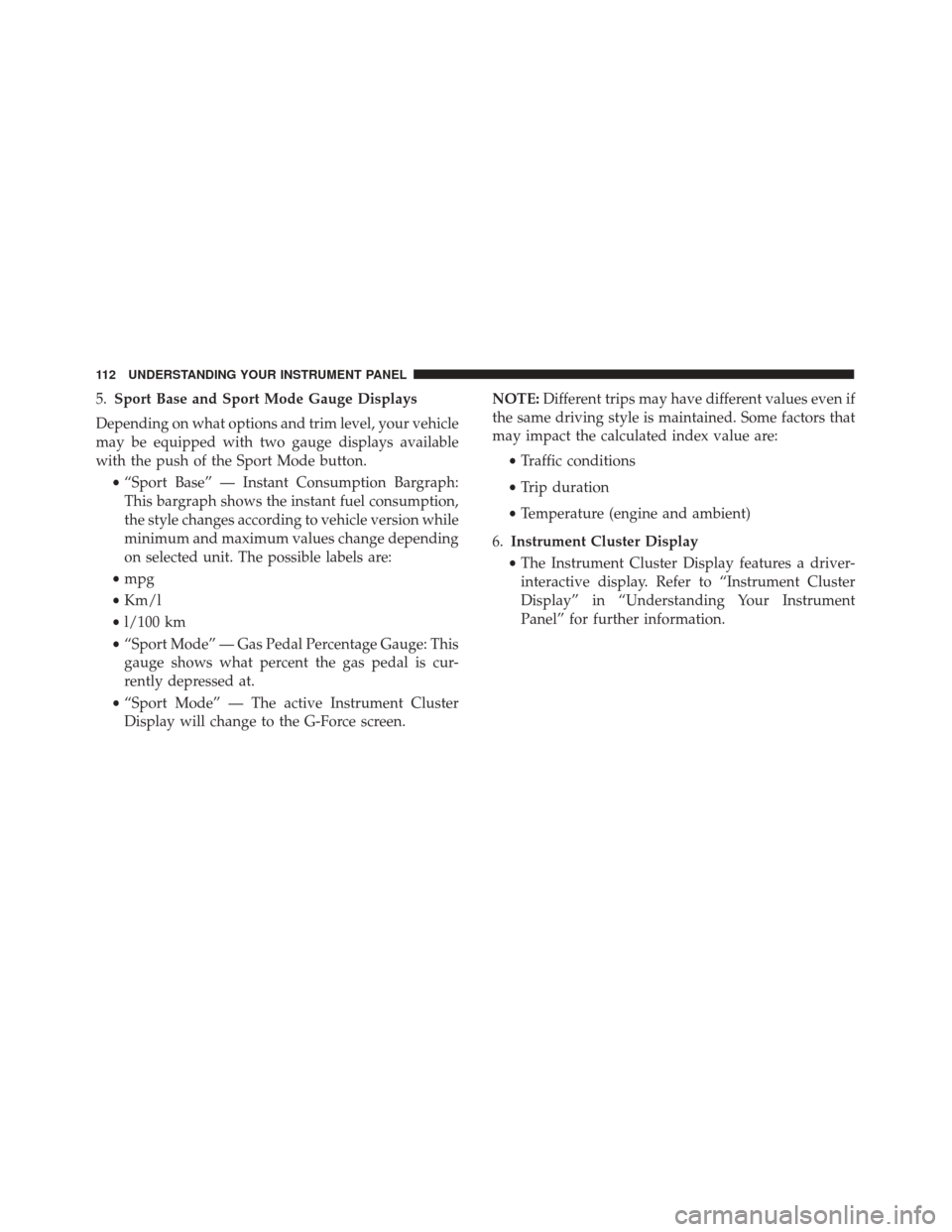
5.Sport Base and Sport Mode Gauge Displays
Depending on what options and trim level, your vehicle
may be equipped with two gauge displays available
with the push of the Sport Mode button. •“Sport Base” — Instant Consumption Bargraph:
This bargraph shows the instant fuel consumption,
the style changes according to vehicle version while
minimum and maximum values change depending
on selected unit. The possible labels are:
• mpg
• Km/l
• l/100 km
• “Sport Mode” — Gas Pedal Percentage Gauge: This
gauge shows what percent the gas pedal is cur-
rently depressed at.
• “Sport Mode” — The active Instrument Cluster
Display will change to the G-Force screen. NOTE:
Different trips may have different values even if
the same driving style is maintained. Some factors that
may impact the calculated index value are:
•Traffic conditions
• Trip duration
• Temperature (engine and ambient)
6. Instrument Cluster Display
• The Instrument Cluster Display features a driver-
interactive display. Refer to “Instrument Cluster
Display” in “Understanding Your Instrument
Panel” for further information.
112 UNDERSTANDING YOUR INSTRUMENT PANEL
Page 117 of 338
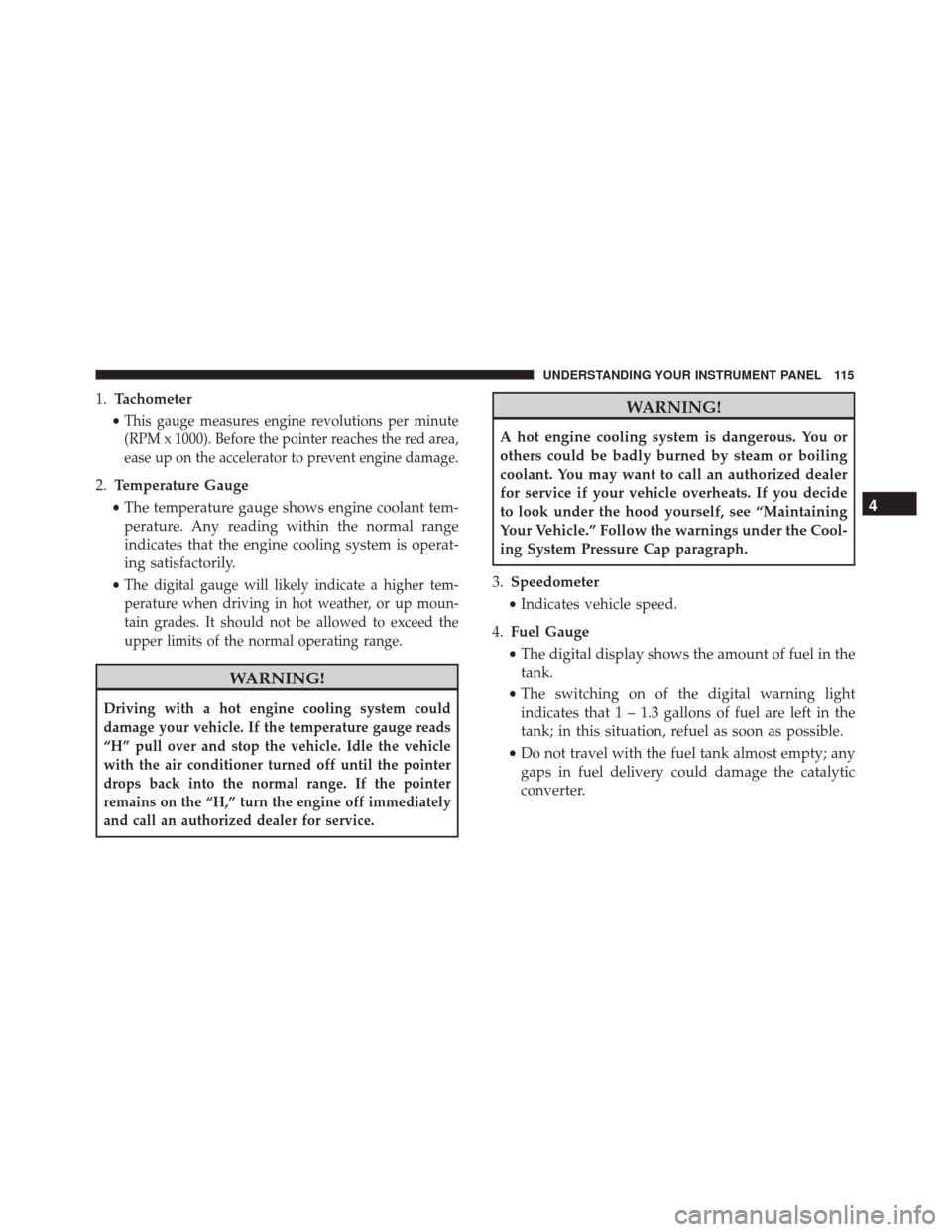
1.Tachometer
•
This gauge measures engine revolutions per minute
(RPM x 1000). Before the pointer reaches the red area,
ease up on the accelerator to prevent engine damage.
2. Temperature Gauge
• The temperature gauge shows engine coolant tem-
perature. Any reading within the normal range
indicates that the engine cooling system is operat-
ing satisfactorily.
•
The digital gauge will likely indicate a higher tem-
perature when driving in hot weather, or up moun-
tain grades. It should not be allowed to exceed the
upper limits of the normal operating range.
WARNING!
Driving with a hot engine cooling system could
damage your vehicle. If the temperature gauge reads
“H” pull over and stop the vehicle. Idle the vehicle
with the air conditioner turned off until the pointer
drops back into the normal range. If the pointer
remains on the “H,” turn the engine off immediately
and call an authorized dealer for service.
WARNING!
A hot engine cooling system is dangerous. You or
others could be badly burned by steam or boiling
coolant. You may want to call an authorized dealer
for service if your vehicle overheats. If you decide
to look under the hood yourself, see “Maintaining
Your Vehicle.” Follow the warnings under the Cool-
ing System Pressure Cap paragraph.
3. Speedometer
• Indicates vehicle speed.
4. Fuel Gauge
• The digital display shows the amount of fuel in the
tank.
• The switching on of the digital warning light
indicates that 1 – 1.3 gallons of fuel are left in the
tank; in this situation, refuel as soon as possible.
• Do not travel with the fuel tank almost empty; any
gaps in fuel delivery could damage the catalytic
converter.
4
UNDERSTANDING YOUR INSTRUMENT PANEL 115
Page 118 of 338
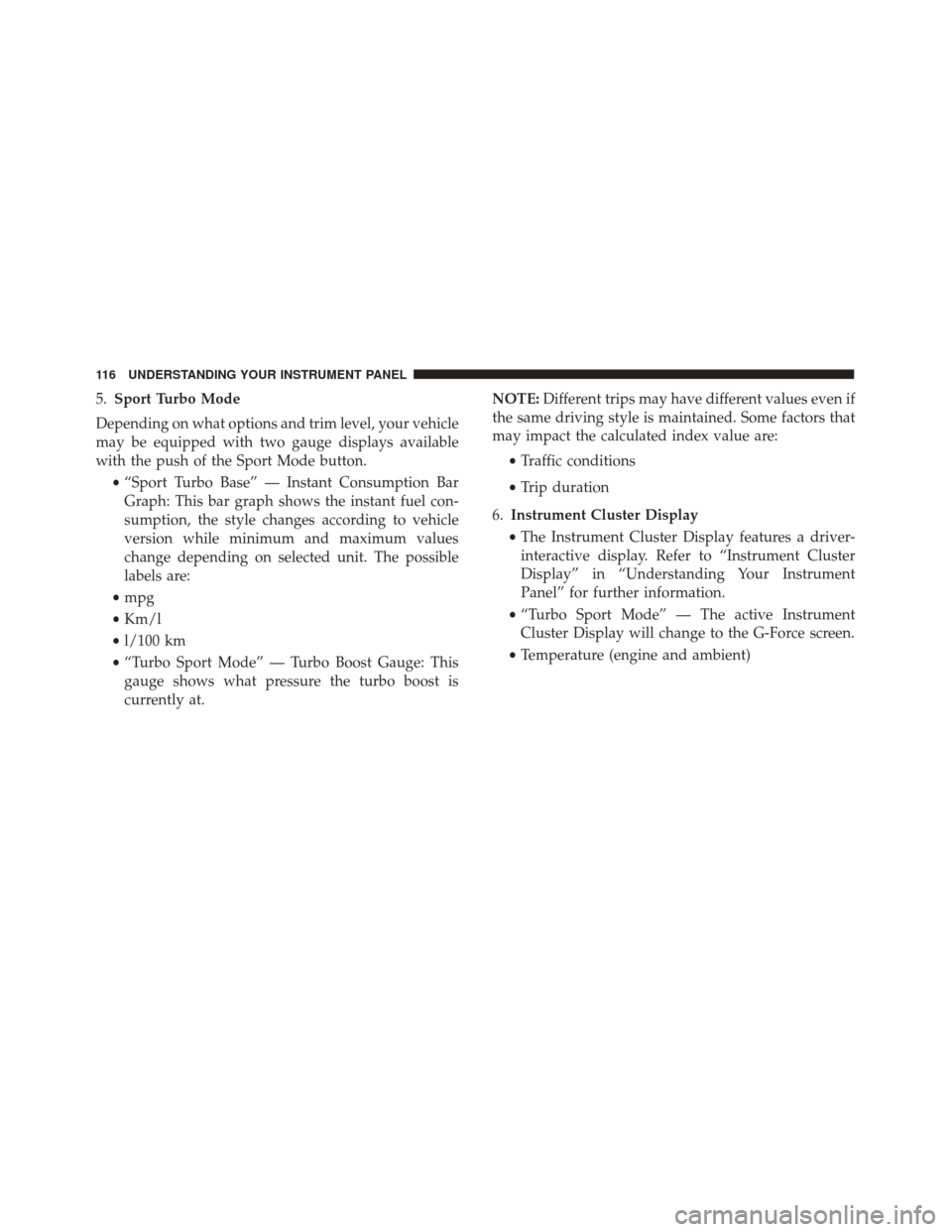
5.Sport Turbo Mode
Depending on what options and trim level, your vehicle
may be equipped with two gauge displays available
with the push of the Sport Mode button. •“Sport Turbo Base” — Instant Consumption Bar
Graph: This bar graph shows the instant fuel con-
sumption, the style changes according to vehicle
version while minimum and maximum values
change depending on selected unit. The possible
labels are:
• mpg
• Km/l
• l/100 km
• “Turbo Sport Mode” — Turbo Boost Gauge: This
gauge shows what pressure the turbo boost is
currently at. NOTE:
Different trips may have different values even if
the same driving style is maintained. Some factors that
may impact the calculated index value are:
•Traffic conditions
• Trip duration
6. Instrument Cluster Display
• The Instrument Cluster Display features a driver-
interactive display. Refer to “Instrument Cluster
Display” in “Understanding Your Instrument
Panel” for further information.
• “Turbo Sport Mode” — The active Instrument
Cluster Display will change to the G-Force screen.
• Temperature (engine and ambient)
116 UNDERSTANDING YOUR INSTRUMENT PANEL
Page 120 of 338
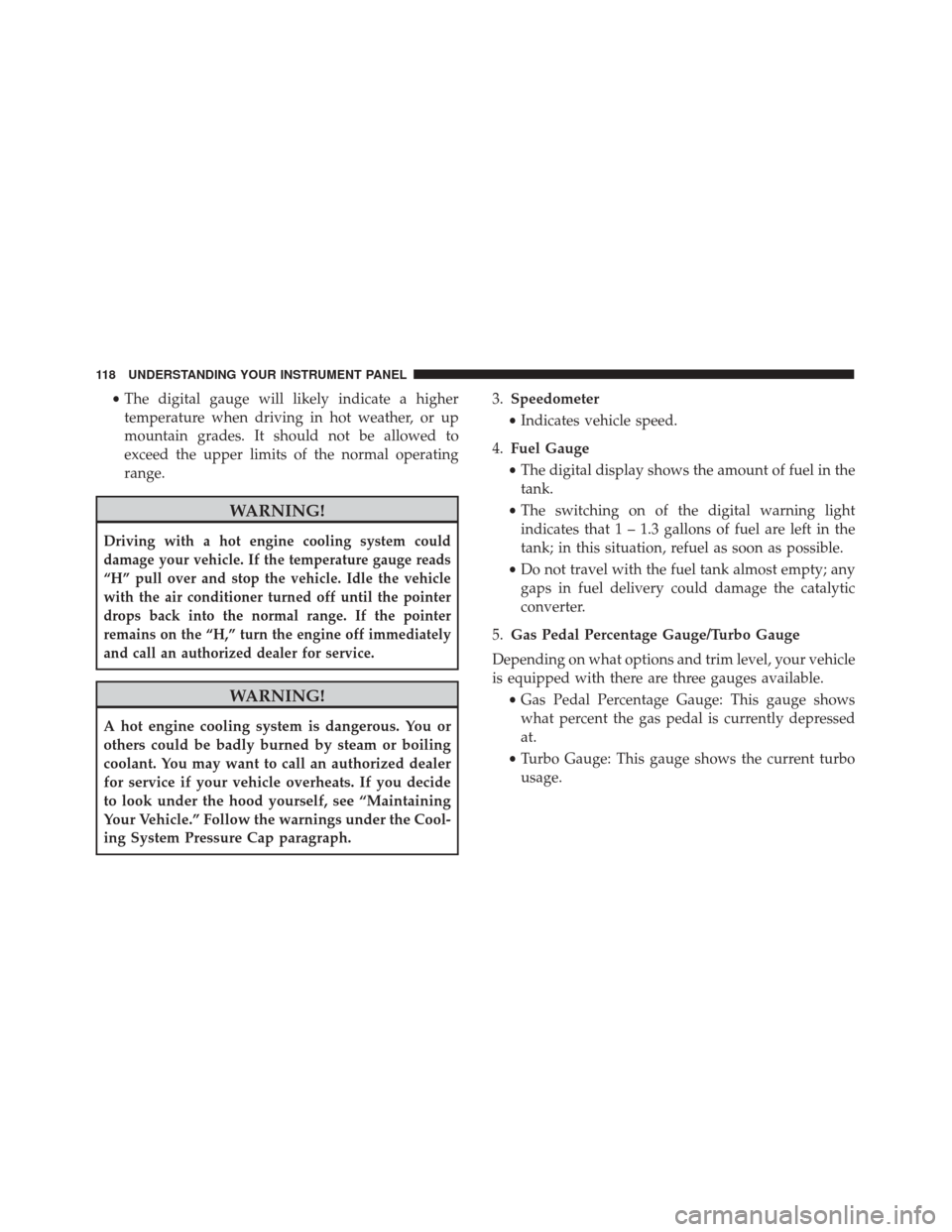
•The digital gauge will likely indicate a higher
temperature when driving in hot weather, or up
mountain grades. It should not be allowed to
exceed the upper limits of the normal operating
range.
WARNING!
Driving with a hot engine cooling system could
damage your vehicle. If the temperature gauge reads
“H” pull over and stop the vehicle. Idle the vehicle
with the air conditioner turned off until the pointer
drops back into the normal range. If the pointer
remains on the “H,” turn the engine off immediately
and call an authorized dealer for service.
WARNING!
A hot engine cooling system is dangerous. You or
others could be badly burned by steam or boiling
coolant. You may want to call an authorized dealer
for service if your vehicle overheats. If you decide
to look under the hood yourself, see “Maintaining
Your Vehicle.” Follow the warnings under the Cool-
ing System Pressure Cap paragraph. 3.
Speedometer
• Indicates vehicle speed.
4. Fuel Gauge
• The digital display shows the amount of fuel in the
tank.
• The switching on of the digital warning light
indicates that 1 – 1.3 gallons of fuel are left in the
tank; in this situation, refuel as soon as possible.
• Do not travel with the fuel tank almost empty; any
gaps in fuel delivery could damage the catalytic
converter.
5. Gas Pedal Percentage Gauge/Turbo Gauge
Depending on what options and trim level, your vehicle
is equipped with there are three gauges available. •Gas Pedal Percentage Gauge: This gauge shows
what percent the gas pedal is currently depressed
at.
• Turbo Gauge: This gauge shows the current turbo
usage.
118 UNDERSTANDING YOUR INSTRUMENT PANEL
Page 121 of 338
NOTE:Different trips may have different values even if
the same driving style is maintained. Some factors that
may impact the calculated index value are:
•Traffic conditions
• Trip duration
• Temperature (engine and ambient)
6. Instrument Cluster Display
• The Instrument Cluster Display features a driver-
interactive display. Refer to “Instrument Cluster
Display” in “Understanding Your Instrument
Panel” for further information.WARNING AND INDICATOR LIGHTS
IMPORTANT: The warning / indicator lights switch on
in the instrument panel together with a dedicated
message and/or acoustic signal when applicable. These
indications are indicative and precautionary and as
such must not be considered as exhaustive and/or
alternative to the information contained in the Owner ’s
Manual, which you are advised to read carefully in all
cases. Always refer to the information in this chapter in
the event of a failure indication.
All active telltales will display first if applicable. The
system check menu may appear different based upon
equipment options and current vehicle status. Some
telltales are optional and may not appear.
4
UNDERSTANDING YOUR INSTRUMENT PANEL 119
Page 128 of 338
Transmission Fault Warning Light
Red TelltaleLight What It Means
Transmission Fault Warning Light
This light will illuminate (together with a message in the Instrument Cluster Display and a
buzzer) to indicate a transmission fault. This light indicates that the transmission fluid tem-
perature is running hot. This may occur with severe usage. If this light turns on, safely pull
over and stop the vehicle. Then, place the transmission into NEUTRAL and run the engine
at idle speed or apply light foot pressure to increase the engine speed RPM until the Trans-
mission Temperature light turns off. Contact your authorized dealer if the message remains
after restarting the engine.
WARNING!
If you continue operating the vehicle when the
Transmission Temperature Warning Light is illumi-
nated you could cause the fluid to boil over, come in
contact with hot engine or exhaust components and
cause a fire.
CAUTION!
Continuous driving with the Transmission Tem-
perature Warning Light illuminated will eventually
cause severe transmission damage or transmission
failure.
126 UNDERSTANDING YOUR INSTRUMENT PANEL
Page 129 of 338
Hood Open Warning Light — If Equipped
Red TelltaleLight What It Means
Hood Open Warning Light
This indicator will illuminate when the hood is ajar/open and not fully closed.
Yellow Telltale Indicator Lights
Tire Pressure Monitoring Indicator Light
Yellow Telltale
Light What It Means
Tire Pressure Monitoring Indicator Light
The warning light switches on and a message is displayed to indicate that the tire pressure
is lower than the recommended value and/or that slow pressure loss is occurring. In these
cases, optimal tire duration and fuel consumption may not be guaranteed.
Should one or more tires be in the condition mentioned above, the display will show the
indications corresponding to each tire in sequence.
IMPORTANT: Do not continue driving with one or
more flat tires as handling may be compromised. Stop
the vehicle, avoiding sharp braking and steering. Repair
immediately using the dedicated tire repair kit and
contact your authorized dealership as soon as possible. Each tire, including the spare (if provided), should be
checked monthly when cold and inflated to the inflation
pressure recommended by the vehicle manufacturer on
the vehicle placard or tire inflation pressure label. If
your vehicle has tires of a different size than the size
4
UNDERSTANDING YOUR INSTRUMENT PANEL 127
Page 141 of 338
INSTRUMENT CLUSTER DISPLAY
Your vehicle may be equipped with an Instrument
Cluster Display, which offers useful information to the
driver. With the ignition in the STOP/OFF position (and
the key removed, for vehicles with mechanical key),
opening/closing of a door will activate the display for
viewing, and display the total miles or kilometers in the
odometer. Your Instrument Cluster Display is designed
to display important information about your vehicle’s
systems and features. Using a driver interactive display
located on the instrument panel, your Instrument Clus-
ter Display can show you how systems are working and
give you warnings when they aren’t. The steering wheel
mounted controls allow you to scroll through and enter
the main menus and submenus. You can access the
specific information you want and make selections and
adjustments.
Instrument Cluster Display And Controls
The driver-interactive Instrument Cluster Display is
located in the center of the instrument cluster.The system display consists of the following:
•
System Status
• Vehicle Information Warning Message Displays
•
Personal Settings (Customer-Programmable Features)
• Outside Temperature Display
• Trip Computer Functions
• Tire Pressure Monitoring Display
Instrument Cluster Display
4
UNDERSTANDING YOUR INSTRUMENT PANEL 139
Page 142 of 338
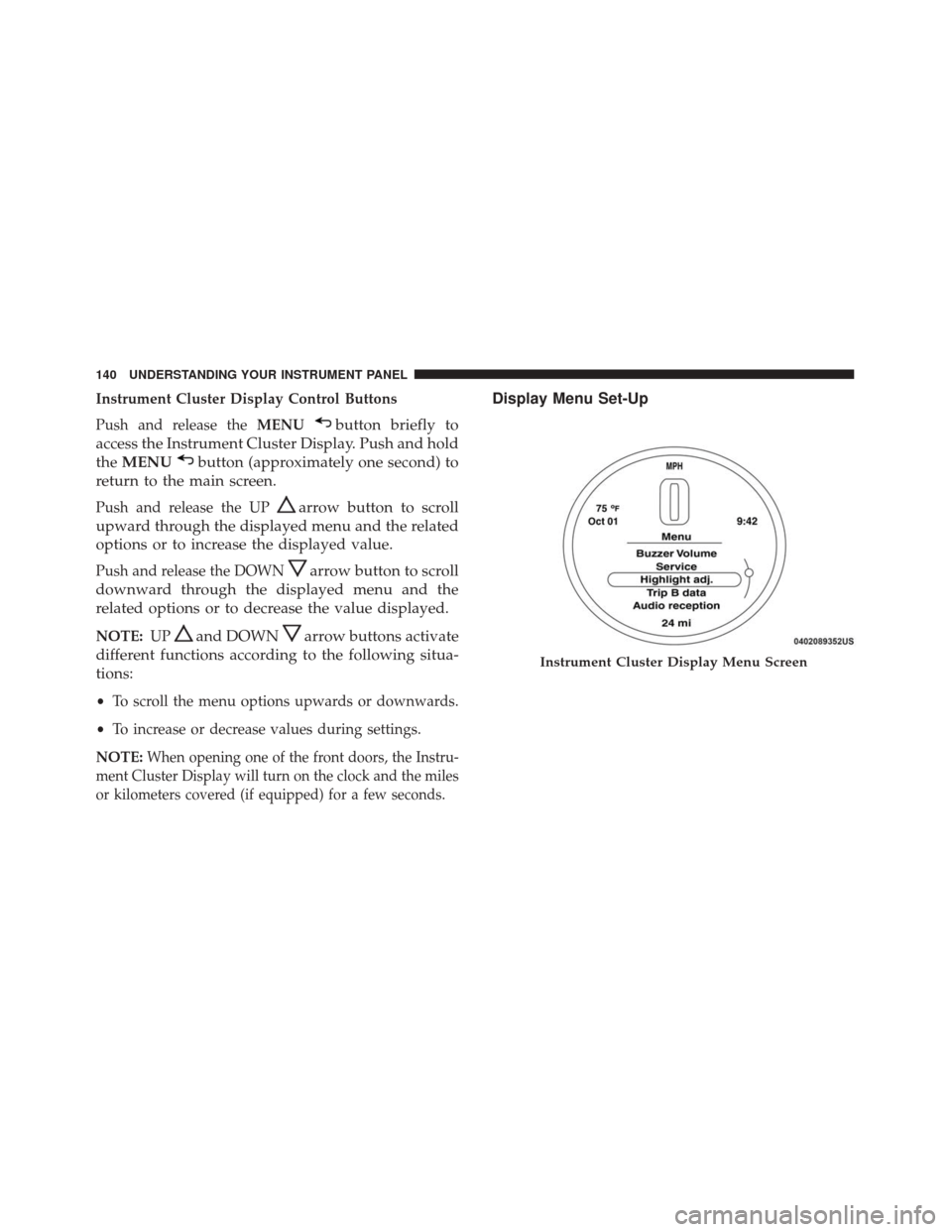
Instrument Cluster Display Control Buttons
Push and release theMENU
button briefly to
access the Instrument Cluster Display. Push and hold
the MENU
button (approximately one second) to
return to the main screen.
Push and release the UParrow button to scroll
upward through the displayed menu and the related
options or to increase the displayed value.
Push and release the DOWNarrow button to scroll
downward through the displayed menu and the
related options or to decrease the value displayed.
NOTE: UPand DOWNarrow buttons activate
different functions according to the following situa-
tions:
• To scroll the menu options upwards or downwards.
• To increase or decrease values during settings.
NOTE:
When opening one of the front doors, the Instru-
ment Cluster Display will turn on the clock and the miles
or kilometers covered (if equipped) for a few seconds.
Display Menu Set-Up
Instrument Cluster Display Menu Screen
140 UNDERSTANDING YOUR INSTRUMENT PANEL
Page 143 of 338
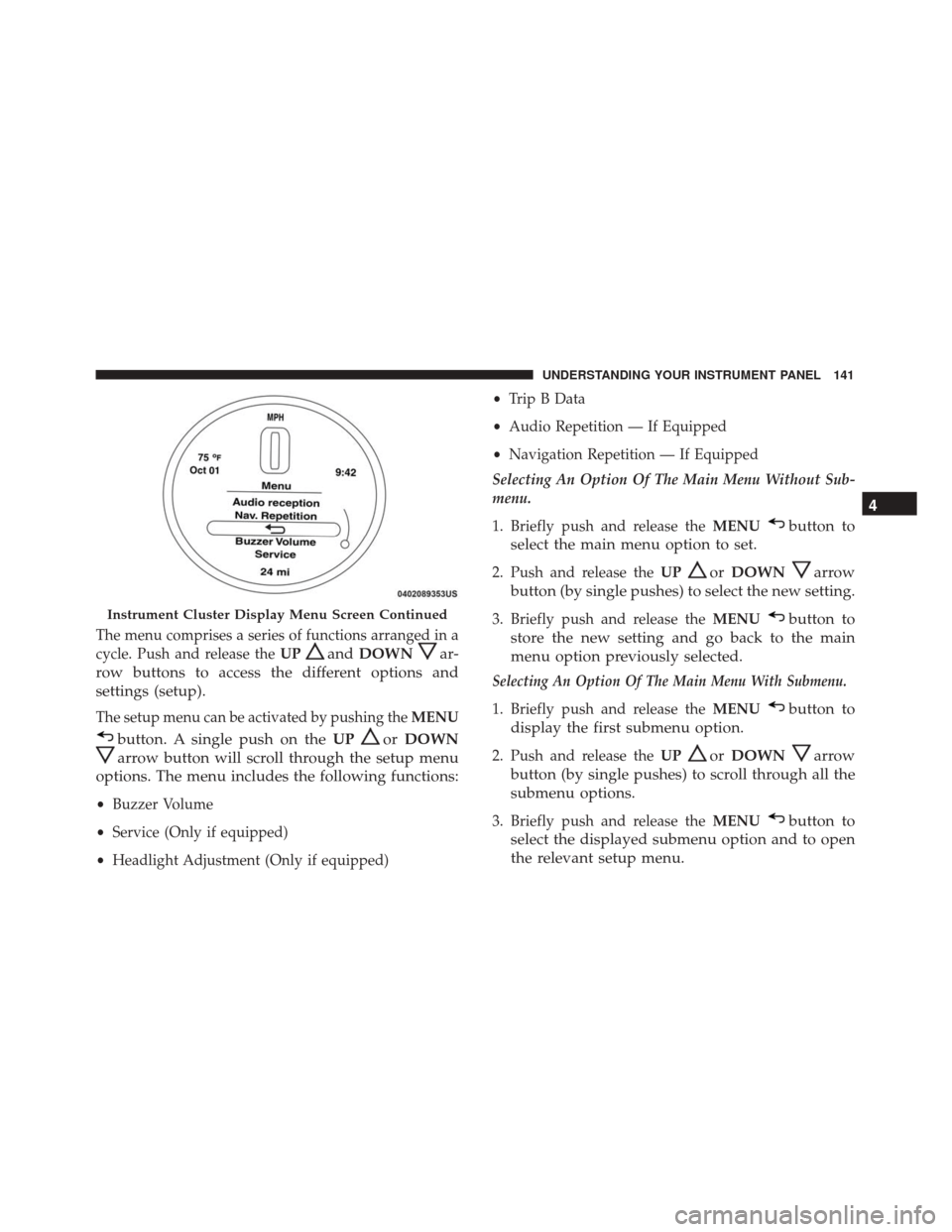
The menu comprises a series of functions arranged in a
cycle. Push and release theUP
andDOWNar-
row buttons to access the different options and
settings (setup).
The setup menu can be activated by pushing the MENU
button. A single push on theUPorDOWN
arrow button will scroll through the setup menu
options. The menu includes the following functions:
• Buzzer Volume
• Service (Only if equipped)
• Headlight Adjustment (Only if equipped) •
Trip B Data
• Audio Repetition — If Equipped
• Navigation Repetition — If Equipped
Selecting An Option Of The Main Menu Without Sub-
menu.
1. Briefly push and release the MENU
button to
select the main menu option to set.
2. Push and release the UPorDOWNarrow
button (by single pushes) to select the new setting.
3. Briefly push and release the MENUbutton to
store the new setting and go back to the main
menu option previously selected.
Selecting An Option Of The Main Menu With Submenu.
1. Briefly push and release the MENUbutton to
display the first submenu option.
2. Push and release the UPorDOWNarrow
button (by single pushes) to scroll through all the
submenu options.
3. Briefly push and release the MENUbutton to
select the displayed submenu option and to open
the relevant setup menu.
Instrument Cluster Display Menu Screen Continued
4
UNDERSTANDING YOUR INSTRUMENT PANEL 141