wheel FIAT 500 ABARTH CABRIO 2017 2.G Owners Manual
[x] Cancel search | Manufacturer: FIAT, Model Year: 2017, Model line: 500 ABARTH CABRIO, Model: FIAT 500 ABARTH CABRIO 2017 2.GPages: 338, PDF Size: 2.78 MB
Page 34 of 338
WARNING!
•The seat belt assembly must be replaced if the
switchable Automatic Locking Retractor (ALR)
feature or any other seat belt function is not
working properly when checked according to the
procedures in the Service Manual.
• Failure to replace the seat belt assembly could
increase the risk of injury in collisions.
• Do not use the Automatic Locking Mode to re-
strain occupants who are wearing the seat belt or
children who are using booster seats. The locked
mode is only used to install rear-facing or
forward-facing child restraints that have a har-
ness for restraining the child.
Supplemental Restraint System (SRS)
Some of the safety features described in this section
may be standard equipment on some models, or may be
optional equipment on others. If you are not sure, ask
your authorized dealer.
Air Bag System Components
Your vehicle may be equipped with the following air
bag system components:
• Occupant Restraint Controller (ORC)
• Air Bag Warning Light
•Steering Wheel and Column
• Instrument Panel
• Knee Impact Bolsters
• Driver and Front Passenger Air Bags
• Supplemental Side Air Bags
• Supplemental Knee Air Bags
• Front and Side Impact Sensors
• Seat Belt Pretensioners
• Seat Track Position Sensors
• Seat Belt Buckle Switch
Advanced Front Air Bags
This vehicle has front air bags and lap/shoulder belt for
both the driver and front passenger. The air bags are
32 THINGS TO KNOW BEFORE STARTING YOUR VEHICLE
Page 35 of 338
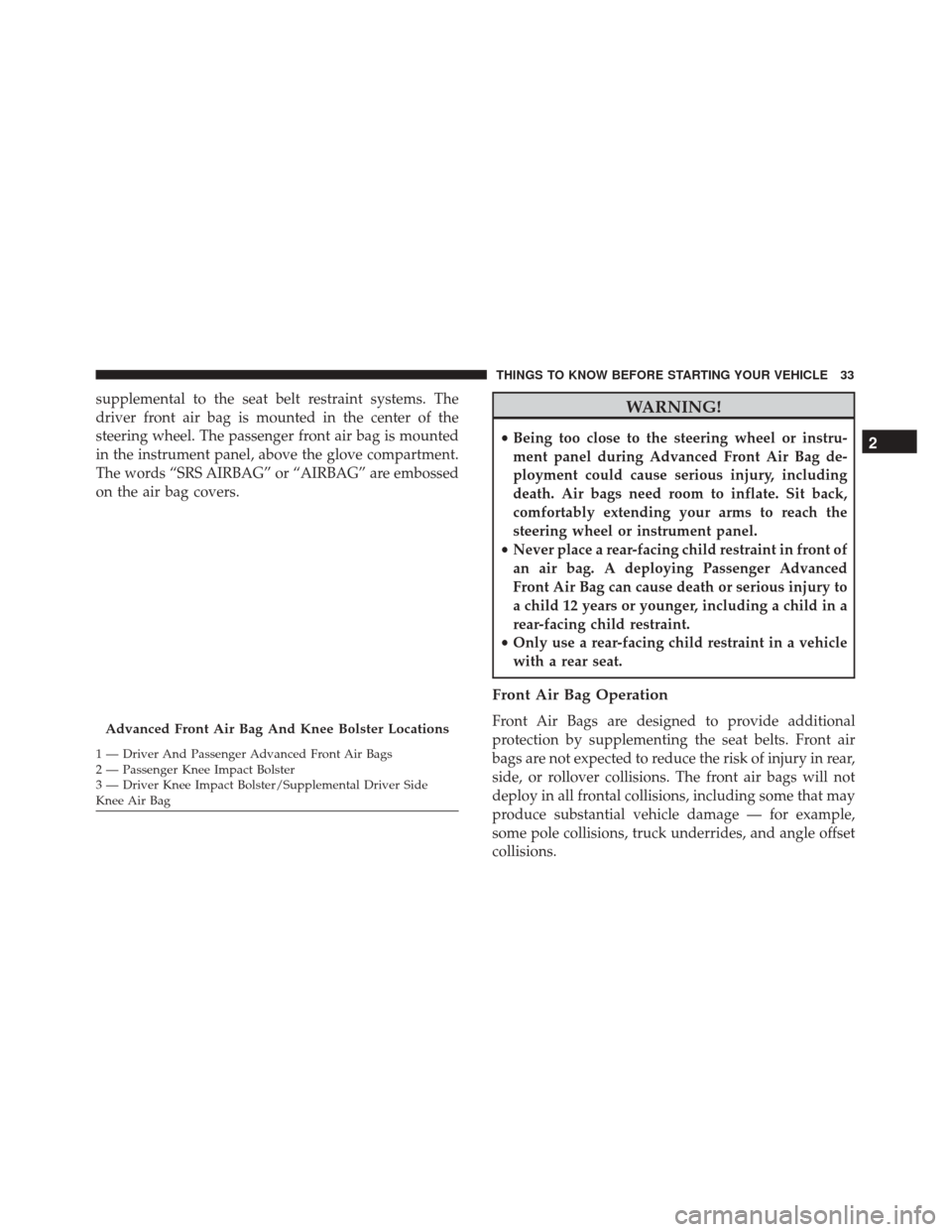
supplemental to the seat belt restraint systems. The
driver front air bag is mounted in the center of the
steering wheel. The passenger front air bag is mounted
in the instrument panel, above the glove compartment.
The words “SRS AIRBAG” or “AIRBAG” are embossed
on the air bag covers.WARNING!
•Being too close to the steering wheel or instru-
ment panel during Advanced Front Air Bag de-
ployment could cause serious injury, including
death. Air bags need room to inflate. Sit back,
comfortably extending your arms to reach the
steering wheel or instrument panel.
• Never place a rear-facing child restraint in front of
an air bag. A deploying Passenger Advanced
Front Air Bag can cause death or serious injury to
a child 12 years or younger, including a child in a
rear-facing child restraint.
• Only use a rear-facing child restraint in a vehicle
with a rear seat.
Front Air Bag Operation
Front Air Bags are designed to provide additional
protection by supplementing the seat belts. Front air
bags are not expected to reduce the risk of injury in rear,
side, or rollover collisions. The front air bags will not
deploy in all frontal collisions, including some that may
produce substantial vehicle damage — for example,
some pole collisions, truck underrides, and angle offset
collisions.Advanced Front Air Bag And Knee Bolster Locations
1 — Driver And Passenger Advanced Front Air Bags
2 — Passenger Knee Impact Bolster
3 — Driver Knee Impact Bolster/Supplemental Driver Side
Knee Air Bag
2
THINGS TO KNOW BEFORE STARTING YOUR VEHICLE 33
Page 36 of 338
On the other hand, depending on the type and location
of impact, front air bags may deploy in crashes with
little vehicle front-end damage but that produce a
severe initial deceleration.
Because air bag sensors measure vehicle deceleration
over time, vehicle speed and damage by themselves are
not good indicators of whether or not an air bag should
have deployed.
Seat belts are necessary for your protection in all
collisions, and also are needed to help keep you in
position, away from an inflating air bag.
When the ORC detects a collision requiring the front air
bags, it signals the inflator units. A large quantity of
non-toxic gas is generated to inflate the front air bags.
The steering wheel hub trim cover and the upper right
side of the instrument panel separate and fold out of the
way as the air bags inflate to their full size. The front air
bags fully inflate in less time than it takes to blink your
eyes. The front air bags then quickly deflate while
helping to restrain the driver and front passenger.Knee Impact Bolsters
The Knee Impact Bolsters help protect the knees of the
driver and front passenger, and position the front
occupants for improved interaction with the front air
bags.
WARNING!
•Do not drill, cut, or tamper with the knee impact
bolsters in any way.
• Do not mount any accessories to the knee impact
bolsters such as alarm lights, stereos, citizen band
radios, etc.
Supplemental Driver Knee Air Bag
This vehicle is equipped with a Supplemental Driver
Knee Air Bag mounted in the instrument panel below
the steering column. The Supplemental Driver Knee Air
Bag provides enhanced protection during a frontal
impact by working together with the seat belts, preten-
sioners, and front air bags.
34 THINGS TO KNOW BEFORE STARTING YOUR VEHICLE
Page 44 of 338
WARNING!
Ignoring the Air Bag Warning Light in your instru-
ment panel could mean you won’t have the air bags
to protect you in a collision. If the light does not
come on as a bulb check when the ignition is first
turned on, stays on after you start the vehicle, or if
it comes on as you drive, have an authorized dealer
service the air bag system immediately.
Maintaining Your Air Bag System
WARNING!
•Modifications to any part of the air bag system
could cause it to fail when you need it. You could
be injured if the air bag system is not there to
protect you. Do not modify the components or
wiring, including adding any kind of badges or
stickers to the steering wheel hub trim cover or
the upper right side of the instrument panel. Do
not modify the front bumper, vehicle body struc-
ture, or add aftermarket side steps or running
boards.
(Continued)
WARNING! (Continued)
•It is dangerous to try to repair any part of the air
bag system yourself. Be sure to tell anyone who
works on your vehicle that it has an air bag
system.
• Do not attempt to modify any part of your air bag
system. The air bag may inflate accidentally or
may not function properly if modifications are
made. Take your vehicle to an authorized dealer
for any air bag system service. If your seat,
including your trim cover and cushion, needs to
be serviced in any way (including removal or
loosening/tightening of seat attachment bolts),
take the vehicle to your authorized dealer. Only
manufacturer approved seat accessories may be
used. If it is necessary to modify the air bag
system for persons with disabilities, contact your
authorized dealer.
42 THINGS TO KNOW BEFORE STARTING YOUR VEHICLE
Page 66 of 338
Periodic Safety Checks You Should Make
Outside The Vehicle
Tires
Examine tires for excessive tread wear and uneven wear
patterns. Check for stones, nails, glass, or other objects
lodged in the tread or sidewall. Inspect the tread for
cuts and cracks. Inspect sidewalls for cuts, cracks and
bulges. Check the wheel bolts for tightness. Check the
tires (including spare) for proper cold inflation pres-
sure.
Lights
Have someone observe the operation of brake lights
and exterior lights while you work the controls. Check
turn signal and high beam indicator lights on the
instrument panel.
Door Latches
Check for proper closing, latching, and locking.
Fluid Leaks
Check area under vehicle after overnight parking for
fuel, engine coolant, oil, or other fluid leaks. Also, if
gasoline fumes are detected or if fuel, power steering
fluid (if equipped), or brake fluid leaks are suspected.
The cause should be located and corrected immediately.
64 THINGS TO KNOW BEFORE STARTING YOUR VEHICLE
Page 84 of 338
LIGHTS
Multifunction Lever
The multifunction lever, located on the left side of the
steering wheel, controls the operation of the headlights,
headlight beam selection, passing light and turn sig-
nals.
NOTE:The headlights can only be turned on with the
ignition in the ON/RUN position.
Headlights
Rotate the end of the multifunction lever up-
ward to the first detent for headlight operation.NOTE: When the headlights are turned on, the Daytime
Running Lights will be deactivated.
High Beams
With the low beams activated, push the multi-
function lever towards the instrument panel to
turn on the high beams. Pull the multifunction lever
toward the steering wheel to turn off the high beams.
Headlight Operation
82 UNDERSTANDING THE FEATURES OF YOUR VEHICLE
Page 85 of 338
Flash-To-Pass
You can signal another vehicle with your headlights by
lightly pulling the multifunction lever toward the steer-
ing wheel. This will turn on the high beams until the
lever is released.
Parking Lights
To turn on the parking lights, remove the key
or turn the ignition to OFF/LOCK position
and turn on the headlights.
Daytime Running Lights
To activate the Daytime Running Lights (DRL), rotate
the end of the multifunction lever to theOsymbol.
NOTE: The low beams and side/taillights will not be
on with DRL.
If allowed by law in the country in which the vehicle
was purchased the DRL function can be turned on or off
using the display menus. Refer to “UConnect settings”
in “Understanding Your Instrument Panel” for further
information.
Turn Signals
Push the multifunction lever upward to signal a right
turn or downward to signal a left turn. The correspond-
ing indicator in the Instrument Cluster Display will
blink to indicate the operation of the turn signal.
NOTE: The indicators will automatically turn off when
the turn has been completed and the steering wheel is
returned to a straight position.
Turn Signal Operation
3
UNDERSTANDING THE FEATURES OF YOUR VEHICLE 83
Page 86 of 338
Lane Change Assist
Tap the lever up or down once, without moving beyond
the detent, and the turn signal (right or left) will flash
three times then automatically turn off.
Follow Me Home/Headlight Delay
When this feature is selected the driver can choose to
have the headlights remain on for a preset period of
time.
Activation
Remove the key or turn the ignition to the STOP
(OFF/LOCK) position, and pull the multifunction lever
toward the steering wheel, within two minutes. Each
time the lever is pulled, the activation of the lights will
be extended by 30 seconds. The activation of the lights
can be extended to a maximum of 210 seconds.
Deactivation
Pull the multifunction lever toward the steering wheel
and hold it for more than two seconds.
Interior Lights
The interior light switches are located in the overhead
console. The interior lights can be set to three different
positions (Off/Left Position, Center Position, On/Right
Position).
Using the switch on the left overhead, push the switch
to the right from its center position and the lights are
always on. Push the switch to the left from its center
position and the lights are always off. Leave the switch
in the center position, and the lights are turned on and
off when the doors are opened or closed. The switch on
the right side of the overhead console controls the map
or reading function of the lights. Push the switch to the
right to turn on the right light and push the switch to
the left to turn on the left light.
CAUTION!
Before getting out of the vehicle be sure that the
switch is in the center position or that the lights are
off to avoid draining the battery.
84 UNDERSTANDING THE FEATURES OF YOUR VEHICLE
Page 89 of 338
NOTE:The Intermittent function only has one detent
but wiper delay will vary with changes in vehicle
speed. As vehicle speed increases the delay time will
decrease.
Low Speed
Push the lever downward to the second detent. The
wipers will operate at low speed.
High Speed
Push the lever downward to the third detent. The
wipers will operate at high speed.
Manual High Speed/Mist
Push the lever upward from the off position. The wipers
will operate at high speed to clear off road mist or spray
from a passing vehicle. This operation will continue
until the lever is released. When the lever is released,
the wipers will return to the off position and automati-
cally shut off.
Front Windshield Washer Operation
Pull the windshield wiper/washer lever toward the
steering wheel to activate the washers. The wipers will
activate automatically for three cycles after the lever is
released.
CAUTION!
• Turn the windshield wipers off when driving
through an automatic car wash. Damage to the
windshield wipers may result if the wiper control
is left in any position other than off.
• In cold weather, always turn off the wiper switch
and allow the wipers to return to the “Park”
position before turning off the engine. If the
wiper switch is left on and the wipers freeze to
the windshield, damage to the wiper motor may
occur when the vehicle is restarted.
•
Always remove any buildup of snow that prevents
the windshield wiper blades from returning to the
off position. If the windshield wiper control is
turned off and the blades cannot return to the off
position, damage to the wiper motor may occur.
3
UNDERSTANDING THE FEATURES OF YOUR VEHICLE 87
Page 91 of 338
Push down on the lever to unlock the column. With one
hand firmly on the steering wheel, move the steering
column up or down as desired. Push the lever up to
lock the column firmly in place.
WARNING!
Do not adjust the steering column while driving.
Adjusting the steering column while driving or driv-
ing with the steering column unlocked, could cause
the driver to lose control of the vehicle. Failure to
follow this warning may result in serious injury or
death.
ELECTRONIC SPEED CONTROL
When engaged, the Electronic Speed Control takes over
accelerator operations at speeds greater than 25 mph
(40 km/h).
The Electronic Speed Control buttons are located on the
right side of the steering wheel.
Tilt Control Lever
Electronic Speed Control Buttons
3
UNDERSTANDING THE FEATURES OF YOUR VEHICLE 89