phone FIAT 500 GUCCI 2012 2.G User Guide
[x] Cancel search | Manufacturer: FIAT, Model Year: 2012, Model line: 500 GUCCI, Model: FIAT 500 GUCCI 2012 2.GPages: 80, PDF Size: 1.87 MB
Page 2 of 80
WarN i NG
1039238_12e_500_UserGuide_082911.indd 28/29/11 9:14 AM
The driver’s primary responsibility is the safe operation of the
vehicle. driving while distracted can result in loss of vehicle
control, resulting in a collision and personal injury. Chrysler
Group LLC strongly recommends that the driver use extreme
caution when using any device or feature that may take their
attention off the road. Use of any electrical devices such as cell
phones, computers, portable radios, vehicle navigation or other
devices by the driver while the vehicle is moving is dangerous
and could lead to a serious collision. Texting while driving is also
dangerous and should never be done while the vehicle is moving.
002D004A0003005D
vehicle operation, pull off the road to a safe location and stop
your vehicle. some states or Provinces prohibit the use of
cellular telephones or texting while driving. it is always
the driver’s responsibility to comply with all local laws.
iMPOrTaNT: This User Guide is intended to familiarize you
with the important features of your vehicle. The dVd enclosed
contains your Owner’s Manual, Navigation/Media Center
Manuals, Warranty Booklets, Tire Warranty and 24-Hour Towing
assistance (new vehicles purchased in the U.s.) or roadside
assistance (new vehicles purchased in Canada) in electronic
004A
be purchased by visiting www.techauthority.com. FiaT is a
registered trademark of FiaT Group Marketing & Corporate
Communication spa, used under license by Chrysler Group LLC.
Copyright 2011 Chrysler Group LLC.
driving and alcohol: drunken driving is one of the most frequent causes of
collisions. Your driving ability can be seriously impaired with blood alcohol levels
far below the legal minimum. if you are drinking, don’t drive. ride with a
designated non-drinking driver, call a cab, a friend, or use public transportation.
driving after drinking can lead to a collision. Your perceptions are less sharp,
005D
drinking. Never drink and then drive.
002C00490003
005C
0032005A00510048005500B7
003A1-888-242-6342 (U.s.) or
00140010001B0013001300100016001B001A001000140014001700160003000B002600440051004400470044000C00030052005500030045
Page 5 of 80
Vehicles Sold In Canada
With respect to any vehicles sold in Canada, the name Chrysler Group LLC shall be deemed to be
deleted and the name Chrysler Canada Inc. used in substitution therefore.
WARNING!
•Pedals that cannot move freely can cause loss of vehicle control and increase the risk
of serious personal injury.
• Always make sure that objects cannot fall into the driver foot well while the vehicle
is moving. Objects can become trapped under the brake pedal and accelerator pedal
causing a loss of vehicle control.
• Failure to properly follow floor mat installation or mounting can cause interference
with the brake pedal and accelerator pedal operation causing loss of control of the
vehicle.
• Never use the ‘PARK’ position as a substitute for the parking brake.Always apply the
parking brake fully when parked to guard against vehicle movement and possible
injury or damage.
• Refer to your Owner's Manual on the DVD for further details.
USE OF AFTERMARKET PRODUCTS (ELECTRONICS)
The use of aftermarket devices including cell phones, MP3 players, GPS systems, or chargers may
affect the performance of on-board wireless features including Keyless Enter-N-Go and Remote
Start range. If you are experiencing difficulties with any of your wireless features, try disconnecting
your aftermarket devices to see if the situation improves. If your symptoms persist, please see an
authorized dealer.
FIAT is a registered trademark of FIAT Group Marketing & Corporate Communication SpA, used
under license by Chrysler Group LLC.
COPYRIGHT ©2011 Chrysler Group LLC
INTRODUCTION/WELCOME
3
Page 31 of 80
MENU
•Press the MENU button and one of the following options will appear on the Radio display. Use
the up and down arrows to scroll through the options; use the left and right arrows to change a
selection setting.
• Speech Volume •Sirius Telephone Number
• Aux Audio Offset •System Reset
• Radio Off •Speed Volume
• Sat ID •On Volume Limit
Clock Setting
• The time is set using the Electronic Vehicle Information Center (EVIC) Display.
• With the Date and Time shown in the EVIC display, press the MENU ESC button to enter the
menu mode.
• Press the plus or minus buttons until "Set Time" is displayed and press the MENU ESC button
again.
• Press the MENU ESC button;“hours” will flash on the display.
• Press the plus or minus buttons to adjust the hours.
• When setting the hour is complete, briefly press the MENU ESC button and “minutes” will flash
in the display. Press the plus or minus buttons to adjust the minutes.
• When setting the time is complete, press and hold the MENU ESC button.
Station Presets
•To store a tuned station, find the station to store by either pressing the right and left arrow
(Seek) buttons or by pressing up or down arrow (Manual Tune) buttons.
• Once the station is found, press and hold one of the PRESET buttons, until you hear a
confirmation beep (Preset Saved will be shown in the radio display).A total of 15 FM, 10 AM
and 15 Sirius XM™ Satellite Radio stations can be preset by pressing the A-B-C button.
A-B-C Button
•Press the A-B-C button to choose between the presets stored in the AM, FM or SAT modes.
The mode (AM, FM, SAT), station preset (A, B, C) and preset button number (P 1-5) will be
displayed in the middle of the radio display.
BLUE&ME™ Hands-Free Communication
•FIAT’s Windows Mobile™ based BLUE&ME™ Hands-Free Communication is a personal
telematics system that incorporates communication and entertainment applications that are
expressly designed for use in your car.
• The BLUE&ME™ Hands-Free Communication package installed in your car is equipped with
integral hands-free kit, message reader, and media player. BLUE&ME™ is designed to support the
future installation of additional services.
ELECTRONICS
29
Page 32 of 80
•The BLUE&ME™ Hands-Free Communication package features integrated voice recognition,
steering wheel controls and a multifunction electronic display that allows you to use your
Bluetooth
®wireless technology enabled mobile phone without having to take your eyes off the
road.You can even keep your phone in a pocket or a bag.You are not required to train the voice
recognition system to recognize your voice.The system is “speaker independent” and performs
equally well for different users.
Steering Wheel Buttons
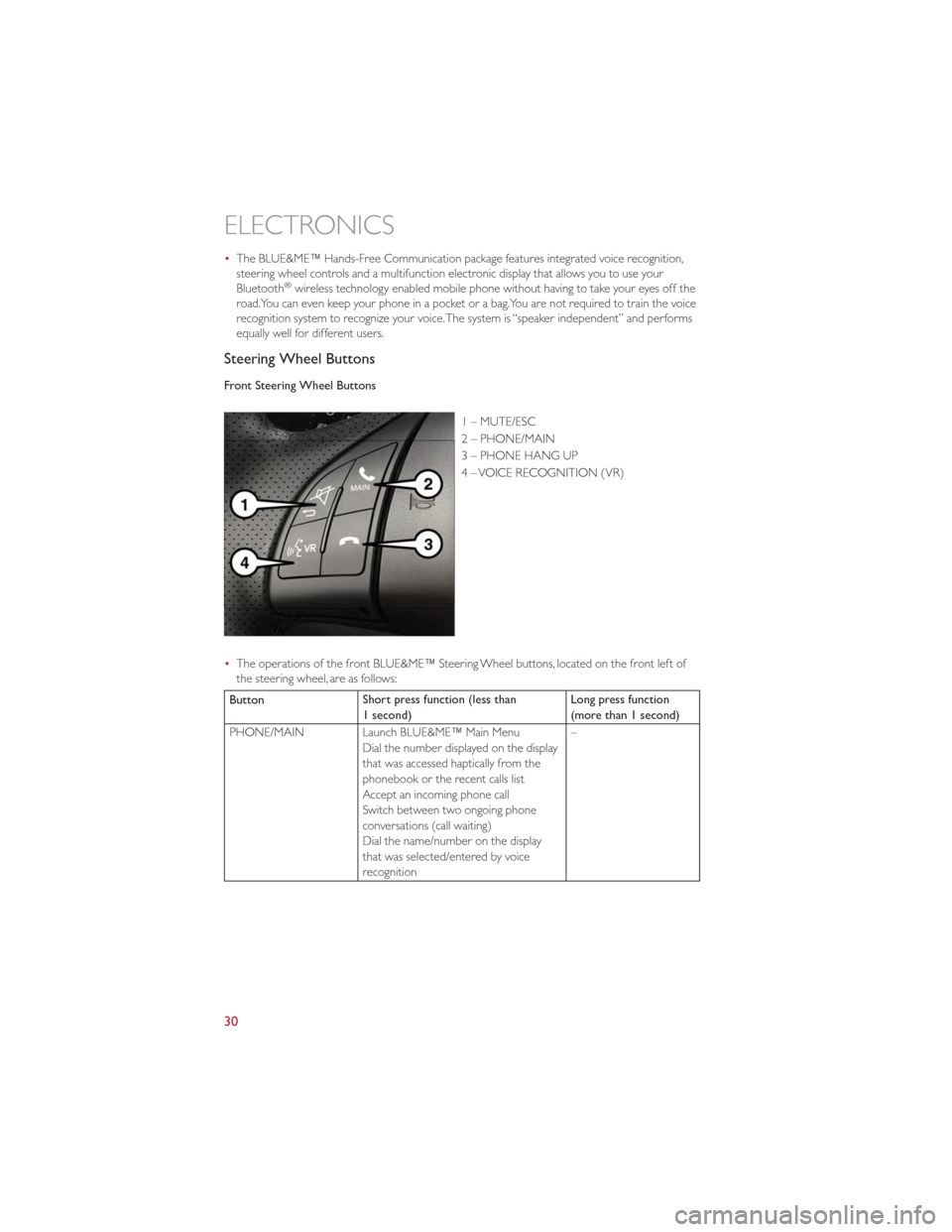
Front Steering Wheel Buttons
1 – MUTE/ESC
2 – PHONE/MAIN
3 – PHONE HANG UP
4 – VOICE RECOGNITION (VR)
• The operations of the front BLUE&ME™ Steering Wheel buttons, located on the front left of
the steering wheel, are as follows:
Button Short press function (less than
1 second) Long press function
(more than 1 second)
PHONE/MAIN Launch BLUE&ME™ Main Menu Dial the number displayed on the display
that was accessed haptically from the
phonebook or the recent calls list
Accept an incoming phone call
Switch between two ongoing phone
conversations (call waiting)
Dial the name/number on the display
that was selected/entered by voice
recognition –
ELECTRONICS
30
Page 33 of 80
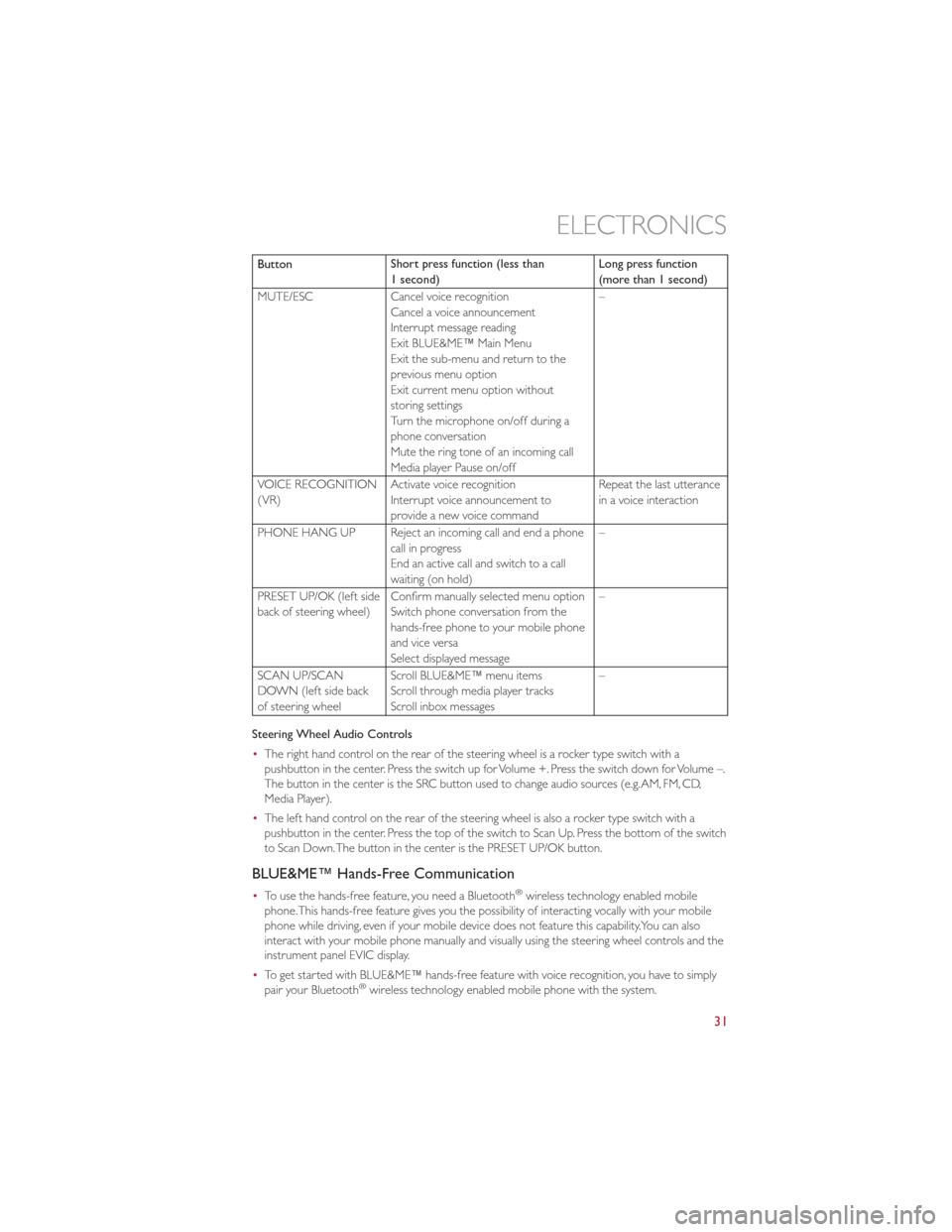
ButtonShort press function (less than
1 second) Long press function
(more than 1 second)
MUTE/ESC Cancel voice recognition
Cancel a voice announcement
Interrupt message reading
Exit BLUE&ME™ Main Menu
Exit the sub-menu and return to the
previous menu option
Exit current menu option without
storing settings
Turn the microphone on/off during a
phone conversation
Mute the ring tone of an incoming call
Media player Pause on/off –
VOICE RECOGNITION
(VR) Activate voice recognition
Interrupt voice announcement to
provide a new voice command Repeat the last utterance
in a voice interaction
PHONE HANG UP Reject an incoming call and end a phone call in progress
End an active call and switch to a call
waiting (on hold) –
PRESET UP/OK (left side
back of steering wheel) Confirm manually selected menu option
Switch phone conversation from the
hands-free phone to your mobile phone
and vice versa
Select displayed message –
SCAN UP/SCAN
DOWN (left side back
of steering wheel Scroll BLUE&ME™ menu items
Scroll through media player tracks
Scroll inbox messages –
Steering Wheel Audio Controls
• The right hand control on the rear of the steering wheel is a rocker type switch with a
pushbutton in the center. Press the switch up for Volume +. Press the switch down for Volume –.
The button in the center is the SRC button used to change audio sources (e.g.AM, FM, CD,
Media Player).
• The left hand control on the rear of the steering wheel is also a rocker type switch with a
pushbutton in the center. Press the top of the switch to Scan Up. Press the bottom of the switch
to Scan Down.The button in the center is the PRESET UP/OK button.
BLUE&ME™ Hands-Free Communication
•To use the hands-free feature, you need a Bluetooth®wireless technology enabled mobile
phone.This hands-free feature gives you the possibility of interacting vocally with your mobile
phone while driving, even if your mobile device does not feature this capability.You can also
interact with your mobile phone manually and visually using the steering wheel controls and the
instrument panel EVIC display.
• To get started with BLUE&ME™ hands-free feature with voice recognition, you have to simply
pair your Bluetooth
®wireless technology enabled mobile phone with the system.
ELECTRONICS
31
Page 34 of 80
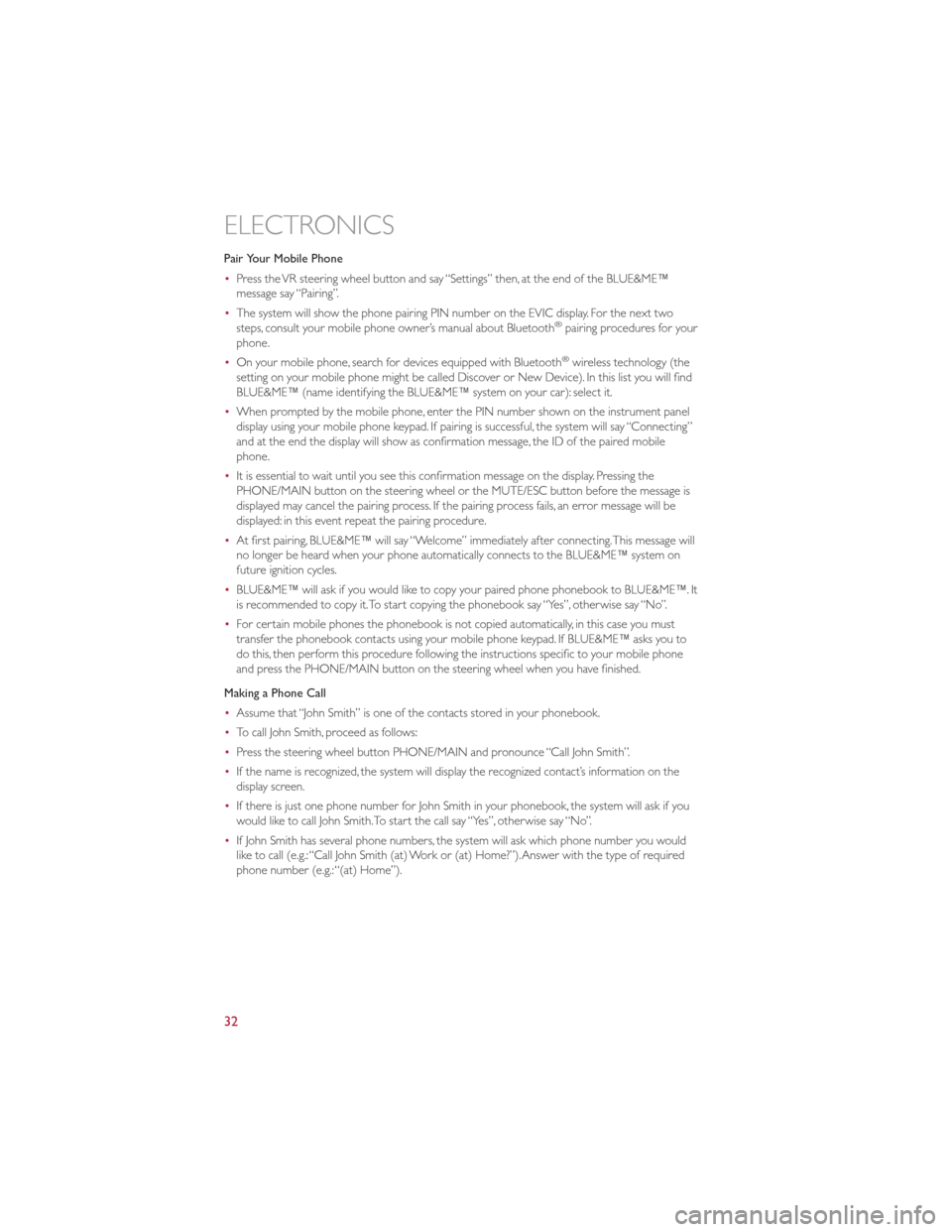
Pair Your Mobile Phone
•Press the VR steering wheel button and say “Settings” then, at the end of the BLUE&ME™
message say “Pairing”.
• The system will show the phone pairing PIN number on the EVIC display. For the next two
steps, consult your mobile phone owner’s manual about Bluetooth
®pairing procedures for your
phone.
• On your mobile phone, search for devices equipped with Bluetooth
®wireless technology (the
setting on your mobile phone might be called Discover or New Device). In this list you will find
BLUE&ME™ (name identifying the BLUE&ME™ system on your car): select it.
• When prompted by the mobile phone, enter the PIN number shown on the instrument panel
display using your mobile phone keypad. If pairing is successful, the system will say “Connecting”
and at the end the display will show as confirmation message, the ID of the paired mobile
phone.
• It is essential to wait until you see this confirmation message on the display. Pressing the
PHONE/MAIN button on the steering wheel or the MUTE/ESC button before the message is
displayed may cancel the pairing process. If the pairing process fails, an error message will be
displayed: in this event repeat the pairing procedure.
• At first pairing, BLUE&ME™ will say “Welcome” immediately after connecting.This message will
no longer be heard when your phone automatically connects to the BLUE&ME™ system on
future ignition cycles.
• BLUE&ME™ will ask if you would like to copy your paired phone phonebook to BLUE&ME™. It
is recommended to copy it.To start copying the phonebook say “Yes”, otherwise say “No”.
• For certain mobile phones the phonebook is not copied automatically, in this case you must
transfer the phonebook contacts using your mobile phone keypad. If BLUE&ME™ asks you to
do this, then perform this procedure following the instructions specific to your mobile phone
and press the PHONE/MAIN button on the steering wheel when you have finished.
Making a Phone Call
• Assume that “John Smith” is one of the contacts stored in your phonebook.
• To call John Smith, proceed as follows:
• Press the steering wheel button PHONE/MAIN and pronounce “Call John Smith”.
• If the name is recognized, the system will display the recognized contact’s information on the
display screen.
• If there is just one phone number for John Smith in your phonebook, the system will ask if you
would like to call John Smith.To start the call say “Yes”, otherwise say “No”.
• If John Smith has several phone numbers, the system will ask which phone number you would
like to call (e.g.:“Call John Smith (at) Work or (at) Home?”).Answer with the type of required
phone number (e.g.:“(at) Home”).
ELECTRONICS
32
Page 35 of 80
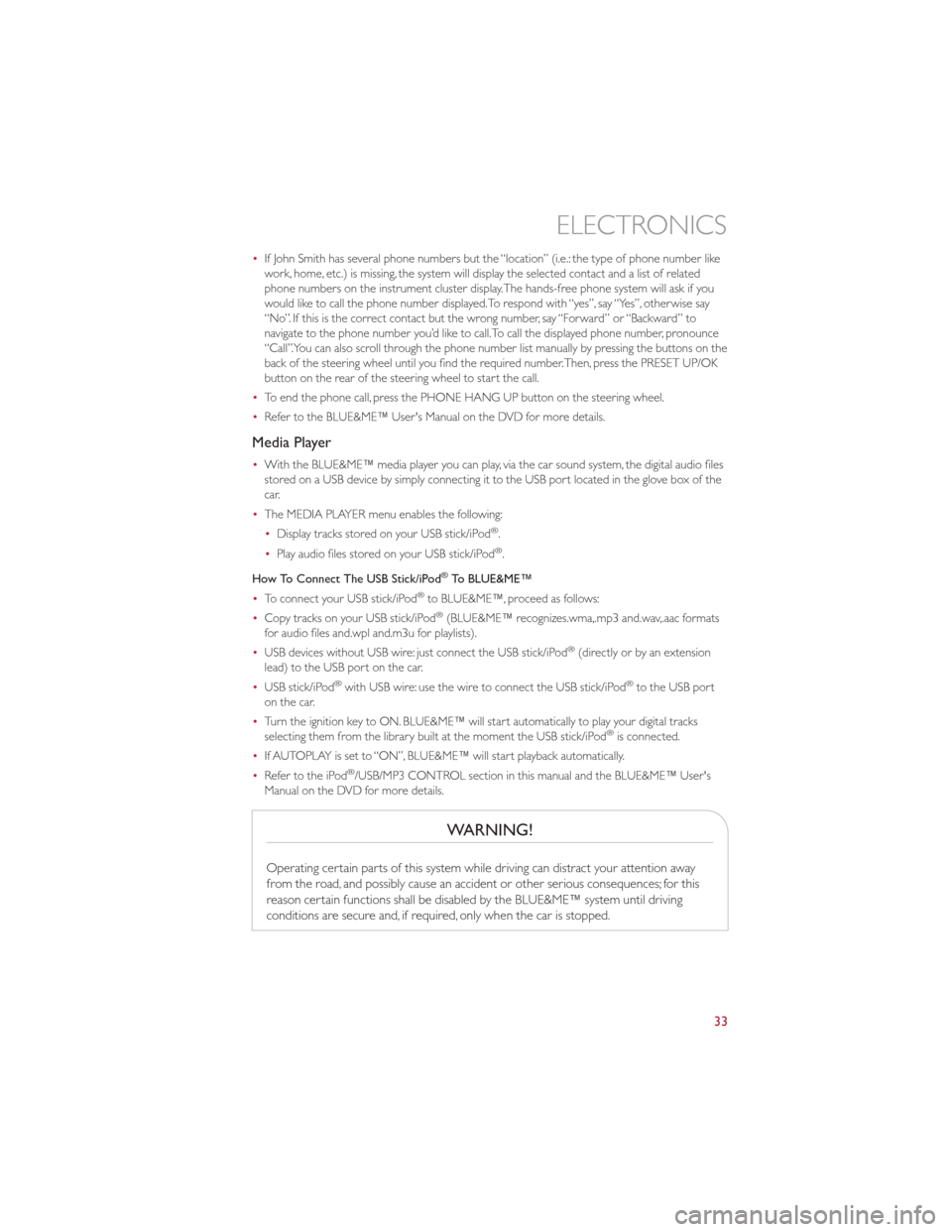
•If John Smith has several phone numbers but the “location” (i.e.: the type of phone number like
work, home, etc.) is missing, the system will display the selected contact and a list of related
phone numbers on the instrument cluster display.The hands-free phone system will ask if you
would like to call the phone number displayed.To respond with “yes”, say “Yes”, otherwise say
“No”. If this is the correct contact but the wrong number, say “Forward” or “Backward” to
navigate to the phone number you’d like to call.To call the displayed phone number, pronounce
“Call”.You can also scroll through the phone number list manually by pressing the buttons on the
back of the steering wheel until you find the required number.Then, press the PRESET UP/OK
button on the rear of the steering wheel to start the call.
• To end the phone call, press the PHONE HANG UP button on the steering wheel.
• Refer to the BLUE&ME™ User's Manual on the DVD for more details.
Media Player
•With the BLUE&ME™ media player you can play, via the car sound system, the digital audio files
stored on a USB device by simply connecting it to the USB port located in the glove box of the
car.
• The MEDIA PLAYER menu enables the following:
•Display tracks stored on your USB stick/iPod
®.
• Play audio files stored on your USB stick/iPod®.
How To Connect The USB Stick/iPod
®To BLUE&ME™
• To connect your USB stick/iPod®to BLUE&ME™, proceed as follows:
• Copy tracks on your USB stick/iPod®(BLUE&ME™ recognizes.wma,.mp3 and.wav,.aac formats
for audio files and.wpl and.m3u for playlists).
• USB devices without USB wire: just connect the USB stick/iPod
®(directly or by an extension
lead) to the USB port on the car.
• USB stick/iPod
®with USB wire: use the wire to connect the USB stick/iPod®to the USB port
on the car.
• Turn the ignition key to ON. BLUE&ME™ will start automatically to play your digital tracks
selecting them from the library built at the moment the USB stick/iPod
®is connected.
• If AUTOPLAY is set to “ON”, BLUE&ME™ will start playback automatically.
• Refer to the iPod
®/USB/MP3 CONTROL section in this manual and the BLUE&ME™ User's
Manual on the DVD for more details.
WARNING!
Operating certain parts of this system while driving can distract your attention away
from the road, and possibly cause an accident or other serious consequences; for this
reason certain functions shall be disabled by the BLUE&ME™ system until driving
conditions are secure and, if required, only when the car is stopped.
ELECTRONICS
33
Page 36 of 80
iPod®/USB/MP3 CONTROL
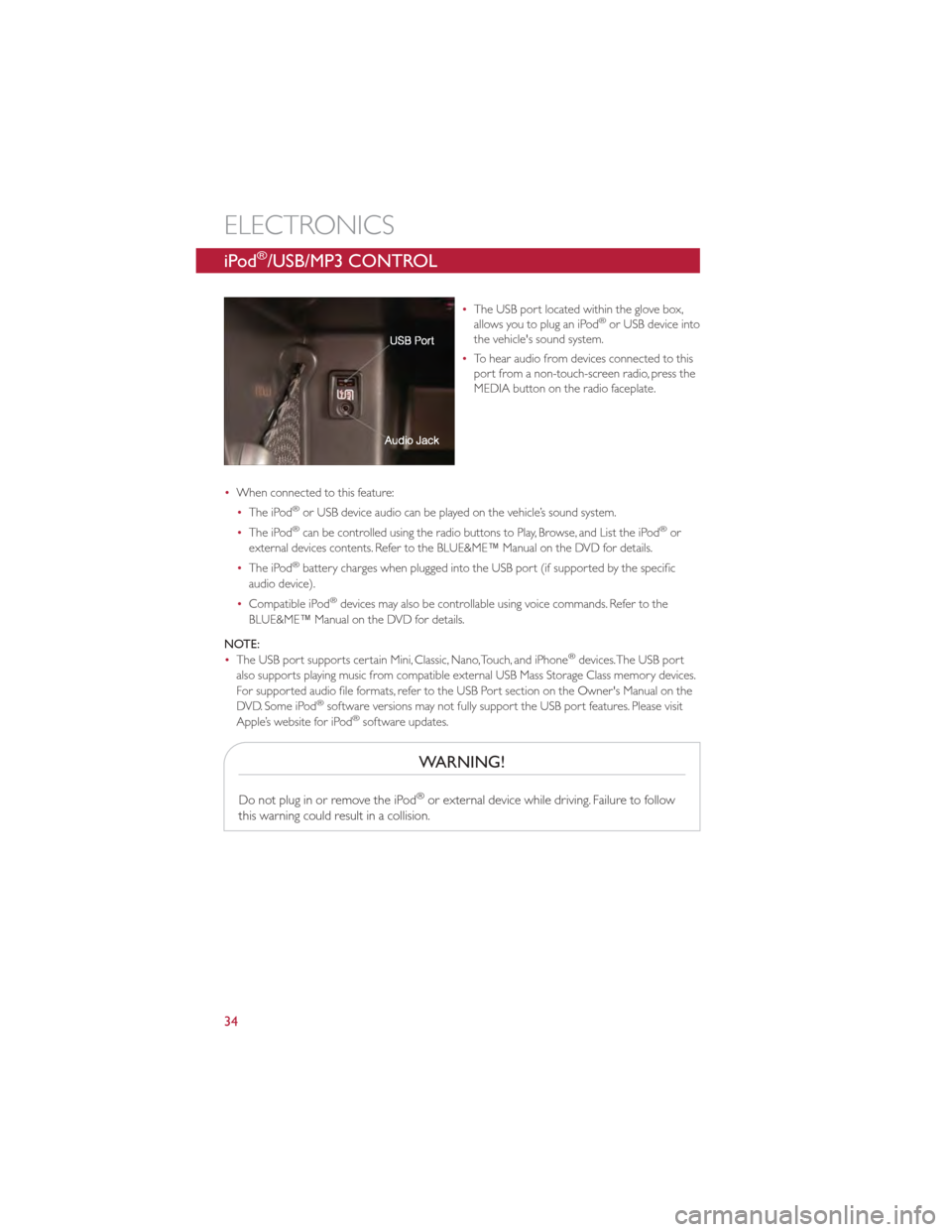
•The USB port located within the glove box,
allows you to plug an iPod®or USB device into
the vehicle's sound system.
• To hear audio from devices connected to this
port from a non-touch-screen radio, press the
MEDIA button on the radio faceplate.
• When connected to this feature:
•The iPod
®or USB device audio can be played on the vehicle’s sound system.
• The iPod®can be controlled using the radio buttons to Play, Browse, and List the iPod®or
external devices contents. Refer to the BLUE&ME™ Manual on the DVD for details.
• The iPod
®battery charges when plugged into the USB port (if supported by the specific
audio device).
• Compatible iPod
®devices may also be controllable using voice commands. Refer to the
BLUE&ME™ Manual on the DVD for details.
NOTE:
• The USB port supports certain Mini, Classic, Nano,Touch, and iPhone
®devices.The USB port
also supports playing music from compatible external USB Mass Storage Class memory devices.
For supported audio file formats, refer to the USB Port section on the Owner's Manual on the
DVD. Some iPod
®software versions may not fully support the USB port features. Please visit
Apple’s website for iPod®software updates.
WARNING!
Do not plug in or remove the iPod®or external device while driving. Failure to follow
this warning could result in a collision.
ELECTRONICS
34
Page 39 of 80
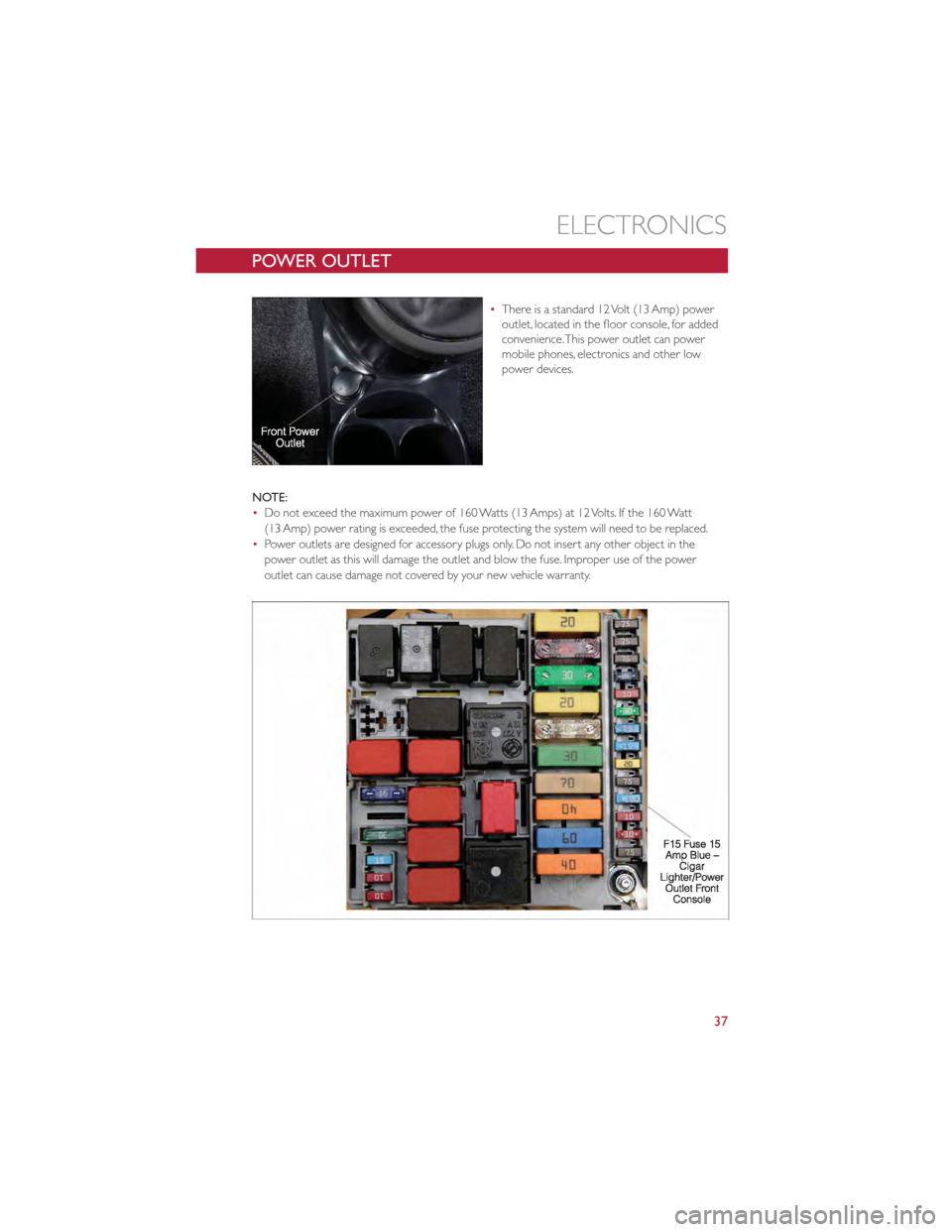
POWER OUTLET
•There is a standard 12 Volt (13 Amp) power
outlet, located in the floor console, for added
convenience.This power outlet can power
mobile phones, electronics and other low
power devices.
NOTE:
• Do not exceed the maximum power of 160 Watts (13 Amps) at 12 Volts. If the 160 Watt
(13 Amp) power rating is exceeded, the fuse protecting the system will need to be replaced.
• Power outlets are designed for accessory plugs only. Do not insert any other object in the
power outlet as this will damage the outlet and blow the fuse. Improper use of the power
outlet can cause damage not covered by your new vehicle warranty.
ELECTRONICS
37
Page 41 of 80
24-HOUR ROADSIDE ASSISTANCE
•If your FIAT 500 requires jump start assistance, out of gas/fuel delivery, tire service, lockout
service or towing due to a defect covered under the Basic Limited Warranty, dial toll-free
1-888-242-6342. See your Warranty booklet for further details.
• Provide your name, vehicle identification number and license plate number.
• Provide your location, including telephone number, from which you are calling.
• Briefly describe the nature of the problem and answer a few simple questions.
• You will be given the name of the service provider and an estimated time of arrival. If you feel
you are in an “unsafe situation”, please let us know.With your consent, we will contact local
police or safety authorities.
INSTRUMENT CLUSTER WARNING LIGHTS
- Generic Warning Light
•The Generic Warning Light will illuminate if any of the following conditions occur: Engine Oil
Pressure Sensor Failure, External Light Failure, Fuel Cut-Off Intervention, Fuel Cut-Off Not
Available, Parking Sensor Failure.
- Power Steering System Warning
•If the “POWER STEERING SYSTEM OVER TEMP” message and icon are displayed in the EVIC
display, it indicates that extreme steering maneuvers have occurred, which caused an over
temperature condition in the power steering system.You will lose power steering assistance
momentarily until the over temperature condition no longer exists. Once driving conditions are
safe, pull over and let the vehicle idle.After approximately five minutes, the system will cool and
return to normal operation.
- Automatic Gearbox Failure
•This light will illuminate when there is an automatic transmission fault.
• Have the vehicle serviced by an authorized service center immediately.
- Engine Temperature Warning Light
•This light warns of an overheated engine condition.
• If the light turns on or flashes continuously while driving, safely pull over and stop the vehicle. If
the A/C system is on, turn it off.Also, shift the transmission into NEUTRAL and idle the vehicle.
If the temperature reading does not return to normal, turn the engine off immediately.
• We recommend that you do not operate the vehicle or engine damage will occur. Have the
vehicle serviced immediately.
WARNING!
A hot engine cooling system is dangerous.You or others could be badly burned by
steam or boiling coolant.You may want to call an authorized service center for service if
your vehicle overheats.
WHAT TO DO IN EMERGENCIES
39